How to Build an n8n AI Agent That Manages Your Notion Workspace
Give an n8n AI Agent real Notion tools: create pages, update databases, and search your workspace from one chat message.
AI-drafted, reviewed by Muhammad Qasim Hammad on August 5, 2026. See our AI disclosure.
Table of contents
- What can an n8n AI agent actually do inside Notion?
- How do you give an n8n AI Agent the Notion tool?
- How should you design the Notion database the agent writes to?
- What does a real example look like, start to finish?
- Should every action run automatically, or wait for you to confirm?
- What breaks, and how do you debug it?
- Is this worth building for your workflow?
Every time someone on your team needs a task logged, a lead added, or a doc created in Notion, they stop what they are doing and open the app. Wire n8n's Notion node into an AI Agent as a tool, and the agent can make that change itself: read one chat message, decide which Notion action it maps to, and write it directly into your workspace in a single run.
This only works if you set it up carefully. Notion's API does not push changes to n8n in real time, so the Notion Trigger polls on an interval rather than firing instantly, and an agent that can create and update pages without a human checking first can make a mess of a shared workspace fast. This guide covers both halves: giving the agent real Notion actions as tools, and keeping it from doing anything you would not approve yourself.
What can an n8n AI agent actually do inside Notion?#
n8n's Notion node covers pages, databases, and blocks as separate resources, each with its own actions: create a page, update a page's properties, retrieve a page by ID, search across a workspace, and append content blocks to an existing page. That is 5 distinct actions, each one maps cleanly to something an agent can call as a tool.
The part people miss is the trigger side. The Notion Trigger node polls your database on a schedule rather than reacting instantly, because Notion does not offer a public webhook for page changes. That is fine for an agent that reacts to a chat message or a form, since nothing is time-sensitive there, but do not build an agent workflow that assumes a Notion edit will trigger n8n within seconds.
Two of those actions look similar but behave differently, and the mismatch is where agents go wrong. Page search is a fuzzy, workspace-wide lookup by title, close to what you get typing into Notion's own search bar. A database query is structured: it filters and sorts on real properties, so it needs a database ID and returns exactly the rows that match. Describe both to the model as separate tools rather than one vague "find things in Notion" tool, or it will reach for search when a property filter was the right call.
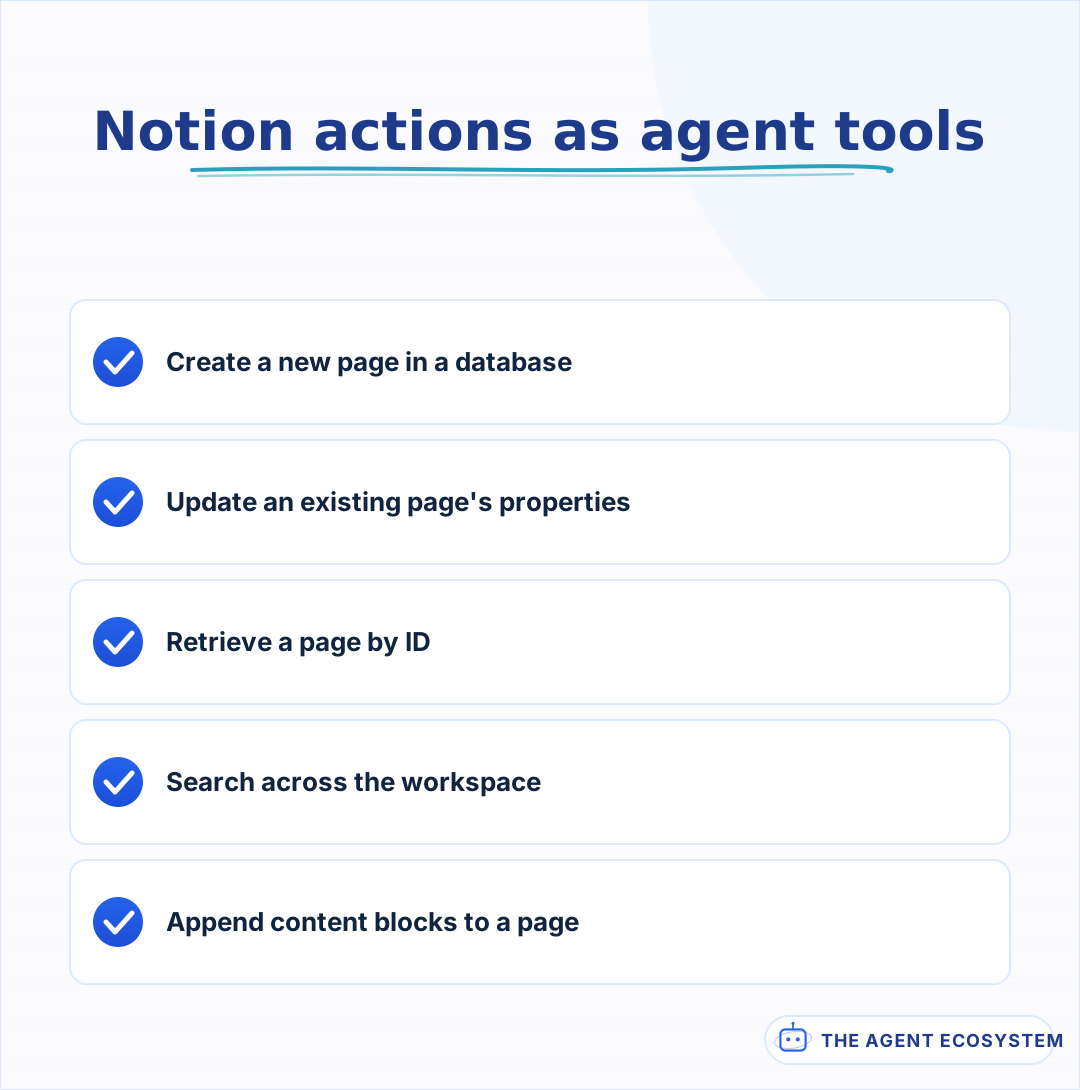 Five distinct actions, each mapped to a clear tool the model can call.
How do you give an n8n AI Agent the Notion tool?#
Add a Notion node to the canvas, switch its mode from a regular step to Use as Tool, and connect it to your AI Agent node's tool input. The agent now sees Notion the same way it sees any other tool: a name, a description, and a set of parameters it fills in from the conversation.
The description is the part worth the most care. Tool descriptions the model can actually use matter more here than usual, because a vague one like "manages Notion" leaves the model guessing which resource and operation to pick. Write the description the way you would brief a new hire: name the exact database, list the properties that exist, and say what a good title looks like. The core mechanics of giving an n8n agent tools apply the same way to Notion as to any other connected app.
One setup step trips up almost everyone the first time: creating a Notion credential is not enough on its own. Notion's API only sees what you explicitly share with your integration, so after you create the internal integration in Notion's settings, you still have to open the target database and add that integration under its Connections menu. Skip that step and every call comes back empty, with no obvious error pointing at why.
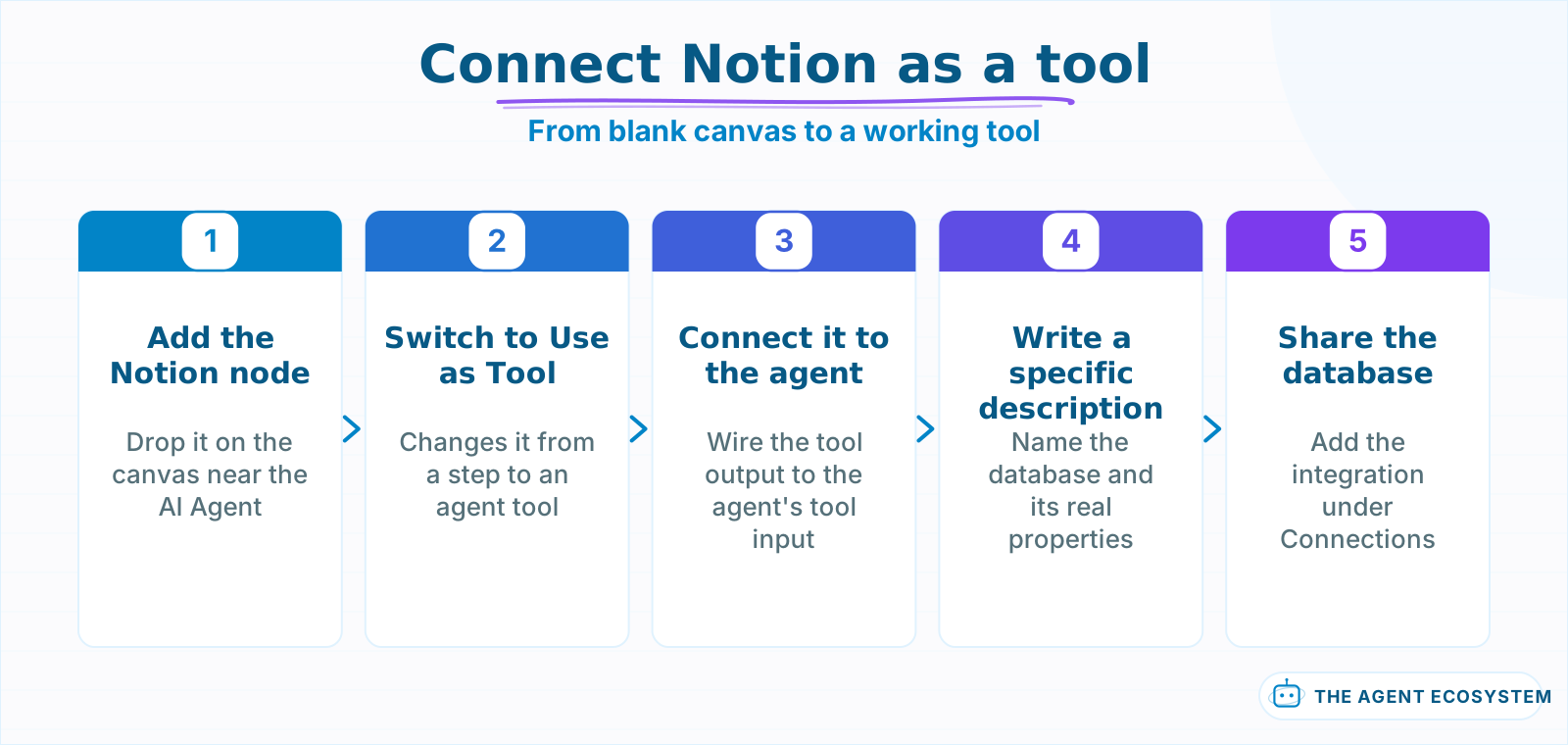 Each step takes a few minutes; the sharing step is the one people skip.
How should you design the Notion database the agent writes to?#
Keep the schema small and typed before you wire an agent to it. An agent maps free text to structured fields, so every extra property is one more place it can guess wrong; 4 or 5 well-named properties beat a database with 20 optional ones.
| Property | Type | Why the agent needs it simple |
|---|---|---|
| Title | Title | The one field every page needs; keep it a plain string |
| Status | Select | A fixed list the agent picks from, not free text |
| Due date | Date | Structured dates parse far more reliably than prose |
| Owner | Person or text | Pin to real names already in the workspace |
| Source | Select or text | Lets you trace which chat or form created the page |
A Select property is worth the setup time over a text field anywhere the values repeat, because the agent picks from a fixed list instead of inventing a new label every time. Relation properties are the one type to leave out of a first version: they ask the agent to know another database's exact page IDs, which is where tool calls fail most often.
Formula and rollup properties belong on the read-only side of that same list. They compute their value from other properties inside Notion itself, so the API rejects a write to them even though they look like any other column in the database view. If the agent's job includes reporting on a rollup, give it a search or get-page tool to read the value, never a property it is expected to set.
What does a real example look like, start to finish?#
Picture a Slack channel where anyone can type "add a task: follow up with the Meridian account by Friday, assign it to Sam." An n8n workflow with a Slack trigger, an AI Agent node, and the Notion tool turns that one sentence into a real page with 4 properties filled in, no one touching the Notion UI.
The agent's job is narrow: read the sentence, decide it means "create a page," and map the words to your schema. "Follow up with the Meridian account" becomes the title, "Friday" resolves to a real date the Date property accepts, and "Sam" matches an existing name in the Owner property instead of a typo the agent invented. None of this needs a second model call; one well-described tool and a clear system prompt handle it in a single agent turn.
A read runs the same way in reverse. Someone asks "what's the status on the Meridian account," and the agent recognizes there is nothing to create: it calls the database-query tool with a title filter, reads the Status property off the one matching page, and answers in the chat instead of touching Notion at all. Giving the agent a distinct read tool alongside the write tool is what makes it choose correctly between the two, rather than defaulting to creating a new page every time.
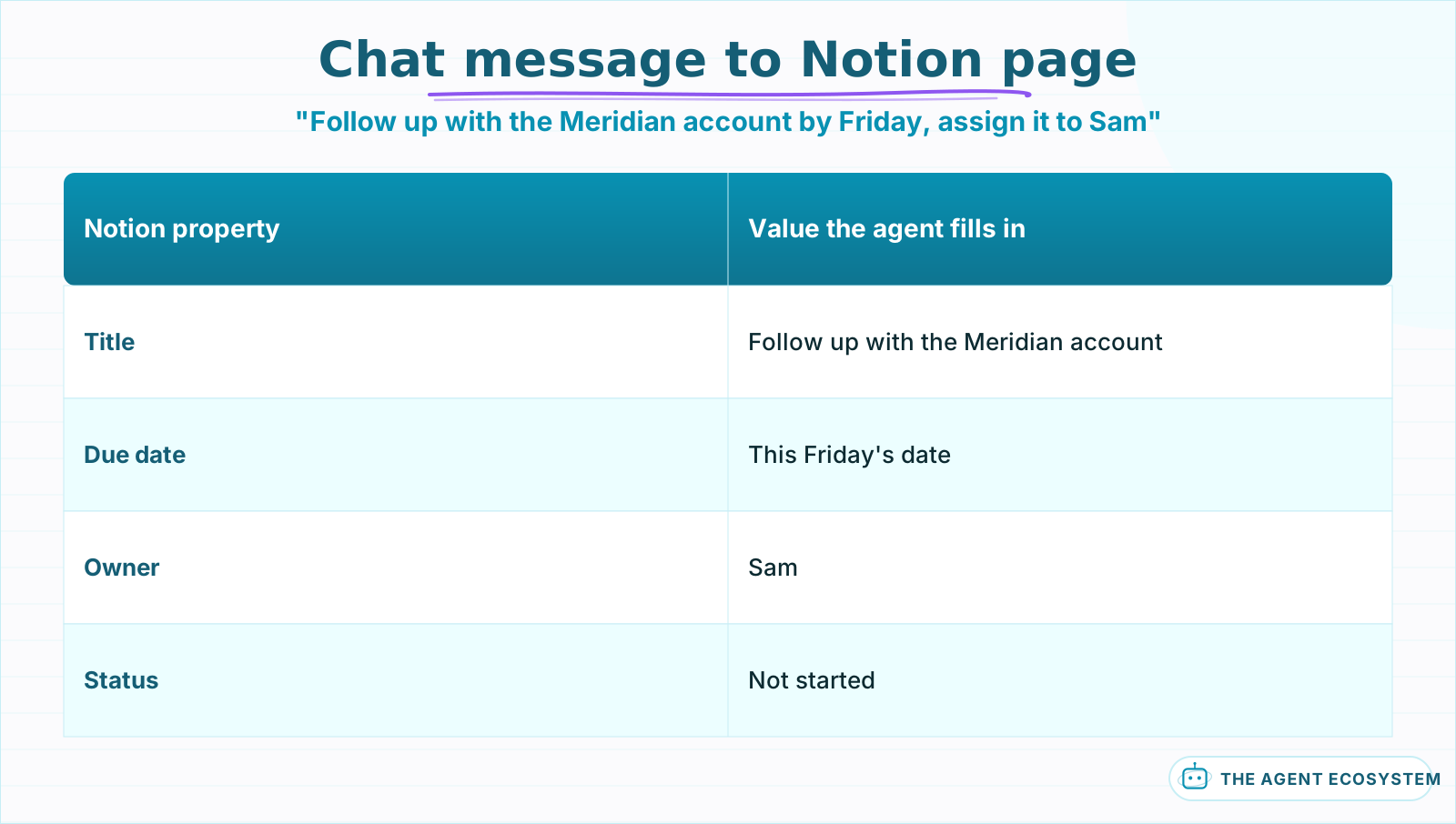 The agent maps free text to four structured fields in a single tool call.
Should every action run automatically, or wait for you to confirm?#
Not every action deserves the same trust. A search or a page lookup is read-only and safe to run without asking; a create or update changes real data in a workspace other people rely on, so it deserves a checkpoint the first few weeks you run this.
n8n's human-in-the-loop pattern fits this exactly: route write actions through an approval step in Slack or email before the Notion node executes, and let read actions run straight through. Once you have watched 20 to 30 runs and the agent's mapping holds up, you can loosen the gate on lower-risk writes and keep it only on anything that deletes or archives a page.
The approval step itself is a small addition, not a separate system. After the AI Agent node decides on a Notion write, route the proposed action to a Slack message with Approve and Reject buttons before the Notion node runs; n8n pauses the workflow at that node until someone responds. Rejecting can feed straight back into the agent as a new instruction, so a reviewer can correct a wrong property value instead of just blocking the run outright.
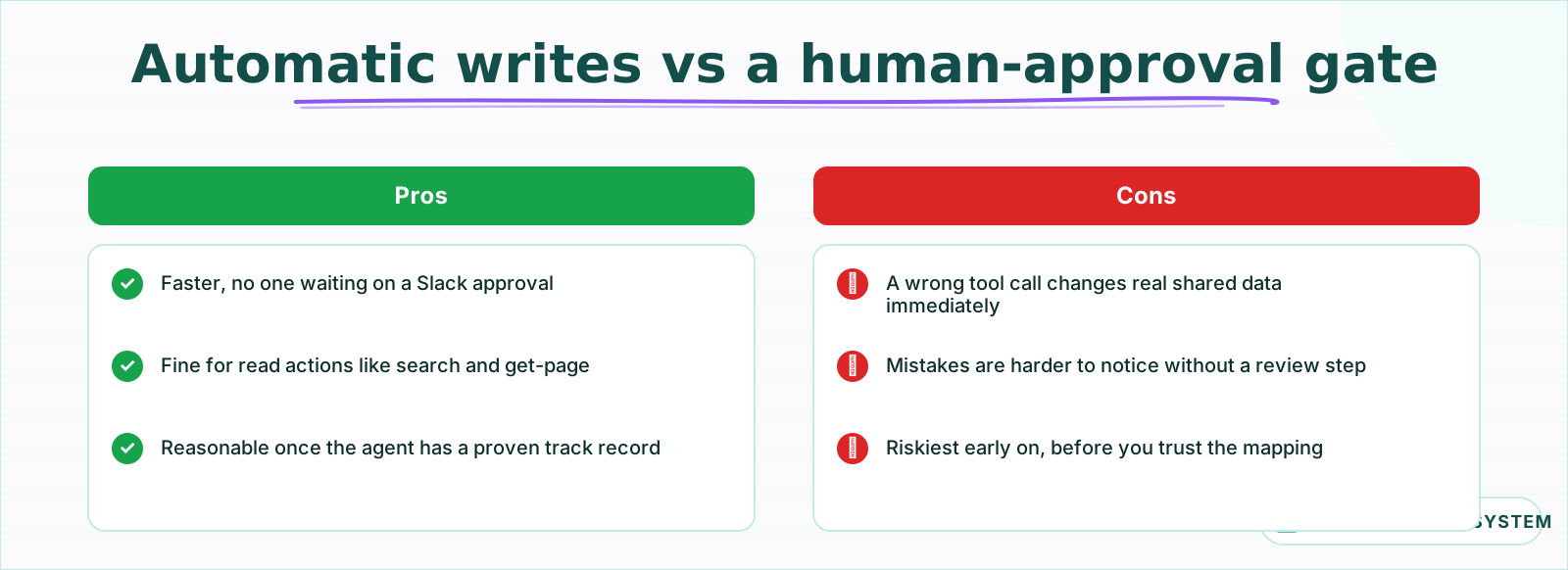 Read actions are safe to automate immediately; write actions earn that trust over time.
What breaks, and how do you debug it?#
Most failures are not the model failing to want the right action; they are the tool description leaving out a detail the model needed. A Select property with values the description never listed, a database ID that changed, or a title format the agent was never shown are the usual suspects.
Turn on Return Intermediate Steps on the AI Agent node and read exactly which tool call the agent made and with what arguments before the Notion node ever ran. If the arguments look right but Notion still rejects them, the general agent-not-working checklist covers the credential and permission issues that show up the same way across every connected app, not just Notion. A near-miss, like a Select value spelled slightly differently than the one in your database, is the single most common cause once credentials are confirmed working.
Silent empty results are the second most common report, and they almost always trace back to the sharing step: the integration works, the credential tests fine, but the database was never connected to it, so every search returns zero pages with no error to point at. Re-check the database's Connections menu before assuming the workflow logic is wrong.
Is this worth building for your workflow?#
Build it when Notion is genuinely the bottleneck: a team that already lives in Notion but keeps forgetting to log things there, or a workflow where the fastest input is a chat message and the destination has to be a shared, searchable page.
If your team barely opens Notion, a simpler destination like Google Sheets as the database gets you the same automation with one less thing to explain.
Start on one database, gate every write behind a human check for the first stretch, and only widen the agent's reach once its tool calls have been right often enough that you stop reading every one. The pattern here, one clearly described tool plus a confirm step on anything destructive, is the same one worth reusing on the next app you connect.
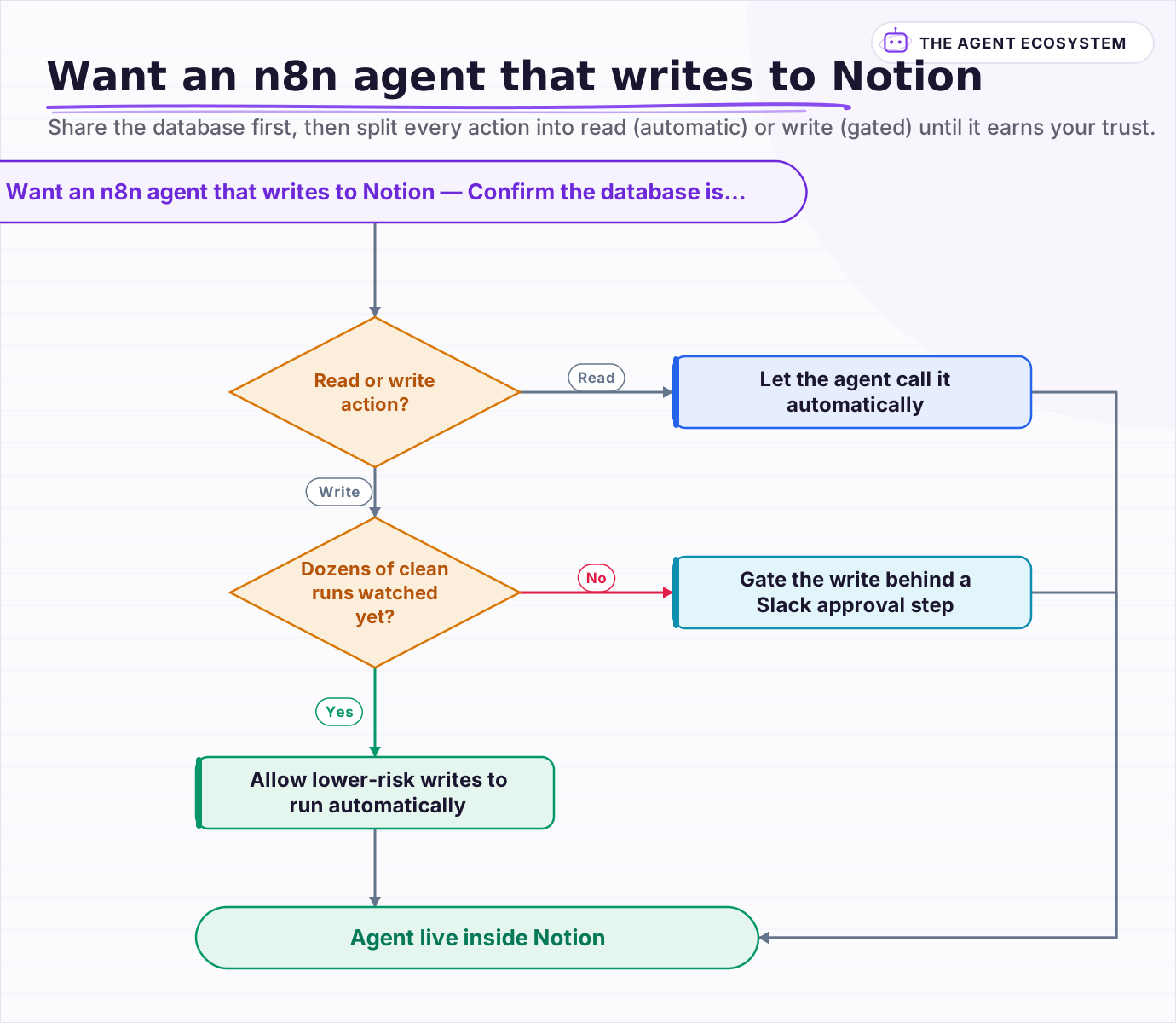 Share the database first, then split every action into read (automatic) or write (gated) until it earns your trust.
Frequently asked questions
Can an n8n AI Agent create and update Notion pages automatically?
Does the n8n Notion Trigger fire in real time?
Why does my n8n Notion node return no results even though the credential works?
Should an AI agent be allowed to write to Notion without approval?
What Notion property types work best with an AI agent?
Sources
Primary references and vendor documentation used while drafting and reviewing this article.
Written by

Muhammad Qasim Hammad is an AI agent and automation expert and the founder of Cart Gaze LLC (cartgaze.com). He builds product for the love of it: when an idea lands, a working prototype is usually running within hours, built with the same AI agents and automations he sells. He puts his own output at roughly 20× what it was before agents, and the Agentic OS behind this site is the working proof, documented in public with the tools he actually ran and what they really cost.
AI & Automation Services
Want a pipeline like this running in your business?
I'm Qasim — I design and ship AI agents and n8n automations for solo operators and small teams. Tell me what's eating your team's week, and I'll scope a fix.
Related reading
How to Build an n8n AI Agent That Updates Your Airtable Base
An n8n AI Agent can create and update Airtable records, search a base with Filter By Formula, and keep a deal tracker or content calendar current from a single chat message. Here is how to wire the Airtable node in as a tool and design a schema the agent can map to reliably.

How to Build an n8n AI Agent for Salesforce Data Hygiene and Case Routing
An n8n AI Agent can read a new Salesforce Lead or Case, decide what a rule engine cannot, and write the fix back through the Salesforce node. Here is how to wire it as a tool, keep it from guessing at fields it cannot infer, and gate every write behind a human check.
5 n8n Workflows That Can Save You ~12 Hours a Week
Five n8n workflows that replace source scanning, topic sorting, first-draft writing, pin prep, and changelog monitoring with a review-gated queue. Nothing autopublishes. You stay in control.
How to Build an n8n AI Agent That Triages GitHub Pull Requests
An n8n AI Agent can read a pull request the moment it opens, label it by size and risk, request the right reviewer, and draft a starting comment, all before a human opens the diff. Here is how to wire GitHub in as a tool and why this is triage, not a replacement for a real
How to Build an n8n AI Agent for HubSpot Lead Scoring
An n8n AI Agent can score a new HubSpot lead the moment it arrives, log which rules fired, and route a task to the right rep, all against a rubric your sales team owns. Here is how to wire HubSpot in as a tool and keep the scoring auditable instead of a black box.
n8n Slack Bot + AI Agent: Answer Team Questions from Your Docs
Your team asks the same question in Slack every week. Wire a Slack Trigger to an n8n AI agent with a vector store and the bot answers from your own documents, in the thread, in seconds.