5 n8n Workflows That Can Save You ~12 Hours a Week
How a review-gated content pipeline turns source scanning, draft writing, and pin prep into queue items instead of calendar blocks.
AI-drafted, reviewed by Muhammad Qasim Hammad on June 9, 2026. See our AI disclosure.
Table of contents
- What n8n workflows save the most time for a solo content business?
- Workflow 1: How do you scout sources into a topic queue?
- Template shape for Scout
- Workflow 2: How do you validate topics before writing?
- Template shape for Validate (01b)
- Workflow 3: How do approved topics become webapp drafts?
- Template shape for Writer (02)
- Workflow 4: How do you prepare Pinterest pins without posting?
- Template shape for Pinterest (03)
- Workflow 5: How do you track tool updates from source pages?
- Template shape for Tool Updates Radar (04)
- How do these workflows stay review-gated?
- How should you copy this system this week?
The five n8n workflows that save the most time for a solo content business are Scout, Validate, Writer, Pinterest pin prep, and Tool Updates Radar. Together they turn daily source scanning, topic triage, first-draft creation, pin copy, and changelog watching into review queues instead of manual tab switching. The important part is the gate: Scout writes IDEA rows, Validate checks grounding, Writer saves DRAFT posts, Pinterest writes REVIEW rows, and Tool Updates Radar keeps updates out of public pages until you approve them. The ~12-hours/week number is an estimate, not a measured promise; track your own baseline before using it in your business. Start with Scout, then add Validate and Writer only after your sheet statuses are clean.
What n8n workflows save the most time for a solo content business?#
The five highest-value n8n workflows that save time are Scout (daily feed-to-queue), Validate (manual topic triage), Writer (approved-topic-to-draft), Pinterest pin prep, and Tool Updates Radar. Each one removes a specific manual task and replaces it with a row in a review sheet. The writer stays in the loop at every status change.
Here is the full system at a glance:
| Workflow | Trigger | Input | Output | Human review point | Estimated time saved |
|---|---|---|---|---|---|
| Scout | Daily schedule | Source feeds, market signals | Topics Queue IDEA rows | Flip best rows to APPROVED | Source scanning |
| Validate | Manual | Candidate topic/source rows | Validation notes | Approve only grounded topics | Fact-check triage |
| Writer | Schedule or manual | APPROVED rows | Webapp DRAFT posts | Admin review before publish | First-draft assembly |
| Daily or manual | DRAFTED posts | Pins sheet review rows | Review before scheduling | Pin copy and image prep | |
| Tool Updates Radar | Manual or webhook | Source Tracker changelogs | Tool Updates REVIEW rows | Promote only useful updates | Changelog monitoring |
Time-saved figures are estimates based on the tasks each workflow replaces. They are not measured stopwatch results.
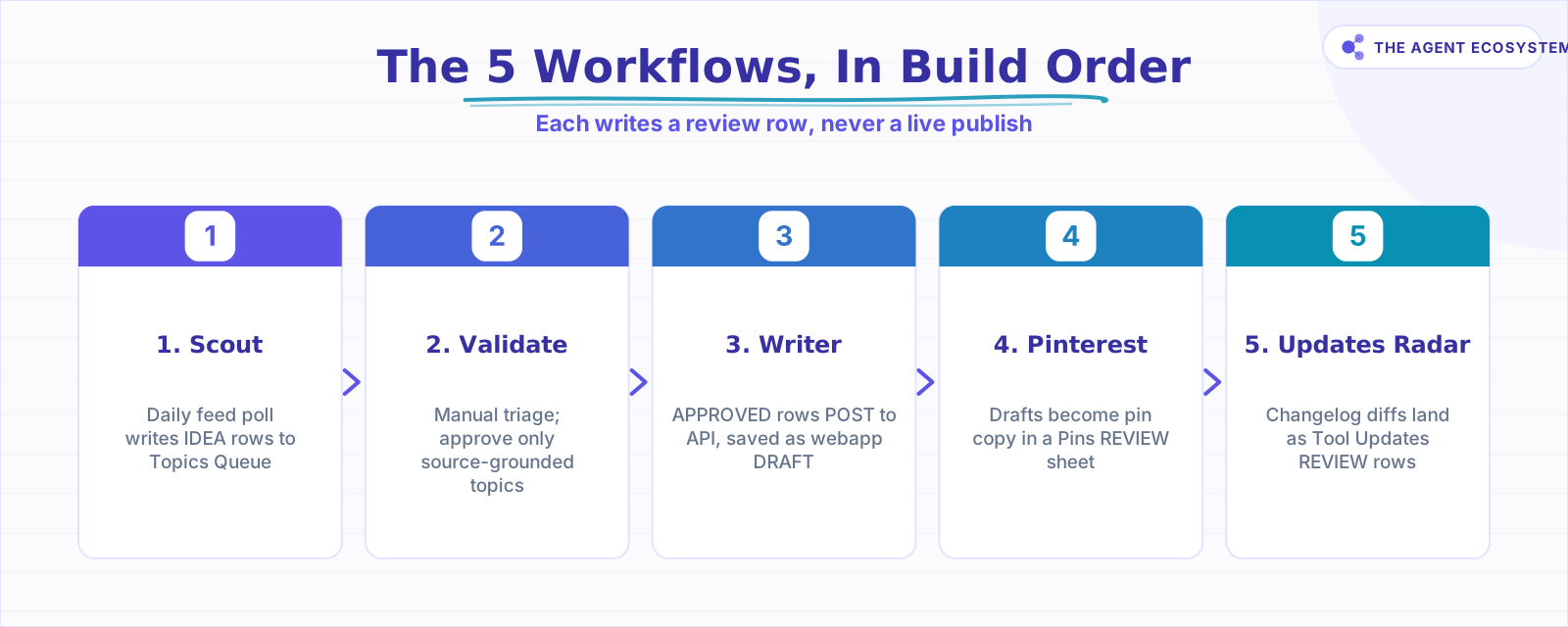 Build Scout first, then layer the rest. Every step ends in a review row.
 Five workflow lanes, one review queue. Nothing exits without a human gate.
Workflow 1: How do you scout sources into a topic queue?#
Scout runs on a daily schedule, polls a list of source feed URLs, and writes each relevant result as a new row in a Topics Queue sheet with status IDEA. You scan those IDEA rows once a day, flip the ones worth pursuing to APPROVED, and move on. No post is created; the output is a tidy list of candidates.
The n8n Workflows documentation shows how Schedule Trigger and HTTP Request nodes chain together. Scout uses exactly that pattern: trigger fires, HTTP Request fetches feeds, a Function node parses titles and URLs, a Google Sheets node appends rows.
Template shape for Scout#
{
  "name": "01 Scout",
  "nodes": [
    { "type": "n8n-nodes-base.scheduleTrigger", "name": "Daily 6am" },
    { "type": "n8n-nodes-base.httpRequest", "name": "Fetch source feeds" },
    { "type": "n8n-nodes-base.function", "name": "Parse titles and URLs" },
    { "type": "n8n-nodes-base.googleSheets", "name": "Append IDEA rows" }
  ]
}
Full JSON exports should be reviewed for credentials and private endpoint URLs before sharing. Replace every API key field with YOUR_API_KEY before attaching as a download.
Workflow 2: How do you validate topics before writing?#
Validate is a manual workflow, not a scheduled one. It reads candidate rows from the Topics Queue, runs a grounding check (does a real source back this topic?), and writes a validation note back to the sheet. Only topics tied to a named, verifiable source move forward.
This is the gate that stops Writer from burning API tokens on topics with no factual foundation. Skipping Validate is the most common mistake in content automation setups. See the self-hosted n8n guide for how to trigger manual workflows from a webhook button instead of a scheduled cron.
Template shape for Validate (01b)#
{
  "name": "01b Validate",
  "nodes": [
    { "type": "n8n-nodes-base.manualTrigger", "name": "Run on demand" },
    { "type": "n8n-nodes-base.googleSheets", "name": "Read candidate rows" },
    { "type": "n8n-nodes-base.httpRequest", "name": "Check source exists" },
    { "type": "n8n-nodes-base.googleSheets", "name": "Write validation note" }
  ]
}
Workflow 3: How do approved topics become webapp drafts?#
Writer is the highest-value workflow in the stack. It reads every APPROVED row in the Topics Queue, posts the topic data to the webapp's /api/ai/generate endpoint, and saves the returned content as a DRAFT. The post does not publish. An admin review step inside the webapp must be completed before anything goes live.
This pattern mirrors the one in the Claude email triage agent with n8n guide: call an AI endpoint, handle the response, write to a datastore, stop. The AI generates; a human decides.
Template shape for Writer (02)#
{
  "name": "02 Writer",
  "nodes": [
    { "type": "n8n-nodes-base.scheduleTrigger", "name": "Hourly or manual" },
    { "type": "n8n-nodes-base.googleSheets", "name": "Read APPROVED rows" },
    { "type": "n8n-nodes-base.httpRequest", "name": "POST to /api/ai/generate" },
    { "type": "n8n-nodes-base.googleSheets", "name": "Update row status to WRITING" },
    { "type": "n8n-nodes-base.httpRequest", "name": "Save post as DRAFT in webapp" }
  ]
}Workflow 4: How do you prepare Pinterest pins without posting?#
Pinterest workflow reads every DRAFTED post, generates pin copy suggestions (title, description, board tag), and writes each suggestion as a new row in a Pins sheet with status REVIEW. No pin is scheduled or posted until you approve the row and trigger the scheduling step manually.
This separates pin copy from pin scheduling into two distinct decisions. Batching the review step into a single weekly 20-minute pass is noticeably faster than handling pin prep inline during writing sessions. Pin copy and image alt text are in one place; nothing hides inside drafts.
Template shape for Pinterest (03)#
{
  "name": "03 Pinterest",
  "nodes": [
    { "type": "n8n-nodes-base.scheduleTrigger", "name": "Daily or manual" },
    { "type": "n8n-nodes-base.httpRequest", "name": "Read DRAFTED posts from webapp" },
    { "type": "n8n-nodes-base.function", "name": "Generate pin copy" },
    { "type": "n8n-nodes-base.googleSheets", "name": "Append Pins REVIEW rows" }
  ]
}
For AI-generated pin copy, a prompt template in the Function node works well:
Write a Pinterest pin title (max 100 chars) and description (max 500 chars)
for a blog post titled: {{$json["post_title"]}}
Audience: solopreneurs using AI automation tools.
Return JSON: { "pin_title": "...", "pin_description": "..." }
Workflow 5: How do you track tool updates from source pages?#
Tool Updates Radar runs manually or by webhook, reads Source Tracker changelog URLs, fetches current page content, and writes changed items to a Tool Updates sheet with status REVIEW. The webapp receives REVIEW rows too, but they stay as candidates until a human decides which update deserves a draft.
This workflow solved a concrete problem: I missed the Gemini API migration changes for several days because I was not checking the changelog manually. The Radar now catches those within hours of a webhook ping from the source.
Template shape for Tool Updates Radar (04)#
{
  "name": "04 Tool Updates Radar",
  "nodes": [
    { "type": "n8n-nodes-base.manualTrigger", "name": "Manual or webhook" },
    { "type": "n8n-nodes-base.googleSheets", "name": "Read Source Tracker rows" },
    { "type": "n8n-nodes-base.httpRequest", "name": "Fetch changelog page" },
    { "type": "n8n-nodes-base.function", "name": "Diff against last snapshot" },
    { "type": "n8n-nodes-base.googleSheets", "name": "Append Tool Updates REVIEW rows" }
  ]
}
How do these workflows stay review-gated?#
Every workflow writes to a status field and stops. Scout writes IDEA; you change selected rows to APPROVED. Writer reads APPROVED and writes DRAFT. Pinterest writes REVIEW rows. Tool Updates Radar writes REVIEW candidates. Publishing, pin scheduling, and update promotion all require a separate human decision.
This design is deliberate. Solopreneur content carries a reputational cost when it is wrong or off-brand. The review gate is not an inefficiency; it is the feature. The AI automation stack for solopreneurs hub post covers the full architecture with costs.
The n8n workflow docs explain how to use the Wait node to pause a workflow until a webhook callback fires. That pattern makes the review gate itself automated: the workflow pauses, sends a Slack message or email with an approve/reject link, and resumes only when that link is clicked. It fits the Validate and Writer steps well.
How should you copy this system this week?#
Start with one workflow, not five. Build Scout first because it has low risk, low cost, and removes daily source-checking work. Then add Validate, then Writer. Add Pinterest and Tool Updates Radar after the shared Google Sheets schema is stable and you have a reliable review routine.
A note on JSON sharing: the workflow IDs in this post (xJd0wua4TH3vrjiv, 9pbwJkQaut1UYowU, RoBHzzKtPgzszWA8, UMLX7Aox2QH5HmFn, EmWnJFgLahQ8LyyO) are internal references. If full sanitized JSON exports get attached as a download in a future update, every credential, API key, and private URL will be replaced with placeholder strings first. Do not paste exported workflow JSON anywhere public before doing that scrub.
For live examples of single-workflow AI agents built the same way, the Claude email triage agent walkthrough and the lead follow-up automation post both use the same node pattern: trigger, fetch, AI call, write to store, stop for review.
Where to go from here: build Scout first, confirm it populates your Topics Queue cleanly, then add Validate and Writer. Once all five lanes are running, track your own time saved against the estimates in the table above — that is the honest way to see how much this system is worth for your specific workflow.
Frequently asked questions
What are the best n8n workflows that save time for a solo content business?
Does n8n autopublish content or social posts?
How does the Scout workflow know which topics to surface?
Can I copy these workflows without knowing JavaScript?
What is a review gate in an n8n workflow?
How much does it cost to run n8n for a solo content system?
Should I share my n8n workflow JSON publicly?
Sources
Primary references and vendor documentation used while drafting and reviewing this article.
Written by

Muhammad Qasim Hammad is an AI agent and automation expert and the founder of Cart Gaze LLC (cartgaze.com). He builds product for the love of it: when an idea lands, a working prototype is usually running within hours, built with the same AI agents and automations he sells. He puts his own output at roughly 20× what it was before agents, and the Agentic OS behind this site is the working proof, documented in public with the tools he actually ran and what they really cost.
AI & Automation Services
Want a pipeline like this running in your business?
I'm Qasim — I design and ship AI agents and n8n automations for solo operators and small teams. Tell me what's eating your team's week, and I'll scope a fix.
Related reading
Build a Scheduled Daily AI Digest in n8n (Auto-Summarized)
An n8n daily digest wires a Schedule Trigger, an RSS fetch, a Claude Summarization Chain, and a delivery node into one unattended workflow that drops a short brief in your inbox every morning for about $1/month.

AI Content Repurposing in n8n: One Post into a Week of Social
You spent hours on one post and it went out once. An n8n workflow reshapes that single source into platform-native LinkedIn, X, and Instagram drafts with an LLM and structured output, then routes them to a human review store. Here is the honest build.
How to Build an n8n AI Agent That Manages Your Notion Workspace
An n8n AI Agent can create Notion pages, update database properties, and search your workspace from a single chat message. Here is how to wire the Notion node in as a tool, design a schema the agent can map to reliably, and gate every write behind a human check.
n8n AI Automation Ideas: 8 Agent Workflows Worth Building (2026)
Finished the n8n AI tutorial and wondering what to actually build? These 8 n8n AI automation ideas come with the exact nodes, the honest Chain-vs-Agent call, and the right Claude model for each job.
Build an AI Research Assistant in n8n: Search, Read, Cite
You want a short answer with real, clickable links, not a confident paragraph the model invented. This is how to build an ai research assistant in n8n: capture a question, search the web, fetch and clean the top pages, and summarize with citations grounded only in that fetched
How to Use Google Sheets as a Database for Your n8n Automations
Turn a Google Sheet into a real datastore for your n8n automations. This guide covers the full CRUD mapping, the Append or Update Row upsert, API quota limits, and when to move to a real database.