The Exact AI Automation Stack I Use as a Solopreneur in 2026 (With Real Monthly Costs)
A job-by-job map of every tool, every tier, and the honest monthly bill
AI-drafted, reviewed by Muhammad Qasim Hammad on June 7, 2026. See our AI disclosure.
Table of contents
- What Does a Real Solopreneur AI Automation Stack Cost Per Month?
- How I Run Automation Without n8n Cloud Fees
- Which AI Models I Actually Use (and When Local Beats the API)
- Where I Host the Site and Store Data for $0
- The Paid Lines, and Why They Are the Only Two Worth It
- How Solopreneurs Overspend on Their AI Automation Stack
- How to Copy This Stack This Week
You are paying $20 here, $29 there, and you have still hit your n8n Cloud execution cap before the month ends. This entire AI automation stack, the one that runs this blog and automates my one-person business, costs under $10 a month, and the breakdown is below.
The problem is subscription creep. You signed up for n8n Cloud Starter because self-hosting sounded complicated. You added a ChatGPT Plus seat "for drafting." You kept the Notion AI add-on. Each line is defensible alone, but together they add up to $60 to $100 a month for a business that could run on a tenth of that if you picked tools by the job, not by the landing page.
I rebuilt the stack from scratch in early 2026 with one rule: every layer earns its cost or it goes. Here is what survived.
 Each layer of the stack does one job. Overlap means you are paying twice.
What Does a Real Solopreneur AI Automation Stack Cost Per Month?#
My all-in cost is roughly $7 to $9 a month. That covers every layer of a working content business: site hosting, database, CDN, version control, email delivery, workflow automation, and AI model access. The two paid lines are a VPS and metered Claude API tokens. Everything else is a deliberate free-tier choice.
The table below maps each layer by job. Read it left to right: what I need done, what tool does it, what tier I run, and what I actually pay.
| Job to be done | Tool | Tier I run | Real monthly cost | Cheaper / paid alternative |
|---|---|---|---|---|
| Workflow automation | n8n (self-hosted) | Community Edition on VPS | $0 (bundled in VPS) | n8n Cloud Starter: $20/mo |
| VPS / compute | Hetzner CX22 | 2 vCPU / 4 GB / Docker | ~$4.90/mo | DigitalOcean Basic: ~$6/mo |
| Frontier AI (drafting, editing) | Claude API (Anthropic) | Usage-based (metered) | ~$1 to $3/mo | Claude.ai Pro: $20/mo seat |
| Local / bulk LLM | Ollama | Open-source, runs on my Mac | $0 (hardware owned) | Groq free tier |
| Site hosting | Vercel | Hobby (free) | $0 | Vercel Pro: $20/mo |
| Database + file storage | Supabase | Free tier | $0 | Supabase Pro: $25/mo |
| DNS + CDN + WAF | Cloudflare | Free plan | $0 | Cloudflare Pro: $20/mo |
| Version control | GitHub | Free (individual) | $0 | GitHub Team: $4/mo |
| Transactional email | Resend | Free (3,000 emails/mo) | $0 | Resend Pro: $20/mo |
| Cover + body images | Gemini / Cloudflare | Free tiers | $0 | Midjourney Basic: $10/mo |
| Domain (.com) | Namecheap | Standard renewal | ~$1/mo (amortized) | Any registrar |
| TOTAL | ~$7 to $9/mo |
That is the full bill. No hidden seats, no annual contracts buried in the footnotes.
How I Run Automation Without n8n Cloud Fees#
Self-hosting n8n on a Hetzner CX22 VPS is the single best switch in the stack. The CX22 costs about $4.90 a month (as of mid-2026 pricing) for 2 vCPUs and 4 GB of RAM. It runs n8n plus a Postgres database in Docker, and it has never been the bottleneck for any workflow I have thrown at it.
The n8n Cloud Starter is $20 a month and caps you at roughly 2,500 executions. At a moderate publishing cadence, that cap lands in the third week of the month. Self-hosting removes per-execution fees entirely. The only ceiling is the CPU and RAM on your box, and the CX22 handles everything a one-person business needs.
I picked Hetzner over DigitalOcean because the CX22 is consistently cheaper for equivalent specs, and the datacenter coverage (US, EU, Asia) means low latency wherever my workflows call external APIs.
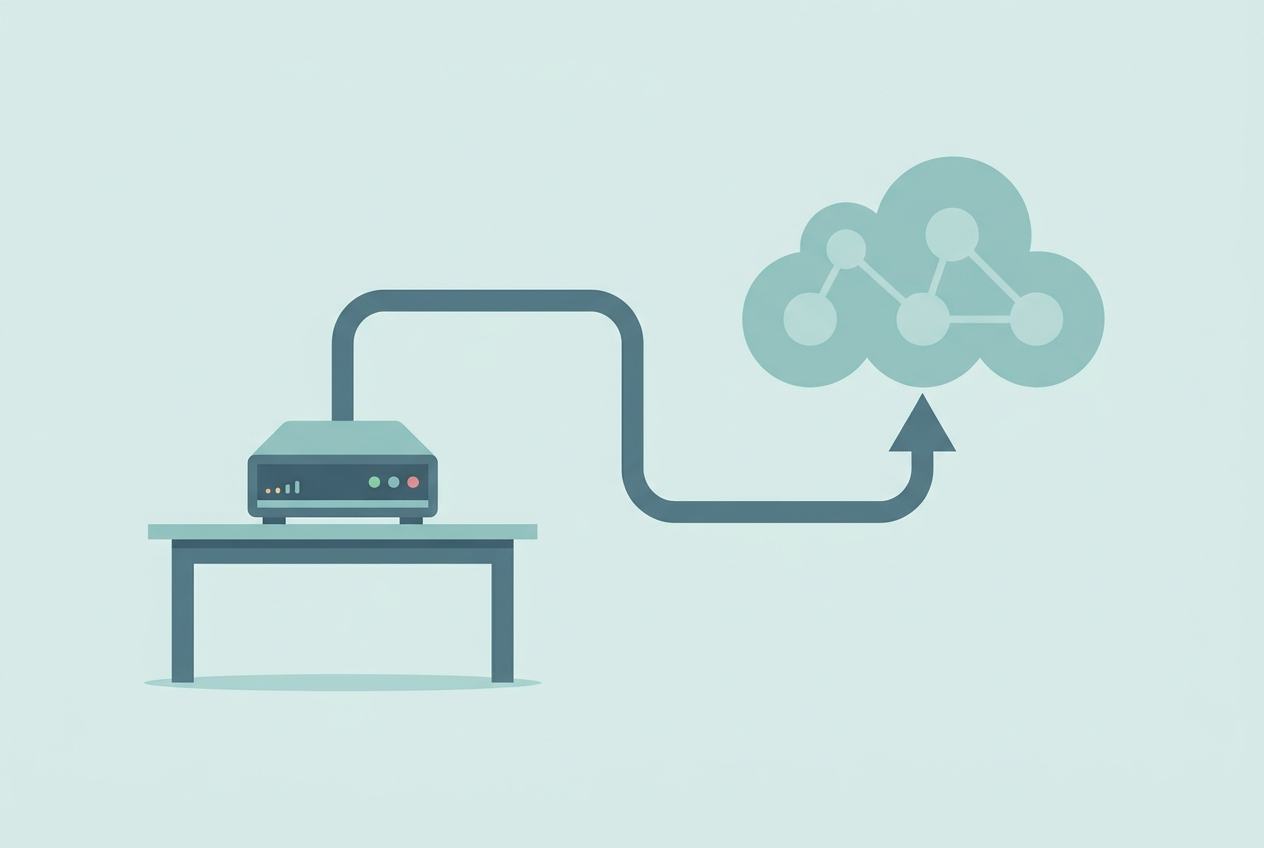 A $4.90 VPS does the same job as a $20 Cloud plan, without execution caps.
Which AI Models I Actually Use (and When Local Beats the API)#
For quality-critical output, I use the Claude API. For everything else, I run Ollama locally on a 16 GB MacBook. My metered Claude spend is $1 to $3 a month at my current publishing volume, because I only call the API when it genuinely changes the output quality.
The split in practice:
- Claude API: long-form post drafts, structural editing passes, any output that gets published or sent to a client
- Ollama (local): classifying RSS items, extracting metadata from PDFs, summarising private documents, bulk reformatting tasks
Ollama is MIT-licensed and free. The models I use most (Llama 3 variants, Mistral) run comfortably in 8 GB of RAM, so the 16 GB MacBook is never stressed. Marginal cost: $0. The hardware was already owned.
If you are still deciding between local model runners, I compared the main options in detail: Ollama vs LM Studio vs Jan: Best Local LLM in 2026.
The Claude API is usage-based with no monthly seat. A seat-based plan charges you whether you used it or not. Metered pricing means a slow publishing month costs less, not the same. At my volume, the difference between $20/month (seat) and $1 to $3/month (metered) is $17 to $19 a month, roughly $200 to $228 a year.
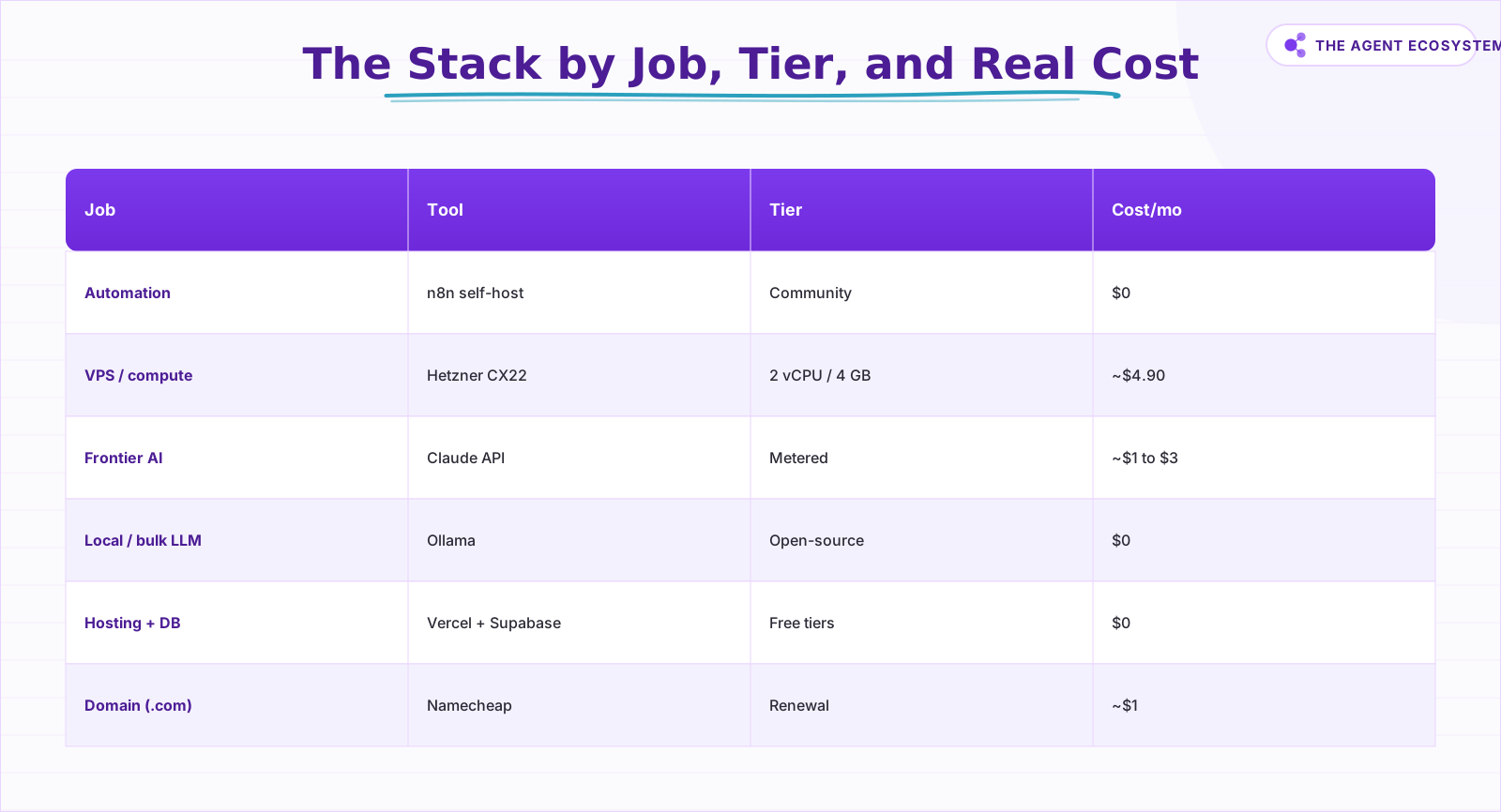 Each line earns its cost or it goes. Two paid lines, the rest free.
Where I Host the Site and Store Data for $0#
My $0 infrastructure layer works because each service handles one narrow job at solo volume. Vercel serves the site, Supabase stores the data, Cloudflare protects and caches traffic, and GitHub handles version control. None of them needs a paid tier until usage or commercial terms change.
Vercel Hobby hosts the Next.js site. It is free for non-commercial personal projects, with automatic SSL, global CDN, and preview deployments on every push. Supabase Free gives me a shared Postgres database (500 MB), 1 GB of file storage, and up to 2 active projects. Cloudflare Free handles DNS, unmetered CDN, and a basic web application firewall. GitHub Free covers unlimited public and private repos for individual accounts.
Resend handles transactional and newsletter email. The free plan allows 3,000 emails a month and 100 a day. At my current list size, I have never come close to that ceiling.
The domain runs through Namecheap. A standard .com renewal is $11 to $15 a year depending on the promo, which amortises to roughly $1 a month. That is the only infrastructure line that costs anything, and it would cost the same at any registrar.
 Two paid lines, seven free. This is what a deliberate stack looks like.
The Paid Lines, and Why They Are the Only Two Worth It#
The only paid lines are the parts that remove real bottlenecks: a small VPS for self-hosted automation and metered Claude API usage for high-quality outputs. Everything else stays free because it either runs locally, fits a generous free tier, or would duplicate another tool.
The VPS is not optional if you want automation without execution caps. It also hosts Postgres, so Supabase stays on the free tier instead of needing the $25 Pro plan. One $4.90 box does the work of two paid subscriptions.
The Claude API is not a seat. I do not pay $20 a month for a Claude.ai Pro subscription because I do not need the consumer interface. I call the API directly from n8n, pay per token, and get the same model quality.
For building and editing the site code itself, I use a free AI IDE. I covered the best options in Best Free AI IDE in 2026 if you want the comparison.
How Solopreneurs Overspend on Their AI Automation Stack#
The most common mistake is paying for a seat when metered access exists. ChatGPT Plus at $20 a month is a fixed cost whether you use it 30 days or 3. The Claude API charges only for what you call. For an automation-first workflow, metered nearly always wins.
The second mistake is never self-hosting. The n8n Cloud Starter is $20 a month for a capped product. A $4.90 VPS runs the same software without caps. The barrier is one afternoon of setup, not ongoing complexity.
Third: using a frontier model for every task. Running a Llama 3.1 8B model locally via Ollama for classification or extraction is free. Calling Claude for the same task burns tokens unnecessarily. Match the model tier to the actual quality requirement of the job.
Fourth: tool overlap. Stacks with Zapier AND Make.com AND n8n, each handling different automations because the owner added them one at a time without auditing. Pick one orchestration layer and migrate everything to it.
A concrete example of what you can automate for under $5 a month in API costs: How Solopreneurs Use AI to Automate Lead Follow-Up.
 Audit for overlap before adding a new tool. Most stacks have at least one redundant pair.
How to Copy This Stack This Week#
Copy the stack by making the two architecture choices first: where workflows run and where the site lives. Once VPS plus n8n and the Vercel/Supabase site are set, the remaining tools become simple nodes around that spine. Do it in this order.
- Register your domain on Namecheap (or transfer an existing one). Point nameservers to Cloudflare immediately, even before the site exists. Cloudflare is free and takes 5 minutes to set up.
- Spin up a Hetzner CX22 VPS. Install Docker and Docker Compose. This is your automation and database server from day one.
- Deploy n8n via Docker on that VPS with a Postgres backend. Follow the self-host guide for the exact compose file and reverse-proxy config.
- Create a free Supabase project for your site's database and file storage. Connect it to n8n with the Supabase node.
- Deploy your Next.js site to Vercel Hobby. Connect your GitHub repo. Vercel handles CI/CD automatically on every push.
- Add Resend for email. Drop the API key into n8n for any workflow that sends notifications or newsletters.
- Install Ollama on your local machine. Pull one mid-size model (I use
llama3.1:8b). Wire it into n8n via the HTTP Request node pointing atlocalhost:11434. - Get a Claude API key from Anthropic. Add it to n8n as a credential. Use it only in workflows where output quality genuinely matters.
The whole stack can be live in a weekend. After two weeks, audit your Claude API spend in the Anthropic console. If it is above $5 for a month at your volume, look at which workflows are calling the API and whether Ollama could handle them instead.
Start with the VPS and n8n setup. That single move eliminates the largest subscription fee in most solopreneur stacks. Once automation is running locally, the free-tier infrastructure slots in around it with almost no friction, and these n8n automation ideas give you eight workflows to run on top of the stack.
Once the spine is standing, wire it into your AI assistant too: MCP servers give Claude one standard connector into the same Supabase, GitHub, and n8n layer, so the stack you just built becomes something you can operate from a chat window.
Frequently asked questions
How much does an AI automation stack cost per month?
Is n8n cheaper self-hosted than n8n Cloud?
Do I need to pay for AI models to automate my business?
Can I run a whole site and blog on free tiers?
What is the cheapest way to run automations as a solopreneur?
When should I use a local model instead of the Claude API?
Sources
Primary references and vendor documentation used while drafting and reviewing this article.
- n8n Pricing - Cloud Starter and Self-Hosting
- Hetzner Cloud Pricing - CX22 VPS
- Vercel Pricing - Hobby Plan
- Supabase Pricing - Free Tier
- Cloudflare Plans - Free Plan
- Resend Pricing - Free Plan
- Ollama - Open Source Local Model Runner
- Anthropic Claude API Pricing
- GitHub Pricing - Free for Individuals
- Namecheap Domain Pricing
Written by

Muhammad Qasim Hammad is an AI agent and automation expert and the founder of Cart Gaze LLC (cartgaze.com). He builds product for the love of it: when an idea lands, a working prototype is usually running within hours, built with the same AI agents and automations he sells. He puts his own output at roughly 20× what it was before agents, and the Agentic OS behind this site is the working proof, documented in public with the tools he actually ran and what they really cost.
AI & Automation Services
Want a pipeline like this running in your business?
I'm Qasim — I design and ship AI agents and n8n automations for solo operators and small teams. Tell me what's eating your team's week, and I'll scope a fix.
Related reading
n8n vs Make vs Zapier in 2026: The Real Cost Math for Solopreneurs
Zapier, Make, and n8n meter completely different units. The same 6-step workflow at 1,000 runs/month can cost 5x more on one platform than another. Here is the exact math for solopreneurs in 2026.

n8n AI Automation Ideas: 8 Agent Workflows Worth Building (2026)
Finished the n8n AI tutorial and wondering what to actually build? These 8 n8n AI automation ideas come with the exact nodes, the honest Chain-vs-Agent call, and the right Claude model for each job.
AI Automation for Solopreneurs: What to Build First
You do not have an automation problem, you have a which-of-these-forty-things problem. Thirteen lessons on picking the first job, counting the baseline, building three automations that survive, and knowing when to stop.
How to Self-Host n8n on a VPS in 2026 (Full Setup Guide)
Self-hosting n8n on a VPS gives solopreneurs unlimited workflows, full data ownership, and a monthly bill under $10. This guide walks you through the exact 7-step setup.
MCP Servers for Solopreneurs: Wire Your AI Into Everything
MCP servers give your AI assistant working hands: connect it to GitHub, Supabase, Zapier, and n8n with one standard protocol. First server live in about 20 minutes, free to start.
Ollama vs LM Studio vs Jan: Best Local LLM Tool for 2026
Running a local LLM cuts your AI API bill to $0 and keeps client data off third-party servers. This breakdown of Ollama, LM Studio, and Jan tells you exactly which tool fits a solo operator's workflow.