n8n vs Make vs Zapier in 2026: The Real Cost Math for Solopreneurs
Why the billing unit decides your bill, before you ever compare feature lists
Updated September 4, 2026 — Added a FAQ on which of n8n, Make, or Zapier is cheaper.
AI-drafted, reviewed by Muhammad Qasim Hammad on June 10, 2026. See our AI disclosure.
Table of contents
You signed up for what looked like a $9 or $20 automation plan, built a 6-step lead follow-up workflow, and your bill quintupled by the end of the month. Put n8n vs Make vs Zapier on the same workflow at the same volume and the cost can differ 5 times over, purely because of what each platform counts as a billable unit.
This is the math almost no comparison post does the work to show. I've run all three platforms, moved to self-hosted n8n on a Hetzner VPS, and the difference in real monthly spend is not subtle. Here is what the numbers actually look like.
All subscription prices below are annual-billing rates as of mid-2026. Month-to-month runs roughly 15-17% higher depending on platform.
What Do n8n, Make, and Zapier Actually Charge For?#
The three platforms meter completely different things, and that single fact determines your bill more than any feature list. Zapier counts every successful action step. Make counts every module action, once per item the trigger fetches. n8n counts one full workflow run, full stop.
| Platform | What you pay for | Free tier | Cheapest paid (annual) | 6-step workflow, 1,000 runs/mo | Self-host option |
|---|---|---|---|---|---|
| Zapier | Per task (1 successful action = 1 task) | 100 tasks/mo, 2-step Zaps only | Pro: $19.99/mo (750 tasks) | 5,000 tasks needed; 750 tasks covers ~150 runs | No |
| Make | Per credit (1 module action per bundle) | 1,000 credits/mo, 2 active scenarios | Core: $9/mo (10,000 credits) | 6,000 credits needed; fits Core comfortably | No |
| n8n Cloud | Per execution (1 full run, any steps) | No cloud free tier (trial only) | Starter: 20 euros/mo (2,500 executions) | 1,000 executions needed; fits Starter easily | Yes (Community Edition) |
| n8n self-hosted | Nothing (license is free) | Unlimited executions | ~$4.90/mo VPS only | No meter | Yes, this is the model |
Sources: Zapier pricing, Make pricing, n8n pricing.
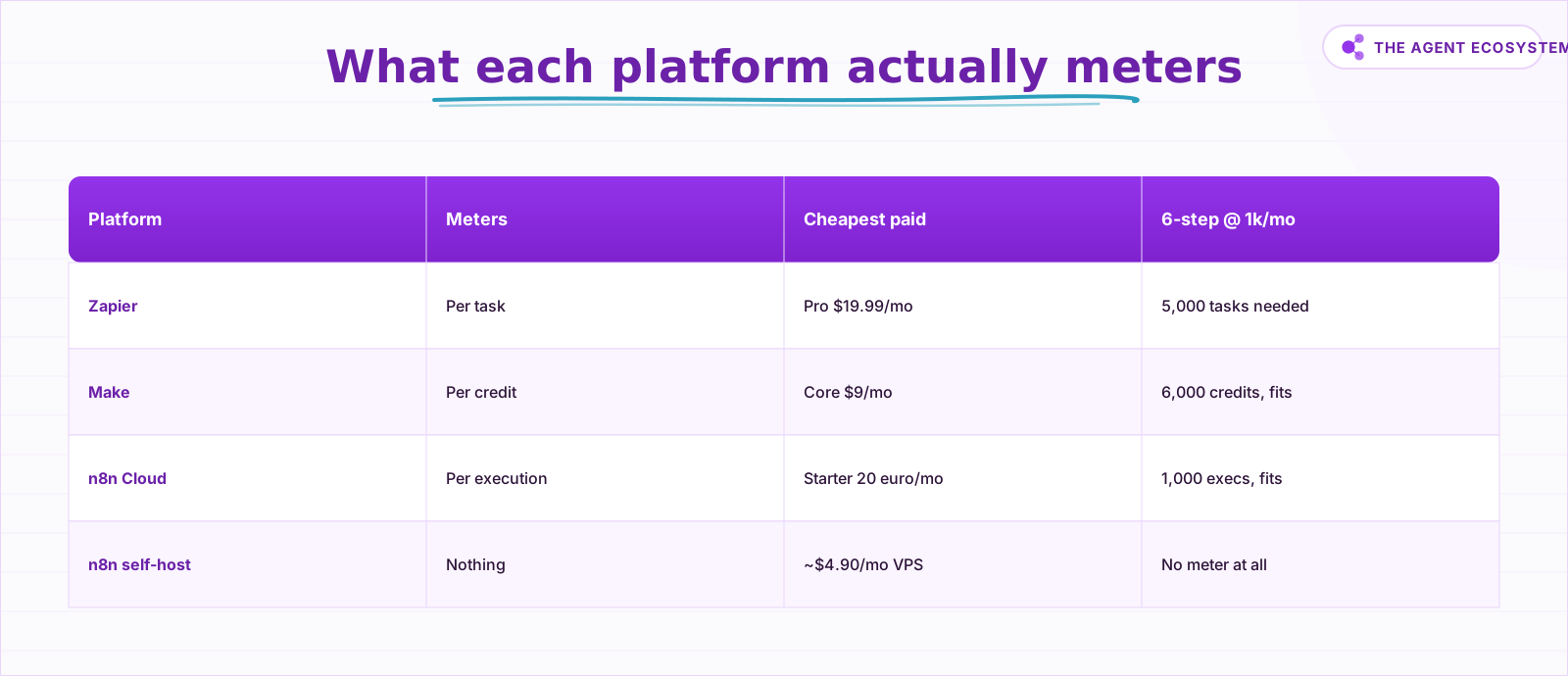 The billing unit, not the sticker price, decides your monthly bill.
The table tells the story, but the mechanism behind it matters. Zapier is explicit: "an action your Zap successfully completes" consumes one task. Filters, Paths, and Formatter steps are exempt, but every other successful action step counts. Make's rename from "operations" to "credits" in its 2025-26 pricing change did not alter the underlying logic: one module action per bundle processed. n8n's own pricing page states it plainly: "Pay for full executions, not for each step."
What Does the Same Workflow Cost on Each Platform?#
Take one concrete workflow: a lead follow-up automation. A new form submission triggers it, the workflow enriches the lead, an AI node drafts a reply, an email goes out, the result logs to a Google Sheet, and a Slack ping fires. That is 1 trigger plus 5 action steps, 6 nodes total.
You can see the full build for this exact automation if you want to wire it up first.
At 1,000 runs per month with one lead per run:
- Zapier: 5 billable action steps x 1,000 runs = 5,000 tasks needed. Pro's 750 tasks covers roughly 150 runs. The remaining 850 runs hit overage or force you up the task slider. Zapier's own documentation confirms: "your automations will still run. You'll just be charged for any completed tasks over that threshold on a per-task basis."
- Make: 6 module actions x 1,000 runs = 6,000 credits needed. Core's 10,000-credit allowance covers this comfortably at $9/month. At this volume, Make is the cheapest cloud option.
- n8n Cloud: 1,000 runs = 1,000 executions. Starter's 2,500-execution allowance fits this at 20 euros/month.
- n8n self-hosted: $0 license + roughly $4.90/month VPS, no meter.
Now add complexity. Double the steps from 6 to 12: Zapier's billable tasks per run roughly double, and so does the cost. Make's credits nearly double too. n8n's execution count stays at 1,000.
 The same starting workflow, three completely different billing outcomes depending on your platform choice.
The model that breaks most visibly is Make's batch trigger. If your trigger returns 50 leads at once instead of one, every downstream module in the scenario runs 50 times per trigger fire. A 6-step scenario processing 50-item batches consumes 6 x 50 = 300 credits per run, not 6. Make effectively bills per item processed, not per scenario run, so estimate your month by counting items times modules. A scenario that fires 1,000 times on 50-item batches is handling 50,000 items, and that is a 300,000-credit month, which is a different conversation entirely.
Which Free Tier Is Actually Usable?#
Zapier Free covers real but tiny use cases: 100 tasks a month across two-step Zaps. Make Free is the most generous of the cloud trio at 1,000 credits a month, capped at 2 active scenarios. n8n has no permanent cloud free tier at all, though the self-hosted Community Edition costs nothing.
Zapier Free gives 100 tasks/month with no time limit, and includes AI tools on the free plan. Free Zaps are capped at two steps (one trigger plus one action). That works for basic glue automations: a form submission that creates a Notion entry, or a Gmail filter that posts to Slack. For anything with 3 or more steps, you need a paid plan.
Make Free gives 1,000 credits/month with a maximum of 2 active scenarios and a 15-minute minimum schedule interval. The 2-scenario cap is the real constraint for a solopreneur running more than a couple of automations. The 15-minute minimum also rules out near-real-time triggers.
n8n has no cloud free tier, but the Community Edition (self-hosted) is free with no execution limits. The trade-off: you provision the server yourself.
How Do AI Agents Change the Cost Math?#
Per-step billing turns AI agents into a budgeting problem, because an agent decides at runtime how many steps it will take. The same agent run might bill 8 tasks or 35 depending on the input. Per-execution billing keeps the number flat: one run is one execution, no matter how the agent reasons.
An AI agent is not a fixed-step workflow. It reasons, calls tools, checks results, and loops until a task is done. On Zapier, each successful action step in that loop is a task. On Make, each module action per bundle is a credit. On n8n, the entire agent run, including every internal tool call, is 1 execution.
When I set up an AI research agent on n8n Cloud that sometimes makes 20-30 sub-calls per run, the execution count stayed flat. The only variable cost was the model API tokens, billed directly by the provider. My Claude and Gemini API spend runs $1-3/month at solo volume; the model bill goes to the provider, not the automation platform.
This is where n8n's bring-your-own-key model genuinely matters. If your agent runs on the Claude API, you can cap and monitor that spend directly. For bulk AI steps at lower cost, check the current Gemini model names before wiring them in. Deprecated names still quietly fail.
Make does offer AI Agents (beta) on all plans, with its own AI provider or your own LLM key. Native Make AI modules consume multiple credits per call (the exact credit cost appears on the module in the scenario editor). Calling an external provider through a standard HTTP module costs 1 credit and you pay the provider separately, which is the more economical path for heavy AI use.
When Are Zapier or Make the Right Choice?#
Zapier wins when connector breadth and zero setup time matter more than per-task cost: it has the broadest connector catalog and the gentlest learning curve. Make wins on price for mid-volume cloud automation, as long as your triggers hand back one item at a time. Both are still the right call for plenty of solo businesses.
Zapier has the longest app catalog of the three. If you need to connect a niche SaaS that nobody else supports, Zapier is often the only option without writing a custom HTTP request. Its interface is also the most forgiving for non-technical builders. For trivial two-step automations at low volume, Zapier Free is genuinely fine. The $19.99/month Pro plan makes sense if your workflows stay short (2-3 steps) and you value a maintenance-free experience over cost optimization.
Make at $9/month Core is the cheapest cloud plan at mid volume for non-batching workflows. Its visual canvas is a real advantage when workflows get complex: seeing every node and data path laid out visually is easier to reason about than Zapier's linear builder. If you are not yet comfortable with self-hosting and your triggers pull single records rather than batches, Make Core is the honest recommendation.
How Do You Escape the Meter Entirely?#
Self-hosting n8n removes the meter entirely: the Community Edition is free to run, has no execution limits, and turns your automation bill into a fixed server cost. For a solo operation that means roughly five dollars a month for a small VPS, whether your workflows fire a hundred times or fifty thousand.
I moved from n8n Cloud Starter (20 euros/month) to a Hetzner CX22 VPS at roughly $4.90/month. The server runs n8n plus a Postgres database in Docker, and every automation behind this site runs on it with no execution meter. Manual test runs never counted toward the quota even on Cloud, but now nothing counts because there is no quota.
The trade-off is real: self-hosting means you own updates, backups, and uptime. n8n releases frequently, and staying current requires attention. If your income depends on an automation firing reliably at 2 AM, you need a monitoring setup and a backup strategy. That is work Zapier and Make absorb into their SaaS pricing.
 Self-hosting removes the meter entirely. The trade-off is owning the road maintenance yourself.
The honest math: if you run more than about 500 multi-step workflow executions per month, self-hosted n8n pays for itself against any cloud plan within the first billing cycle. Below that volume, Make Core at $9/month is the lower-friction choice.
Which Should a Solopreneur Pick in 2026?#
Pick by matching the billing unit to your usage pattern: short simple workflows at low volume suit Zapier, mid-volume single-item scenarios suit Make Core, long or agent-driven workflows suit n8n, and anyone comfortable maintaining a server should self-host n8n and stop paying per run altogether. The decision comes down to four usage patterns.
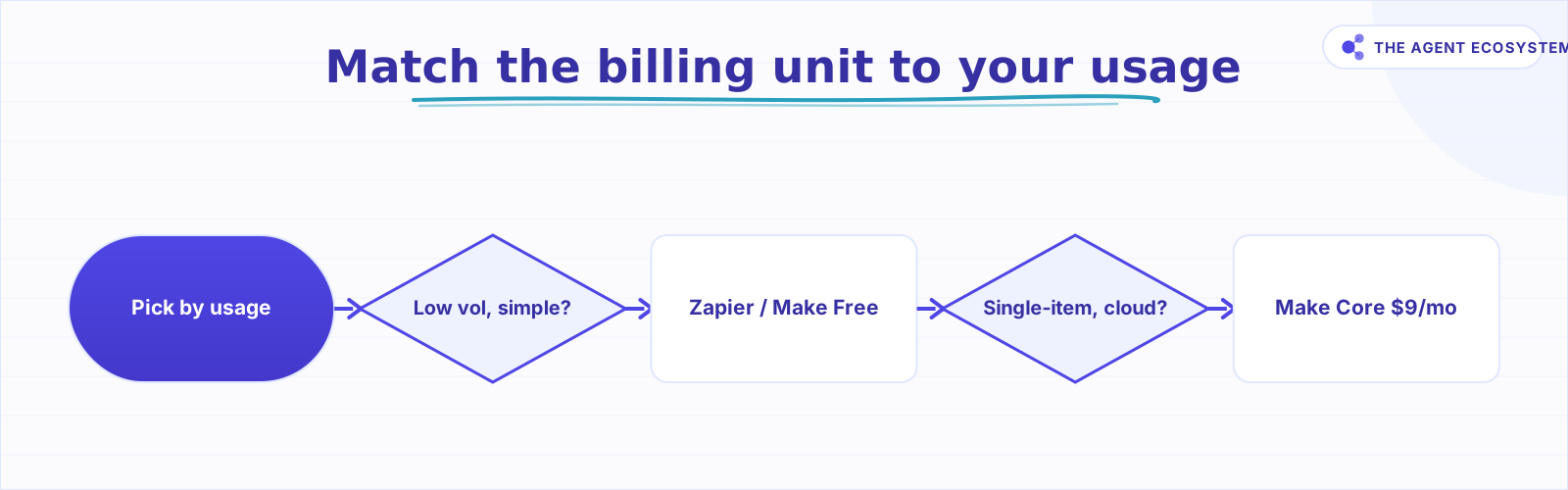 Match your real usage pattern before committing to a plan.
- Low volume, simple automations, no server work: Zapier Free or Make Free. Zapier wins if you need a rare app connector. Make wins if you want more credits and scheduling flexibility.
- Mid volume (hundreds of runs/month), non-batch triggers, cloud-only: Make Core at $9/month. It is the cheapest cloud plan that handles a multi-step workflow at this scale.
- High volume or complex AI agents, cloud-only: n8n Cloud Starter at 20 euros/month. The per-execution model stays predictable as steps and agent calls grow.
- Any volume, comfortable with a VPS: n8n self-hosted at ~$4.90/month. No license cost, no execution meter, bring-your-own-key AI. The full cost breakdown of this stack puts the total at under $10/month all-in at solo scale.
Once you have picked your platform, the next move is filling it with automations that actually save time. The n8n workflows built for solopreneurs post covers the ones worth building first.
The billing unit is the product. Match it to your actual usage pattern before you swipe a card.
Frequently asked questions
Is n8n cheaper than Zapier?
What is the difference between a Zapier task, a Make credit, and an n8n execution?
Is Make cheaper than Zapier?
Is n8n really free?
Which platform is best for AI agents in 2026?
When is Zapier still worth paying for?
Which is cheaper: n8n, Make, or Zapier?
Sources
Primary references and vendor documentation used while drafting and reviewing this article.
Written by

Muhammad Qasim Hammad is an AI agent and automation expert and the founder of Cart Gaze LLC (cartgaze.com). He builds product for the love of it: when an idea lands, a working prototype is usually running within hours, built with the same AI agents and automations he sells. He puts his own output at roughly 20× what it was before agents, and the Agentic OS behind this site is the working proof, documented in public with the tools he actually ran and what they really cost.
AI & Automation Services
Want a pipeline like this running in your business?
I'm Qasim — I design and ship AI agents and n8n automations for solo operators and small teams. Tell me what's eating your team's week, and I'll scope a fix.
Related reading
The Exact AI Automation Stack I Use as a Solopreneur in 2026 (With Real Monthly Costs)
Most "AI stack" posts hide the bill. Mine runs under $10/month. Here is every tool, the exact tier, the real cost, and the job each layer does for my one-person content business.

I Built the Same AI Agent in n8n, Make and LangChain: The Honest Difference
I built the exact same order-status AI agent in n8n, Make.com, and LangChain, then compared setup effort, cost model, portability, and who each platform actually suits.
n8n AI Agent Pricing: What It Really Costs to Run
An n8n AI agent has two bills that behave nothing alike: a flat n8n platform fee and a per-run LLM token cost. Here is what each one comes to, with modeled per-run math across Claude, GPT, and Gemini, and the levers that actually lower the total.
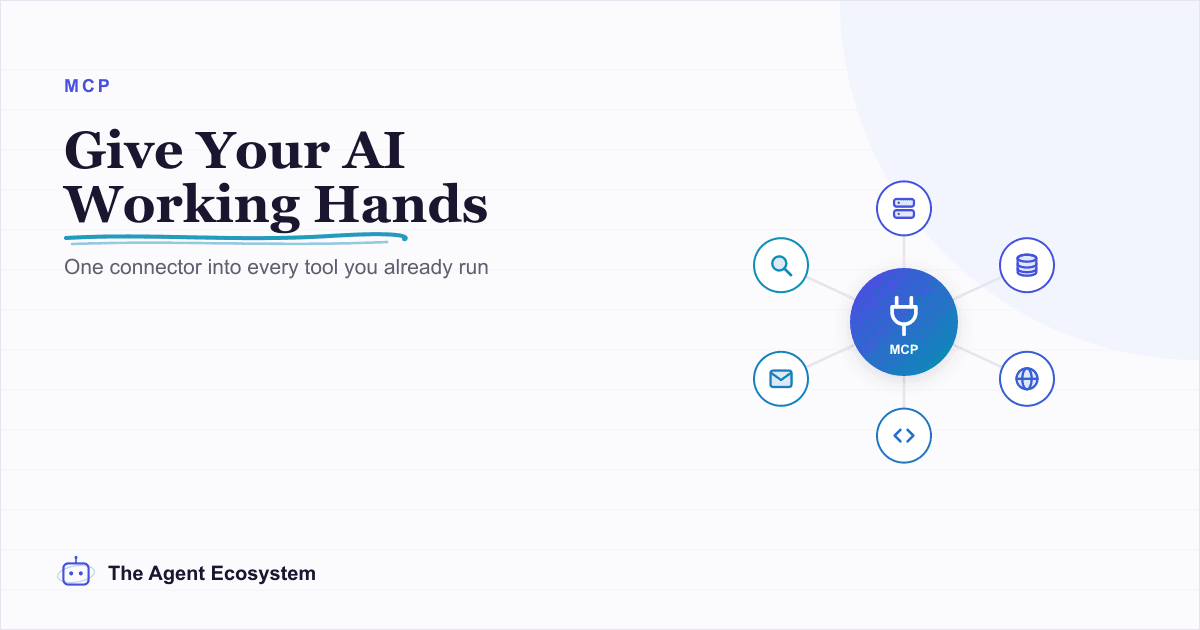
MCP Servers for Solopreneurs: Wire Your AI Into Everything
MCP servers give your AI assistant working hands: connect it to GitHub, Supabase, Zapier, and n8n with one standard protocol. First server live in about 20 minutes, free to start.
n8n AI Automation Ideas: 8 Agent Workflows Worth Building (2026)
Finished the n8n AI tutorial and wondering what to actually build? These 8 n8n AI automation ideas come with the exact nodes, the honest Chain-vs-Agent call, and the right Claude model for each job.
Everyone's Selling AI Agent Factories. You Just Need n8n.
HPE and NVIDIA's AI Factory, NVIDIA's Vera CPU and Agent Toolkit, and NAVER's coming platform are real enterprise agent infrastructure. For a small team, they are mostly noise. Here is where the heavy stack earns its keep, and why I would still default to n8n and one API.