Gemini API Migration: Fix Your Workflows Before They Break
The 2026 shutdown already happened. Here is the exact swap list.
AI-drafted, reviewed by Muhammad Qasim Hammad on June 8, 2026. See our AI disclosure.
Table of contents
This Gemini API migration is now mandatory, not optional. If an automation still calls gemini-2.0-flash, gemini-2.0-flash-001, gemini-2.0-flash-lite, or gemini-2.0-flash-lite-001, fix it now: Google's Gemini API changelog says those model strings were shut down on 2026-06-01, so they return errors instead of silently upgrading. Use gemini-3.5-flash for the standard Flash replacement and gemini-3.1-flash-lite for high-volume, cost-sensitive work. In n8n, Make, Zapier, LangChain, and direct SDK code, search for gemini-2.0, update the model field or URL path, then run one live call today. The practical edge is simple: move the model name into GEMINI_MODEL after the fix, so the next deprecation is one environment-variable edit instead of another broken workflow hunt.
 Broken connections happen silently. A migration checklist catches them before your users do.
Which Gemini Models Were Shut Down, and When?#
Four models were retired on 2026-06-01 in a single batch, according to the Gemini API changelog verified on 2026-06-09. Any API call to these exact strings now errors: gemini-2.0-flash, gemini-2.0-flash-001, gemini-2.0-flash-lite, and gemini-2.0-flash-lite-001. The changelog states explicitly: "Use gemini-3.5-flash or gemini-3.1-flash-lite instead."
Four dead model strings. One shutdown date. Already gone, not "deprecating soon."
When I ran a grep across my automation stack, I found gemini-2.0-flash hardcoded in three places: an n8n HTTP Request node URL, a LangChain model= argument in a Python script, and a Make.com module I had not touched in months. All three were broken. The fix took less than ten minutes once I had the replacement table in front of me.
What Do I Replace gemini-2.0-flash With?#
Use gemini-3.5-flash as the direct replacement for both gemini-2.0-flash and the pinned gemini-2.0-flash-001. For the lite variants, switch to gemini-3.1-flash-lite. Both replacements are at GA status, which means they are stable, not preview builds, and Google will not pull them without advance notice on the changelog.
Here is the full mapping from the changelog:
| Dead model (shut down 2026-06-01) | Replace with | Tier / when to pick it |
|---|---|---|
gemini-2.0-flash | gemini-3.5-flash | Default workhorse, more capable |
gemini-2.0-flash-001 | gemini-3.5-flash | Pinned-version callers: move to the GA name |
gemini-2.0-flash-lite | gemini-3.1-flash-lite | Cost/latency-sensitive, high-volume |
gemini-2.0-flash-lite-001 | gemini-3.1-flash-lite | Pinned-version callers: move to the GA name |
gemini-3.5-flash became GA on 2026-05-19. gemini-3.1-flash-lite became GA on 2026-05-07. Both dates are sourced from the Gemini API changelog.
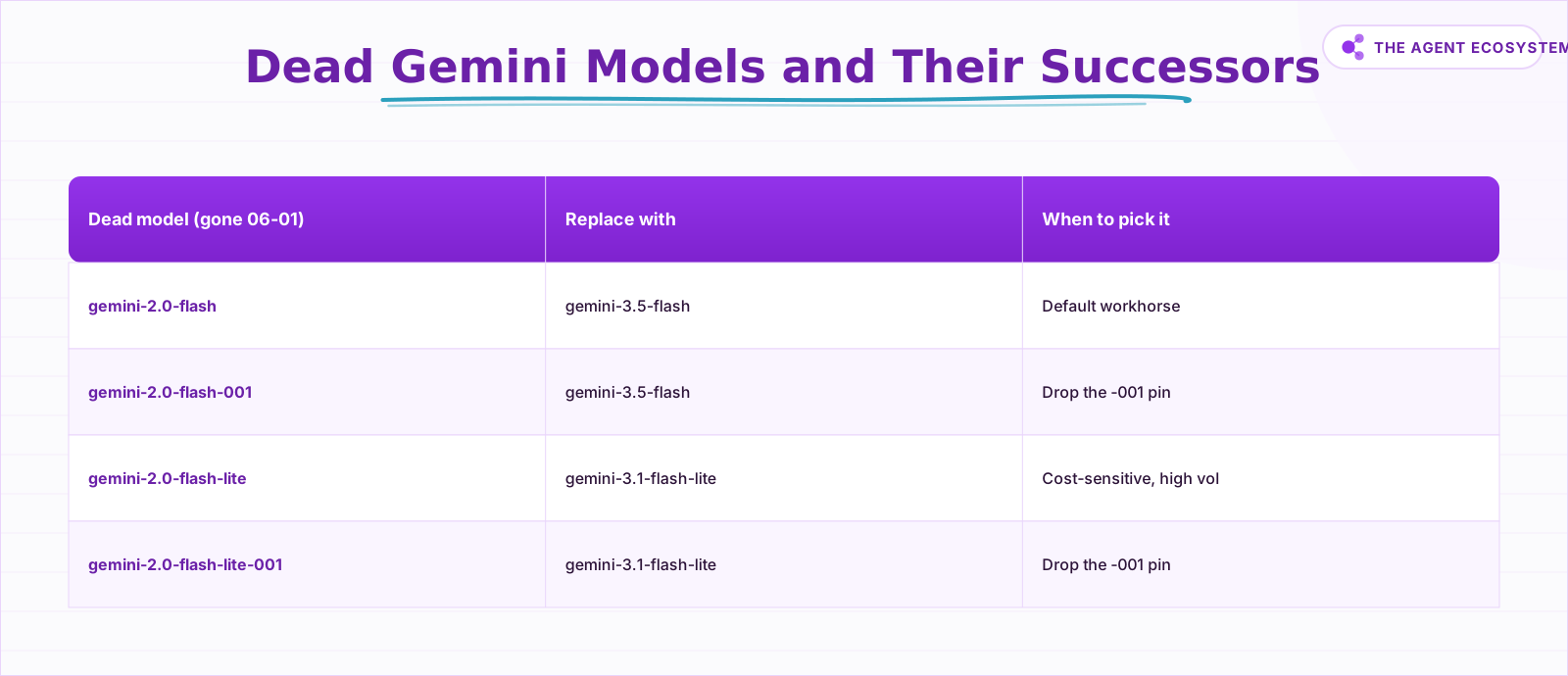 Four dead strings, two GA replacements. Your full swap reference.
How Do I Update My n8n Workflow?#
In n8n, open the Google Gemini node, find the Model field, and replace the dead string with gemini-3.5-flash. Save the node and re-run the workflow once to confirm a live call. For most n8n users that single field edit is the entire migration, with no credential or endpoint changes needed.
If you built a custom integration using an HTTP Request node pointed at:
https://generativelanguage.googleapis.com/v1beta/models/gemini-2.0-flash:generateContentupdate the path segment to gemini-3.5-flash:generateContent and re-run to confirm a 200 response. A 404 means the string is still wrong somewhere.
For Make.com, open the Google Gemini module in your scenario and update the Model dropdown or text field. For Zapier, find the Gemini action step, change the model field, then republish the zap. For LangChain or direct SDK use, grep your repo:
grep -r "gemini-2.0" .The model call is billed by Google either way, but each platform also meters the workflow steps around it differently. If this migration has you rethinking where your automations live, the n8n vs Make vs Zapier cost math shows what those runs cost on each platform.
Every match needs a replacement. Change the model="gemini-2.0-flash" argument or the GEMINI_MODEL environment variable, then redeploy.
 Updating a model string in n8n takes under two minutes once you know the correct replacement name.
Should I Use Flash or Flash-Lite?#
Use gemini-3.5-flash as your default. It is the more capable tier and the replacement Google recommends first. Pick gemini-3.1-flash-lite when cost and latency are your primary constraints, such as high-volume classification, summarization pipelines, or any workflow that fires hundreds of calls per day.
Per-token prices are not listed here because Gemini API pricing changes regularly. Check https://ai.google.dev/gemini-api/docs/pricing directly before making a cost decision. Any number from a blog post may already be stale.
A practical routing rule: if the task requires nuanced reasoning, structured output, or multi-step instructions, use gemini-3.5-flash. If the task is simple, repetitive, and fires at scale, use gemini-3.1-flash-lite. You can split a single workflow into two branches routed by task complexity to keep costs predictable.
What Else Shipped: Managed Agents and Video-to-Image#
The shutdown was not the only change this cycle. Three additions landed alongside the retirement, all recorded on the Gemini API changelog: Managed Agents entered public preview, two native image models reached GA, and video-to-image generation arrived. Each one removes a step a solo builder used to handle manually.
On 2026-05-19, Google launched Managed Agents in public preview. These are autonomous, stateful agents that run in secure, isolated Google-hosted Linux sandbox environments. For a solopreneur who would otherwise spin up a VPS or container to host an agent runtime, this removes that infrastructure step entirely.
On 2026-05-28, two native image models reached GA: gemini-3.1-flash-image (Nano Banana 2) and gemini-3-pro-image (Nano Banana Pro). That same release added video-to-image generation: pass a video file (direct upload or a public YouTube URL) alongside a text prompt, and the model generates a thumbnail or still frame. For solo creators, video-to-image is the standout: turn an existing clip into a thumbnail without a separate design pass, using gemini-3.1-flash-image for cheaper jobs or gemini-3-pro-image when the still needs to be crisp.
 Route by task complexity: capable tasks to flash, high-volume simple tasks to flash-lite.
How Solopreneurs Get This Migration Wrong#
The most common mistake is fixing one place and missing two others. The same dead model string can hide in a node field, an HTTP Request URL, a model= argument, an environment file, a Make.com module, and a Zapier action at once. Run the grep first, fix every match, then test.
The second mistake is assuming the -lite variant is always cheaper. It usually is, but "usually" is not a billing strategy. Check the pricing page for the current ratio between gemini-3.5-flash and gemini-3.1-flash-lite at your actual token volumes before committing a pipeline to one tier.
The third mistake is using a preview suffix because it appeared in a tutorial you followed six months ago. Preview models are not stable endpoints. gemini-3.1-flash-lite-preview was shut down on 2026-05-25, six days before the main batch. Any tutorial still showing a -preview suffix is out of date.
One more thing: if you use the Gemini API models reference page to verify a model name, cross-check it against the changelog. The models page lists currently available models; the changelog is the authoritative record of what was removed and when.
Where to Go From Here#
Run grep -r "gemini-2.0" . across every codebase and workflow tool you own, apply the replacement table above, and re-test each workflow with a live call today. Once everything is green, move your model names into environment variables so the next deprecation becomes a one-line fix instead of another scavenger hunt across nodes.
Then bookmark the Gemini API changelog and check it once a month. Google ships and retires models on a faster cycle now, and a monthly glance is far cheaper than an hour spent debugging a silently broken automation.
Frequently asked questions
Which Gemini models were shut down in 2026?
What do I replace gemini-2.0-flash with?
How do I update the model in n8n?
Is gemini-3.1-flash-lite-preview still usable?
When should I use flash-lite instead of flash?
What are the new Gemini image models released in 2026?
Where can I find current Gemini API pricing?
What are Gemini Managed Agents?
Sources
Primary references and vendor documentation used while drafting and reviewing this article.
Written by

Muhammad Qasim Hammad is an AI agent and automation expert and the founder of Cart Gaze LLC (cartgaze.com). He builds product for the love of it: when an idea lands, a working prototype is usually running within hours, built with the same AI agents and automations he sells. He puts his own output at roughly 20× what it was before agents, and the Agentic OS behind this site is the working proof, documented in public with the tools he actually ran and what they really cost.
AI & Automation Services
Want a pipeline like this running in your business?
I'm Qasim — I design and ship AI agents and n8n automations for solo operators and small teams. Tell me what's eating your team's week, and I'll scope a fix.
Related reading
DeepSeek Model Migration: Replace deepseek-chat Before July 24
DeepSeek is retiring deepseek-chat and deepseek-reasoner on 2026-07-24. Replace them with deepseek-v4-flash or deepseek-v4-pro now using this step-by-step migration checklist for n8n, LangChain, and code configs.

Claude vs GPT vs Gemini in n8n: Tested Cost and Speed
There is a 25x cost spread between the cheapest and priciest LLM tier for the exact same n8n AI Agent workflow. This post prices all three providers across 11 model tiers so you can pick the right Chat Model sub-node and stop overpaying.
The 2026 Model Wave: What It Changes for Automation Builders
Three model releases landed in two weeks in June 2026: Fable 5, open-weight GLM-5.2, and limited-preview GPT-5.6. Skip the leaderboard drama. Here is the builder's take on which model belongs on which workflow step, with every price and benchmark dated and attributed.
Cheapest AI API in 2026: DeepSeek vs Claude vs GPT vs Gemini
The cheapest AI API by published token rate in June 2026 is DeepSeek V4 Flash, but the lowest sticker rate is rarely the lowest bill. Here is a dated, source-linked price table for DeepSeek, Gemini, GPT, and Claude, the cost-per-task math that output tokens dominate, and the
Kimi K3 in n8n: Using Moonshot's 2.8T Model for AI Agents
Moonshot's Kimi K3 is a 2.8-trillion-parameter model with a 1-million-token context and an OpenAI-compatible API. That last part means it drops into an n8n AI Agent today. Here is how to wire it up, what it costs, and when it beats a frontier model.
The OpenAI-Compatible API: Swap Models Without a Rewrite
A new frontier model lands every week, and rewriting your integration each time is a losing game. Because most providers now speak the OpenAI API format, swapping a model is usually a base-URL and key change. Here is the portability pattern, and where it breaks.