DeepSeek Model Migration: Replace deepseek-chat Before July 24
Your audit checklist for retiring deepseek-chat and deepseek-reasoner safely
AI-drafted, reviewed by Muhammad Qasim Hammad on June 9, 2026. See our AI disclosure.
Table of contents
- What changed in the DeepSeek API?
- Which DeepSeek model names are being retired?
- What should you replace deepseek-chat and deepseek-reasoner with?
- How do you find old DeepSeek model strings in n8n and code?
- How do you update an n8n workflow safely?
- What should LangChain or OpenAI-compatible clients change?
- How do you test the migration before July 24?
- Where should automation builders go from here?
If your stack uses deepseek-chat or deepseek-reasoner, the migration is simple: replace deepseek-chat with deepseek-v4-flash, test deepseek-v4-pro first for reasoning-heavy deepseek-reasoner workflows, keep the same base URL, and run one live test per n8n workflow or client before 2026-07-24. The official DeepSeek API update says the old names retire on that date, so this is not a cosmetic cleanup. For solo automation builders, the safest pattern is to move the model name into DEEPSEEK_MODEL, search every workflow and repo for old strings, update one place at a time, and keep deepseek-v4-flash for simple/high-volume calls while reserving deepseek-v4-pro for outputs where reasoning quality matters.
What changed in the DeepSeek API?#
The DeepSeek API now supports two new models, deepseek-v4-pro and deepseek-v4-flash, through both the OpenAI ChatCompletions and Anthropic interfaces. The older names, deepseek-chat and deepseek-reasoner, are transition aliases only. They are being retired on 2026-07-24, according to the DeepSeek API updates page, so workflows need a model-string audit now.
Until that date, both old names still resolve. deepseek-chat points to the non-thinking mode of deepseek-v4-flash. deepseek-reasoner points to the thinking mode of deepseek-v4-flash. Your workflows are not broken yet, but one deadline will break them.
The base_url does not change. This is a model-string-only migration.
DeepSeek V4 is currently a preview release, so the new models can still change before general availability. The retirement of deepseek-chat and deepseek-reasoner on 2026-07-24 is firm, so migrate now and re-test if anything shifts when V4 reaches GA.
Which DeepSeek model names are being retired?#
Two model strings are being retired on 2026-07-24: deepseek-chat and deepseek-reasoner. That matters because these names often sit quietly inside workflow nodes, .env files, SDK snippets, and copied templates. If you do not replace them, the same automation can work today and fail after the cutoff.
Here is the full mapping, including current transitional behavior and the recommended replacement:
| Old model string | Current behavior before deadline | Safer replacement | Use when |
|---|---|---|---|
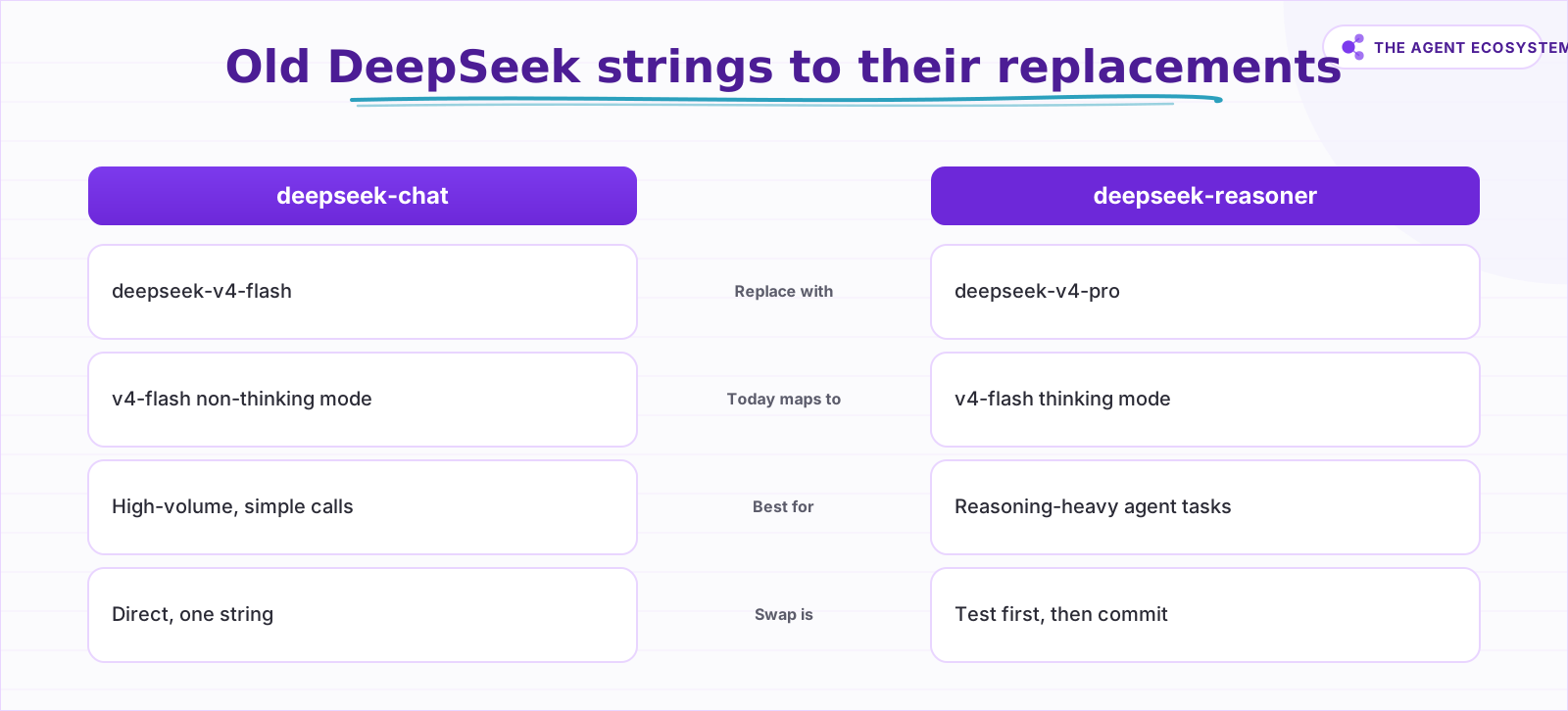
deepseek-chat | Points to non-thinking mode of deepseek-v4-flash during the transition | deepseek-v4-flash | Cost-sensitive, high-volume, simple automation calls |
deepseek-reasoner | Points to thinking mode of deepseek-v4-flash during the transition | deepseek-v4-pro or deepseek-v4-flash after testing | Reasoning-heavy agent tasks or when output quality matters |
The swap for deepseek-chat is direct: one string for another. The deepseek-reasoner replacement deserves a test run first, because the right choice between deepseek-v4-pro and deepseek-v4-flash depends on your task complexity.
What should you replace deepseek-chat and deepseek-reasoner with?#
Replace deepseek-chat with deepseek-v4-flash. For deepseek-reasoner, test deepseek-v4-pro first on reasoning-heavy tasks, then test deepseek-v4-flash if the workflow is simple or cost-sensitive. DeepSeek says the base_url stays unchanged, so the migration is mostly a controlled edit to the model parameter.
The cleaner long-term setup is to stop hardcoding the model name entirely. Set it as an environment variable:
DEEPSEEK_MODEL=deepseek-v4-flashThen reference it in code:
const model = process.env.DEEPSEEK_MODEL ?? "deepseek-v4-flash";When DeepSeek updates model names again, you change one line in your .env file instead of hunting through every config file, workflow body, and runbook.
How do you find old DeepSeek model strings in n8n and code?#
Start with a text search before you edit the workflow. DeepSeek model strings can live in n8n HTTP Request bodies, Code nodes, credentials notes, local .env files, CI secrets, LangChain constructors, and old runbooks. A single scan gives you the migration list before you change anything.
rg "deepseek-chat|deepseek-reasoner|DEEPSEEK_MODEL" .If you do not have ripgrep installed, plain grep works:
grep -r "deepseek-chat\|deepseek-reasoner\|DEEPSEEK_MODEL" .For n8n specifically, the old model string can live in four places. Check all of them:
- HTTP Request node body where the
modelfield is set in the JSON payload. - AI/LLM node model field if you are using a DeepSeek-compatible credential in an n8n AI workflow.
- Code node environment variable references, such as
$env.DEEPSEEK_MODEL. - Workflow variables or static data set at the workflow level.
Also check copied examples in Notion runbooks, prompt templates, or README files. Stale strings there will mislead you or a teammate the next time you set up a new workflow.
 deepseek-chat swaps directly; deepseek-reasoner needs a test run first.
How do you update an n8n workflow safely?#
Update one n8n workflow at a time and keep the change boring. Open the node that calls DeepSeek, change only the model string, save a copy if the workflow is important, then run one manual test. For a ChatCompletions-style HTTP Request node, the edit is the model field.
{
  "model": "deepseek-v4-flash",
  "messages": [
    { "role": "user", "content": "{{$json.prompt}}" }
  ]
}
For an AI/LLM node using a DeepSeek-compatible credential, click the node, find the Model field, and type deepseek-v4-flash or deepseek-v4-pro directly. If the field pulls from a workflow variable, update the variable definition instead.
After saving, run a manual test execution with a real prompt before re-activating the workflow. Check the output node for a valid response, not just a 200 status code. A 200 with a degraded or empty response is still a failure.
If you use Ollama as a local fallback for any DeepSeek-routed calls, the n8n and Ollama local AI agent setup guide covers how to route between remote and local models without breaking either path.
What should LangChain or OpenAI-compatible clients change?#
LangChain, OpenAI-compatible clients, and small custom agents usually need the same tiny edit. Look for model, modelName, DEEPSEEK_MODEL, or a provider config object. Keep the base URL unchanged, replace the old string, and run the smallest test that proves the client still returns a valid response.
A typical LangChain TypeScript setup before migration:
const chat = new ChatOpenAI({
  modelName: "deepseek-chat",
  openAIApiKey: process.env.DEEPSEEK_API_KEY,
  configuration: {
    baseURL: "https://api.deepseek.com/v1",
  },
});
After migration:
const chat = new ChatOpenAI({
  modelName: process.env.DEEPSEEK_MODEL ?? "deepseek-v4-flash",
  openAIApiKey: process.env.DEEPSEEK_API_KEY,
  configuration: {
    baseURL: "https://api.deepseek.com/v1",
  },
});
The pattern is the same whether you use LangChain's Python SDK, a raw fetch call, or another OpenAI-compatible wrapper. Find the model parameter, replace the string, and move it to an environment variable.
The same environment-variable pattern applies to Claude and other providers where model names change on rolling schedules. The Claude API cost-control and agent workflow guide covers that pattern in detail for Anthropic's API.
How do you test the migration before July 24?#
Run a real prompt through each updated workflow and compare the output to what the old model string produced. Check that the response is the right shape, the right length, and the right quality for your use case — a 200 status alone tells you nothing.
For reasoning-heavy workflows that previously used deepseek-reasoner, this test matters more. If deepseek-v4-flash produces noticeably weaker outputs on your specific prompt, switch to deepseek-v4-pro and re-test. Complete this comparison before 2026-07-24.
A simple before/after test structure for any workflow:
- Save the response from your current (old model string) workflow run as a baseline.
- Update the model string to the new value.
- Run the same prompt.
- Compare response quality side by side.
- If acceptable, activate the updated workflow. If not, try the other replacement model.
This process mirrors the approach in the Gemini API migration playbook, which walks through the same validation loop for Google model deprecations.
Where should automation builders go from here?#
Run the ripgrep scan today. Update each model string, move it to an environment variable, and run one test per workflow. The entire migration should take under an hour for most solo operator stacks. The deadline is 2026-07-24. The path forward is two new strings: deepseek-v4-flash and deepseek-v4-pro. Everything else in your DeepSeek integration stays the same.
Frequently asked questions
What is the deadline for the DeepSeek model migration?
What should I replace deepseek-chat with?
What should I replace deepseek-reasoner with?
Does the DeepSeek base_url change during this migration?
How do I find old DeepSeek model strings in my codebase?
Does this affect n8n workflows using a DeepSeek-compatible credential?
Can I use deepseek-v4-flash for reasoning tasks that used deepseek-reasoner?
Is the DeepSeek API still OpenAI-compatible after this migration?
Sources
Primary references and vendor documentation used while drafting and reviewing this article.
Written by

Muhammad Qasim Hammad is an AI agent and automation expert and the founder of Cart Gaze LLC (cartgaze.com). He builds product for the love of it: when an idea lands, a working prototype is usually running within hours, built with the same AI agents and automations he sells. He puts his own output at roughly 20× what it was before agents, and the Agentic OS behind this site is the working proof, documented in public with the tools he actually ran and what they really cost.
AI & Automation Services
Want a pipeline like this running in your business?
I'm Qasim — I design and ship AI agents and n8n automations for solo operators and small teams. Tell me what's eating your team's week, and I'll scope a fix.
Related reading
Gemini API Migration: Fix Your Workflows Before They Break
4 Gemini 2.0 Flash models were shut down on 2026-06-01. If your n8n, Make.com, or Zapier workflows still call those model strings, they are throwing errors right now. Here is the exact swap list.

The OpenAI-Compatible API: Swap Models Without a Rewrite
A new frontier model lands every week, and rewriting your integration each time is a losing game. Because most providers now speak the OpenAI API format, swapping a model is usually a base-URL and key change. Here is the portability pattern, and where it breaks.
Claude vs GPT vs Gemini in n8n: Tested Cost and Speed
There is a 25x cost spread between the cheapest and priciest LLM tier for the exact same n8n AI Agent workflow. This post prices all three providers across 11 model tiers so you can pick the right Chat Model sub-node and stop overpaying.
DeepSeek V4 Is '8 Months Behind' the Frontier. That's Fine.
An official US evaluation says DeepSeek V4 Pro lags the frontier by about eight months. It gets quoted as a verdict. My take: for most real coding and automation work, an open-weight model that is eight months behind at a fraction of the price is not a compromise, it is the
Cheapest AI API in 2026: DeepSeek vs Claude vs GPT vs Gemini
The cheapest AI API by published token rate in June 2026 is DeepSeek V4 Flash, but the lowest sticker rate is rarely the lowest bill. Here is a dated, source-linked price table for DeepSeek, Gemini, GPT, and Claude, the cost-per-task math that output tokens dominate, and the
How to Choose an LLM for Your n8n AI Agent (2026)
Kimi K3, GLM-5.2, DeepSeek V4, Claude, and GPT all plug into an n8n AI Agent, and they are not interchangeable. Here are the 5 questions that decide the pick for your agent, and why the honest answer for most workflows is to route by task, not standardize on one.