Claude vs GPT vs Gemini in n8n: Tested Cost and Speed
A reproducible cost model across 11 model tiers, so you pick the right Chat Model sub-node and stop overpaying.
AI-drafted, reviewed by Muhammad Qasim Hammad on June 14, 2026. See our AI disclosure.
Table of contents
- Why Model Choice Is the Best LLM for n8n AI Agent Cost Decision
- Provider Comparison: Claude, GPT, and Gemini Inside n8n
- How to Switch LLM Providers in n8n (One Sub-Node Swap)
- Step 1: Open the AI Agent node
- Step 2: Identify the Chat Model sub-node
- Step 3: Swap the sub-node
- Step 4: Add the credential
- Step 5: Run a test and measure
- How Solopreneurs Get This Wrong
- Where to Go From Here
What's the best LLM for n8n AI agents? I tested Claude, GPT, and Gemini on the same agent run for cost and speed. You are about to pick an LLM for your n8n AI Agent node, and the price difference between a good choice and a lazy one is roughly 25x per 1,000 runs. Drop a fast-tier model into your Chat Model sub-node by default, and only upgrade to a flagship when the task actually demands it.
Most automation guides skip the cost math entirely. They compare Claude and GPT on chat quality, then let you guess which one to wire into a workflow that will run hundreds of times a month. That gap costs real money. A solopreneur running 5,000 agent runs a month on gpt-5.5 pays ~$405 in LLM fees alone. The same workflow on gpt-5.4-nano costs ~$16.50.
This post builds a reproducible cost model across all three providers (Claude, GPT, Gemini) and 11 model tiers, priced against the same n8n agent run. The numbers are stated openly so you can adjust for your own workflow.
Why Model Choice Is the Best LLM for n8n AI Agent Cost Decision#
Model selection is the fastest path to overspending on n8n automation when you treat it as a one-time decision. For repeated workflows at scale, the model tier is often the single largest line item past a few hundred runs a month. The good news: n8n makes testing cheap because the provider swap is exactly one sub-node.
Before picking, you need the cost model. Here it is.
The assumption: one n8n AI Agent run involves roughly 3 model calls (initial reasoning, one tool round-trip, final answer). Each call uses approximately 3,000 input tokens (system prompt, tool schemas, short history) and 400 output tokens. That works out to 9,000 input tokens and 1,200 output tokens per run, or 9.0M input and 1.2M output tokens per 1,000 runs.
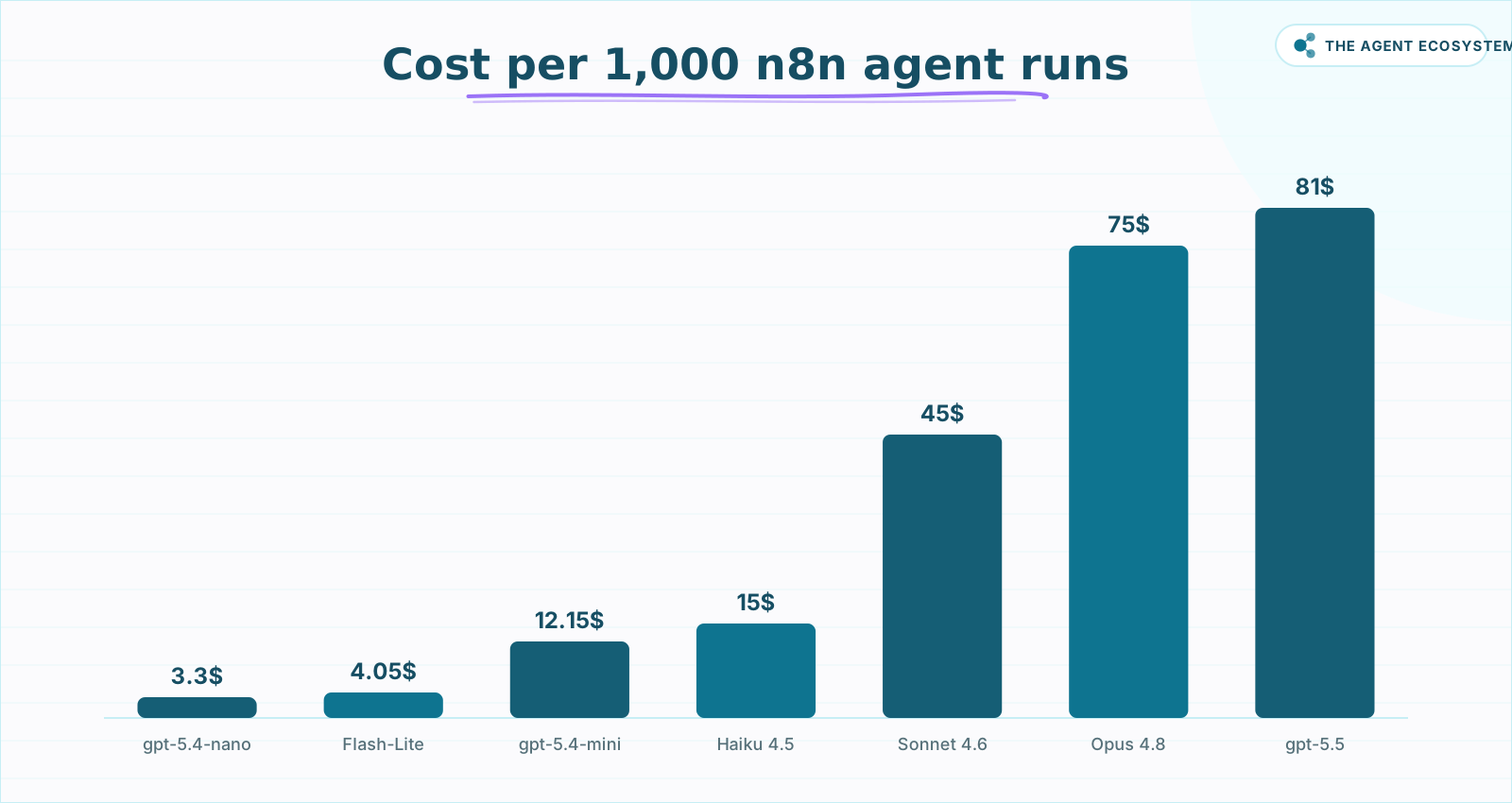 Identical workflow logic, priced across the tier ladder (mid-2026).
Cost per 1,000 agent runs, cheapest to most expensive (as of mid-2026, June 2026 list prices):
| Rank | Model | Input ($/1M) | Output ($/1M) | Cost / 1K runs |
|---|---|---|---|---|
| 1 | gpt-5.4-nano | $0.20 | $1.25 | $3.30 |
| 2 | Gemini 3.1 Flash-Lite | $0.25 | $1.50 | $4.05 |
| 3 | Gemini 2.5 Flash | $0.30 | $2.50 | $5.70 |
| 4 | gpt-5.4-mini | $0.75 | $4.50 | $12.15 |
| 5 | Claude Haiku 4.5 | $1.00 | $5.00 | $15.00 |
| 6 | Gemini 3.5 Flash | $1.50 | $9.00 | $24.30 |
| 7 | Gemini 3.1 Pro | $2.00 | $12.00 | $32.40 |
| 8 | gpt-5.4 | $2.50 | $15.00 | $40.50 |
| 9 | Claude Sonnet 4.6 | $3.00 | $15.00 | $45.00 |
| 10 | Claude Opus 4.8 | $5.00 | $25.00 | $75.00 |
| 11 | gpt-5.5 | $5.00 | $30.00 | $81.00 |
Prices sourced from Anthropic pricing, OpenAI pricing, and Google Gemini API pricing (page updated 2026-06-09). Confirm before committing; API pricing changes without notice.
The headline: a 25x spread between gpt-5.4-nano ($3.30) and gpt-5.5 ($81.00) for the exact same workflow logic.
Provider Comparison: Claude, GPT, and Gemini Inside n8n#
Each provider plugs into n8n's AI Agent node through its own Chat Model sub-node: OpenAI, Anthropic, and Google Gemini each have a dedicated one. The model tier you select inside that sub-node is what sets both quality and cost. Here is a reference summary of the tiers worth knowing, as of mid-2026.
| Provider | Model | Context | Best for in n8n |
|---|---|---|---|
| OpenAI | gpt-5.4-nano | 400K | High-volume routing, classification, triage |
| OpenAI | gpt-5.4-mini | 400K | Drafting, moderate reasoning at low cost |
| OpenAI | gpt-5.4 | 1M | Production workhorse, balanced cost/quality |
| OpenAI | gpt-5.5 | 1M | Complex reasoning steps, sparingly |
| Anthropic | Claude Haiku 4.5 | 200K | Fast extraction, formatting tasks |
| Anthropic | Claude Sonnet 4.6 | 1M | Long-context pipelines, structured output |
| Anthropic | Claude Opus 4.8 | 1M | Hardest reasoning steps only |
| Gemini 3.1 Flash-Lite | Standard | Ultra-high-volume, simple decisions | |
| Gemini 2.5 Flash | Standard | Good balance of speed and instruction-following | |
| Gemini 3.5 Flash | Standard | Richer reasoning, still mid-price | |
| Gemini 3.1 Pro | 200K / 1M+ | Long-doc analysis, complex pipelines |
A few practical notes from wiring these up.
The OpenAI Chat Model sub-node in n8n handles gpt-5.4-nano through gpt-5.5 with a single credential. Swapping tiers is a dropdown change, not a new sub-node. The Anthropic Chat Model sub-node works the same way. The Google Gemini Chat Model sub-node uses a Google Gemini (PaLM) API credential; see the n8n Google Gemini Chat Model docs for setup details.
On latency: for most automation steps (classification, extraction, routing, structured drafting), the fast tier from any provider is sufficient. Latency in these workflows is dominated by the HTTP or database tool calls the agent makes, not the model's response time. On one extraction workflow, the Flash and nano tiers felt identical in end-to-end time to the mid-tier models because the Airtable write afterward took longer than any model call.
 Run this before wiring any Chat Model sub-node into your agent.
How to Switch LLM Providers in n8n (One Sub-Node Swap)#
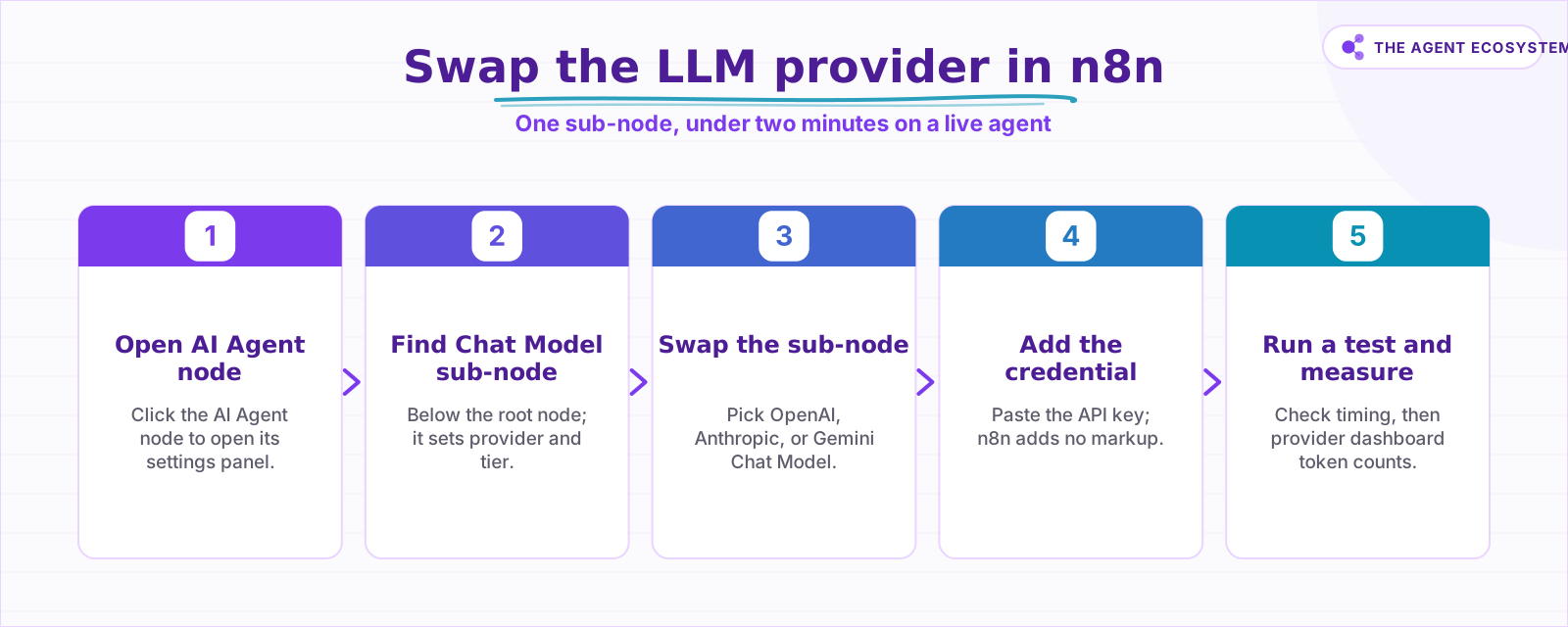
Switching providers in n8n is the only benchmark that actually matters, because it tests your prompts on your data instead of someone else's generic eval. The whole swap lives in one sub-node and takes under two minutes on an existing agent. Here is exactly how it works, step by step.
Step 1: Open the AI Agent node#
Click the AI Agent node on your canvas to open its settings.
Step 2: Identify the Chat Model sub-node#
Look below the root node for the Chat Model sub-node. This is the only component that determines your provider and model tier.
Step 3: Swap the sub-node#
Click the sub-node, then open the node picker. Replace it with OpenAI Chat Model, Anthropic Chat Model, or Google Gemini Chat Model depending on which provider you want to test next. Connect the new sub-node to the AI Agent root.
Step 4: Add the credential#
Inside the new sub-node settings, select an existing API key credential or click Create New Credential and paste your key. n8n stores it encrypted and passes it directly to the provider. No markup is applied.
Step 5: Run a test and measure#
Trigger a test execution. Check n8n's Execution Details panel for timing. Then open your provider's usage dashboard (OpenAI Platform, Anthropic Console, or Google AI Studio) to see the exact token counts for that run. Multiply by the table above to project monthly cost.
This is the only benchmark that matters: your workflow, your prompts, your data. Generic benchmarks measure tasks that probably do not match your agent's actual job.
 The whole provider swap lives in one sub-node.
How Solopreneurs Get This Wrong#
The most common mistake is wiring in a flagship model because it just works, then never revisiting it. A single extraction agent running 300 times a week on Claude Sonnet 4.6, at $45 per 1,000 runs, costs $13.50 a week. The same task on Claude Haiku 4.5 at $15 per 1,000 is roughly $4.50 a week, with no quality loss.
Three patterns come up repeatedly:
- Using a flagship for every step in a multi-step agent. Break your agent into sub-steps and assign the cheapest model that passes each step's quality bar individually.
- Ignoring prompt caching. If your system prompt is longer than a few hundred tokens and runs thousands of times a month, caching is the single biggest cost lever you have. See the Claude cost control guide for a practical setup.
- Treating provider lock-in as real. It is not. The sub-node swap takes under two minutes. There is no reason to stay on an expensive tier without testing a cheaper one. If you are evaluating a move to a different provider entirely, the Gemini API migration playbook walks through the credential and prompt-format differences.
For workflows where cost is the top concern and quality requirements are modest, local models are worth a look. The Ollama + n8n local AI agent guide covers running models at zero per-token cost on your own hardware. For the full picture of what automation costs across your stack, the solopreneur AI automation cost breakdown for 2026 puts LLM spend in context alongside n8n, databases, and hosting.
The DeepSeek model migration guide covers another sub-$5-per-1,000-runs option worth evaluating if the OpenAI/Google/Anthropic tiers do not fit your budget.
Where to Go From Here#
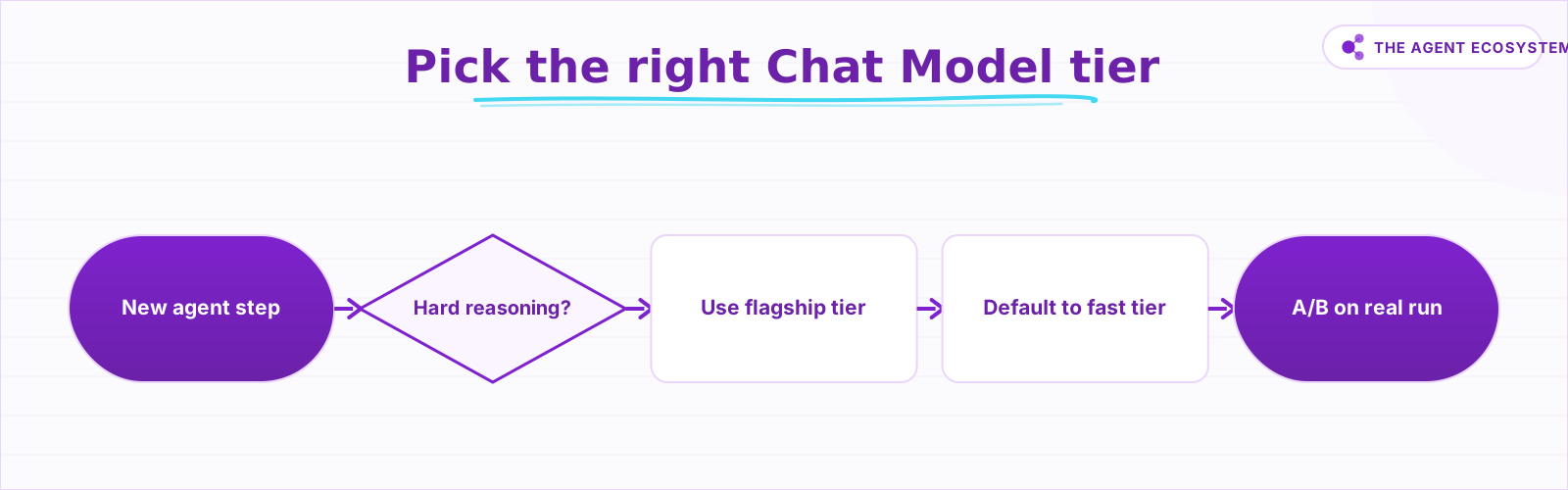
Start with the cheapest tier your intuition says might work, then run 20 test executions through your real workflow. Compare the output against your actual acceptance criteria and check the token counts in your provider's dashboard. If quality passes, you are done; if not, step up one tier and repeat until it does.
That whole process takes about 30 minutes and can save hundreds of dollars a month at scale. The n8n AI Agent and MCP guide shows how to extend the agent once you have settled on a model.
Frequently asked questions
What is the cheapest model for n8n AI agents?
Is Claude or GPT better for n8n automation?
Does n8n add a markup on LLM tokens?
How do I switch LLM providers in n8n?
Do I need a flagship model for my n8n agent?
Sources
Primary references and vendor documentation used while drafting and reviewing this article.
Written by

Muhammad Qasim Hammad is an AI agent and automation expert and the founder of Cart Gaze LLC (cartgaze.com). He builds product for the love of it: when an idea lands, a working prototype is usually running within hours, built with the same AI agents and automations he sells. He puts his own output at roughly 20× what it was before agents, and the Agentic OS behind this site is the working proof, documented in public with the tools he actually ran and what they really cost.
AI & Automation Services
Want a pipeline like this running in your business?
I'm Qasim — I design and ship AI agents and n8n automations for solo operators and small teams. Tell me what's eating your team's week, and I'll scope a fix.
Related reading
n8n AI Agent Pricing: What It Really Costs to Run
An n8n AI agent has two bills that behave nothing alike: a flat n8n platform fee and a per-run LLM token cost. Here is what each one comes to, with modeled per-run math across Claude, GPT, and Gemini, and the levers that actually lower the total.

How to Choose an LLM for Your n8n AI Agent (2026)
Kimi K3, GLM-5.2, DeepSeek V4, Claude, and GPT all plug into an n8n AI Agent, and they are not interchangeable. Here are the 5 questions that decide the pick for your agent, and why the honest answer for most workflows is to route by task, not standardize on one.
Cheapest AI API in 2026: DeepSeek vs Claude vs GPT vs Gemini
The cheapest AI API by published token rate in June 2026 is DeepSeek V4 Flash, but the lowest sticker rate is rarely the lowest bill. Here is a dated, source-linked price table for DeepSeek, Gemini, GPT, and Claude, the cost-per-task math that output tokens dominate, and the
n8n AI Agent vs Chain: Which Should You Use? (2026)
Every n8n builder reaches for the AI Agent by reflex, but a Basic LLM Chain costs roughly 5x less per 1,000 runs on Haiku 4.5. Learn the one mechanical rule that decides which node to use.
Estimate Any LLM Bill Before You Build: Token Math for n8n Builders
A single LLM call costs a fraction of a cent, until you multiply by 10,000 runs a month. Here is the reproducible token math: chars over 4 for tokens, the input and output rates, and the per-run times volume multiply, with one support-reply run priced across five models.
How to Build an AI Agent: The 80% That Survives Week Two
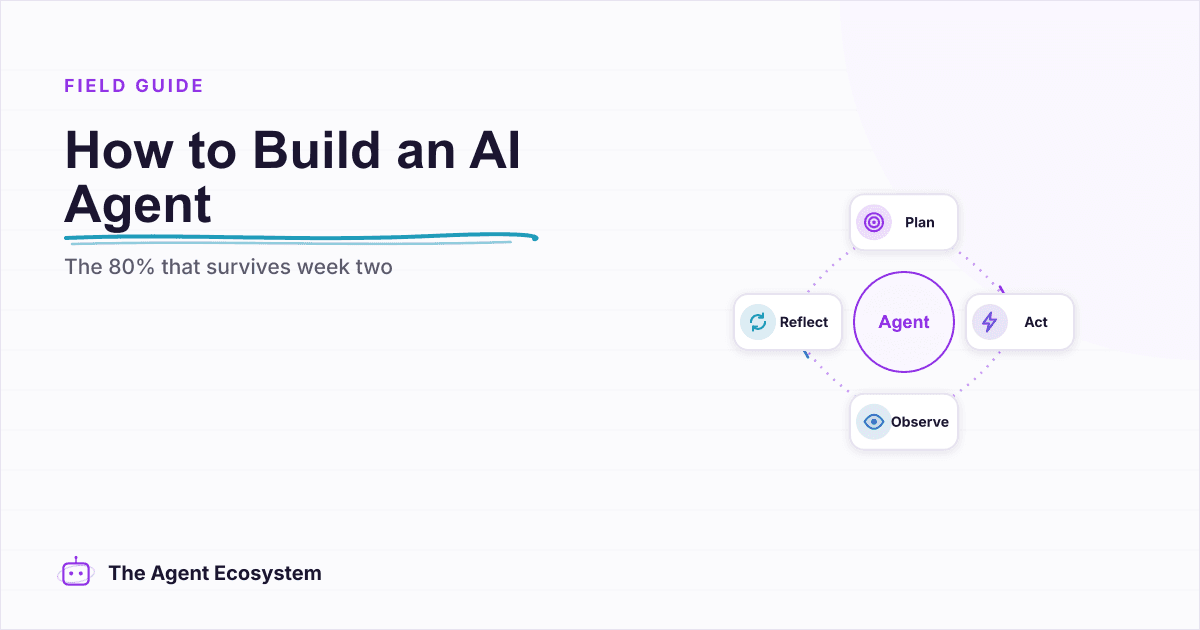
Most tutorials get you a working agent in ten minutes and skip what breaks it in week two. Sixteen lessons covering the loop, tool descriptions, memory, fallbacks, guardrails, evaluation, and the cost levers that decide your bill.