How to Use n8n with MCP: Client, Server, and AI Agent Setup
Two nodes, one protocol, and a whole new way to give your agent real tools
Updated September 5, 2026 — Rewrote as a two-path setup guide (client + server), added instance-level MCP access, troubleshooting, and version specifics.
AI-drafted, reviewed by Muhammad Qasim Hammad on June 13, 2026. See our AI disclosure.
Table of contents
- What is MCP and why does it matter for n8n?
- How MCP differs from a standard API call
- What n8n can do as an MCP client vs an MCP server
- What are the 2 MCP nodes in n8n?
- What the MCP Client Tool node does
- What the MCP Server Trigger node does
- What do you need before you start?
- How do you expose an n8n workflow as an MCP server?
- Step 1: Add and configure the MCP Server Trigger node
- Step 2: Attach the workflows you want to expose
- Step 3: Configure Bearer authentication
- Step 4: Activate the workflow and share the production URL
- How do you give your AI agent MCP tools?
- Step 1: Add an AI Agent node with a Claude model
- Step 2: Attach an MCP Client Tool sub-node
- Step 3: Point the node at the external MCP server URL
- Step 4: Choose authentication
- Step 5: Test with a tool-dependent question
- Step 6: Confirm the call in the execution log
- How does Claude Desktop connect to your n8n MCP server?
- Edit claudedesktopconfig.json
- Test and validate the connection
- Instance-level MCP access vs the MCP Server Trigger: which do you need?
- When to use each approach
- What can you build with an n8n MCP integration?
- A personal assistant in n8n using MCP
- Lead generation and CRM automation
- Connecting external AI tools and community MCP servers
- What should your first MCP agent actually do?
- How solopreneurs get this wrong
- Troubleshooting common n8n MCP issues
- Authentication errors
- The MCP Client Tool connects but lists no tools
- Claude Desktop never shows your n8n tools
- Your workflow is invisible to the MCP client
- Connections drop behind a reverse proxy
- Where to go from here
To use n8n with MCP, you work with 2 built-in nodes. The MCP Client Tool lets your AI agent call every tool an external MCP server exposes, and the MCP Server Trigger turns your own n8n workflows into an MCP server that clients like Claude Desktop can call. Pick the direction you need, point the node at the right endpoint, and put Bearer auth on anything that leaves your machine.
This is a hands-on answer to how to use n8n with MCP, written against n8n as it ships in 2026: prerequisites, both setup paths step by step, a working Claude Desktop connection, instance-level MCP access (the newer integration route most write-ups skip), and the troubleshooting for the failures I actually hit. Before I built my first n8n MCP integration, I was solving every capability gap by adding another HTTP Request node, wiring credentials again, and hoping nothing broke. The moment I attached an MCP Client Tool to my existing agent and pointed it at a server, the agent could suddenly do things I never explicitly wired.
If you have not read the broader context on why MCP matters for solo operators, the MCP servers solopreneur guide covers the background before this hands-on build.
What is MCP and why does it matter for n8n?#
MCP (Model Context Protocol) is an open standard that gives AI models one consistent way to discover and call external tools, instead of a custom integration for each one. For n8n agents, a single MCP Client Tool node can replace a pile of hand-built tool nodes, because the agent reads the server's tool list at runtime.
Before MCP, every new capability for an n8n agent was a project. You designed the node, mapped the parameters, managed the credentials, tested the errors. With MCP, you point the agent at a server that already does the work, and the agent stops needing you to predict which tools it will use.
For a solo operator, that is not a small gain. If you are already running an agent for email triage or customer support (see the Claude email triage agent walkthrough), adding a new capability used to mean a new build cycle. With MCP, it means updating or swapping the server.
How MCP differs from a standard API call#
An HTTP Request node calls 1 endpoint you wired by hand: you picked the URL, mapped the parameters, and parsed the response yourself. An MCP connection is a session. The client asks the server what tools it has, gets back names, descriptions, and input schemas, and the model decides at runtime which tool fits the request. Swap the server's tool list and the agent adapts without you touching the workflow. If you want the deeper comparison, function calling vs MCP vs native tool nodes breaks down when each approach wins.
What n8n can do as an MCP client vs an MCP server#
As an MCP client, n8n consumes tools: your AI Agent node reaches out to an external MCP server and uses whatever it offers. As an MCP server, n8n provides tools: your workflows become callable capabilities for outside clients like Claude Desktop, Cursor, or another n8n instance. The 2 roles are independent. You can run either alone or both at once, and the same instance can serve tools to Claude while its own agents consume tools from somewhere else.
What are the 2 MCP nodes in n8n?#
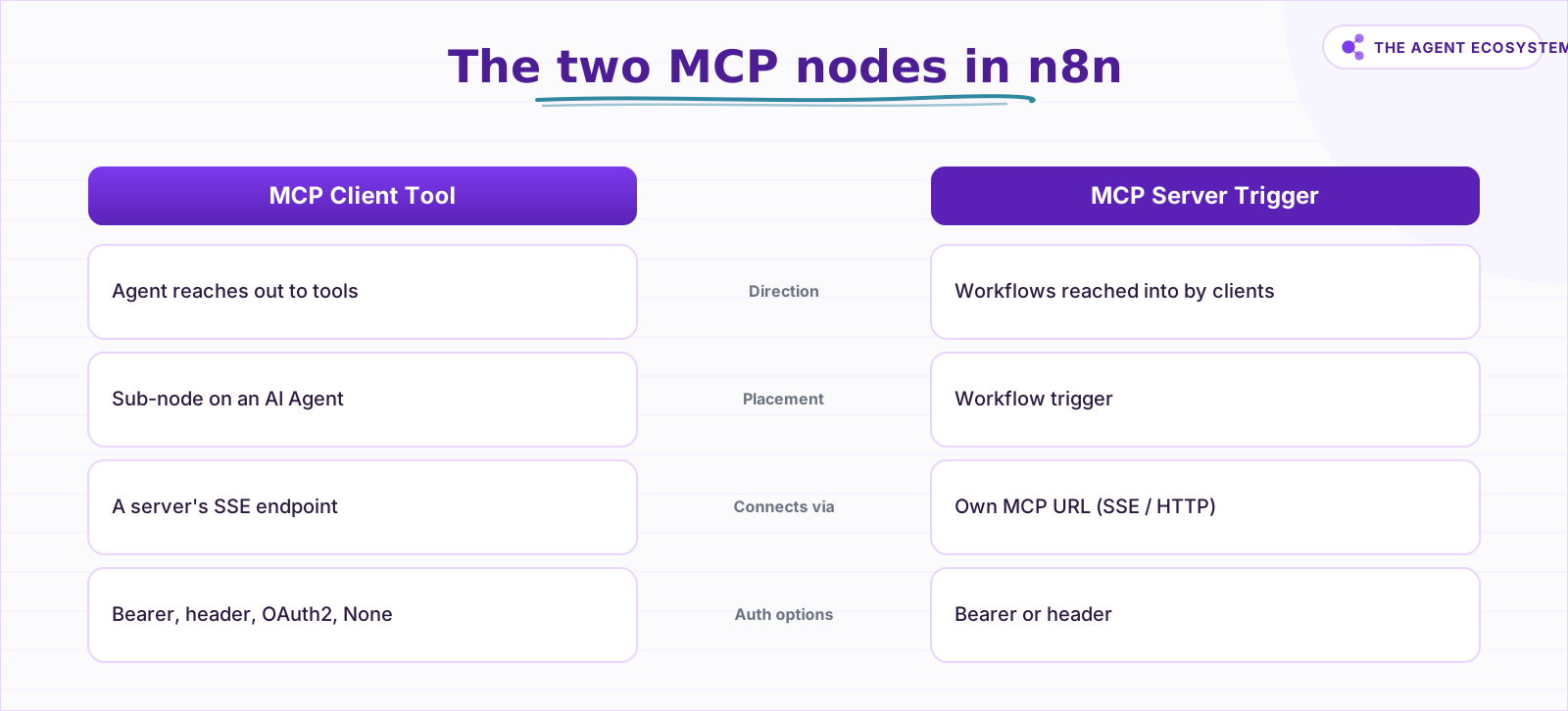
The 2 n8n MCP nodes are the MCP Client Tool and the MCP Server Trigger. They run the same protocol in opposite directions: the Client Tool is your agent reaching out to use tools, and the Server Trigger is your workflows being reached into by other clients. Know which direction you need before you build.
Here is the full comparison at a glance:
| Node | What it does | Connects via | Auth options |
|---|---|---|---|
| MCP Client Tool | Your AI agent uses an external server's tools | A server's SSE endpoint | Bearer, header, multiple headers, OAuth2, None |
| MCP Server Trigger | Exposes your n8n workflows as an MCP server | Its own MCP URL (SSE or streamable HTTP) | Bearer, header |
Sources: MCP Client Tool docs, MCP Server Trigger docs
 Same protocol, opposite directions: know which node you need.
That table is the thing I wish I had seen before spending 20 minutes searching for a single "MCP node" that handled both directions. There is no single node. There are 2, and which one you need depends entirely on which direction data flows.
What the MCP Client Tool node does#
The MCP Client Tool is a sub-node that attaches to an AI Agent node, the same way a Calculator or Code tool does. It connects to an external MCP server's SSE endpoint, fetches the tool list, and hands those tools to the agent's reasoning loop. A Tools to Include setting controls the exposure: All passes everything through, Selected lets you handpick, and All Except blocklists specific tools while allowing the rest.
What the MCP Server Trigger node does#
The MCP Server Trigger is a workflow trigger that publishes 2 URLs, test and production, at a Path you can customize. It speaks SSE and streamable HTTP, and only tool nodes can attach to it. In practice that means you hang Custom n8n Workflow Tool nodes off the trigger, each one pointing at a workflow you want to expose, and any MCP client with the URL and the auth token can call them.
What do you need before you start?#
The prerequisites are short, and checking them upfront saves a debugging session later. An n8n MCP integration in 2026 needs 4 things: a current n8n version with both MCP nodes built in, a reachable instance if you run the server direction, a Bearer credential, and a model credential for the client direction.
- A current n8n version. Both MCP nodes ship as built-in nodes on current releases, cloud and self-hosted. Search the node panel for "MCP"; if nothing appears, update your instance before anything else. Instance-level MCP access has its own floor: the settings page arrived in v2.2.0, and workflow building and editing through MCP works from v2.13 onward.
- A reachable instance for the server direction. If outside clients will call your n8n MCP server, the instance needs a URL those clients can reach. A Claude Desktop install on the same machine can reach a local n8n over
localhostthrough themcp-remotebridge, but anything remote needs your instance exposed over HTTPS. - A Bearer credential. Create the credential in n8n before you build, so it is ready when the MCP Server Trigger asks. An unauthenticated production MCP URL is an open endpoint.
- A model credential for the client direction. The AI Agent node needs a Chat Model attached, which means an API credential for Claude or whichever model you run.
The last prerequisite is a decision, and it shapes everything after it: which direction are you integrating? Consuming tools points you at the MCP Client Tool. Providing tools points you at the MCP Server Trigger, or at instance-level MCP access, and the difference between those 2 is covered below.
How do you expose an n8n workflow as an MCP server?#
To expose an n8n workflow as an MCP server, add an MCP Server Trigger node, attach 1 Custom n8n Workflow Tool node per workflow, set Bearer auth on the trigger, and activate the workflow so the production URL goes live. Any MCP client with that URL and token can then discover and call your workflows as tools.
The MCP Server Trigger only connects to and executes tool nodes, not full workflow chains. You are exposing discrete capabilities, not entire pipelines, which gives you precise control over what a client can call.
Step 1: Add and configure the MCP Server Trigger node#
Create a new workflow and place an MCP Server Trigger as its trigger. The node generates a random Path and publishes 2 URLs built from it: a test URL, live while you run "Listen for Test Event," and a production URL that activates when you publish the workflow. You can customize the path, but treat it like a secret either way; the real protection is the auth in step 3.
Step 2: Attach the workflows you want to expose#
Hang a Custom n8n Workflow Tool node off the trigger for each workflow you want callable. Give each tool a name and description the calling model will actually read: "look_up_order: returns order status and tracking for an order ID" beats "workflow_3." The workflows worth exposing do useful, repeatable work with clear inputs and outputs. An email triage workflow and a CRM lookup are strong candidates. A workflow that sends bulk emails without a confirmation step is not.
Step 3: Configure Bearer authentication#
In the trigger's Authentication dropdown, pick Bearer auth (or Header auth if the client requires a custom header) and attach the credential you created earlier. Every client will need to send this token to connect. Set this before you share the URL with anything, including your own Claude Desktop.
Step 4: Activate the workflow and share the production URL#
Activate the workflow. The production MCP URL is now live, and calls to it show up in the Executions tab rather than in the editor. Copy the production URL and the bearer token into whichever client is connecting. If you want a full worked example of this direction, the n8n MCP server build guide turns a real workflow into a served tool end to end.
How do you give your AI agent MCP tools?#
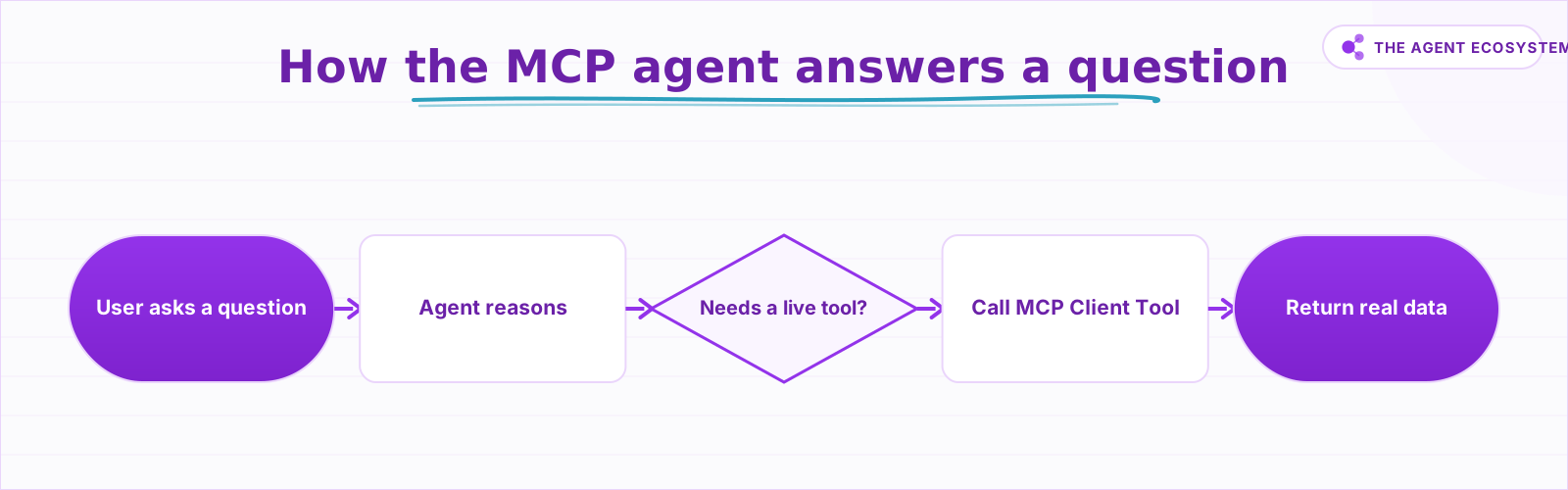
To give your n8n AI agent MCP tools, add an MCP Client Tool sub-node to an existing AI Agent node, set the SSE Endpoint to your external MCP server's URL, and choose an authentication method. The agent discovers the server's tools at runtime and calls them when its reasoning decides they are relevant.
 The agent picks the right tool and returns live data, not a guess.
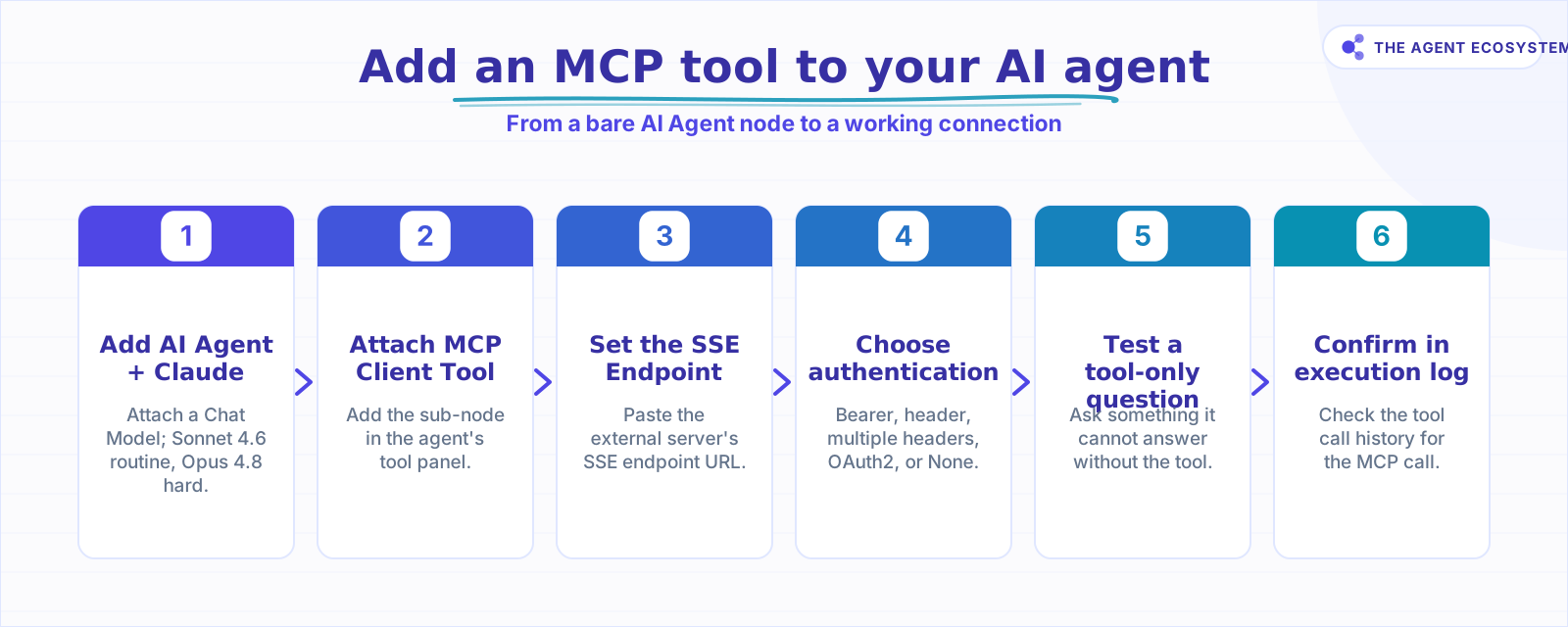
Here is the build, step by step:
 Six steps from a bare AI Agent node to a working MCP connection.
Step 1: Add an AI Agent node with a Claude model#
Open your n8n workflow and place an AI Agent node. Attach a Chat Model sub-node and configure it to use a current Claude model. For routine agent work, Claude Sonnet 4.6 handles most tasks well. For harder multi-step reasoning, Claude Opus 4.8 is the right call.
If you are already running an agent on a local model (the connect Ollama to n8n guide covers that setup), you can swap in a Claude model or keep your local model and just add the MCP tool sub-node below it.
Step 2: Attach an MCP Client Tool sub-node#
Inside the AI Agent node's tool panel, add a new MCP Client Tool. This sub-node connects to an external server's SSE endpoint, fetches the server's tool list, and passes available tools to the agent's context. It is what makes your agent an MCP client.
Step 3: Point the node at the external MCP server URL#
In the MCP Client Tool node, paste your MCP server's SSE endpoint URL into the SSE Endpoint field. This is the specific URL format the server exposes for streaming events. If you are connecting to a public MCP server, its documentation will list this URL. If you are connecting to your own n8n MCP Server Trigger (built above), copy the URL from that node.
While you are in the node, check Tools to Include. All is fine for a first test, but on a server with many tools, Selected keeps the agent's context tight and its tool choices sharper.
Step 4: Choose authentication#
Select one of: Bearer, generic header, multiple headers, OAuth2, or None. For any server outside your own local environment, use at least Bearer auth. The MCP Client Tool supports all 4 named auth options natively, so you will not need a separate credential workaround.
Step 5: Test with a tool-dependent question#
Send a message the agent cannot answer without calling the MCP tool. Something like "What is the current status of issue #42 in my project?" only makes sense if the agent actually calls the tool. If it answers plausibly from general knowledge, your system prompt or tool description needs tightening, not the wiring.
Step 6: Confirm the call in the execution log#
Open the execution in n8n and check that the MCP Client Tool node actually fired. A plausible answer proves nothing; the log entry does. This 30-second check is the difference between a working integration and a model improvising.
How does Claude Desktop connect to your n8n MCP server?#
Claude Desktop talks to MCP servers over stdio transport, but n8n's MCP Server Trigger only speaks SSE and streamable HTTP, so a direct connection silently fails with no error at all. The fix is the mcp-remote bridge, a small npx process that translates between the 2 transports so Claude can reach n8n.
I ran into this exact wall the first time I pointed Claude Desktop at my n8n MCP server. No error, no connection, just nothing. After checking the n8n docs, the answer was straightforward: add an entry to Claude Desktop's claude_desktop_config.json that runs npx mcp-remote, points at the n8n MCP URL, and passes the bearer token as a header.
Edit claude_desktop_config.json#
Here is the exact config block from n8n's documentation:
{
  "mcpServers": {
    "n8n": {
      "command": "npx",
      "args": [
        "mcp-remote",
        "<MCP_URL>",
        "--header",
        "Authorization: Bearer ${AUTH_TOKEN}"
      ],
      "env": {
        "AUTH_TOKEN": "<MCP_BEARER_TOKEN>"
      }
    }
  }
}
Replace <MCP_URL> with the test or production MCP URL from your MCP Server Trigger node. Replace <MCP_BEARER_TOKEN> with the bearer token you configured in that node's authentication settings. The env block keeps the token out of the args array so it does not appear in process listings.
Test and validate the connection#
Quit Claude Desktop fully and reopen it; a window close is not enough, the config only loads on launch. Once restarted, Claude connects through mcp-remote to your n8n server as if it were a native stdio server, and your n8n tools appear in the tools list. Validate with a prompt that forces a call, like asking for data only your exposed workflow can return, then confirm the run in n8n's Executions tab. If the tools never appear, the troubleshooting section below covers the usual causes in order.
Source: MCP Server Trigger docs
Instance-level MCP access vs the MCP Server Trigger: which do you need?#
n8n now has 2 ways to act as an MCP server, and they solve different problems. The MCP Server Trigger exposes a curated toolset from 1 workflow. Instance-level MCP access exposes your whole instance through a single endpoint: an MCP client can search your workflows, trigger them, and from v2.13 onward even create and edit them.
To enable the instance-level route, go to Settings > Instance-level MCP and turn on Enable MCP access (you need owner or admin permissions). The server then lives at https://<your-n8n-domain>/mcp-server/http, authenticated with OAuth2 or a personal access token. Workflows are not exposed automatically: each one needs its Available in MCP toggle switched on, from the MCP settings page, the workflow editor's settings menu, or the workflow card menu. From v2.24.0 you can bulk-toggle a whole project or folder through Options > Manage MCP access.
| MCP Server Trigger | Instance-level MCP access | |
|---|---|---|
| Scope | Tools attached to 1 workflow | Every workflow marked Available in MCP |
| Endpoint | Per-workflow test + production URLs | 1 instance URL: /mcp-server/http |
| Auth | Bearer or header | OAuth2 or access token |
| Client can edit workflows | No, tool calls only | Yes, from v2.13 onward |
When to use each approach#
Use the MCP Server Trigger when you are handing a narrow, production toolset to someone or something else: a client project, a public-facing agent, a teammate's Claude. The blast radius is 1 workflow, and the auth is a single revocable token. Use instance-level MCP access when the client is your own assistant or IDE and you want it managing the instance itself, searching workflows, running tests, editing things. Keep in mind that every connected client sees the same set of enabled workflows; there is no per-client scoping. Self-hosters who want the feature gone entirely can set N8N_DISABLED_MODULES=mcp.
Source: n8n instance-level MCP docs
What can you build with an n8n MCP integration?#
Concrete beats abstract here. These 3 builds are where an n8n MCP integration earns its keep, and each maps cleanly onto the nodes above: a personal assistant that calls external MCP servers, a lead-gen and CRM toolset you expose through the MCP Server Trigger, and an agent wired to community MCP servers your team runs.
A personal assistant in n8n using MCP#
To build a personal assistant in n8n using MCP, start with a Chat Trigger feeding an AI Agent node with memory attached, then give the agent MCP Client Tool connections to the servers that hold your life: a calendar server, an email server, a Notion server. The agent answers "what does my week look like?" by calling tools, not guessing. The inverse build works too: expose your own booking and email-draft workflows through 1 MCP Server Trigger, then drive them from Claude Desktop as your front end. Memory is what turns this from a toolbox into an assistant; the n8n agent memory types guide covers which kind fits a personal assistant.
Lead generation and CRM automation#
Expose a lead-enrichment workflow and a CRM lookup as 2 tools behind 1 MCP Server Trigger. A sales-side agent, in Claude or in another n8n instance, can then chain them: enrich the domain, check if the contact exists in HubSpot, log the result to a Google Sheets tracker. Because the tools are workflows, every call carries n8n's retry logic and error handling instead of a brittle one-off script.
Connecting external AI tools and community MCP servers#
The built-in MCP Client Tool connects your agent to any SSE-based server: public ones like a GitHub or Notion MCP server, or private ones your team runs. 2 community projects fill the remaining gaps. The n8n-nodes-mcp community package predates the built-in nodes and connects to stdio-based local servers, which the native Client Tool does not speak. And the separate n8n-mcp project is an MCP server about n8n itself: it gives an AI assistant the node documentation to build workflows for you rather than call them. For how MCP fits alongside agent-to-agent protocols in an n8n stack, see MCP and A2A for n8n builders.
What should your first MCP agent actually do?#
Your first MCP agent should do exactly one thing: call 1 MCP server, answer a question that requires that tool, and let you verify in the n8n execution log that the tool was actually called. Start small and confirm the plumbing before adding complexity.
That discipline matters. An agent that gives the right answer by guessing from general knowledge is not a working MCP integration. It is a language model doing what language models do. The execution log is the only verification that counts.
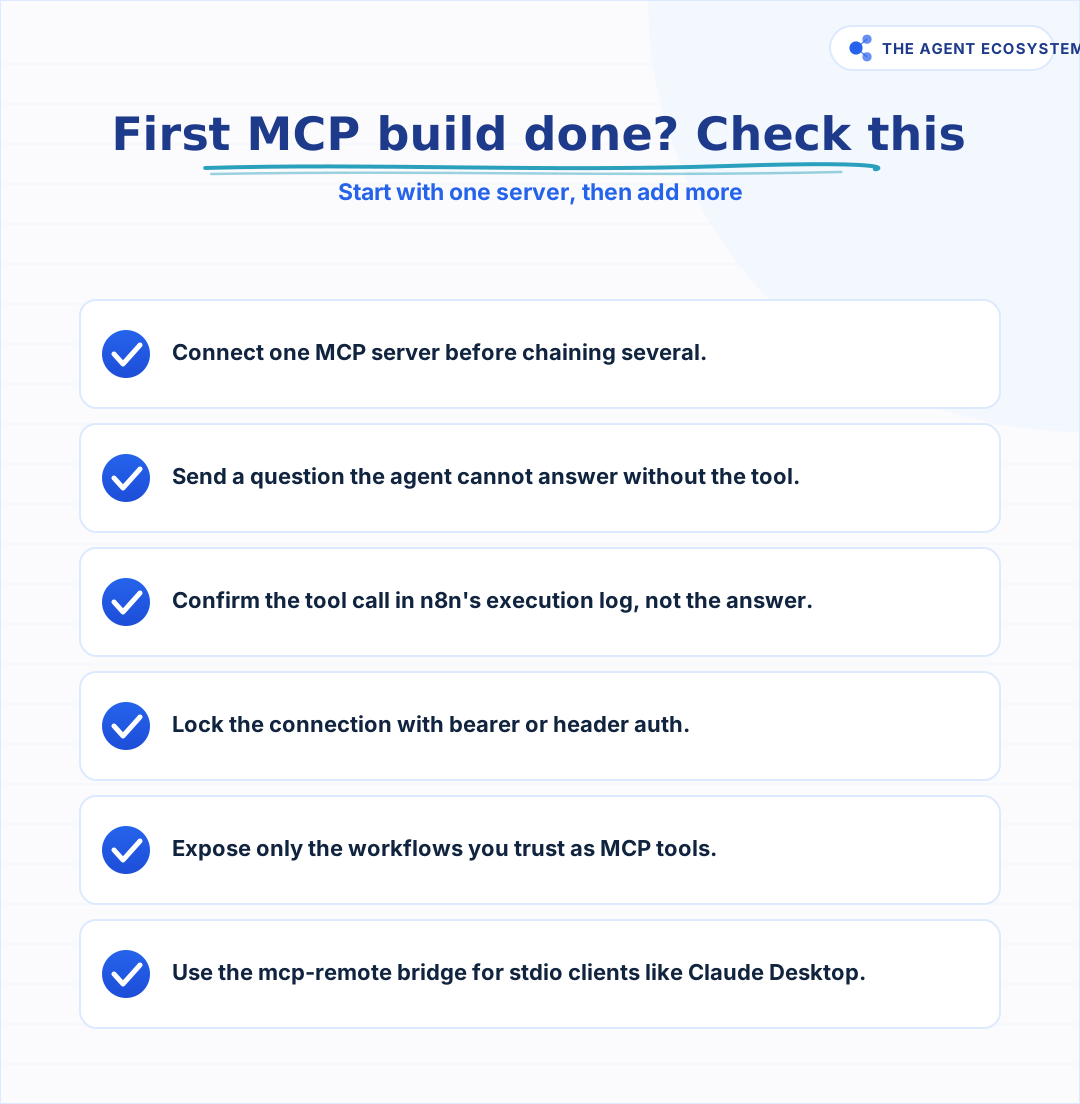 Run through this before calling your first MCP build done.
Once your first build is confirmed, the next natural step is exposing one of your own workflows as a tool other clients can call. The AI automation stack overview for 2026 shows where MCP fits in a full solo operator setup, which helps you decide which workflow to expose first.
How solopreneurs get this wrong#
The most common mistake is treating the MCP Client Tool and the MCP Server Trigger as interchangeable. They are not, and they point in opposite directions. Searching for a single "MCP node" and getting confused when the behavior does not match the docs is a real time sink that catches almost everyone first.
The second mistake is skipping auth on a production MCP Server Trigger URL because "it's just for testing." Once a workflow is activated in n8n, its production URL is live. An unauthenticated MCP endpoint is an open API for anyone who finds the URL.
The third is chaining 5 MCP servers before verifying the first one works. Every server you add is a new failure point. One confirmed tool call is worth more than 5 unverified connections.
The fourth is newer: enabling instance-level MCP access when a Server Trigger was the right scope. Instance-level access lets a connected client edit workflows, and every connected client sees everything you have toggled on. If all you wanted was to expose 1 lookup tool, that is a much larger surface than the job required.
Troubleshooting common n8n MCP issues#
Most n8n MCP failures are quiet: no error, no connection, no tools listed. These are the 5 failure patterns I see, in the order worth checking: authentication errors, a client that lists no tools, Claude Desktop showing nothing, a workflow invisible to the client, and dropped connections behind a reverse proxy.
Authentication errors#
A 401 or 403 means the token the client sends does not match the credential on the n8n side. Check that the client sends Authorization: Bearer <token> exactly, with no extra whitespace, and that the token matches the Bearer credential attached to the trigger. With the mcp-remote config above, the token belongs in the env block and the header string must read Authorization: Bearer ${AUTH_TOKEN} verbatim. If you chose Header auth instead, the header name in the client must match the name in the n8n credential, not just the value.
The MCP Client Tool connects but lists no tools#
Usually the endpoint is wrong or filtered. The SSE Endpoint field needs the server's SSE URL, not its base URL or homepage. If the server is your own MCP Server Trigger, the test URL only works while the trigger workflow is listening in the editor, and the production URL only works while that workflow is active. Also check Tools to Include: a Selected list with nothing selected, or an All Except list that excludes everything, presents the agent with an empty toolbox.
Claude Desktop never shows your n8n tools#
This is almost always the transport mismatch: Claude Desktop speaks stdio, the MCP Server Trigger does not, and without the mcp-remote bridge the connection dies silently. Confirm the config block sits under mcpServers with valid JSON (a trailing comma is enough to break it), that Node.js is installed so npx can run, and that you fully quit and relaunched Claude Desktop rather than closing the window. If it still fails, run the same npx mcp-remote <url> --header ... command in a terminal and read the output directly.
Your workflow is invisible to the MCP client#
If the client connects but your workflow is not offered as a tool, work through scope. On a Server Trigger build, only tool nodes attached to the trigger are exposed; the workflow behind a Custom n8n Workflow Tool must be referenced by that tool node, and the trigger workflow must be active for the production URL. On instance-level access, the workflow's Available in MCP toggle must be on; enabling MCP access at Settings > Instance-level MCP exposes nothing by itself.
Connections drop behind a reverse proxy#
Self-hosted instances behind nginx or similar hit this one. SSE needs an unbuffered stream, so for the MCP endpoint you should disable proxy buffering, gzip compression, and chunked transfer encoding, and set the Connection header to an empty string. In queue mode, a single webhook replica works out of the box, but multiple replicas need all /mcp* requests routed to 1 dedicated replica, or sessions will land on a worker that has never heard of them.
Where to go from here#
Add the MCP Client Tool to an agent you already run and point it at 1 server you care about, then confirm the tool call in the execution log before building anything else. If you have a workflow worth exposing, drop an MCP Server Trigger on it, set bearer auth, and test the mcp-remote connection from Claude Desktop.
The protocol is the same in both directions. Once you understand that, both nodes make sense immediately. If you run the server direction, track the July 2026 MCP spec revision too: it makes the protocol stateless and moves auth toward OAuth 2.1, which changes what a client expects from your endpoint.
Frequently asked questions
What is MCP in n8n?
What is the difference between the MCP Client Tool and the MCP Server Trigger?
How do I connect Claude Desktop to my n8n MCP server?
Does the n8n MCP Server Trigger support stdio?
What authentication does the n8n MCP Client Tool support?
Can my n8n AI agent use external MCP tools?
How do you use n8n with MCP?
How do you build a personal assistant in n8n using MCP?
What is instance-level MCP access in n8n?
Do you need a specific n8n version for MCP?
Why is my n8n MCP connection failing silently?
Sources
Primary references and vendor documentation used while drafting and reviewing this article.
Written by

Muhammad Qasim Hammad is an AI agent and automation expert and the founder of Cart Gaze LLC (cartgaze.com). He builds product for the love of it: when an idea lands, a working prototype is usually running within hours, built with the same AI agents and automations he sells. He puts his own output at roughly 20× what it was before agents, and the Agentic OS behind this site is the working proof, documented in public with the tools he actually ran and what they really cost.
AI & Automation Services
Want a pipeline like this running in your business?
I'm Qasim — I design and ship AI agents and n8n automations for solo operators and small teams. Tell me what's eating your team's week, and I'll scope a fix.
Related reading
Turn n8n Into an MCP Server: Expose Your Workflows to Claude and Cursor (2026)
Stop leaving Claude Desktop to run n8n workflows by hand. The MCP Server Trigger node turns your existing workflows into callable tools so Claude and Cursor can invoke them directly.

Function Calling vs MCP vs Tools: Give an Agent Capabilities
You keep seeing function calling, tool use, and MCP used as if they compete. They do not. Tools are the functions, function calling is the model mechanism that calls them, and MCP is the standard that shares them across clients. Here is how the three layers stack and which to
MCP Servers for Solopreneurs: Wire Your AI Into Everything
MCP servers give your AI assistant working hands: connect it to GitHub, Supabase, Zapier, and n8n with one standard protocol. First server live in about 20 minutes, free to start.
MCP and A2A: Do These Agent Protocols Matter If You Use n8n?
MCP and A2A are the two agent protocols everyone names, but they solve different problems. MCP connects one agent to tools and data and already ships as an n8n node; A2A coordinates agents across vendors and is aimed at the enterprise. Here is what each means for a solopreneur
Give Your n8n AI Agent Tools (Calculator, HTTP, Workflows)
Your n8n AI Agent answers from stale training data until you attach real tools. This guide shows you exactly how to wire HTTP Request, Calculator, and Workflow tools so your agent acts on live data.
MCP's Biggest Update Ships July 28: Stateless, OAuth, Simpler Scaling
The Model Context Protocol's 2026-07-28 revision is at release candidate now. It makes the core stateless, aligns authorization with OAuth 2.1 and OpenID Connect, and reports about six breaking changes production servers must handle first. Here is what it means if you ship