AI Agent Memory Types: Buffer vs Window vs Summary vs Vector
A chooser for the four memory strategies: what each stores, what each costs, and the n8n node that maps to it.
AI-drafted, reviewed by Muhammad Qasim Hammad on July 7, 2026. See our AI disclosure.
Table of contents
You added "memory" to an agent, and either the token bill started climbing every turn or the agent started forgetting what it was told five messages ago. Both are the same problem: you picked a memory type by accident. The four ai agent memory types are just four answers to one question, which prior turns do you pay to re-send on the next call.
This is a chooser, not a glossary. It covers what each type stores, what each costs in tokens with the math shown, and which n8n node actually maps to it, because two of the four are patterns you wire rather than nodes you pick.
Why does an AI agent need a "memory type" at all?#
Because the model itself remembers nothing. An LLM is stateless between calls, so choosing among ai agent memory types is really choosing which prior turns get re-sent on the next request. Memory is not storage the model reads from; it is text your framework prepends to the prompt, which makes every type a cost-versus-recall trade.
Two axes define every type. The first is how much history you carry: all of it, the last N turns, a compressed summary, or just the relevant bits. The second is where it lives: in the workflow process or a persistent store. The second axis is about durability, not intelligence, so do not confuse "I moved memory to Postgres" with "I changed how my agent remembers." The first axis is the one that drives the bill.
What are the four memory types, and how does each work?#
Four strategies differ only in how much of the past they re-send. Full buffer sends the entire history verbatim. Window buffer sends the last N turns. Summary compresses older turns into a running paragraph. Vector-backed embeds every turn and retrieves only the relevant ones on demand. Each answers how much past you pay to carry.
Full buffer is the naive default: faithful and simple, but it grows without bound, so it is fine for a five-message session and ruinous for a two-hundred-message one. Window buffer caps that by keeping only the last N turns, so cost stays flat while anything older than N falls off the back. Summary trades fidelity for size: an extra model call compresses old turns into a paragraph, cheap on tokens but lossy by design. Vector-backed treats history as a search index, embedding each turn and retrieving only the most relevant ones per message.
The mental model worth keeping is that these are points on a single curve, not four unrelated features. Full buffer and window buffer both re-send raw text and differ only in where they cut it off. Summary and vector-backed both stop re-sending everything, and differ in how they decide what is worth carrying: a summary compresses by recency, a vector store fetches by relevance. Once you see it that way, the choice stops being a menu and becomes a question about your conversation's shape.
The cleanest way to see the central trade is window against summary, because most long-chat decisions come down to those two:
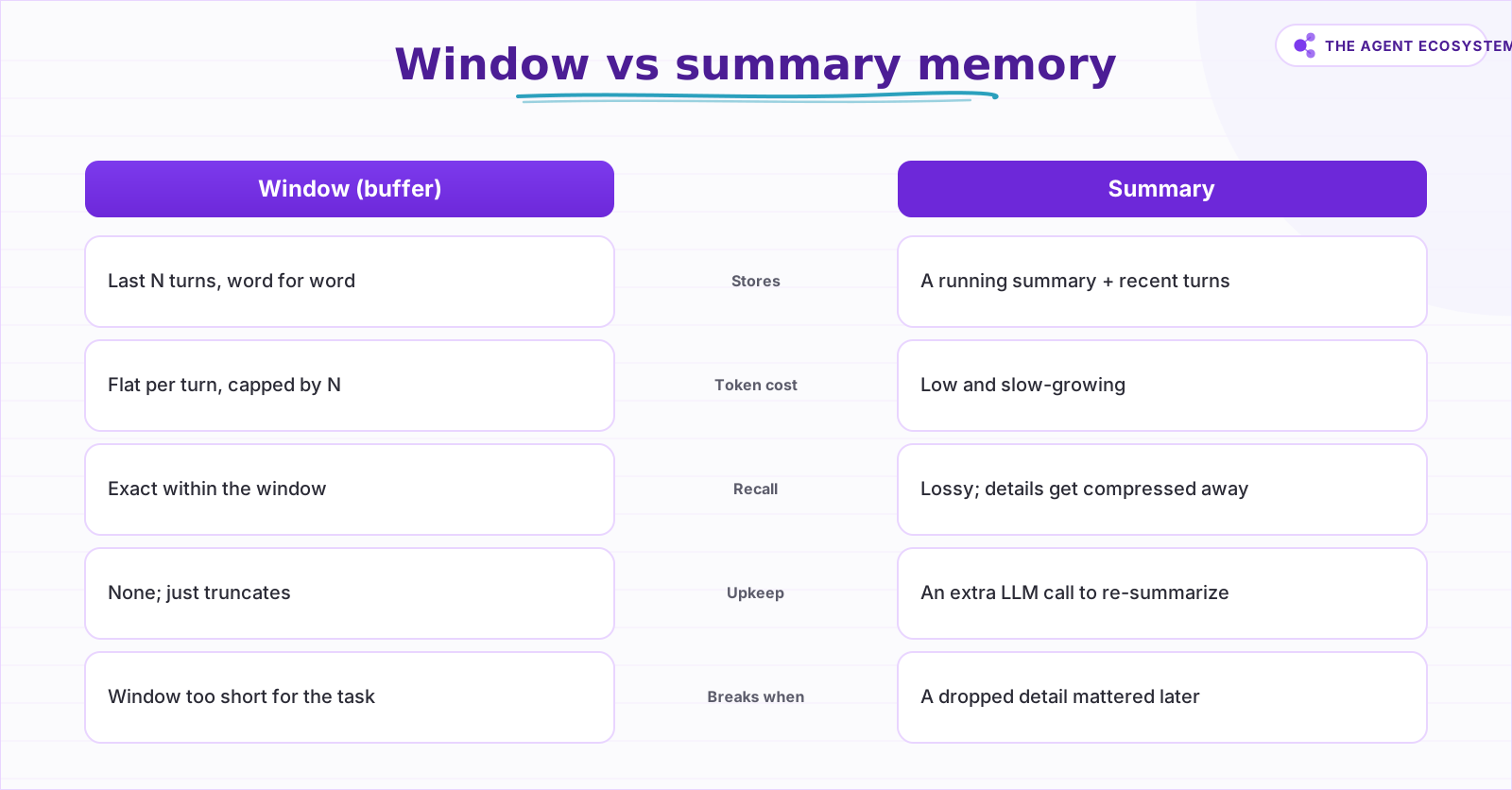 Window keeps the last N turns verbatim; summary compresses older turns into a paragraph. One is faithful, one is cheap.
Here are all four side by side, including the n8n mapping you will care about in the next section:
| Memory type | What it keeps | Token cost as chat grows | n8n mapping | Best for |
|---|---|---|---|---|
| Full buffer | Entire history, verbatim | Grows unbounded every turn | Window node, N very high (risky) | Short sessions only |
| Window buffer | Last N turns, verbatim | Flat, capped by N | Simple Memory (native) | Most chat agents |
| Summary | Rolling summary + recent turns | Low, slow-growing | Wire it (LLM + state) or Zep | Long support threads |
| Vector-backed | All turns, fetched by relevance | Per-call retrieval, not full history | Vector Store as a tool | Long-lived assistants |
What does each memory type cost in tokens?#
Every call carries the system prompt, whatever memory re-sends, and the new message. Model a turn at roughly 200 tokens, a 500-token system prompt, and a 100-token message. A four-turn window is about 1,400 input tokens per call; a ten-turn window about 2,600, an 85 percent jump for re-sending more verbatim history.
The window formula is simple: per-call input is about 500 + 200 × N + 100. So window 4 is roughly 1,400 tokens and window 10 is roughly 2,600. On Claude Haiku 4.5 at $1 per million input and $5 per million output, with about 300 output tokens per call, 1,000 calls at window 4 cost 1.4M × $1 + 0.3M × $5 = $2.90, and at window 10 cost 2.6M × $1 + 0.3M × $5 = $4.10. All modeled, and checkable by hand.
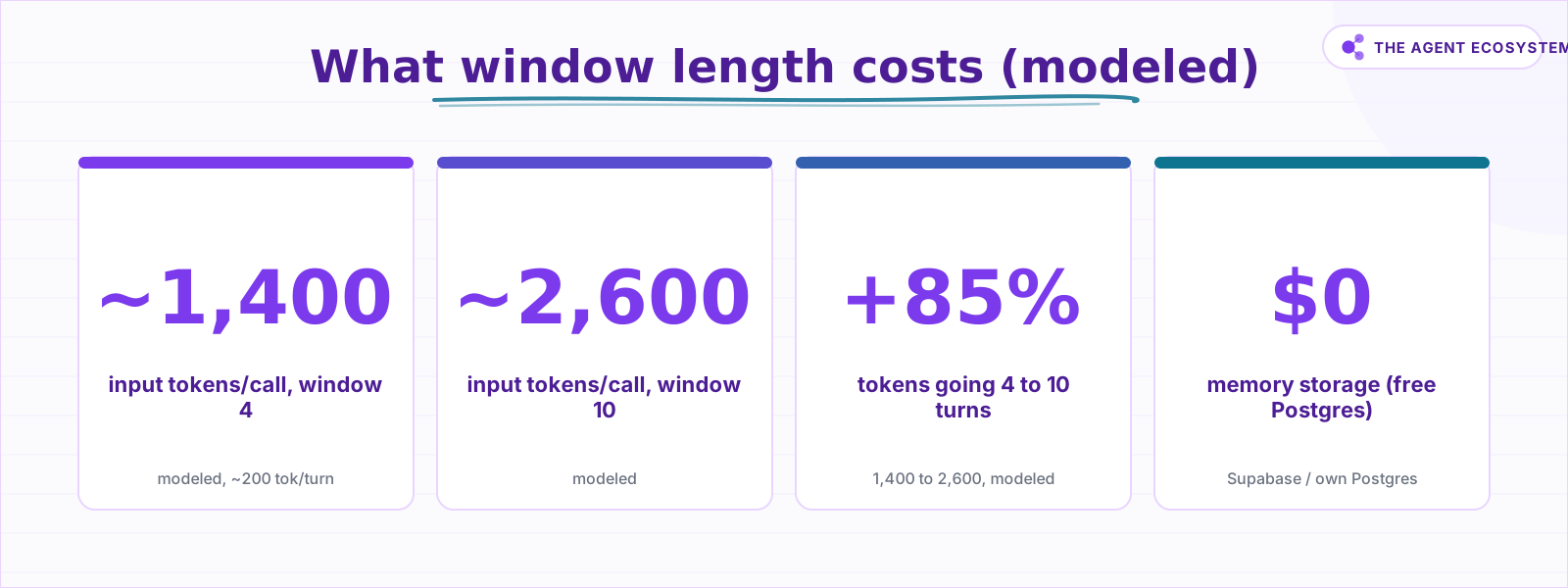 Modeled at ~200 tokens/turn, a 500-token system prompt, a 100-token new message. The window sets the bill; storage is free.
Summary and vector-backed break that growth curve differently. A summary keeps per-call input small even at turn 100, but you pay one extra model call to re-summarize and you accept lossy recall. Vector-backed does not re-send history at all; it retrieves the top few relevant turns, so per-call input is roughly system prompt plus those few chunks plus the new message, flat as total history grows, at the cost of an embedding write per turn and a vector store to run.
Storage is the cheap part: a free-tier Postgres is $0. The bill is tokens, and the memory type is the single biggest lever on it. Caching the fixed system prefix helps a little, and the prompt-caching breakdown shows how much, but caching does nothing for the growing or retrieved history, which is exactly the part a memory type controls.
Which memory type maps to which n8n node?#
Only two of the four are native nodes. n8n's Simple Memory is the window buffer, with a Session Key and a Context Window Length that counts turns. Postgres, Redis, and Mongo Chat Memory change where the window lives, not how much it keeps. Summary and vector memory are patterns you wire yourself.
Simple Memory's Context Window Length counts exchanges, not individual messages, so a value of 5 keeps the last five user-and-assistant pairs. It is in-process and lost on restart, and n8n warns it is not reliable in queue mode because there is no worker affinity. Swapping in Postgres Chat Memory makes the same window durable across restarts and workers; it does not change the memory type, only its persistence.
This is the distinction most builders blur. Postgres, Redis, Mongo, Motorhead, Xata, and Zep are all listed as memory backends, which makes it look like a menu of memory types, but most of them are the same window buffer with a different place to store the rows. The Session Key decides which conversation a row belongs to, so multiple users or chats stay separated in the same table. Pick a backend for durability and concurrency, and pick the Context Window Length for cost and recall; they are independent decisions.
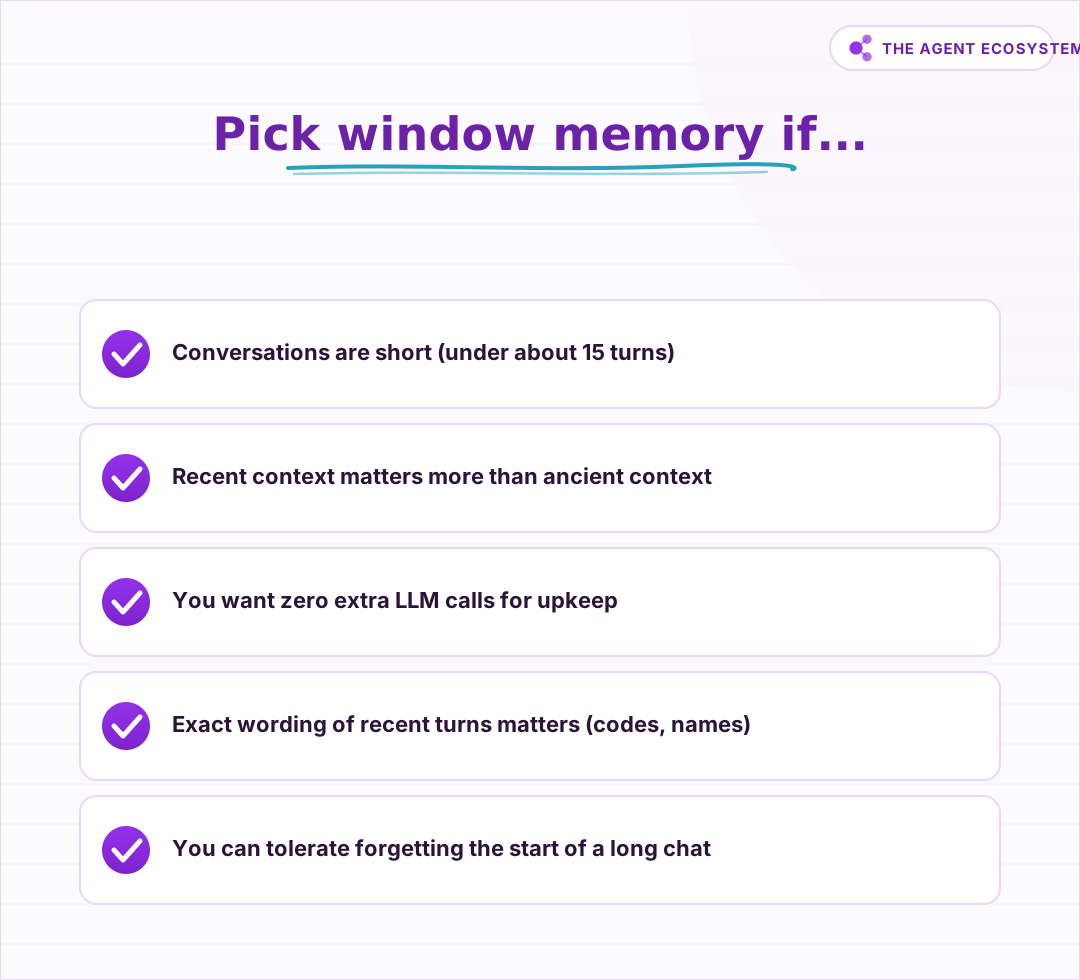 If most of these are true, do not overthink it: use the window node and move on.
For the other two types you build the pattern. Summary memory has no native node: you add a step that periodically asks a model to compress older turns into a stored field, or you use a backing store like Zep that summarizes server-side. Vector-backed memory is not a memory node either; it is the Vector Store node in "retrieve as a tool" mode, so the agent searches past conversation on demand, and the Chat Memory Manager node handles load, insert, and delete if you need direct control over stored history.
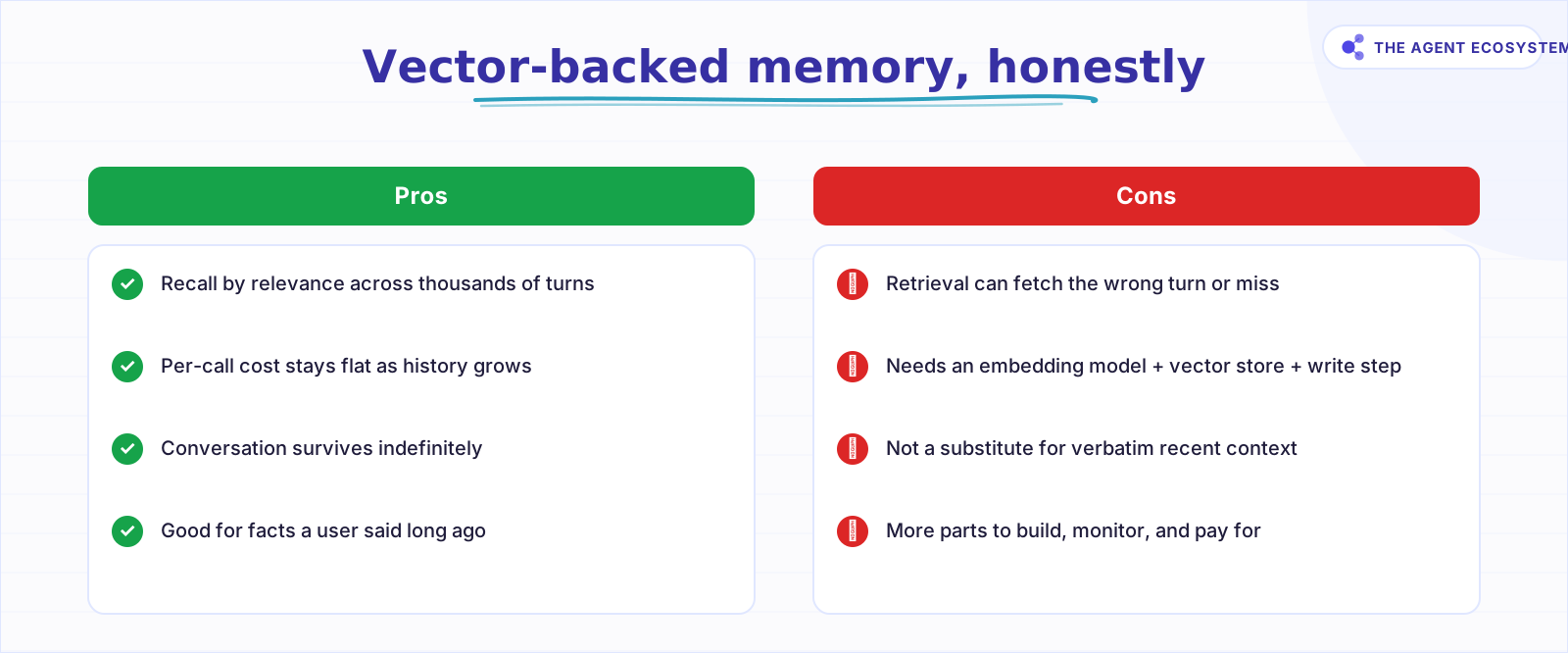 Vector memory scales recall but is a retrieval problem, not a buffer. It complements a window; it rarely replaces one.
Which memory type should you use?#
Start simple and escalate only when a window stops fitting. Use the window buffer for short chats, persist it in Postgres when it must survive restarts, reach for summary memory when threads get long and lossy recall is fine, and add vector-backed memory when the agent must recall old facts by topic. The flowchart below walks the same decision.
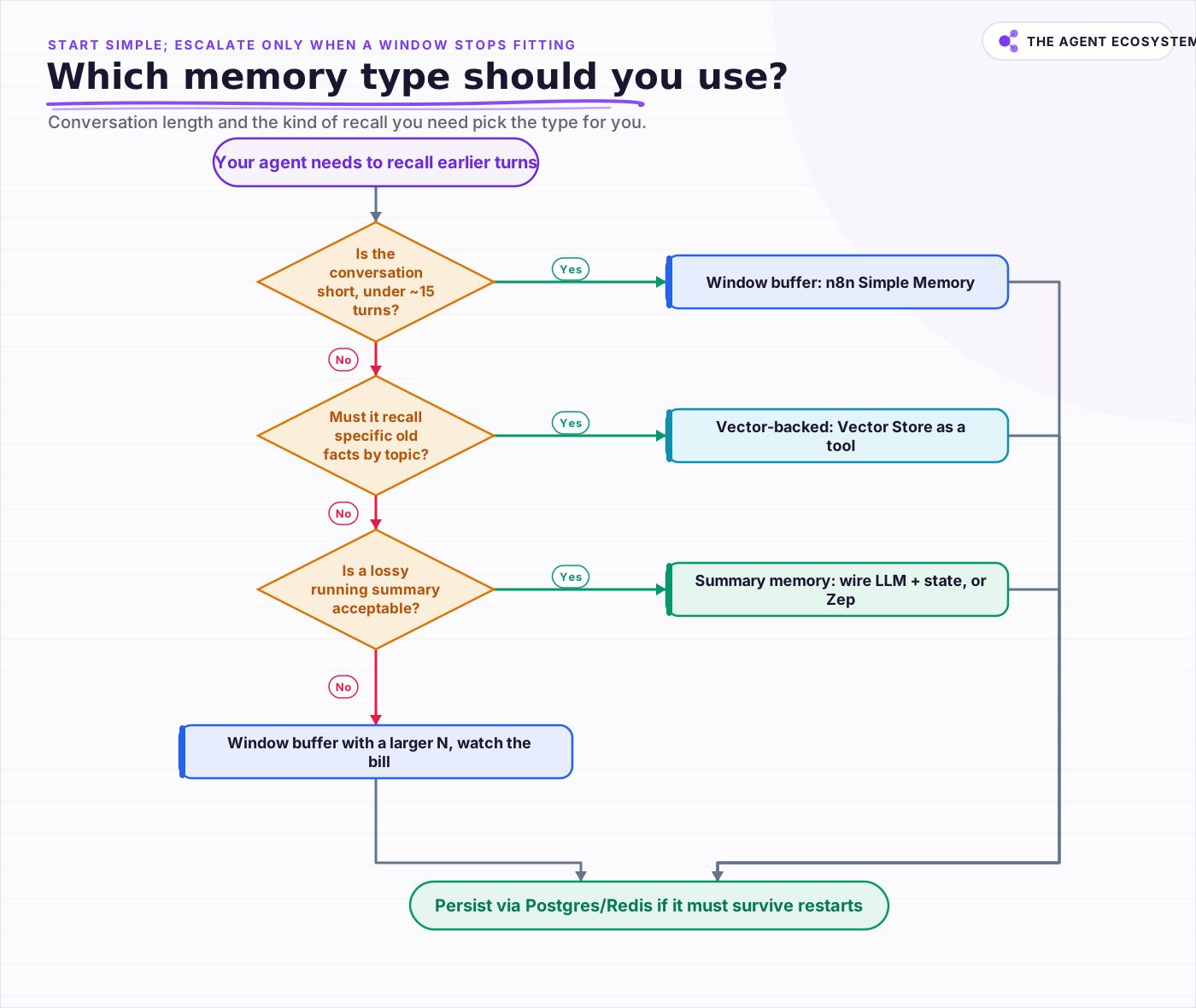 Start with a window; escalate to vector or summary only when a plain window forgets too much or costs too much.
The mistake to avoid is reaching for the most powerful option first. Vector-backed memory is appealing because it scales, but it adds an embedding model, a store, a write step, and a retrieval step that can miss, and it still does not give you faithful recent context the way a window does. In practice it complements a window rather than replacing one. Begin with Simple Memory and a small Context Window Length, move to a persistent backend when durability matters, and only add summary or vector patterns once a plain window genuinely forgets too much or costs too much.
Frequently asked questions
What are the four AI agent memory types?
Which memory type does n8n support natively?
Does memory make my agent smarter or just cost more?
What is Context Window Length in n8n Simple Memory?
When should I use vector-backed memory?
Sources
Primary references and vendor documentation used while drafting and reviewing this article.
Written by

Muhammad Qasim Hammad is an AI agent and automation expert and the founder of Cart Gaze LLC (cartgaze.com). He builds product for the love of it: when an idea lands, a working prototype is usually running within hours, built with the same AI agents and automations he sells. He puts his own output at roughly 20× what it was before agents, and the Agentic OS behind this site is the working proof, documented in public with the tools he actually ran and what they really cost.
AI & Automation Services
Want a pipeline like this running in your business?
I'm Qasim — I design and ship AI agents and n8n automations for solo operators and small teams. Tell me what's eating your team's week, and I'll scope a fix.
Related reading
Give Your n8n AI Agent Memory (Postgres Chat Memory, Step by Step)
Your n8n agent forgets every message because the model is stateless. Add Postgres Chat Memory, set a per-user Session Key, and tune Context Window Length to keep conversations coherent without blowing your token budget.

n8n Redis Chat Memory: Persistent Memory for Your AI Agent
Redis Chat Memory gives an n8n AI agent conversation history that survives restarts and is shared across queue-mode workers. Here is how the Session Key, Context Window Length, and TTL fields work, what it costs, and when to pick Redis over Simple Memory or Postgres.
n8n AI Agent Pricing: What It Really Costs to Run
An n8n AI agent has two bills that behave nothing alike: a flat n8n platform fee and a per-run LLM token cost. Here is what each one comes to, with modeled per-run math across Claude, GPT, and Gemini, and the levers that actually lower the total.
n8n AI Agent Too Slow? Latency and Cost Fixes
A slow n8n AI Agent is usually doing more work than the task needs: too many tool loops, too big a context, or too heavy a model. Latency and cost come from the same place, the model calls, so here is how to measure them and the levers that cut both at once.
Build a Vector Store in n8n (Embeddings for RAG)
Build an n8n vector store that retrieves your own documents by meaning, not keywords. Embedding 1,000 docs costs ~1.3 cents; Supabase free-tier storage costs $0. Full node wiring and step-by-step setup inside.
n8n Slack Bot + AI Agent: Answer Team Questions from Your Docs
Your team asks the same question in Slack every week. Wire a Slack Trigger to an n8n AI agent with a vector store and the bot answers from your own documents, in the thread, in seconds.