Build a Vector Store in n8n (Embeddings for RAG)
The cheapest part of RAG is the index. Here is exactly how to build it.
Updated August 6, 2026 — Added the exact Supabase SQL setup (pgvector, documents table, match_documents) the vector store node needs.
AI-drafted, reviewed by Muhammad Qasim Hammad on June 16, 2026. See our AI disclosure.
Table of contents
- What is a vector store, and why does RAG need one?
- Simple, Supabase, or another backend: which should you use?
- How much do embeddings and storage cost?
- How do you load documents into the store?
- How do you set up the Supabase table for n8n's vector store?
- How do you build it in n8n, step by step?
- Where can this go wrong?
- Which vector store should you use? (Decision guide)
- What should you set up this weekend?
Your help docs, past support tickets, and PDF guides are sitting in folders where no AI can find them, and keyword search misses anything a customer phrased differently. An n8n vector store converts each document into an embedding and retrieves by meaning, and building the entire index costs about 1.3 cents per thousand documents.
The symptom is a support bot that answers from its training data instead of your actual product. Or you copy-paste context into every Claude prompt by hand. Or you told yourself "vector databases are complicated." None of that holds once you see the node wiring.
This post covers how a vector store works inside n8n, which backend to pick, what the index actually costs (almost nothing), and the exact node wiring to load your documents into it.
What is a vector store, and why does RAG need one?#
A vector store is the retrieval half of RAG. It holds each document chunk as a list of numbers (the embedding) that encodes its meaning. At query time it embeds your question the same way and returns the chunks whose vectors sit closest. That is how it matches "cancellation policy" to "how do I stop my subscription."
Keyword search misses synonyms, paraphrases, and anything phrased unexpectedly. A vector store trades exact-match precision for semantic breadth. For question-answering over your own documents, that trade is almost always worth it.
n8n ships with a Simple Vector Store node (in-memory, four modes) and dedicated nodes for persistent backends including Supabase Vector Store, Pinecone, Qdrant, and PGVector, according to the n8n vector store node docs. Every one of them requires an Embeddings sub-node to convert text into vectors before storing or querying.
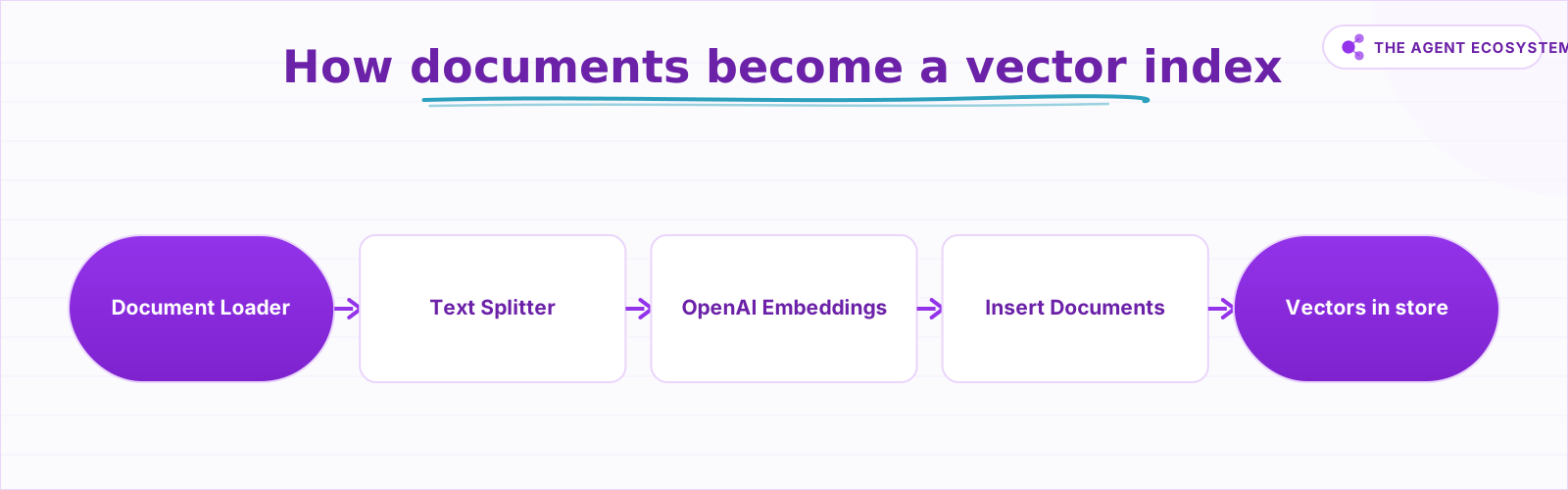 Every chunk is embedded before it enters the store.
Simple, Supabase, or another backend: which should you use?#
The Simple Vector Store is zero-setup and useful for a five-minute test. The Supabase Vector Store is the right choice for anything real: it writes to a Postgres database with pgvector, survives instance restarts, and is inspectable with plain SQL.
The Simple Vector Store node docs are explicit: the store is not persistent, and all instance users can read it. That makes it wrong for production or for anything containing private data. The Supabase Vector Store adds an Update Documents mode on top of the standard four modes (Get Many, Insert Documents, Retrieve Documents As Vector Store for Chain, Retrieve Documents As Tool for AI Agent), giving you five modes total.
Other backends follow the same pattern with different storage: Pinecone is a managed cloud index, Qdrant is self-hostable, PGVector is Postgres without the Supabase wrapper. Pick based on where you already run infrastructure.
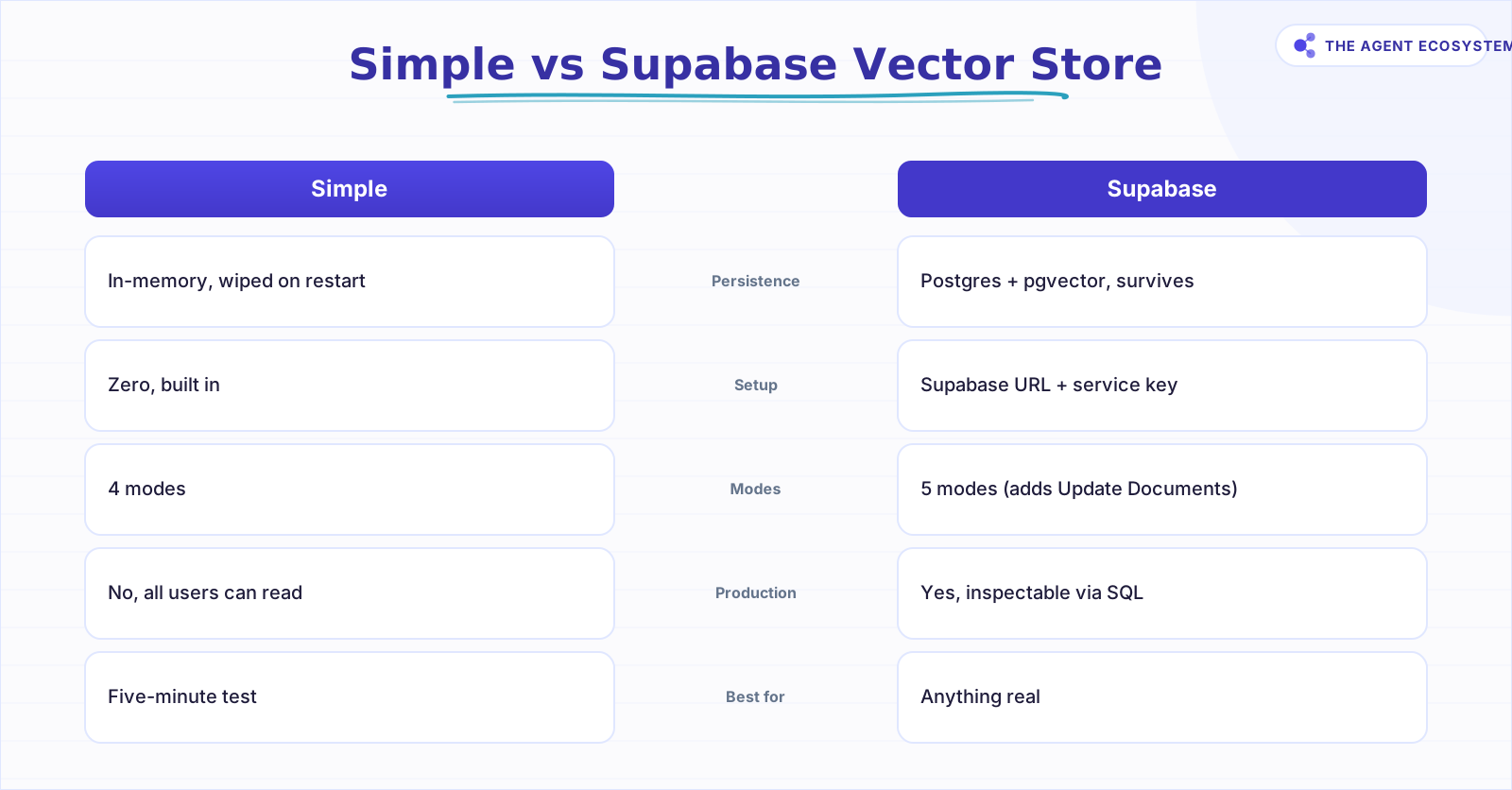 Pick Simple for a quick test; Supabase for anything real.
How much do embeddings and storage cost?#
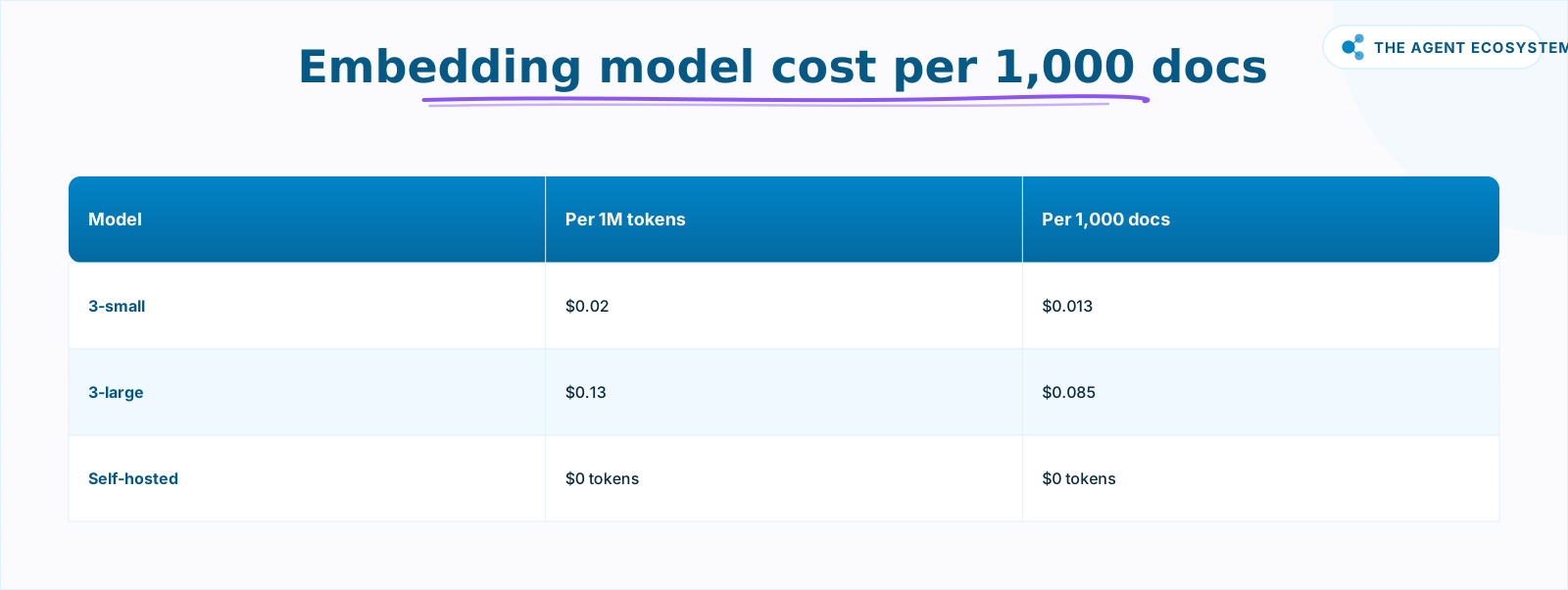
Embedding 1,000 documents costs about 1.3 cents with OpenAI text-embedding-3-small, and storing them on Supabase free tier costs $0. The index is nearly free. The real, recurring cost of RAG is the generation model (Claude, GPT-4o, etc.) that reads the retrieved chunks at query time.
The math is checkable by hand. A "document" here means one chunk of roughly 500 words, about 650 tokens. Embeddings charge input tokens only, no output. Embedding 1,000 such chunks uses 0.65 million tokens.
| Embedding model | Price per 1M tokens | Cost per 1,000 docs | Best for |
|---|---|---|---|
| OpenAI text-embedding-3-small | $0.02 | $0.013 (~1.3 cents) | Default: cheap, accurate, 1536-dim |
| OpenAI text-embedding-3-large | $0.13 | $0.085 (~8.5 cents) | Higher retrieval accuracy, larger corpora |
| Self-hosted (Ollama / Hugging Face) | $0 in tokens | $0 in tokens | You pay compute, not per call |
Prices are from OpenAI's pricing page as of mid-2026 (June 2026). These are OpenAI embedding prices. Anthropic has no embeddings API.
Supabase free tier stores vectors at $0 within the 500 MB database limit, per supabase.com/pricing. Beyond that limit, you pay for database size, not for embeddings themselves. n8n self-hosted (Community edition) is $0; n8n Cloud Starter is €20/month per n8n.io/pricing under the sustainable-use license.
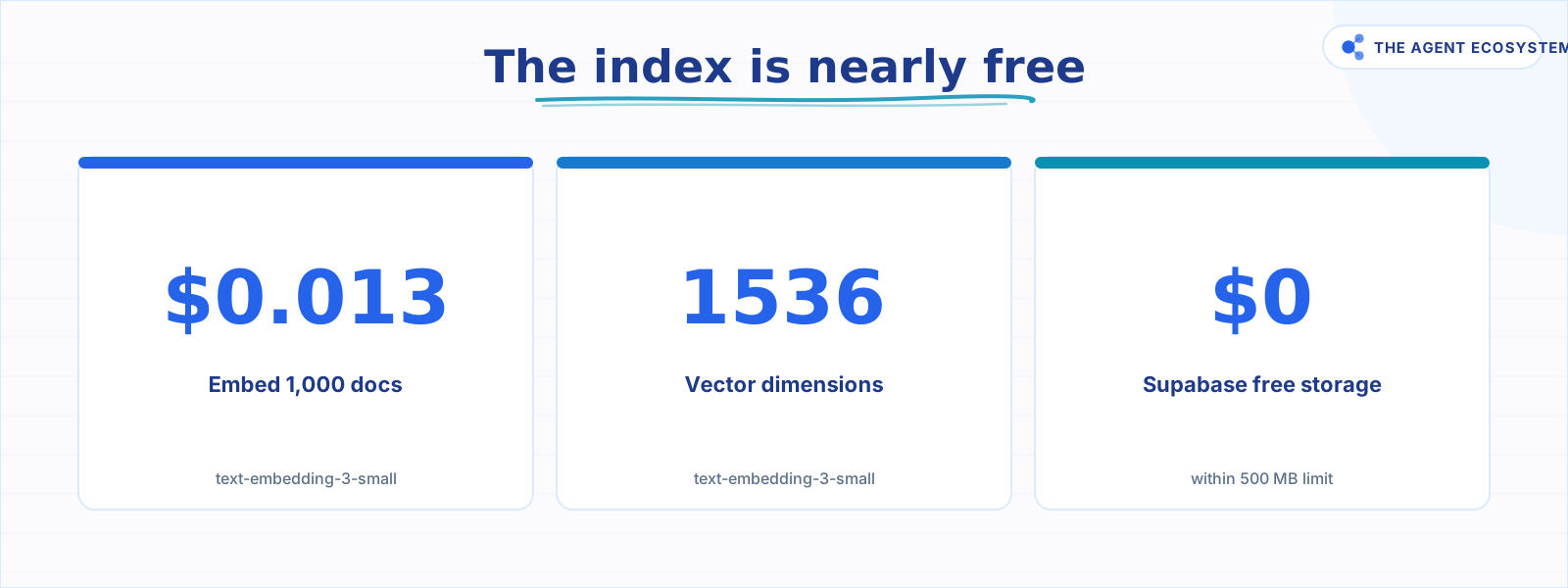 Index cost is near zero; budget the generation model instead.
How do you load documents into the store?#
The ingestion flow in n8n has three stages: load and split the source documents, embed each chunk, then insert the vectors. A Document Loader node reads the source (file, URL, or plain text). A Text Splitter node breaks it into chunks. The Vector Store node in Insert Documents mode calls its Embeddings sub-node per chunk and writes the result.
Chunk size matters. Chunks that are too large dilute the match because a single vector has to represent too many ideas. Chunks that are too small lose context across sentence boundaries. Start at roughly 500 words and test retrieval on real questions. You can pre-condense very long documents with n8n's AI summarization workflow before feeding them here.
If your source is a structured file (invoice, form, ticket export), document extraction pulls specific fields rather than semantic chunks. That is a different pattern. Vector stores shine on free-form text: help articles, email threads, PDFs, transcripts.
How do you set up the Supabase table for n8n's vector store?#
Before n8n can write vectors, Supabase needs 3 things: the pgvector extension, a documents table with an embedding column, and a match_documents function the node calls at query time. Run the SQL below once in the Supabase SQL editor, then point the n8n Supabase Vector Store node at that table.
Open your Supabase project, go to the SQL Editor, and run these three statements. They enable vector storage, create the table the node writes to, and add the similarity-search function that retrieval mode depends on.
-- 1. Enable the pgvector extension
create extension vector with schema extensions;

-- 2. Create the documents table (1536 dims = OpenAI text-embedding-3-small)
create table documents (
  id bigserial primary key,
  content text,
  metadata jsonb,
  embedding extensions.vector(1536)
);

-- 3. Add the similarity-search function the node calls on retrieve
create function match_documents (
  query_embedding extensions.vector(1536),
  match_count int default null,
  filter jsonb default '{}'
) returns table (
  id bigint,
  content text,
  metadata jsonb,
  similarity float
)
language plpgsql
as $$
#variable_conflict use_column
begin
  return query
  select id, content, metadata, 1 - (documents.embedding <=> query_embedding) as similarity
  from documents
  where metadata @> filter
  order by documents.embedding <=> query_embedding
  limit match_count;
end;
$$;
Two details trip people up. The vector dimension must match your embedding model: 1536 is correct for OpenAI text-embedding-3-small, while text-embedding-3-large returns 3072, so change the number if you switch models. And the Table Name field in the n8n node must read documents to match the table above, or the node inserts nothing and retrieval comes back empty. With the table live, the six build steps below wire the node to it.
How do you build it in n8n, step by step?#
This is the full node wiring, from an empty canvas to a working index you can query. The build has six steps: an insert-mode Vector Store, an OpenAI Embeddings sub-node, a loader and splitter to chunk your documents, the insert run, then a second retrieval node to test. Every label below is exactly what you will see in n8n.
Step 1: Add a Supabase Vector Store node in Insert Documents mode. Open a blank workflow. Add the Supabase Vector Store node. Set Operation Mode to Insert Documents. Connect your Supabase credentials (URL + service role key). Create or name the target table in the Table Name field.
Step 2: Attach an OpenAI Embeddings sub-node.
Inside the Vector Store node, open the Embeddings sub-node slot and add Embeddings OpenAI. Set the model to text-embedding-3-small. Connect your OpenAI API key.
Step 3: Connect a Document Loader and Text Splitter. Upstream of the Vector Store, add a Default Data Loader (or Binary Input Loader for files). Chain a Recursive Character Text Splitter after it. Set Chunk Size to around 2,000 characters (~500 words) and Chunk Overlap to 200 characters to preserve boundary context. Wire the splitter's output into the Vector Store document input.
Step 4: Run the insert to build the index. Execute the workflow. Watch the Supabase table populate with rows, each containing the chunk text, its embedding vector, and any metadata. This is your index.
Step 5: Add a second Vector Store node in retrieval mode.
Add a second Supabase Vector Store node. Set its mode to Retrieve Documents (As Vector Store for Chain) to use it inside an AI chain, or Get Many for a standalone query. Attach the same Embeddings OpenAI sub-node with text-embedding-3-small.
Step 6: Test retrieval with a real question. Wire a trigger (manual or webhook) that passes a question string to the retrieval node. Inspect the returned chunks and their similarity scores. If the top result is not relevant, check your chunk size and confirm the embedding model matches the insert model.
 Prices from OpenAI pricing, mid-2026; Anthropic has no embeddings API.
The full retrieval-and-generation layer (where Claude reads the chunks and produces an answer) is the n8n RAG support bot. That post picks up exactly where this one ends. For controlling the per-query token cost of the generation model, see the Claude API cost control guide. To compare Claude, GPT-4o, and Gemini as generation models, the AI agents cost and speed test has the numbers.
Where can this go wrong?#
The most common mistake is using the Simple Vector Store and assuming the data persists. It does not. Everything in memory vanishes the moment n8n restarts, and anyone else on the same instance can read what you stored. Move to Supabase before you show this to a client or store anything sensitive.
The second mistake is an embedding-model mismatch. If you embed documents with text-embedding-3-small and then query with text-embedding-3-large, you are comparing 1536-dimensional vectors to 3072-dimensional ones. The similarity scores are nonsense and the store returns irrelevant chunks with no error message. Lock the model name in a credential note or an n8n sticky and check it before adding any new workflow step that touches the store.
The third mistake is treating the vector store as a source of facts. The store returns the closest chunks, not the correct answer. Garbage source text, duplicate articles, and outdated content all get embedded faithfully and retrieved faithfully. Curate what goes in. Run a handful of real questions against the store before building the generation layer on top of it.
Do not confuse the near-free indexing cost with the ongoing query cost. The 1.3-cent figure covers building the entire index. Every query at production time sends retrieved chunks plus the user's question to a generation model, and that is where the bill accumulates. Plan the generation budget separately.
Which vector store should you use? (Decision guide)#
The answer comes down to two questions: are you testing or shipping, and where does your infrastructure already live? Use the Simple Vector Store only for a quick local test. For anything real, use Supabase if you already run Postgres, or reach for Qdrant or Pinecone otherwise. The flowchart below walks through it.
flowchart TD
    classDef startEnd fill:#22c55e,color:#fff,stroke:none
    classDef decision fill:#f97316,color:#fff,stroke:none
    classDef action fill:#3b82f6,color:#fff,stroke:none

    A([Need a vector store]):::startEnd --> B{Just testing?}:::decision
    B -- Yes --> C[Use Simple Vector Store]:::action --> Z([Done]):::startEnd
    B -- No --> D{Run Postgres or Supabase?}:::decision
    D -- Yes --> E[Use Supabase Vector Store]:::action --> Z
    D -- No --> F[Use Qdrant or Pinecone]:::action --> Z
What should you set up this weekend?#
Pick one set of documents you wish an AI could answer questions about: your help articles, a product FAQ, a folder of past client emails. Create a free Supabase project, enable the pgvector extension, and wire the six steps above. The index will cost a cent or two in tokens and nothing in storage.
Once the rows are in the table, the RAG support bot post shows you how to query them with Claude.
The foundation takes an afternoon. The generation layer takes another one. If you run n8n on a VPS rather than cloud, the self-host n8n setup guide covers the full installation so you pay $0 for the platform itself.
Frequently asked questions
What is a vector store in n8n?
How much does it cost to embed documents in n8n?
Does Anthropic have an embeddings API?
What is the difference between the Simple and Supabase vector stores in n8n?
Which embedding model should I use with n8n?
Is the vector store the same as RAG?
How do you connect n8n to a Supabase vector store?
Why does my n8n Supabase Vector Store return no results?
Sources
Primary references and vendor documentation used while drafting and reviewing this article.
Written by

Muhammad Qasim Hammad is an AI agent and automation expert and the founder of Cart Gaze LLC (cartgaze.com). He builds product for the love of it: when an idea lands, a working prototype is usually running within hours, built with the same AI agents and automations he sells. He puts his own output at roughly 20× what it was before agents, and the Agentic OS behind this site is the working proof, documented in public with the tools he actually ran and what they really cost.
AI & Automation Services
Want a pipeline like this running in your business?
I'm Qasim — I design and ship AI agents and n8n automations for solo operators and small teams. Tell me what's eating your team's week, and I'll scope a fix.
Related reading
Build an AI Customer-Support Bot in n8n (RAG, With Real Monthly Cost)
Build an n8n AI customer support bot that answers repeat questions from your own docs using RAG. Two workflows, about $4.50 per 1,000 answers on Claude Haiku 4.5, and $0 platform cost if you self-host.

n8n Pinecone vs Supabase Vector Store: Which to Pick
The n8n Pinecone Vector Store and Supabase Vector Store nodes wire into an agent the same way, but one is a managed service and one is Postgres you run. Here is how their free tiers, cost at scale, latency, and node wiring compare, and when to pick each for RAG.
Build a Question and Answer Chain in n8n (Answer From Your Docs)
The n8n Question and Answer Chain retrieves passages from your own vector store and answers from them, not from the model's memory. Index once for about $0.01, then answer 1,000 questions for about $2.50 on Claude Haiku 4.5.
Best Embedding Model for n8n RAG: OpenAI vs Gemini vs Local (2026)
Choosing between n8n RAG embeddings comes down to four verifiable axes: dimensions, price per 1M tokens, max input context, and cloud vs local. This guide compares OpenAI, Gemini, and Ollama options so you pick the one you can live with.
Embedding Dimensions and Cost: Bigger Vectors, Better RAG?
You assumed more embedding dimensions mean better retrieval, and you are about to over-pay on vector storage for a margin you will never notice. OpenAI's own numbers show text-embedding-3-large at 256 dims beating ada-002 at 1536. Here is what dimensions cost and how to pick a
Self-Hosted n8n RAG Pipeline: The Private Stack
A fully self-hosted RAG pipeline keeps your documents and compute in-house: n8n orchestrates, Ollama serves a local model, and pgvector stores embeddings in Postgres. Here is the end-to-end node graph, the modeled cost, and when self-hosting beats a managed stack.