Build an AI Document-Extraction Agent in n8n (Invoices, Receipts & Emails)
Stop retyping invoice fields. Let Claude read the document and write the row.
AI-drafted, reviewed by Muhammad Qasim Hammad on June 17, 2026. See our AI disclosure.
Table of contents
- What is an AI document-extraction agent, and what can it pull?
- How does document extraction work inside n8n? (the nodes)
- The Extract from File node
- The Information Extractor node
- How much does AI document extraction cost?
- How do you tell it what to extract? (the schema)
- How do you build it in n8n, step by step?
- Step 1: Trigger on a new document
- Step 2: Extract text from the file
- Step 3: Add the Information Extractor node and attach Claude
- Step 4: Define your schema
- Step 5: Add an IF check on required fields
- Step 6: Save to Google Sheets
- Where can this go wrong?
- What should you set up this weekend?
Every week, a stack of invoices, receipts, and supplier emails lands in your inbox, and you retype the same fields into a spreadsheet by hand. n8n AI document extraction reads each document and writes the fields you care about straight into structured data, no manual entry required.
Ten invoices might take 20 minutes of copy-paste work. Multiply that across a year and you've burned through hours that could go toward actual client work. The fix is a three-node chain in n8n: pull the text out of the file, hand it to Claude with a schema, save the result.
What is an AI document-extraction agent, and what can it pull?#
An AI document-extraction agent reads unstructured text (a PDF invoice, a scanned receipt, a forwarded email) and returns a clean JSON object containing only the fields you defined. It is schema-driven: you decide the output shape, Claude fills in the values. This works on invoices, purchase receipts, expense forms, supplier emails, contracts, and any document with repeating fields.
Common fields you might extract:
- Invoices: vendor name, invoice number, invoice date, due date, line items, subtotal, tax, total amount
- Receipts: merchant name, date, items purchased, total, payment method
- Inbound emails: sender, subject, requested action, deadline, amount mentioned
The agent doesn't summarize or chat. It returns a structured object every time, which is why it pairs naturally with a Google Sheets append step or a Supabase insert. For more on using Sheets as a lightweight database for extracted rows, see the Google Sheets as a database in n8n guide.
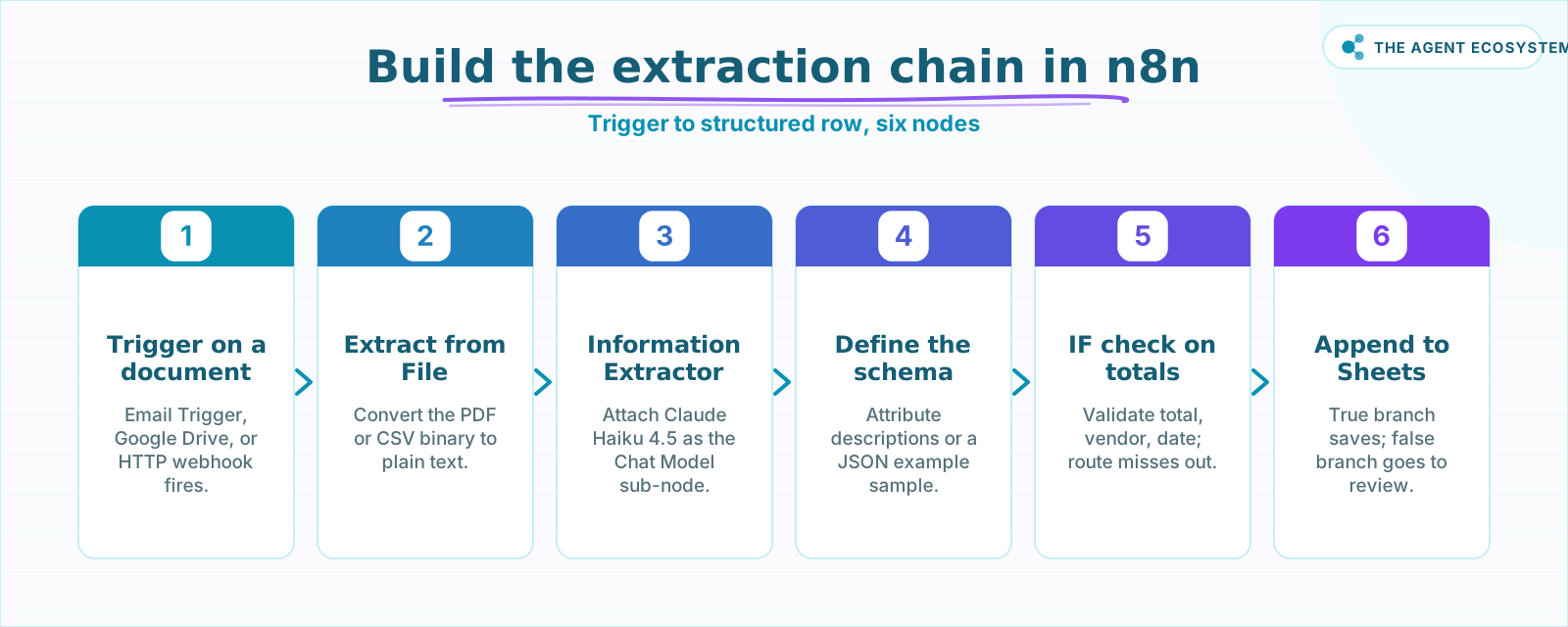 The six-node chain from document trigger to a validated, structured row.
How does document extraction work inside n8n? (the nodes)#
The core chain is three nodes: Extract from File converts the document to plain text, the Information Extractor node takes that text plus your schema and returns structured JSON, and then you save the result. For scanned or image-only PDFs with no text layer, skip Extract from File and pass the image to a vision model like Claude.
The Extract from File node#
The Extract from File core node handles PDFs, CSVs, spreadsheets, and other binary formats. Connect your trigger's binary output to its Input Binary Field, and the node outputs clean text.
One catch worth knowing early: if the PDF was created by scanning a physical document, Extract from File returns empty text because there is no embedded text layer. If that describes your documents, skip to the vision-model path covered in the "Where can this go wrong?" section below.
The Information Extractor node#
The Information Extractor node is the LangChain root node that does the actual extraction. It requires a Chat Model sub-node attached to it. Feed it the text from Extract from File, define the schema of fields you want back, and the node handles prompt construction internally, returning a structured JSON object matching your schema.
When I wired this up alongside the Claude email triage agent I already had running, I reused the same Anthropic credentials. Same Chat Model node, different job.
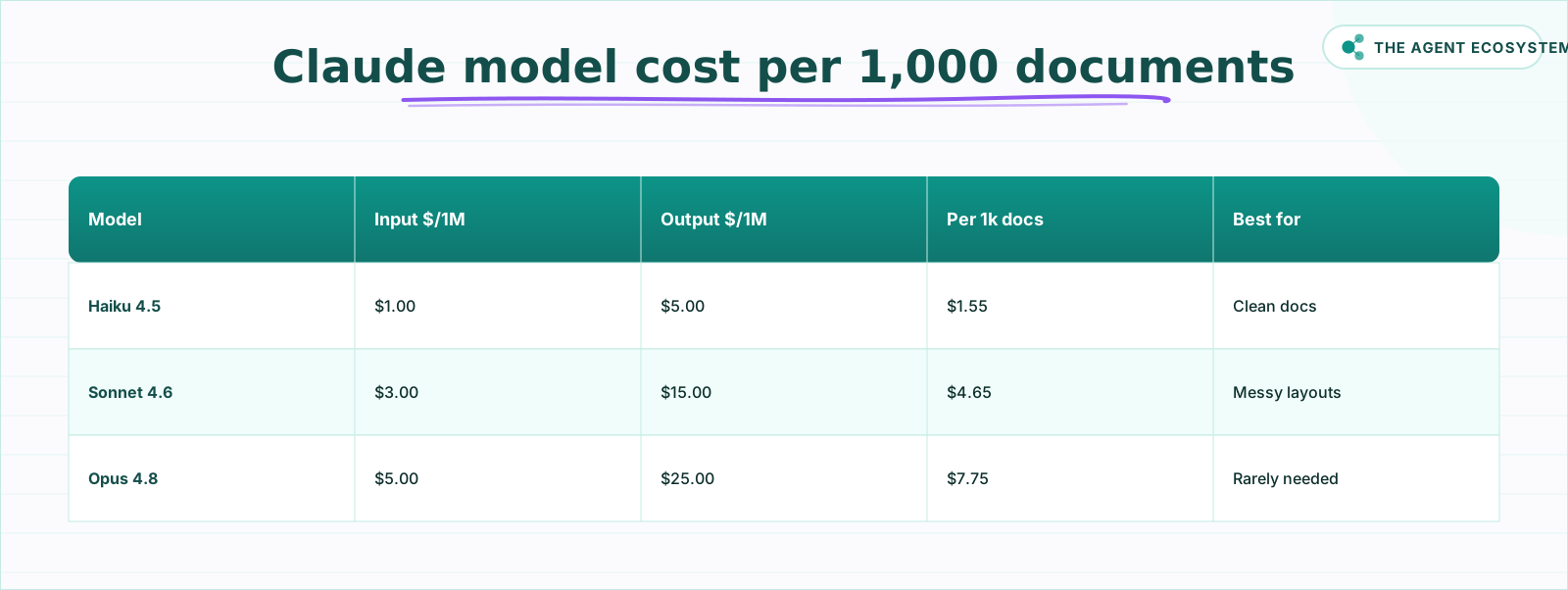 Token cost per 1,000 docs at ~800 input and ~150 output tokens each.
How much does AI document extraction cost?#
Extracting structured fields from 1,000 invoices or receipts costs about $1.55 in Claude tokens on Haiku 4.5 (as of mid-2026), based on ~800 input and ~150 output tokens per document. Self-hosted n8n is $0 under the fair-code license; n8n Cloud Starter is €20/month. Tokens are the only real variable, and the table breaks them down.
The table below uses Claude's published list prices as of mid-2026. All arithmetic is checkable by hand.
| Model | Input $/1M tokens | Output $/1M tokens | Cost per 1,000 docs | Best for |
|---|---|---|---|---|
| Claude Haiku 4.5 | $1.00 | $5.00 | $1.55 | Clean, structured docs |
| Claude Sonnet 4.6 | $3.00 | $15.00 | $4.65 | Messy layouts, mixed languages |
| Claude Opus 4.8 | $5.00 | $25.00 | $7.75 | Rarely needed |
Calculation: 1,000 docs x 0.8M input tokens x (price per 1M) + 0.15M output tokens x (price per 1M). Example for Haiku: (0.8 x $1.00) + (0.15 x $5.00) = $0.80 + $0.75 = $1.55.
One more cost lever: because the schema definition is identical on every call, prompt caching applies to that repeated input. Cached input tokens cost roughly 0.1x the standard rate, which can meaningfully cut the per-document cost at volume.
For the broader "use the cheapest tier that passes your accuracy bar" logic, see the Claude vs GPT vs Gemini cost and speed comparison.
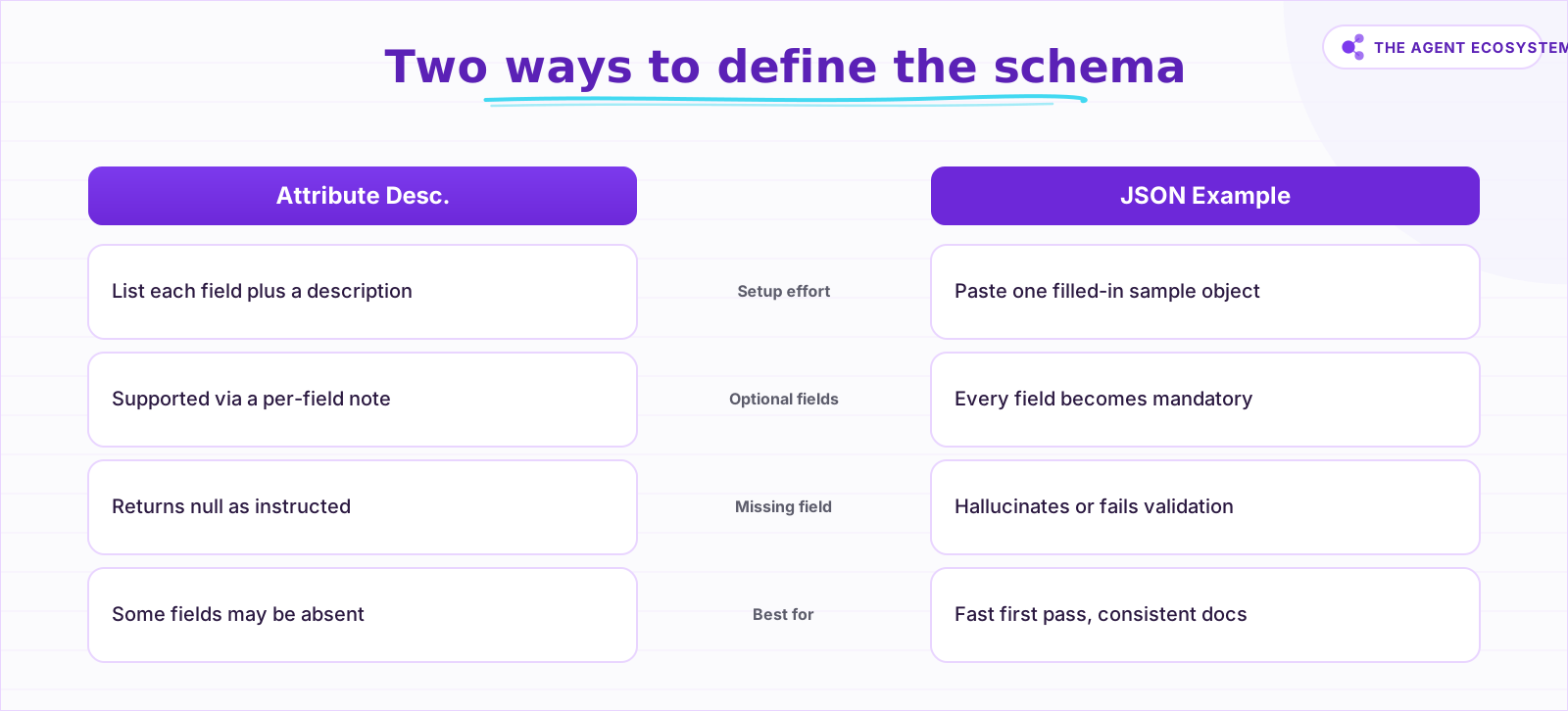 Use attribute descriptions when any field may be absent.
How do you tell it what to extract? (the schema)#
Inside the Information Extractor node, you define the schema one of two ways: From Attribute Descriptions, where you list each field with a written description, or Generate From JSON Example, where you paste one filled-in sample and n8n infers the fields. The choice matters because it controls whether fields are optional or mandatory.
From Attribute Descriptions lets you list each field name alongside a short description of what to look for. Use this when some fields may not appear on every document. A "discount_amount" field that only appears on some invoices should be defined here with a note like "the discount line if present, otherwise null."
Generate From JSON Example is faster to set up. Paste a filled-in sample JSON object and n8n infers the field names and types from the property keys (it ignores the values). The catch: every field becomes mandatory. If a field is missing from a document, the model will either hallucinate a value or the extraction will fail validation.
A related option for more freeform use cases is the Structured Output Parser sub-node on a Basic LLM Chain. It gives you structured output from a custom prompt rather than the dedicated extractor interface, which is useful when you want to combine extraction with conditional logic in the same chain.
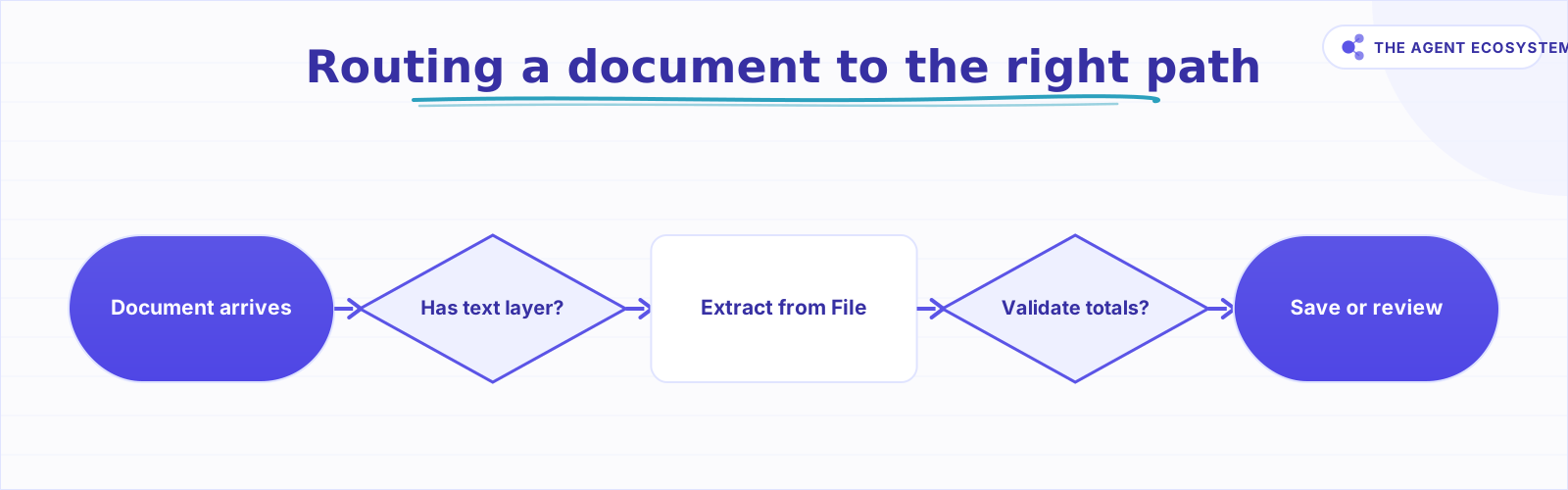 No text layer goes to a vision model; mismatched totals go to review.
How do you build it in n8n, step by step?#
The full chain takes about 30 minutes to wire up if you already have n8n running and an Anthropic API key configured. Starting from scratch, the self-host n8n on a VPS guide gets the platform up in under an hour. For connecting this to a client onboarding flow once extraction is running, see automate client onboarding in n8n.
Step 1: Trigger on a new document#
Add a trigger that fires when a document arrives. An Email Trigger node works for inbound invoice attachments. A Google Drive trigger works for new file uploads to a shared folder. An HTTP Webhook works if your invoicing tool can POST to an endpoint.
Step 2: Extract text from the file#
Add the Extract from File node. Set Operation to Extract Text and point the Input Binary Field at the attachment from the previous step. The output will be a text string containing the document content.
Step 3: Add the Information Extractor node and attach Claude#
Add the Information Extractor node from the LangChain section. Click the sub-node slot and add a Chat Model node. Select Anthropic Claude and choose claude-haiku-4-5 for standard documents. Connect the text output from Step 2 to the Information Extractor's input.
Step 4: Define your schema#
Inside the Information Extractor, set Extraction Mode to From Attribute Descriptions. Add each field: name it, describe what it looks like in the source document, and mark it optional if it may not always appear. A minimal invoice schema looks like this:
{
  "vendor_name": "The name of the company or person who issued the invoice",
  "invoice_number": "The unique invoice or reference number",
  "invoice_date": "The date the invoice was issued, in ISO format if possible",
  "due_date": "The payment due date, in ISO format if possible",
  "total_amount": "The final amount due including tax",
  "currency": "The currency code, e.g. USD or EUR"
}
Step 5: Add an IF check on required fields#
Place an IF node after the Information Extractor. Check that total_amount is not empty and is a number. Check that vendor_name and invoice_date are present. Route the false branch to a Slack message or an Email node so you can review the partial extraction manually.
Step 6: Save to Google Sheets#
On the true branch of the IF node, add a Google Sheets node. Set Operation to Append Row and map the extracted JSON fields to the correct columns. For more on structuring the sheet itself, see Google Sheets as a database in n8n.
Where can this go wrong?#
The biggest failure modes are not bugs in n8n. They are schema design choices and document quality issues that surface after you go live: scanned files with no text layer, vague field descriptions that produce vague output, and the PII that every invoice and receipt carries. Here is what to watch.
Scanned and image-only PDFs have no text layer for Extract from File to read. The node returns empty text and the extractor gets nothing useful. For these documents, skip Extract from File entirely and pass the binary image directly to a vision-capable Chat Model. Claude can read images natively. Set the Chat Model input to the binary attachment and write your extraction instructions in the system prompt manually, or use a Basic LLM Chain with a Structured Output Parser.
Schema design decides output quality. A vague field description produces vague results. "Amount" is worse than "The total amount due including all taxes, in the document's stated currency." Spend time on the descriptions. They are the real prompt.
Documents contain PII. Names, addresses, partial card numbers, and bank details appear in invoices and receipts. Treat every extracted row as sensitive data. Apply the same access controls to the output sheet that you would apply to the documents themselves. Consider whether you need to store the original binary at all once extraction is complete.
For a broader look at controlling the token bill as your document volume grows, see the Claude API cost control agent.
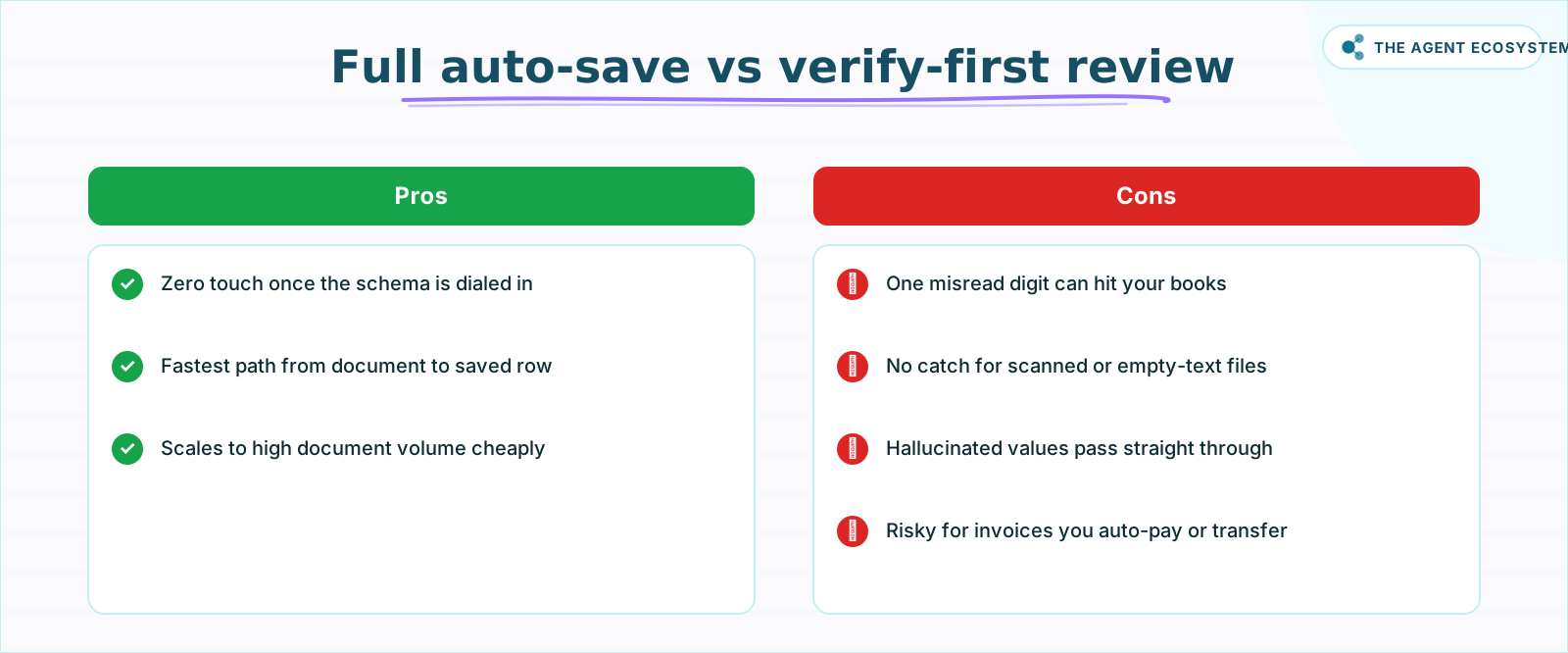 For financial docs, the verify-first IF check usually wins.
What should you set up this weekend?#
Pick one document type you process repeatedly. Receipts from a single supplier are a good start because the layout is consistent. Build the three-node chain (Extract from File -> Information Extractor -> Sheets), run it against five real documents, and check how often the totals match. That gives you an accuracy baseline for your own documents.
Once receipts are running cleanly, add the IF check and the human-review branch. Then expand to invoices. Same n8n workflow, same Chat Model node, different schema. The n8n MCP AI agent post shows how to extend this kind of build with tool-calling once you outgrow simple extraction.
The token cost at this scale is genuinely small. The time cost of manual data entry is not.
Frequently asked questions
What is the n8n Information Extractor node?
How much does AI invoice extraction cost?
How do I define which fields to extract?
Can n8n extract data from a scanned PDF?
Which Claude model is best for document extraction?
Is AI document extraction accurate enough to trust?
Sources
Primary references and vendor documentation used while drafting and reviewing this article.
Written by

Muhammad Qasim Hammad is an AI agent and automation expert and the founder of Cart Gaze LLC (cartgaze.com). He builds product for the love of it: when an idea lands, a working prototype is usually running within hours, built with the same AI agents and automations he sells. He puts his own output at roughly 20× what it was before agents, and the Agentic OS behind this site is the working proof, documented in public with the tools he actually ran and what they really cost.
AI & Automation Services
Want a pipeline like this running in your business?
I'm Qasim — I design and ship AI agents and n8n automations for solo operators and small teams. Tell me what's eating your team's week, and I'll scope a fix.
Related reading
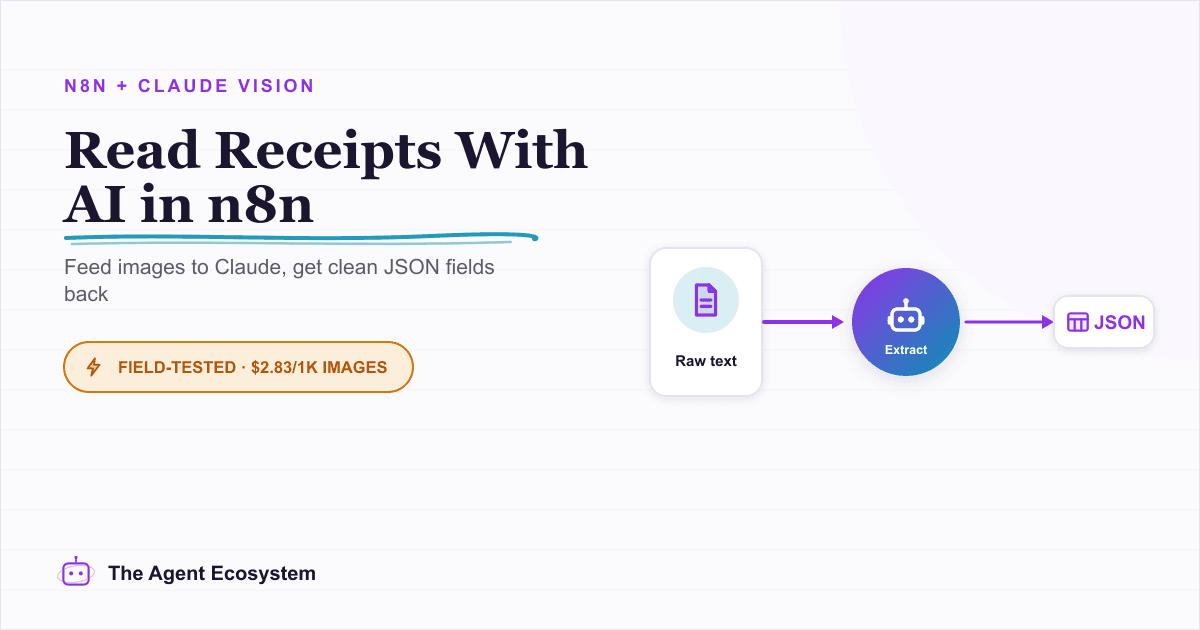
Read Images With AI in n8n: Claude Vision for Receipts and Screenshots
Set up n8n AI image analysis with Claude's Anthropic node to read receipts, screenshots, and forms. Get clean JSON fields back for $2.83 per 1,000 images on Haiku 4.5.

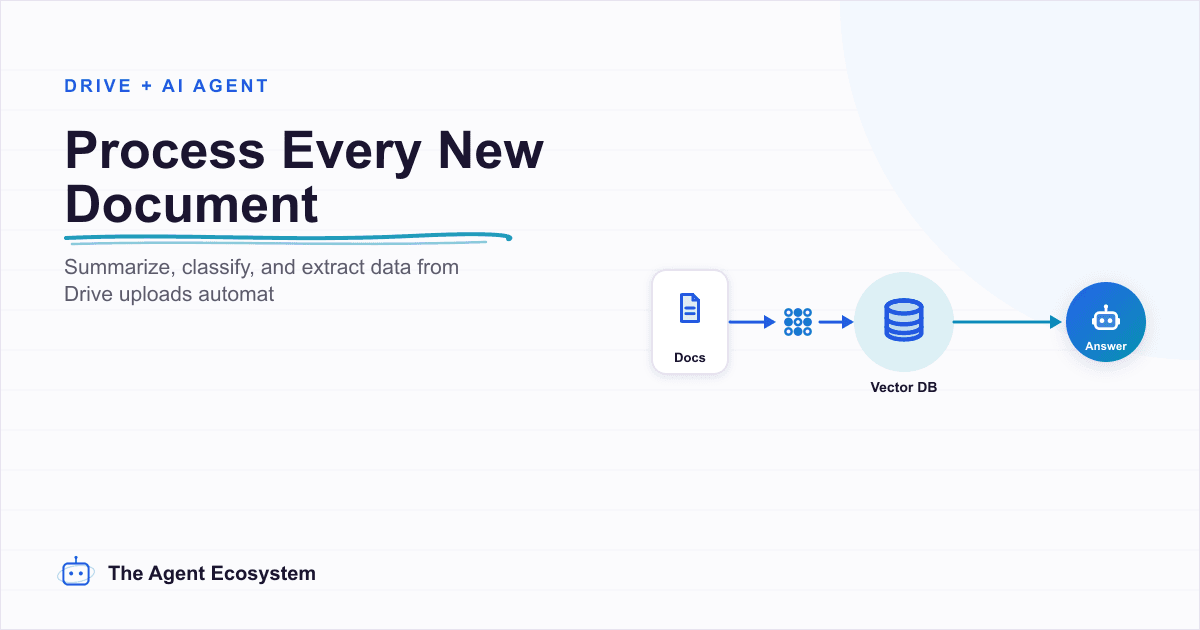
n8n Google Drive AI Document Processing: Summarize and Extract Data Automatically
A contract lands in a shared Drive folder and sits unread for three days. An n8n workflow detects the file, extracts the text, runs it through an AI agent, and posts a structured summary with key dates and parties before anyone opens it.
Force Structured JSON Output from AI in n8n
Your n8n AI step returns a paragraph when the next node needs clean fields. The Structured Output Parser sub-node fixes this by constraining the model to a JSON schema you define, for roughly 30 cents per 1,000 calls on Claude Haiku 4.5.
Build an AI Lead-Generation Agent in n8n (With Real Monthly Cost)
An n8n AI lead generation agent triages every inbound lead the moment it lands: scoring intent, drafting a personalized reply, and pinging you on the hot ones. Real cost: about $5/month for 100 leads on Claude Sonnet 4.6.
Summarize Long Documents in n8n with the AI Summarization Chain
Use the n8n Summarization Chain node to automatically condense transcripts, PDFs, and long articles into one-paragraph summaries. Costs $0.85 per 100 documents on Claude Haiku 4.5, with three method options for any document length.
Build an AI Customer-Support Bot in n8n (RAG, With Real Monthly Cost)
Build an n8n AI customer support bot that answers repeat questions from your own docs using RAG. Two workflows, about $4.50 per 1,000 answers on Claude Haiku 4.5, and $0 platform cost if you self-host.