5 Claude API Changes That Cut Agent Workflow Cost
A practical checklist for solopreneurs building Claude-powered agents in n8n and custom pipelines
AI-drafted, reviewed by Muhammad Qasim Hammad on June 8, 2026. See our AI disclosure.
Table of contents
- What Does Claude API Cost Control Actually Mean for Solo Agent Builders?
- Change 1: How do you cap advisor tool output with maxtokens?
- How to apply it in an n8n HTTP Request node
- Change 2: When do refused requests stop costing money?
- Change 3: How does adaptive thinking avoid runaway reasoning tokens?
- Enabling adaptive thinking
- Change 4: How do cache diagnostics debug cache misses?
- What to do with cache diagnostic data
- Change 5: How do mid-conversation system messages reduce redundant context?
- Practical application in a content automation pipeline
- When is the 1M token context window worth the cost?
- What to Test Before Changing Production Agents
- How Solopreneurs Get This Wrong
- Where to Go From Here
Claude API cost control for agent workflows means cutting token waste at the places where automated calls silently multiply: uncapped advisor output, cache misses, unnecessary reasoning, repeated context, and refused requests. For a solopreneur running n8n or custom research agents, start with the cheapest changes first: cap advisor max_tokens, inspect cache diagnostics, use adaptive thinking only where the model supports it, and stop resending static instructions when mid-conversation system messages are cleaner. The Claude API release notes matter because these are shipped features, not SEO theory. Apply one change at a time, compare cost, latency, and output quality on the same prompt set, and keep the 1M-token context window for cases where the extra context actually changes the answer.
 Uncapped advisor calls and cache misses are the two biggest silent cost drivers in solo agent setups.
What Does Claude API Cost Control Actually Mean for Solo Agent Builders?#
Claude API cost control means reducing token waste without weakening the output your agents need. For a solopreneur running n8n pipelines or research agents, uncapped calls, cache misses, and refused requests can all raise the bill. The five changes below each target a different spend leak.
These are not optimization theories. They are features Anthropic has already shipped, documented in the official release notes. You just have to turn them on.
Change 1: How do you cap advisor tool output with max_tokens?#
The advisor tool now supports a max_tokens parameter that caps the advisor model's output per call, cutting latency and output token cost (per the Claude API release notes). Before this parameter existed, the advisor could produce a long response even when your workflow only needed a short one.
If your agent uses the advisor tool to classify a document or pick a next step, you rarely need more than 50-100 output tokens. Without a cap, you might get 400. Multiply that by 500 daily calls and the difference is material.
How to apply it in an n8n HTTP Request node#
In the JSON body of your Claude API call, set max_tokens on the advisor tool definition (shown below). The advisor tool is in public beta, so send the advisor-tool-2026-03-01 beta header, and keep its required type and model fields alongside the cap. Test on a staging workflow first, and confirm the shorter advisor output still satisfies your downstream node logic before deploying.
{
  "tools": [
    {
      "type": "advisor_20260301",
      "name": "advisor",
      "model": "claude-sonnet-4-6",
      "max_tokens": 80
    }
  ]
} Capping advisor output tokens is a one-line change that can reduce per-call output spend immediately.
Change 2: When do refused requests stop costing money?#
This is a pure win with zero configuration required. Per the Claude API release notes, you are no longer billed for a request when it returns stop_reason: "refusal" without Claude having generated any output. Previously, even a zero-output refusal could generate a charge.
If your agents process user-submitted content, edge cases that trip content policy filters were quietly adding up on your bill. Now they do not.
Audit your logs. Pull the last 30 days of API responses and filter for stop_reason: "refusal". If you see a meaningful number, recognize that as zero-cost traffic going forward. More importantly, a spike in refusals signals a prompt design problem, not a billing emergency.
| stop_reason value | Billed? | What it means |
|---|---|---|
| end_turn | Yes | Normal completion |
| max_tokens | Yes | Hit your token cap |
| stop_sequence | Yes | Hit a stop string |
| refusal (no output) | No | Content policy block, zero tokens produced |
| tool_use | Yes | Claude called a tool |
Change 3: How does adaptive thinking avoid runaway reasoning tokens?#
With adaptive thinking enabled, Claude Opus 4.8 triggers reasoning only when a turn needs it (per the Claude API release notes). Without this setting, every turn in an extended thinking workflow spends thinking tokens regardless of complexity, even when the next step only needs classification, routing, or a short draft.
Consider a multi-step research agent: step 1 fetches a URL (simple), step 2 summarizes a paragraph (moderate), step 3 cross-references 10 documents (complex). Under standard extended thinking, steps 1 and 2 burn reasoning budget they do not need. Adaptive thinking skips the overhead on those lighter turns.
Enabling adaptive thinking#
Set "thinking": {"type": "adaptive"} in your API request body. This is a Claude Opus 4.8 feature, so confirm your model parameter targets claude-opus-4-8 before flipping the switch.
{
  "model": "claude-opus-4-8",
  "thinking": {
    "type": "adaptive"
  }
} Adaptive thinking skips reasoning budget on lightweight turns, focusing spend where it actually matters.
Change 4: How do cache diagnostics debug cache misses?#
Cache diagnostics, now in public beta, help you see why prompt cache hits are failing in Claude API workflows. For a long-running agent, a cache miss means you may pay full input-token cost for instructions you expected to reuse. Start by checking repeated system prompts and large static context blocks.
Cache diagnostics show you which requests hit the cache and which missed. Before this tool existed, you were essentially guessing from latency differences.
What to do with cache diagnostic data#
- Add the
cache-diagnosis-2026-04-07beta header to your Claude API requests. - Pass
diagnostics.previous_message_idon each request so the API can compare the prompt against the previous turn. - Read the
cache_miss_reasonthe response returns, which pinpoints where the prompt prefix diverged and broke the cache. - Identify which nodes are constructing prompts dynamically in ways that break cache key consistency.
- Restructure those nodes so the static portion of the system prompt is always identical across calls.
The most common cause of unexpected cache misses in n8n agents is string interpolation that inserts a timestamp or session ID into what should be a static system prompt prefix. Move variable context to the user turn, not the system prompt.
Change 5: How do mid-conversation system messages reduce redundant context?#
Mid-conversation system messages let a Claude API agent update instructions after a workflow has already started. That matters when an n8n or custom agent changes from research to drafting to QA. Instead of resending bloated instructions, you can separate stable context from stage-specific guidance.
Both old approaches waste tokens. A 3,000-token system prompt covering five possible agent modes costs 3,000 tokens per call. With mid-conversation system messages, you can open with a minimal 600-token system prompt and swap in a focused instruction set only when the agent reaches the relevant stage.
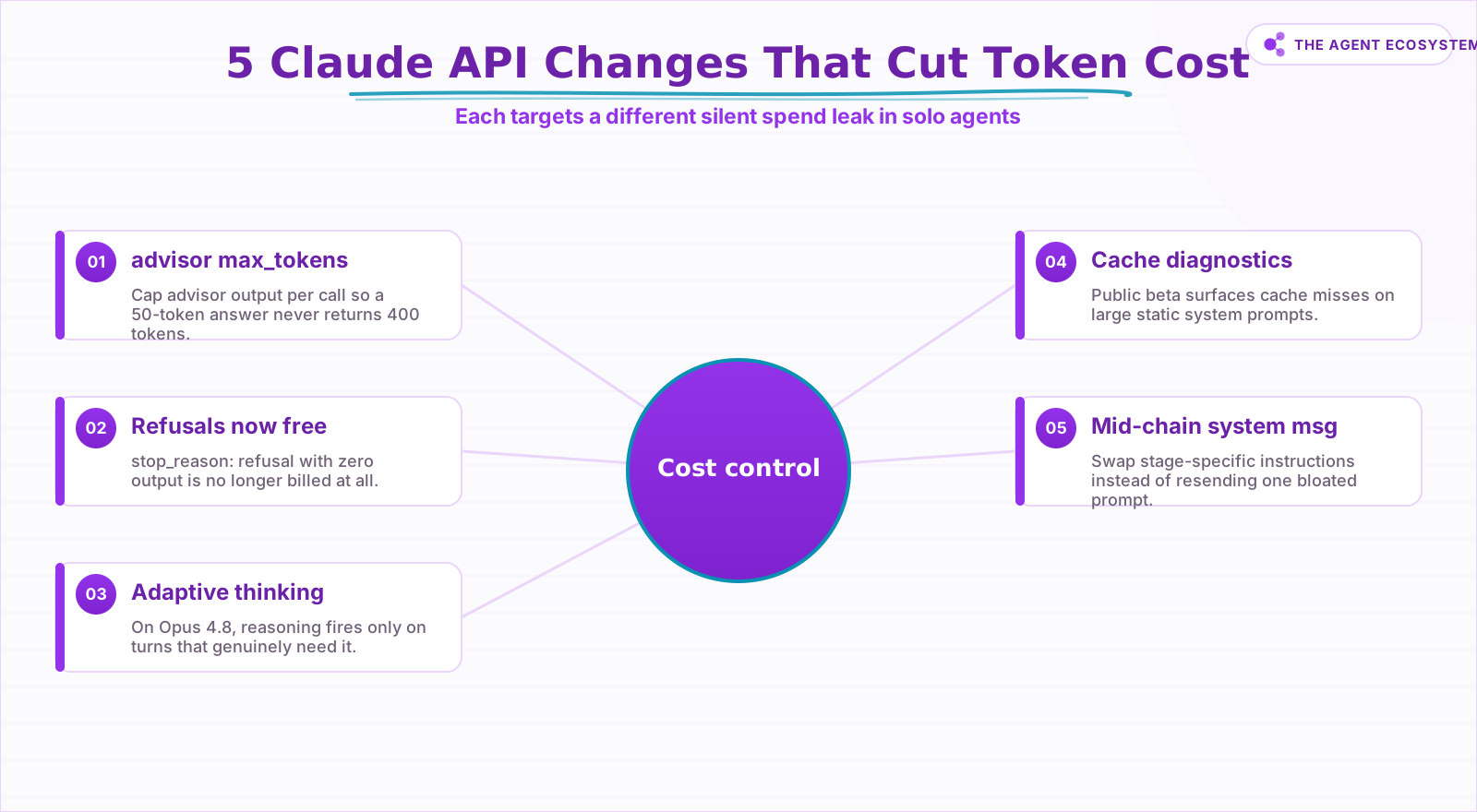 Five shipped Claude API changes, each plugging a different token-spend leak.
Practical application in a content automation pipeline#
Consider a three-stage pipeline: research, outline, draft. In n8n, the first HTTP Request node sends a system prompt scoped only to research behavior. The second node, once the research turn is complete, sends a new system message scoped to outlining. The third node does the same for drafting. Each stage loads only the instructions it needs.
This approach also makes prompts easier to maintain. Each stage has its own focused instruction set rather than one monolithic prompt you are afraid to edit.
When is the 1M token context window worth the cost?#
Claude Opus 4.8 supports a 1 million token context window by default on the Claude API, Amazon Bedrock, and Vertex AI. That opens larger document-agent workflows, but it does not make every call cheaper. Use the window selectively, then measure whether fewer calls offset the larger input.
The 1M window is an upper bound, not a default you should fill. Use it selectively for turns that genuinely need large context. For everything else, trim aggressively.
| Context window size | Approximate input token cost per call (at Opus 4.8 pricing) | Best used when |
|---|---|---|
| 10,000 tokens | Low | Single document, focused task |
| 100,000 tokens | Moderate | Multi-document research |
| 500,000+ tokens | High | Full codebase or legal corpus review |
| 1,000,000 tokens | Maximum | Rare, exceptional use cases only |
Note: specific per-token pricing varies by plan and changes over time. Check Anthropic's pricing page for current rates before estimating costs.
What to Test Before Changing Production Agents#
Test these Claude API changes one at a time before updating production agents. Start with the lowest-risk parameter, run the same prompt set before and after, and compare cost, latency, refusals, and output quality. If the output changes in a customer-facing workflow, roll back before optimizing further.
Before touching production, run this checklist on a staging copy of the workflow:
- Capture a baseline. Record token counts, latency, and output quality across at least 50 representative calls with the current configuration.
- Change one variable at a time. Apply a single parameter change (e.g.
max_tokenson the advisor tool) and re-run the same 50 calls. - Check stop_reason distribution. A shift in how often you see
end_turnvs.max_tokenstells you if a cap is cutting outputs short. - Review output quality manually. Automated token counts do not catch cases where shorter outputs break downstream logic.
- Verify cache hit rates. With cache diagnostics enabled, confirm the change did not accidentally break a cache key.
- Monitor for 48 hours post-deploy. Token costs and refusal rates can behave differently on weekend traffic vs. weekday peaks.
How Solopreneurs Get This Wrong#
Solopreneurs usually get this wrong by changing every cost control at once. If adaptive thinking, cache diagnostics, advisor caps, and prompt changes land together, any regression becomes hard to isolate. Treat each change as a small release with its own before-and-after log.
The second mistake is optimizing for token count without measuring output quality. A 60% reduction in output tokens means nothing if your downstream automation breaks because it expected a longer structured response.
The third mistake is ignoring cache diagnostics because the dashboard is "good enough." Cache misses on large system prompts compound silently. A single uncaught miss pattern across a high-volume agent can cost more per week than the time it takes to read one diagnostic report.
Where to Go From Here#
Start with the change that matches your biggest current leak. If advisor calls are long, cap max_tokens; if prompts keep missing cache, inspect diagnostics; if refusals are common, audit logs. Then review the official Claude API release notes monthly so useful changes reach your agents before the bill surprises you.
Token spend is also only half the agent bill: the platform running the workflow meters its own units on top. The n8n vs Make vs Zapier cost comparison breaks down that side, including why per-execution pricing suits agent workflows.
This article is produced with AI assistance and reviewed by Muhammad Qasim Hammad for technical accuracy. Feature claims are sourced from the official Anthropic release notes linked above.
Frequently asked questions
Does Anthropic charge for Claude API calls that are refused?
What is adaptive thinking on Claude Opus 4.8?
How do cache diagnostics help with Claude API cost control?
Can I use mid-conversation system messages in n8n Claude nodes?
What is the max_tokens parameter on the advisor tool?
How large is the Claude Opus 4.8 context window?
What should I check before applying these API changes to a production agent?
Sources
Primary references and vendor documentation used while drafting and reviewing this article.
Written by

Muhammad Qasim Hammad is an AI agent and automation expert and the founder of Cart Gaze LLC (cartgaze.com). He builds product for the love of it: when an idea lands, a working prototype is usually running within hours, built with the same AI agents and automations he sells. He puts his own output at roughly 20× what it was before agents, and the Agentic OS behind this site is the working proof, documented in public with the tools he actually ran and what they really cost.
AI & Automation Services
Want a pipeline like this running in your business?
I'm Qasim — I design and ship AI agents and n8n automations for solo operators and small teams. Tell me what's eating your team's week, and I'll scope a fix.
Related reading
Prompt Caching: Cut Claude and Agent Costs Without Losing Quality
Prompt caching stores the unchanging part of your Claude prompt once and bills every later read at a tenth of the price, same model, same output. Here is the token math, the break-even point, and how to wire it into an n8n agent loop.

Cut Your AI API Bill: 7 Levers That Actually Work
To reduce AI API costs you need levers that change the bill by a verifiable mechanism, not vague advice. This hub names all seven, right-size the model, prompt caching, the Batch API, routing and fallback, local versus API, token discipline, and RAG over long-context, with a
n8n AI Agent Pricing: What It Really Costs to Run
An n8n AI agent has two bills that behave nothing alike: a flat n8n platform fee and a per-run LLM token cost. Here is what each one comes to, with modeled per-run math across Claude, GPT, and Gemini, and the levers that actually lower the total.
Give Your n8n AI Agent Tools (Calculator, HTTP, Workflows)
Your n8n AI Agent answers from stale training data until you attach real tools. This guide shows you exactly how to wire HTTP Request, Calculator, and Workflow tools so your agent acts on live data.
Estimate Any LLM Bill Before You Build: Token Math for n8n Builders
A single LLM call costs a fraction of a cent, until you multiply by 10,000 runs a month. Here is the reproducible token math: chars over 4 for tokens, the input and output rates, and the per-run times volume multiply, with one support-reply run priced across five models.
Claude Fable 5: Anthropic's Mythos-Class Model, Explained
Anthropic's Claude Fable 5 shipped on June 9, 2026 topping the coding benchmarks it publishes and priced near twice Opus 4.8. Here is an honest read on the reported numbers, the real trade-off, and who should pay the premium.