Prompt Caching: Cut Claude and Agent Costs Without Losing Quality
Pay full price for your prompt once, then a tenth on every repeat call.
AI-drafted, reviewed by Muhammad Qasim Hammad on June 29, 2026. See our AI disclosure.
Table of contents
- What is prompt caching, and why does it cut cost without cutting quality?
- How does Claude prompt caching actually work?
- What does prompt caching actually save? (modeled)
- Should you turn on prompt caching for this workload?
- How does prompt caching land in an n8n agent loop?
- What should you set up this week?
Your n8n agent loop sends Claude the same 8,000-token system prompt and tool list on every single step, and you pay full input price for all of it, every time. The model has already read those exact bytes a hundred times today. Prompt caching tells Claude to store that unchanging block once and bill every later read at a tenth of the price, with the same model and the exact same output.
Most "cut your AI bill" advice tells you to downgrade the model and quietly accept worse answers. Caching is the opposite trade: identical prompt, identical response, lower bill. You stop paying to re-read the parts of your prompt that never change.
What is prompt caching, and why does it cut cost without cutting quality?#
Prompt caching is a billing and latency optimization on identical input bytes. The model still reads the same prompt and produces the same kind of answer; only the price and speed of the repeated portion change. There are three input lanes to know: a normal uncached token, a one-time cache write, and a cheap cache read on every reuse.
Think of any Claude call as two parts. A stable prefix that repeats (your system prompt, your tool definitions, a reference document) and a small variable tail that changes (the new user message). Without caching you pay full input price for the whole thing on every call. With caching you pay once to store the prefix, then a fraction to read it back.
The three lanes, priced relative to the base input rate:
- A cache write stores the prefix the first time. It costs 1.25x base input for the 5-minute cache, or 2x for the 1-hour cache. You pay it once.
- A cache read (a hit) happens on every later call that reuses the prefix. It costs 0.1x base input, a 90% discount on those tokens.
- An uncached token is anything outside the cached prefix, like your changing user message, billed at the normal rate.
Quality is untouched because the bytes are untouched. Caching does not summarize the prompt, truncate it, or swap in a smaller model. It is the honest version of "spend less", because the model sees exactly what it saw before.
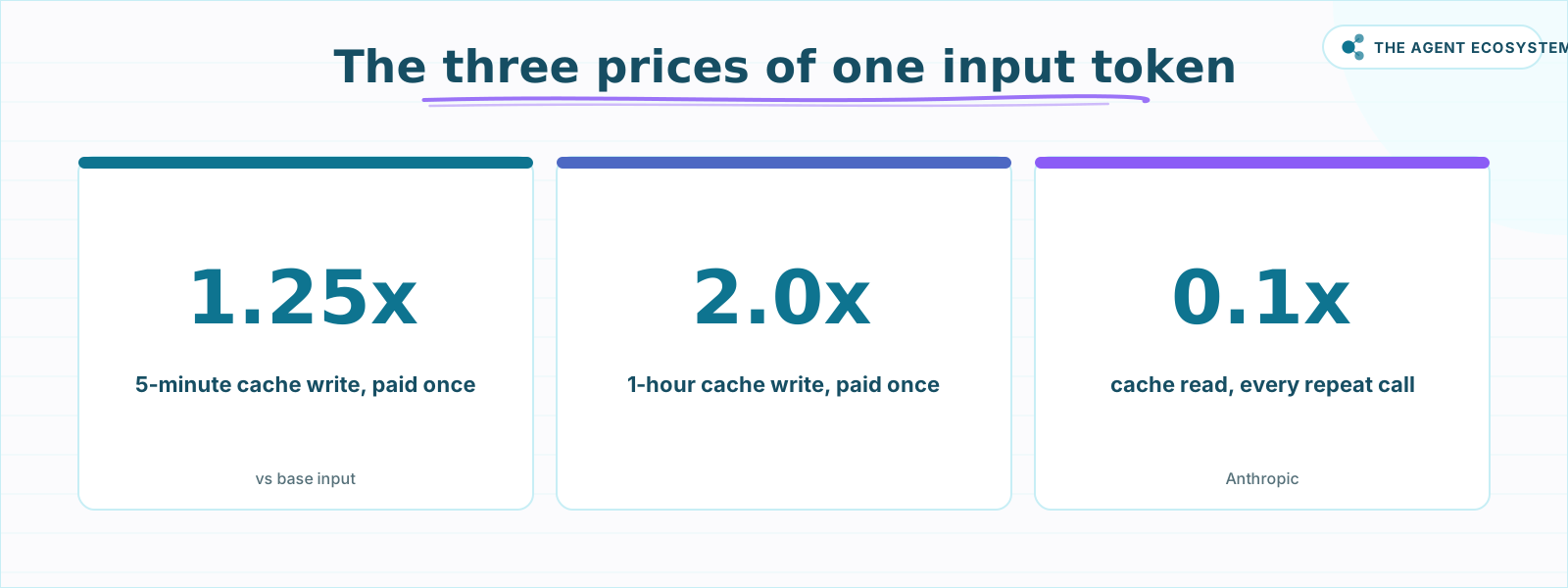 A cached token costs a tenth of a fresh one to read; the only premium is the one-time write. Source: Anthropic pricing.
How does Claude prompt caching actually work?#
Claude builds the cache prefix in a fixed order: tools, then system, then messages. You mark where the stable part ends with a cache_control breakpoint, up to four per request, or one automatic top-level marker. A change above or at a breakpoint invalidates that level and everything after it.
The cache works on prefixes, so order matters. Claude assembles the prompt as tools, then system, then messages, and keys the cache on that running prefix. Put your most stable content (tool definitions, system prompt) first and your changing content (the user's question, a timestamp) last. A single edit near the top invalidates the cache for everything below it.
You set the boundary with a cache_control breakpoint. You get up to four explicit breakpoints per request, or you can set one top-level cache_control and let Claude walk the breakpoint forward automatically as a conversation grows. Cache the stable system prompt, the tool list, and any long reference document or few-shot examples. Never cache a timestamp, a per-request ID, or the incoming user message; those belong after the breakpoint.
Two rules decide whether a cache forms at all:
- Minimum length. A prefix under the model minimum is processed without caching and returns no error, so it fails silently. The minimum is 1,024 tokens for Sonnet 4.5/4.6 and Opus 4.8, 2,048 for Opus 4.7, and 4,096 for Opus 4.5/4.6 and Haiku 4.5.
- Time to live. The default cache lasts 5 minutes and refreshes for free every time it is hit, so a busy loop keeps it warm at no extra cost. The 1-hour option suits slower, scheduled work that still reuses the same prefix.
Here is what each lane costs across the current models. Check current Claude pricing before a large run, since token rates are updated periodically.
| Model | Input $/1M | 5-min write | 1-hour write | Cache read | Output $/1M |
|---|---|---|---|---|---|
| Claude Haiku 4.5 | $1.00 | $1.25 | $2.00 | $0.10 | $5.00 |
| Claude Sonnet 4.6 | $3.00 | $3.75 | $6.00 | $0.30 | $15.00 |
| Claude Opus 4.8 | $5.00 | $6.25 | $10.00 | $0.50 | $25.00 |
To confirm caching is live, read the usage block on the API response. cache_creation_input_tokens shows what was written, cache_read_input_tokens shows what was reused, and total input equals cache read plus cache creation plus uncached input. If cache_read_input_tokens stays at zero, your prefix is changing or sits below the minimum.
What does prompt caching actually save? (modeled)#
Savings apply only to the cached, unchanged prefix, and there they are large. A read priced at 0.1x means a big stable prefix reused many times costs close to a tenth of the uncached version. The numbers below are modeled from Anthropic's published Sonnet 4.6 rates, and every figure is checkable by hand.
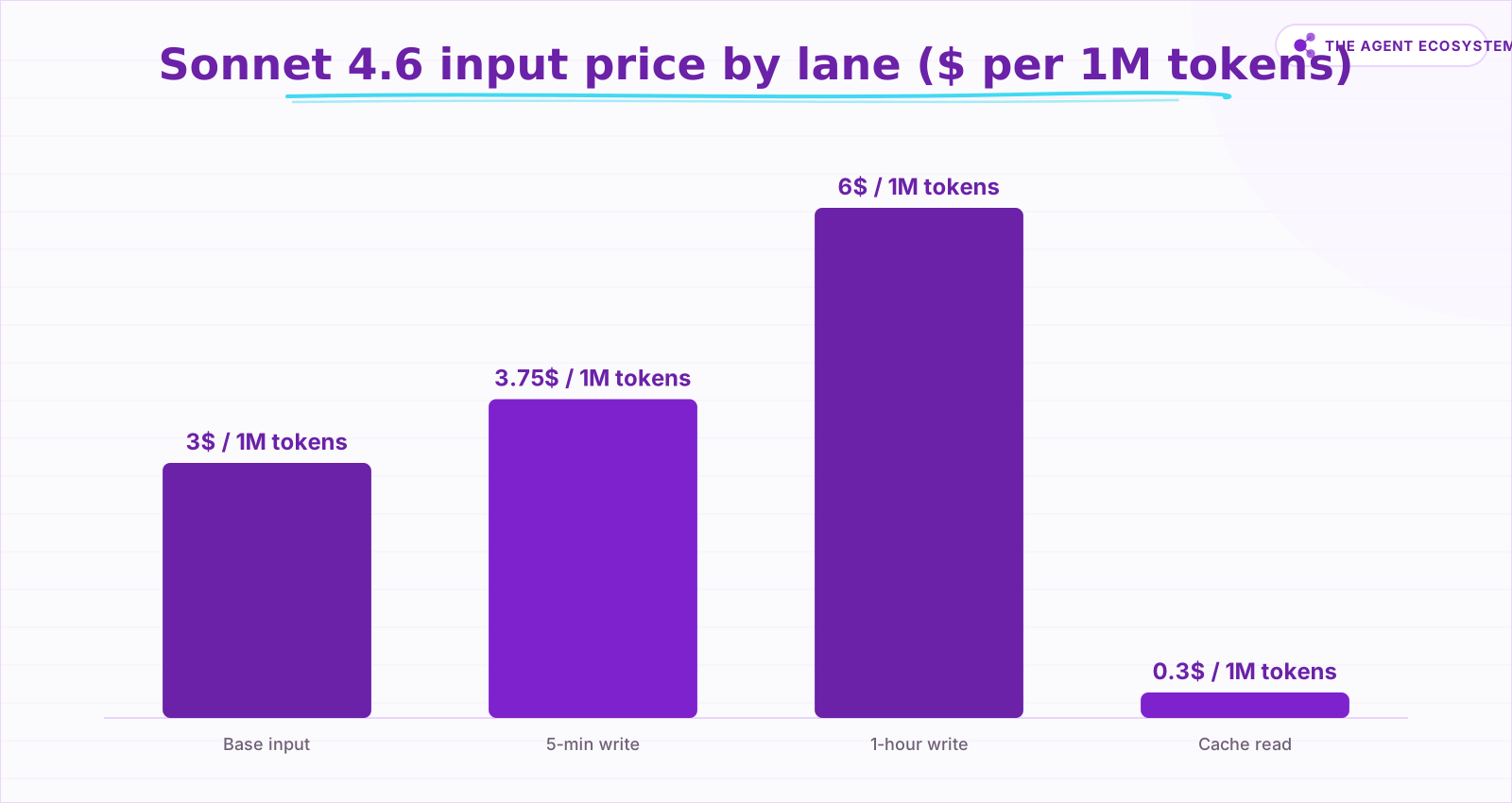 Modeled from Anthropic's published Sonnet 4.6 rates. The read bar is the one you pay on every repeat call.
Take a Sonnet 4.6 agent with a 10,000-token stable prefix (system prompt, tools, and a reference doc) reused across 50 steps in one session. Look at just that repeated prefix:
- Without caching: 50 reads x 10,000 tokens = 500,000 input tokens at $3.00/1M = $1.50.
- With the 5-minute cache: one write of 10,000 tokens at $3.75/1M = $0.0375, then 49 reads of 10,000 tokens at $0.30/1M = $0.147. Prefix total is about $0.185.
That is roughly 88% off the repeated prefix, same model, same outputs. The variable tokens (the ~500 new tokens each step) are billed normally either way; caching does not touch them.
Break-even is fast because a read costs a tenth of an uncached token. One write plus one read (1.25 + 0.1 = 1.35x) already beats paying full price twice (2.0x). So the 5-minute cache pays for itself after a single reuse, and the 1-hour cache after two.
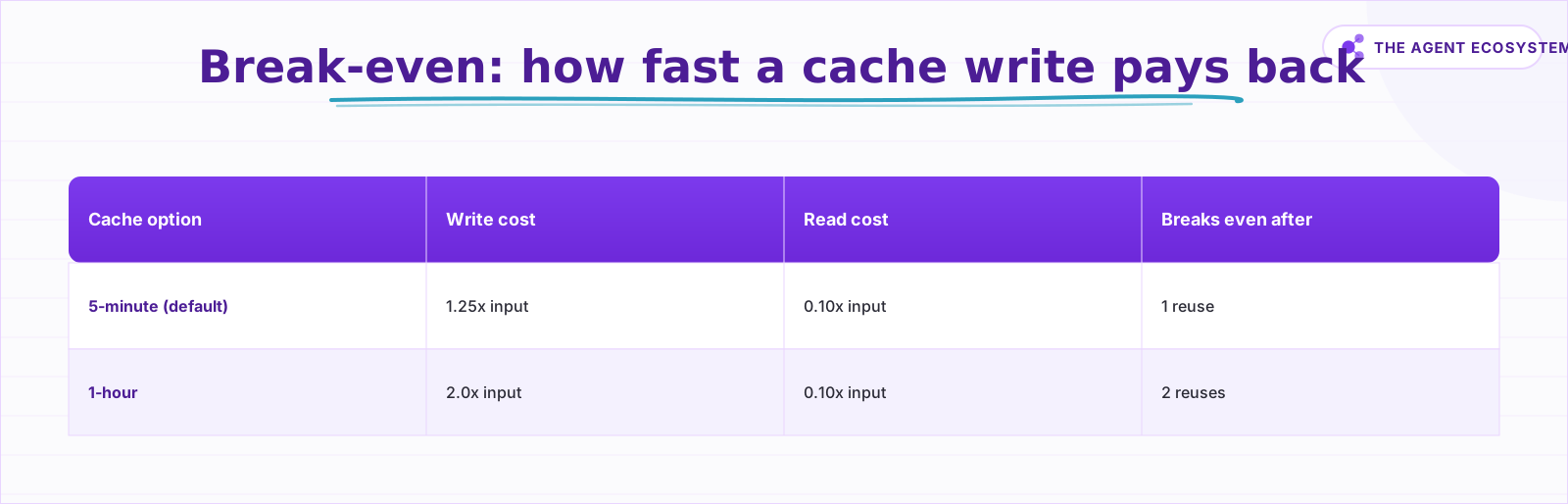 A cache hit costs 10% of input, so even a single reuse beats paying full price twice. Source: Anthropic.
The honest caveat: this only works on bytes that stay identical. If your prompt mutates every call (a timestamp in the system message, a fresh ID, reshuffled tools), the prefix never matches and you pay full price plus the write premium. If the stable part is below the model minimum, nothing caches at all. Caching rewards big, stable prefixes reused often, and does little for short, ever-changing prompts.
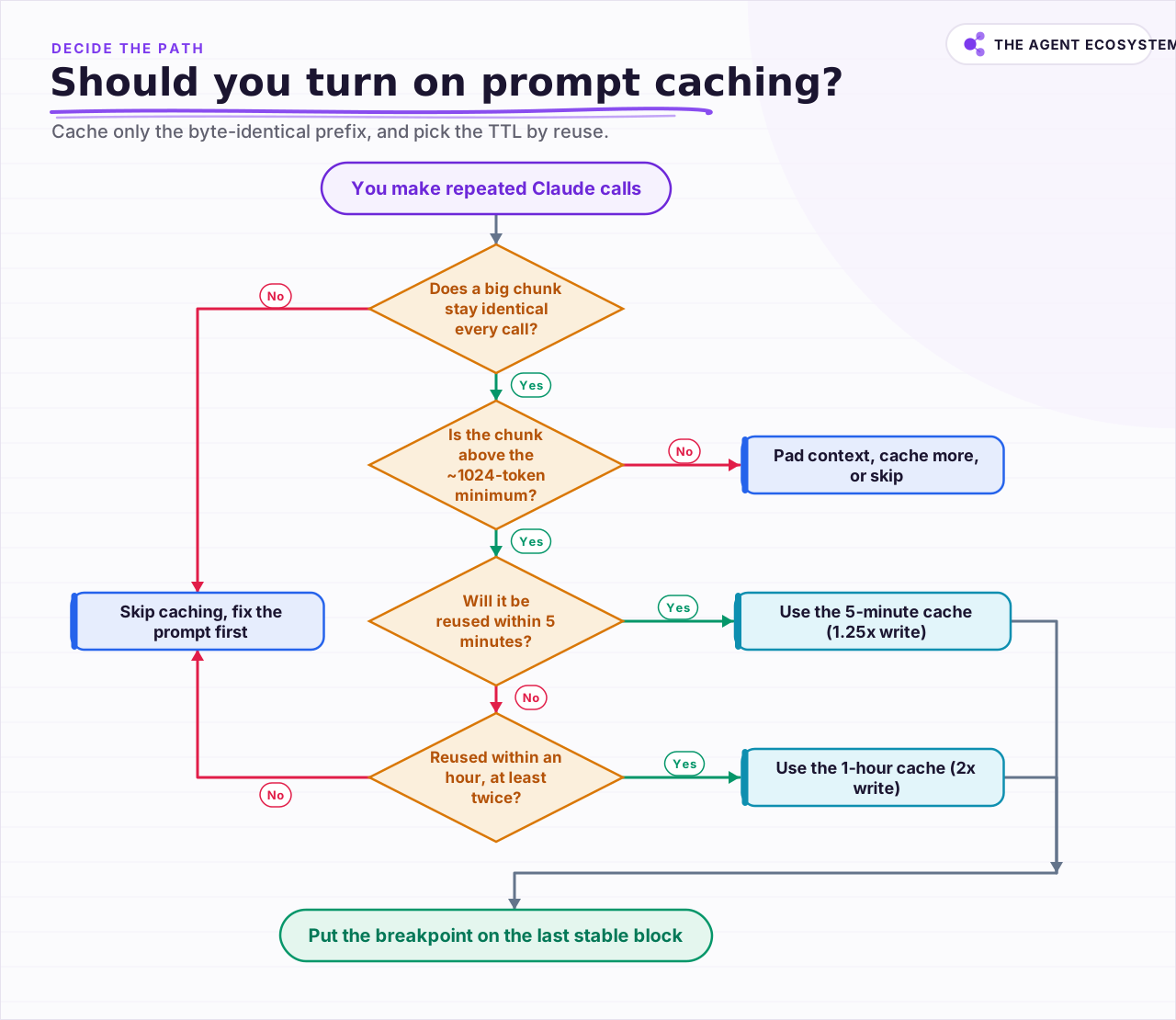 Cache only the byte-identical prefix, and pick the TTL by how often you reuse it.
Should you turn on prompt caching for this workload?#
Turn it on when a large block of your prompt stays byte-identical across calls and you reuse it inside the cache window. Skip it when the prompt changes every time or the stable part is tiny. The flowchart above walks the full decision; the short version is here.
- Cache it when you run repeated calls with a fixed system prompt and tool list (agent loops, chatbots, classifiers), or you pass the same long document into many questions (RAG, document Q&A).
- 5-minute cache for tight loops where calls land within a few minutes of each other; it refreshes free on every hit.
- 1-hour cache for scheduled or bursty work that reuses the same prefix but spaces calls out, as long as you will get at least two reuses.
- Skip caching when each prompt is largely unique, the stable prefix is under about 1,024 tokens, or you make one-off calls with no reuse.
Fix the prompt before you cache it. If your stable content is scattered or rewritten each run, caching cannot help until you pull the unchanging parts into one fixed prefix.
How does prompt caching land in an n8n agent loop?#
As of June 2026, n8n's standard Anthropic Chat Model node has no prompt-caching toggle, so you add cache_control yourself. The two paths that work today are an HTTP Request node that calls the Messages API directly, or a caching proxy that injects cache_control before the request reaches Anthropic.
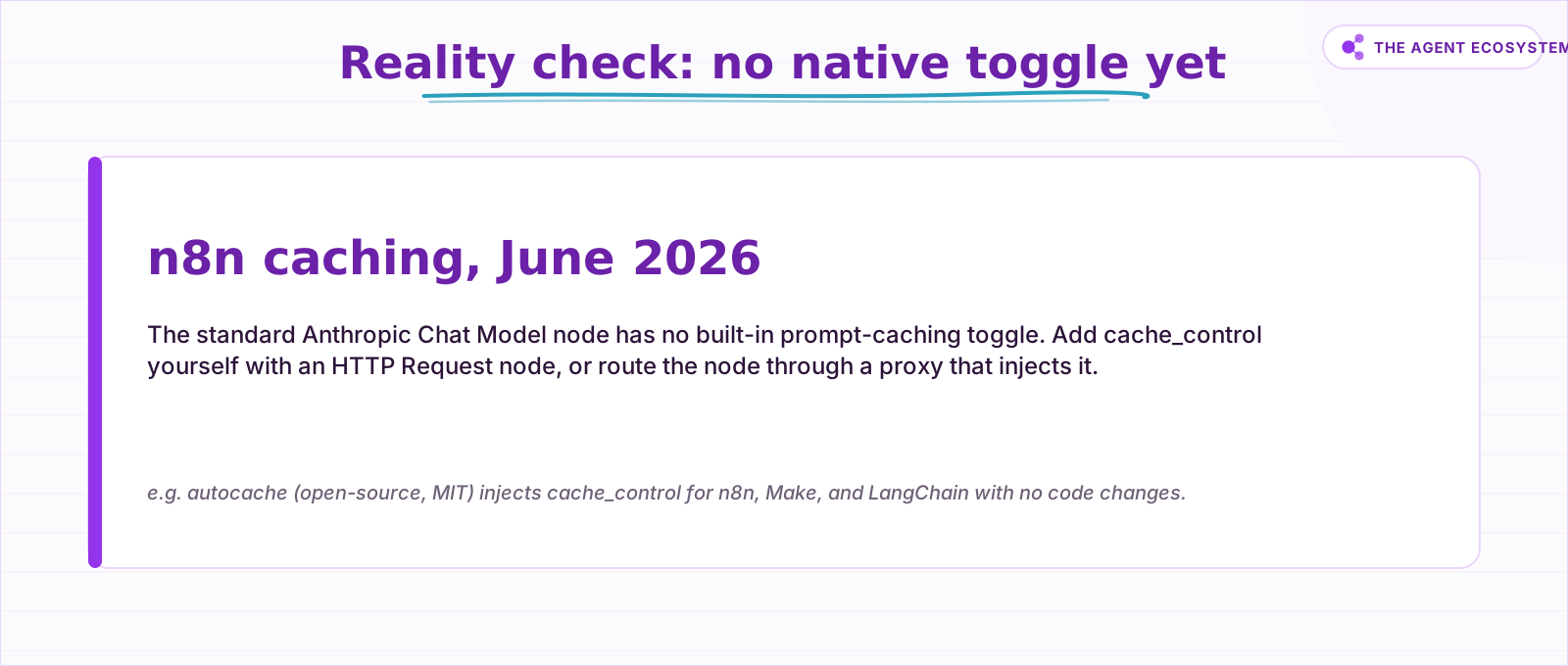 No native toggle in the standard agent node; the workarounds are what actually work today.
The convenient agent node hides the raw request, so there is nowhere to attach a cache_control marker. A community proposal to add an "Enable Prompt Caching" option to the Anthropic node was not merged into the standard node, so you are on workarounds. Two of them work well.
Path A, the HTTP Request node. Call the Messages API directly from an HTTP Request node and add cache_control to the blocks you want stored. Put the marker on the last stable block (tools and system) and keep the changing user message after it. This gives the most control and the most plumbing, because you rebuild the request body yourself.
Path B, a caching proxy. Point the node's base URL at a transparent proxy that injects cache_control before forwarding to Anthropic. The open-source autocache proxy (MIT) does this for n8n, Make, LangChain, and others with no node changes. You trade a little infrastructure for caching everywhere instead of editing each workflow.
Whichever path you pick, design the loop for hits. Keep the system prompt and tool list byte-identical across iterations, with no timestamps or per-run IDs inside the cached block, and keep iterations under five minutes apart so the default cache stays warm. Then read usage.cache_read_input_tokens from the response. If it is non-zero and growing, caching is working. If it stays at zero, your prefix is changing or is too short.
To cap spend on the variable side of these calls, the Claude API cost control guide covers token-budget guards, and Claude vs GPT vs Gemini in n8n agents helps you pick the model you then cache.
What should you set up this week?#
This week, turn one repeated Claude call into a cached one. Pick a workflow you already run often, find the block of the prompt that never changes, and put cache_control on it through an HTTP Request node or a proxy. Then prove the hit before you trust the savings.
Concretely: take an agent loop, a support classifier, or a document Q&A. Move every per-request variable after the stable prefix, run the workflow twice within five minutes, and read cache_read_input_tokens on the second call. If that number is non-zero, you are paying a tenth of the price for the same prompt, and you gave up nothing on quality to get there. Then roll the same pattern out to your other high-volume calls, starting with the ones that carry the biggest fixed prefix.
Frequently asked questions
Does prompt caching change the model's answer?
How much can prompt caching actually save?
What is the difference between the 5-minute and 1-hour cache?
Why is my n8n workflow not getting cache hits?
Can I cache tool definitions?
Sources
Primary references and vendor documentation used while drafting and reviewing this article.
Written by

Muhammad Qasim Hammad is an AI agent and automation expert and the founder of Cart Gaze LLC (cartgaze.com). He builds product for the love of it: when an idea lands, a working prototype is usually running within hours, built with the same AI agents and automations he sells. He puts his own output at roughly 20× what it was before agents, and the Agentic OS behind this site is the working proof, documented in public with the tools he actually ran and what they really cost.
AI & Automation Services
Want a pipeline like this running in your business?
I'm Qasim — I design and ship AI agents and n8n automations for solo operators and small teams. Tell me what's eating your team's week, and I'll scope a fix.
Related reading
5 Claude API Changes That Cut Agent Workflow Cost
Five recent Claude API updates can reduce wasted tokens and lower your bill in n8n agents and custom pipelines. Here is exactly what changed, why it matters, and what to test before changing production workflows.

Cut Your AI API Bill: 7 Levers That Actually Work
To reduce AI API costs you need levers that change the bill by a verifiable mechanism, not vague advice. This hub names all seven, right-size the model, prompt caching, the Batch API, routing and fallback, local versus API, token discipline, and RAG over long-context, with a
LLM Semantic Caching: Skip the Call, Not Just the Tokens
Prompt caching discounts repeated input tokens but still runs the model. A semantic cache embeds each query, searches past query-response pairs, and returns a stored answer on a close-enough match, skipping the call. Here is how it works, how it differs from prompt caching, and
Claude vs GPT vs Gemini in n8n: Tested Cost and Speed
There is a 25x cost spread between the cheapest and priciest LLM tier for the exact same n8n AI Agent workflow. This post prices all three providers across 11 model tiers so you can pick the right Chat Model sub-node and stop overpaying.
n8n AI Agent Pricing: What It Really Costs to Run
An n8n AI agent has two bills that behave nothing alike: a flat n8n platform fee and a per-run LLM token cost. Here is what each one comes to, with modeled per-run math across Claude, GPT, and Gemini, and the levers that actually lower the total.
LLM Batch API: When 50% Off Is Worth the Wait
The batch API is the same model and the same output at half the token price, as long as nobody is waiting on the response. Here is which jobs belong on batch, the reproducible cost math, how Anthropic and OpenAI differ, and the exact n8n submit-and-poll pattern.