Force Structured JSON Output from AI in n8n
Make your AI node return predictable fields instead of prose, every single time
AI-drafted, reviewed by Muhammad Qasim Hammad on June 16, 2026. See our AI disclosure.
Table of contents
- What is structured output, and why do you need it?
- How does the Structured Output Parser work in n8n?
- What does structured output cost?
- How do you define the schema?
- How do you build it in n8n, step by step?
- Do you always need structured output?
- Where can this go wrong?
- What should you set up this weekend?
Your n8n AI step just returned "Sure! Here is the information you asked for:" followed by a paragraph, and the Set node after it crashed because $json.amount is undefined. When your n8n AI agent returns text instead of JSON, attaching a schema to the generation you are already making fixes it, so every downstream node receives predictable fields instead of prose.
The symptom is familiar. You build a workflow, test it once, it works. Then the model adds a preamble. Or it italicises a field name. Or it returns a list instead of an object. The next node reads nothing useful, the workflow halts, and you spend an hour writing a regex you will have to rewrite the next time the model changes its mind.
Structured output removes that entire category of failure. Here is exactly how to set it up.
What is structured output, and why do you need it?#
Structured output forces the AI model to return a valid JSON object matching a schema you define, instead of whatever prose it feels like producing. Downstream nodes get named fields they can read directly, no parsing code required, and the workflow does not break when the model rephrases its answer on a Tuesday morning.
Every automation that feeds AI output into another node benefits from this. A Set node, an IF branch, an HTTP Request body, a Supabase insert: all of them need specific field names at specific paths. Free text satisfies none of those requirements. A JSON schema satisfies all of them, and the cost to add one is close to zero.
For solopreneurs running lean workflows on self-hosted n8n (which costs $0 in platform fees), the only bill is the model generation itself. Adding a schema does not change that bill in any meaningful way.
How does the Structured Output Parser work in n8n?#
The Structured Output Parser is a sub-node that attaches to a Basic LLM Chain or any AI Agent node via the output-parser connector. You define a schema once, and the parser validates every response against it. When the model returns malformed output, the built-in auto-fix makes a second attempt to reformat the response so it matches.
The wiring is simple: the sub-node sits below the parent chain or agent, connected at the output-parser slot. No extra credentials, no separate service. The schema travels with the prompt on the same API call.
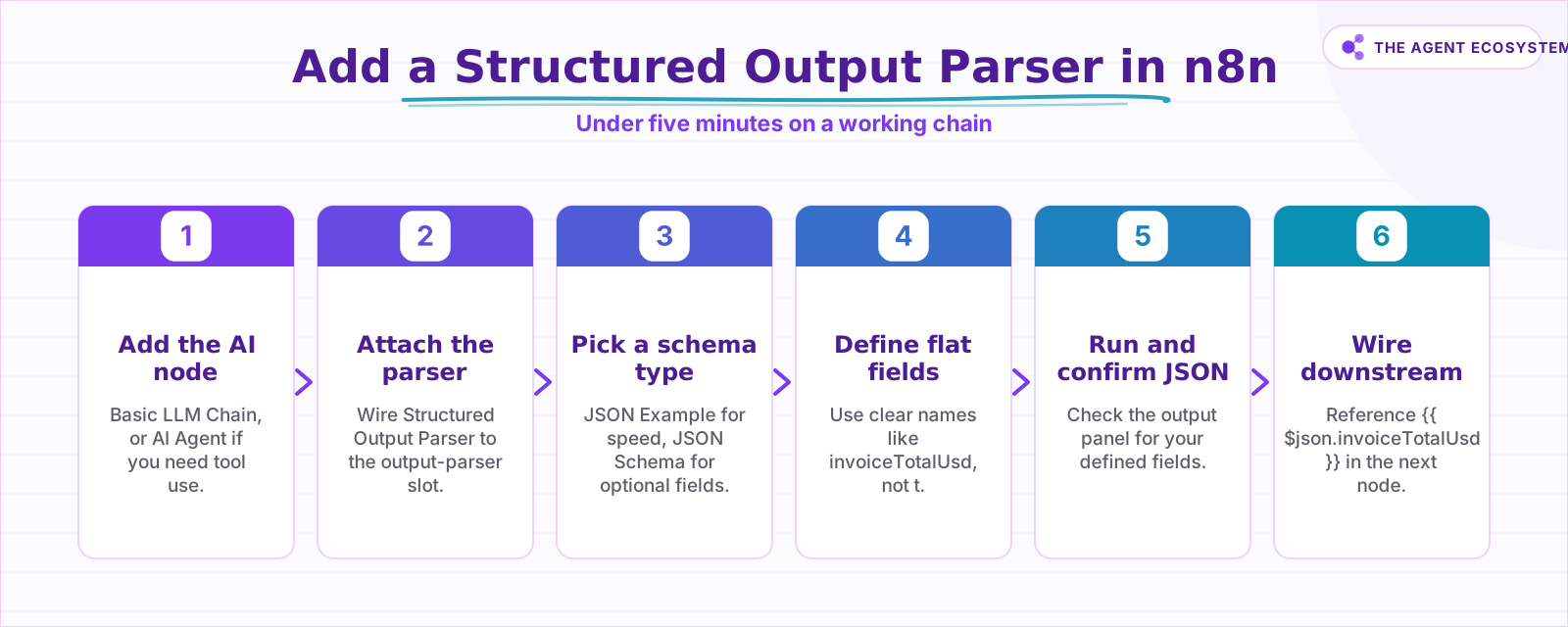 The full setup takes under five minutes on a working chain.
One detail worth knowing upfront: the auto-fix is useful, but each fix is an extra model round trip. A call that needs fixing costs roughly double. Keep schemas simple and you keep retries rare.
What does structured output cost?#
Adding a JSON schema is not a separate API call. It adds the schema definition to the input prompt of the generation you are already making. A typical schema adds roughly 300 input tokens per call. That is the entire marginal cost.
Here is what that looks like across Claude models (as of mid-2026, based on Anthropic's published pricing):
| Model | Input price per 1M tokens | Schema cost per 1,000 calls (0.3M input tokens) | Best for |
|---|---|---|---|
| Claude Haiku 4.5 | $1.00 | $0.30 | High-volume, simple schemas |
| Claude Sonnet 4.6 | $3.00 | $0.90 | Balanced quality and cost |
| Claude Opus 4.8 | $5.00 | $1.50 | Complex reasoning tasks |
These figures are the marginal cost of adding the schema, not the full generation cost. The full generation cost depends on your prompt length and expected output. The schema overhead is a rounding error on top of that.
The one real cost variable is the auto-fix retry. When the parser makes a second call to fix bad JSON, that one call costs roughly double. At $0.30 per 1,000 calls on Haiku 4.5, even doubling stays cheap, but a schema that fires the auto-fix on every call is a sign to simplify the schema rather than accept the overhead.
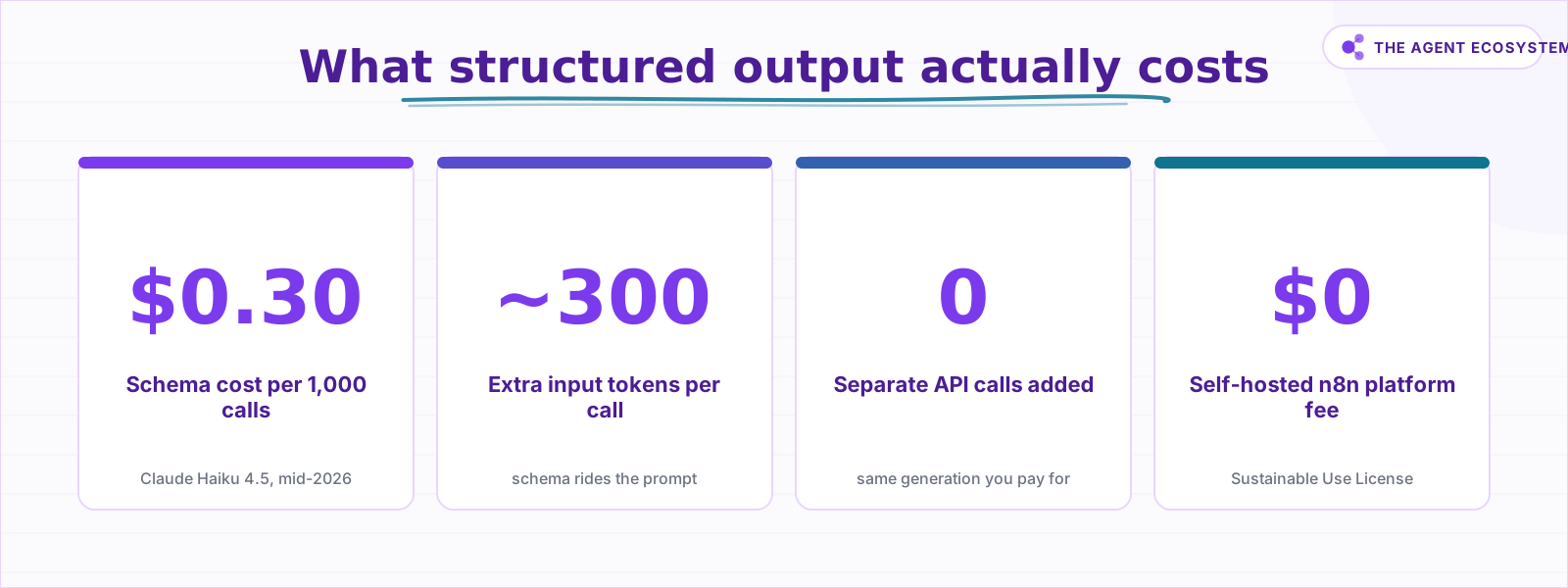 Schema overhead is a rounding error on most workflow budgets.
How do you define the schema?#
The Structured Output Parser offers two options in the Schema Type dropdown: Generate From JSON Example and Define using JSON Schema. The first infers the shape from a sample object you paste; the second lets you write the schema by hand for full control, including optional fields. Each suits a different situation.
Generate From JSON Example is the faster path. Paste one sample JSON object and n8n infers the schema from the property names and value types. The values themselves are ignored; only the structure matters.
Define using JSON Schema gives full control. You write the schema yourself using standard JSON Schema syntax. You can mark fields as optional, add description properties to guide the model, and set enum constraints. One limit: $ref references are not supported, so keep the schema self-contained.
A practical example. If you want to extract an invoice, a JSON Example schema might look like this:
{
  "invoiceNumber": "INV-001",
  "vendorName": "Acme Corp",
  "invoiceTotalUsd": 1200.00,
  "dueDate": "2026-07-01"
}
n8n infers that all four fields are required strings or numbers. If dueDate is sometimes absent in real invoices, switch to JSON Schema mode and mark it optional there.
Field names matter more than most tutorials mention. invoiceTotalUsd tells the model exactly what to put in that field. t does not. In JSON Schema mode, add a description to each field for the same reason: the description ends up in the prompt, and the model uses it.
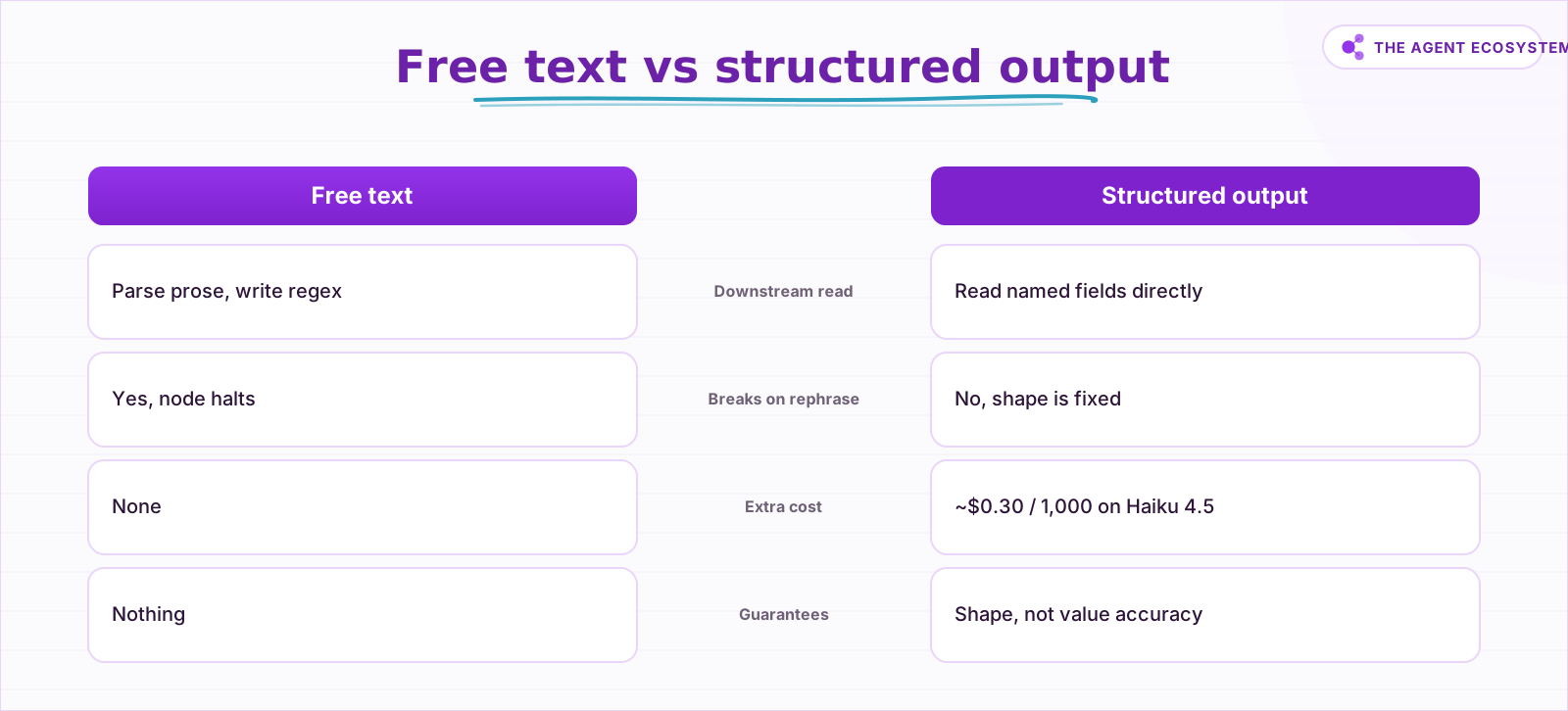 Structure is the cheaper reliability upgrade for any AI step.
How do you build it in n8n, step by step?#
Connect a Structured Output Parser sub-node to a Basic LLM Chain or AI Agent, define the schema, run the workflow, and wire the output fields into your downstream nodes. The whole setup takes under five minutes if you already have a working chain.
The steps below mirror the how-to setup:
- Open your workflow and add a Basic LLM Chain node (or AI Agent if you need tool use).
- Click the output-parser connector slot below the node and add a Structured Output Parser.
- In the parser's Schema Type dropdown, choose Generate From JSON Example or Define using JSON Schema.
- Paste your sample object or write your JSON Schema. Keep the schema flat: no deeply nested objects, no more fields than you actually need downstream.
- Run the workflow with a real input. Check the output panel to confirm a JSON object appears with your defined fields.
- In the next node, reference fields with expressions like
{{ $json.invoiceNumber }}. Because the shape is fixed, the expression works regardless of how the model words its response.
Do you always need structured output?#
Not every AI step needs a schema. If the next node is a plain Send Email or a Slack message where you paste the whole AI response in as the body, free text is fine. Structure is only necessary when a downstream node reads specific fields.
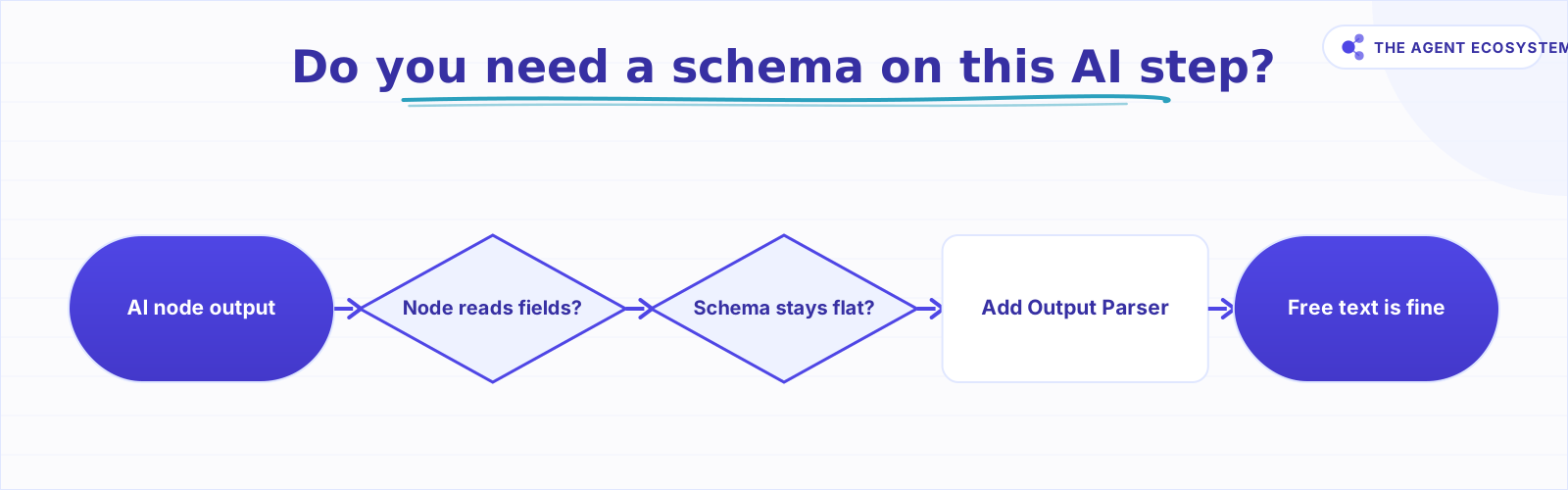 Run this decision before adding a schema to any AI step.
Where can this go wrong?#
The Structured Output Parser is reliable for simple, flat schemas, but it is not magic. It runs into trouble in four specific situations, and all of them trace back to either an over-complicated schema or trusting the output too much. Each is worth knowing before you ship a workflow to production.
Structure is not truth. The parser checks shape, not accuracy. A well-formed JSON object can still contain a hallucinated vendor name or a transposed invoice total. For anything that drives a payment, a notification, or a database write, add a downstream validation step.
Over-complex schemas fail more often. Deeply nested objects, dozens of required fields, and strict enum constraints all raise the chance the model produces output that needs auto-fixing or fails entirely. Flat schemas with five to eight fields are the sweet spot.
The mandatory-field trap. If you use Generate From JSON Example and a field is sometimes absent, the model is forced to invent a value for it. That invented value passes schema validation but is wrong. Use Define using JSON Schema and mark that field optional.
Schema drift. When you add a new field to the downstream node, update the schema too. A schema that no longer matches what your Set node or database insert expects will silently drop the new field or throw an expression error.
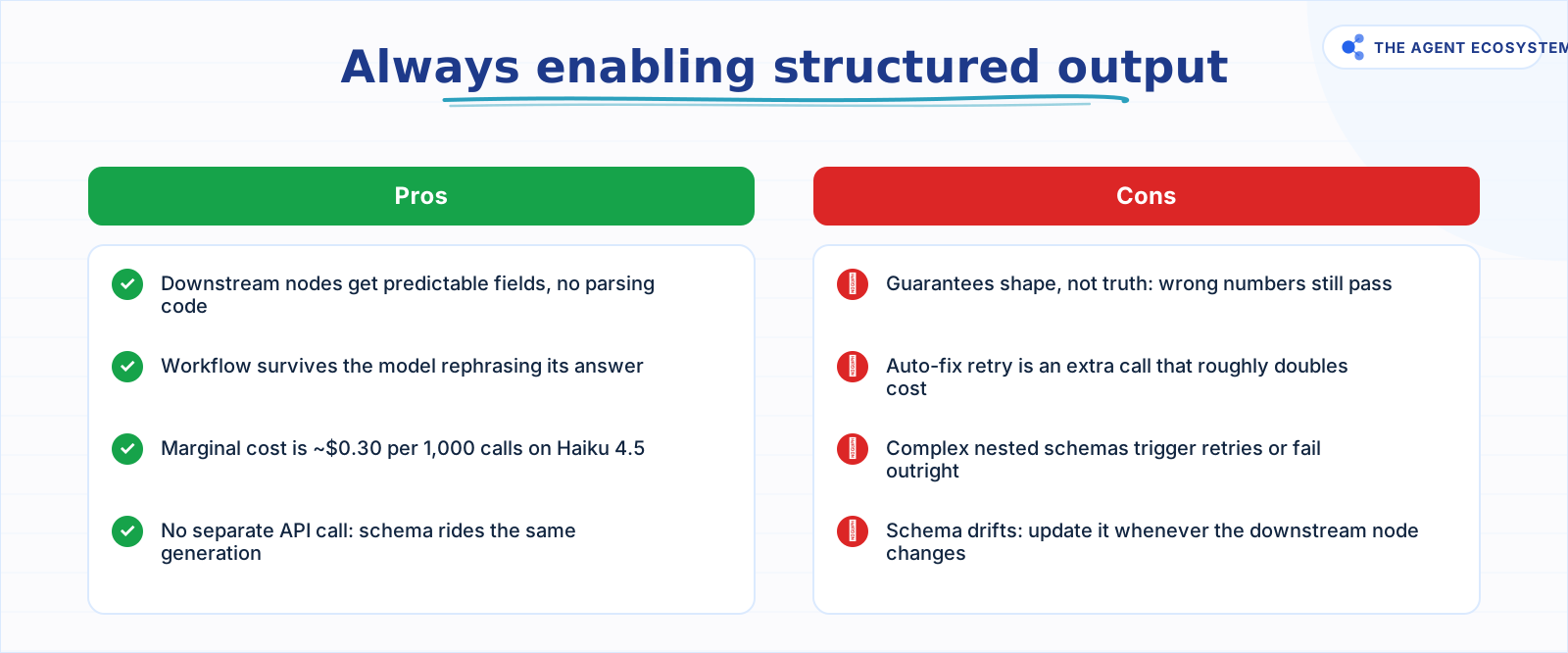 Enable it whenever a downstream node reads specific fields.
What should you set up this weekend?#
Pick one workflow where an AI step currently returns prose that you parse manually or that occasionally breaks a downstream node. Add a Structured Output Parser, define four to six flat fields, and wire those fields into the next node.
The cost on Claude Haiku 4.5 is around $0.30 per 1,000 calls for the schema overhead alone (as of mid-2026). On $0 self-hosted n8n, that is your entire incremental spend.
For a deeper look at pulling structured data from documents specifically, see the n8n AI document extraction workflow. If you are running an agent and want its final answer in JSON, n8n AI Agent tools covers forcing structure at the agent output layer. And if the model bill is a concern, Claude API cost control walks through capping generation spend across a whole workflow.
Start with one workflow. Get one clean JSON object. Then wire it into whatever node was previously broken.
Frequently asked questions
What is structured output in n8n?
Does structured output cost extra?
What is the difference between JSON Example and JSON Schema mode?
What does the auto-fixing parser do?
Can the model still return wrong values even with structured output?
Which nodes can use the Structured Output Parser?
Sources
Primary references and vendor documentation used while drafting and reviewing this article.
Written by

Muhammad Qasim Hammad is an AI agent and automation expert and the founder of Cart Gaze LLC (cartgaze.com). He builds product for the love of it: when an idea lands, a working prototype is usually running within hours, built with the same AI agents and automations he sells. He puts his own output at roughly 20× what it was before agents, and the Agentic OS behind this site is the working proof, documented in public with the tools he actually ran and what they really cost.
AI & Automation Services
Want a pipeline like this running in your business?
I'm Qasim — I design and ship AI agents and n8n automations for solo operators and small teams. Tell me what's eating your team's week, and I'll scope a fix.
Related reading
Turn an n8n Workflow Into an AI API: Webhook to Claude to JSON
Skip the Express server. An n8n AI API endpoint takes three nodes: a Webhook node receives the HTTP request, an AI node runs Claude, and a Respond to Webhook node returns clean JSON to the caller.

How to Use the Basic LLM Chain in n8n (Your First AI Step)
The n8n Basic LLM Chain is the simplest AI building block: one prompt in, one model response out, no tools, no memory, no loops. Wire it up in minutes and keep your token bill predictable at about $1.40 per 1,000 calls on Claude Haiku 4.5.
Build an AI Document-Extraction Agent in n8n (Invoices, Receipts & Emails)
Build an n8n AI document extraction agent that reads invoices, receipts, and emails, then writes clean structured data to a sheet. Uses Claude and the Information Extractor node. Costs $1.55 per 1,000 documents on Haiku 4.5.
Constrained Decoding Sounds Bulletproof. It Only Fixes the Shape.
Constrained decoding is the mechanism behind OpenAI's Structured Outputs and Anthropic's strict tool use: it compiles your JSON Schema into a grammar and masks invalid tokens before they can ever be sampled, so shape failures stop happening. What it cannot do is check that the
Read Images With AI in n8n: Claude Vision for Receipts and Screenshots
Set up n8n AI image analysis with Claude's Anthropic node to read receipts, screenshots, and forms. Get clean JSON fields back for $2.83 per 1,000 images on Haiku 4.5.
AI Agent Guardrails: Stop Your n8n Agent From Going Off the Rails
An AI agent is a language model with hands. Without guardrails it can follow a malicious instruction, leak data, loop until your bill spikes, or return output the next node cannot parse. This guide maps the five ways an n8n agent breaks to the exact control that stops each.