Give Your n8n AI Agent Tools (Calculator, HTTP, Workflows)
From chatbot to action-taker: wire real tools to your agent and let it fetch live data, call APIs, and run sub-workflows on demand.
AI-drafted, reviewed by Muhammad Qasim Hammad on June 15, 2026. See our AI disclosure.
Table of contents
- What Does It Mean to Give an AI Agent Tools?
- Which Tools Can You Attach in n8n?
- How Much Does an Agent with Tools Cost?
- How Does the Agent Decide Which Tool to Use?
- How Do You Build It in n8n, Step by Step?
- Add the AI Agent node
- Attach a Claude Chat Model
- Wire in your tools
- Write the descriptions
- Cap max iterations and test
- Should You Add This as a Tool? (A Decision Guide)
- Where Can This Go Wrong?
- What Should You Set Up This Weekend?
Your n8n AI Agent answers questions from training data alone, which means every answer could be months out of date. An n8n AI agent not calling tools can only guess from training data. Attaching them lets it call real functions (a live API, a calculation, a sub-workflow, your own document store) and act on current data instead.
That stale-data problem shows up as frustrated users, wrong answers, and an agent that can only chat. You end up patching prompts when the real fix is giving the agent the right functions to call.
What Does It Mean to Give an AI Agent Tools?#
A tool is a callable function, not a plugin or a prompt trick. The agent reads each tool's name and description, decides which to invoke, runs it, and feeds the result back into the model. This decide-call-read-repeat loop, documented in the n8n AI Agent reference, is what makes an agent different from a single LLM call.
Without tools, the model can only predict text. With tools, the same node can fetch a live stock price, submit a form, query your database, or fire off a Slack message, all in one agent run.
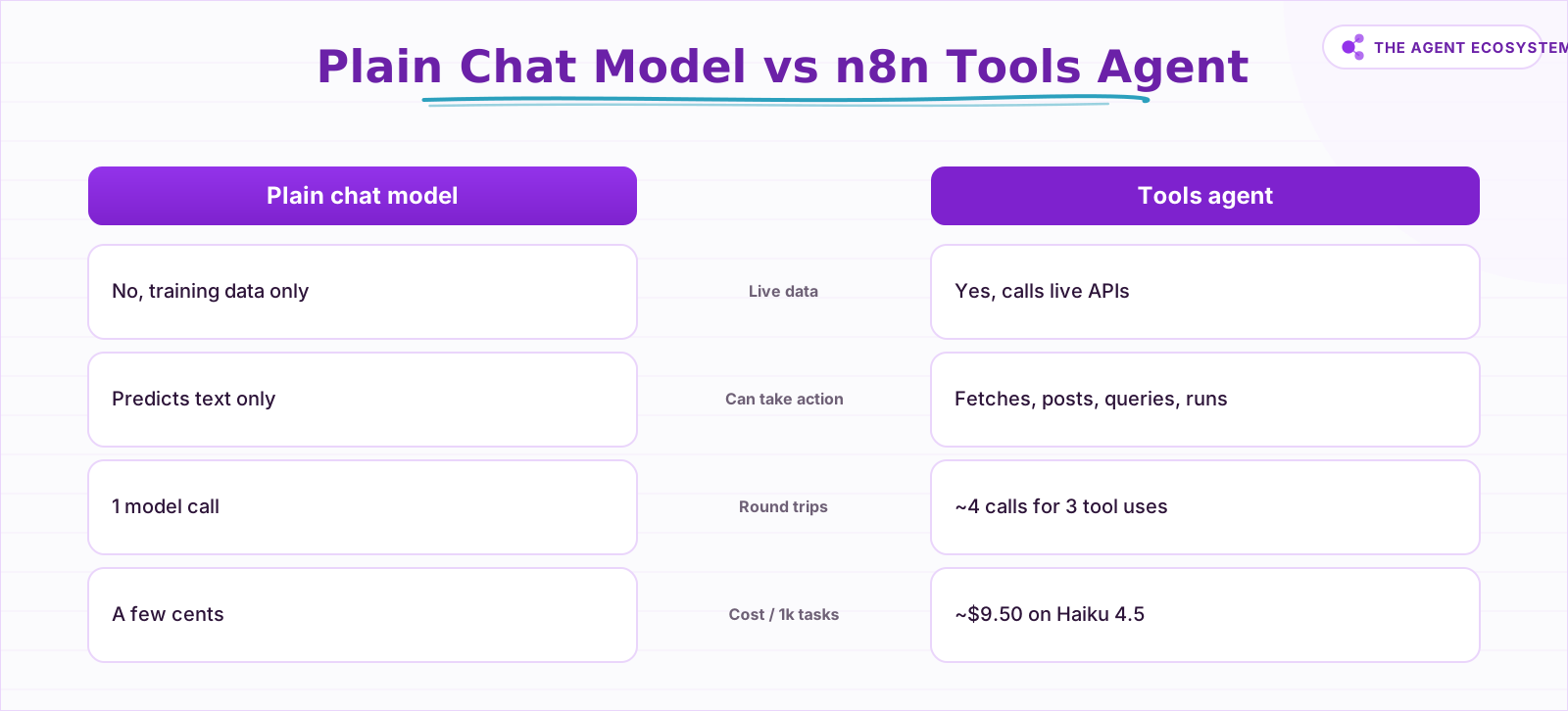 Adding tools changes what the agent can do and what it costs.
Which Tools Can You Attach in n8n?#
n8n's AI Agent node supports named tool sub-nodes you wire directly to its Tools connector. Each tool is a separate sub-node the agent can invoke during its loop, from a simple calculator to a whole sub-workflow. The n8n tools documentation lists the built-ins, and any HTTP or Code node can wrap a service that has no native tool.
Here is what each tool does in practice:
- HTTP Request Tool - calls any website or REST API. Use it to fetch live prices, hit your CRM, post to a webhook, or read a JSON feed.
- Custom Code Tool - runs a JavaScript or Python snippet the agent can call. Useful for data transformation or logic that does not fit a standard node.
- Call n8n Workflow Tool - wraps any existing n8n workflow as a callable function. Build a workflow once, reuse it as a tool across multiple agents. (Full reference for this sub-node.)
- Calculator - lets the agent do arithmetic reliably instead of asking the model to compute in its head (models are unreliable calculators).
- Wikipedia / SerpAPI - built-in tools for general knowledge lookups and web search.
- AI Agent Tool - lets one agent call another agent or sub-workflow, enabling multi-agent pipelines.
- Vector Store (retrieval mode) - set any Vector Store node to "Retrieve Documents (As Tool for AI Agent)" mode and it becomes a tool the agent can search on demand. That powers RAG-style customer support bots without hard-coding retrieval into every run. (See also: wiring a vector store for semantic search.)
The current default agent type in n8n is the Tools Agent, which is optimised for function calling. That is the one you want.
How Much Does an Agent with Tools Cost?#
More than you might expect. Each tool call is another full model round trip, and every round trip re-sends the system prompt, all tool definitions, and the conversation so far. A task that makes about 3 tool calls involves roughly 4 model round trips total.
Assuming approximately 6,500 input tokens and 600 output tokens across all round trips per task, here is what 1,000 agent runs costs in Claude tokens (as of June 2026, from the Anthropic pricing page):
| Model | Input $/1M tokens | Output $/1M tokens | Cost per 1,000 agent tasks | Best for |
|---|---|---|---|---|
| Claude Haiku 4.5 | $1.00 | $5.00 | $9.50 | Routing, triage, high-volume agents |
| Claude Sonnet 4.6 | $3.00 | $15.00 | $28.50 | Agents where reasoning must be reliable |
| Claude Opus 4.8 | $5.00 | $25.00 | $47.50 | Critical tasks, cost secondary |
The arithmetic: Haiku at $1.00 input and $5.00 output gives 6.5 x $1.00 + 0.6 x $5.00 = $9.50 per 1,000 tasks. That is several times the cost of a single classification or summarization call with the same model, purely because of the loop.
Running n8n self-hosted on a VPS (here is how to set that up for $0 in platform fees) keeps the platform cost at $0. n8n Cloud Starter is €20/month (n8n pricing page). The token cost is the variable you control most directly. Fewer tools, tighter descriptions, and lower max iterations all reduce it.
For a deeper look at controlling token spend on agentic workflows, see Claude API cost control for agent workflows.
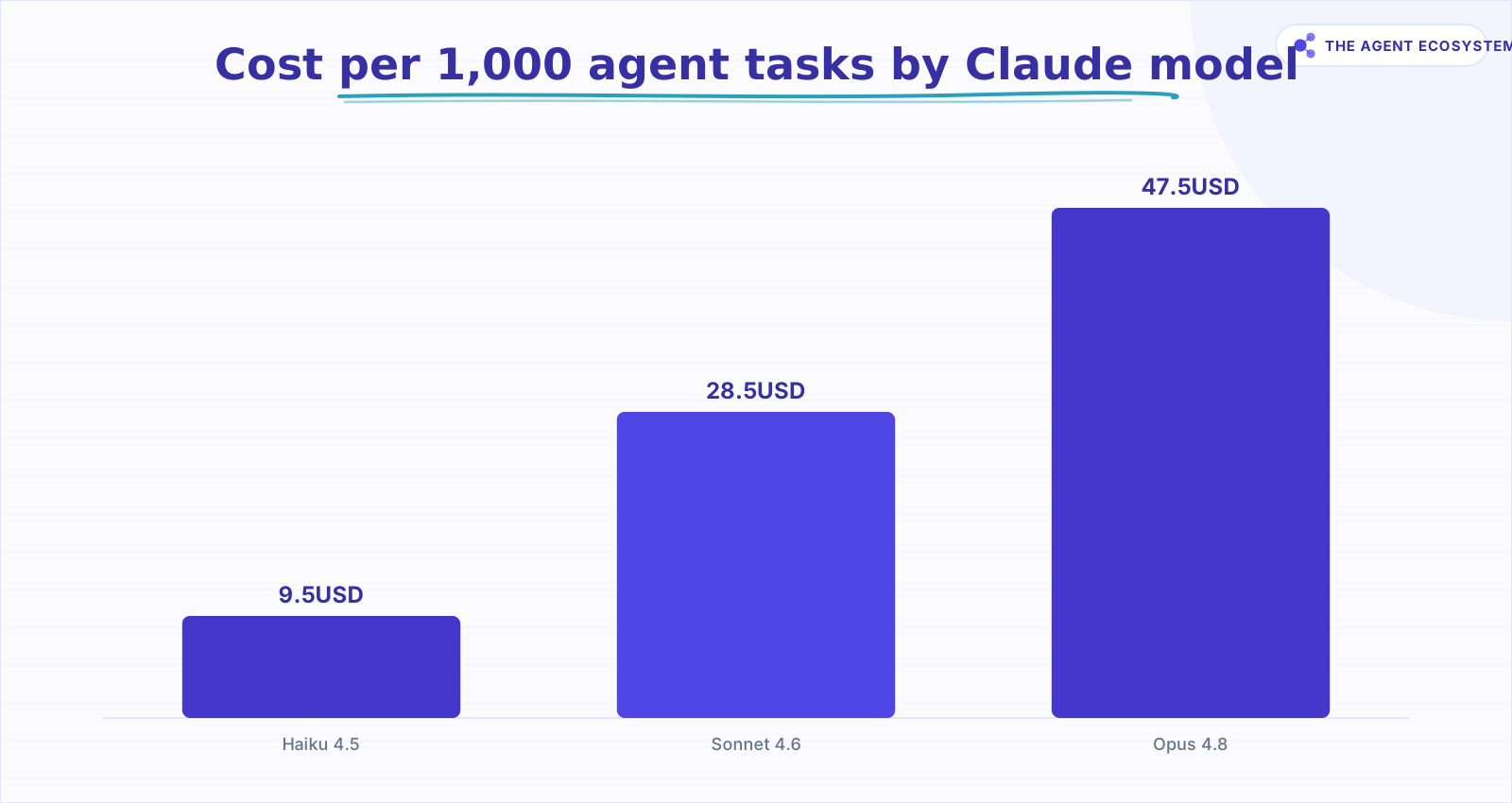 Same 3-tool loop, three models: token cost is the dial you control.
How Does the Agent Decide Which Tool to Use?#
The model reads each tool's name and description on every round trip and picks whichever best matches what the task needs next. The description field is not a label, it is a prompt. "HTTP Request" tells the model almost nothing; "Fetch the EUR/USD rate from open.er-api.com, passing the base currency as a string" tells it exactly when and how.
When agents repeatedly skip the right tool, the fix is almost always rewriting that tool's description, not changing the model. The model is doing its job; it just lacks enough information to choose correctly.
Keep the tool list to 3 to 5 tools per agent. If you need more capability, build a second agent and connect the two with the AI Agent Tool sub-node.
How Do You Build It in n8n, Step by Step?#
Open your n8n canvas, add an AI Agent node, wire a Chat Model sub-node to its Chat Model connector, then add your chosen tool sub-nodes to its Tools connector. That three-part structure (agent + model + tools) is the complete wiring. The agent does not start until all three are connected and configured.
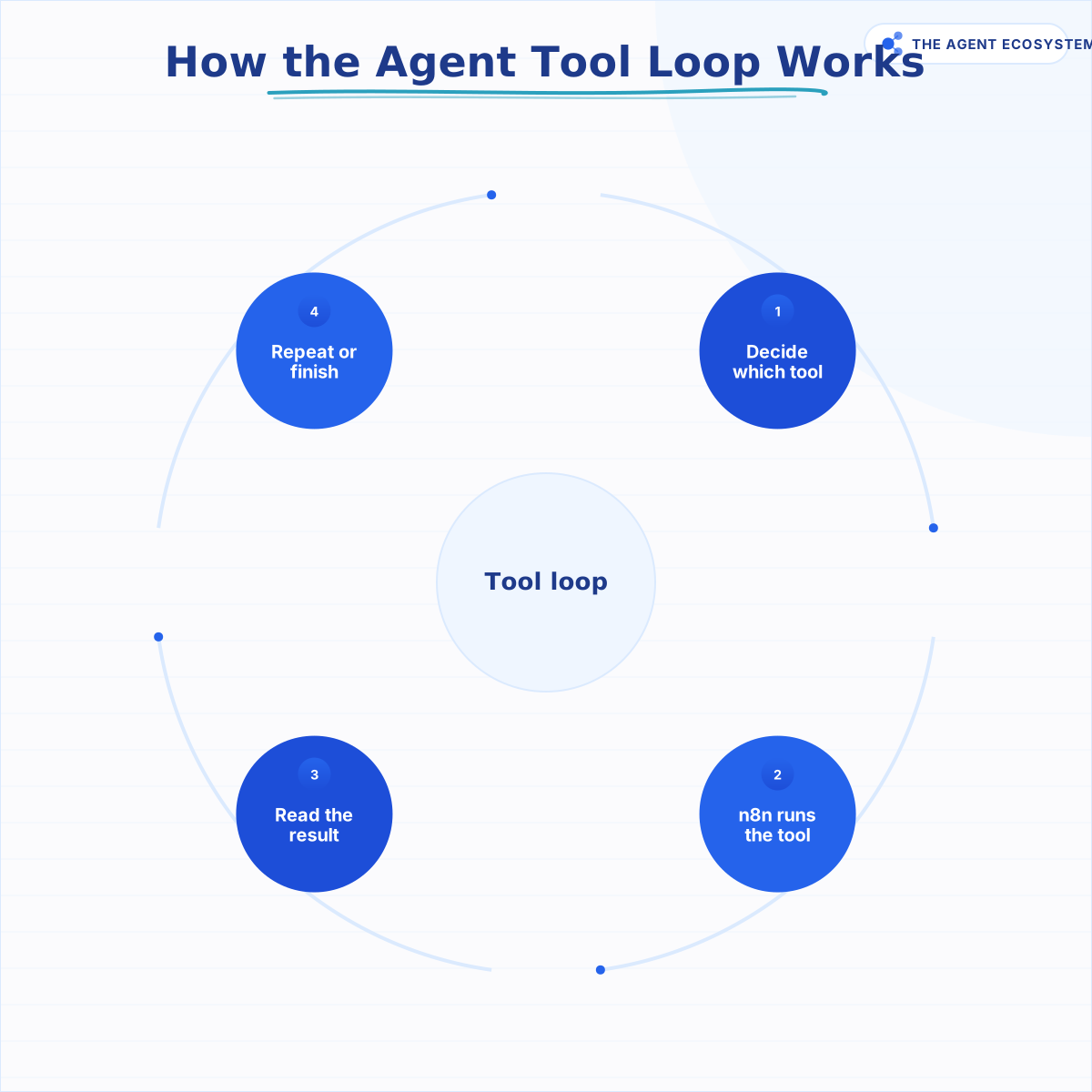 The decide-call-read-repeat loop separates an agent from a chatbot.
Add the AI Agent node#
Click the canvas plus button, search AI Agent, and drag it onto the canvas. In the node settings, confirm the agent type is set to Tools Agent (the current default).
Attach a Claude Chat Model#
Click the Chat Model connector, add an Anthropic Chat Model sub-node, and enter your Anthropic API key. Select claude-haiku-4-5 for volume agents or claude-sonnet-4-6 when the reasoning needs to be more reliable. (For a tested comparison of Claude models in n8n, see Claude vs GPT vs Gemini in n8n agents.)
Wire in your tools#
Click the Tools connector. Add one sub-node per function:
- HTTP Request Tool - set the method, URL, and any auth headers in the sub-node. The agent will call this when its description matches the task.
- Calculator - no configuration needed. Add it and the agent can do arithmetic reliably.
- Call n8n Workflow Tool - pick the target workflow from the dropdown. This turns any existing automation into a callable function.
Write the descriptions#
In each tool sub-node, fill the Description field with a plain-English sentence. Be specific about when to call it and what to pass. Vague descriptions are the single most common cause of agents picking the wrong tool.
Cap max iterations and test#
In the AI Agent node settings, set Max Iterations (5 to 10 is a safe starting range). Then send a real test query and open the execution log. Watch which tools the agent called and in what order. If it misses a tool, rewrite that tool's description.
Should You Add This as a Tool? (A Decision Guide)#
Before wiring a new capability as a tool, ask two questions. First: should the model choose when to invoke this, or should it always run? If it always runs, it belongs in a fixed workflow step, not a tool. Second: if the model calls this at the wrong time, what breaks?
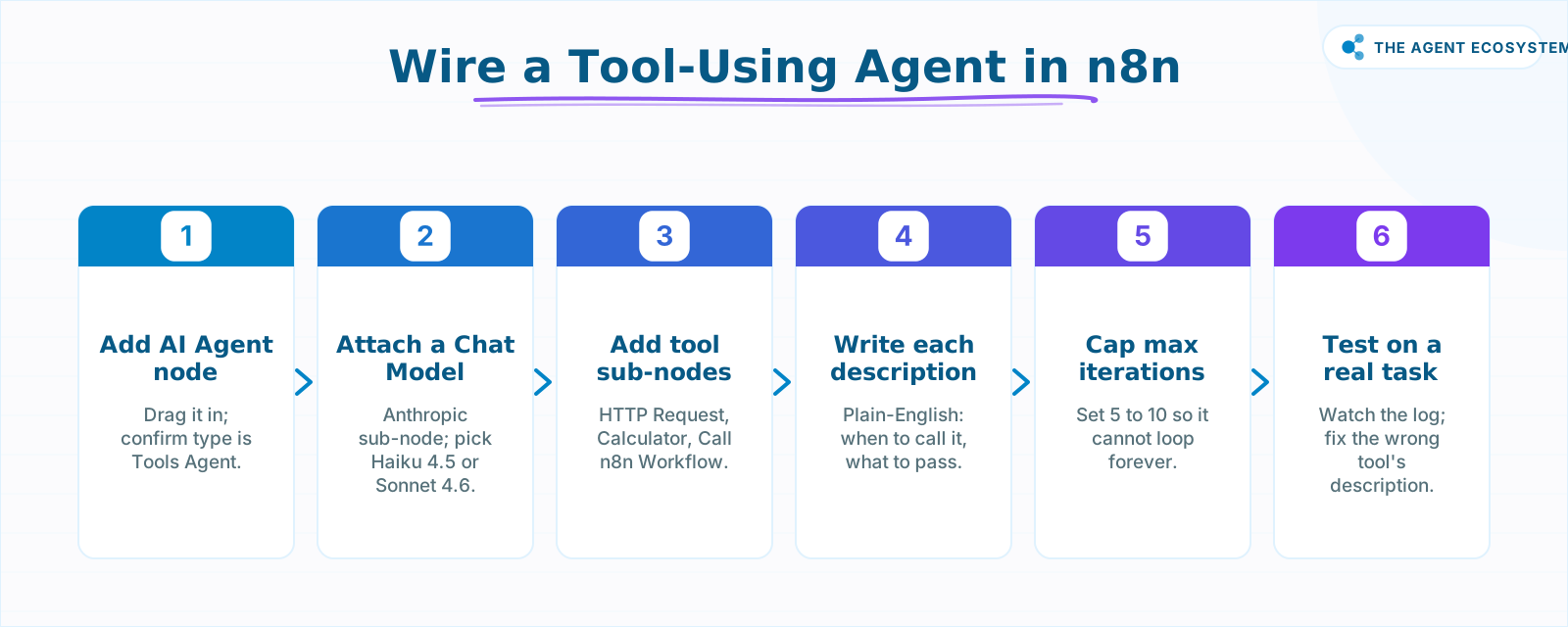 The minimum wiring to get a tool-using agent running.
The decision tree above is the fastest gut-check. Anything involving sending messages, moving money, or deleting records belongs behind a human approval gate. For a full walkthrough of gating agent actions, see n8n AI human approval workflows.
Where Can This Go Wrong?#
Most agent failures are configuration failures, not model failures. The model is usually doing its job; the problem is how you set up the tools, the descriptions, and the loop. Four patterns cause the overwhelming majority of broken agents, and each has a fix you control. Here are the four that come up most often:
Too many tools. The model picks worse as the list grows. Each tool definition adds tokens to every round trip and introduces ambiguity. If your agent has more than 5 tools, split it into two agents.
Vague tool descriptions. A description like "calls the API" causes the agent to skip the tool or call it at the wrong time. Rewrite it with the exact trigger condition and the expected input format.
Runaway loops. A confused agent can loop many times, spending tokens on each pass. Always set a Max Iterations cap and track execution counts in your n8n logs.
Tools that fail silently. APIs time out; HTTP endpoints return 500s; workflows break. An agent that receives an error must handle it gracefully. Add error-handling logic to each tool sub-workflow and test what happens when the tool returns nothing useful.
High-stakes tools without gates. An agent that can send email or post to Slack autonomously will eventually do it at the wrong time. Keep those tools behind a human-in-the-loop approval. The n8n memory guide covers how to give the agent context across turns so it does not re-attempt a failed action on the next message.
What Should You Set Up This Weekend?#
Start with one tool, not five. Pick the capability your current agent most obviously lacks, probably live data via the HTTP Request Tool or reusable logic via the Call n8n Workflow Tool, and wire just that one. Write a specific description, cap iterations at 5, and run ten real test queries before adding anything else.
Once that single tool works reliably, add a second. After two tools are solid, you have a working pattern you can repeat. That is faster and cheaper than building a 10-tool agent that misfires unpredictably because several of its tool descriptions are ambiguous and you cannot tell which ones.
Check your execution logs after the first real-world day. If the agent is calling a tool zero times or every single time regardless of input, the description needs rewriting. Fix the description before assuming the model is wrong.
Frequently asked questions
What is a tool in an n8n AI agent?
Which tools can an n8n agent use?
How much more does a tool-using agent cost than a single LLM call?
How does the agent choose which tool to call?
Can an n8n agent call another workflow or another agent?
Which Claude model should I run an agent on?
Sources
Primary references and vendor documentation used while drafting and reviewing this article.
- n8n AI Agent node: Chat Model, Tools, Memory, iterative loop, Tools Agent default
- n8n tools documentation: HTTP Request Tool, Custom Code Tool, Call n8n Workflow Tool, Calculator, Wikipedia, SerpAPI
- n8n Call n8n Workflow Tool sub-node reference
- Anthropic Claude pricing: Haiku 4.5 $1/$5, Sonnet 4.6 $3/$15, Opus 4.8 $5/$25 per million tokens
- n8n Cloud pricing: Starter plan at EUR 20/month
- n8n fair-code sustainable use license: self-hosting is free
Written by

Muhammad Qasim Hammad is an AI agent and automation expert and the founder of Cart Gaze LLC (cartgaze.com). He builds product for the love of it: when an idea lands, a working prototype is usually running within hours, built with the same AI agents and automations he sells. He puts his own output at roughly 20× what it was before agents, and the Agentic OS behind this site is the working proof, documented in public with the tools he actually ran and what they really cost.
AI & Automation Services
Want a pipeline like this running in your business?
I'm Qasim — I design and ship AI agents and n8n automations for solo operators and small teams. Tell me what's eating your team's week, and I'll scope a fix.
Related reading
n8n AI Agent vs Chain: Which Should You Use? (2026)
Every n8n builder reaches for the AI Agent by reflex, but a Basic LLM Chain costs roughly 5x less per 1,000 runs on Haiku 4.5. Learn the one mechanical rule that decides which node to use.

How to Build an AI Agent: The 80% That Survives Week Two
Most tutorials get you a working agent in ten minutes and skip what breaks it in week two. Sixteen lessons covering the loop, tool descriptions, memory, fallbacks, guardrails, evaluation, and the cost levers that decide your bill.
What Is an AI Agent? A Plain-English Guide for Builders
An AI agent is a language model running in a loop that decides its own next action, not a chatbot and not a chain. Here is how the perceive-decide-act-observe loop works, how an agent differs from a chatbot, chain, and workflow, and a checklist for when you actually need one.
n8n AI Automation Ideas: 8 Agent Workflows Worth Building (2026)
Finished the n8n AI tutorial and wondering what to actually build? These 8 n8n AI automation ideas come with the exact nodes, the honest Chain-vs-Agent call, and the right Claude model for each job.
n8n Multi-Agent Orchestration: One Orchestrator, Many Sub-Agents (2026)
Your single n8n AI Agent has 10+ tools and keeps picking the wrong one. n8n multi-agent orchestration fixes this: one coordinator routes each job to a small, specialized sub-agent on the right model.
n8n AI Agent Pricing: What It Really Costs to Run
An n8n AI agent has two bills that behave nothing alike: a flat n8n platform fee and a per-run LLM token cost. Here is what each one comes to, with modeled per-run math across Claude, GPT, and Gemini, and the levers that actually lower the total.