Add Human Approval to an n8n AI Agent (Send and Wait)
Gate irreversible agent actions before they fire, for $0 in extra tokens
AI-drafted, reviewed by Muhammad Qasim Hammad on June 20, 2026. See our AI disclosure.
Table of contents
Your n8n AI agent can now send emails, issue refunds, and delete records without you touching a thing. Adding an n8n human approval step pauses the workflow and waits for a person to approve before the agent fires the irreversible action. That single checkpoint is the difference between a capable agent and a safe one.
The problem is probability. A model is right most of the time, which means it is wrong some of the time. For read-only lookups that is fine. For an email to 2,000 customers, a refund that hits a payment processor, or a record deletion, "some of the time" is not acceptable. Every wrong action in that category either costs real money or cannot be undone at all.
Why does an AI agent need a human approval step?#
AI agents are probabilistic, not deterministic. They get it right most of the time, but they will occasionally misread context, hallucinate a parameter, or pick the wrong tool. A human approval gate catches those rare wrong calls before they cause damage you cannot undo. The gate is a checkpoint, not a fix for the model.
When I wired up a Slack approval for a customer-email agent, the value became clear immediately. The agent was right almost every time. But "almost" vanishes the moment a mis-sent campaign goes out. One click to approve takes a moment. One mis-sent email can take hours to fix, if it can be fixed at all.
The gating logic is simple: irreversible or external actions need a checkpoint. Everything else can run freely.
How does Send and Wait for Response work in n8n?#
The Send and Wait for Response operation pauses workflow execution, sends a message to a chosen channel, and resumes only when a person responds. As of mid-2026, it works with Slack, Gmail, Microsoft Teams, Telegram, Discord, WhatsApp, and the Chat node. It supports three response types: Approval, Free Text, and Custom Form.
For most agent safety gates, Approval is the right choice. It renders inline buttons in the message. Under Approval Options, choose Approve and Disapprove so a reviewer can reject with one click rather than ignoring the message.
n8n also documents a specific human-in-the-loop path for AI tool calls. When the agent wants to call a tool, the workflow pauses and sends a message showing exactly which tool it wants to use and with what parameters. The approver sees the proposed action in full before deciding, which is what makes the checkpoint meaningful rather than a blind rubber-stamp.
For lower-stakes pauses, the Wait node is the general mechanism. It can pause for a set time, wait for a webhook, or wait for a form submission. Send and Wait for Response is the streamlined version built specifically for human approval flows.
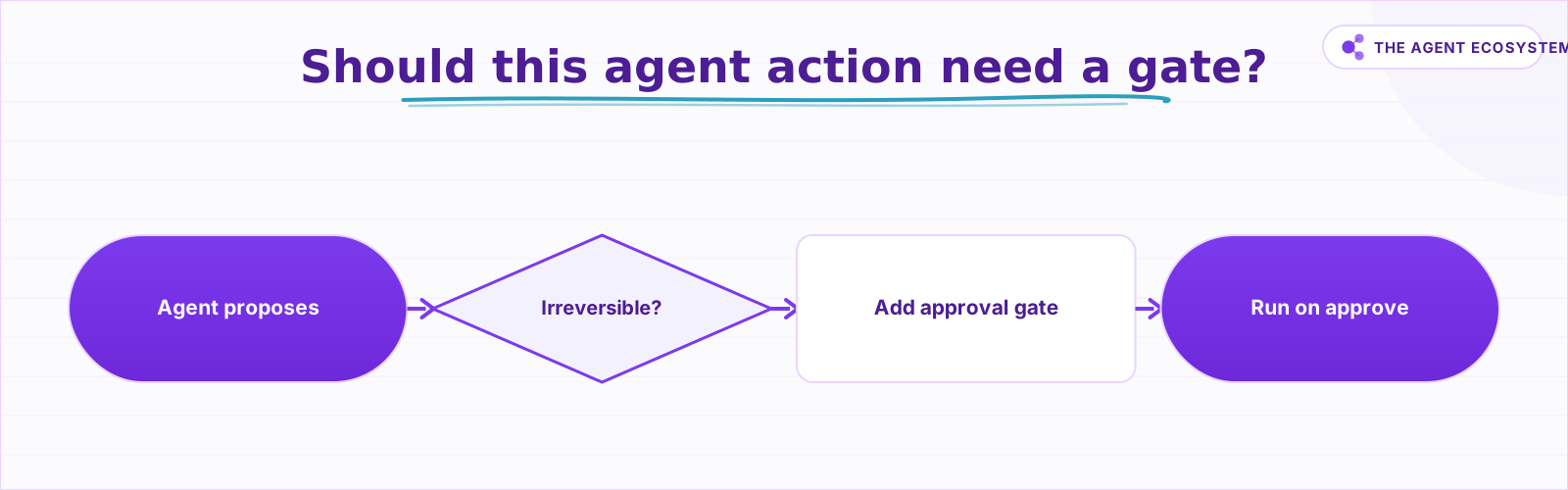 The rule: gate irreversible or external actions, run read-only steps freely.
Which actions should you gate?#
Gate any action that is irreversible or touches something external to your own systems. Read-only lookups, draft saves, and internal log entries can run without a gate. Customer-facing sends, financial transactions, and permanent deletions always need one. The test is simple: ask whether undoing it would require contacting someone or reversing a transaction.
The table below is the decision rule I use. It covers the categories that matter most for a solopreneur running an AI agent.
| Action type | Example | Gate it? |
|---|---|---|
| Read-only | Look up an order, fetch customer data | No |
| Reversible write | Save a draft, create a record you can edit | Usually no |
| Internal notify | Post to a private team channel | Depends on audience |
| Irreversible or external | Email customers, issue a refund, delete a record, post publicly | Always |
The rule behind the table: if the action can be undone in under a minute with no external consequence, skip the gate. If undoing it requires contacting a customer, reversing a transaction, or explaining a public mistake, add the gate.
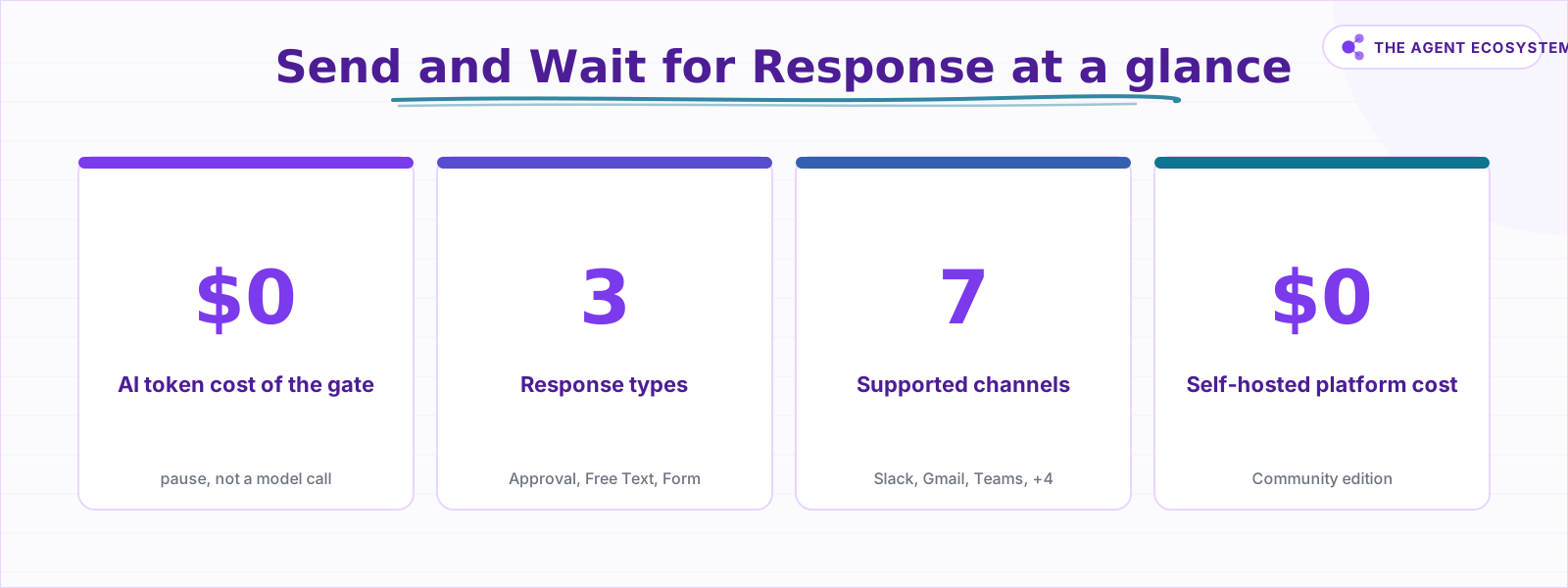 The approval gate adds zero token cost to your agent workflow.
What does a human approval gate cost?#
The gate costs $0 in AI tokens. It is a pause in the workflow, not a model call. No prompt is sent to Claude, GPT, or any other model while the workflow waits for a human. The only costs are latency (the workflow waits until someone responds) and human attention (a few seconds to read and click).
Weigh those against the blast radius of the action you are gating. A mis-sent email campaign can take hours to address and may be impossible to fully retract. A wrong refund hits a payment processor immediately. A deleted record may be gone permanently. A few seconds of human attention is trivially cheap next to any of those outcomes.
For platform costs: n8n self-hosted (Community edition) is $0 under n8n's fair-code sustainable-use license. n8n Cloud Starter is 20 euros per month as of mid-2026. The approval gate adds nothing to either figure.
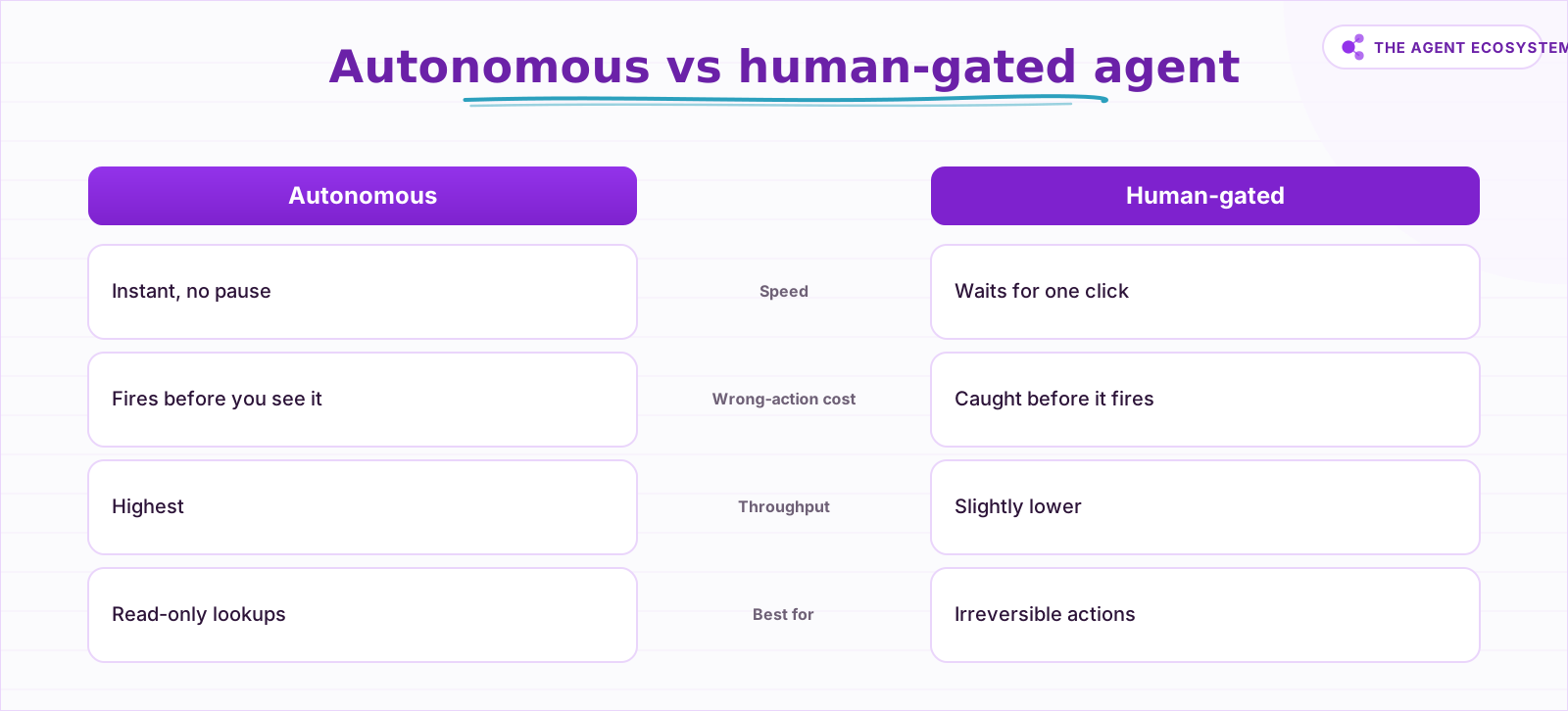 Gating trades a small speed cost for a large drop in irreversible-action risk.
How do you build it in n8n, step by step?#
The build has four connected pieces: the agent or action chain, the Send and Wait for Response node, an IF branch on the response, and the gated action on the approved path only. Place the gate before the irreversible node, never after it.
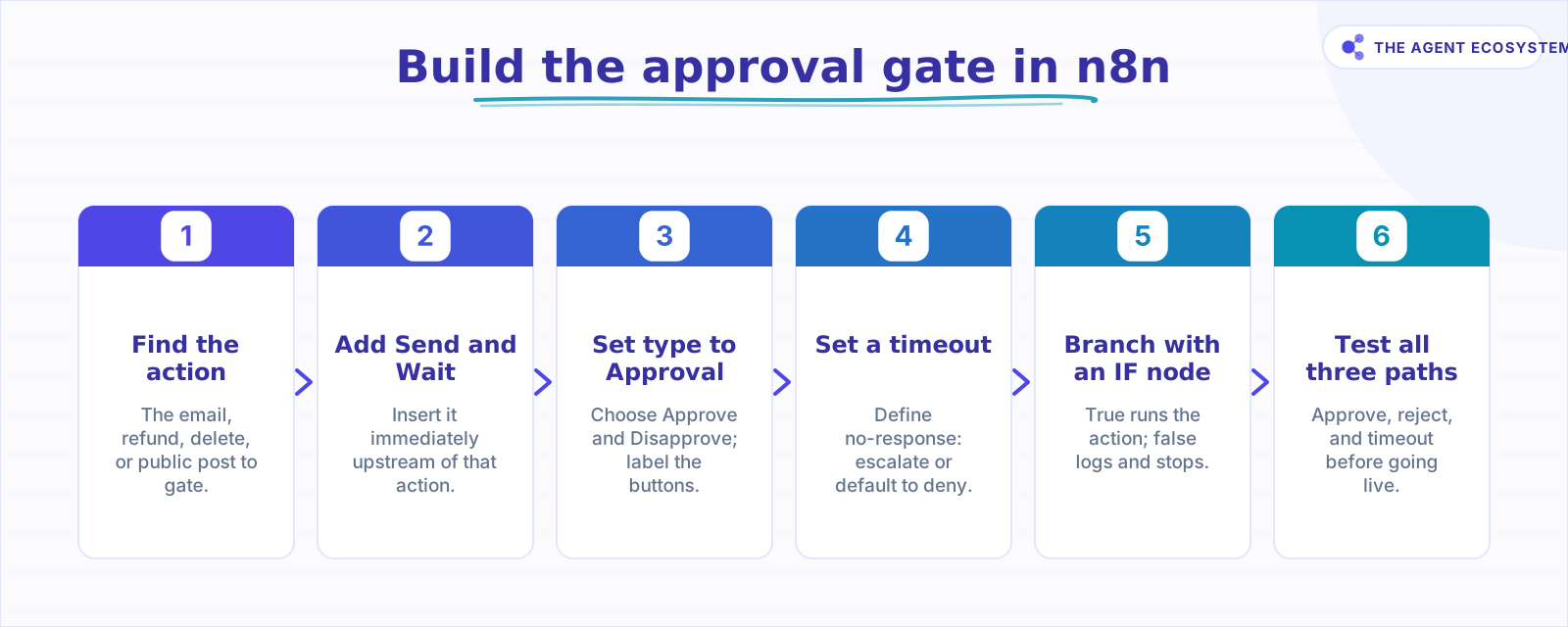 Four nodes, one checkpoint placed before the irreversible action.
Here is the exact node wiring:
- Identify the irreversible action node in your agent workflow. That is the target.
- Insert a Send and Wait for Response node immediately before it. Connect it to your Slack workspace (or Gmail, Teams, Telegram, or Discord).
- Set Response Type to Approval. Under Approval Options, choose Approve and Disapprove. Edit the button labels so the approver knows exactly what they are approving (for example, "Send campaign email" and "Cancel").
- Set a timeout on the wait. Decide what happens if no one responds: escalate to a second reviewer, or default to deny. No timeout means a stuck workflow.
- Connect an IF node after Send and Wait. Condition: the response value equals "approved". The true branch runs the irreversible action. The false branch logs the rejection or stops.
- Test all three paths: approve, reject, and timeout. Confirm each branch behaves exactly as intended before running the agent on live data.
For AI tool-call gates specifically, n8n's human-in-the-loop feature surfaces the tool name and parameters in the approval message automatically. You do not need to format that message yourself; the platform handles it.
Where can this go wrong?#
Five failure modes come up repeatedly, and the most common is gating too much. If every agent step requires approval, you have rebuilt a manual process and lost the entire throughput benefit that made automation worth it. Gate only the irreversible, external, high-blast-radius actions, and let everything else run untouched.
The second failure mode is no timeout. If the approver is on holiday, in a meeting, or simply misses the message, the workflow waits forever. Set a timeout and decide what happens on no-response before you deploy. Pair it with an error workflow that alerts you so a stuck or failed run never sits unnoticed.
Third: approver fatigue. High approval volume trains people to click without reading. Keep the volume low by gating only the actions that truly warrant it.
Fourth: placing the gate after the action. This sounds obvious, but it happens when someone adds an "approval notification" as an afterthought. An approval that fires after the email has already sent is not a gate. It is a post-mortem.
Fifth: the wrong channel. An approval request sent to an email inbox nobody checks is not a real checkpoint. Use the channel the approver sees first, in most cases Slack.
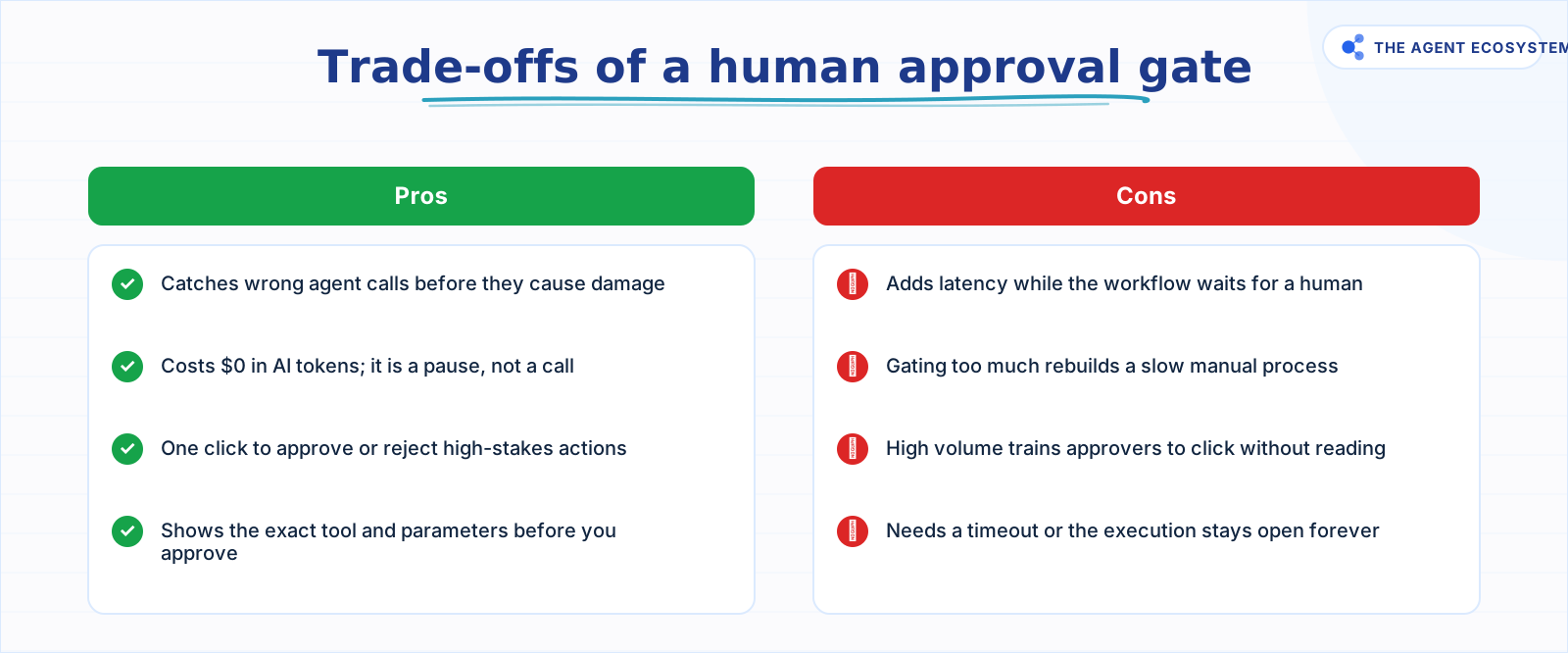 Gate only irreversible actions to keep the pros without the throughput cost.
What should you set up this weekend?#
Pick one agent workflow you are running right now that touches an external system, whether that is sending emails, creating invoices, or posting to a customer channel. Add a Send and Wait for Response node before that action, set it to Approval with Approve and Disapprove, route it to Slack, and add a timeout.
That single change takes under 30 minutes to wire and test. It costs $0 in tokens. And it means the next time the agent misreads context, you catch it before it matters.
From there, look at your AI agent tools and apply the same decision rule to every tool call that touches something external. If you are running a lead generation agent, gate the outbound email step. If you have a RAG customer support bot, gate any auto-reply that goes to a real customer. The pattern is always the same: find the irreversible action, put the gate in front of it, and let everything else run.
For platform costs and self-hosting, see the self-host n8n on a VPS guide. Running n8n free on your own server means the approval gate adds literally zero to your monthly bill.
Frequently asked questions
What is human-in-the-loop in n8n?
How does Send and Wait for Response work in n8n?
Does a human approval step cost extra tokens?
Which AI agent actions should I gate?
What happens if no one approves the request?
Can the agent show me which tool it wants to use before I approve?
Is n8n free to self-host?
Sources
Primary references and vendor documentation used while drafting and reviewing this article.
Written by

Muhammad Qasim Hammad is an AI agent and automation expert and the founder of Cart Gaze LLC (cartgaze.com). He builds product for the love of it: when an idea lands, a working prototype is usually running within hours, built with the same AI agents and automations he sells. He puts his own output at roughly 20× what it was before agents, and the Agentic OS behind this site is the working proof, documented in public with the tools he actually ran and what they really cost.
AI & Automation Services
Want a pipeline like this running in your business?
I'm Qasim — I design and ship AI agents and n8n automations for solo operators and small teams. Tell me what's eating your team's week, and I'll scope a fix.
Related reading
AI Agent Guardrails: Stop Your n8n Agent From Going Off the Rails
An AI agent is a language model with hands. Without guardrails it can follow a malicious instruction, leak data, loop until your bill spikes, or return output the next node cannot parse. This guide maps the five ways an n8n agent breaks to the exact control that stops each.

Stop Prompt Injection in n8n AI Agents: Practical Defenses
Your n8n agent reads emails, scraped pages, and RAG chunks nobody on your side wrote, and a planted instruction can hijack it. Here is the layered prompt injection defense, mapped to OWASP LLM01 and to nodes you can actually toggle.
What Is an AI Agent? A Plain-English Guide for Builders
An AI agent is a language model running in a loop that decides its own next action, not a chatbot and not a chain. Here is how the perceive-decide-act-observe loop works, how an agent differs from a chatbot, chain, and workflow, and a checklist for when you actually need one.
How to Build an AI Agent: The 80% That Survives Week Two
Most tutorials get you a working agent in ten minutes and skip what breaks it in week two. Sixteen lessons covering the loop, tool descriptions, memory, fallbacks, guardrails, evaluation, and the cost levers that decide your bill.
Keep n8n AI Workflows From Breaking: Retry, Fallback Models, and Error Branches
Your n8n AI workflow passed every test, then a 429 killed a whole overnight batch with no alert. This guide wires 3 defenses: Retry On Fail, a fallback model, and a global Error Workflow.
How to Build an n8n AI Agent for Stripe Billing Support
An n8n AI Agent can look up a customer's charges, invoices, and subscription status and draft a grounded answer to a billing question in seconds. Here is how to wire Stripe in as a read-heavy tool and why refunds and subscription changes should stay gated behind a human