Build an AI Customer-Support Bot in n8n (RAG, With Real Monthly Cost)
Two workflows, a few dollars a month, and your own docs as the source of truth
AI-drafted, reviewed by Muhammad Qasim Hammad on June 14, 2026. See our AI disclosure.
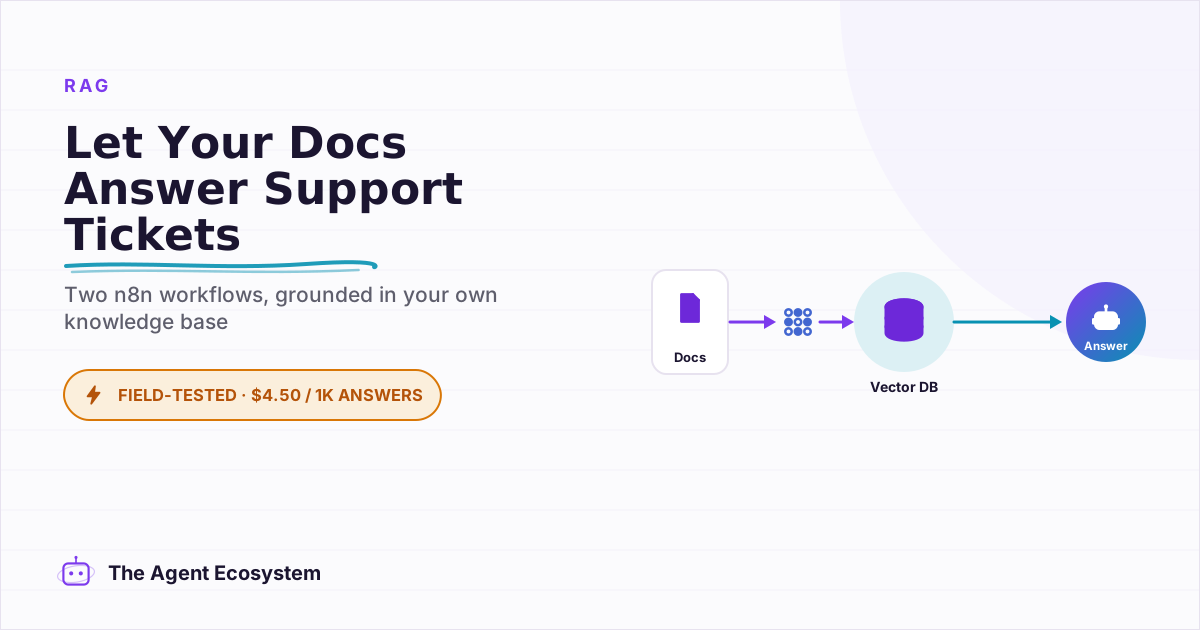
Table of contents
- What Is a RAG Customer-Support Bot, and What Can It Actually Do?
- How Does RAG Work Inside n8n? (The Two Workflows)
- How Much Does an n8n Support Bot Cost to Run?
- Which Vector Store and Embedding Model Should You Use?
- How Do You Build It in n8n, Step by Step?
- Ingest Workflow
- Answer Workflow
- Where Can This Go Wrong?
- What Should You Set Up This Weekend?
The same five questions land in your inbox every single day: pricing, hours, how to reset a password, refund policy, and where to find the getting-started guide. An n8n AI customer support bot built with RAG answers all of them from your own docs, the moment they arrive, around the clock.
Without one, you spend a chunk of every morning copy-pasting the same replies. That time compounds. Even 20 minutes a day is 10 hours a month you could spend on paid work or building something new.
The good news: this is not a complex enterprise build. It is two small n8n workflows, a handful of nodes, and a Claude API key. I have run the same Webhook -> AI Agent pattern for email triage and WhatsApp responses. A support bot is the same shape with a retrieval tool bolted on.
What Is a RAG Customer-Support Bot, and What Can It Actually Do?#
An n8n AI customer support bot built with RAG reads a question, pulls the most relevant passages from your knowledge base, and writes a reply grounded in those passages. It handles FAQ-style questions 24/7: pricing, policies, how-to steps, product details. It cannot place orders, process refunds, or access live databases unless you wire those tools in separately.
The "from your docs" part is what separates this from a generic chatbot. A plain ChatGPT wrapper answers from its training data and guesses when it does not know. A RAG bot either finds the answer in your specific docs or admits it cannot help. That honesty is the feature you want in a customer-facing tool.
This is not a fit for every support scenario. If your support volume is mostly unique, complex problems, a bot will frustrate more than it helps. But if you can identify a cluster of repeat questions, most solo operators have 10 to 20 of them, this setup earns its $4.50 a month on day one.
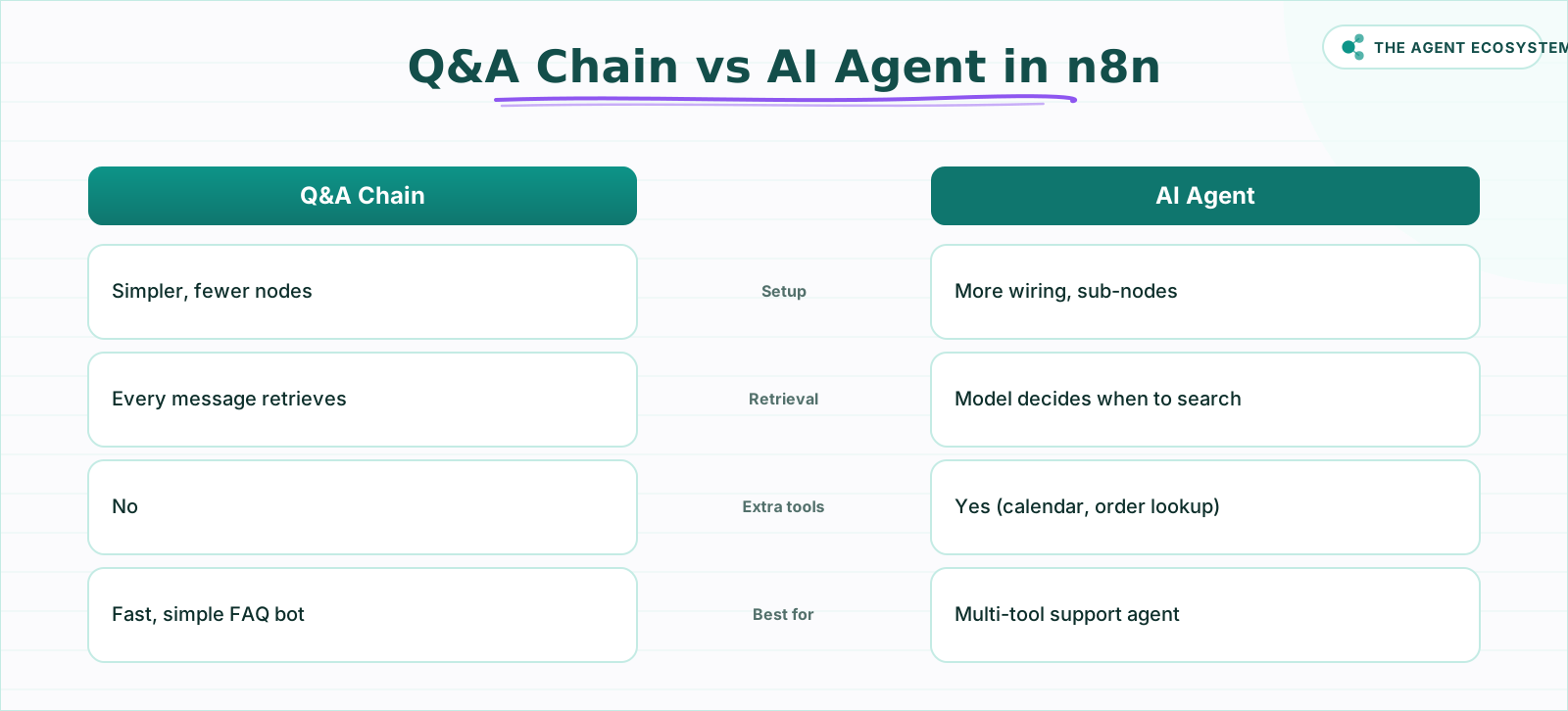 Pick Q&A Chain for simplicity; pick AI Agent when you need tools.
How Does RAG Work Inside n8n? (The Two Workflows)#
RAG in n8n is two workflows, not one. According to the n8n documentation, the ingest workflow runs once (or whenever your docs change) and writes vectors to a store; the answer workflow runs continuously and reads from that store at query time.
Ingest workflow (run once, then re-run on updates):
- A trigger node (Manual Trigger or a scheduled run)
- Default Data Loader to pull in your files
- Recursive Character Text Splitter (or Token Splitter) to chunk text into roughly 500-token pieces with a 50-token overlap
- An Embeddings sub-node: Embeddings OpenAI (text-embedding-3-small) or Embeddings Ollama for a free local option
- A Vector Store node in Insert mode
Answer workflow (runs on every customer message):
- A Chat Trigger (or Webhook for a custom integration)
- An AI Agent node (or Question and Answer Chain for a simpler setup)
- Attached sub-nodes: an Anthropic Chat Model (Claude) and a Vector Store Tool pointing to the same store
One hard rule: the embedding model used to query must exactly match the one used to ingest. If you ingest with text-embedding-3-small (1,536 dimensions) and query with a different model, retrieval breaks silently. Put this in a comment on the workflow so future-you does not spend an hour debugging it.
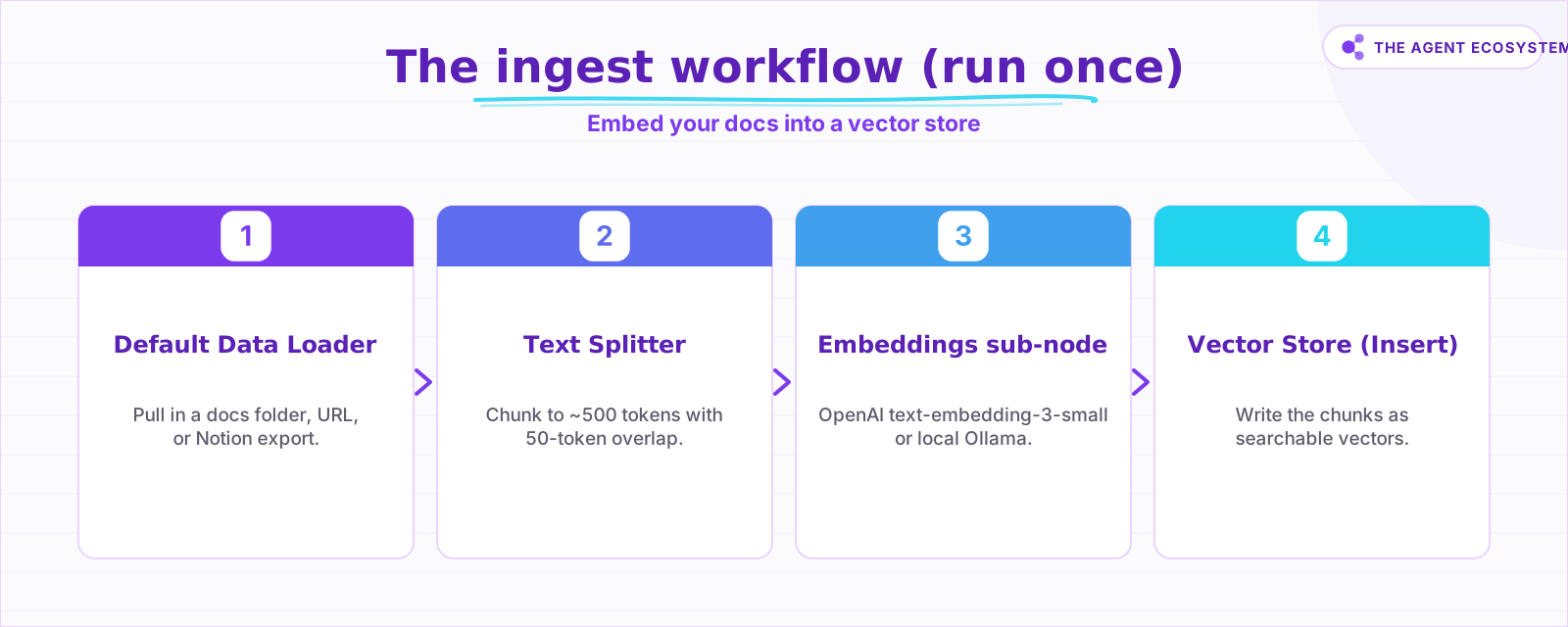 Run this once, then re-run it whenever your docs change.
How Much Does an n8n Support Bot Cost to Run?#
A RAG support bot answering 1,000 questions a month costs about $4.50 in Claude tokens on Haiku 4.5 (as of June 2026). The platform fee is $0 if you self-host n8n, the vector store can also be $0, and embeddings add only a fraction of a cent. The table below breaks the math down by model tier.
Here is the arithmetic, fully checkable by hand. One answer uses roughly 3,000 input tokens (system prompt + 4 retrieved chunks at ~500 tokens each + the question) and about 300 output tokens (a short reply). So 1,000 answers consume approximately 3.0M input tokens and 0.3M output tokens.
Cost per 1,000 answered questions (as of mid-2026):
| Model | Input $/1M | Output $/1M | Cost / 1,000 answers | Best for |
|---|---|---|---|---|
| Claude Haiku 4.5 | $1.00 | $5.00 | $4.50 | FAQ-style support, high volume |
| Claude Sonnet 4.6 | $3.00 | $15.00 | $13.50 | Nuanced or multi-step answers |
| Claude Opus 4.8 | $5.00 | $25.00 | $22.50 | Complex reasoning; overkill for most support |
Prices sourced from Anthropic's official pricing page. Confirm before you build; LLM pricing changes frequently.
The embedding cost is negligible. Embedding a 200-article knowledge base of roughly 160,000 tokens once costs about $0.003 using OpenAI's text-embedding-3-small at $0.02 per 1M tokens. Embedding each incoming 50-token question costs about $0.000001. The dominant cost is the LLM answering, not the retrieval side.
One more saving: Claude's prompt caching discounts repeated input tokens (the system prompt is the same on every call) by roughly 0.1x. The real bill for a high-volume bot often falls below the table figures above.
n8n's Community Edition is free to self-host under the Sustainable Use License. If you prefer managed hosting, n8n Cloud Starter is €20/mo. That is your only platform cost.
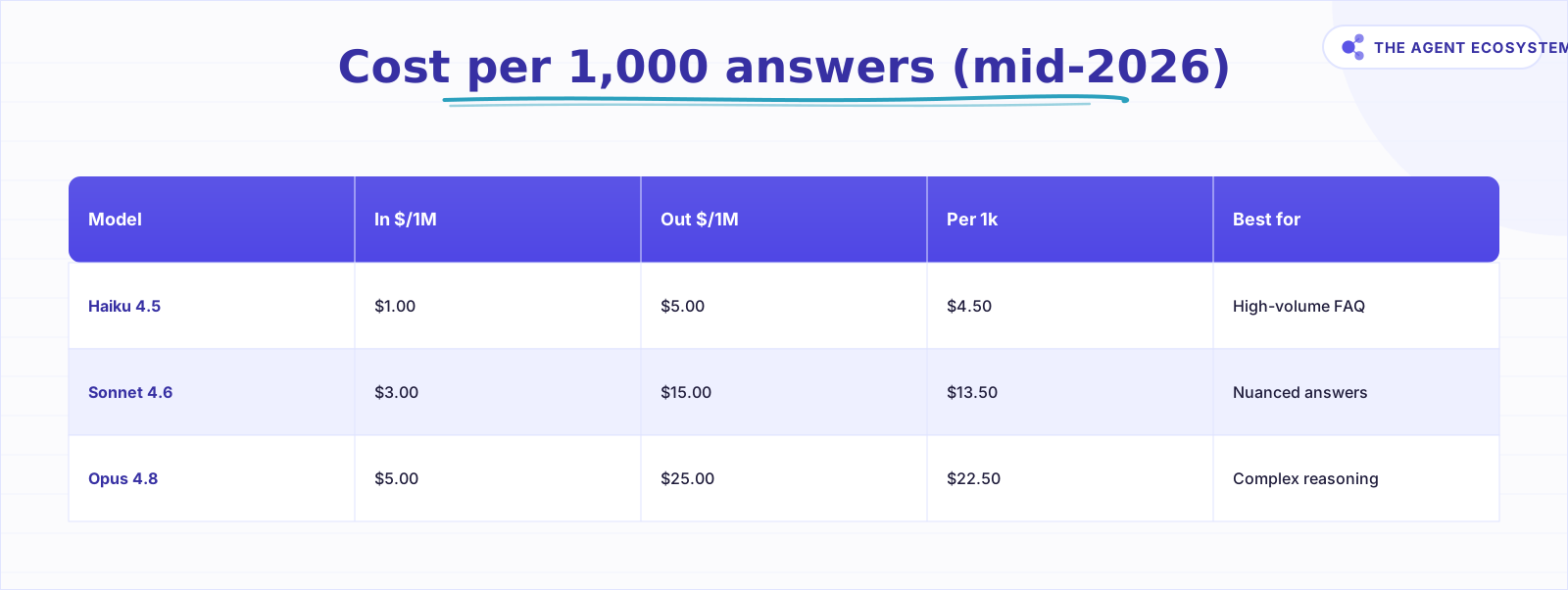 Based on ~3,000 input and 300 output tokens per answer.
Which Vector Store and Embedding Model Should You Use?#
For testing, use the Simple Vector Store (in-memory, built into n8n, costs nothing). For production, Supabase Vector Store, a self-hosted PGVector Vector Store, or a self-hosted Qdrant Vector Store are all free to run and survive restarts. The n8n docs list all supported vector store nodes.
To wire the Supabase option specifically, my n8n Supabase vector store guide walks through the pgvector table SQL and node setup.
For embeddings, you have two real options:
- Embeddings OpenAI (text-embedding-3-small): $0.02 per 1M tokens. Hosted, reliable, zero setup. For a 200-article knowledge base, the one-time ingest cost is about a third of a cent.
- Embeddings Ollama (e.g. nomic-embed-text): $0.00. Runs locally. Keeps your documents off third-party servers. Requires Ollama installed on the same machine as n8n or reachable on your network. See the local RAG with Ollama guide for the full setup.
The practical rule: if your docs contain sensitive client information, go local with Ollama. If you are embedding public-facing help content and want the simplest path, use OpenAI embeddings.
How Do You Build It in n8n, Step by Step?#
Building an n8n AI customer support bot takes two workflows and about two hours the first time: one to ingest your docs into a vector store, and one to answer questions from it. The AI Agent node documentation covers the sub-node wiring; here is the practical sequence.
Ingest Workflow#
Start a new workflow in n8n. Add a Manual Trigger (you will click "Test workflow" once, then re-run it whenever docs change).
Connect a Default Data Loader node. Point it at your docs folder, a URL, or a Notion database. Connect a Recursive Character Text Splitter node. Set chunk size to 500 tokens and overlap to 50 tokens. Smaller chunks give more precise retrieval; larger chunks give more context per match. 500 is a solid starting point.
Attach an Embeddings OpenAI sub-node (or Embeddings Ollama). Then connect a Vector Store node: pick Supabase Vector Store or Simple Vector Store depending on your setup. Set the mode to Insert.
Run the workflow once. Your docs are now searchable vectors.
Answer Workflow#
Create a second workflow. Add a Chat Trigger node (this gives you a hosted chat URL for testing right away).
Add an AI Agent node. Attach these sub-nodes:
- Anthropic Chat Model sub-node, set to
claude-haiku-4-5 - Vector Store Tool sub-node, pointed at the same vector store collection from the ingest step
In the AI Agent's System Prompt field, paste:
Answer the customer question using only the retrieved context below.
If the retrieved context does not contain enough information to answer,
reply: "I am not sure about that one. Let me connect you with a human."
Do not make up facts, prices, or policies that are not in the context.
Set the Vector Store Tool's top-k to 4. That retrieves four ~500-token chunks per question, totalling ~2,000 tokens of context per call. Raise to 6 if answers feel thin; lower to 3 to trim costs.
Test with five real questions from your inbox. Compare each answer to your actual docs. If a correct answer is missing, the chunk containing that information is likely too large or the wrong content was retrieved. Adjust the splitter or improve the source doc's wording.
When answers look good, connect the Chat Trigger to your live channel: a website widget, WhatsApp via Twilio, or any webhook-capable chat tool.
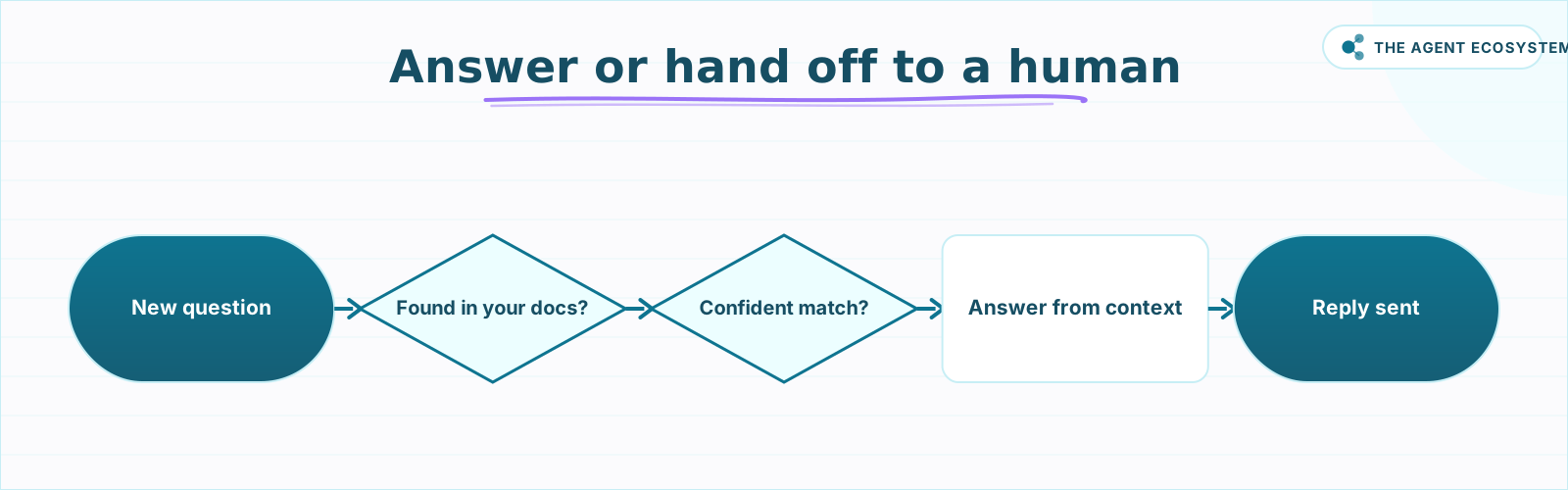 Wire this as an IF node after the AI Agent for safe production.
Where Can This Go Wrong?#
The most common failure mode is stale docs. The bot can only answer from what is in the vector store. If you update your pricing page and forget to re-ingest, the bot keeps quoting the old price with full confidence. Re-ingest whenever docs change; a scheduled ingest once a week is a reasonable safety net.
The second failure mode is a mismatched embedding model at query time. If you ingest with text-embedding-3-small (1,536 dimensions) and later swap to a local Ollama model with different dimensions, every search returns garbage results. Retrieval does not error out; it just silently returns irrelevant chunks. Keep both sub-nodes set to the same model.
The third is over-trusting retrieval. RAG reduces hallucination; it does not eliminate it. Claude can still misread a chunk or stitch two chunks together incorrectly. The system prompt instruction to admit uncertainty when context is thin is your main guard. Test the "I do not know" response explicitly: ask a question that is nowhere in your docs and confirm the bot routes to a human rather than inventing an answer.
Top-k is a cost-quality dial. A top-k of 4 at 500 tokens per chunk adds about 2,000 tokens of context to every call. Raising it to 8 gives better recall for complex questions but nearly doubles your input token cost. Run a two-week test at k=4, note which questions the bot misses, then decide if a higher k is worth it.
For a deeper look at choosing the right Claude model for your agent, the Claude vs GPT vs Gemini cost and speed comparison walks through the trade-offs across real workflows. If you want to cap spend at the API level, the Claude API cost-control agent workflow adds a guardrail before costs run away.
flowchart TD
  START([New customer question]) --> D1{Answer found in your docs?}
  D1 -- No --> HANDOFF1[Hand off to a human]
  D1 -- Yes --> D2{Confident in the retrieved match?}
  D2 -- No --> HANDOFF2[Hand off to a human]
  D2 -- Yes --> ANSWER[Answer from retrieved context]
  ANSWER --> END([Reply sent])
What Should You Set Up This Weekend?#
Start with the ingest workflow: collect your docs, run them through the Default Data Loader -> Recursive Character Text Splitter -> Embeddings OpenAI -> Simple Vector Store chain, and confirm the vectors are written. That takes under an hour, and the in-memory Simple Vector Store costs nothing to test with.
Next, wire the answer workflow: Chat Trigger -> AI Agent -> Anthropic Chat Model + Vector Store Tool. Paste in the system prompt. Ask it the five questions your customers ask most often. If four of five come back accurate, you have a working bot. Add the handoff branch before you connect it to any live channel.
The whole stack, at 1,000 answered questions a month, costs about $4.50 in tokens. If you self-host n8n on a $5 VPS and use a free-tier vector store, the platform cost is $0. No seat fees, no per-agent pricing, no surprise overage bill at month end.
If you want to go fully private with $0 embedding cost, the local RAG with Ollama guide covers running the entire stack on your own machine. For help choosing between Supabase, PGVector, and Qdrant for production, the vector store comparison lays out the trade-offs.
Frequently asked questions
What is a RAG chatbot?
How much does an n8n AI customer support bot cost to run?
Which vector store should I use in n8n?
Do I need OpenAI for embeddings, or can I run them locally?
Can the bot hallucinate, and how do I stop it?
Q&A Chain or AI Agent: which RAG approach should I use?
Sources
Primary references and vendor documentation used while drafting and reviewing this article.
Written by

Muhammad Qasim Hammad is an AI agent and automation expert and the founder of Cart Gaze LLC (cartgaze.com). He builds product for the love of it: when an idea lands, a working prototype is usually running within hours, built with the same AI agents and automations he sells. He puts his own output at roughly 20× what it was before agents, and the Agentic OS behind this site is the working proof, documented in public with the tools he actually ran and what they really cost.
AI & Automation Services
Want a pipeline like this running in your business?
I'm Qasim — I design and ship AI agents and n8n automations for solo operators and small teams. Tell me what's eating your team's week, and I'll scope a fix.
Related reading
Build a Question and Answer Chain in n8n (Answer From Your Docs)
The n8n Question and Answer Chain retrieves passages from your own vector store and answers from them, not from the model's memory. Index once for about $0.01, then answer 1,000 questions for about $2.50 on Claude Haiku 4.5.

Build a Vector Store in n8n (Embeddings for RAG)
Build an n8n vector store that retrieves your own documents by meaning, not keywords. Embedding 1,000 docs costs ~1.3 cents; Supabase free-tier storage costs $0. Full node wiring and step-by-step setup inside.
Add an AI Chatbot to Your Website With n8n (Chat Trigger)
Add a working AI chat widget to any website using n8n's Chat Trigger node and the @n8n/chat embed snippet. No React, no SaaS widget, about $7.25 per 1,000 conversations on Claude Haiku 4.5.
Local RAG With Ollama: Chat With Your Business Docs Privately
Local RAG with Ollama lets you ask questions across hundreds of private documents without uploading a single file to the cloud. This guide covers three paths from 20-minute desktop setup to n8n pipelines, all at $0 running cost.
n8n AI Automation Ideas: 8 Agent Workflows Worth Building (2026)
Finished the n8n AI tutorial and wondering what to actually build? These 8 n8n AI automation ideas come with the exact nodes, the honest Chain-vs-Agent call, and the right Claude model for each job.
Self-Hosted n8n RAG Pipeline: The Private Stack
A fully self-hosted RAG pipeline keeps your documents and compute in-house: n8n orchestrates, Ollama serves a local model, and pgvector stores embeddings in Postgres. Here is the end-to-end node graph, the modeled cost, and when self-hosting beats a managed stack.