Build a WhatsApp AI Agent With n8n and Twilio
Three nodes, one evening, and a bot that answers your inbox while you sleep
AI-drafted, reviewed by Muhammad Qasim Hammad on June 11, 2026. See our AI disclosure.
Table of contents
- What Is a WhatsApp AI Agent, and What Can It Actually Do?
- Why Start in the Twilio WhatsApp Sandbox?
- How Much Does a WhatsApp AI Agent Cost to Run?
- How Do You Build It in n8n? (Three Nodes)
- Node 1: Webhook
- Node 2: AI Agent
- Node 3: Twilio Send
- When Are You Ready to Go Live?
- Where Can This Go Wrong?
- What Should You Set Up This Weekend?
The same four questions land in your WhatsApp every day: hours, price, availability, location. A WhatsApp AI agent answers those repeat questions the moment they arrive, day or night, so you stop living in the chat.
Each interruption costs you context. You drop what you're doing, type the same reply you typed yesterday, and get back to work two minutes later. Multiply that by 20 messages a day and you've lost an hour. None of those messages needed you specifically. They just needed an answer.
This post walks through the full build: a Webhook node, an AI Agent node running Claude, and a Twilio node that fires the reply back. You can test the whole thing for free tonight. Going live takes a bit more setup, and this post is honest about that too.
What Is a WhatsApp AI Agent, and What Can It Actually Do?#
A WhatsApp AI agent receives customer messages through the WhatsApp Business API, answers them with a language model, and sends the reply without you touching the app. It works inside the 24-hour customer-service window, so it handles the questions customers start. It is not a payments bot, a booking system, or a replacement for you.
The practical use case for a solopreneur is narrow and useful: deflect the repeat questions. "Are you open Saturday?" "What does your starter package cost?" "Do you work with clients in Berlin?" The agent handles those instantly. Anything involving money, a firm commitment, or a complaint goes to a human. That framing also keeps the agent safe.
This is the same Webhook -> AI Agent pattern I already run for email triage with Claude in n8n. WhatsApp is just a new front door onto an identical shape.
Why Start in the Twilio WhatsApp Sandbox?#
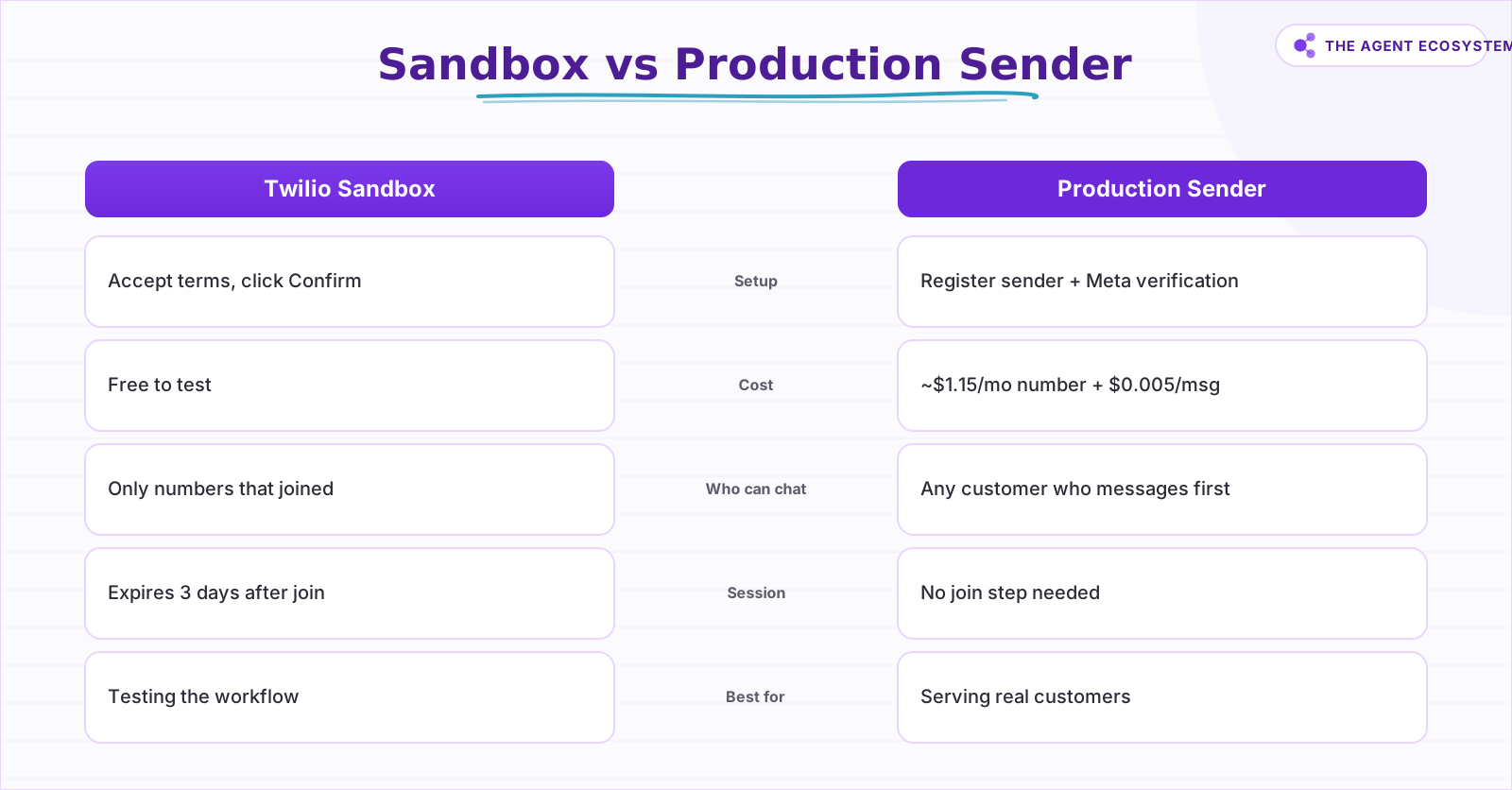
The Twilio WhatsApp Sandbox is free, requires no Meta Business verification, no registered sender, and no purchased phone number. You activate it in the Twilio Console under Try WhatsApp, accept the terms, and click Confirm. You get a shared sandbox number (+1 415 523 8886) and a unique join code.
Anyone you want to test with texts join <your-sandbox-code> to that number. The sandbox confirms they are in. I pasted the n8n Webhook URL into the "When a message comes in" field, texted "what are your hours?" from my personal phone, and got a Claude reply back in about four seconds. No inbox, no app to install.
The sandbox has real limits you should know before you count on it:
- Test numbers only: you can only exchange messages with numbers that have joined your sandbox.
- The session expires three days after joining. A tester must re-join after that.
- The sandbox sends one message every three seconds maximum.
- Only three pre-approved templates exist for business-initiated messages.
For building and verifying the workflow, these limits are fine. For serving real customers, you need a registered sender (covered under "When are you ready to go live?").
 The full build fits three core n8n nodes plus a handoff.
How Much Does a WhatsApp AI Agent Cost to Run?#
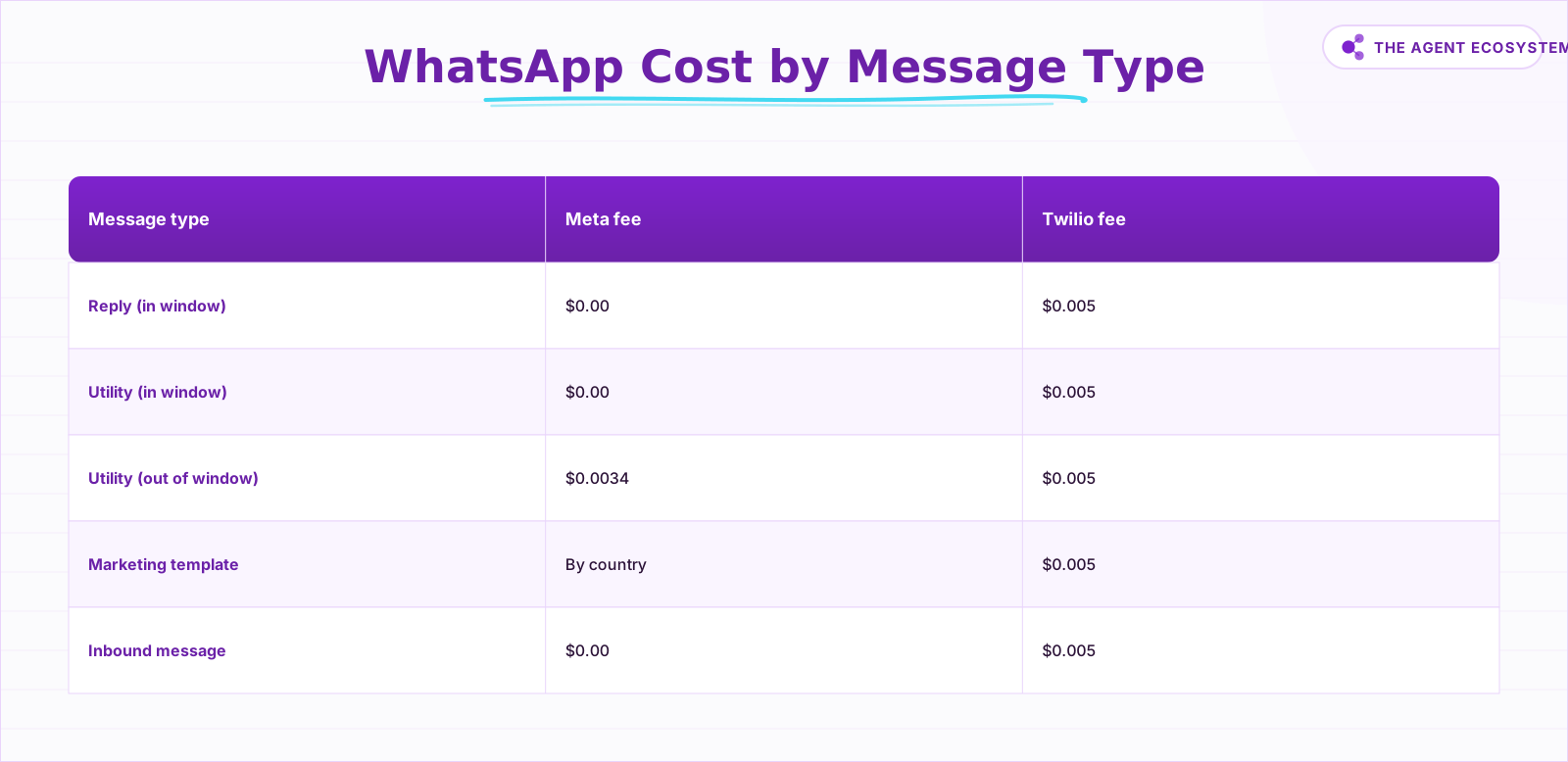
At 1,000 customer replies a month, your Twilio bill is exactly $5: 1,000 x $0.005 = $5. Meta charges nothing for free-form replies inside the 24-hour window. Add number rental (around $1.15/month for a local number in production) and your Claude API cost, and you have the full picture.
Here is the breakdown by message type, pulled from Twilio's WhatsApp pricing page:
| Message type | Meta fee | Twilio fee | When it applies |
|---|---|---|---|
| Customer reply (free-form, in window) | $0.00 | $0.005 | You reply within 24h of customer message |
| Utility template (in window) | $0.00 | $0.005 | Structured reply inside the window |
| Utility template (outside window) | $0.0034 | $0.005 | You initiate after 24h expires |
| Marketing template | Varies by country | $0.005 | Promotional messages you start |
| Inbound message (customer to you) | $0.00 | $0.005 | Every message that arrives |
The reply agent in this guide operates entirely in row one. If you get 1,000 customer questions a month and reply to each once, total Twilio cost is $5. That is the honest ceiling, not a marketing headline.
To keep your Claude API bill predictable as this scales, see the Claude API cost control guide.
 The reply agent lives entirely in row one: $0 Meta fee.
 Choose sandbox to test, production to serve real customers.
How Do You Build It in n8n? (Three Nodes)#
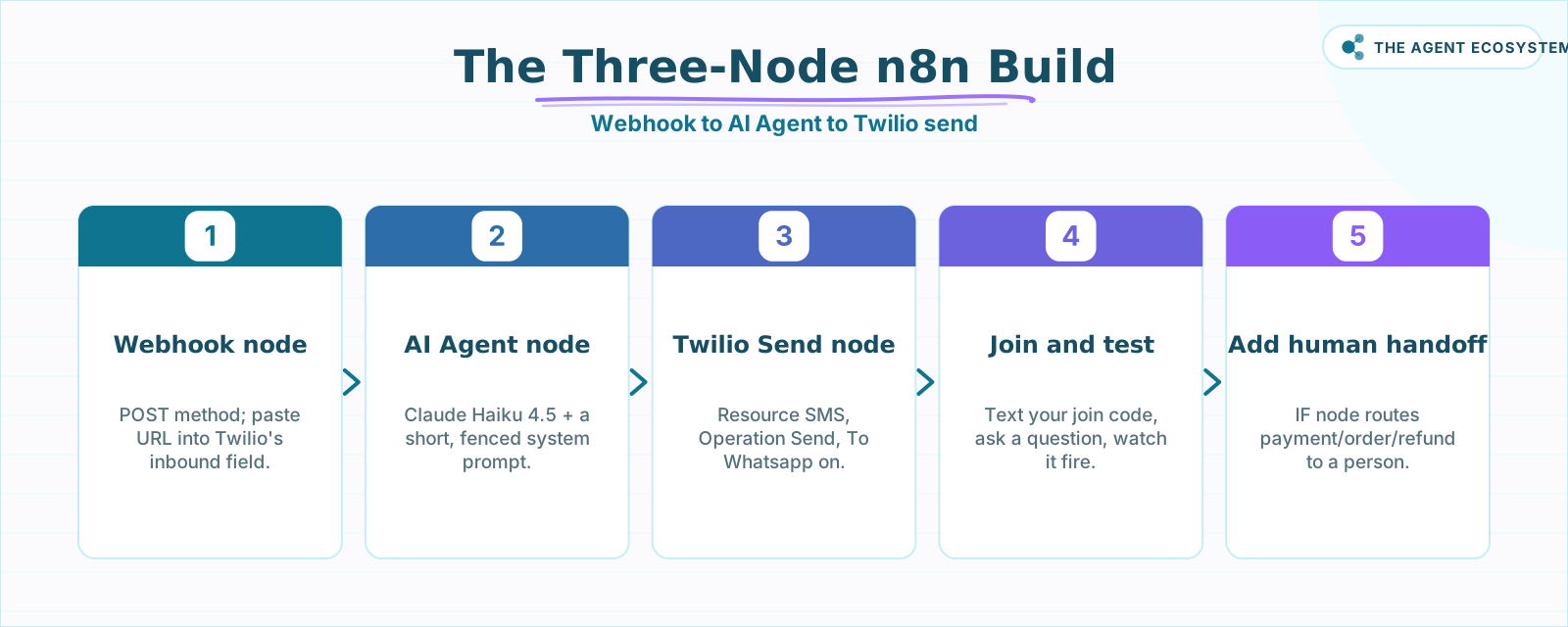
Three nodes handle the entire flow: a Webhook that catches the inbound message, an AI Agent that generates the reply, and a Twilio node that sends it back. Build it on n8n self-hosted on a $5/month VPS (see the self-host n8n VPS setup guide) or on n8n Cloud.
Node 1: Webhook#
Add a Webhook node. Set HTTP Method to POST. Copy the Production URL. Paste it into the "When a message comes in" field in your Twilio sandbox settings. When Twilio receives a WhatsApp message, it POSTs the message body and the sender's number to this URL. The key fields you'll use downstream are Body (the message text) and From (the customer's WhatsApp number in whatsapp:+15551234567 format).
Node 2: AI Agent#
Add an AI Agent node (LangChain-based) connected to the Webhook. Attach a Claude model. For FAQ replies, Claude Haiku 4.5 is fast and cheap; upgrade to Claude Sonnet 4.6 if you need more nuanced answers. Write a short system prompt:
You are the assistant for [Business Name]. You answer questions about [what you do, your hours, your pricing range].
If a customer asks about payments, orders, or anything requiring a firm commitment, say: "Great question - I'll have a real person follow up with you shortly."
Keep replies under 3 sentences. Be friendly and specific.
Map the Webhook's Body field into the agent's user input.
Node 3: Twilio Send#
Add a Twilio node after the AI Agent. Set Resource to SMS and Operation to Send. Turn on the "To Whatsapp" toggle. n8n automatically prefixes whatsapp: on both the From and To numbers.
- From:
whatsapp:+14155238886(sandbox number) or your registered production number later. - To: the
Fromvalue from the Webhook (the customer's number). - Message: the AI Agent's output text.
The Webhook returns an immediate HTTP 200 to Twilio (preventing a timeout), while the AI Agent and Twilio node run asynchronously. Twilio's inbound webhook has a short response window, so this async pattern gives the AI time to generate a good reply without racing a clock.
This is the same architecture described in the lead follow-up automation guide: a webhook front door with an async send at the back.
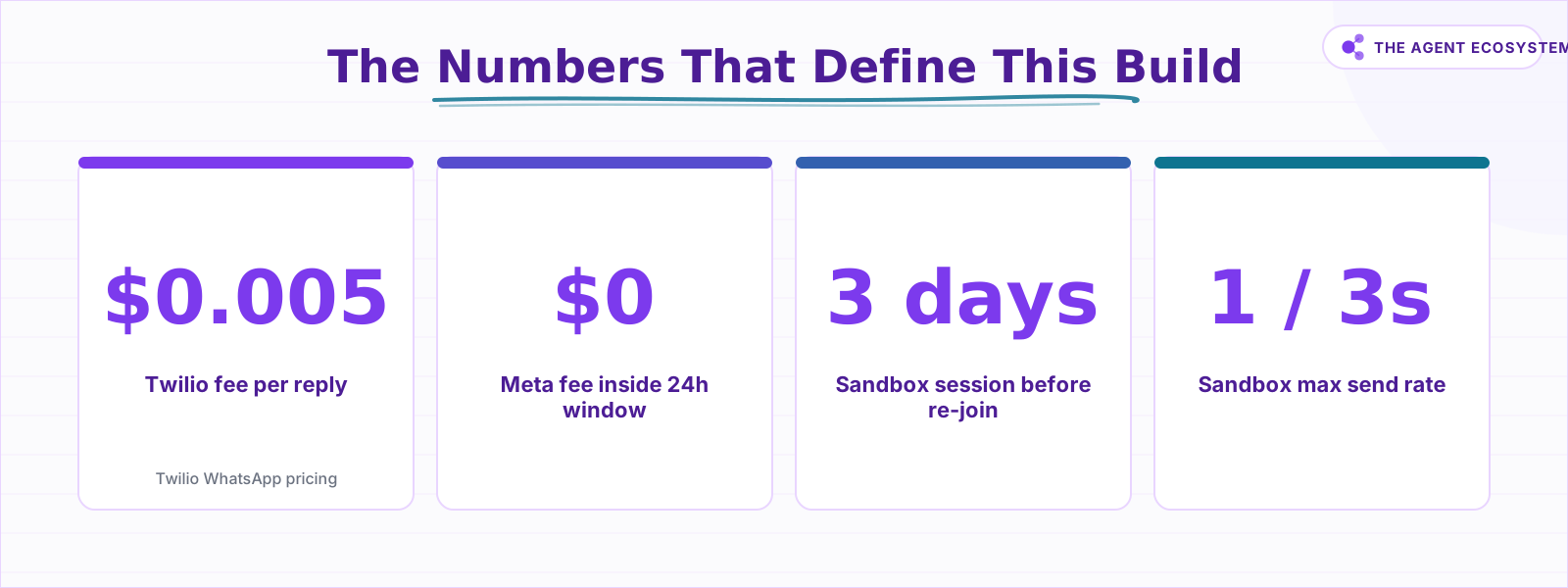 The four numbers that set this build's cost and limits.
When Are You Ready to Go Live?#
Going live means leaving the sandbox and connecting a registered WhatsApp sender. You need a Twilio phone number (local numbers start at about $1.15/month) and Meta Business verification. Meta reviews your business display name, website, and use case before approving the sender.
Once approved, swap the sandbox number for your registered number in the Twilio node's From field. Everything else in the workflow stays identical.
The key limit to carry into production: the agent can reply freely to any customer who messages first, inside the 24-hour window. It cannot start a new conversation after that window closes without using a paid template. If a customer asks a question on Monday and you want to follow up on Wednesday, that is a template message, not a free reply.
Where Can This Go Wrong?#
The biggest risk is an agent that overcommits. If the system prompt does not clearly fence what the agent can and cannot do, Claude will answer confidently about things it should not touch: refund timelines, specific prices that change, stock availability, delivery dates.
A few other failure points worth knowing:
- Hallucination guardrails. The agent only knows what is in its system prompt. Give it your actual hours, your actual price ranges, your actual service areas. Do not leave it to infer.
- The 24-hour window. If a customer messages and your agent doesn't reply within 24 hours (n8n downtime, for example), the window closes. You'll need a template to re-engage.
- Sandbox rate limits. During testing, one message every three seconds means rapid-fire test sequences will queue or drop. Test one message at a time.
- Number formatting. Twilio passes the From number with the
whatsapp:prefix already attached. If you map it incorrectly into the Twilio send node, the message will fail. Check the execution log first.
See the n8n vs Make vs Zapier cost comparison if you are weighing whether n8n is the right automation layer for this.
What Should You Set Up This Weekend?#
Start with the sandbox build tonight: it takes one evening and confirms the whole concept with your own phone before you spend a single dollar. Then spend a second short session tightening the system prompt against the real questions you get, so the replies sound like you and stay accurate.
Once the replies look right, open a Twilio account, register a WhatsApp sender, complete Meta Business verification, and swap the number. The workflow does not change. Add the human-handoff IF branch before you point any real customer at it.
The three-node pattern here is reusable. The same Webhook -> AI Agent -> send shape powers the email triage agent and can extend to SMS, Slack, or any channel Twilio or n8n touches. Build it once, move it where the questions are.
Frequently asked questions
Is the Twilio WhatsApp Sandbox free?
How much does a WhatsApp AI agent cost to run?
Do I need Meta Business verification to test?
Can n8n send WhatsApp messages through Twilio?
What is the 24-hour customer service window?
Can the agent message customers first?
Sources
Primary references and vendor documentation used while drafting and reviewing this article.
Written by

Muhammad Qasim Hammad is an AI agent and automation expert and the founder of Cart Gaze LLC (cartgaze.com). He builds product for the love of it: when an idea lands, a working prototype is usually running within hours, built with the same AI agents and automations he sells. He puts his own output at roughly 20× what it was before agents, and the Agentic OS behind this site is the working proof, documented in public with the tools he actually ran and what they really cost.
AI & Automation Services
Want a pipeline like this running in your business?
I'm Qasim — I design and ship AI agents and n8n automations for solo operators and small teams. Tell me what's eating your team's week, and I'll scope a fix.
Related reading
Build an AI Telegram Bot With n8n (No Code, No Fees)
Build an AI-powered n8n Telegram bot in under an hour using three nodes and zero platform fees. Get a shareable t.me link, no business verification required, and a bot that replies around the clock.

Build an AI Lead-Generation Agent in n8n (With Real Monthly Cost)
An n8n AI lead generation agent triages every inbound lead the moment it lands: scoring intent, drafting a personalized reply, and pinging you on the hot ones. Real cost: about $5/month for 100 leads on Claude Sonnet 4.6.
Add an AI Chatbot to Your Website With n8n (Chat Trigger)
Add a working AI chat widget to any website using n8n's Chat Trigger node and the @n8n/chat embed snippet. No React, no SaaS widget, about $7.25 per 1,000 conversations on Claude Haiku 4.5.
Build an AI Customer-Support Bot in n8n (RAG, With Real Monthly Cost)
Build an n8n AI customer support bot that answers repeat questions from your own docs using RAG. Two workflows, about $4.50 per 1,000 answers on Claude Haiku 4.5, and $0 platform cost if you self-host.
How to Build a Voice AI Agent in n8n With Twilio Phone Calls
A phone call is not one webhook and one reply. Twilio asks n8n for TwiML instructions after every turn, and the AI Agent node's job is generating what to say next inside that loop. Here is how the turn-by-turn pattern works, the gotchas that drop calls, and when plain n8n stops
Turn an n8n Workflow Into an AI API: Webhook to Claude to JSON
Skip the Express server. An n8n AI API endpoint takes three nodes: a Webhook node receives the HTTP request, an AI node runs Claude, and a Respond to Webhook node returns clean JSON to the caller.