I Built the Same AI Agent in n8n, Make and LangChain: The Honest Difference
One order-status agent. Three platforms. Four axes that actually decide which to use.
Updated August 15, 2026 — Added FAQs on choosing LangChain vs n8n and how n8n uses LangChain.js under the hood.
AI-drafted, reviewed by Muhammad Qasim Hammad on June 14, 2026. See our AI disclosure.
Table of contents
I built the same AI agent in n8n, Make, and LangChain — one identical spec, three platforms — to find the honest difference. You want to build an AI agent, but every platform comparison you find lists features instead of showing you the actual build. This post builds the identical agent three ways, in n8n, Make.com, and LangChain, then tells you exactly what each trade-off costs you.
The symptom: you pick a platform based on a blog post feature table, spend two hours wiring it up, and only then discover the billing model punishes loops, or that you can't export the workflow, or that you needed Python all along. Three wasted hours and a half-built agent.
The agent spec I used is deliberately small: an order-status triage agent. Input: a customer message like "Where's my order #1234?" The agent has one tool, lookup_order(order_id), and must decide whether to call it, then write a short reply. One tool. Genuinely agentic (the model decides to call the tool). This spec is concrete enough to be real and simple enough to be apples-to-apples across all three platforms.
How I Built the Same AI Agent in n8n, Make, and LangChain#
Building the same agent in n8n, Make.com, and LangChain shows that the platforms share the same logic but differ sharply on setup effort, hosting model, and cost structure. n8n takes roughly 4 nodes, Make takes 4-5 modules, and LangChain takes about 10 lines of Python. The agent logic is identical; the platform wrapper is where the differences live.
The comparison below is not a stopwatch race. Build times vary by familiarity. What I can verify and you can replicate: node/module count, lines of code, and the structural decisions each platform forces on you.
Build 1: The Agent in n8n#
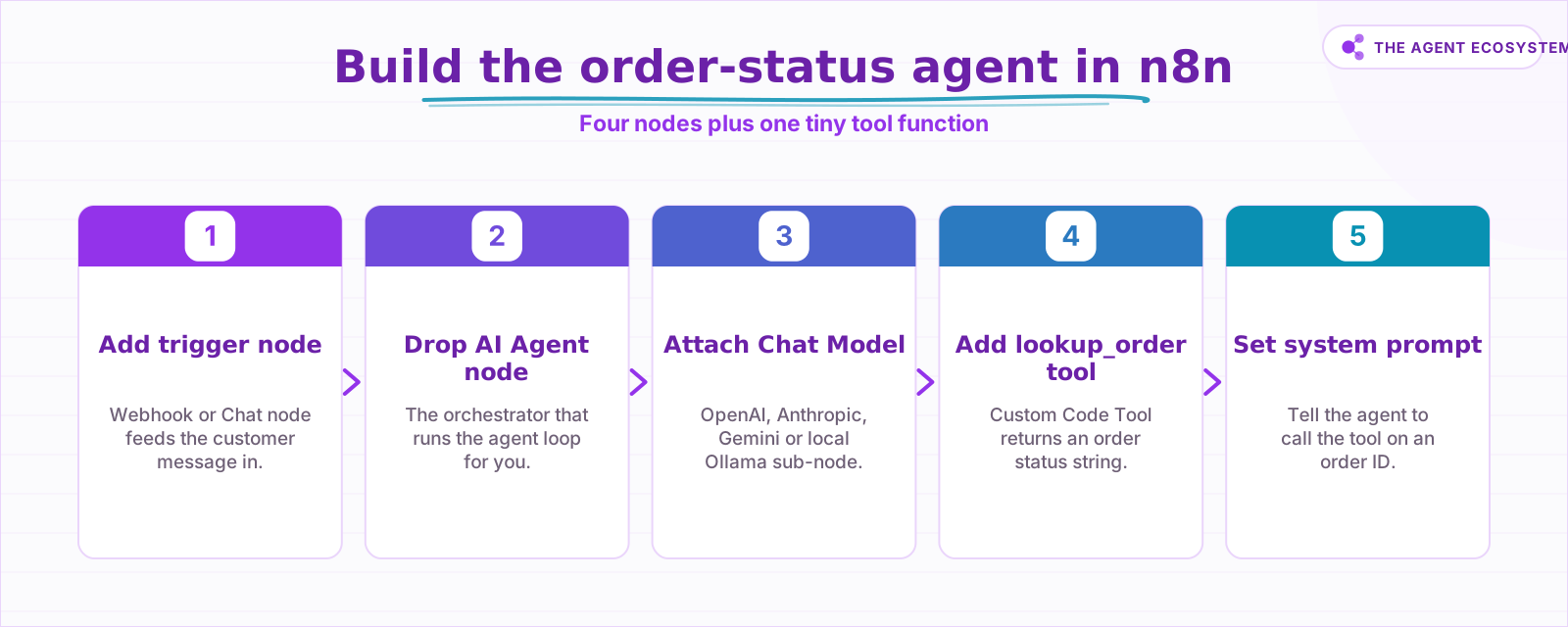
n8n's AI Agent node is a cluster node: you attach sub-nodes for the model, memory, and tools, and it runs the agent loop for you internally. For this order-status spec you need exactly four nodes total, plus one tiny tool function that the agent can call when it sees an order ID.
Here is the full wiring:
- Add a Webhook or Chat trigger node as the input.
- Drop in the AI Agent node. This is the orchestrator.
- Attach an OpenAI Chat Model sub-node (or swap to Anthropic, Google Gemini, or Ollama for local models, see connecting Ollama to n8n for the free local path).
- Attach a Custom Code Tool sub-node. Name it
lookup_order. Inside, write a small JavaScript function that acceptsorder_idand returns a status string.
// Custom Code Tool: lookup_order
const orderId = $input.first().json.order_id;
const statuses = { "1234": "Shipped, arriving Tuesday" };
return [{ json: { status: statuses[orderId] || "Order not found" } }];- Set the System Prompt field on the AI Agent node: "You are an order-status support agent. Use the lookup_order tool when an order ID is mentioned."
That is the entire build. The AI Agent node handles the ReAct loop internally: the model reads the system prompt, decides to call lookup_order, gets the result, and writes a reply.
The honest catch with n8n: the system prompt field and sub-node configuration are not version-controlled by default. If you self-host, you are responsible for backups and updates. That is a real ops cost most comparisons skip.
n8n is fair-code under the Sustainable Use License, which means self-hosting for internal use is free. You pay only your server and the LLM API. n8n Cloud starts at 20 euros/month (billed annually) for 2,500 executions on the Starter plan, scaling to 50 euros/month for 10,000 executions on Pro. For a solopreneur running an occasional support agent, the self-hosted path is the financially sensible default. See the full n8n vs Make vs Zapier cost breakdown for the longer math.
 Four axes decide which platform fits your situation.
Build 2: The Agent in Make.com#
Make.com is a fully-hosted visual automation SaaS, so there is no self-hosting option and no code to write. You build the agent as a Scenario: a left-to-right sequence of modules the platform runs whenever your trigger fires. The same order-status spec takes four to five modules instead of four nodes.
Here is the wiring for the same order-status spec:
- Add a Webhooks module as the trigger (or a manual trigger for testing).
- Add an OpenAI: Create a Chat Completion module (or Anthropic Claude: Create a Prompt Completion). Paste the system prompt into the System field.
- Add a Router module. Route on whether the model's output text contains an order ID pattern.
- On the "yes" branch, add an HTTP: Make a Request module (or a custom app module) that calls your
lookup_orderlogic. This is your tool. - Feed the tool result back into a second OpenAI module to generate the final reply.
The build is 4-5 modules. Make added a native AI agents layer in 2026 with centralized agent management, but under the hood it still runs as a Scenario where each module execution is billed.
The honest catch with Make: Make's pricing is operations-based. The Free plan gives you 1,000 operations/month. Core is $9/month for 10,000 ops, Pro is $16/month, Teams is $29/month. Each module run counts as one operation. A single agent invocation that routes through 5 modules burns 5 operations. A looping agent burns even faster. For a high-volume support workflow, this adds up in a way that flat-rate pricing does not.
Build 3: The Agent in LangChain#
LangChain's current agent API, as of mid-2026, centers on create_agent from langchain.agents, backed by LangGraph as the runtime. You define a tool, name a model, and pass a system prompt; LangChain handles the reasoning loop. The full working build for the order-status spec is roughly 10 lines of Python.
from langchain.agents import create_agent
from langchain.tools import tool

@tool
def lookup_order(order_id: str) -> str:
    """Return the status of an order by its ID."""
    return {"1234": "Shipped, arriving Tuesday"}.get(order_id, "Order not found")

agent = create_agent(
    model="anthropic:claude-sonnet-4-6",   # swap to "openai:gpt-5.4" or "google_genai:gemini-2.5-flash-lite"
    tools=[lookup_order],
    system_prompt="You are an order-status support agent. Use the tool when an order ID is given.",
)

result = agent.invoke(
    {"messages": [{"role": "user", "content": "Where's my order #1234?"}]}
)
print(result["messages"][-1].content_blocks)
Switching the model is a single string change. Adding memory means attaching a LangGraph InMemorySaver checkpointer and passing a thread_id in the invoke config. LangSmith (observability) and LangGraph Platform (hosted deployment) are optional paid add-ons; neither is required to run the agent above.
The honest catch with LangChain: you own the code and the runtime. That means you also own the deployment, the retries, the logging, and the debugging. For a developer this is a feature. For a non-technical solopreneur, it is a genuine barrier. The platform cost is $0, but the ops overhead is real.
For choosing the right model to slot in here, the best LLM for n8n AI agents guide applies directly to LangChain too: the model selection logic is the same.
 Four nodes wire the full order-status agent in n8n.
The 4-Axis Verdict: Where Each Platform Actually Wins#
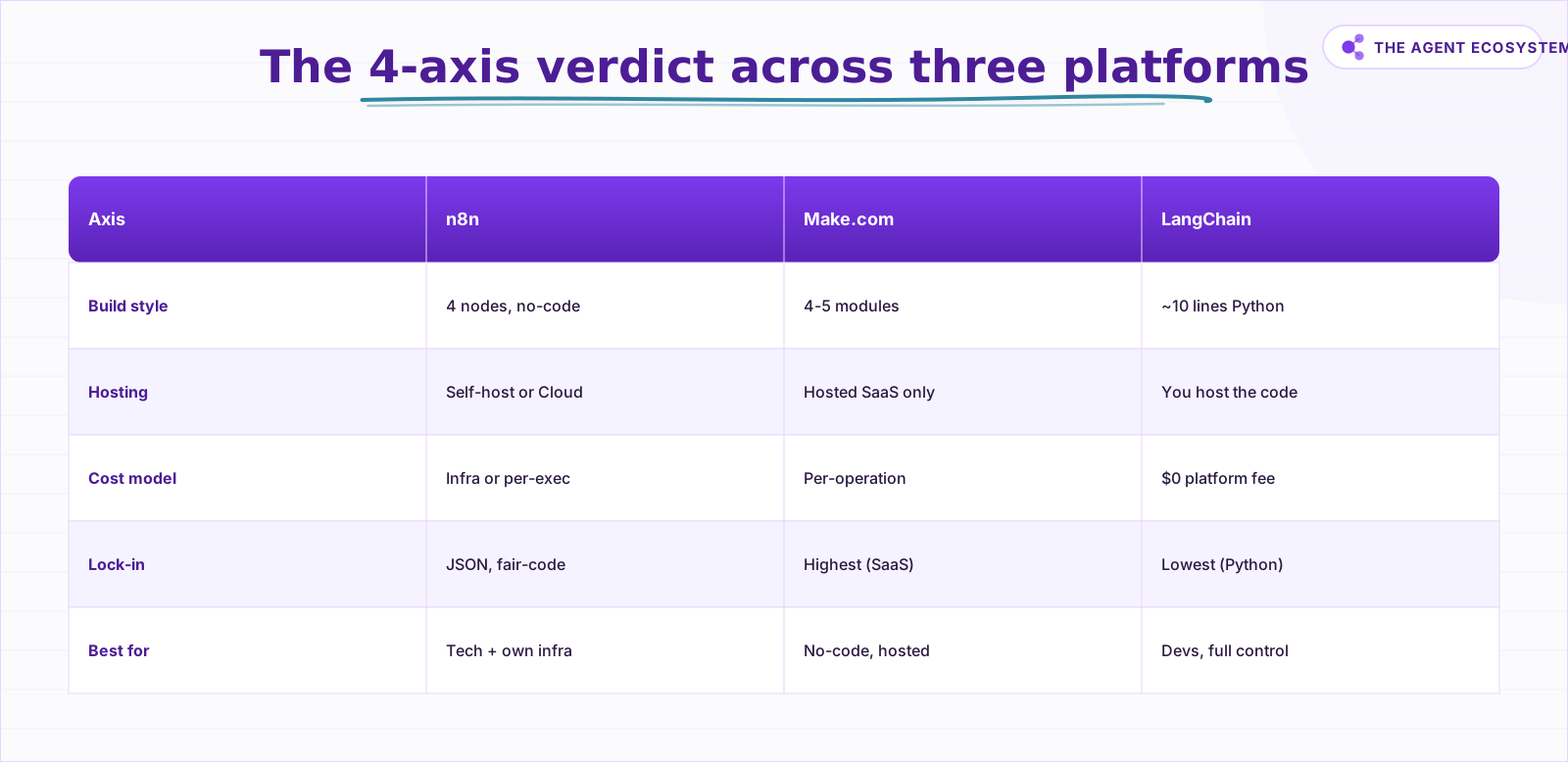
The table below is the comparison I wish existed before I started: the same agent and the same spec, scored on the four axes that actually decide which platform fits your situation. Build style, hosting, cost model, and portability matter far more than the feature checklists most comparisons lead with.
| Axis | n8n | Make.com | LangChain |
|---|---|---|---|
| Build style | No-code, drag sub-nodes (4 nodes) | No-code, visual Scenario (4-5 modules) | ~10 lines of Python |
| Hosting | Self-host free OR Cloud from 20 euros/mo | Fully hosted SaaS only | You host the code |
| Cost model | Self-host: infra only. Cloud: per-execution | Per-operation (loops cost more) | $0 platform; pay model API + infra |
| Portability / lock-in | JSON workflow, self-hostable (fair-code) | Proprietary SaaS (highest lock-in) | Plain Python (most portable) |
| Best for | Technical solopreneurs who want no-code and own their infra | Non-technical users who want fully-hosted no-code | Developers who need full control or production logic |
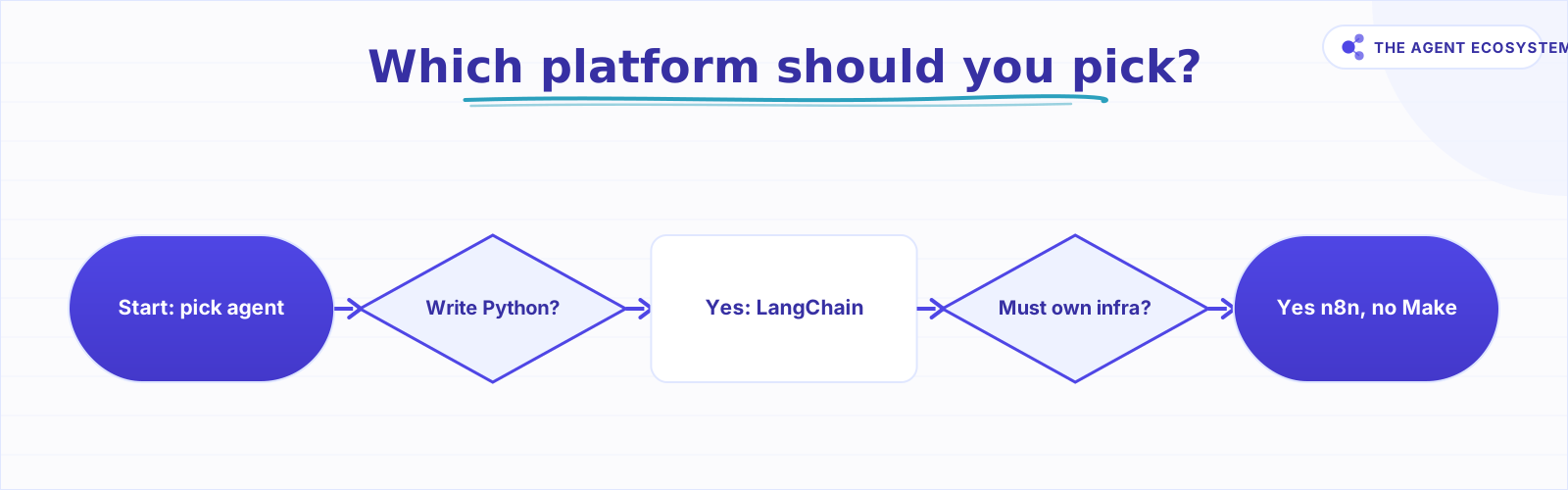
There is no universal winner. The right choice follows directly from which axis matters most to you right now.
 Follow this flow to pick the right platform for your agent.
How Solopreneurs Get This Decision Wrong#
The most common mistake is picking by feature count rather than by the one axis that actually constrains you. A longer feature list does not help if the platform bills every loop, locks your workflow on its servers, or demands Python you do not want to write. Start from your real constraint, then match the platform to it.
If you are non-technical and just need the agent running by this afternoon, Make.com's hosted setup removes every infrastructure decision. But if your agent loops (and most useful agents do), price the operations cost against your expected message volume before you sign up.
If you care about owning your data and your workflow files, Make is the wrong call. Your Scenarios live on Make's servers. Exporting is limited. If Make changes its pricing or goes offline, your agent goes with it.
If you start in n8n self-hosted and later want to move to n8n Cloud, your JSON workflow exports cleanly. That portability is real. If you later want to move off n8n entirely, you are rewriting the agent, but at least you have the logic documented in a readable visual graph. For the full self-hosting setup walkthrough, the n8n VPS setup guide covers the exact steps.
The LangChain trap is the opposite: developers reach for it first because it feels like "real" work, then spend a day on deployment plumbing for a workflow that n8n would have wired in 20 minutes. Use code when you need code control. Use the visual tools when you do not.
For extending either n8n or LangChain with external tools via the Model Context Protocol, the MCP servers for solopreneurs guide and the n8n MCP AI agent post are the logical next reads.
Where to Go From Here#
Pick the platform by the single axis that is non-negotiable for you: code control (LangChain), no-code plus infra ownership (n8n), or fully-hosted no-code (Make). Build the order-status agent above in your chosen platform first. It is small enough to finish in one session and real enough to show you exactly where the edges are.
Once it is running, the n8n MCP AI agent guide shows how to give your agent access to a much richer tool ecosystem without adding complexity to the core workflow.
Frequently asked questions
Is n8n or LangChain better for AI agents?
Is Make.com good for AI agents?
Which platform is cheapest for running an AI agent?
Can I self-host n8n for free?
Do I need to know Python to build an AI agent?
Should you use LangChain or n8n to build an AI agent?
Is n8n built on LangChain?
Sources
Primary references and vendor documentation used while drafting and reviewing this article.
- n8n AI Agent node documentation (cluster node, sub-nodes)
- n8n Cloud pricing: Starter 20 eu/mo, Pro 50 eu/mo
- n8n Sustainable Use License: free self-hosting terms
- Make.com pricing: Free 1,000 ops, Core $9, Pro $16, Teams $29
- Make.com native AI agents product page
- LangChain create_agent quickstart (2026 API, LangGraph runtime)
Written by

Muhammad Qasim Hammad is an AI agent and automation expert and the founder of Cart Gaze LLC (cartgaze.com). He builds product for the love of it: when an idea lands, a working prototype is usually running within hours, built with the same AI agents and automations he sells. He puts his own output at roughly 20× what it was before agents, and the Agentic OS behind this site is the working proof, documented in public with the tools he actually ran and what they really cost.
AI & Automation Services
Want a pipeline like this running in your business?
I'm Qasim — I design and ship AI agents and n8n automations for solo operators and small teams. Tell me what's eating your team's week, and I'll scope a fix.
Related reading
What Is an AI Agent? A Plain-English Guide for Builders
An AI agent is a language model running in a loop that decides its own next action, not a chatbot and not a chain. Here is how the perceive-decide-act-observe loop works, how an agent differs from a chatbot, chain, and workflow, and a checklist for when you actually need one.

How to Build an AI Agent: The 80% That Survives Week Two
Most tutorials get you a working agent in ten minutes and skip what breaks it in week two. Sixteen lessons covering the loop, tool descriptions, memory, fallbacks, guardrails, evaluation, and the cost levers that decide your bill.
Best AI Agent Framework in 2026: CrewAI vs LangGraph vs AutoGen vs n8n
There is no single best AI agent framework, only the best fit for your task and whether you build in code or no-code. This honest 2026 chooser puts CrewAI, LangGraph, AutoGen, and n8n on one table, flags that AutoGen is in maintenance mode, and ends with a decision tree plus the
n8n AI Agent vs Chain: Which Should You Use? (2026)
Every n8n builder reaches for the AI Agent by reflex, but a Basic LLM Chain costs roughly 5x less per 1,000 runs on Haiku 4.5. Learn the one mechanical rule that decides which node to use.
n8n AI Automation Ideas: 8 Agent Workflows Worth Building (2026)
Finished the n8n AI tutorial and wondering what to actually build? These 8 n8n AI automation ideas come with the exact nodes, the honest Chain-vs-Agent call, and the right Claude model for each job.
n8n vs Make vs Zapier in 2026: The Real Cost Math for Solopreneurs
Zapier, Make, and n8n meter completely different units. The same 6-step workflow at 1,000 runs/month can cost 5x more on one platform than another. Here is the exact math for solopreneurs in 2026.