Add an AI Chatbot to Your Website With n8n (Chat Trigger)
No frontend build, no SaaS widget bill. Just a Chat Trigger node and a snippet.
AI-drafted, reviewed by Muhammad Qasim Hammad on June 26, 2026. See our AI disclosure.
Table of contents
- What Is the n8n Chat Trigger, and Why Does It Replace a Frontend Build?
- How Do You Wire the Chatbot Inside n8n?
- How Do You Embed the Chat Widget on Your Website?
- How Much Does a Website AI Chatbot Cost to Run?
- Should It Answer from Your Docs or Take Actions?
- Where Can This Go Wrong?
- What Should You Ship This Weekend?
You want a "chat with us" bubble on your site that is actually an AI, but every path looks like a project: a paid SaaS widget with a per-seat bill, or a hand-built React chat UI plus a backend. An n8n website AI chatbot skips both, because n8n's Chat Trigger node ships a hosted chat page and an embeddable widget, so you wire the brains once and paste a snippet.
Most site owners end up paying a recurring monthly fee for a hosted SaaS chat widget they barely configured. I run a chat widget off n8n on my own site instead. The plumbing is four nodes and a snippet, and the per-conversation cost is checkable arithmetic.
What Is the n8n Chat Trigger, and Why Does It Replace a Frontend Build?#
The Chat Trigger is the only start node you need for an n8n website AI chatbot. It offers two modes: Hosted Chat spins up a ready-made chat page on your n8n instance URL with zero extra setup, while Embedded Chat lets you point the @n8n/chat widget at your workflow's webhook URL to get a corner bubble on any HTML page.
In Hosted Chat mode, set an Initial Message(s) as your greeting and share the URL. Done. In Embedded Chat mode, your chat interface calls the webhook URL shown under Chat URL in the node. The @n8n/chat package turns that into a two-line CDN snippet instead of a full frontend build.
Authentication gives you three choices: None for a fully public bot, Basic Auth for a single shared username and password, and n8n User Auth for logged-in n8n users only. Most public site widgets run on None, which is fine once CORS is locked down.
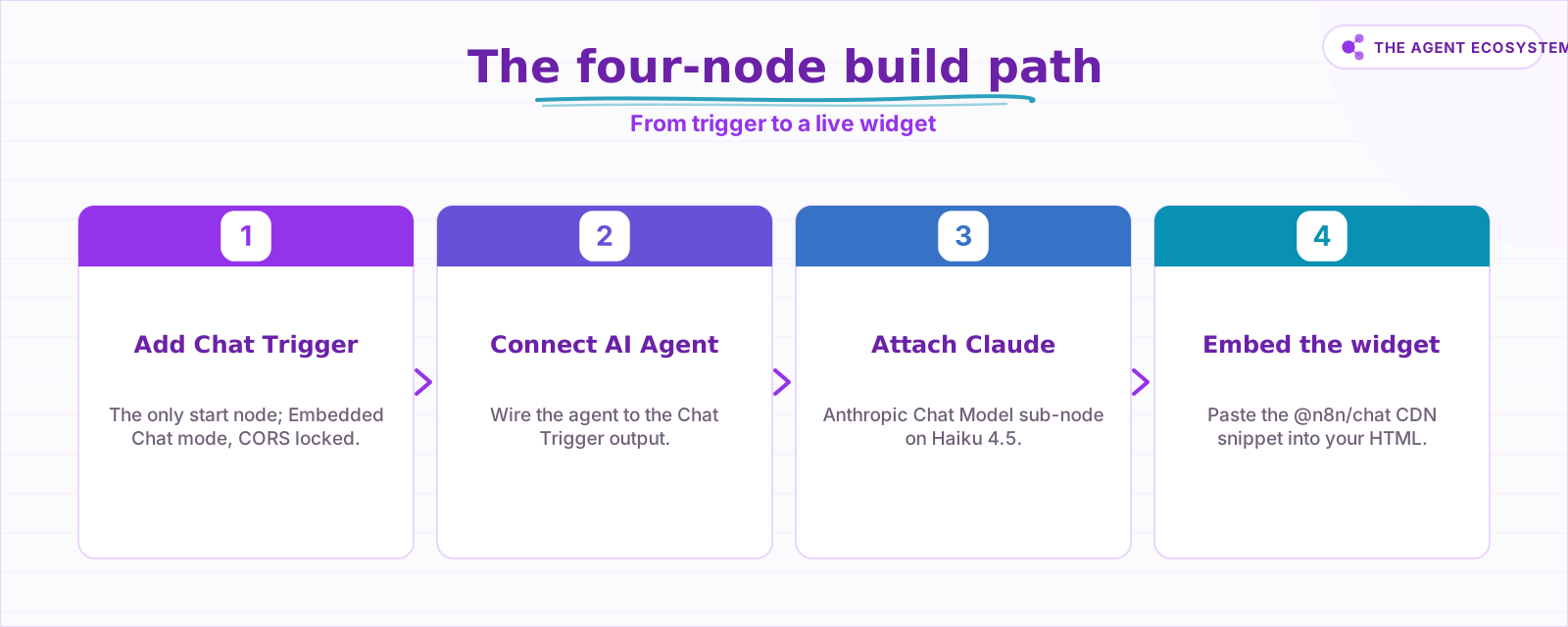 The complete build path from trigger to live widget.
How Do You Wire the Chatbot Inside n8n?#
Connect the Chat Trigger to an AI Agent node, attach an Anthropic Chat Model sub-node as the brains, and add a Simple Memory sub-node so the bot remembers earlier turns. For the simplest possible version, you can wire Chat Trigger directly to a bare Chat Model node, but you lose memory and tool-calling.
Here is the minimal wiring for a production-ready bot:
- Chat Trigger node (start, Embedded Chat mode, CORS locked)
- AI Agent node connected to the Chat Trigger's output
- Anthropic Chat Model sub-node attached to the AI Agent (select Claude Haiku 4.5)
- Simple Memory sub-node attached to both the Chat Trigger and the AI Agent
The AI Agent node requires at least one tool sub-node. During testing, attach a placeholder. Before you go live, swap it for a useful tool (a retriever, a calendar API, whatever the bot needs). All agents in n8n now run as the Tools Agent.
Set Load Previous Session on the Chat Trigger to From Memory to wire up session history. Without this, every message looks like a brand-new conversation to the model.
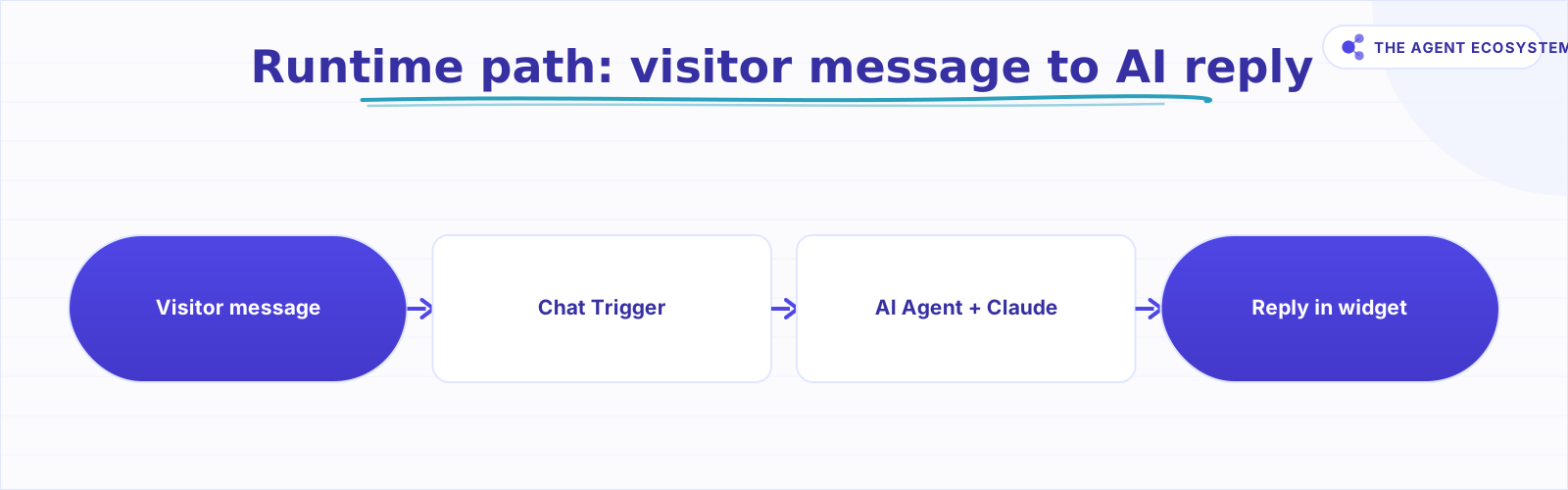 Runtime path from visitor input to AI reply.
How Do You Embed the Chat Widget on Your Website?#
Set the Chat Trigger's Mode to Embedded Chat, activate the workflow, and copy the Chat URL. Paste the @n8n/chat CDN snippet into your site's HTML. The widget appears as a corner bubble with no React, no build step, no backend code.
The full snippet from the npm package looks like this:
<link href="https://cdn.jsdelivr.net/npm/@n8n/chat/dist/style.css" rel="stylesheet" />
<script type="module">
  import { createChat } from 'https://cdn.jsdelivr.net/npm/@n8n/chat/dist/chat.bundle.es.js';
  createChat({
    webhookUrl: 'YOUR_PRODUCTION_WEBHOOK_URL',
    mode: 'window'
  });
</script>
The mode option is either 'window' (the toggle-button corner bubble, the default) or 'fullscreen' (fills its container, good for a dedicated support page). Use 'window' for the classic "chat with us" look.
The workflow must be Active for the widget to respond. A common first-time mistake is testing in the editor, deactivating the workflow, and then wondering why the live site shows no responses.
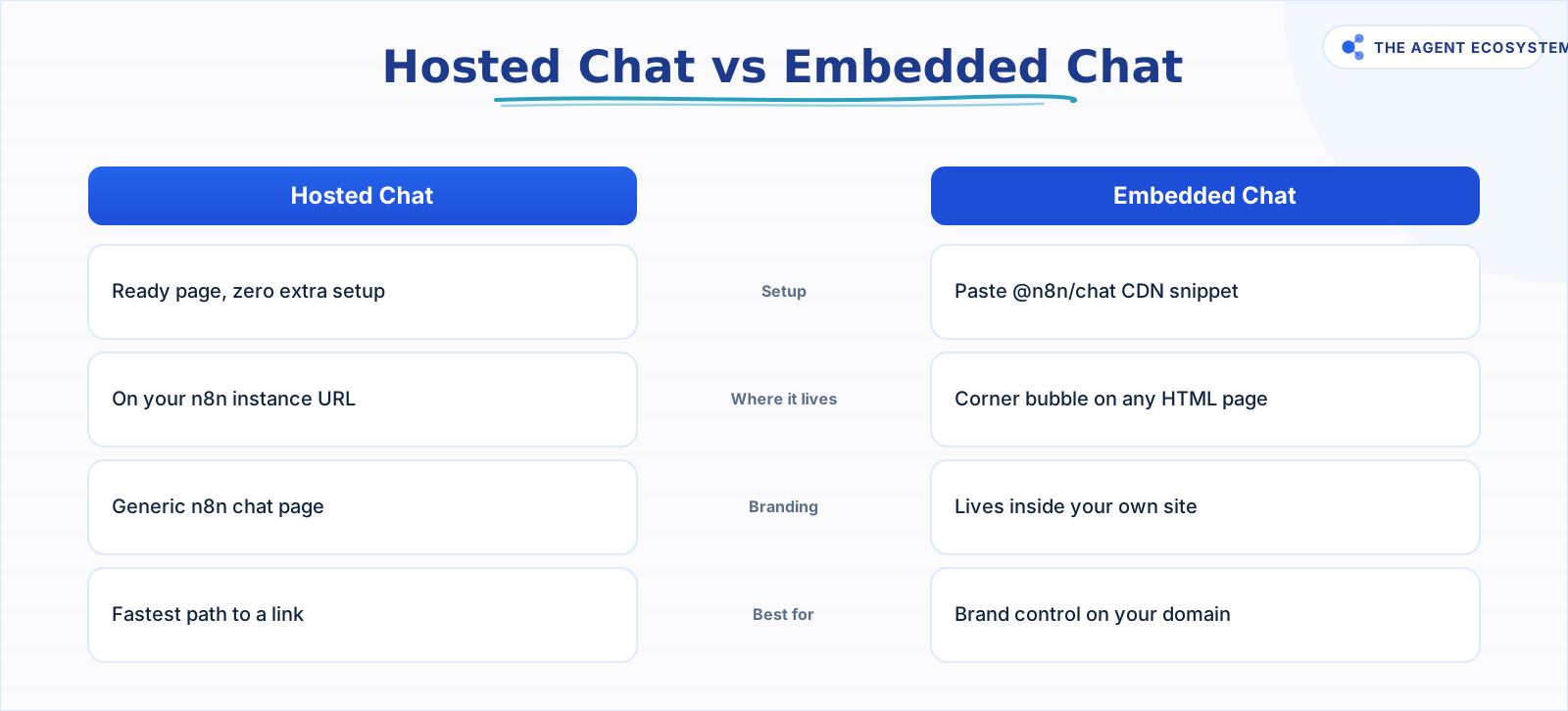 Choose Hosted Chat for speed; Embedded Chat for brand control.
How Much Does a Website AI Chatbot Cost to Run?#
On self-hosted n8n, the platform cost is $0 (n8n is free to self-host under its fair-code license). The only ongoing cost is the Claude API. A website chat is multi-turn, not a one-shot call, so price it per conversation, not per message.
Assumption: 5 turns per conversation, each turn roughly 700 input tokens (system prompt plus growing history) and 150 output tokens. One conversation is about 3,500 input tokens plus 750 output tokens. Prices are from Anthropic's pricing page as of mid-2026 (June 2026).
| Model | Input $/1M | Output $/1M | Cost per 1,000 conversations | Best for |
|---|---|---|---|---|
| Claude Haiku 4.5 | $1.00 | $5.00 | $7.25 | Website FAQ, most chat use cases |
| Claude Sonnet 4.6 | $3.00 | $15.00 | $21.75 | Complex reasoning or nuanced tone |
| Claude Opus 4.8 | $5.00 | $25.00 | $36.25 | Research-grade depth (rarely justified here) |
Arithmetic for Haiku: (3.5M input tokens x $1.00) + (0.75M output tokens x $5.00) = $3.50 + $3.75 = $7.25 per 1,000 conversations, or about $0.00725 per chat.
The input side dominates because every turn resends the full conversation history. Prompt-caching the system prompt (the identical instructions sent every turn) cuts the input cost further at Anthropic's cached rate.
If a visitor sends 15 turns instead of 5, their session costs roughly 3x the table estimate. The 5-turn assumption is a starting point; measure your own distribution after a week of traffic.
n8n Cloud Starter is €20/mo if you prefer a managed instance. That fixed cost dwarfs the token spend at typical indie-site traffic levels, so self-hosting makes sense once you are past the proof-of-concept stage. See how to self-host n8n on a VPS to get the platform line to $0.
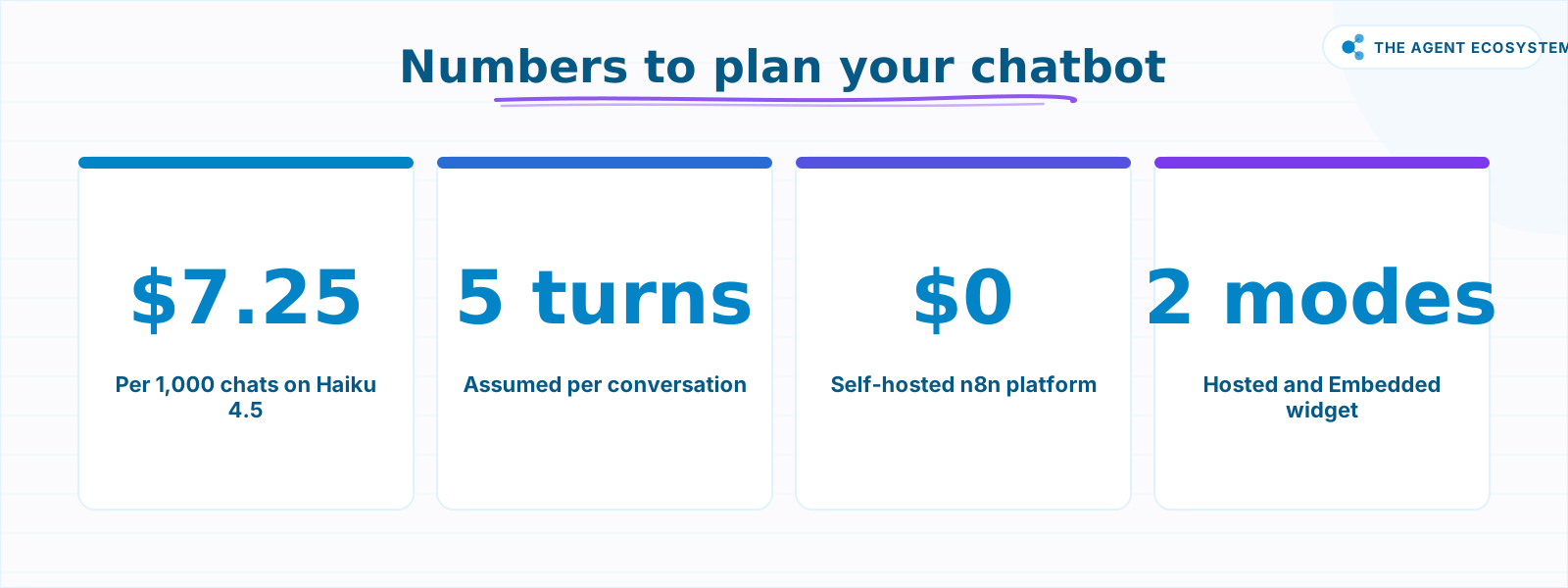 Key figures for planning your chatbot budget and setup.
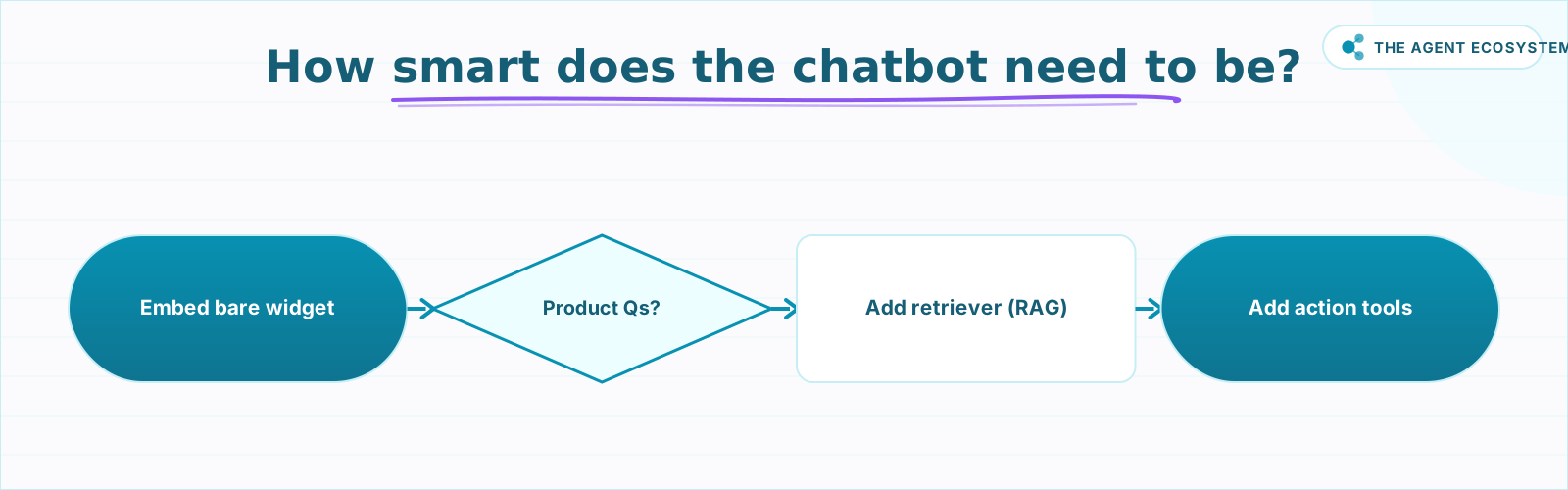 Pick how smart your n8n website chatbot needs to be.
Should It Answer from Your Docs or Take Actions?#
For a bare general-purpose chatbot, the Chat Trigger plus a Chat Model with a strong system prompt is enough. But if visitors ask product-specific questions, the bare model will hallucinate answers it was never given. That is not a configuration problem; it is a fundamental limit of what any model knows.
Three levels of capability, in order of complexity:
- Bare Chat Model: answers from the model's training data plus your system prompt. Fast to build, prone to making up specifics. Good for very general questions or a lead-capture greeter.
- AI Agent with a retriever (RAG): the agent fetches relevant chunks from your docs before answering. Answers are grounded in your actual content. See the n8n RAG customer support bot build for the wiring.
- AI Agent with action tools: the agent can look up orders, check calendars, or book appointments by calling APIs. Wire tool nodes to the AI Agent and follow the n8n tools guide. Gate any risky action (like a cancellation or a purchase) behind a human-review step.
The same Claude-powered agent you wire here runs identically on other channels. Swap the Chat Trigger for a Telegram Trigger and you have the n8n Telegram bot. Point it at WhatsApp via Twilio and you get the WhatsApp AI agent. One workflow, multiple surfaces.
Where Can This Go Wrong?#
Building the workflow takes under an hour, so the real risk is not the wiring; it is the last step before going public. Most mistakes that cost real money or break the live widget happen there: open CORS anyone can call, chatty visitors who run up turns, a bare model that invents answers, and risky tools without a human gate.
Open CORS is the most expensive mistake. Leaving Allowed Origin (CORS) at * means any script on any site can call your webhook. A single automated scraper can send thousands of requests and build a real bill before you notice.
Chatty visitors are more expensive than the table suggests. The 5-turn assumption is an average. A visitor who asks 15 back-and-forth questions costs roughly 3x the per-conversation estimate. If your site attracts complex support questions, budget for a higher average or set a conversation turn limit in your workflow logic.
A bare Chat Model makes things up. A well-written system prompt reduces hallucinations but does not eliminate them. If the bot must answer from your real pricing, real policies, or real product specs, it needs a retriever, not just a prompt.
Actions need guardrails. An AI Agent that can send emails, book meetings, or modify orders should have an explicit human-review node before any irreversible action. The Tools Agent supports this pattern natively.
What Should You Ship This Weekend?#
Ship the bare version this weekend: four nodes and a snippet. If you already have an n8n instance running and an Anthropic API key, you can get a live chat widget loading on your real site before the weekend is over, then decide later whether it needs your docs, needs to take actions, or stays a general greeter.
Start with the bare version: Chat Trigger in Embedded Chat mode, AI Agent, Haiku 4.5, Simple Memory. Get the widget loading on your actual site. Then decide whether it needs your docs (add a retriever), needs to take actions (add tools), or is fine as a general greeter.
The n8n RAG customer support bot build shows exactly how to attach a retriever once the basic widget is working. That is the natural next step once visitors start asking questions the bare model cannot answer well.
Frequently asked questions
What is the n8n Chat Trigger node?
How do I put an AI chatbot on my website with n8n?
How much does an n8n website chatbot cost to run?
What is the difference between Hosted Chat and Embedded Chat in n8n?
Can the chatbot answer from my own documents?
Which Claude model should I use for a website chatbot?
Do I need to write any frontend code to add the n8n chat widget?
Sources
Primary references and vendor documentation used while drafting and reviewing this article.
Written by

Muhammad Qasim Hammad is an AI agent and automation expert and the founder of Cart Gaze LLC (cartgaze.com). He builds product for the love of it: when an idea lands, a working prototype is usually running within hours, built with the same AI agents and automations he sells. He puts his own output at roughly 20× what it was before agents, and the Agentic OS behind this site is the working proof, documented in public with the tools he actually ran and what they really cost.
AI & Automation Services
Want a pipeline like this running in your business?
I'm Qasim — I design and ship AI agents and n8n automations for solo operators and small teams. Tell me what's eating your team's week, and I'll scope a fix.
Related reading
Build an AI Customer-Support Bot in n8n (RAG, With Real Monthly Cost)
Build an n8n AI customer support bot that answers repeat questions from your own docs using RAG. Two workflows, about $4.50 per 1,000 answers on Claude Haiku 4.5, and $0 platform cost if you self-host.

Build an AI Telegram Bot With n8n (No Code, No Fees)
Build an AI-powered n8n Telegram bot in under an hour using three nodes and zero platform fees. Get a shareable t.me link, no business verification required, and a bot that replies around the clock.
n8n AI Automation Ideas: 8 Agent Workflows Worth Building (2026)
Finished the n8n AI tutorial and wondering what to actually build? These 8 n8n AI automation ideas come with the exact nodes, the honest Chain-vs-Agent call, and the right Claude model for each job.
n8n AI Agent Pricing: What It Really Costs to Run
An n8n AI agent has two bills that behave nothing alike: a flat n8n platform fee and a per-run LLM token cost. Here is what each one comes to, with modeled per-run math across Claude, GPT, and Gemini, and the levers that actually lower the total.
Build an AI Lead-Generation Agent in n8n (With Real Monthly Cost)
An n8n AI lead generation agent triages every inbound lead the moment it lands: scoring intent, drafting a personalized reply, and pinging you on the hot ones. Real cost: about $5/month for 100 leads on Claude Sonnet 4.6.
Build a WhatsApp AI Agent With n8n and Twilio
Connect n8n, Claude, and Twilio to build a WhatsApp AI agent that answers customer FAQs instantly. Test free on the Twilio sandbox, then go live for $0.005 per reply.