n8n AI Automation Ideas: 8 Agent Workflows Worth Building (2026)
A buildable shortlist: exact nodes, honest Chain-vs-Agent calls, and the right Claude model for each workflow
Updated September 4, 2026 — Added FAQs on where to start with n8n automation ideas and what n8n can automate.
AI-drafted, reviewed by Muhammad Qasim Hammad on June 18, 2026. See our AI disclosure.
Table of contents
- What makes an n8n AI automation actually worth building?
- Which 8 AI automation ideas are worth building in n8n?
- What are the simplest ideas to start with?
- Idea 1: AI email triage
- Idea 2: Inbox/text classifier
- Idea 3: Daily AI digest
- Idea 7: Content repurposer
- Idea 8: Meeting-notes-to-actions
- Which ideas need a full AI Agent with tools?
- Idea 4: Lead research agent
- Idea 5: RAG support answerer
- Idea 6: Client onboarding agent
- Which Claude model should each idea use?
- How do you go from idea to a running workflow this week?
- Where do builders get these ideas wrong?
- Where to go from here
You finished the n8n AI Agent tutorial. You have a working canvas. Now you're staring at it wondering what to actually point it at. The best n8n AI automation ideas aren't buzzwords: they're a short list of buildable workflows where you already know the trigger, the AI step, and the action before you write a single line of prompt.
This post is that list. Eight ideas, each grounded in real node names from n8n's documentation, with an honest call on whether you need a Basic LLM Chain or a full AI Agent, and which Claude model fits the job without overspending.
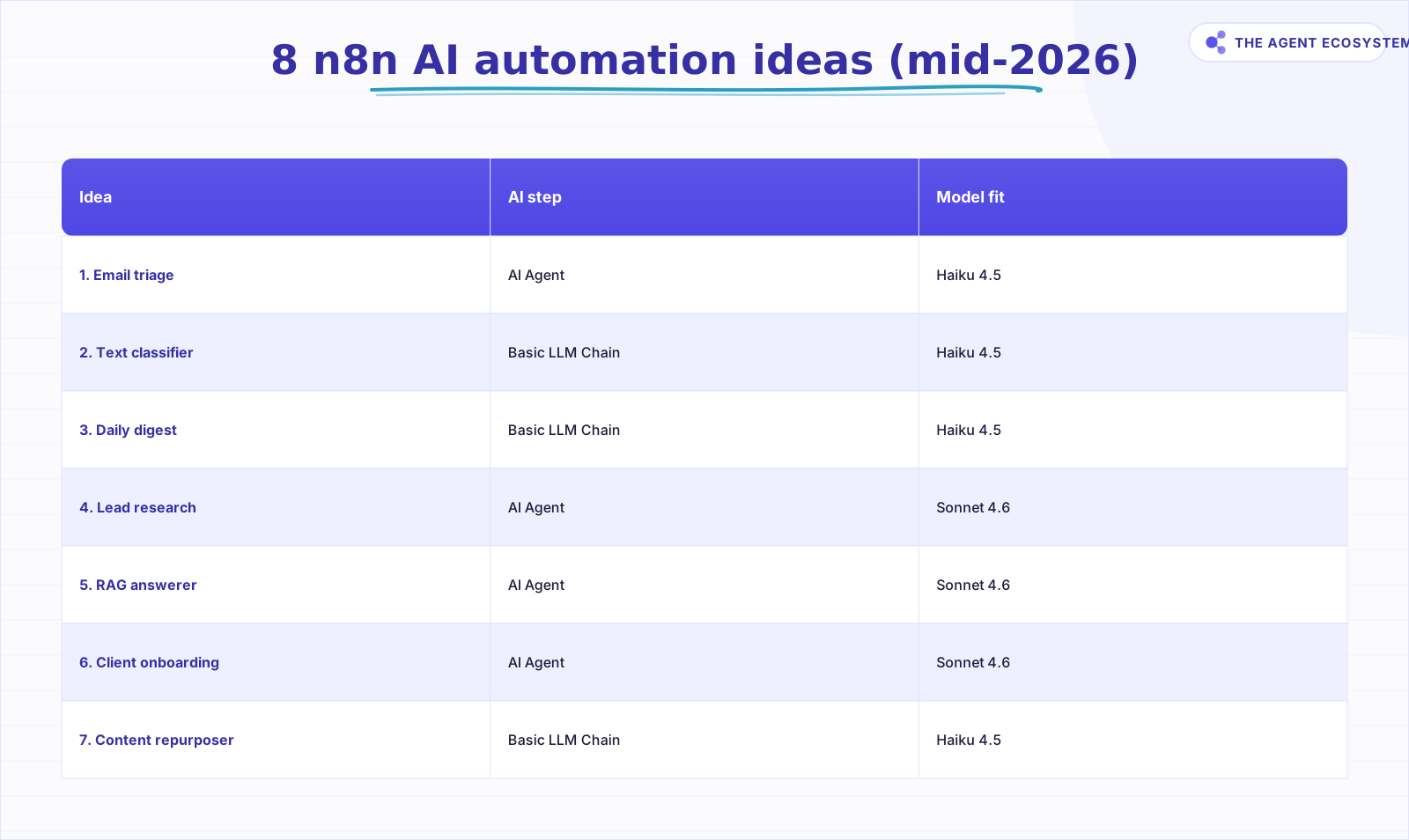 The shortlist: each idea's AI step and the model that fits it.
What makes an n8n AI automation actually worth building?#
A workflow earns its place when it removes a real, recurring task from your week: something you do the same way every time, where the output matters but the doing-of-it doesn't require your judgment. If you can't name the trigger, AI step, and action before you open the canvas, the idea isn't ready to build.
The model choice is the cost lever. As of mid-2026, Claude list prices are: Haiku 4.5 at $1 input / $5 output per 1M tokens, Sonnet 4.6 at $3 / $15, and Opus 4.8 at $5 / $25. Anthropic's own guidance frames the order: Haiku for simple tasks, Sonnet for most production workloads, Opus for the most complex reasoning. That maps cleanly onto the Chain-vs-Agent split.
Reach for a Basic LLM Chain before an AI Agent. If the task is one transform with a fixed output, a Chain is cheaper, simpler, and has fewer failure points. An Agent earns its overhead only when the run needs to pick between tools or loop through decisions.
Which 8 AI automation ideas are worth building in n8n?#
These eight ideas cover the most common repetitive tasks a solopreneur faces: inbox work, lead research, content production, client ops, and knowledge retrieval. Every node name below ships in n8n. The table is labeled "as of mid-2026" because the Model fit column references current published prices.
| Idea | Problem it solves | n8n nodes | AI step | Model fit (mid-2026) |
|---|---|---|---|---|
| 1. AI email triage | Sort and draft replies to inbound mail | Gmail Trigger -> AI Agent -> Gmail | AI Agent | Haiku 4.5 |
| 2. Inbox/text classifier | Tag incoming messages by topic or intent | Gmail Trigger -> Basic LLM Chain -> Set | Basic LLM Chain | Haiku 4.5 |
| 3. Daily AI digest | One summary of feeds, news, or calendar each morning | Schedule Trigger -> HTTP Request -> Basic LLM Chain -> Gmail | Basic LLM Chain | Haiku 4.5 |
| 4. Lead research agent | Enrich a new lead from public data | Webhook -> AI Agent (+ HTTP Request tool) -> CRM | AI Agent | Sonnet 4.6 |
| 5. RAG support answerer | Answer questions from your own docs | Trigger -> AI Agent + Vector Store Question Answer Tool -> reply | AI Agent | Sonnet 4.6 |
| 6. Client onboarding agent | Turn a signed deal into tasks, docs, and emails | Trigger -> AI Agent (+ Call n8n Workflow Tool) -> actions | AI Agent | Sonnet 4.6 |
| 7. Content repurposer | One post into many channel formats | Trigger -> Basic LLM Chain -> publish queue | Basic LLM Chain | Haiku 4.5 |
| 8. Meeting-notes-to-actions | Transcript into owners and due dates | Trigger -> Basic LLM Chain (structured output) -> tasks | Basic LLM Chain | Haiku 4.5 |
Ideas 1-3, 7, and 8 are Basic LLM Chain workflows. Ideas 4-6 are AI Agent workflows. That split determines your token spend and the complexity of your error handling.
What are the simplest ideas to start with?#
The Basic LLM Chain ideas (email triage, inbox classifier, daily digest, and content repurposer) are the right starting point because each is a single transform: one input, one prompt, one output. There's no tool selection, no loop, no branching decision. Wire the trigger, attach the Chain with a Chat Model sub-node, write a tight prompt, and add the action.
Idea 1: AI email triage#
The Gmail Trigger fires when a new message arrives (poll mode; you set how often it polls via Poll Time). The AI Agent reads the subject and body, decides if it needs a reply, drafts one, and uses a Gmail action node to send or save as draft. For most solo inboxes, a Basic LLM Chain classifying then drafting is enough. See the full build in our email triage deep-dive.
Idea 2: Inbox/text classifier#
Same Gmail Trigger, but the output is a tag or label, not a reply draft. A Basic LLM Chain classifies the message (client, prospect, newsletter, support) and a Set node writes the label. One prompt template, one Chain node. This is the fastest workflow on the list to ship.
Idea 3: Daily AI digest#
The Schedule Trigger fires each morning. An HTTP Request node pulls your RSS feeds or API sources. The Basic LLM Chain summarizes them into a single digest. A Gmail or Slack node delivers it. The whole workflow runs before you open your laptop.
Idea 7: Content repurposer#
A trigger fires when you publish a blog post or drop a transcript into a folder. The Basic LLM Chain rewrites it into three channel formats: a LinkedIn post, a short email, and three X posts. The action nodes push each to a queue or draft folder. Haiku 4.5 handles this well; the task is a rewrite, not reasoning.
Idea 8: Meeting-notes-to-actions#
Drop a transcript into a watched folder or send it via webhook. The Basic LLM Chain extracts action items with owners and due dates as structured JSON. A downstream node writes them to your task manager via HTTP Request. Use a structured output parser sub-node to enforce the JSON shape.
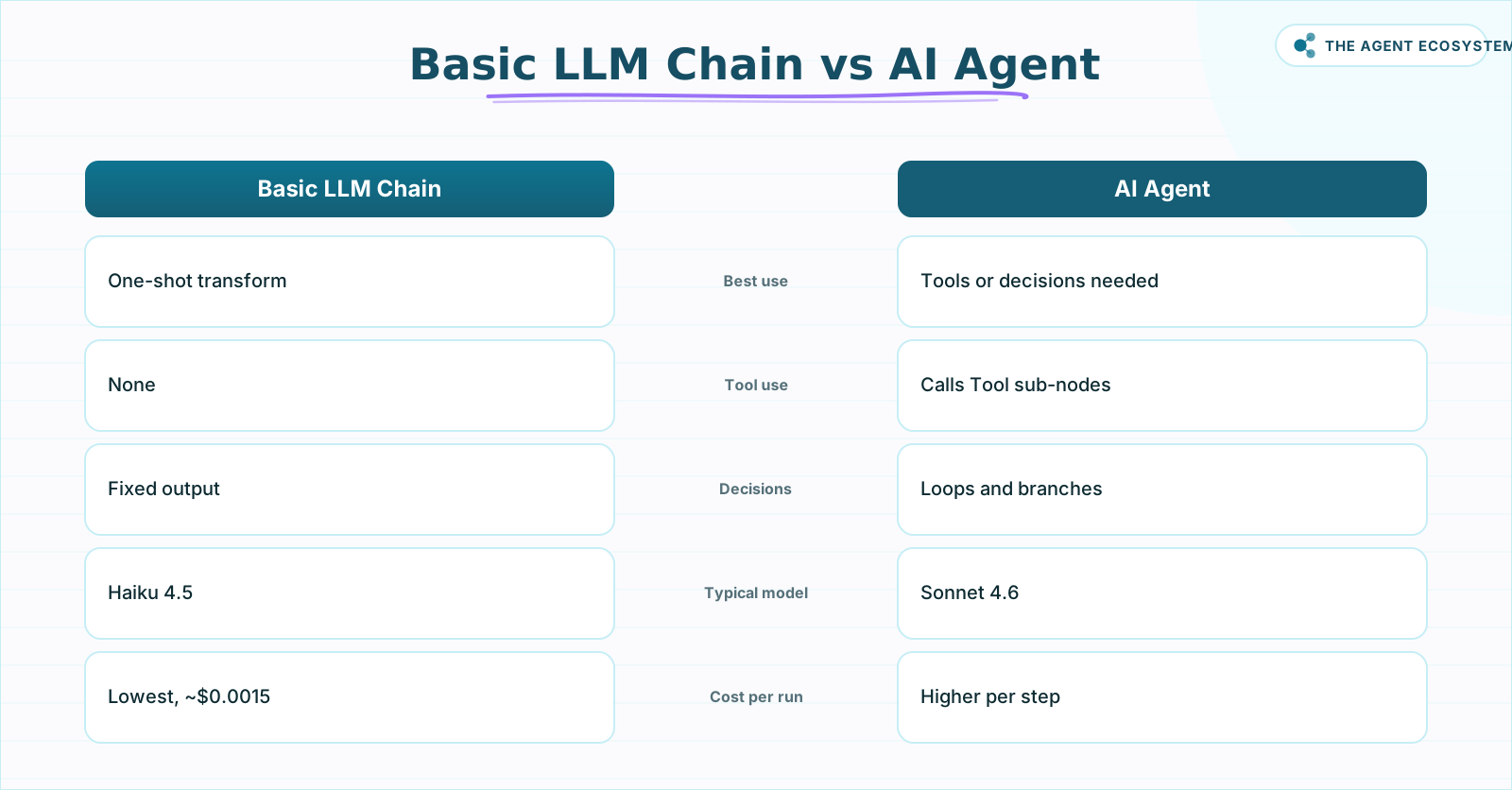 Match the AI step to the task shape before opening the canvas.
Which ideas need a full AI Agent with tools?#
An AI Agent (Tools Agent) is the right choice when the workflow must decide which tool to call, or take actions in sequence based on what it finds. That describes ideas 4, 5, and 6. Each attaches Tool sub-nodes and runs best on Sonnet 4.6 because the reasoning is genuinely multi-step.
Idea 4: Lead research agent#
A webhook fires when a new lead lands in your CRM or form. The AI Agent receives the lead's name and company, then calls HTTP Request tool nodes to pull public data (LinkedIn profile, company website, news). It synthesizes the findings and writes a structured enrichment record back to the CRM. The Agent decides which sources to query based on what it finds. Full build: n8n AI lead generation agent.
For context on how Tool sub-nodes work, see our n8n AI agent tools guide.
Idea 5: RAG support answerer#
A trigger fires when a support question arrives. The AI Agent has a Vector Store Question Answer Tool sub-node attached. That tool "allows an agent to summarize results and answer questions based on chunks from a vector store." The Agent queries your docs, finds the relevant chunk, and replies. Use a persistent vector store backend (PGVector, Supabase, Qdrant, or Pinecone), not the Simple Vector Store, for anything you keep running.
Idea 6: Client onboarding agent#
A trigger fires when a deal closes. The AI Agent uses a Call n8n Workflow Tool sub-node to call reusable sub-workflows: create the project folder, send the welcome email, post to Slack, create the task list. The Agent decides the order based on the deal type. Full build: automating client onboarding in n8n.
Which Claude model should each idea use?#
Pick the cheapest model that actually does the job. For a Basic LLM Chain running a single classification at roughly 1,000 input and 100 output tokens on Haiku 4.5, the math is 0.001M × $1 + 0.0001M × $5 = $0.0015 per run. That's the cheapest pattern here, and it covers ideas 2, 3, 7, and 8 well.
For an AI Agent run on Sonnet 4.6 with multiple tool calls, each step consumes more tokens because the Agent sends the full context with every tool call. The per-run cost rises, but the task complexity justifies it. Reserve Opus 4.8 ($5 / $25 per 1M tokens) only for a step that genuinely needs deep reasoning: complex multi-document synthesis, hard classification with edge cases, or a strategy-level decision the Agent must make.
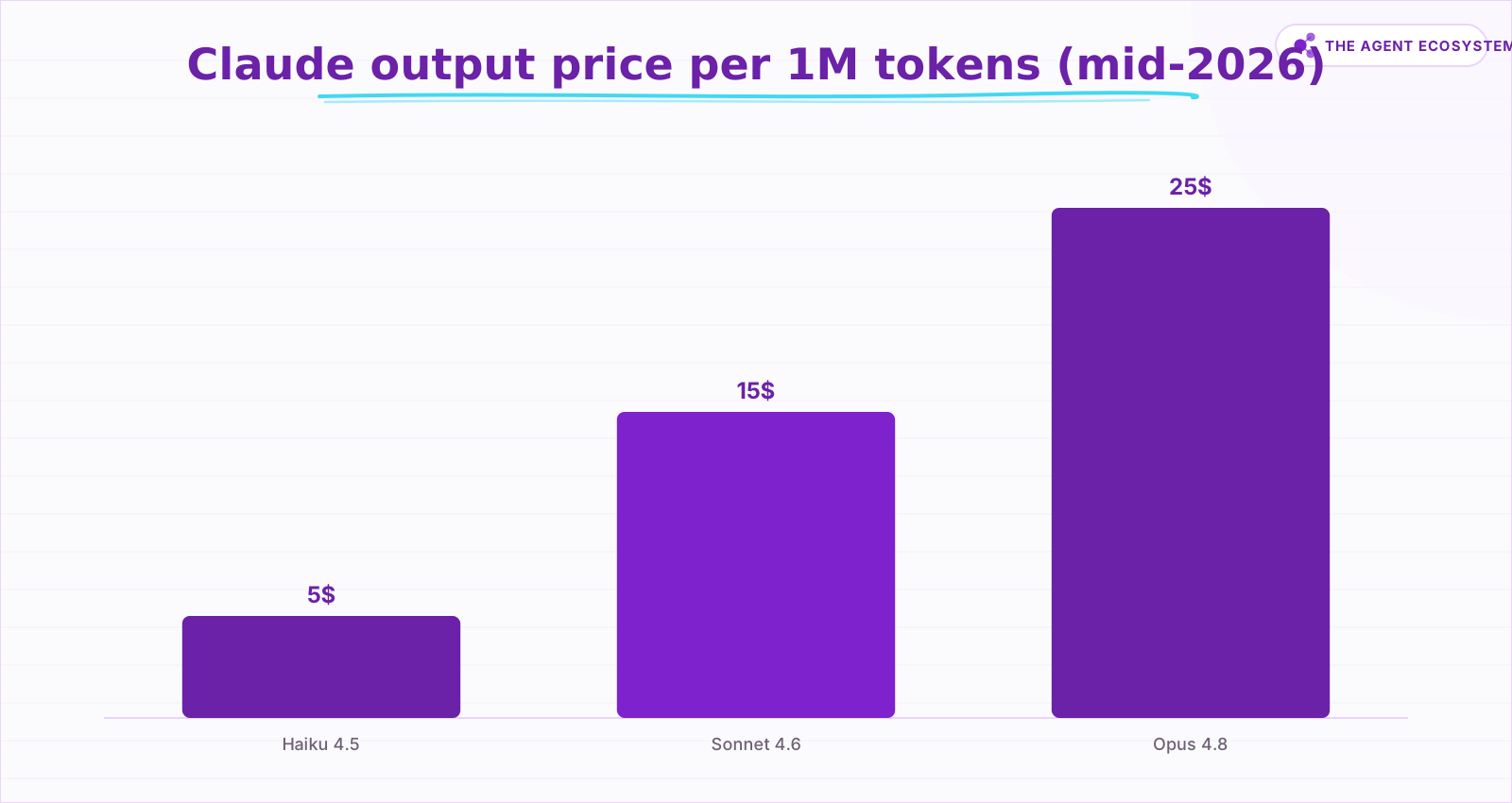 Output token list prices; self-hosted n8n itself is free.
If you want to compare n8n automations that need no model at all, the solopreneur time-saver roundup covers those alongside the AI ones.
How do you go from idea to a running workflow this week?#
Pick the one idea from the table that maps to something you did manually this week. Not last month. This week. That specificity keeps the scope small enough to ship in a single session. Wire the three parts in order: trigger first, AI step second, action third.
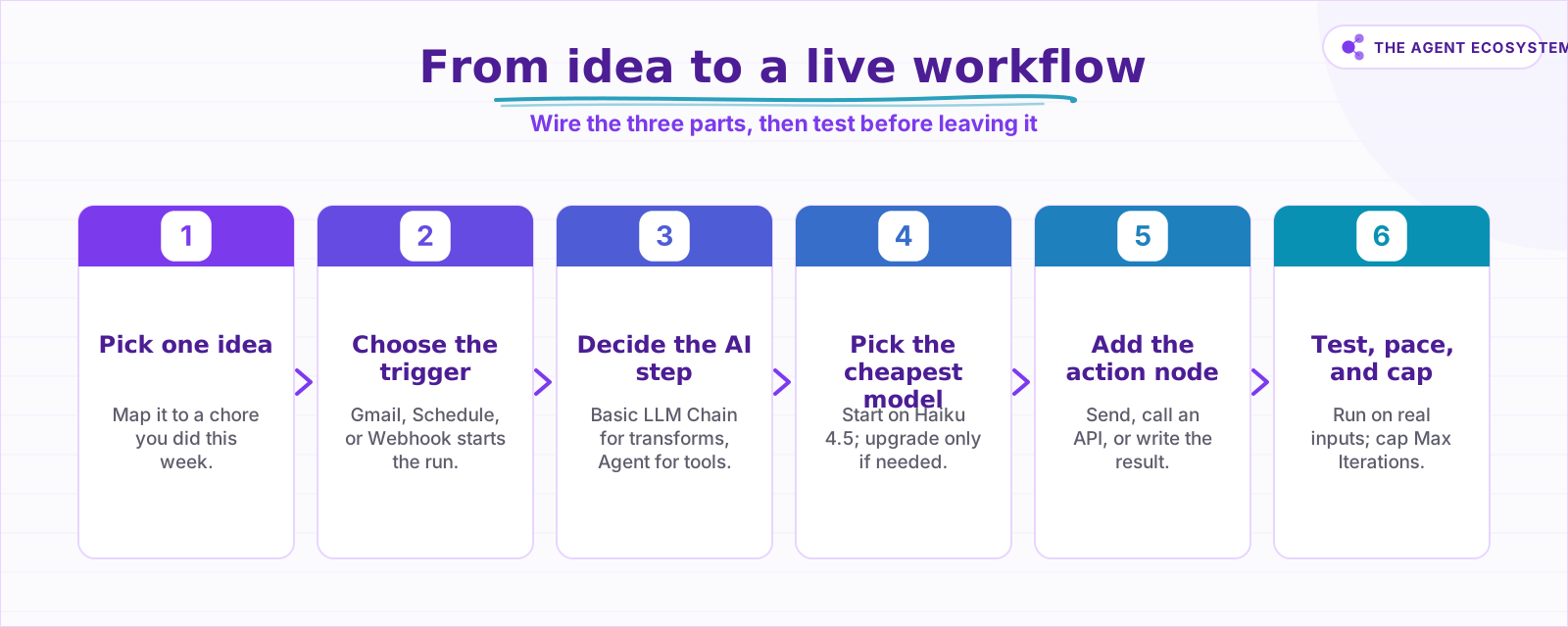 Follow these in order; do not skip testing on real inputs.
Test on real inputs before enabling the workflow. Feed it the messiest example you can find: a vague email, a short transcript, a lead with missing fields. If the output breaks, fix the prompt before you fix the nodes. The prompt is usually the problem.
Once it runs cleanly on three real examples, pace the trigger and cap the Agent loop. Then leave it.
Where do builders get these ideas wrong?#
The most common mistake is reaching for an AI Agent when a Basic LLM Chain would do the job. An Agent adds a reasoning loop, tool-calling overhead, and more tokens per run. For a single-step classify-and-label task, that overhead costs more and introduces extra failure points with no benefit.
The second mistake is keeping the Simple Vector Store in production. It's in-memory and non-persistent: every n8n restart wipes your document index. For idea 5 (RAG support answerer), move to a persistent backend like Supabase or PGVector before you go live. The Vector Store node supports multiple backends; pick one that survives a restart.
The third mistake is no trigger pacing. A Gmail Trigger set to poll too often, or a Schedule Trigger firing every minute, can run up a model bill while you sleep. Set a sensible interval and cap Max Iterations on any Agent before you enable the workflow.
Where to go from here#
Open the table, pick the one idea that maps to a chore you did this week, and wire the three parts tonight. The first run doesn't need to be perfect; it needs to prove the skeleton works on real input. Once it does, you have a template you can clone for the next idea on the list.
Frequently asked questions
What are good AI automation ideas to build in n8n?
Do I need an AI Agent or is a Basic LLM Chain enough?
Which n8n nodes do I need to build an AI automation?
Which Claude model should I use for an n8n AI workflow?
How much does it cost to run an n8n AI automation?
What is the easiest AI automation to build first in n8n?
What are the best n8n automation ideas to start with?
What can you automate with n8n?
Sources
Primary references and vendor documentation used while drafting and reviewing this article.
- n8n AI Agent node documentation
- n8n Tools Agent documentation
- n8n Advanced AI intro tutorial: Basic LLM Chain vs AI Agent
- n8n Gmail Trigger node
- n8n Gmail Trigger poll mode options
- n8n Schedule Trigger node
- n8n HTTP Request node
- n8n Simple Vector Store node
- n8n Vector Store Question Answer Tool
- n8n Call n8n Workflow Tool sub-node
- Claude pricing as of mid-2026
- n8n pricing: Community edition free, Cloud Starter EUR 20/mo
- n8n Community edition features
Written by

Muhammad Qasim Hammad is an AI agent and automation expert and the founder of Cart Gaze LLC (cartgaze.com). He builds product for the love of it: when an idea lands, a working prototype is usually running within hours, built with the same AI agents and automations he sells. He puts his own output at roughly 20× what it was before agents, and the Agentic OS behind this site is the working proof, documented in public with the tools he actually ran and what they really cost.
AI & Automation Services
Want a pipeline like this running in your business?
I'm Qasim — I design and ship AI agents and n8n automations for solo operators and small teams. Tell me what's eating your team's week, and I'll scope a fix.
Related reading
n8n AI Agent vs Chain: Which Should You Use? (2026)
Every n8n builder reaches for the AI Agent by reflex, but a Basic LLM Chain costs roughly 5x less per 1,000 runs on Haiku 4.5. Learn the one mechanical rule that decides which node to use.

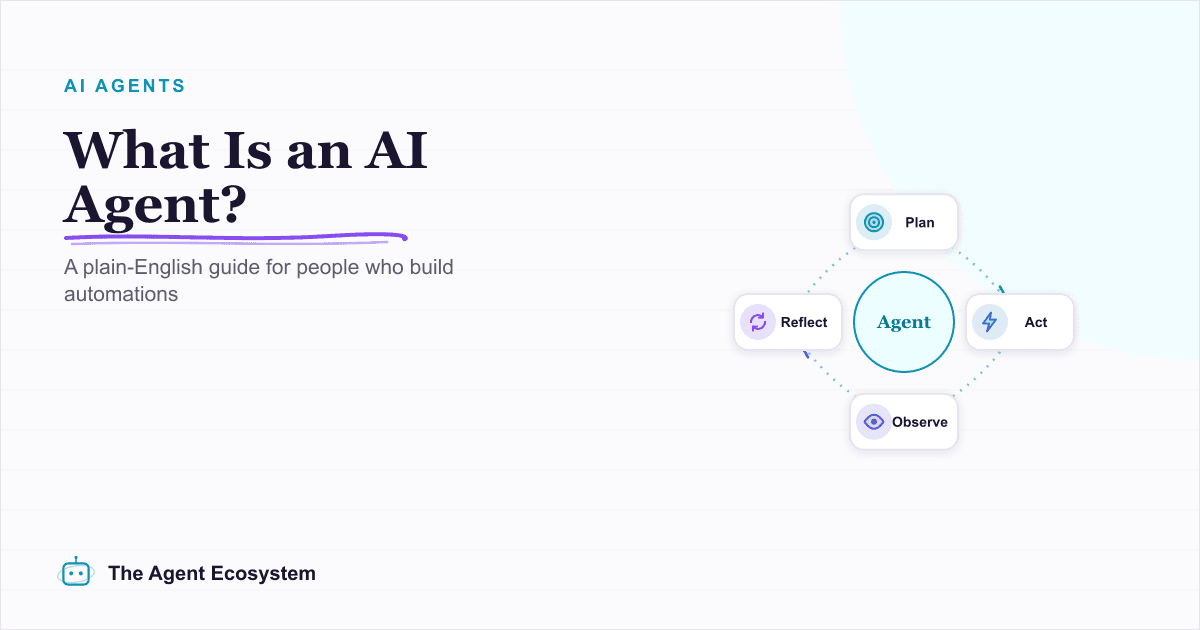
What Is an AI Agent? A Plain-English Guide for Builders
An AI agent is a language model running in a loop that decides its own next action, not a chatbot and not a chain. Here is how the perceive-decide-act-observe loop works, how an agent differs from a chatbot, chain, and workflow, and a checklist for when you actually need one.
How to Use the Basic LLM Chain in n8n (Your First AI Step)
The n8n Basic LLM Chain is the simplest AI building block: one prompt in, one model response out, no tools, no memory, no loops. Wire it up in minutes and keep your token bill predictable at about $1.40 per 1,000 calls on Claude Haiku 4.5.
How to Build an AI Agent: The 80% That Survives Week Two
Most tutorials get you a working agent in ten minutes and skip what breaks it in week two. Sixteen lessons covering the loop, tool descriptions, memory, fallbacks, guardrails, evaluation, and the cost levers that decide your bill.
Build an AI Lead-Generation Agent in n8n (With Real Monthly Cost)
An n8n AI lead generation agent triages every inbound lead the moment it lands: scoring intent, drafting a personalized reply, and pinging you on the hot ones. Real cost: about $5/month for 100 leads on Claude Sonnet 4.6.
Claude vs GPT vs Gemini in n8n: Tested Cost and Speed
There is a 25x cost spread between the cheapest and priciest LLM tier for the exact same n8n AI Agent workflow. This post prices all three providers across 11 model tiers so you can pick the right Chat Model sub-node and stop overpaying.