Automate Client Onboarding With n8n: Welcome Email, Notion, and More
One trigger, five automatic actions, zero manual effort after setup
AI-drafted, reviewed by Muhammad Qasim Hammad on June 13, 2026. See our AI disclosure.
Table of contents
- What does an automated client onboarding workflow actually do?
- Which trigger should you use?
- How does Claude write the personalised welcome email?
- How do you build the full workflow in n8n?
- Step 1: Trigger node
- Step 2: Set node
- Step 3: AI Chain node
- Step 4: Gmail Send node
- Step 5: Notion Create Page node
- Step 6: Telegram or Slack notification
- Step 7: Google Sheets CRM log
- What if Notion fails during the workflow?
- What should you add next?
Signing a new client should feel like a win, but the first 20 minutes after that signature are always the same frantic routine: write the welcome email, create the project folder, add them to the CRM sheet, send the intake form, put the kickoff call in the calendar. n8n client onboarding automation runs that entire routine in under 30 seconds, the moment the client signs, every time.
The symptom is familiar: you're mid-focus on actual client work, your phone buzzes with a payment notification, and suddenly you're context-switching into a copy-paste checklist. Miss a step and the new client's first impression is silence for 30 minutes. Nail every step and it still cost you 20 minutes of focused time.
I run this on n8n self-hosted on a 5-dollar-per-month VPS. When a client signs, the first thing they receive is a personalised email referencing exactly what they purchased and their next three steps, written by Claude in under 10 seconds. The Notion project page exists before the kickoff call. I usually find out a client signed by seeing the Slack notification from the workflow, not by checking my inbox.
One client replied "wow, how did you send this so quickly?" two minutes after checkout. I had not even opened my email yet.
What does an automated client onboarding workflow actually do?#
The n8n client onboarding automation runs five actions the moment a trigger fires: it generates a personalised welcome email with Claude, sends it via Gmail, creates a Notion project page, posts a Slack or Telegram notification to you, and logs the client in a Google Sheets CRM. The whole sequence finishes in under 30 seconds.
The architecture is a spine with optional arms. The spine is always: Trigger -> Set node -> AI Chain -> Gmail Send. The arms are Notion, Slack or Telegram, and Sheets. Build only the spine if you want results today and add arms later.
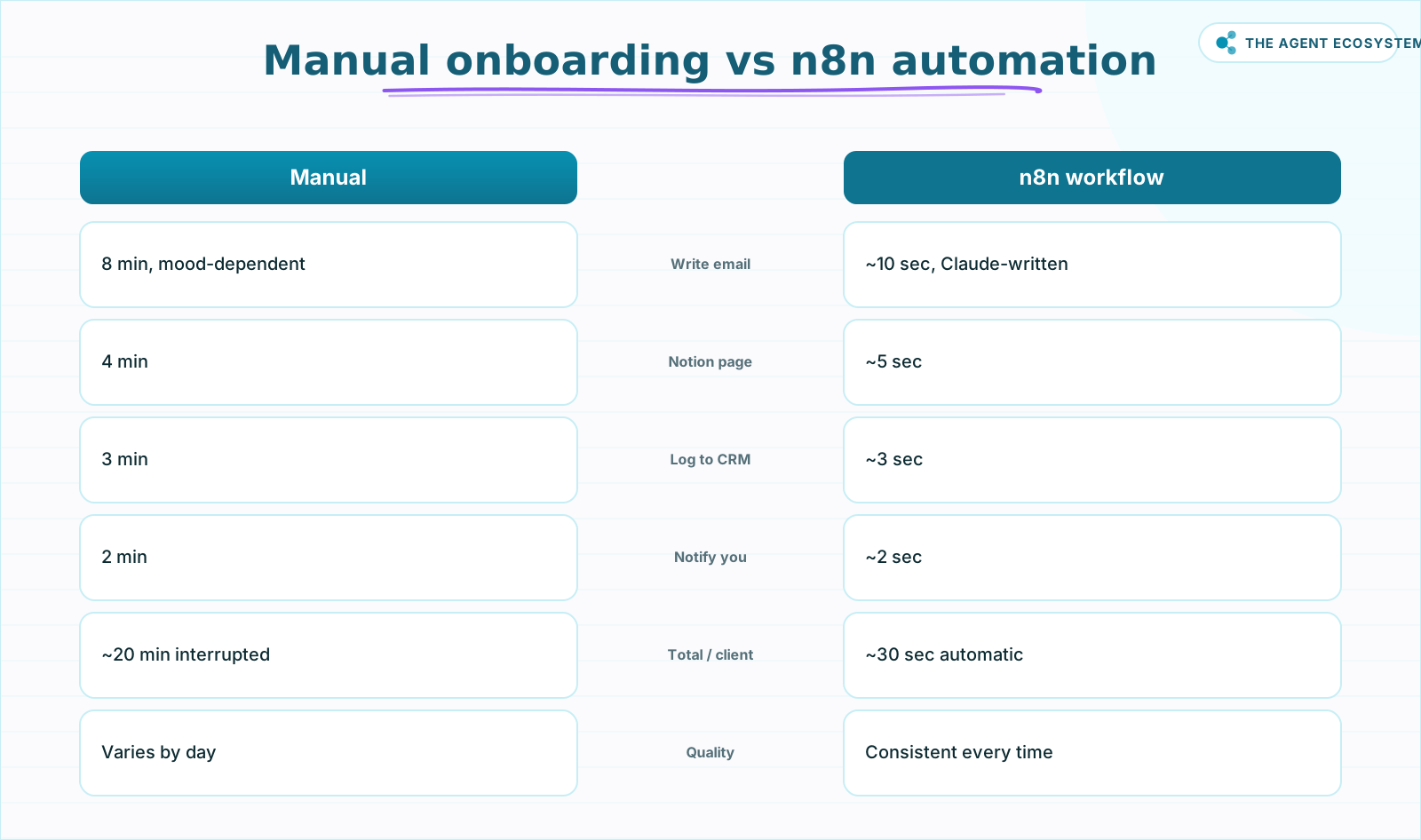 Every task done faster and more consistently by the workflow.
Here is the starkest way to see the difference this makes:
| Task | Manual time | Automated time | Quality variation |
|---|---|---|---|
| Write welcome email | 8 min | ~10 sec (Claude) | High (mood-dependent) |
| Create project page in Notion | 4 min | ~5 sec | None |
| Log client in CRM sheet | 3 min | ~3 sec | None |
| Send Slack/Telegram notification | 2 min | ~2 sec | None |
| Send intake form link | 3 min | Included in email | None |
| Total per new client | ~20 min | ~30 sec | Consistent every time |
Twenty minutes of interrupted work versus 30 seconds of automatic execution, with no quality variation. Claude writes the same calibre of email at 3am on a Sunday as it does on a Monday morning.
Which trigger should you use?#
Use the trigger that matches how you already collect client information. Stripe is right if you take payment before onboarding. Typeform works when the intake form is the entry point. Google Sheets fits when clients come through a Google Form or a manually updated sheet. All three feed the same downstream workflow after the Set node normalises them.
Stripe Webhook: Add a Webhook node in n8n with a POST method. Register the endpoint in the Stripe Dashboard under Developers -> Webhooks, listening for the customer.created event. The payload includes customer.name, customer.email, and any metadata fields you configure, such as the service name.
Typeform Trigger: Add the Typeform Trigger node. It maps every form field by label, so What service are you signing up for? becomes a usable field. See the n8n Typeform Trigger docs for authentication steps.
Google Sheets Trigger: Add the Google Sheets Trigger node set to Row Added. This pairs well with Google Forms, which auto-append submissions to a linked sheet. See the n8n Google Sheets Trigger docs.
After whichever trigger you choose, add a Set node. Create exactly four output fields: clientName, clientEmail, serviceBooked, notes. Map them from the trigger's field names. Every node after this point uses those four fields and has no idea which trigger fired.
The structural insight worth internalising: swap the trigger, keep the logic.
If you are already running a lead follow-up sequence before onboarding, see the solopreneur lead follow-up automation for how to chain that into this workflow.
How does Claude write the personalised welcome email?#
Claude reads the client's name, the specific service they booked, and any notes from the intake form, then writes a warm 3-sentence welcome paragraph and a numbered list of next steps. This is not a mail-merge template with {{first_name}} swapped in. The output reads like a person wrote it, because the model reasons about context rather than filling blanks.
In n8n, add a Basic LLM Chain node (simpler than the AI Agent node when you do not need tool calls). Connect it to Anthropic using your API key. As of mid-2026, the available models include Claude Opus 4.8, Sonnet 4.6, and Haiku 4.5 (Anthropic model overview). Haiku 4.5 is fast and cheap enough for this task; use Sonnet 4.6 if you want richer prose.
Here is the prompt template to paste into the node:
You are a friendly business assistant. Write a welcome email body for a new client.

Client name: {{ $('Set').item.json.clientName }}
Service booked: {{ $('Set').item.json.serviceBooked }}
Intake notes: {{ $('Set').item.json.notes }}

Write:
1. A warm 3-sentence welcome paragraph that references their name and the specific service.
2. A numbered list of their next three steps (schedule kickoff call, complete intake form, review the project brief).

Keep the tone conversational and professional. Do not use greetings like "Dear" or sign-offs.
Example input: clientName: Sarah Chen, serviceBooked: Brand Strategy Sprint, notes: Launching a DTC food brand, needs positioning before October.
Example Claude output:
Sarah, welcome to the Brand Strategy Sprint. I'm looking forward to helping you build sharp positioning for your food brand before the October launch. You've picked exactly the right moment to get this locked in before go-to-market.
Your next three steps:
- Schedule your kickoff call using the link below.
- Complete the brand intake questionnaire (takes about 15 minutes).
- Review the Sprint brief I'll send once we've spoken.
That output goes directly into the Gmail node body. No editing required.
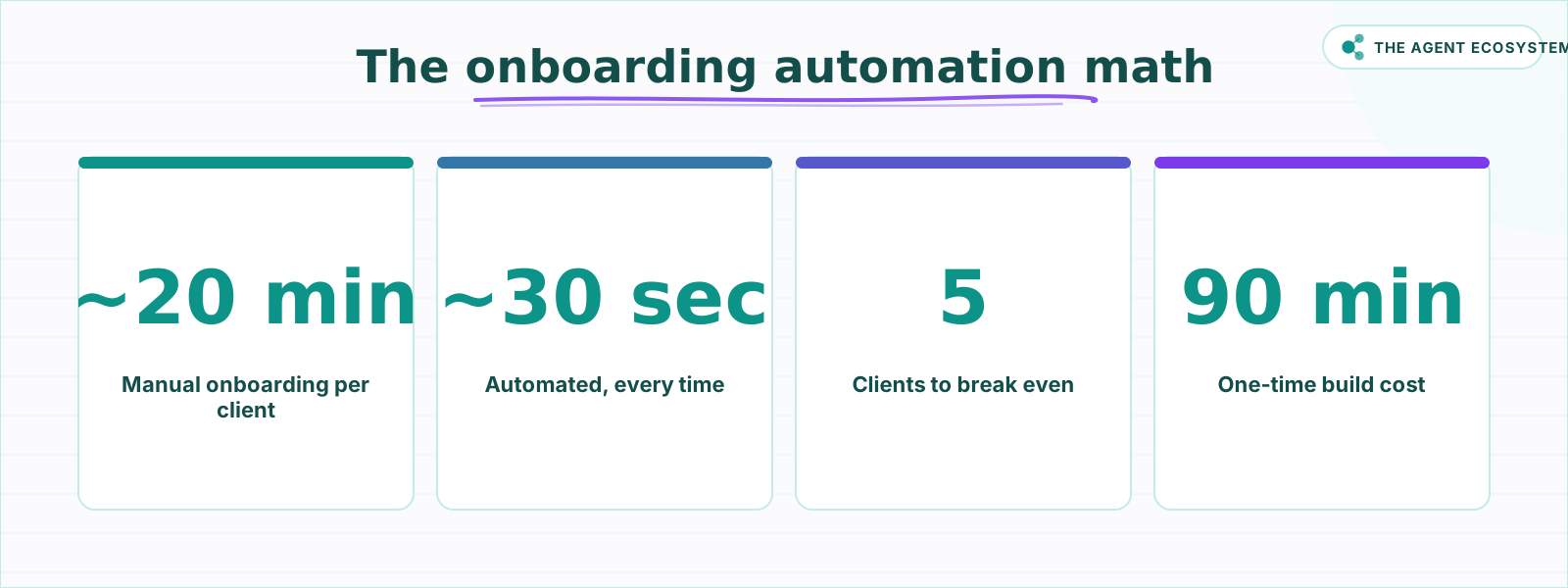 Five clients recoup the 90-minute setup completely.
How do you build the full workflow in n8n?#
Building the n8n client onboarding automation takes about 90 minutes the first time. After that, every new client runs through it automatically in under 30 seconds. The steps below cover the full spine (trigger, Set node, AI, Gmail) plus all three optional arms: Notion, Telegram, and the Sheets CRM log.
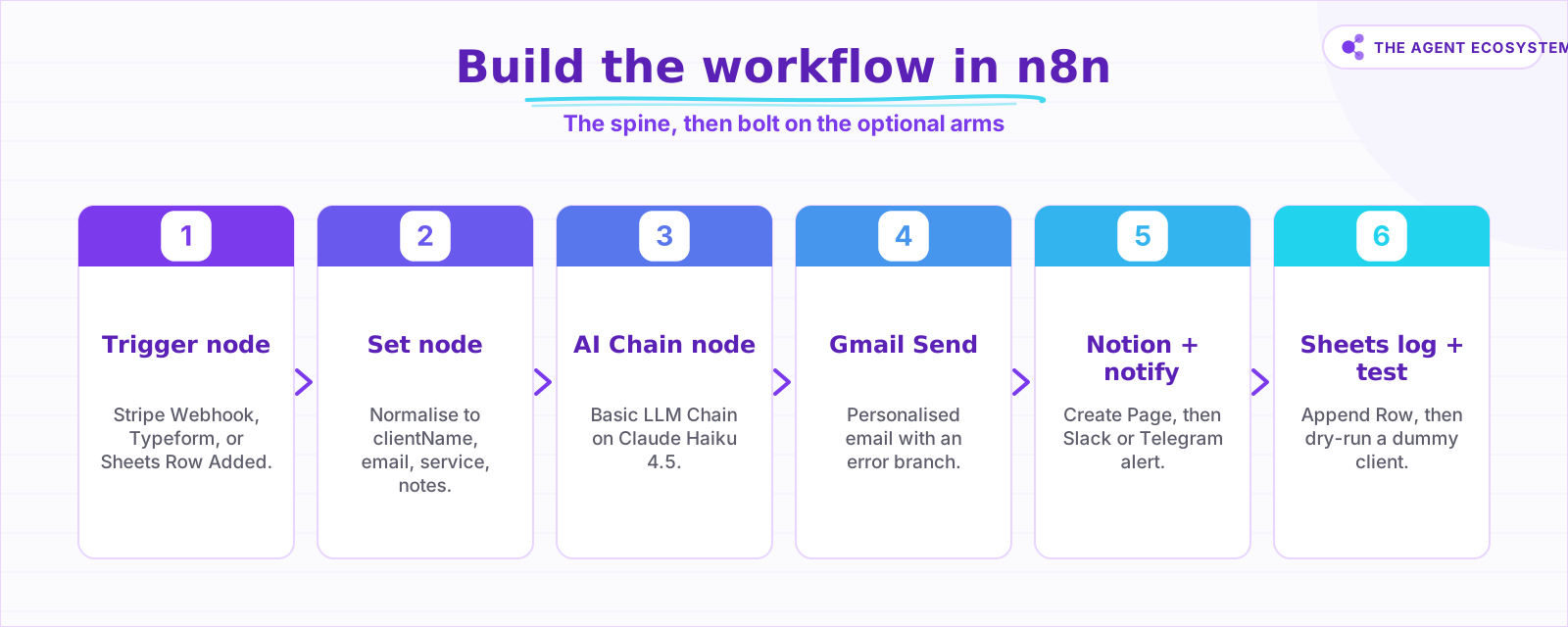 Build each step in order; Notion and Sheets are optional arms.
Step 1: Trigger node#
Add your chosen trigger (Stripe Webhook, Typeform Trigger, or Google Sheets Trigger) as node 1. Configure authentication and register the webhook URL in the external platform.
Step 2: Set node#
Add a Set node. Create the four fields: clientName, clientEmail, serviceBooked, notes. Save and connect it to the trigger.
Step 3: AI Chain node#
Add a Basic LLM Chain node (n8n LangChain docs). Select Anthropic as the provider, choose Claude Haiku 4.5, and paste the prompt template from the section above.
Step 4: Gmail Send node#
Add a Gmail node, operation Send (n8n Gmail docs). Set:
- To:
{{ $('Set').item.json.clientEmail }} - Subject:
Welcome to your {{ $('Set').item.json.serviceBooked }}, {{ $('Set').item.json.clientName }} - Message: the output from the AI Chain node
- Enable HTML if you want formatted bullet points.
Add an error branch on this node. If anything downstream fails, the welcome email must still go out.
Step 5: Notion Create Page node#
Add a Notion node, operation Create Page (n8n Notion docs). Set Parent to your Clients database. Map: Name = clientName, Email = clientEmail, Service = serviceBooked, Status = Active.
Step 6: Telegram or Slack notification#
Add a Telegram node (Send Message) or a Slack node (n8n Slack docs). Use this message:
New client signed: {{ $('Set').item.json.clientName }}
Service: {{ $('Set').item.json.serviceBooked }}
Email: {{ $('Set').item.json.clientEmail }}
Step 7: Google Sheets CRM log#
Add a Google Sheets node, operation Append Row (n8n Sheets docs). Columns: Date, Name, Email, Service, Source. This creates a single running record of every client. For a deeper look at using Sheets as a lightweight CRM backend, see Google Sheets as a database with n8n.
What if Notion fails during the workflow?#
Add an error branch on the Notion node and the welcome email goes out regardless of what Notion or Sheets returns. Without an error branch, a Notion API error halts the entire execution at that node and the client never receives the welcome message, which defeats the purpose of the automation.
In n8n, open the Notion node settings and enable the Error Branch option (n8n error handling docs). Connect the error output to a Telegram notification that alerts you to the failure. You can then create the Notion page manually in the rare case it fails, while the client experience stays clean.
The design principle: decouple the client-facing action (the email) from the internal actions (Notion, Sheets). The client never needs to know about your project management system.
For a complete guide to building reliable error branches across any n8n workflow, see n8n error handling for reliable workflows.
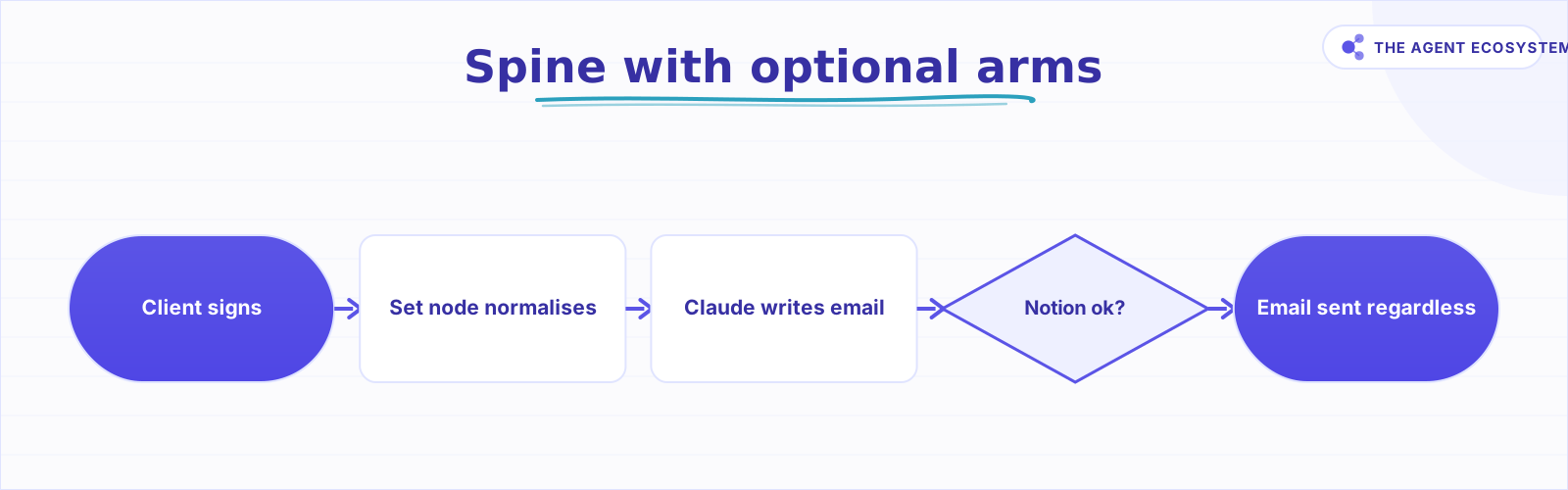 An error branch keeps the email going out even if Notion fails.
What should you add next?#
Once the core spine runs cleanly, adding more arms is straightforward: each one plugs into the existing flow without restructuring the nodes already working. The three highest-value additions are a Calendly link in the welcome email, a contract-signing node via DocuSign, and an intake questionnaire trigger via Typeform.
Calendly or Cal.com link in the email: Add the booking URL to the Claude prompt so it appears as step one in the client's next-steps list. No extra node needed.
Contract signing via DocuSign: Add a DocuSign node after the Gmail send. Pass the client email and a pre-built contract template ID. The client receives the welcome email and the contract link within the same 30-second window.
Intake questionnaire via Typeform: If your trigger is Stripe, the client has paid but not filled out an intake form yet. Add a Typeform link to the Claude-generated email as step two. The workflow handles it automatically.
Reading and sorting incoming replies: Once clients reply to the welcome email, you need a way to triage those messages without opening every one. The Claude email triage agent for n8n shows how to route incoming mail automatically.
The break-even math is simple: 20 minutes of manual onboarding per client, multiplied by five clients, equals 100 minutes of recovered time. The workflow takes about 90 minutes to build. After client five, every minute is pure gain.
Build the spine first (Trigger, Set, AI Chain, Gmail). Run it with three dummy entries and verify the emails read naturally. Then add the Notion arm, the Slack notification, and the Sheets log one node at a time. Each arm takes under 10 minutes once the spine works.
Once onboarding runs itself, the next question is what to build next: these n8n automation ideas are eight AI workflows worth wiring up.
Frequently asked questions
What can n8n automate in client onboarding?
Which trigger should I use, Stripe, Typeform, or Google Sheets?
How does Claude personalise the welcome email?
What happens if Notion fails during the workflow?
How long does it take to build this workflow?
Can I add contract signing or Calendly to the workflow?
Sources
Primary references and vendor documentation used while drafting and reviewing this article.
- Stripe Webhooks Documentation
- n8n Webhook Node Documentation
- n8n Typeform Trigger Documentation
- n8n Google Sheets Trigger Documentation
- n8n Set Node Documentation
- n8n LangChain Agent Node Documentation
- Anthropic Claude Models Overview
- n8n Gmail Node Documentation
- n8n Notion Node Documentation
- n8n Telegram Node Documentation
- n8n Slack Node Documentation
- n8n Google Sheets Node Documentation
- n8n Error Handling Documentation
Written by

Muhammad Qasim Hammad is an AI agent and automation expert and the founder of Cart Gaze LLC (cartgaze.com). He builds product for the love of it: when an idea lands, a working prototype is usually running within hours, built with the same AI agents and automations he sells. He puts his own output at roughly 20× what it was before agents, and the Agentic OS behind this site is the working proof, documented in public with the tools he actually ran and what they really cost.
AI & Automation Services
Want a pipeline like this running in your business?
I'm Qasim — I design and ship AI agents and n8n automations for solo operators and small teams. Tell me what's eating your team's week, and I'll scope a fix.
Related reading
Build an AI Lead-Generation Agent in n8n (With Real Monthly Cost)
An n8n AI lead generation agent triages every inbound lead the moment it lands: scoring intent, drafting a personalized reply, and pinging you on the hot ones. Real cost: about $5/month for 100 leads on Claude Sonnet 4.6.

n8n AI Automation Ideas: 8 Agent Workflows Worth Building (2026)
Finished the n8n AI tutorial and wondering what to actually build? These 8 n8n AI automation ideas come with the exact nodes, the honest Chain-vs-Agent call, and the right Claude model for each job.
AI Automation for Solopreneurs: What to Build First
You do not have an automation problem, you have a which-of-these-forty-things problem. Thirteen lessons on picking the first job, counting the baseline, building three automations that survive, and knowing when to stop.
Build an AI Document-Extraction Agent in n8n (Invoices, Receipts & Emails)
Build an n8n AI document extraction agent that reads invoices, receipts, and emails, then writes clean structured data to a sheet. Uses Claude and the Information Extractor node. Costs $1.55 per 1,000 documents on Haiku 4.5.
Run AI Sentiment Analysis in n8n (Reviews, Feedback & Support)
Set up n8n sentiment analysis to classify every review, survey reply, or support message automatically. Route negatives to an instant alert and positives to a testimonial ask, for about $0.45 per 1,000 items.
How to Build an n8n AI Agent That Preps You Before Every Calendly Call
An n8n AI Agent can turn a Calendly booking into a short, useful briefing: who is meeting, what they want to discuss, and whether your CRM or inbox has any history with them. Here is how to build it, since n8n only offers a Calendly Trigger, not an action node, and why that