How to Use Google Sheets as a Database for Your n8n Automations
Rows as records, a header as your schema, and one upsert operation that keeps everything clean
AI-drafted, reviewed by Muhammad Qasim Hammad on June 13, 2026. See our AI disclosure.
Table of contents
- Can you really use Google Sheets as a database?
- What can the n8n Google Sheets node do?
- How do you add or update a row without creating duplicates?
- How do you look up and filter your records?
- What are the real limits of using Sheets as a database?
- When should you move off Sheets to a real database?
- What does a Sheets-backed workflow look like end to end?
Your automation needs somewhere to store leads, a subscriber list, or a content queue, and standing up a Postgres instance feels like three hours of yak-shaving for a one-person shop. Using Google Sheets as a database for your n8n automations gives you a real, editable datastore in minutes, with a UI you already know.
The symptom is familiar: you pipe data through a workflow, you have nowhere clean to put it, so it ends up in a Notion page that breaks filtering or a JSON file you can never read by hand.
This setup runs my lead tracker right now. I pipe every inbound contact form submission into a single sheet, keyed on email, and the sheet stays clean and readable without a single duplicate. Here is how to build the same thing.
Can you really use Google Sheets as a database?#
Yes, for the right workload. If your data is small, writes are infrequent, and you are the only writer, a sheet works well. Rows are records, the header row is your schema, and the n8n Google Sheets node covers every basic database operation. It is not a replacement for a real database under concurrent load.
Think of it as a well-behaved CSV that lives in the cloud and has an API. A content queue with a few hundred rows, a subscriber list under ten thousand contacts, a simple CRM for a solo pipeline: all fine. A high-frequency event log with thousands of writes per hour: not the right fit.
A Google Sheet is a collaborative spreadsheet, not an ACID database. Concurrent read-modify-write on the same rows can clash, and there are no transactions. Treat it as a low-concurrency store and it rewards you. Push it like a real database under load and it pushes back.
What can the n8n Google Sheets node do?#
The Google Sheets node (as of mid-2026) supports eight operations: Append or Update Row, Append Row, Clear, Create, Delete, Delete Rows or Columns, Get Row(s), and Update Row. That covers every standard database operation. The table below maps each to its SQL equivalent so you can think in familiar terms while building your workflow.
| You want to... | n8n operation | Database equivalent |
|---|---|---|
| Add a record | Append Row | INSERT |
| Add or update by key | Append or Update Row | UPSERT |
| Change an existing record | Update Row | UPDATE |
| Look up records | Get Row(s) | SELECT |
| Remove records | Delete Rows or Columns | DELETE |
| Empty the table | Clear | TRUNCATE |
Keep those operation names exact when following tutorials or reading the n8n Google Sheets node docs. The node UI uses these names word-for-word. Picking the wrong one, say Update Row when you want Append or Update Row, will silently fail to add new records.
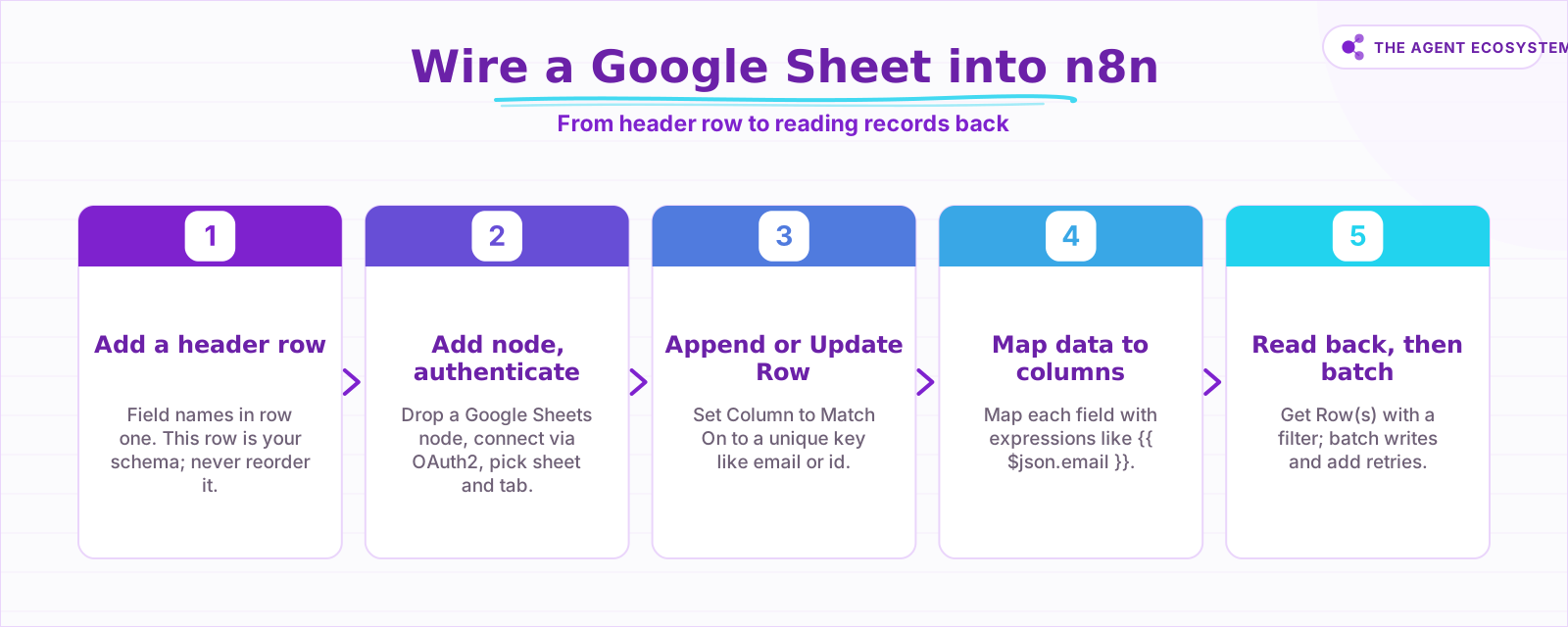 Five steps to connect a Google Sheet as your n8n datastore.
How do you add or update a row without creating duplicates?#
Append or Update Row is the upsert operation. It checks a column you designate (the Column to Match On) against existing rows, updates the row on a match, and appends a new row when there is none. Keyed on a unique field like email or id, this single operation keeps the sheet clean across every workflow run.
In my lead tracker, every form submission hits a webhook trigger in n8n, and the Google Sheets node is the second step. The Column to Match On is email. A person can submit the form twice; the sheet gets one row, and the second submission just refreshes the data in that row. No deduplication step needed elsewhere.
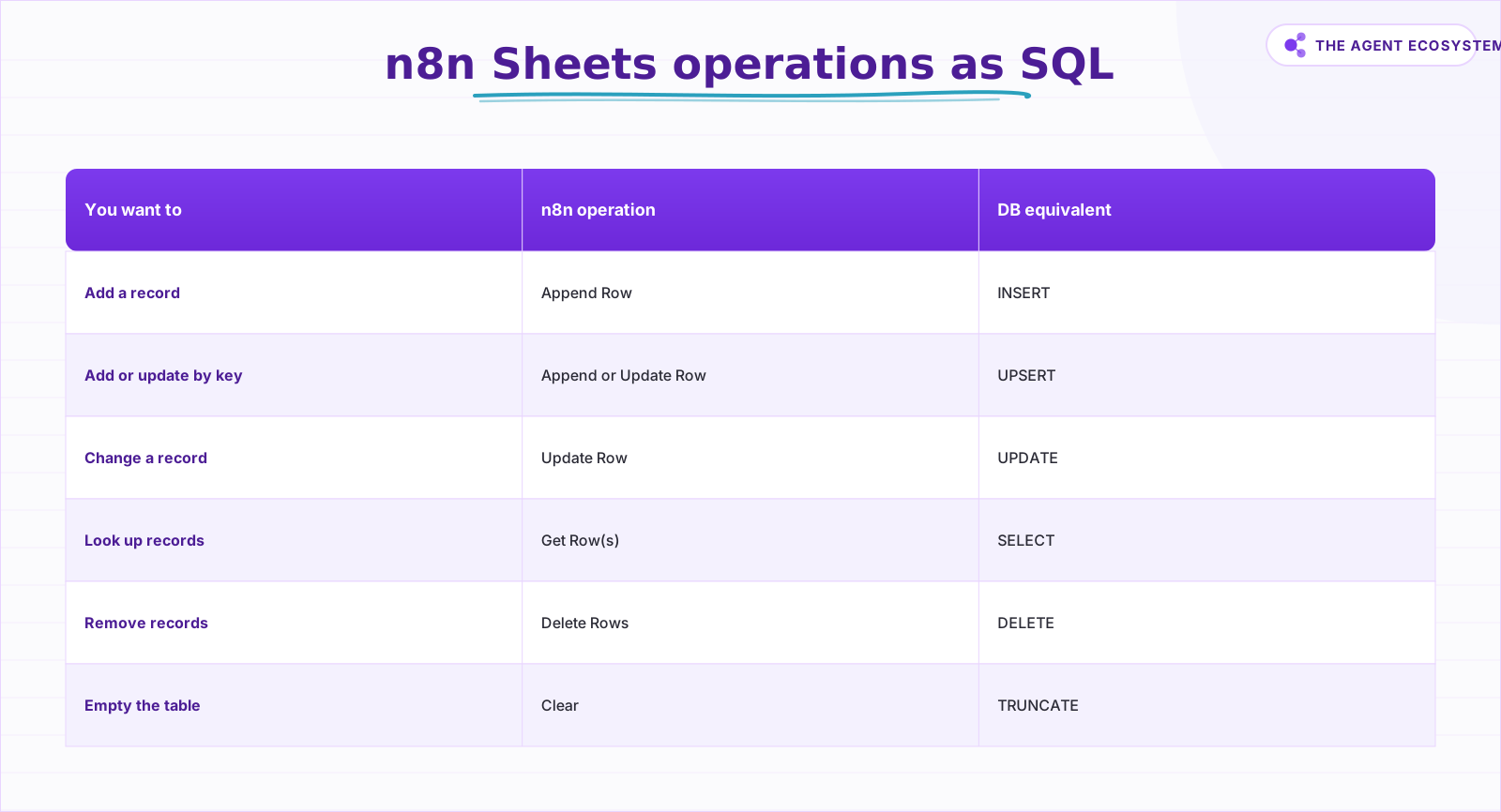 Each Google Sheets node operation mapped to its SQL equivalent.
Contrast this with Update Row: that operation modifies existing rows only and does NOT append when there is no match. Use Update Row when you know the record already exists and you want to change a field, such as marking a lead as contacted. Use Append or Update Row for everything else.
How do you look up and filter your records?#
Get Row(s) reads rows from the sheet and returns them as individual items in your n8n workflow. Use the Filters section inside the node to match on one or more column values. Every row where all filter conditions pass becomes a separate item that downstream nodes can act on.
A common pattern for a solo CRM: a scheduled workflow runs every morning, calls Get Row(s) with a filter on a Status column set to New, and sends a follow-up email for each matching row. Rows flow one by one into your email node. That is a basic SELECT WHERE in two n8n nodes.
For more complex filtering, chain a Filter node after Get Row(s) to apply logic the sheet node's built-in filter cannot express. Keep the sheet-level filter as tight as possible. Fetching every row and filtering inside n8n burns more API quota than filtering at the source.
See this lead follow-up workflow walkthrough for a real example of Get Row(s) paired with a conditional email step.
What are the real limits of using Sheets as a database?#
The limits are specific. Google caps a spreadsheet at 10 million cells across all tabs combined. A sheet with 20 columns and 100,000 rows uses 2 million cells, so you have headroom, but a wide schema with many tabs fills up faster than you expect.
The API quota is the wall you will hit first. As of mid-2026, the Google Sheets API allows 300 read requests per minute per project and 60 per minute per user; write quotas are the same: 300 per minute per project, 60 per minute per user. Exceeding those returns 429: Too many requests. Google recommends truncated exponential backoff as the fix.
I learned that directly. A workflow that looped over a batch of new records and wrote them one at a time started throwing 429 errors once volume grew. The fix was to stop writing inside a tight loop. I grouped records and used n8n's built-in node retry settings to handle transient quota hits with backoff. Sheets is not broken; you just have to write to it like a polite API client, not a database driver.
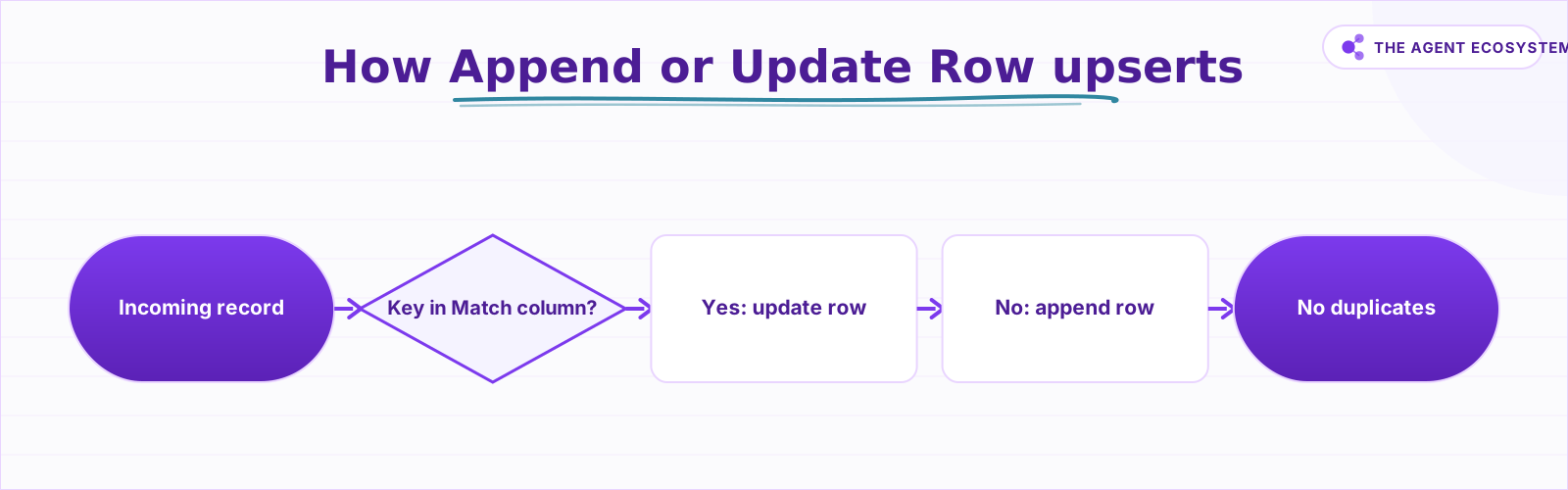 The upsert logic behind Append or Update Row in n8n.
When should you move off Sheets to a real database?#
Move when the Sheets model actively causes problems, not as a precaution. The real signals: concurrent writes from multiple parallel workflow branches, frequent updates at high volume, transactional logic that needs rollback, or a row count approaching the cell ceiling.
n8n now ships a native Data Tables feature as the natural step up. It is a simple table store inside n8n itself, no external service required. For a solo operator who has outgrown a sheet but is not ready to provision a Postgres instance, Data Tables is the right next stop. For serious workloads, a managed Postgres database like Supabase (which also gives you a REST API out of the box) is the clean exit.
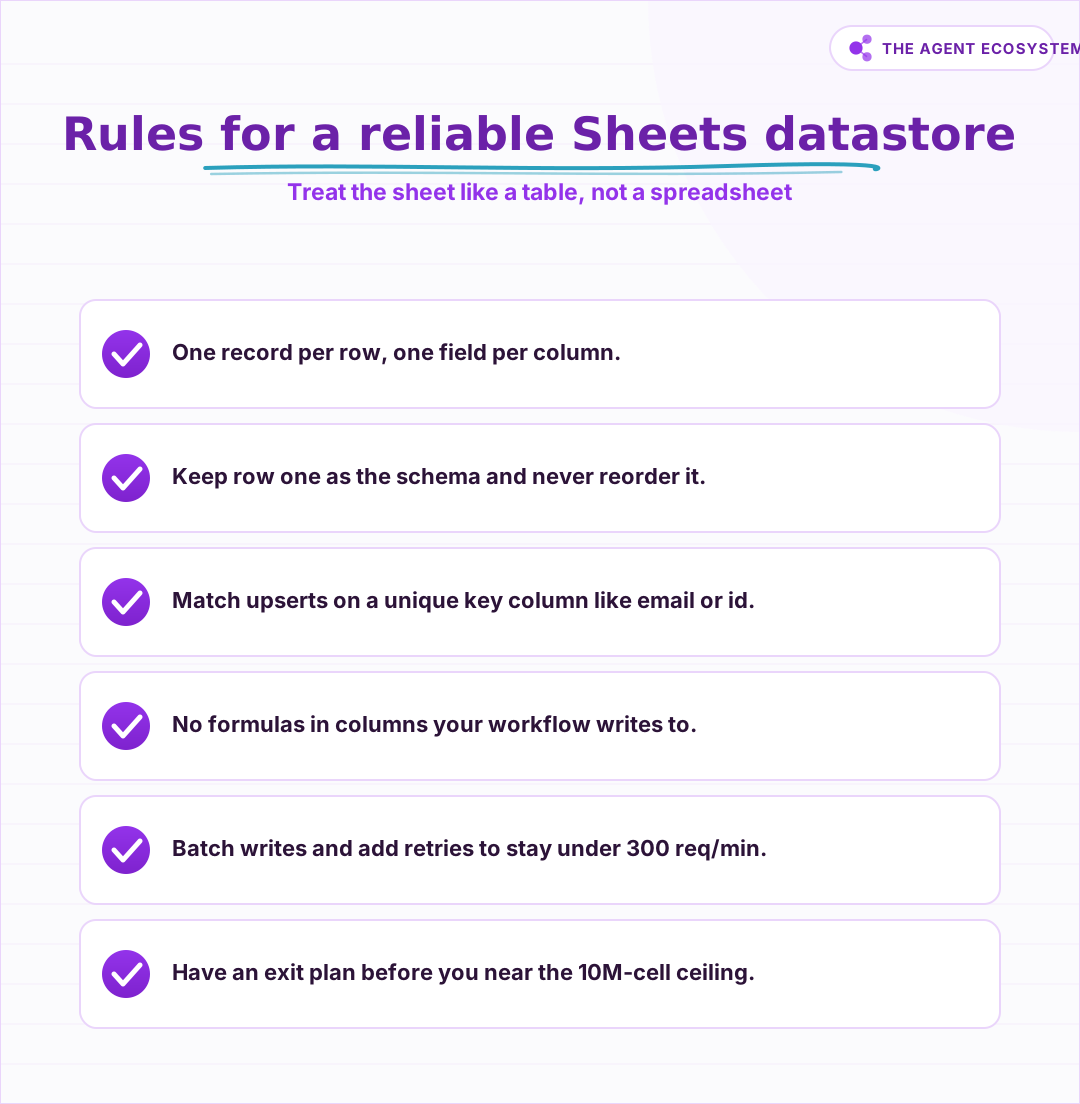 Six rules that keep a Sheets-backed workflow reliable.
Start with Sheets because the feedback loop is fast and the UI is familiar. Move when the limitations cost you time or data integrity. See the full solopreneur automation stack breakdown for where a database fits against the other tools and their real costs.
What does a Sheets-backed workflow look like end to end?#
A concrete Sheets-backed workflow has three parts: a trigger that brings data in, an Append or Update Row node that stores it, and a Get Row(s) node that reads it back for a downstream action. The whole thing wires up in under fifteen minutes.
For a lead capture workflow: a form tool (Typeform, Tally, or a plain webhook) triggers the workflow. The Google Sheets node runs Append or Update Row, matched on email, and writes the lead's name, email, source, and a timestamp. A second Google Sheets node runs Get Row(s) filtered to rows where Status is empty. A third node sends a welcome email, then an Update Row node sets Status to Welcomed.
That is a four-node workflow backing a real CRM for a solo business. More workflow ideas using this exact pattern are in the n8n workflows collection for solopreneurs. If you are running n8n self-hosted, the VPS setup guide covers getting the instance running before you build any of this.
Where to go from here: set up the header row in a fresh sheet, wire up the Append or Update Row node with your unique key column, and run a test submission. The whole setup takes under twenty minutes. When your sheet grows and the 300-requests-per-minute quota starts to feel tight, that is the right moment to evaluate n8n Data Tables or a Postgres backend. Not before.
Frequently asked questions
Can Google Sheets be used as a database?
What is the upsert operation in the n8n Google Sheets node?
How many cells can a Google Sheet hold?
What are the Google Sheets API rate limits?
When should I use a real database instead of Google Sheets?
Does n8n have a built-in database?
Sources
Primary references and vendor documentation used while drafting and reviewing this article.
Written by

Muhammad Qasim Hammad is an AI agent and automation expert and the founder of Cart Gaze LLC (cartgaze.com). He builds product for the love of it: when an idea lands, a working prototype is usually running within hours, built with the same AI agents and automations he sells. He puts his own output at roughly 20× what it was before agents, and the Agentic OS behind this site is the working proof, documented in public with the tools he actually ran and what they really cost.
AI & Automation Services
Want a pipeline like this running in your business?
I'm Qasim — I design and ship AI agents and n8n automations for solo operators and small teams. Tell me what's eating your team's week, and I'll scope a fix.
Related reading
How to Build an n8n AI Agent That Updates Your Airtable Base
An n8n AI Agent can create and update Airtable records, search a base with Filter By Formula, and keep a deal tracker or content calendar current from a single chat message. Here is how to wire the Airtable node in as a tool and design a schema the agent can map to reliably.

5 n8n Workflows That Can Save You ~12 Hours a Week
Five n8n workflows that replace source scanning, topic sorting, first-draft writing, pin prep, and changelog monitoring with a review-gated queue. Nothing autopublishes. You stay in control.
How to Build an n8n AI Agent That Manages Your Notion Workspace
An n8n AI Agent can create Notion pages, update database properties, and search your workspace from a single chat message. Here is how to wire the Notion node in as a tool, design a schema the agent can map to reliably, and gate every write behind a human check.
Process Thousands of Rows Through AI in n8n Without Hitting Rate Limits
Wire a spreadsheet straight into an AI node and it dies on row 47. n8n batch processing AI with Loop Over Items and a Wait node fixes that, for about $1.35 per 1,000 rows on Claude Haiku 4.5.
Automate Client Onboarding With n8n: Welcome Email, Notion, and More
Build an n8n client onboarding automation that sends a Claude-written welcome email, creates a Notion project page, and logs the client in a CRM sheet, all in under 30 seconds after a new client signs.
n8n AI Lead Enrichment: Score and Route Every New Lead Automatically
A new lead arrives with nothing but a name and email. An n8n workflow pulls company data, scores the lead with an AI agent against your ICP, and routes it to the right rep or drip sequence before anyone opens a browser tab.