Process Thousands of Rows Through AI in n8n Without Hitting Rate Limits
Flow control, not a bigger API plan, is the fix for 429 errors on large datasets
AI-drafted, reviewed by Muhammad Qasim Hammad on June 23, 2026. See our AI disclosure.
Table of contents
- Why does running a big dataset through AI hit rate limits?
- What is the Loop Over Items (Split in Batches) node?
- How do you add a Wait between batches?
- How much does AI batch processing cost?
- How do you build it in n8n, step by step?
- Step 1: Read the rows
- Step 2: Add Loop Over Items and set Batch Size
- Step 3: Wire the AI node to the loop output
- Step 4: Add the Wait node
- Step 5: Turn on Retry On Fail
- Step 6: Wire the done output and test small
- How do you stop one bad row from killing the run?
- What should you set up this weekend?
You have a spreadsheet with thousands of rows to enrich, classify, or summarize. You wire it straight into an AI node, hit execute, and it dies on row 47 with a wall of 429 errors. n8n batch processing AI solves this by feeding the dataset through the AI node a few rows at a time and pausing between batches so you stay under the API's per-minute rate limit.
The symptom is familiar: ten rows work perfectly, ten thousand crater partway through, leaving no record of which rows finished. The fix is not a faster API plan or a pricier model. It is two nodes and a bit of math.
Why does running a big dataset through AI hit rate limits?#
Without flow control, n8n fires one AI request per row as fast as it can process them. Most AI providers enforce a per-minute request limit per API key, and a burst of hundreds of calls blows past it instantly. The provider returns HTTP 429 errors, the workflow stops, and your data is half-processed with no clean recovery path.
The core issue is timing, not volume. The provider does not care that you have 10,000 rows. It cares how many requests arrive in a 60-second window. Spread those requests out and the job completes. Dump them all at once and it fails in the first minute.
A job that chokes at 50 rows in a naive setup runs cleanly overnight when the batches are paced correctly.
What is the Loop Over Items (Split in Batches) node?#
The Loop Over Items (Split in Batches) node is n8n's built-in mechanism for processing a large list in chunks. Set the Batch Size parameter to control how many items pass through per cycle. The node runs the downstream branch once per batch, then moves to the next one automatically.
The node has two outputs (docs.n8n.io): the loop output runs once per batch (wire your AI node here), and the done output runs once after every batch has finished (wire your write-back or aggregation here). A Reset option lets you replay the job with fresh state if needed.
The AI node never sees the full dataset at once. It only ever sees the current batch.
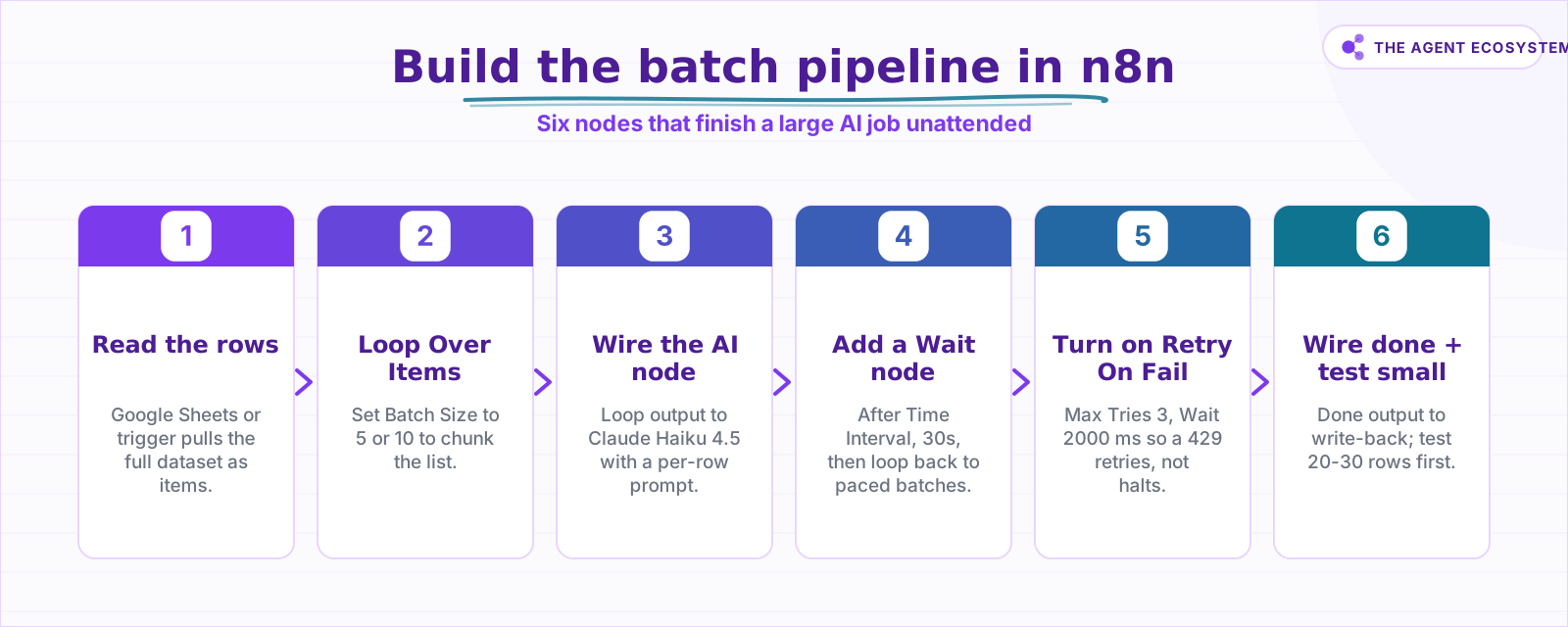 The six-node build that runs a large AI job overnight without babysitting.
How do you add a Wait between batches?#
Add a Wait node on the loop path, between the AI node and the Loop Over Items node. Set its resume mode to After Time Interval, then configure Wait Amount and Wait Unit (Seconds, Minutes, Hours, or Days) (docs.n8n.io). The Wait node pauses execution for that interval before the loop moves to the next batch.
The math is straightforward. With a Batch Size of 10 and a Wait of 30 seconds (0.5 minutes), you send roughly 20 requests per minute. Adjust those two numbers until your throughput sits below the per-minute limit shown on your API key dashboard. There is no universal right answer. Read your own limit and tune from there.
How much does AI batch processing cost?#
AI batch processing cost scales linearly with rows, and each row costs the same no matter how you batch it. The model below assumes about 600 input tokens per row plus 150 output tokens, so 1,000 rows runs roughly 0.6M input and 0.15M output tokens, priced from the mid-2026 Anthropic list.
| Model | Input $/1M | Output $/1M | Cost per 1,000 rows | Best for |
|---|---|---|---|---|
| Claude Haiku 4.5 | $1.00 | $5.00 | $1.35 | Bulk enrich, classify, summarize (use this) |
| Claude Sonnet 4.6 | $3.00 | $15.00 | $4.05 | Rows needing nuanced reasoning |
| Claude Opus 4.8 | $5.00 | $25.00 | $6.75 | Usually overkill for bulk rows |
The Haiku 4.5 arithmetic: (0.6 x $1.00) + (0.15 x $5.00) = $0.60 + $0.75 = $1.35 per 1,000 rows. At that rate, 10,000 rows costs $13.50.
On the platform side, n8n self-hosted (Community edition) runs at $0 under the fair-code license. n8n Cloud Starter is €20 per month.
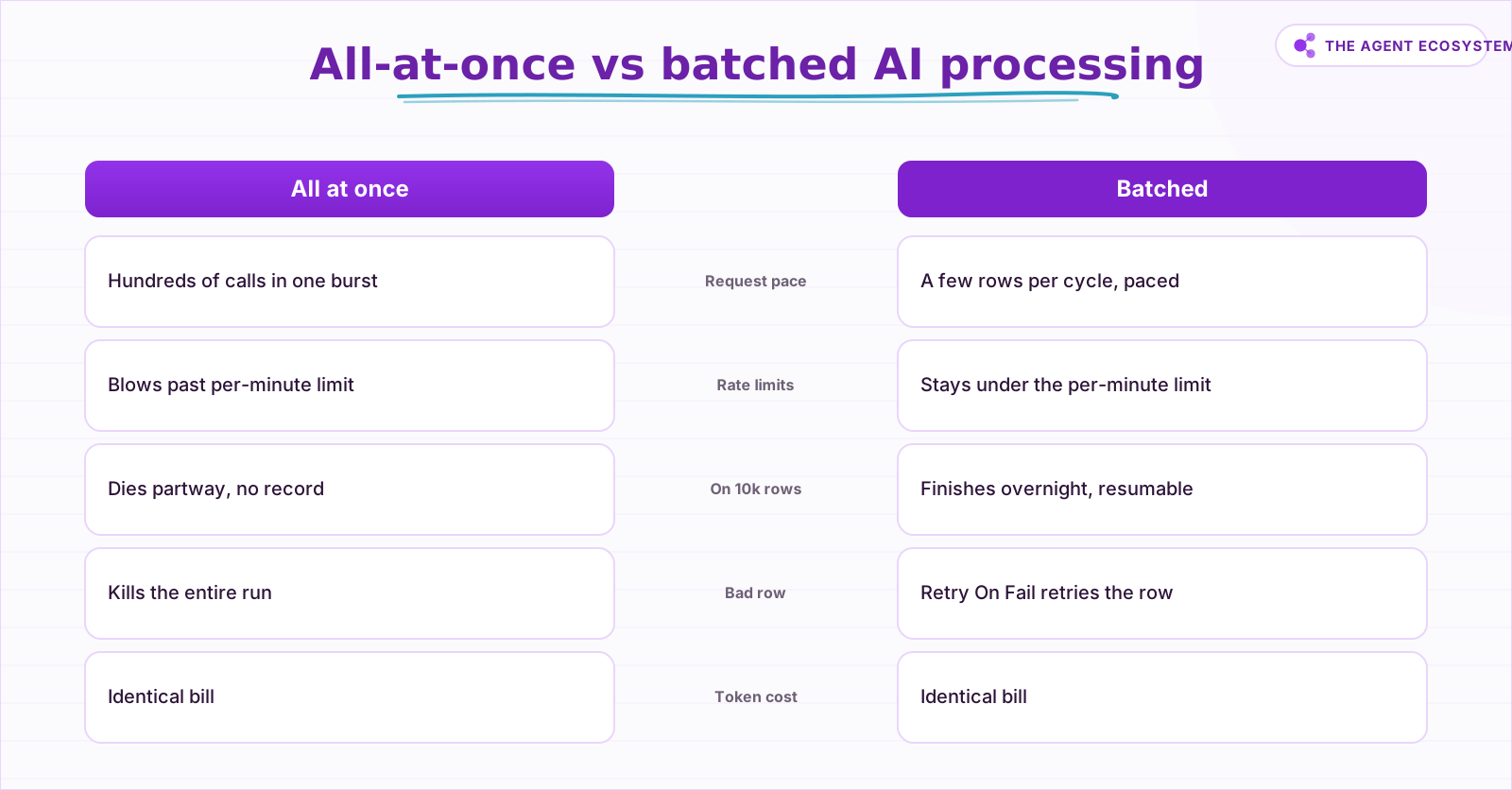 Batching changes when rows go through, not how much they cost.
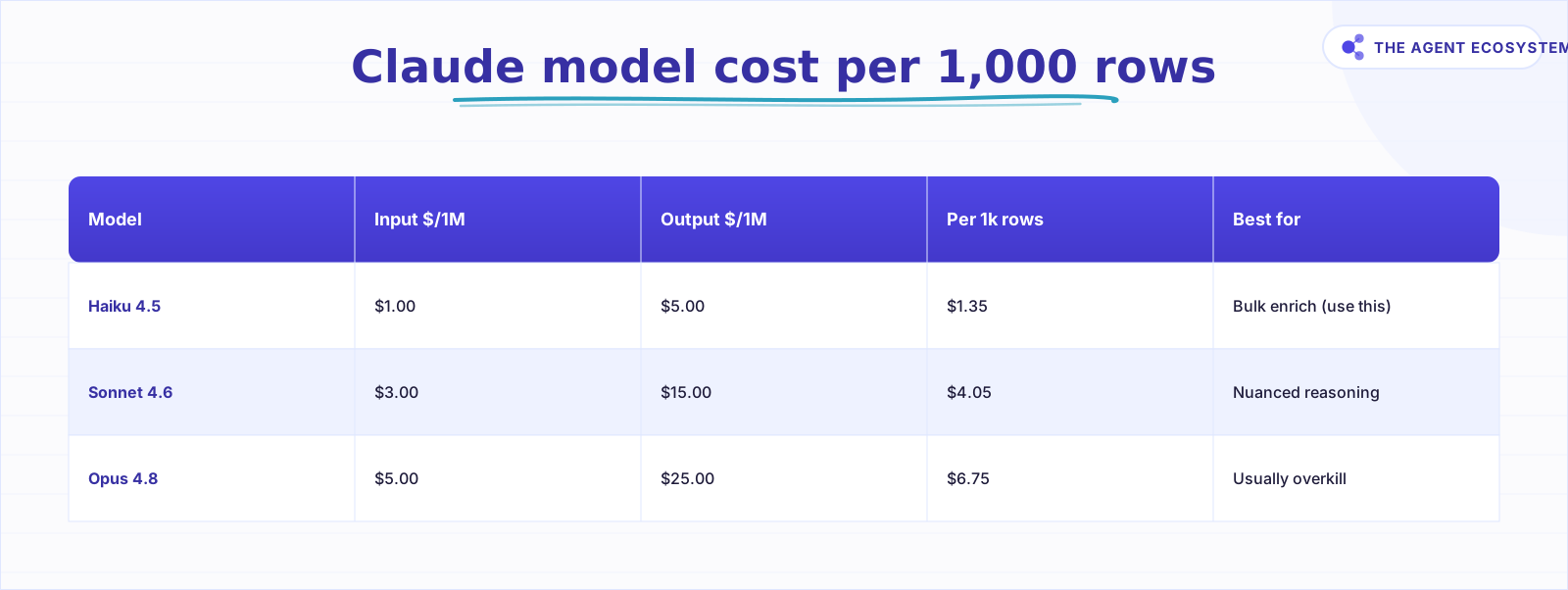 Based on ~600 input / 150 output tokens per row, mid-2026 pricing.
How do you build it in n8n, step by step?#
The full wiring takes about 15 minutes. Connect the nodes in this order: data source -> Loop Over Items -> AI node -> Wait node -> back to Loop Over Items (loop output). The Loop Over Items done output goes to your write-back node.
Step 1: Read the rows#
Start with a Google Sheets node (or a Webhook / Schedule trigger that fetches your data). Pull the full dataset into n8n as a list of items. The Google Sheets as database guide covers the read/write wiring in detail.
Step 2: Add Loop Over Items and set Batch Size#
Add the Loop Over Items (Split in Batches) node. Set Batch Size to 5 or 10 as a safe starting point. Connect the data source to the node's input.
Step 3: Wire the AI node to the loop output#
Connect the loop output to a Claude node (or an HTTP Request node pointed at the Anthropic API). Select Claude Haiku 4.5 as the model. Write a prompt template that reads the current item's fields:
System: You are a data enrichment assistant. Classify the following company description into one of these categories: SaaS, Agency, E-commerce, Other. Reply with the category name only.

User: {{$json["description"]}}
For classification tasks, the n8n AI text classifier guide has a ready-made prompt structure.
Step 4: Add the Wait node#
After the AI node, add a Wait node. Set Resume to After Time Interval. Set Wait Amount to 30 and Wait Unit to Seconds as a starting point. Connect the Wait node's output back into the Loop Over Items node so it cycles to the next batch after the pause.
Step 5: Turn on Retry On Fail#
Open the AI node's Settings tab. Enable Retry On Fail. Set Max Tries to 3 and Wait Between Tries to 2000 ms (docs.n8n.io). A transient 429 now retries automatically instead of stopping the run. The n8n error handling guide covers adding a full error branch for persistent failures.
Step 6: Wire the done output and test small#
Connect the done output of the Loop Over Items node to your Google Sheets write-back node. Test with 20 to 30 rows first. Confirm the AI output looks correct, then let the full job run unattended.
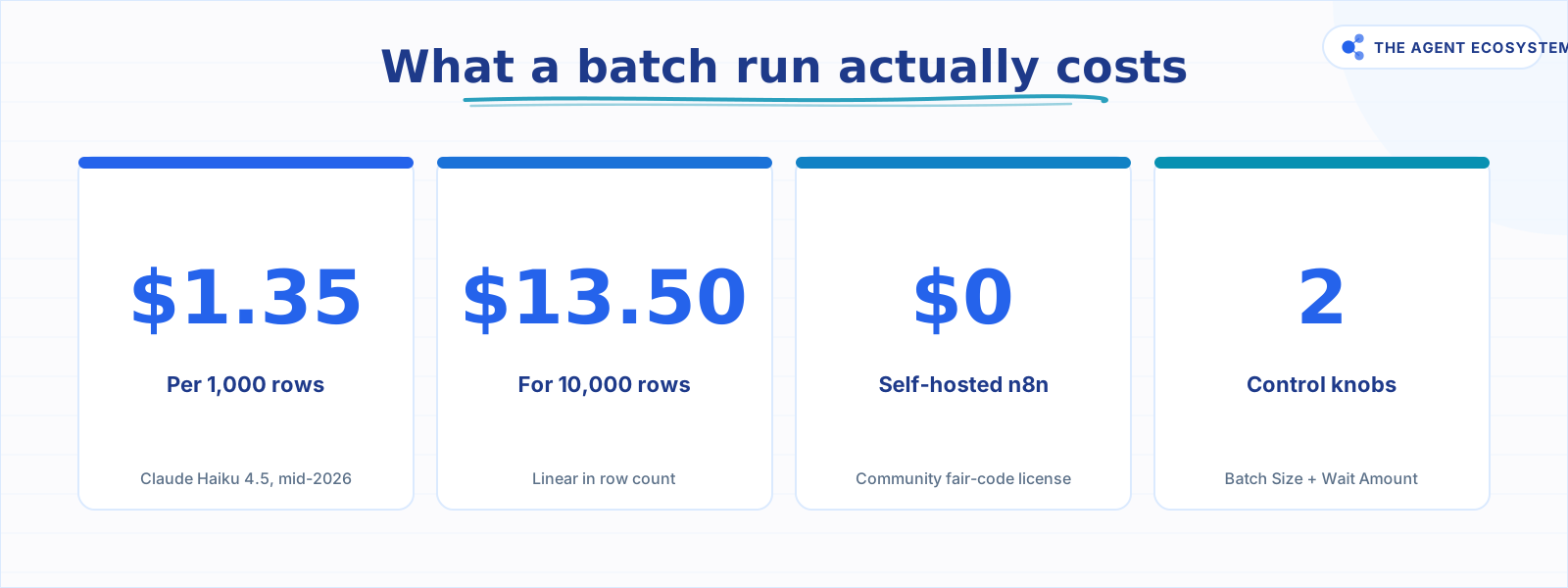 All figures based on Claude Haiku 4.5 pricing as of mid-2026.
How do you stop one bad row from killing the run?#
Stop one bad row from killing the run by turning on Retry On Fail on the AI node, with Max Tries set to 3 and Wait Between Tries around 2000 ms. A single 429 or momentary timeout then retries up to three times before the node actually fails and halts everything.
For persistent failures (a row with malformed data that always errors), add an error branch off the AI node that logs the problematic row to a separate sheet. The rest of the dataset keeps processing while you inspect the bad rows later.
Track which rows are done by adding a "processed" column to your source sheet. After each batch writes back, mark those rows done. If the run dies at row 4,000, filter on unprocessed rows and re-run without starting over. This matters especially on self-hosted n8n: the job only runs while n8n is alive, so a sleeping laptop pauses everything mid-batch.
For keeping a large token spend under control, the Claude API cost control guide covers capping spend at the workflow level.
What should you set up this weekend?#
Pick one real dataset you have been putting off: a CRM export, a scraped list, a product catalog. Set Batch Size to 10, Wait to 30 seconds, and the model to Claude Haiku 4.5. Run it on 50 rows first. Once the output looks right, let it run overnight on the full set.
At $1.35 per 1,000 rows on Haiku 4.5, a 5,000-row enrichment job costs under $7. Flow control is what makes it finish.
Frequently asked questions
Why does my n8n workflow hit rate limits on big datasets?
What does the Loop Over Items (Split in Batches) node do?
Does batching make AI processing cheaper?
How big should my batch size be?
How do I stop one failed row from killing the whole run?
Which Claude model should I use for bulk row processing?
Sources
Primary references and vendor documentation used while drafting and reviewing this article.
Written by

Muhammad Qasim Hammad is an AI agent and automation expert and the founder of Cart Gaze LLC (cartgaze.com). He builds product for the love of it: when an idea lands, a working prototype is usually running within hours, built with the same AI agents and automations he sells. He puts his own output at roughly 20× what it was before agents, and the Agentic OS behind this site is the working proof, documented in public with the tools he actually ran and what they really cost.
AI & Automation Services
Want a pipeline like this running in your business?
I'm Qasim — I design and ship AI agents and n8n automations for solo operators and small teams. Tell me what's eating your team's week, and I'll scope a fix.
Related reading
Keep n8n AI Workflows From Breaking: Retry, Fallback Models, and Error Branches
Your n8n AI workflow passed every test, then a 429 killed a whole overnight batch with no alert. This guide wires 3 defenses: Retry On Fail, a fallback model, and a global Error Workflow.

Rate-Limit-Proof n8n AI Workflows: Queues, Retries, Backoff
A Loop Over Items node fanning rows into an LLM keeps hitting 429 Too Many Requests, and every guide fixes it differently. Here is the full ladder: node retry, batching, Wait, hand-rolled backoff, and a real queue, with the built-in caps most posts bury.
LLM Batch API: When 50% Off Is Worth the Wait
The batch API is the same model and the same output at half the token price, as long as nobody is waiting on the response. Here is which jobs belong on batch, the reproducible cost math, how Anthropic and OpenAI differ, and the exact n8n submit-and-poll pattern.
Run AI Sentiment Analysis in n8n (Reviews, Feedback & Support)
Set up n8n sentiment analysis to classify every review, survey reply, or support message automatically. Route negatives to an instant alert and positives to a testimonial ask, for about $0.45 per 1,000 items.
Multi-Model Fallback in n8n: Stay Up When Claude Is Down or Over Budget
The model call is the least reliable step in your n8n workflow. Build a multi model fallback ladder (primary, cheaper, local, human) plus a budget guard so a 429, a 529 overload, or a blown budget degrades gracefully instead of killing the run.
Read Images With AI in n8n: Claude Vision for Receipts and Screenshots
Set up n8n AI image analysis with Claude's Anthropic node to read receipts, screenshots, and forms. Get clean JSON fields back for $2.83 per 1,000 images on Haiku 4.5.