Auto-Categorize Emails & Tickets in n8n with the AI Text Classifier
One node. One output per category. Zero manual sorting.
AI-drafted, reviewed by Muhammad Qasim Hammad on June 15, 2026. See our AI disclosure.
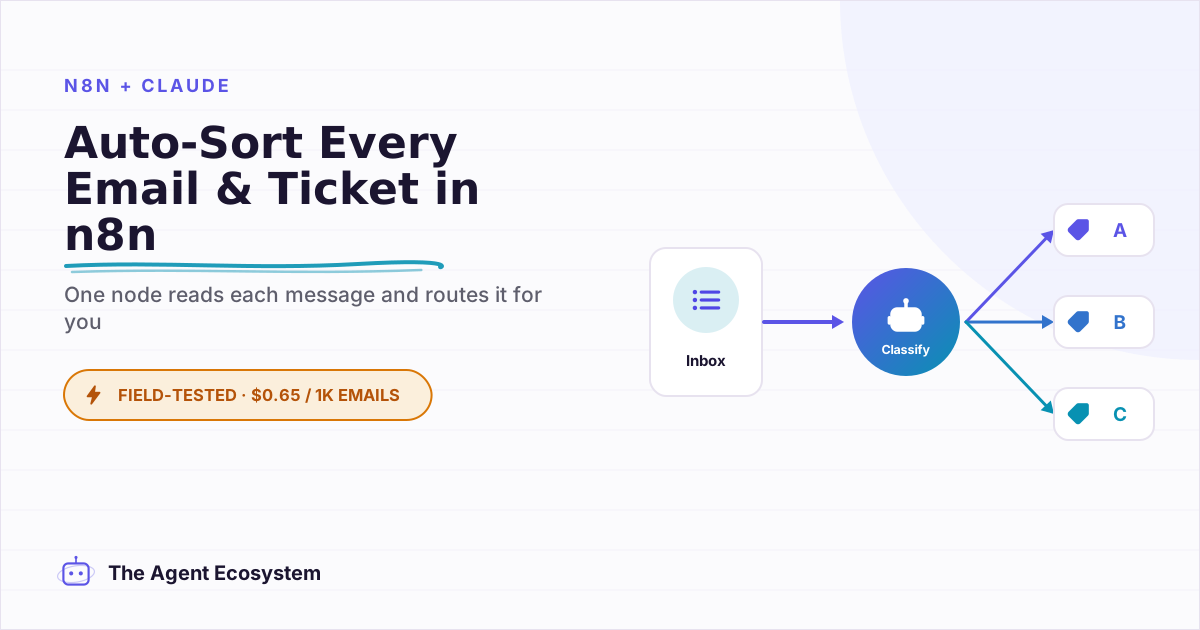
Table of contents
- What is the n8n AI Text Classifier, and what can it sort?
- How does it work inside n8n? (one output per category)
- How much does AI classification cost?
- How do you define good categories?
- How do you build it in n8n, step by step?
- Step 1: Trigger on a new message
- Step 2: Add the Text Classifier node
- Step 3: Attach a Claude Haiku 4.5 Chat Model
- Step 4: Add each category
- Step 5: Set "When No Clear Match" to a fallback
- Step 6: Wire each output and test on real messages
- Where can this go wrong?
- What should you set up this weekend?
Every inbound email or support ticket has to be read and sorted before anyone can act on it, billing questions here, bug reports there, sales leads somewhere else, and right now that triage is manual, slow, and boring. The n8n AI text classifier reads each message, decides which category it belongs in, and routes it down the right branch automatically, with no keyword lists to maintain.
The symptom is familiar: you open your inbox at 9 AM and spend the first 30 minutes deciding who should handle what. Nothing gets resolved in that window. The same thing happens in a shared support queue. The sorting is not the work. It is the thing blocking the work.
What is the n8n AI Text Classifier, and what can it sort?#
The n8n AI Text Classifier is a LangChain root node that sorts any text into categories you define, producing one output pin per category so your workflow branches automatically. It works on emails, support tickets, form submissions, or chat messages. You attach a Chat Model sub-node, define your categories, and the node handles the routing.
The node is not limited to email. It works on Typeform responses, Intercom conversations, and raw webhook payloads from a helpdesk. Anywhere you have a stream of mixed text that needs sorting, the same build applies.
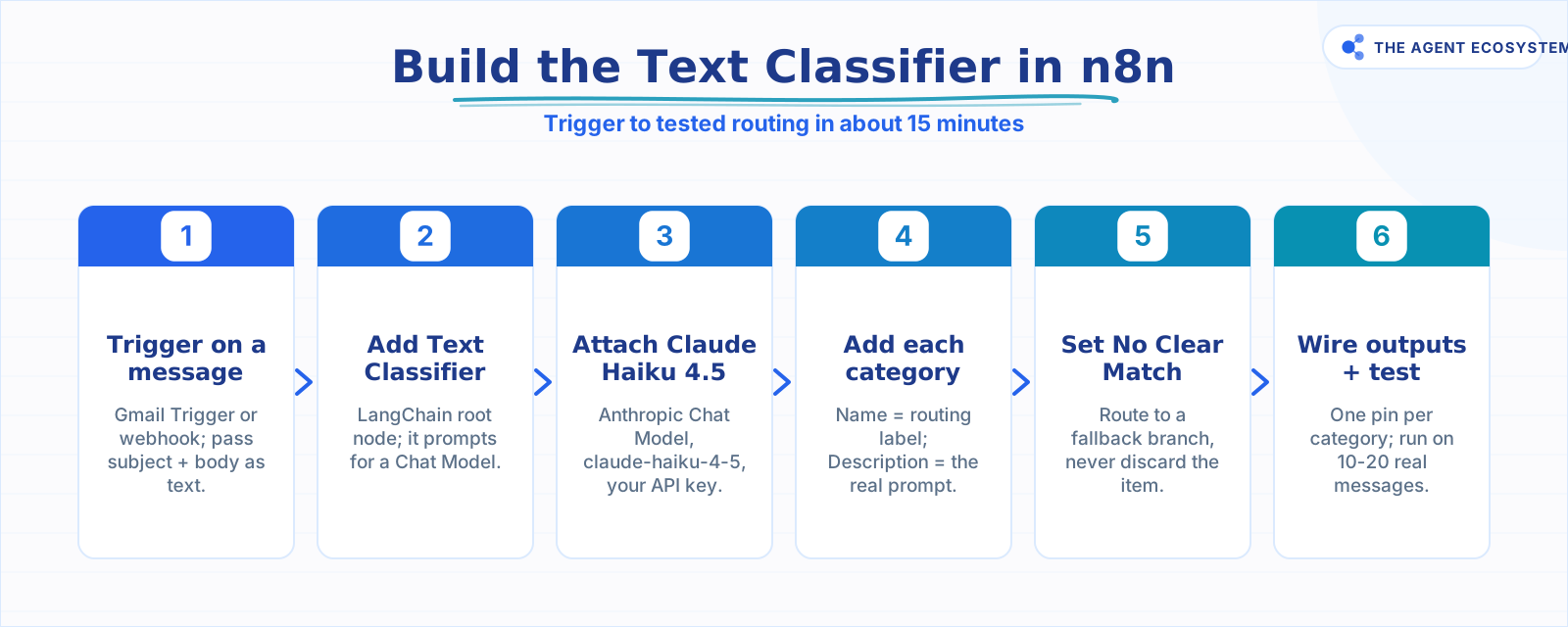 The complete build in six steps, start to finish.
How does it work inside n8n? (one output per category)#
The Text Classifier node takes input text, sends it to the attached Chat Model with your category definitions as context, and routes the item to the corresponding output pin. You define each category with a Name (the routing label) and a Description (the prompt that tells the model what belongs there).
A four-category setup, Billing, Bug Report, Sales Inquiry, Spam, gives you four output pins. Wire each pin to its own downstream handler. No IF nodes. No Switch nodes. The branching is built into the classification result.
Two options control edge cases. "When No Clear Match" decides what happens when the model cannot confidently assign a category: route those items to a fallback branch or discard them (always route; never discard). "Allow Multiple Classes To Be True" lets one item match several categories at once, useful when a message is both a billing question and a bug report.
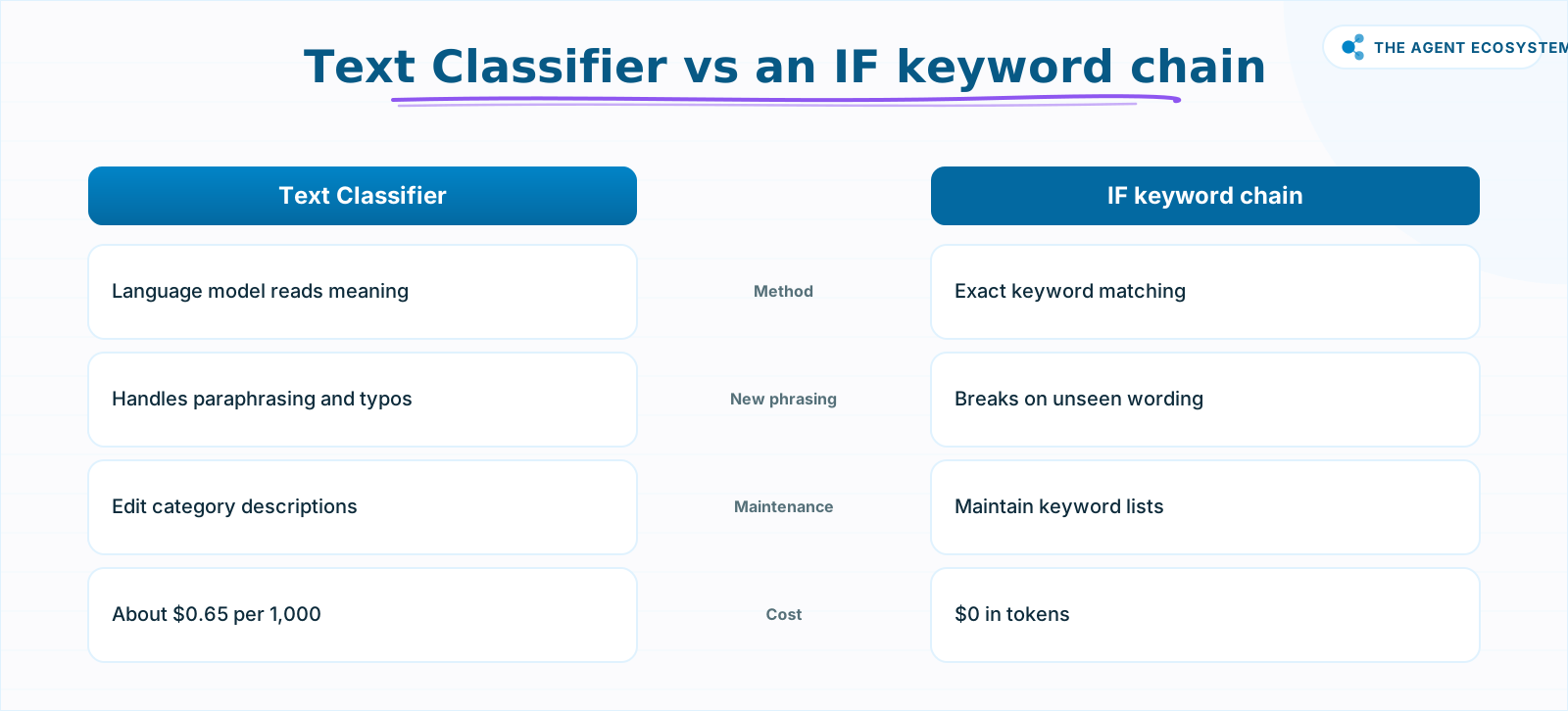 The classifier handles phrasing the IF chain has never seen.
How much does AI classification cost?#
Classifying 1,000 emails costs about $0.65 in Claude tokens on Haiku 4.5 (as of mid-2026 June pricing), and self-hosted n8n adds $0 in platform fees. Classification is cheap because the output is a single short label, roughly 10 output tokens per call, against about 600 input tokens for system context, category descriptions, and the message text.
Here is the full cost table across Claude models. Prices are from Anthropic's official pricing page as of mid-2026.
| Model | Input $/1M tokens | Output $/1M tokens | Cost per 1,000 classifications | Best for |
|---|---|---|---|---|
| Claude Haiku 4.5 | $1.00 | $5.00 | $0.65 | Default choice for routing |
| Claude Sonnet 4.6 | $3.00 | $15.00 | $1.95 | Edge cases needing nuance |
| Claude Opus 4.8 | $5.00 | $25.00 | $3.25 | Not recommended for routing |
The arithmetic: 1,000 calls at 600 input tokens each = 0.6M input tokens. 1,000 calls at 10 output tokens each = 0.01M output tokens. At Haiku 4.5 rates: (0.6 x $1.00) + (0.01 x $5.00) = $0.65.
n8n self-hosted under the fair-code license costs $0. n8n Cloud Starter is EUR 20 per month for managed hosting. For a pure classification workflow processing a few thousand messages a month, the token cost stays well under $5.
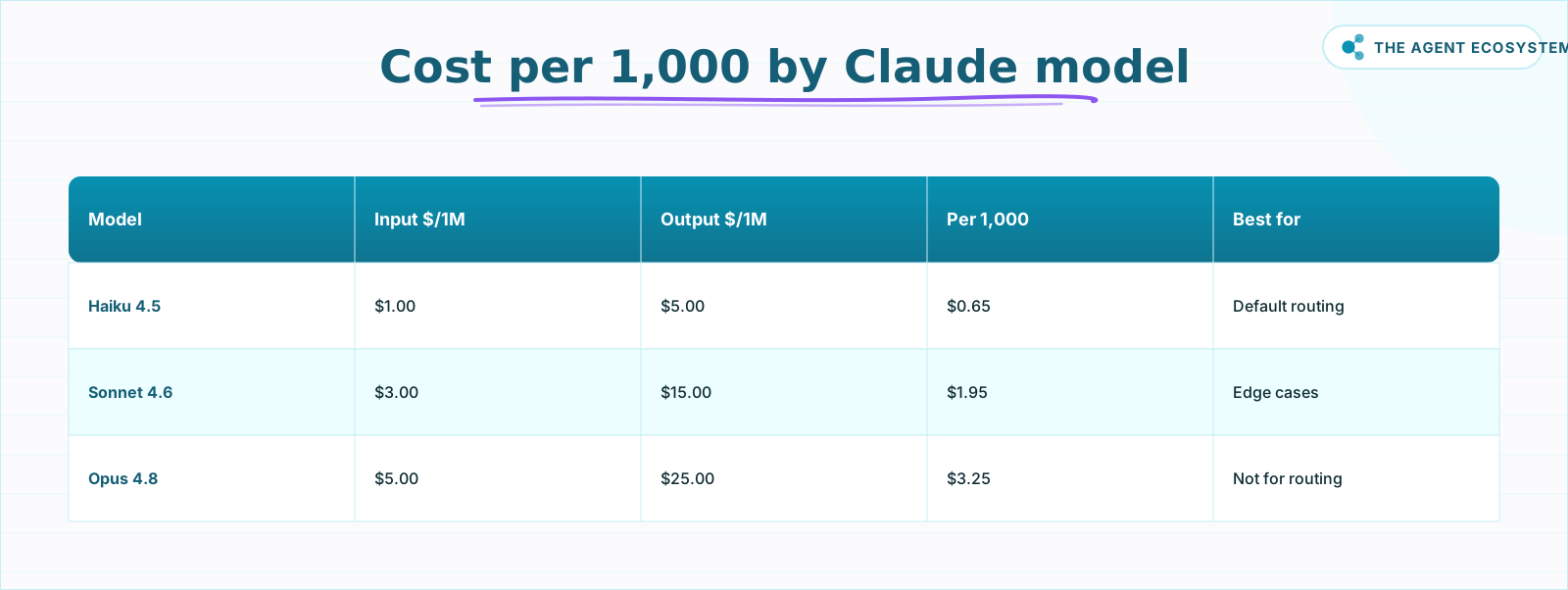 As of mid-2026, Haiku 4.5 classifies at scale for cents.
How do you define good categories?#
Good category descriptions are the difference between a workflow that routes correctly and one that misfires. The Description field is not a label. It is the prompt. Write it as if you are explaining to a new team member exactly what kind of message belongs in that bucket.
Keep categories distinct and non-overlapping. If "Billing" and "Refunds" both exist, the model will hesitate on a message that mentions both. Either merge them or write descriptions that explicitly exclude the overlap ("Billing covers invoices and payment questions but not refund requests, which go to Refunds").
For single-topic messages, leave "Allow Multiple Classes To Be True" off. Enable it only when your data genuinely contains messages that belong in two categories at once, for example, a message that is both a bug report and a billing dispute. Multi-label routing adds complexity; only add it when the use case demands it.
How do you build it in n8n, step by step?#
The full build is a trigger node feeding into the Text Classifier, which has a Claude Chat Model attached, with one downstream handler wired to each category output. The wiring takes about 15 minutes once your category list is ready. The six steps below walk through it, from the trigger to testing on real messages.
Step 1: Trigger on a new message#
Add a Gmail Trigger, an HTTP Webhook (for a helpdesk like Intercom or Zendesk), or any node that fires on a new inbound item. Set the trigger to pass the message subject and body as a combined text field. If your source is a webhook, map the relevant JSON fields to a single text string in a Set node before the classifier.
Step 2: Add the Text Classifier node#
Click the plus button after your trigger and search for Text Classifier. Add it. Because it is a LangChain root node, n8n will immediately prompt you to attach a Chat Model sub-node.
Step 3: Attach a Claude Haiku 4.5 Chat Model#
Click Add Chat Model, choose Anthropic Chat Model, select claude-haiku-4-5 from the model dropdown, and enter your Anthropic API key. This is the only credential the node needs.
Step 4: Add each category#
Click Add Category for each bucket. Fill in the Name (used as the routing label and output pin name) and the Description (the model reads this to decide). A working description for a billing category might read: "The message is about an invoice, a charge, a subscription payment, or a question about pricing, but not a refund or a product bug."
Step 5: Set "When No Clear Match" to a fallback#
Open the node options and set "When No Clear Match" to route to a fallback output. Wire that output to a Slack message or a Gmail draft so a human sees it. This one setting prevents silent data loss.
Step 6: Wire each output and test on real messages#
Each category output pin appears on the right side of the node. Connect Billing to your billing handler (see how to route into a full support bot), Sales Inquiry to your lead nurture workflow, and New Client to your onboarding automation. Run the workflow manually on 10 to 20 real messages from your inbox history and inspect every result. Adjust descriptions where it misfires.
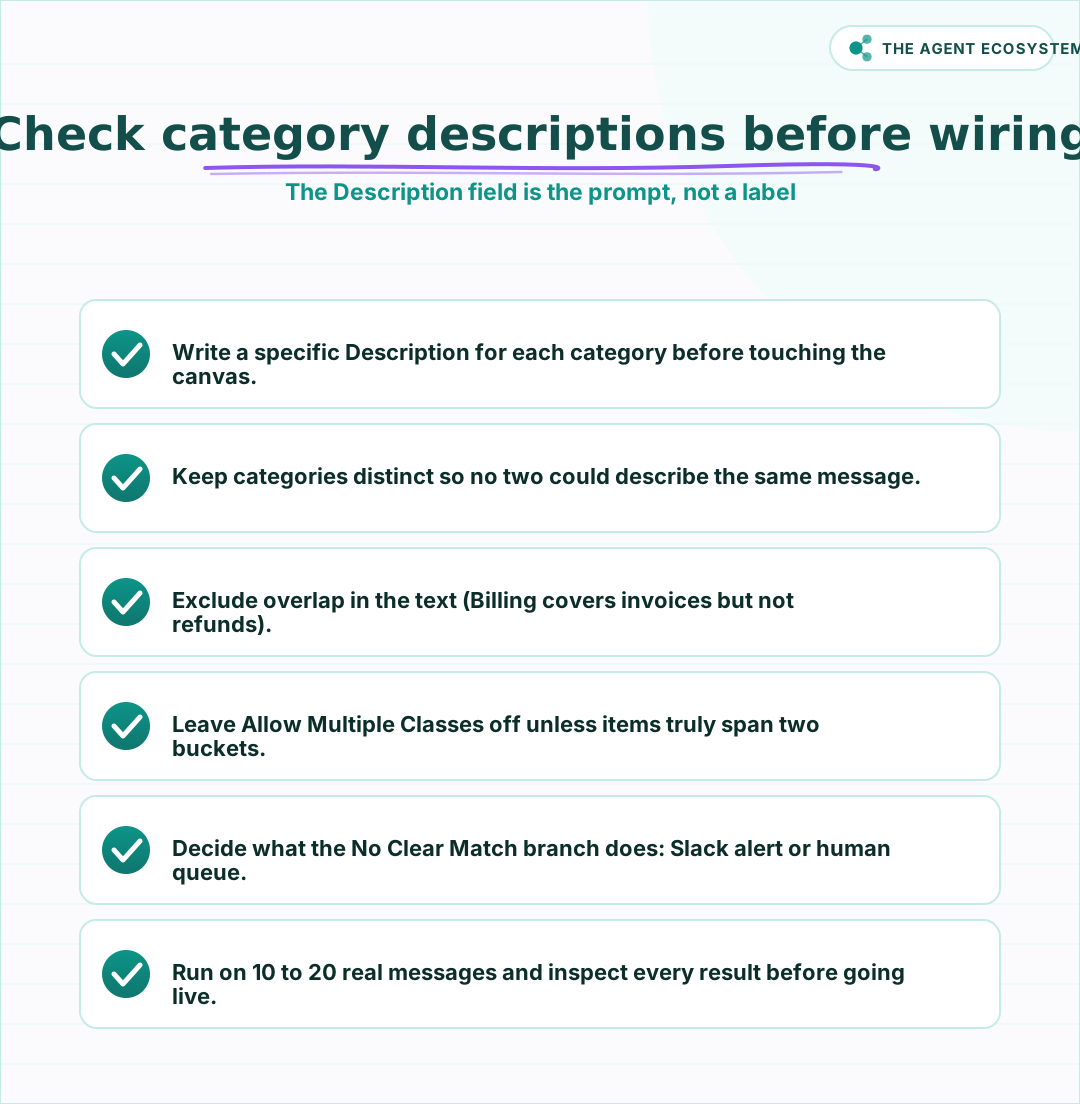 Run this check before wiring any downstream handlers.
Where can this go wrong?#
Most classification failures trace back to one of four avoidable mistakes, not to the model being wrong: vague or overlapping category descriptions, silently dropped no-match items, misusing multi-label mode, and routing high-stakes messages with no human checkpoint. Each one is a setup choice you control, and each has a simple fix.
Vague or overlapping descriptions are the most common cause of misrouting. If two categories could plausibly describe the same message, the model will pick inconsistently. Fix the descriptions first, not the model.
Silently dropped no-match items happen when "When No Clear Match" is left at its discard default. Every discarded message is an unanswered customer. Route the fallback bucket to a human inbox, always.
Multi-label misuse creates downstream confusion. If a message lands in three categories at once, all three handler workflows fire. Only enable "Allow Multiple Classes To Be True" when your data actually contains multi-topic messages and each handler can process a partial match cleanly.
High-stakes routing without a human checkpoint. Classification is accurate on distinct, well-described categories, but it is not perfect. For messages involving refunds, legal requests, or account cancellations, add a human approval step at the start of the handler workflow. The classifier gets it there; a human confirms the action. I use this pattern in my own email triage setup with Claude, and it has caught the occasional edge case before an automated reply goes out.
If you want to keep the token bill predictable as volume grows, pair this workflow with a cost control agent that alerts you when spend crosses a threshold.
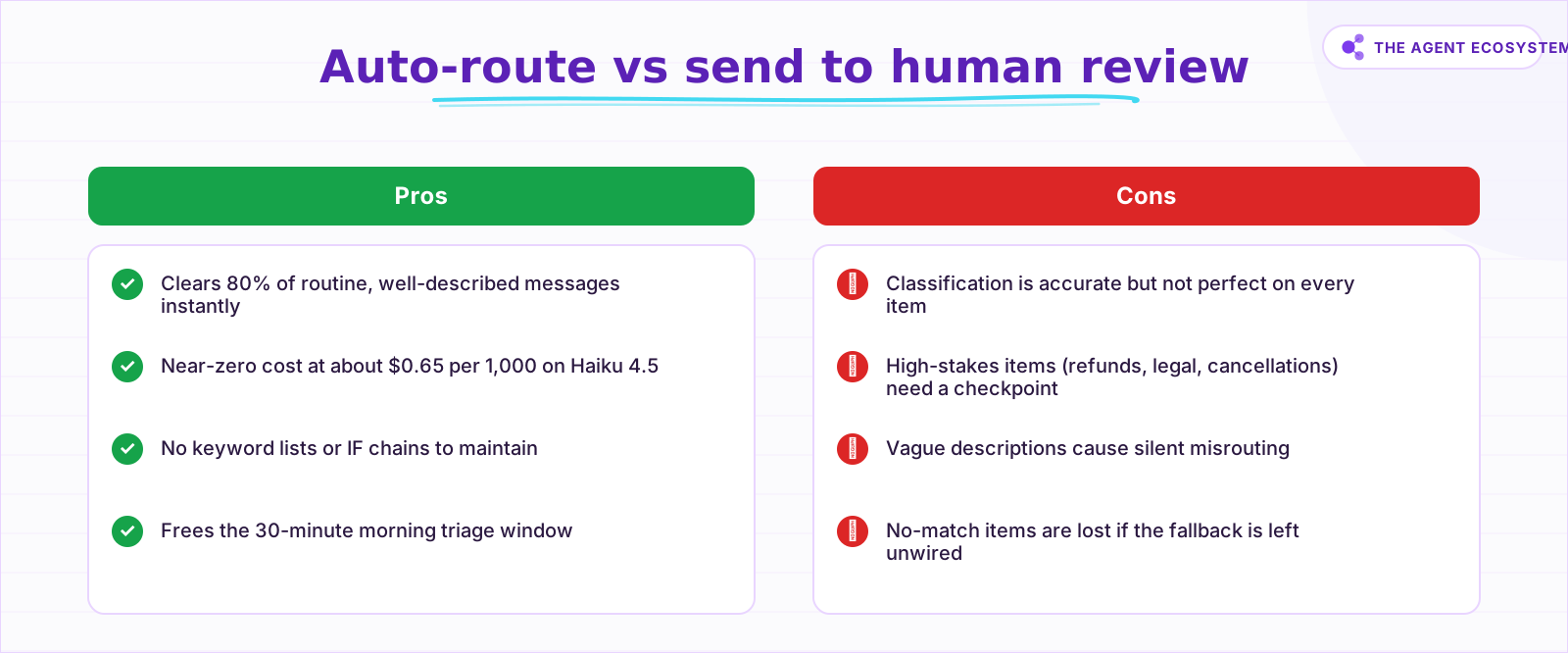 Use both: auto-route most items, review high-stakes ones.
What should you set up this weekend?#
Start with the narrowest version: pick three or four categories that cover 80% of your actual inbox, write one-sentence descriptions for each, and wire the fallback to your own email. Run it on a test batch of 20 real messages before connecting it to your live queue. Once the descriptions are solid, the workflow sorts correctly on its own.
If you are not yet running n8n, the self-host setup guide gets you to a working instance in under an hour at $0 platform cost. The classifier build takes another 15 minutes on top of that. For under $1 in Claude tokens on the first test batch, you will know whether your category descriptions are sharp enough, and you will have a working triage automation ready for Monday morning.
Frequently asked questions
What is the n8n Text Classifier node?
How much does AI text classification cost in n8n?
Can one message be placed in multiple categories?
What happens if no category matches?
Which Claude model should I use for classification?
Is the Text Classifier better than an IF node?
Sources
Primary references and vendor documentation used while drafting and reviewing this article.
Written by

Muhammad Qasim Hammad is an AI agent and automation expert and the founder of Cart Gaze LLC (cartgaze.com). He builds product for the love of it: when an idea lands, a working prototype is usually running within hours, built with the same AI agents and automations he sells. He puts his own output at roughly 20× what it was before agents, and the Agentic OS behind this site is the working proof, documented in public with the tools he actually ran and what they really cost.
AI & Automation Services
Want a pipeline like this running in your business?
I'm Qasim — I design and ship AI agents and n8n automations for solo operators and small teams. Tell me what's eating your team's week, and I'll scope a fix.
Related reading
Automate Content Moderation in n8n With an AI Classifier
Build an n8n AI content moderation workflow using the Text Classifier node: safe content publishes instantly, unsafe gets blocked and logged, and uncertain submissions route to a human queue for about $0.58 per 1,000 items.

Run AI Sentiment Analysis in n8n (Reviews, Feedback & Support)
Set up n8n sentiment analysis to classify every review, survey reply, or support message automatically. Route negatives to an instant alert and positives to a testimonial ask, for about $0.45 per 1,000 items.
n8n AI Automation Ideas: 8 Agent Workflows Worth Building (2026)
Finished the n8n AI tutorial and wondering what to actually build? These 8 n8n AI automation ideas come with the exact nodes, the honest Chain-vs-Agent call, and the right Claude model for each job.
Build an AI Lead-Generation Agent in n8n (With Real Monthly Cost)
An n8n AI lead generation agent triages every inbound lead the moment it lands: scoring intent, drafting a personalized reply, and pinging you on the hot ones. Real cost: about $5/month for 100 leads on Claude Sonnet 4.6.
Build an AI Customer-Support Bot in n8n (RAG, With Real Monthly Cost)
Build an n8n AI customer support bot that answers repeat questions from your own docs using RAG. Two workflows, about $4.50 per 1,000 answers on Claude Haiku 4.5, and $0 platform cost if you self-host.
Summarize Long Documents in n8n with the AI Summarization Chain
Use the n8n Summarization Chain node to automatically condense transcripts, PDFs, and long articles into one-paragraph summaries. Costs $0.85 per 100 documents on Claude Haiku 4.5, with three method options for any document length.