Keep n8n AI Workflows From Breaking: Retry, Fallback Models, and Error Branches
Three layers of defense so one bad model call never takes down your whole run
AI-drafted, reviewed by Muhammad Qasim Hammad on June 22, 2026. See our AI disclosure.
Table of contents
- Why do AI nodes break differently from normal n8n nodes?
- What are the three safeguards for n8n AI error handling?
- How does Retry On Fail work on an AI node?
- How do you add a fallback model when retries run out?
- How do you build the full safety net in n8n, step by step?
- Where does n8n AI error handling go wrong?
- What should you wire up this weekend?
Your n8n AI workflow passed every test in development, then a rate-limit hit at 2am killed the whole batch. Nobody got the output. Nobody got an alert. Good n8n AI error handling assumes the model call will sometimes fail and wires three defenses so one bad call never takes down the whole run.
You wake up to an empty output folder, no Slack ping, no idea when it broke. The workflow that felt bulletproof in testing is fragile in production because AI nodes fail for reasons a Postgres or HTTP node almost never hits: the provider was busy, slow, or over capacity.
The rest of this guide builds each layer in order. I route email-processing through an AI node and have wrapped it in all three. Here is what I actually wired and why.
Why do AI nodes break differently from normal n8n nodes?#
AI model nodes break because the provider is busy, slow, or over capacity, conditions outside your control, whereas a normal Postgres, HTTP, or Sheets node fails on input you do control, like a bad query or missing field. AI nodes also fail softly, returning text the next node cannot parse.
The two failure classes need different defenses:
- Transient call failures: HTTP 429 (rate limit), request timeout, HTTP 5xx (server overloaded). The provider will recover; retrying after a short wait often succeeds.
- Malformed output failures: the model returned prose when you needed JSON, or skipped a required field. The call itself did not error, so Retry On Fail will not catch it. You need an output-validation branch that routes bad output to human review.
This split is the foundation of every fix below. See n8n error handling docs for how the node-level settings map to each scenario.
What are the three safeguards for n8n AI error handling?#
The three safeguards are Retry On Fail, the error output branch (On Error set to Continue using error output), and a global Error Workflow. They stack in order: retry the transient call, catch whatever still fails in the error lane, and catch anything that escapes both in the global net.
| Safeguard | What it catches | When it fires | What it costs |
|---|---|---|---|
| Retry On Fail | Transient call failures: 429, timeout, overloaded | Automatically, after the node errors, up to Max Tries | A few extra tokens per retried call, pennies |
| Error output branch (Continue using error output) | Any item that still fails after retries, or unparseable output routed by logic | When the node finally errors after all retries | No extra model tokens unless the error lane calls a model |
| Error Workflow (Error Trigger) | Anything that escapes the first two; whole-run failures | Once per failed execution | One alert message, effectively $0 |
Keep this table somewhere visible. Every AI node you ship should touch all three rows.
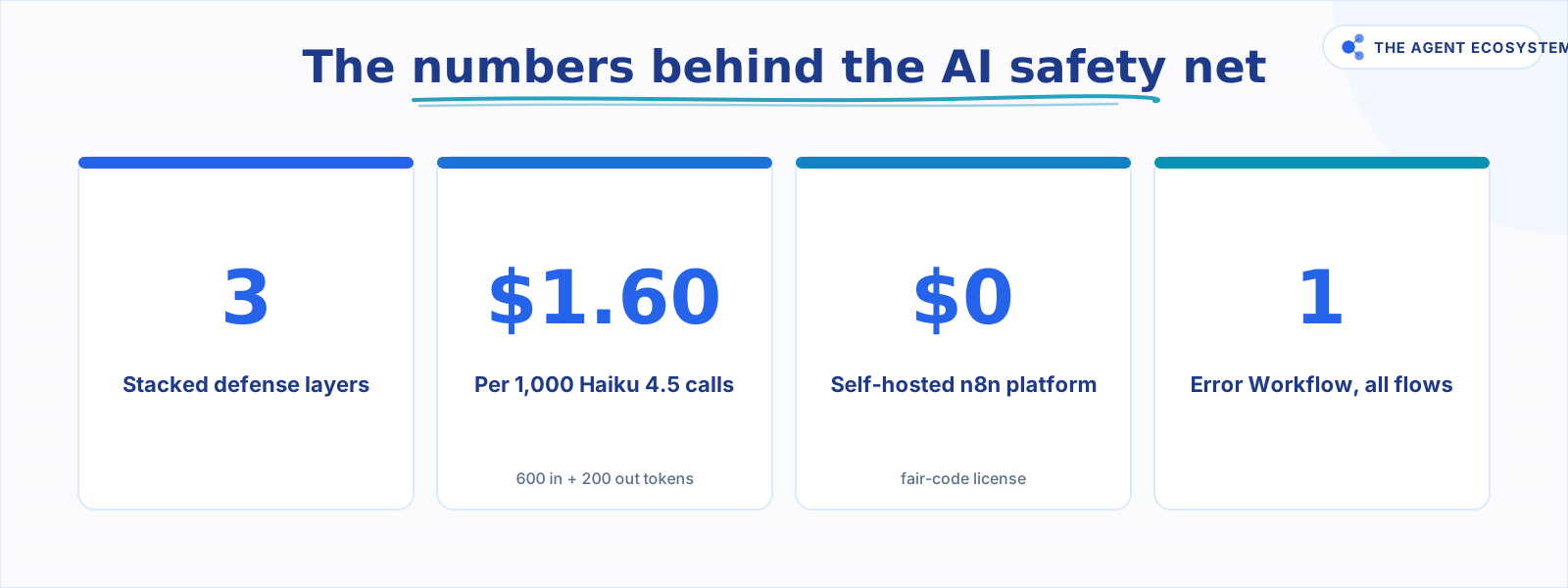 Core numbers behind the three-layer n8n AI safety net.
How does Retry On Fail work on an AI node?#
Retry On Fail is a toggle in the node's Settings tab. When enabled, n8n re-runs the node automatically on error, pausing between attempts for the duration you set in Wait Between Tries (ms). The wait matters for AI nodes specifically because it gives a rate-limited provider time to recover instead of hammering it with repeated requests.
One important caveat from the n8n error handling docs: if On Error is set to a "Continue" value, Retry On Fail can behave differently, so configure both settings together deliberately rather than one at a time.
A practical starting point: Max Tries set to 3, Wait Between Tries (ms) set to 5000. That covers most burst rate-limit situations without letting a single item hold up the queue for a minute.
How do you add a fallback model when retries run out?#
Set the primary AI node's On Error dropdown to Continue (using error output). That exposes a second output lane: a green success path and a red error path. Wire the red error output into a second AI node running a different model or provider account, so an item that exhausts its retries flows to the backup instead of dying.
For example: first node on Claude Haiku 4.5, fallback node on Claude Sonnet 4.6 (as of mid-2026, Haiku 4.5 costs $1.00/M input and $5.00/M output; Sonnet 4.6 costs $3.00/M input and $15.00/M output, per the official Claude pricing page). The fallback is not a special node type. It is the same AI node wired from the error lane.
The same error lane pattern works for malformed output. If you add a validation step after the AI node and it finds bad JSON, route that item back through a correction prompt or straight to a Google Sheet for manual fixes. Consult n8n structured output patterns to reduce how often malformed output fires in the first place.
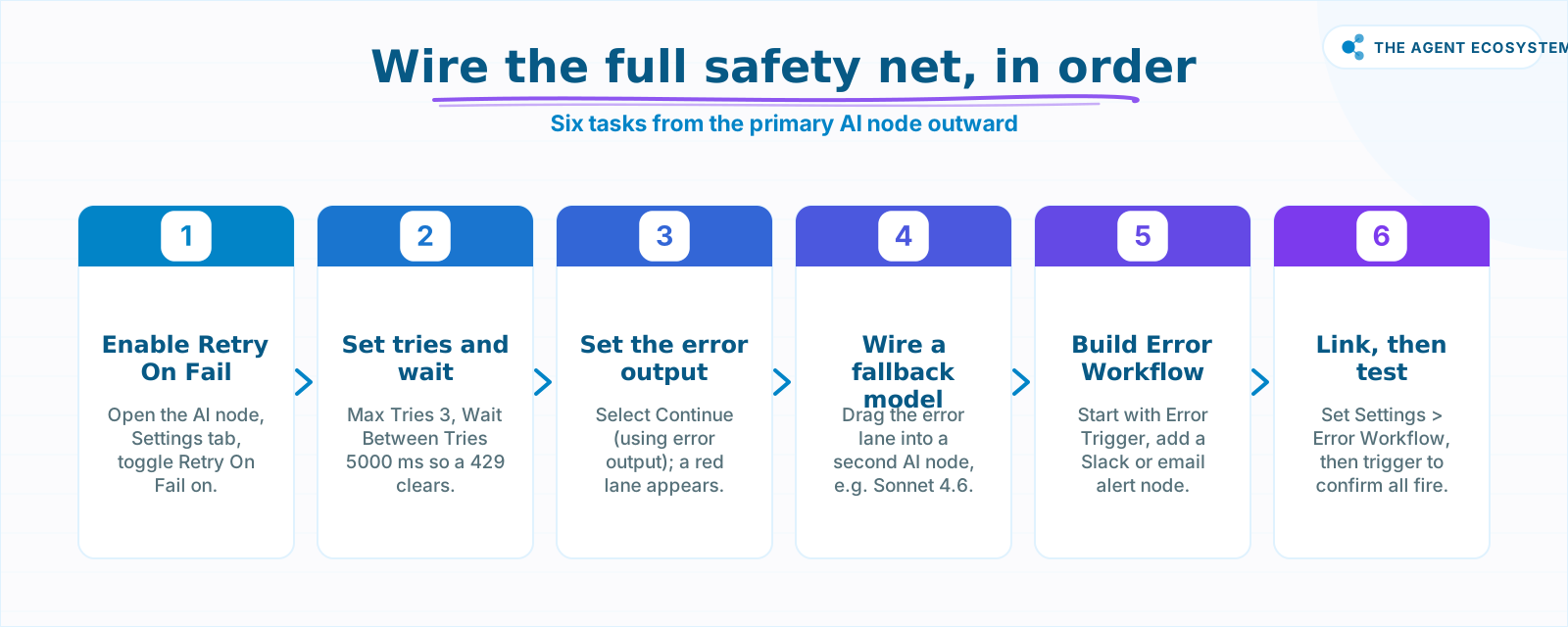 Six wiring tasks build the complete three-layer safety net.
How do you build the full safety net in n8n, step by step?#
Building the full net takes four concrete wiring tasks, done in order, starting from the primary AI node already running in your workflow. Turn on Retry On Fail with its Max Tries and wait, set On Error to Continue (using error output), wire a fallback AI node onto the error lane, then add one Error Workflow that alerts you.
- Open the AI node, click Settings, toggle Retry On Fail on.
- Set Max Tries to 3 and Wait Between Tries (ms) to 5000.
- Still in Settings, open the On Error dropdown and select Continue (using error output). A second output connector appears on the node.
- Drag a wire from the error output into a second AI node. Configure that node with a fallback model (for example, Sonnet 4.6 if your primary is Haiku 4.5).
- Create a new workflow starting with the Error Trigger node. Add a Slack or email node. Pass the error data fields (workflow name, node name, execution ID) into the message body.
- Back in your main workflow, go to Settings > Error Workflow and select the new error-alert workflow.
For a full walkthrough of the Error Trigger node's data schema, see the n8n Error Trigger docs.
On cost: assume a typical AI call in this stack is roughly 600 input tokens and 200 output tokens. On Claude Haiku 4.5 at $1.00/M input and $5.00/M output (as of mid-2026), that is $0.60 + $1.00 = $1.60 per 1,000 full calls. A retry re-runs that one call, so three retries cost at most 3x a single call's tokens. In practice most calls succeed on the first try, so actual retry spend stays well below that ceiling. Contrast that with a silent overnight failure: the whole batch produces nothing and you find out at 9am. For a closer look at keeping the token bill capped across retry and fallback spend, see Claude API cost control for agent workflows.
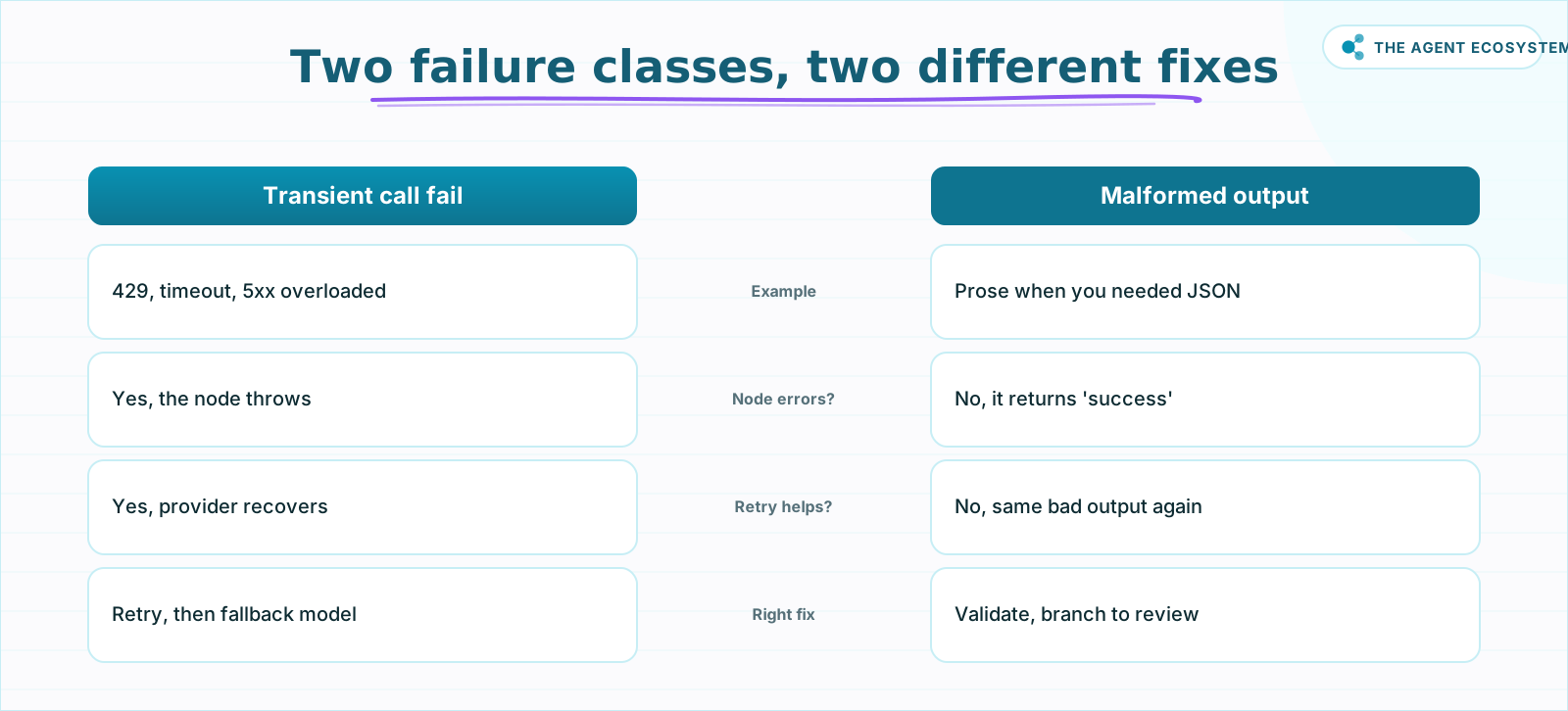 Retry catches transient calls; validation catches bad output.
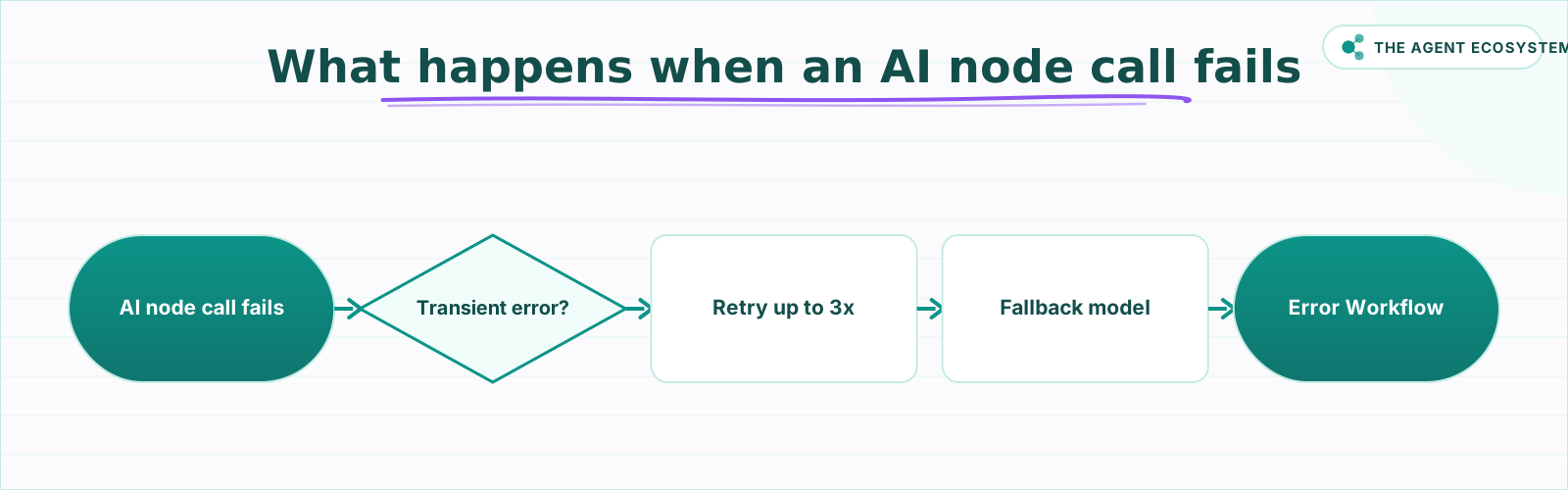 Retry transient errors, fall back, then alert on whatever escapes.
Where does n8n AI error handling go wrong?#
The biggest mistake is retrying a non-transient error. If the model call fails because the API key is revoked or the prompt is malformed JSON, setting Max Tries to 5 just fails 5 times and charges you for 5 broken calls. Retry covers transient, external conditions only. Branch everything else.
A close second: using bare Continue on the On Error dropdown. The run does not crash, but the failed item disappears silently. There is no error output lane, no log entry you can act on, just a missing record. For any workflow that processes customer data, invoices, or email replies, that silent drop is the failure mode you least want.
Fallback models carry their own trap. A Sonnet 4.6 fallback is a good backstop, but if the primary fails constantly, you end up paying Sonnet rates on every item. Watch your execution logs weekly. If the fallback fires more than a handful of times per day, fix the root cause rather than accepting permanent fallback spend.
Finally, skipping the Error Workflow means no alert. The retry and error lane protect individual items, but they cannot catch a scenario where the whole execution crashes at a higher level. The Error Trigger node is your last line. Without it, a complete run failure at 2am stays invisible until a human notices the missing output.
For a comparison of which primary and fallback model pairing fits your workflow's cost and speed profile, see Claude vs GPT vs Gemini in n8n AI agents: tested for cost and speed. If malformed output is the main failure mode rather than rate limits, the n8n AI structured output guide will reduce how often that error branch fires in the first place.
What should you wire up this weekend?#
Start with Retry On Fail today: it is one toggle and two number fields, and it handles the most common single failure, a 429 on a busy afternoon. Add the error output branch next, wire in a fallback model, then spend 20 minutes building the Error Workflow so you wake to a Slack message, not a mystery.
The platform cost is $0 on self-hosted n8n (free under the fair-code license) or €20/mo for n8n Cloud Starter (as of mid-2026, per n8n pricing). Error handling is identical on both. The general n8n error-handling foundation covering all node types is a useful reference before you go deeper, and it covers the workflow-wide alerting this page does not: how to send n8n error alerts to Slack or email.
Build the three layers once. The Slack alert will prove it works.
Frequently asked questions
What is Retry On Fail in n8n?
How do I handle a 429 rate limit on an AI node in n8n?
What does Continue (using error output) do in n8n?
How do I add a fallback model in n8n?
What is an Error Workflow and the Error Trigger node in n8n?
Should I retry every error from an AI node?
Sources
Primary references and vendor documentation used while drafting and reviewing this article.
Written by

Muhammad Qasim Hammad is an AI agent and automation expert and the founder of Cart Gaze LLC (cartgaze.com). He builds product for the love of it: when an idea lands, a working prototype is usually running within hours, built with the same AI agents and automations he sells. He puts his own output at roughly 20× what it was before agents, and the Agentic OS behind this site is the working proof, documented in public with the tools he actually ran and what they really cost.
AI & Automation Services
Want a pipeline like this running in your business?
I'm Qasim — I design and ship AI agents and n8n automations for solo operators and small teams. Tell me what's eating your team's week, and I'll scope a fix.
Related reading
Multi-Model Fallback in n8n: Stay Up When Claude Is Down or Over Budget
The model call is the least reliable step in your n8n workflow. Build a multi model fallback ladder (primary, cheaper, local, human) plus a budget guard so a 429, a 529 overload, or a blown budget degrades gracefully instead of killing the run.

How to Make Your n8n Workflows Reliable: Error Handling, Retries, and Alerts
n8n does zero error handling by default. Learn to add three layers: node retries, inline error outputs, and one Error Workflow that alerts you whenever any workflow fails silently.
n8n Error Workflow Template: A Copy-Paste Error Handler
An n8n error workflow template is one reusable flow, built on the Error Trigger node, that you set as your Error workflow so every failure is captured, formatted, and alerted from one place. Here is how to build it, wire it, and set it as your handler.
Process Thousands of Rows Through AI in n8n Without Hitting Rate Limits
Wire a spreadsheet straight into an AI node and it dies on row 47. n8n batch processing AI with Loop Over Items and a Wait node fixes that, for about $1.35 per 1,000 rows on Claude Haiku 4.5.
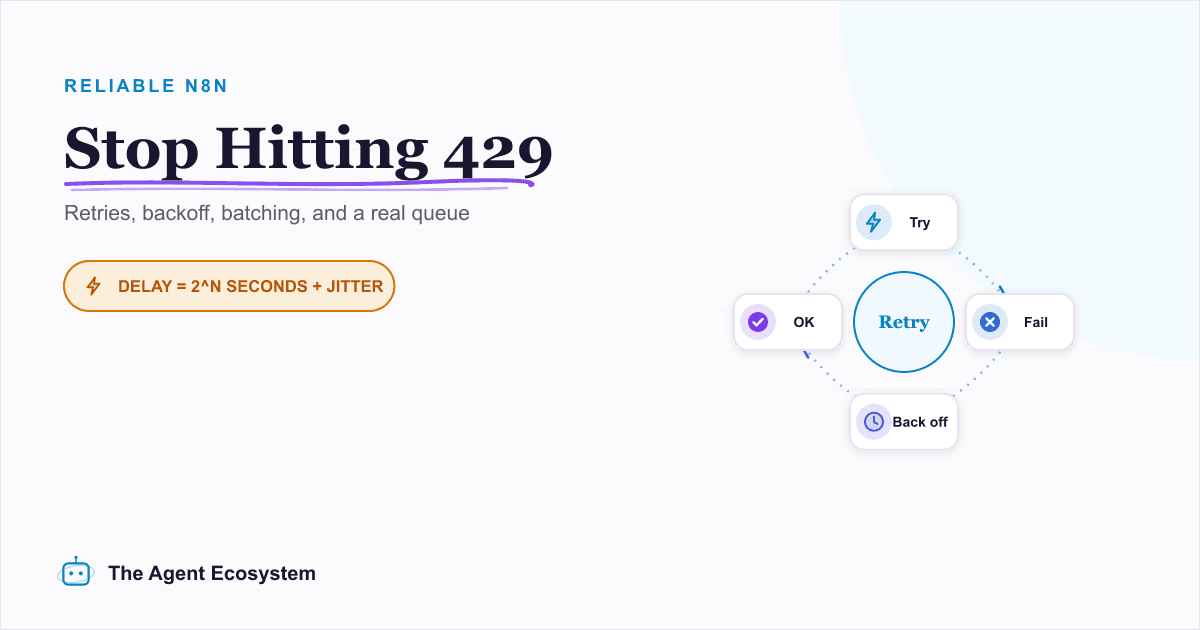
Rate-Limit-Proof n8n AI Workflows: Queues, Retries, Backoff
A Loop Over Items node fanning rows into an LLM keeps hitting 429 Too Many Requests, and every guide fixes it differently. Here is the full ladder: node retry, batching, Wait, hand-rolled backoff, and a real queue, with the built-in caps most posts bury.
AI Agent Guardrails: Stop Your n8n Agent From Going Off the Rails
An AI agent is a language model with hands. Without guardrails it can follow a malicious instruction, leak data, loop until your bill spikes, or return output the next node cannot parse. This guide maps the five ways an n8n agent breaks to the exact control that stops each.