n8n Error Workflow Template: A Copy-Paste Error Handler
Build one reusable Error Trigger flow and set it as your global handler.
AI-drafted, reviewed by Muhammad Qasim Hammad on July 11, 2026. See our AI disclosure.
Table of contents
A workflow that ran clean for weeks fails at 2 a.m. and nobody notices until a customer does. The fix is not more logging buried inside each automation. It is one small workflow that n8n runs automatically whenever any other workflow throws an error. An n8n error workflow template is a reusable Error Trigger flow you set once as your Error workflow, so every failure gets captured, formatted, and alerted from a single place.
This is the template itself, not a general theory of error handling. It captures the error object, formats it into a message a person can read, and alerts over Slack or email, with an optional log step. Below is how to build it, how to wire it, and when to point every workflow at it.
What is an n8n error workflow template, and why use one?#
It is a single workflow that starts with the Error Trigger node and runs whenever another workflow fails. Instead of copying error branches into every automation, you build the alert logic once and point each workflow at it. One reusable template means one place to edit when the alert format changes.
The alternative is what most people start with: an error branch wired into each workflow, usually an IF node checking a previous node's output, followed by a notification. That works for 1 workflow. By the time you run 10 or 20, you are maintaining the same branch in 20 places, and any workflow you forgot to wire fails silently.
Silent failure is the expensive case. A branch you forgot to add does not warn you that it is missing; the workflow just stops, the data does not move, and you learn about it from the person waiting on the result. A shared handler removes that whole class of gap, because coverage becomes a setting you pick, not a branch you have to remember to build.
A dedicated error workflow flips that. n8n already knows when a run fails, so you let the platform route every failure to one handler. The broader error-handling guide covers the full set of tactics; this post is specifically about the reusable template you set as the shared handler.
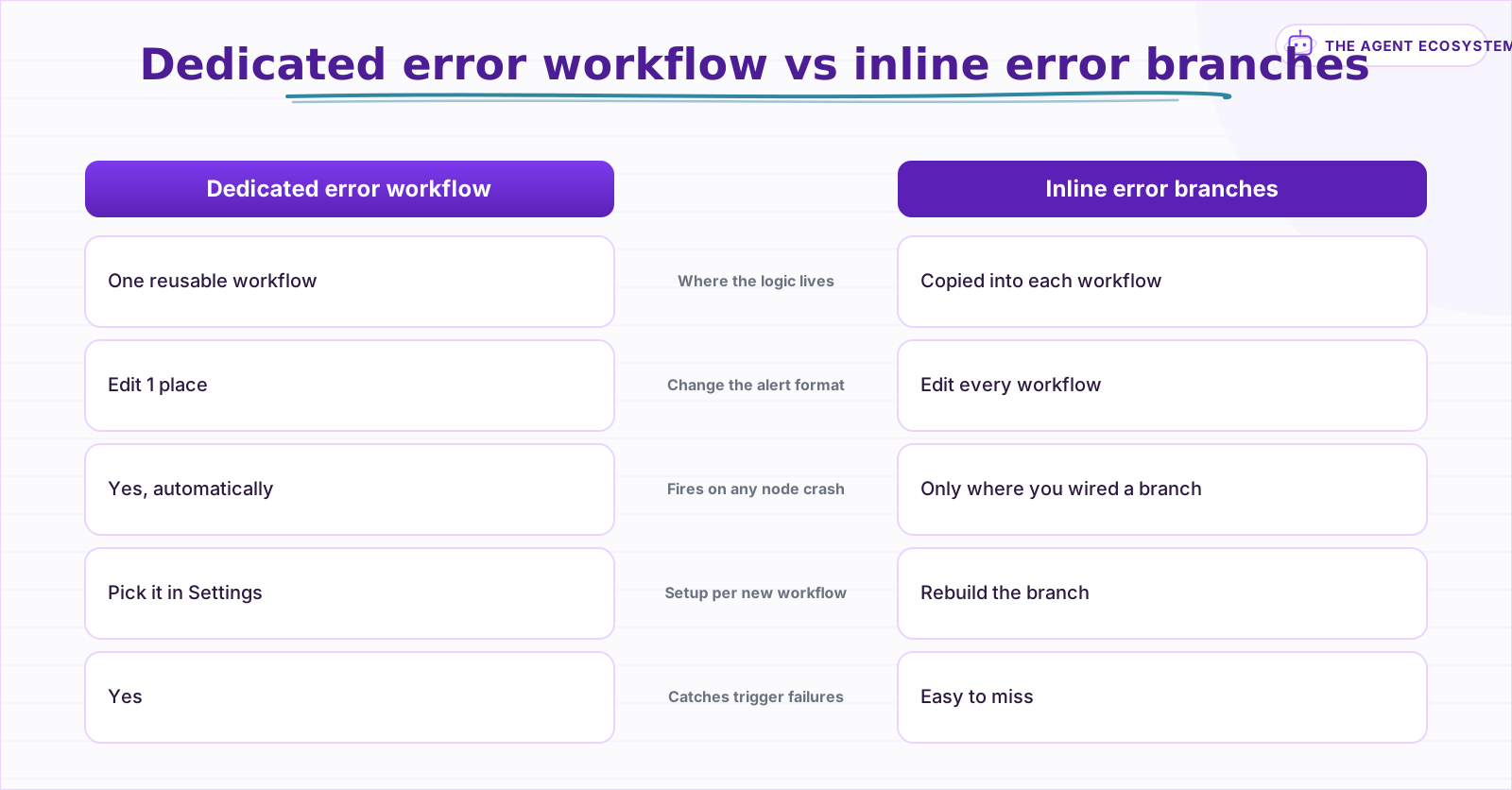 One reusable handler beats copying the same error branch into every workflow.
How do you set a workflow as your error handler?#
Build a workflow whose first node is the Error Trigger, then open the workflow you want to protect, go to Options > Settings, and choose your handler under the Error workflow field. n8n now runs that handler automatically every time the protected workflow fails. You repeat that selection for each workflow.
The Error Trigger has no configuration of its own. It sits at the top of the handler and outputs the error object the moment n8n calls it. Everything after it, the formatting and the alerting, is ordinary nodes you already know.
One caveat worth knowing early: n8n has no single instance-wide setting that applies one error workflow to everything at once. The Error workflow field is per workflow, so a new automation defaults to no handler until you set it. Teams work around this with a scheduled watchdog that patches the setting on every active workflow through the n8n API.
If you manage workflows as code, the same setting shows up as an errorWorkflow value in the workflow's JSON, holding the handler's ID. That is what the watchdog patches, and it is also why importing a workflow from another instance can quietly drop the handler when that ID does not exist on the new machine. Re-select the error workflow after any import.
To confirm the handler works before you rely on it, wire a throwaway workflow with a node that always fails, such as an HTTP Request pointed at a bad URL, set your handler as its Error workflow, and let it run once on a schedule. If the alert lands, every other workflow you point at the same handler is covered too.
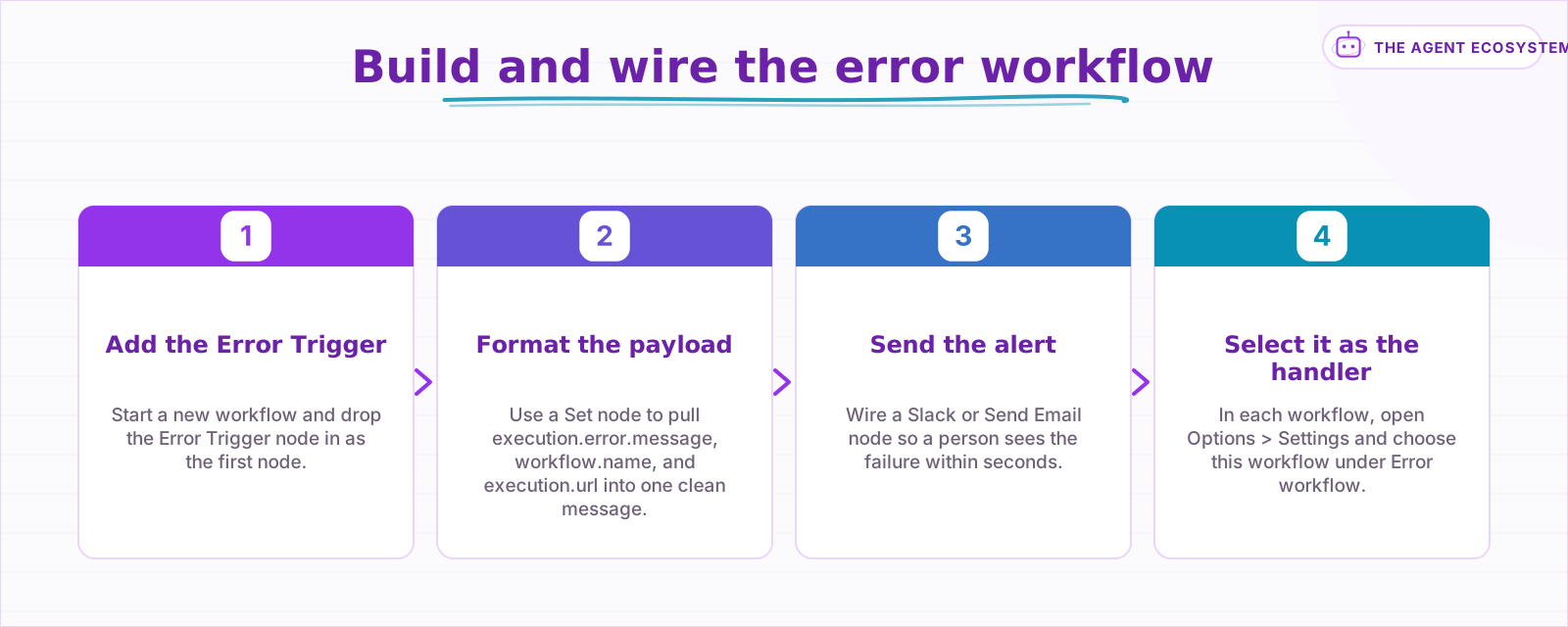 From a blank workflow to a durable handler every workflow can share.
What should the error template actually do?#
Three jobs: capture the error object, format it into a message a human can read, and send that message somewhere they will see it. The Error Trigger hands you a single JSON item with the failure details. You pull the useful fields, build a short alert, and route it to Slack or email.
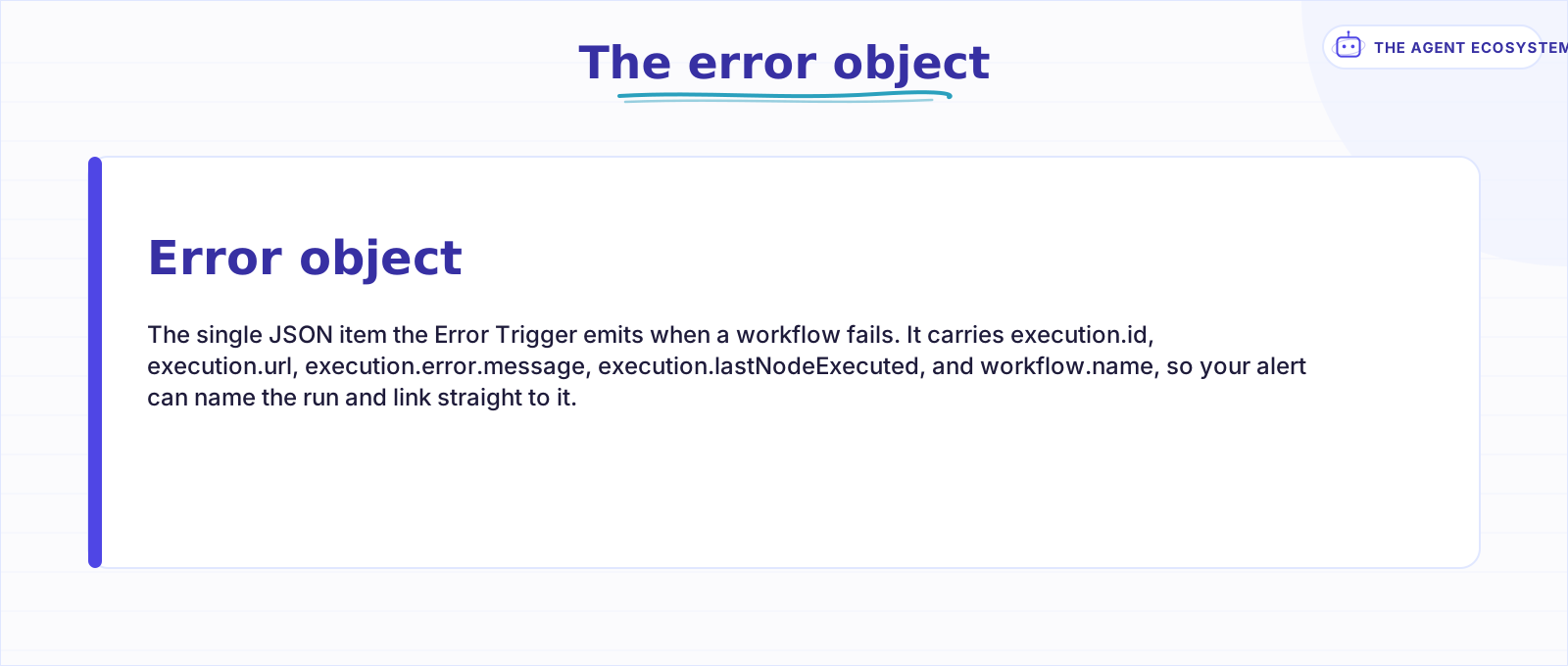 Everything your alert needs arrives as one JSON item.
The error object is one JSON item, and only a handful of its fields matter for a useful alert:
| Field | What it holds | Use it for |
|---|---|---|
| execution.error.message | The failure reason | The alert headline |
| execution.url | Link to the failed run | One-click debugging |
| execution.lastNodeExecuted | The node that threw | Pinpointing the break |
| workflow.name | The failed workflow | Routing and triage |
| execution.id | The execution identifier | Matching against logs |
Two of these come with a catch. execution.id and execution.url only populate when your instance saves executions to the database, which n8n does by default for failed runs. If the Error Trigger fires because the trigger node itself failed, you get a trigger.error object instead, so guard your expressions for a missing field rather than assuming it is always there.
Formatting is where the template earns its keep. A single Set node builds the message body, for example Workflow {{ $json.workflow.name }} failed at node {{ $json.execution.lastNodeExecuted }}: {{ $json.execution.error.message }}, with {{ $json.execution.url }} on its own line so the link is one tap away. Keep the message short. A wall of stack trace in Slack gets skimmed and ignored, and the full stack is one click away at the execution URL anyway.
How do you add retries without alert storms?#
Turn on Retry On Fail for flaky nodes so transient failures heal before the error workflow ever runs. n8n caps Max Tries at 5 and Wait Between Tries at 5000 ms per node. Only failures that survive every retry reach your handler, which keeps a single blip from paging you repeatedly.
Retry On Fail lives in each node's Settings tab, not in the error workflow. Set Max Tries to 3 for a rate-limited API and Wait Between Tries to a second or two, and most transient blips clear on their own. One gotcha: if a node's On Error is set to a Continue option, n8n ignores the retry settings, so leave On Error on Stop Workflow when you actually want the retries to run. The AI node error handling guide digs into this for model and tool nodes, which fail in their own ways.
Retries handle the failures you expect to be transient. For failures you want to raise on purpose, such as a validation check that finds bad input, the Stop And Error node throws a clean error with your own message, and that error routes to the same handler like any other. Between Retry On Fail on flaky nodes and Stop And Error on your own checks, most workflows need no inline error branches at all.
For the alerts that do fire, add a simple guard so one noisy workflow cannot bury you. A short quiet window, or a dedupe key built from workflow.name plus the error message, stops the same failure from sending 5 alerts in a minute.
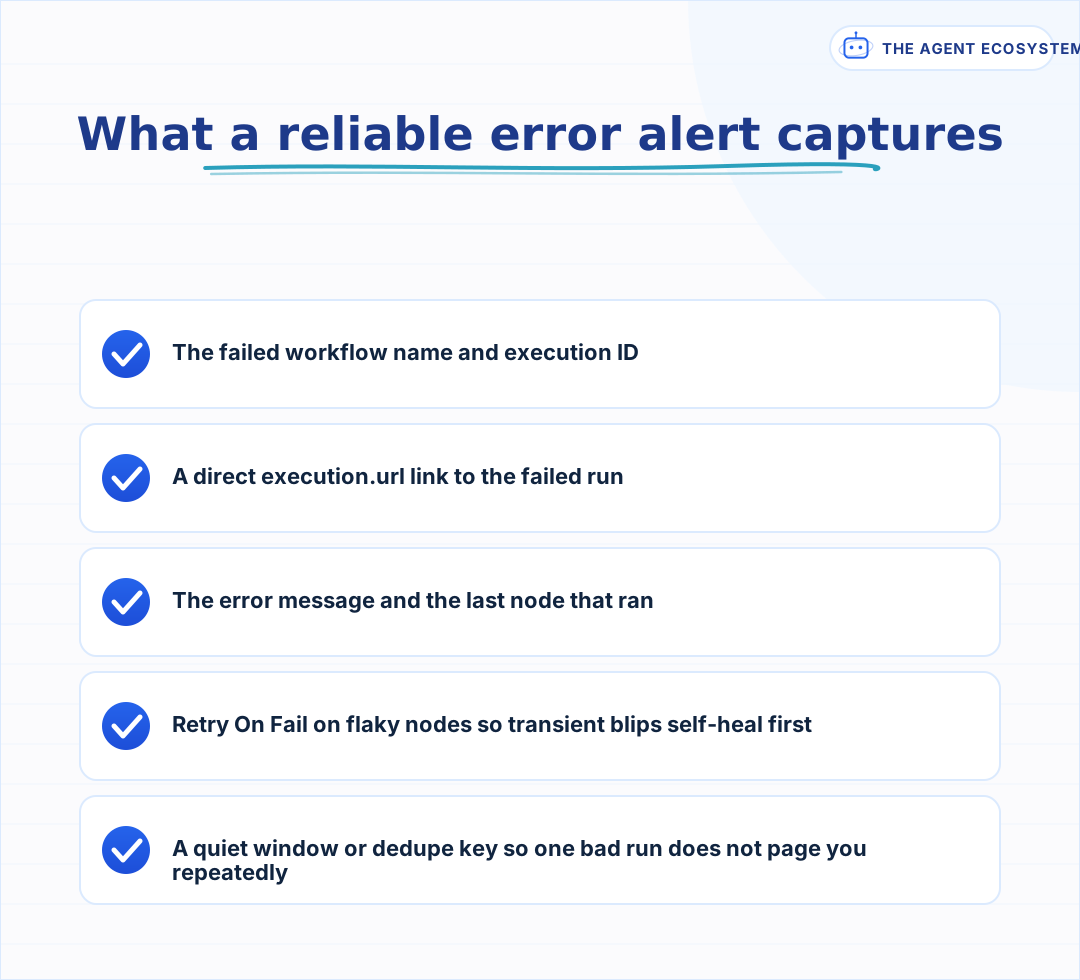 Capture enough to act fast, and mute the noise from transient retries.
When should every workflow point at this template?#
As soon as a workflow does anything you would want to know about when it breaks. Prototypes on your laptop can skip it. Anything running on a schedule, serving a webhook, or touching a customer should point at the shared error workflow before you consider it done.
Make the handler part of your definition of done. When you build a new production workflow, the last step is opening Settings and selecting the error workflow, the same way you would set a schedule or a name. Because the template is just another workflow, keep it in version control with the rest; the git backup guide shows how to snapshot workflows so the handler itself never gets lost.
The handler does not have to be dumb, either. Because it is a normal workflow, you can branch on workflow.name to page someone for the payment flow while a nightly cleanup gets a quiet log line, or fan a critical failure out to Slack and a ticket at once. Start with a single alert channel, then add routing once the volume tells you which failures actually deserve attention.
The payoff is boring in the best way. A node fails, the error workflow catches it, a message lands in Slack with a link, and you open the failed run and repair it before most people notice. That is the whole point of wiring it once.
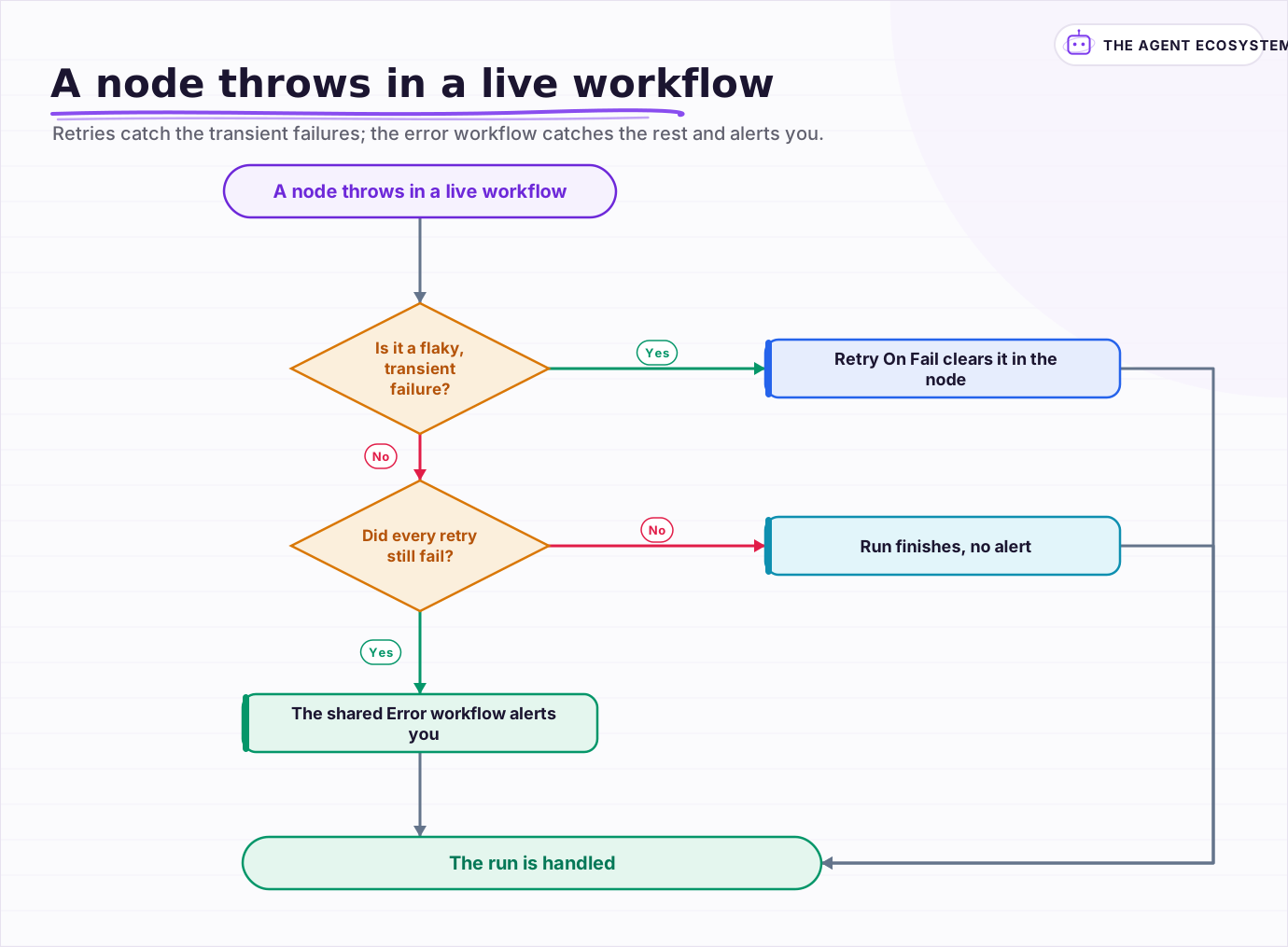 Retries catch the transient failures; the error workflow catches the rest and alerts you.
Frequently asked questions
Does n8n have an error workflow?
How do I set a default error workflow for all workflows in n8n?
What data does the n8n Error Trigger give me?
Why does the Error Trigger not fire when I test manually?
How do retries interact with the error workflow?
Sources
Primary references and vendor documentation used while drafting and reviewing this article.
Written by

Muhammad Qasim Hammad is an AI agent and automation expert and the founder of Cart Gaze LLC (cartgaze.com). He builds product for the love of it: when an idea lands, a working prototype is usually running within hours, built with the same AI agents and automations he sells. He puts his own output at roughly 20× what it was before agents, and the Agentic OS behind this site is the working proof, documented in public with the tools he actually ran and what they really cost.
AI & Automation Services
Want a pipeline like this running in your business?
I'm Qasim — I design and ship AI agents and n8n automations for solo operators and small teams. Tell me what's eating your team's week, and I'll scope a fix.
Related reading
How to Make Your n8n Workflows Reliable: Error Handling, Retries, and Alerts
n8n does zero error handling by default. Learn to add three layers: node retries, inline error outputs, and one Error Workflow that alerts you whenever any workflow fails silently.

Keep n8n AI Workflows From Breaking: Retry, Fallback Models, and Error Branches
Your n8n AI workflow passed every test, then a 429 killed a whole overnight batch with no alert. This guide wires 3 defenses: Retry On Fail, a fallback model, and a global Error Workflow.
n8n Sub-Workflows: Build Modular, Reusable Automations
Your n8n canvas hit 40 nodes and you keep copy-pasting the same blocks. A sub-workflow is the fix: a workflow that starts with the When Executed by Another Workflow trigger, so others call it like a function. Here is how data crosses the boundary and when to extract.
Multi-Model Fallback in n8n: Stay Up When Claude Is Down or Over Budget
The model call is the least reliable step in your n8n workflow. Build a multi model fallback ladder (primary, cheaper, local, human) plus a budget guard so a 429, a 529 overload, or a blown budget degrades gracefully instead of killing the run.
n8n Webhooks vs Polling: Which Trigger to Use, and Why
Should an n8n workflow fire the instant an event happens (a webhook, push) or check on a timer (polling, pull)? The wrong pick means missed events or wasted executions. Here is the decision framework plus how to wire each trigger.
n8n Schedule Trigger: Cron, Intervals, and Overlaps
Your scheduled n8n workflow ran an hour off, stacked runs on top of each other, or silently never fired. All three are fixable once you know where n8n looks for cron, timezone, and concurrency. Here is the honest, docs-verified recipe.