n8n Sub-Workflows: Build Modular, Reusable Automations
Extract shared logic into a callable workflow: how data crosses the boundary, and when extracting pays off.
AI-drafted, reviewed by Muhammad Qasim Hammad on July 9, 2026. See our AI disclosure.
Table of contents
Your n8n canvas crossed 40 nodes a while ago, and the same Slack-alert and data-cleanup blocks now live, copy-pasted, in five different workflows. Fix a bug in one and you have four stale copies. An n8n sub workflow turns that shared block into a single callable function: one copy you call from anywhere, edited in one place.
This is a decision framework, not a node tour. It covers which blocks are worth extracting, how data crosses the boundary in both directions, the Execute Sub-workflow settings that actually change behavior, and the honest cost of pulling logic out, all verified against the current n8n docs.
What is an n8n sub-workflow, and why use one?#
An n8n sub workflow is a normal workflow that starts with the When Executed by Another Workflow trigger instead of a webhook or schedule, so another workflow can call it like a function. You pass input items in as arguments and get the child's final output back as the return value. Reuse, readability, and isolation are the payoff.
The mental model is simple: the parent workflow is the caller, the sub-workflow is the function. That reframing buys you three things. Reuse means one copy of shared logic instead of five. Readability means a 60-node canvas becomes a 15-node parent plus a few clearly named children. Isolation means you can test and log each piece on its own instead of only through the whole flow.
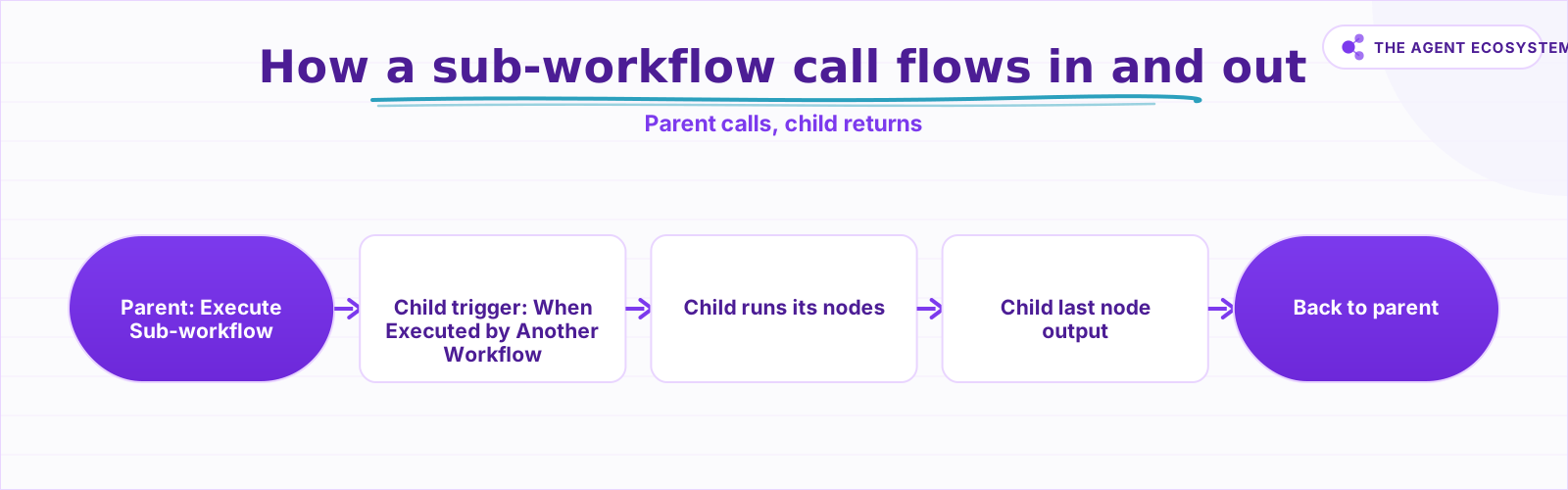 Data in via the trigger, data out via the child's final node. The boundary is one node on each side.
The readability win is the one builders underrate. A single sprawling canvas forces you to hold the whole flow in your head at once, while a parent that reads "validate input, enrich record, notify the team" as three named sub-workflow calls tells the next person what it does without making them trace every node. The logic did not get smaller; it got named, and named logic is far easier to reason about and hand off.
The boundary is genuinely just two nodes, one on each side, which is what makes the pattern cheap to adopt. Everything else, the data contract and the call behavior, is configuration on those two nodes, and that is what the next sections walk through.
How do you pass data in and out of a sub-workflow?#
Data goes in through the child's trigger and comes back through its last node. The parent's Execute Sub-workflow node feeds input items to the trigger, whose input-data mode sets the contract. The child runs, and whatever its final node emits is the return value. You do not need a Respond to Webhook node for that.
On the way in, the trigger's input-data mode is the contract, and it has three options. "Define using fields below" declares named, typed fields, which is the grown-up choice because the parent's Execute Sub-workflow node then shows exactly those fields to fill, so a caller cannot forget an argument. "Define using JSON example" infers the shape from a sample object you paste, useful when the input is a known but larger structure. "Accept all data" sets no contract at all and makes the child handle whatever arrives, which is flexible but pushes the burden of validation onto the child.
Pick the contract deliberately, because it is the difference between a sub-workflow that documents itself and one that silently breaks when a caller sends the wrong shape. For anything you will reuse across workflows, the named-fields mode is worth the extra minute, since the explicit contract is what lets a teammate call your sub-workflow correctly without reading its internals.
On the way out, the return value is the child's last-node output. This is the detail several published guides get wrong: you do not add a Respond to Webhook node, because that is for webhook responses; the final node's output simply becomes the parent node's output. The Source parameter on the parent picks which child to run, and these are the settings that actually matter:
| Setting | Options | Why it matters |
|---|---|---|
| Source | Database / Local File / Parameter / URL | Database (pick from a list) is the normal reuse path; the others embed or fetch JSON |
| Mode | Run once with all items / Run once for each item | Per-item runs the child once per input row; all-items hands the whole batch over once |
| Wait for Sub-Workflow Completion | On (default) / Off | Off makes the call fire-and-forget; the parent moves on without the child's output |
| Input mapping | Driven by the child trigger's fields | If the trigger defines fields, the parent node shows them to fill in |
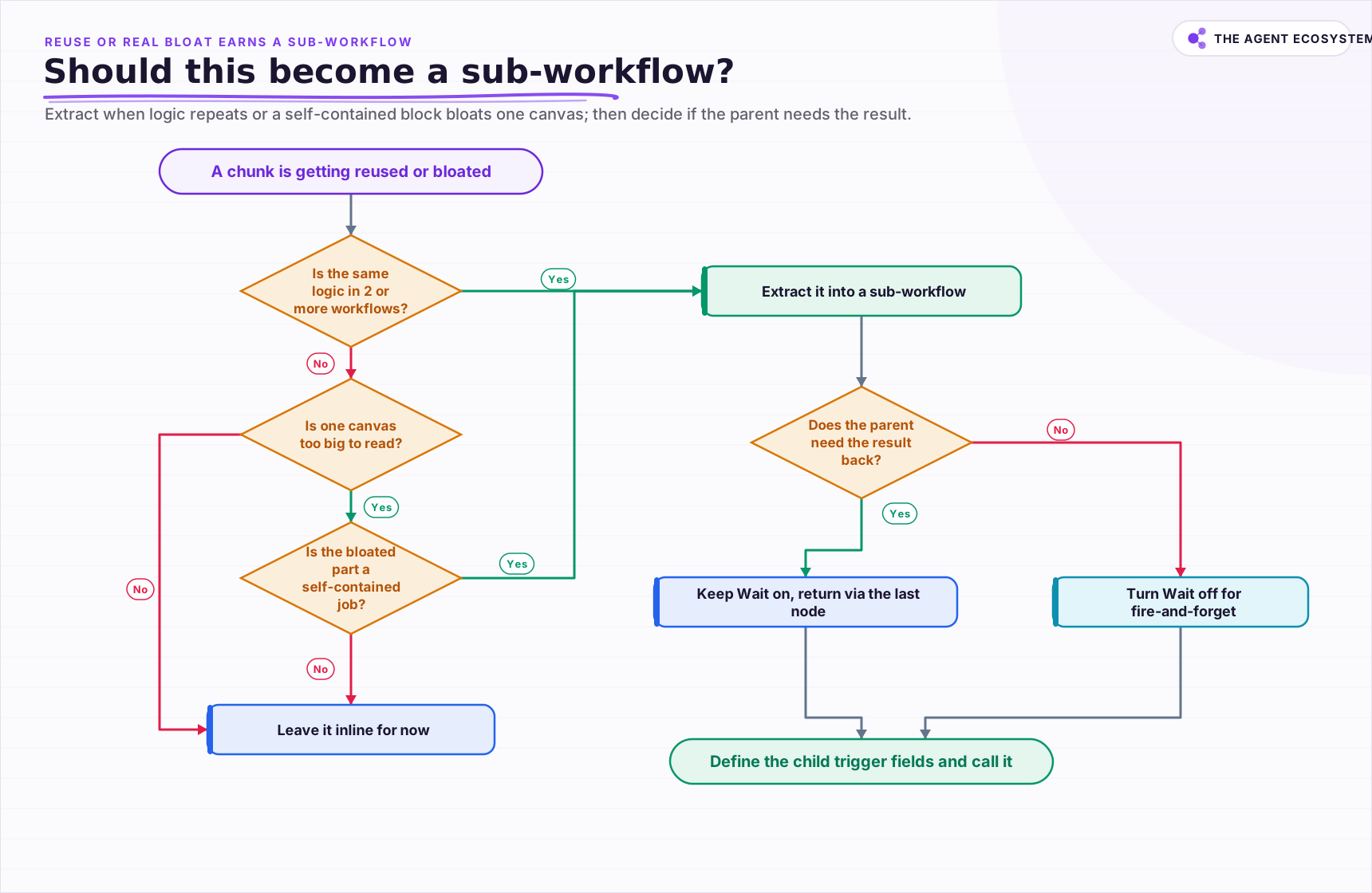 Extract when logic repeats or a self-contained block bloats one canvas; keep Wait on only when the parent needs the result.
Should this become a sub-workflow?#
Extract a block when the same logic lives in two or more workflows, or when one canvas is too big to read and the bloated part is a self-contained job. The cost is real but small: every call is its own execution with its own log, plus a little overhead, in exchange for fixing the logic in one place.
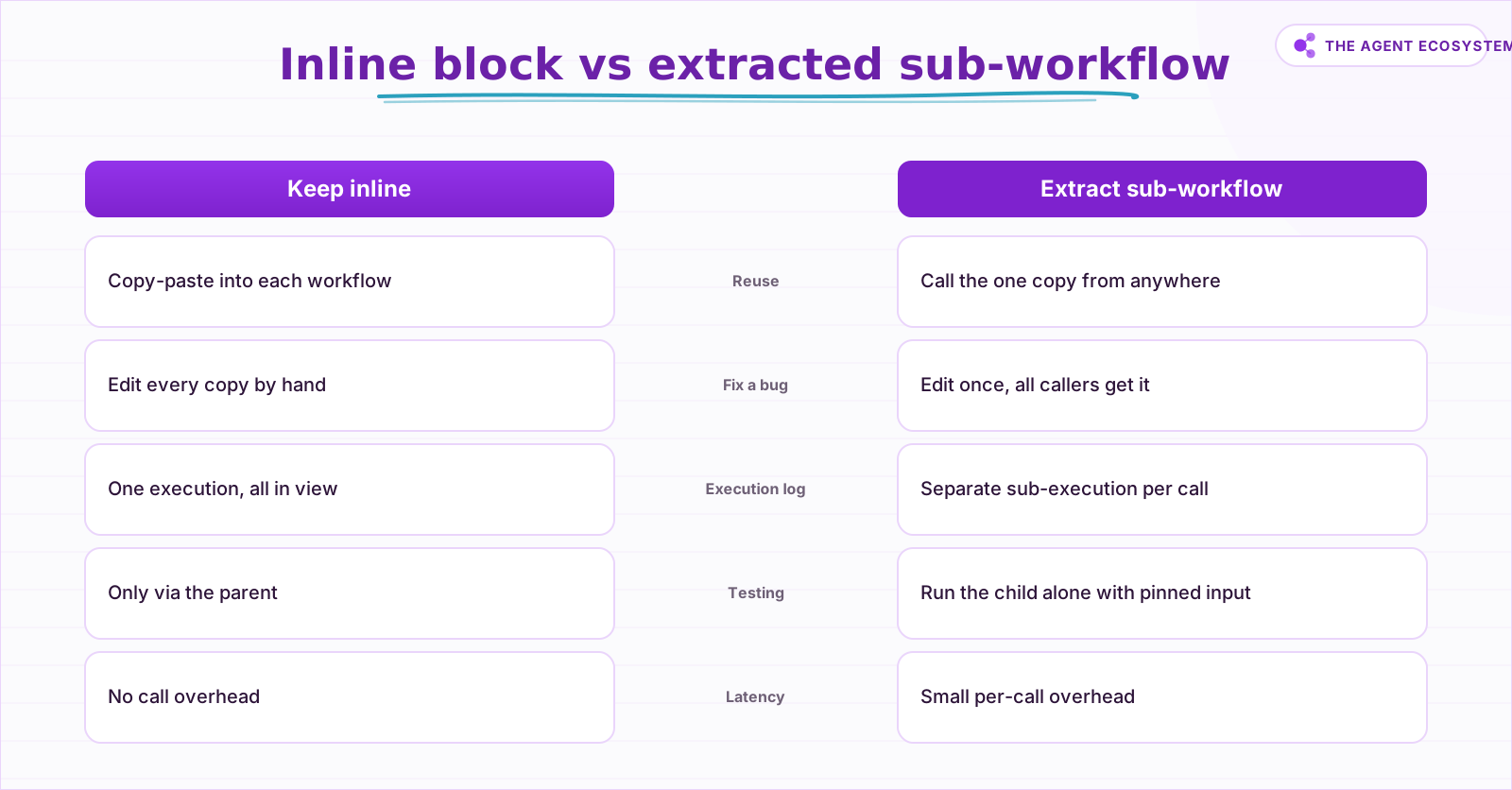 Extract when the same logic lives in two or more workflows, or when one canvas is too big to read.
Be honest about what extraction costs. Each sub-workflow call is a separate execution with its own log entry, so a parent that calls 3 children is 4 executions to trace when something breaks, and you jump between them with the node's View sub-execution link the same way you would chase a failure with solid error handling. Sub-workflow executions are also excluded from the production concurrency limit, which is usually fine but worth knowing. Run the symptom check before you commit:
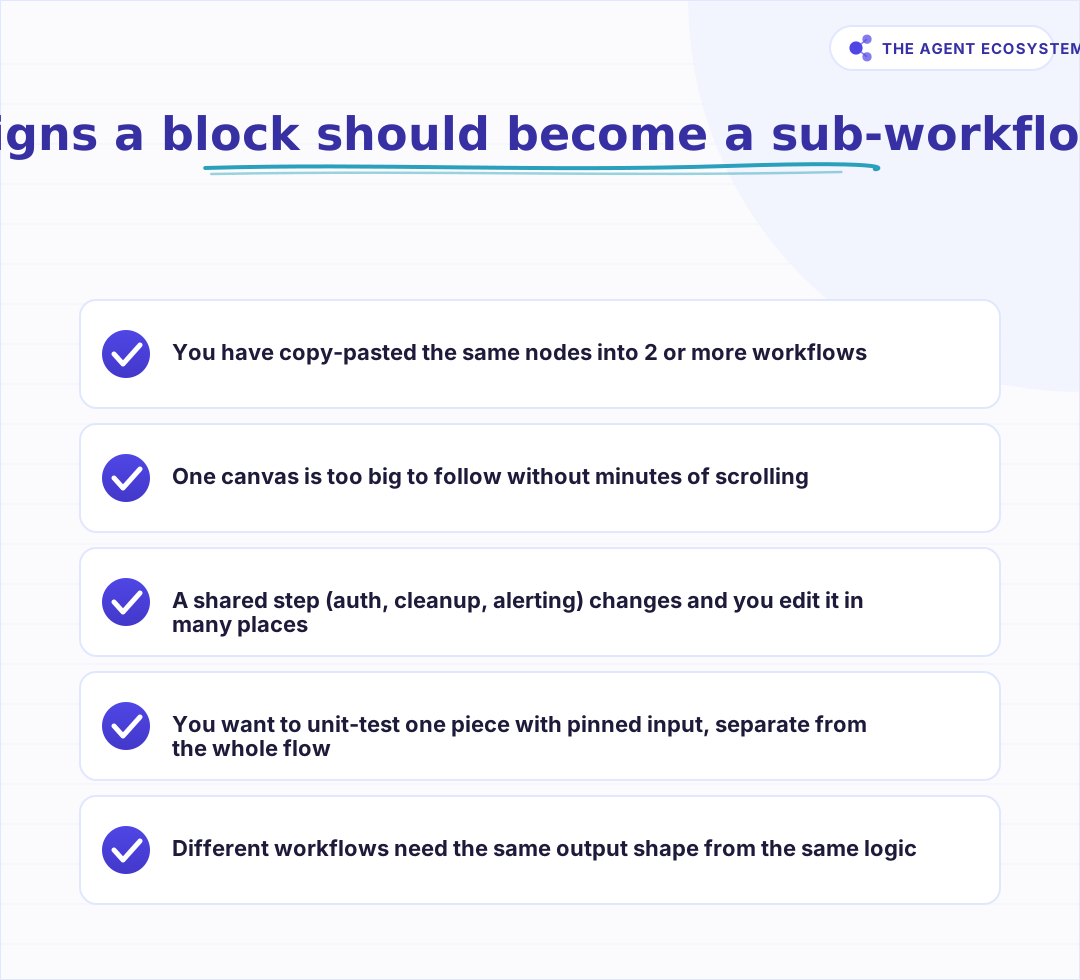 Two or more of these and the block earns its own workflow.
One setting causes more "it only processed the first row" bugs than any other: Mode. "Run once for each item" runs the child once per input row and is the safe default when the child logic is written for a single record; "Run once with all items" hands the whole batch over in one run and is right when the child is built to process a batch. Match it to how the child was actually written. The same modular instinct underpins multi-agent orchestration, where each agent is effectively a callable piece.
How do you build and test one in practice?#
Build the child first: add the When Executed by Another Workflow trigger, set its input mode to Define using fields below, declare the fields, and add the logic. Test it alone with pinned input. Then add an Execute Sub-workflow node in the parent, set Source to Database, pick the child, and fill the fields it declared.
Testing the child in isolation is the quiet superpower here. Because the child is a normal workflow, you can pin sample input on its trigger and run only that workflow, iterating on one piece without touching the parent at all. When you wire the parent, choose the Mode deliberately and leave Wait for Sub-Workflow Completion on whenever you need the result back, or turn it off for fire-and-forget side effects like logging or notifications.
Debugging stays manageable because the two executions are linked. From the parent's Execute Sub-workflow node you can open View sub-execution to jump straight into the child's run for that call, see its inputs and outputs, and confirm the boundary behaved. That linkage is what keeps the separate-execution cost from becoming a tracing headache: you are never hunting for which sub-run belongs to which parent.
The one habit to keep is versioning awareness: every parent points at the same saved child, so editing the child changes behavior for all callers at once. That is exactly the benefit, and exactly the thing to double-check before you change a widely-used sub-workflow. If an AI agent needs to call one, the separate Call n8n Workflow Tool node exposes a sub-workflow as a tool while the child still uses the same trigger, which is how these pieces slot into the broader time-saving automations you are already running. Start small, extract the first block that hurts, and let the library grow from there. See the Execute Sub-workflow docs for the current settings.
Frequently asked questions
How does a sub-workflow send a result back to the parent?
What is the difference between Run once for each item and Run once with all items?
How do I make a sub-workflow's inputs explicit?
When should I not extract a sub-workflow?
Can an AI agent call a sub-workflow?
Sources
Primary references and vendor documentation used while drafting and reviewing this article.
- n8n Execute Sub-workflow node docs (Source, Mode, Wait, last-node returns data)
- n8n Execute Sub-workflow Trigger docs (When Executed by Another Workflow, input data modes)
- n8n sub-workflows concept overview
- n8n Call n8n Workflow Tool node (AI agent calls a sub-workflow as a tool)
- n8n concurrency control (sub-workflow executions excluded from the production limit)
Written by

Muhammad Qasim Hammad is an AI agent and automation expert and the founder of Cart Gaze LLC (cartgaze.com). He builds product for the love of it: when an idea lands, a working prototype is usually running within hours, built with the same AI agents and automations he sells. He puts his own output at roughly 20× what it was before agents, and the Agentic OS behind this site is the working proof, documented in public with the tools he actually ran and what they really cost.
AI & Automation Services
Want a pipeline like this running in your business?
I'm Qasim — I design and ship AI agents and n8n automations for solo operators and small teams. Tell me what's eating your team's week, and I'll scope a fix.
Related reading
n8n Error Workflow Template: A Copy-Paste Error Handler
An n8n error workflow template is one reusable flow, built on the Error Trigger node, that you set as your Error workflow so every failure is captured, formatted, and alerted from one place. Here is how to build it, wire it, and set it as your handler.

How to Make Your n8n Workflows Reliable: Error Handling, Retries, and Alerts
n8n does zero error handling by default. Learn to add three layers: node retries, inline error outputs, and one Error Workflow that alerts you whenever any workflow fails silently.
n8n Webhooks vs Polling: Which Trigger to Use, and Why
Should an n8n workflow fire the instant an event happens (a webhook, push) or check on a timer (polling, pull)? The wrong pick means missed events or wasted executions. Here is the decision framework plus how to wire each trigger.
n8n Multi-Agent Orchestration: One Orchestrator, Many Sub-Agents (2026)
Your single n8n AI Agent has 10+ tools and keeps picking the wrong one. n8n multi-agent orchestration fixes this: one coordinator routes each job to a small, specialized sub-agent on the right model.
Function Calling vs MCP vs Tools: Give an Agent Capabilities
You keep seeing function calling, tool use, and MCP used as if they compete. They do not. Tools are the functions, function calling is the model mechanism that calls them, and MCP is the standard that shares them across clients. Here is how the three layers stack and which to
n8n Expressions Explained: Items, $json, and Node References
Most n8n frustration is a data-shape misunderstanding, not a broken node. Every connection carries an array of items, each with a json key. Once you can picture that shape, $json, $('Node Name'), and the 'Referenced node has no data' error all make sense.