LLM Batch API: When 50% Off Is Worth the Wait
The batch endpoint runs the same model at half the token price, if your job can wait. Here is the decision, the cost math, and the n8n wiring.
AI-drafted, reviewed by Muhammad Qasim Hammad on July 13, 2026. See our AI disclosure.
Table of contents
You have a backlog of work to push through a model: 10,000 tickets to classify, a content library to summarize, a CSV to enrich. Nobody is sitting there watching a spinner. That is exactly the workload the batch endpoint was built for, and it bills at half the token price. An llm batch api runs the same model asynchronously and charges 50% of the standard input and output price, so the only real question is whether your job can wait.
What is a batch API, and why is it 50% cheaper?#
A batch API processes your requests asynchronously and returns identical output to the real-time API. An llm batch api bills at half the standard price on both input and output tokens. The discount is a latency-for-price swap, not a downgrade: async jobs let the provider schedule your work into spare capacity instead of holding a low-latency slot open.
Because the model and the request are identical, quality is identical. What changes is the contract on timing and money. Both Anthropic and OpenAI quote a 24-hour completion ceiling, and Anthropic's batch docs say most batches finish in under an hour. You access results when every request has completed or after 24 hours, whichever comes first. Batches that do not finish inside the window expire, and you are not billed for expired requests.
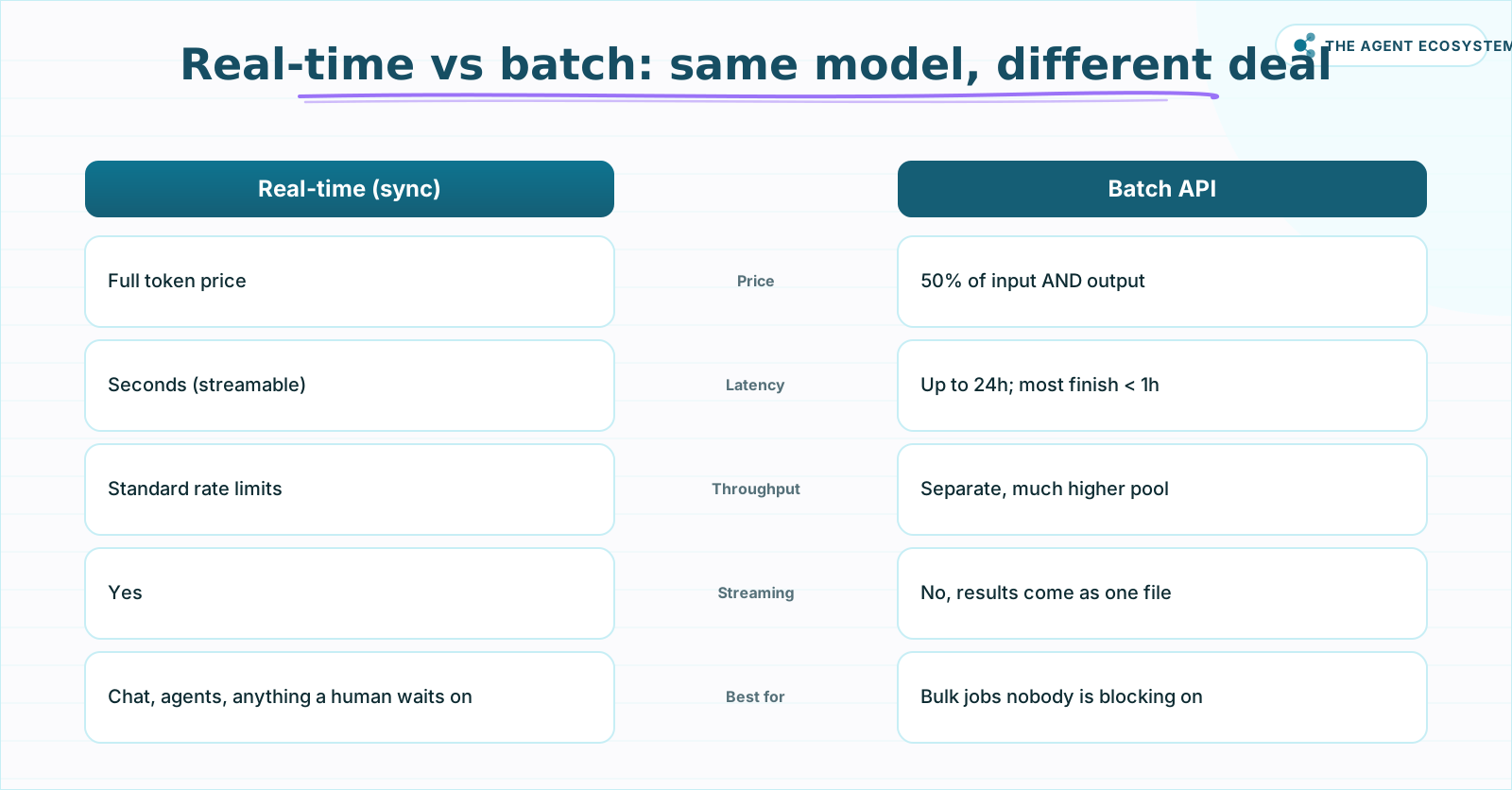 Identical model and output quality. Batch trades immediacy for half the price and a separate, higher rate-limit pool.
Read the ceiling as an SLA, not a promise of speed. Design your pipeline for "any time up to 24 hours," and treat the sub-hour typical case as a pleasant surprise rather than something to depend on. That single reframing is what keeps batch out of anything a human is actively blocking on.
The expiry rule is worth pausing on, because it changes how you budget. If a batch does not finish inside 24 hours it expires, and the requests that expired cost you nothing. The same protection covers requests that error or that you cancel: those are not billed either. So a partial batch never bills you for the parts that failed, which means your worst-case cost is capped at the requests that actually succeeded, at half price. That is a friendlier failure mode than a real-time loop that burns tokens on every retry.
Anthropic Message Batches vs OpenAI Batch: the same deal, different plumbing#
Both providers give you the identical headline: 50% off input and output, a separate and much higher rate-limit pool, a 24-hour window, and results matched by a caller-supplied custom_id. The plumbing differs. Anthropic takes an inline requests array; OpenAI takes an uploaded .jsonl file. Everything past that is detail you wire once.
On Anthropic, a batch is capped at 100,000 requests or 256 MB, whichever hits first. You POST a requests array to /v1/messages/batches, each request carrying a custom_id and a params object of standard Messages fields. Results live at a results_url as .jsonl for 29 days. A few things are rejected in batch mode, including stream: true and fast mode, so paraphrase the request rather than copying a real-time call verbatim.
On OpenAI's Batch API, the cap is 50,000 requests or 200 MB, with up to 2,000 batches per hour. You upload a .jsonl file through the Files API (each line has custom_id, method, url, body), then create the batch with completion_window: "24h", poll /v1/batches/{id}, and download the output_file_id.
| Dimension | Anthropic Message Batches | OpenAI Batch API |
|---|---|---|
| Discount | 50% input + output | 50% input + output |
| Max requests | 100,000 | 50,000 |
| Max size | 256 MB | 200 MB |
| Window | 24h (most < 1h) | 24h (set completion_window) |
| Result retention | 29 days at results_url | Output file via Files API |
| Submit shape | Inline requests array | Upload .jsonl, then create batch |
The gotcha that bites people on both providers: results can come back in any order. You must reconcile each result to its input by custom_id, never by position. Errored, canceled, and expired requests are not billed, but you still have to detect and handle them in your parsing step.
Two more practical points decide which side you build on. The first is scale: if a single job needs more than 50,000 requests, Anthropic's 100,000-request ceiling lets you send it as one batch where OpenAI would force you to split it. The second is state: Anthropic keeps results downloadable at a results_url for 29 days, so a scheduled job can pick them up later without extra storage, while OpenAI hands you an output file through the Files API that you fetch by id. Neither is better; they just push slightly different plumbing into your pipeline. Pick the provider you already pay for and match your polling to its status field.
What are the modeled savings, and where does batch stop making sense?#
The saving is exactly half, because the discount is flat on both token lanes. Here is a modeled example (assumptions stated inline, published per-token prices): 10,000 support tickets, roughly 700 input tokens and 120 output tokens each, on Claude Haiku 4.5 at $1 input and $5 output per MTok real-time, $0.50 and $2.50 on batch.
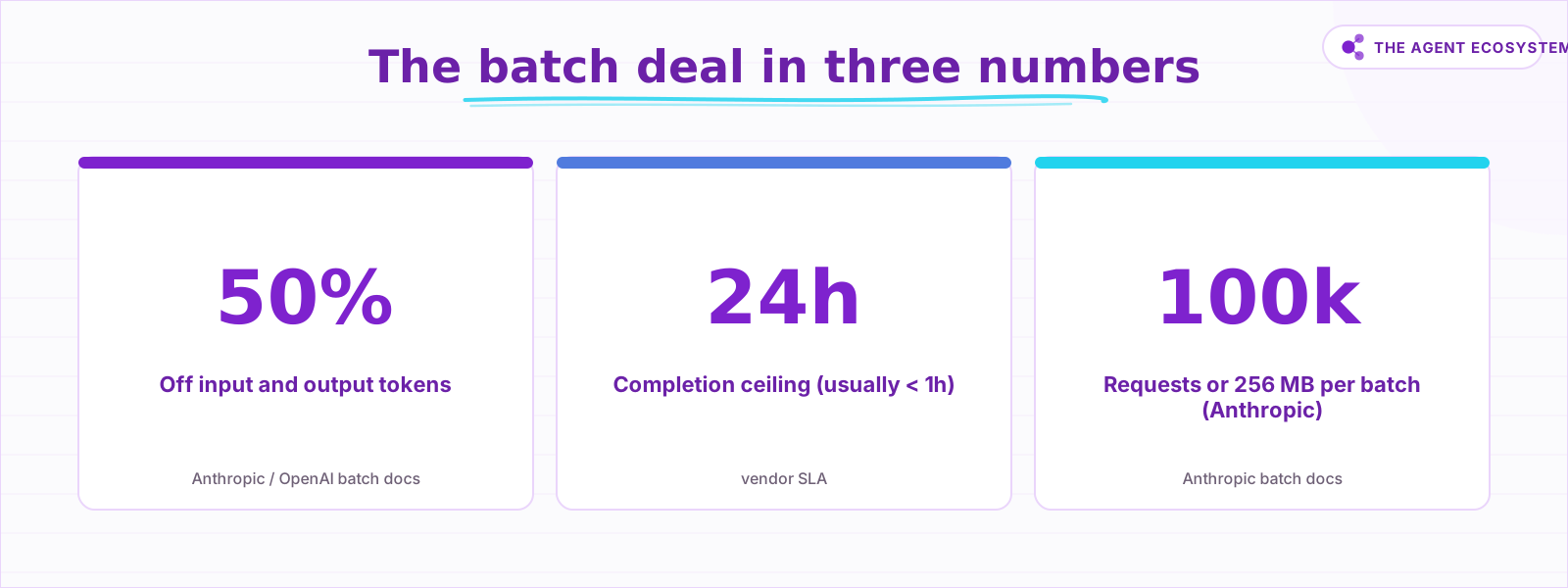 The discount and the ceiling are the whole trade. Source: Anthropic and OpenAI batch docs.
Real-time cost: 10,000 x 700 = 7M input tokens x $1/MTok = $7.00; 10,000 x 120 = 1.2M output tokens x $5/MTok = $6.00; total about $13.00. On batch, the same tokens at half price come to $3.50 input plus $3.00 output, about $6.50, exactly 50% lower. Scale the same job to Sonnet 4.6 ($3/$15 real-time, $1.50/$7.50 batch) and it is roughly $39 real-time versus about $19.50 on batch (modeled).
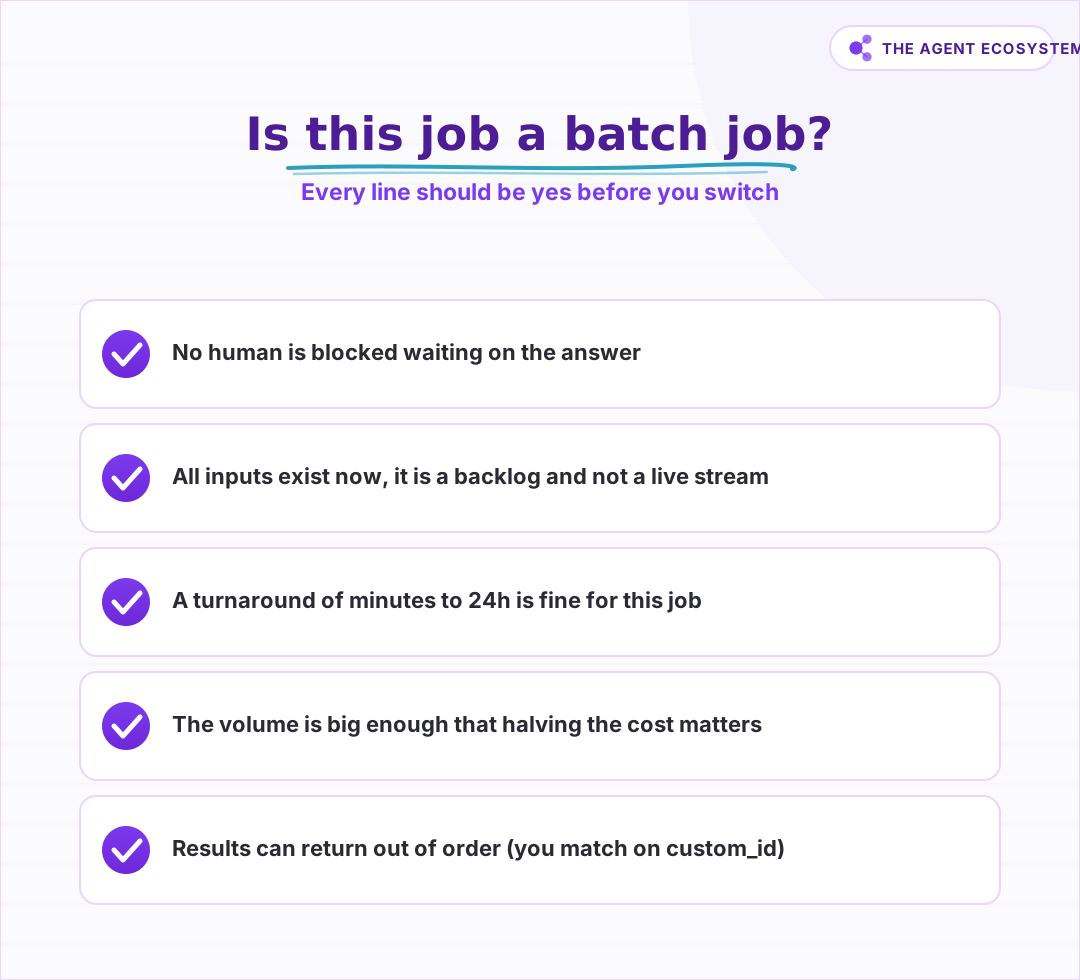 If even one of these is no, keep it on the real-time API. Batch is for backlog, not for chat.
Notice what the discount does not do: it does not change your token counts. Batch halves the price per token, so the way to make batch savings bigger is the same way you make any bill smaller, by sending fewer tokens. A tighter prompt, a smaller model where quality allows, and trimmed context all compound with the 50% cut. The batch discount is a multiplier on whatever your token math already is, not a substitute for controlling it.
The flip side matters just as much. On a one-off of a few hundred requests, halving the cost saves cents, so the discount is real but only meaningful at volume. Batch is the wrong call for anything a user waits on, since the 24-hour ceiling makes it unusable for chat, agents, or live RAG answers. It is also wrong when you need streaming or strict ordering.
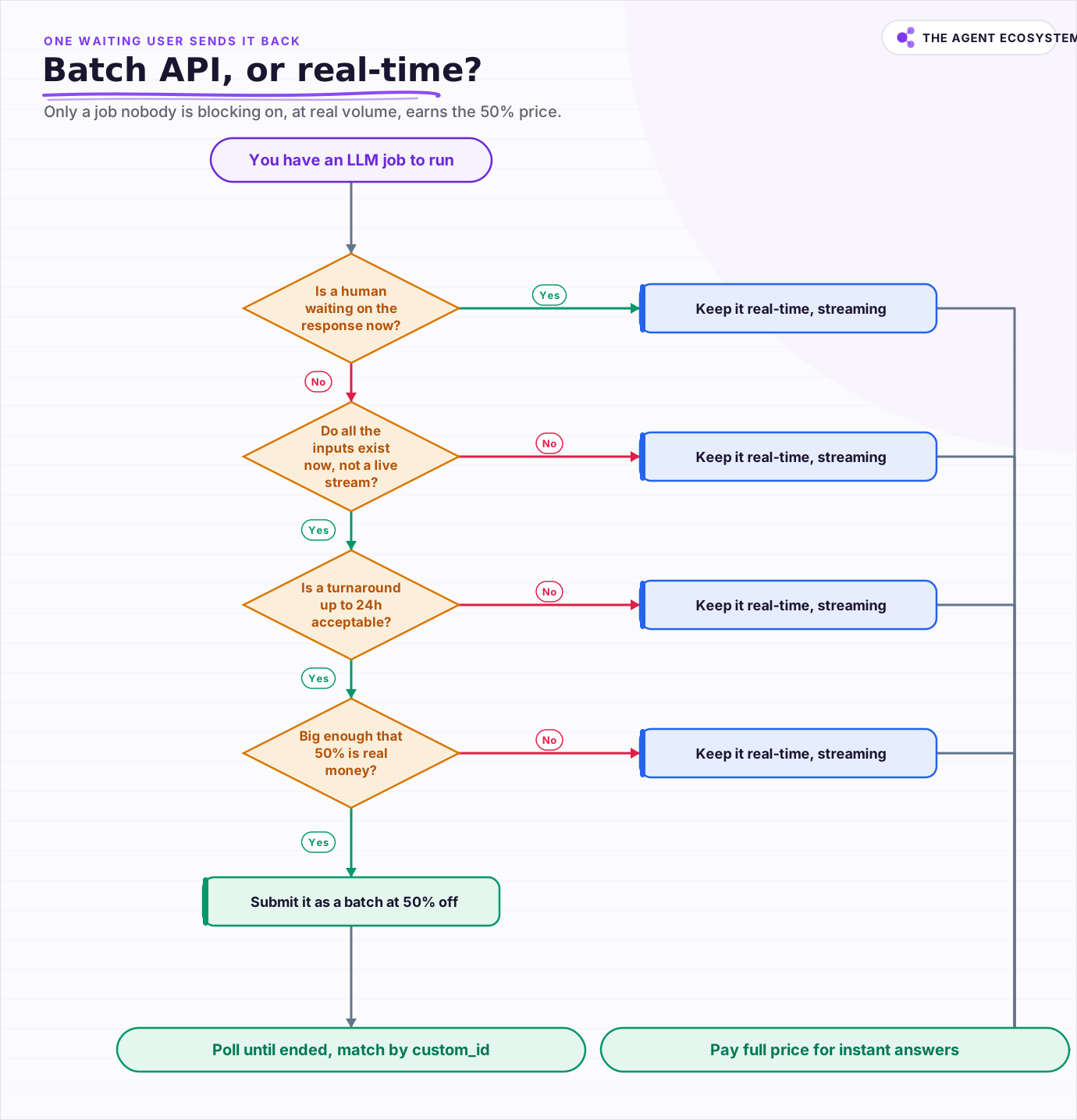 Walk the spine: a single waiting user sends the job back to the real-time API. Only a job nobody is blocking on, at real volume, earns the 50% batch price.
Use that gate on every candidate job. If squeezing model cost is your whole problem, our 7 levers to reduce AI API costs covers the other moves that stack with this one.
Stack batch with caching, and gate the decision#
The 50% batch discount stacks with prompt caching's cache-read price, which is a fraction of full input. For an eval or bulk-analysis job where every request shares one big system prompt, the combination drops your effective input cost far below either lever alone. Use it, but read the fine print on cache behavior inside batch.
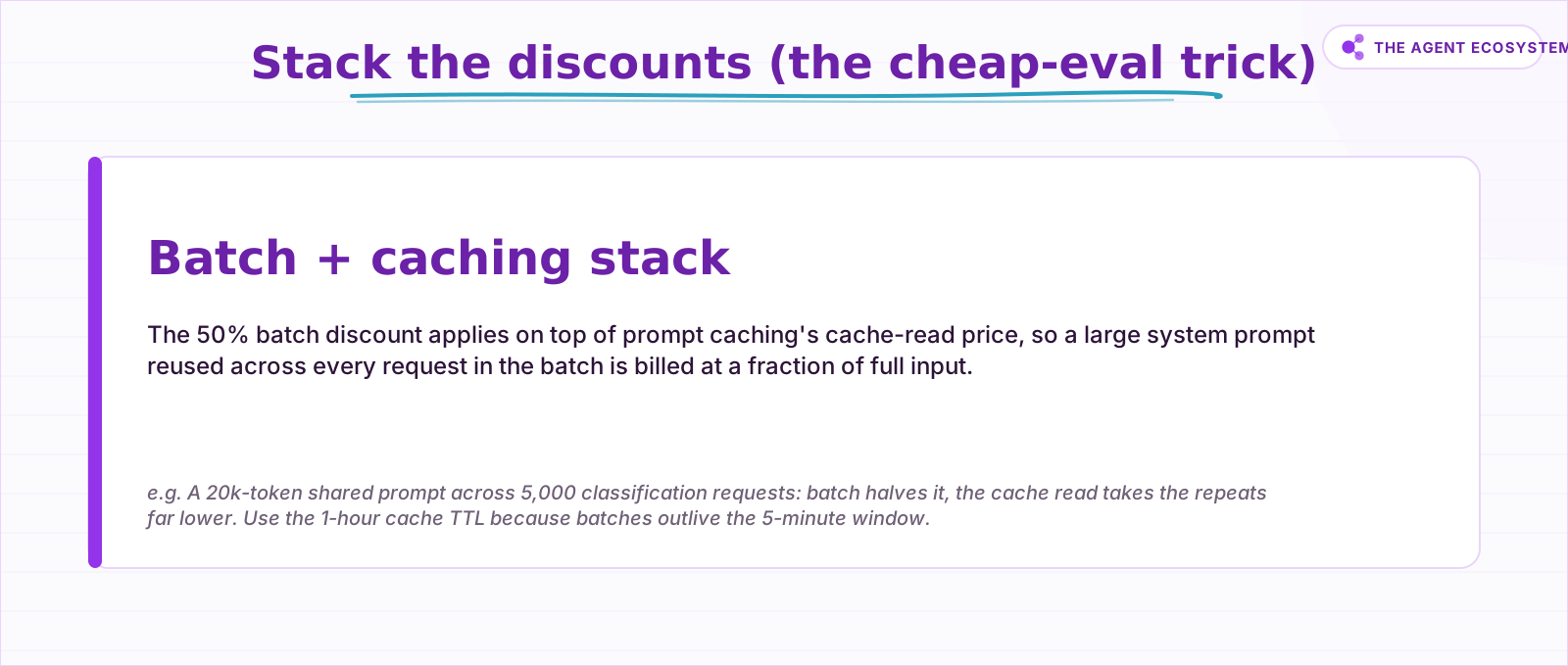 For evals or bulk analysis over one shared context, batch plus a 1-hour cache compounds. Cache hits in batch are best-effort (Anthropic cites 30 to 98 percent).
Anthropic notes that cache hits inside a batch are best-effort, with users typically seeing 30% to 98% hit rates, and recommends the 1-hour cache TTL because batches outlive the default 5-minute window. So the caching win is real but not guaranteed per request. Before you move a workload over, run it through a hard gate: if any single condition below is a no, keep the job on the real-time API.
How do you run a batch from n8n?#
As of June 2026, n8n's built-in Anthropic and OpenAI nodes are built for real-time chat, not batch submission, so you wire the batch flow yourself as an HTTP-Request-plus-poll loop. There is an official community template, "Batch process prompts with Anthropic Claude API," that implements exactly this submit-and-poll shape end to end.
The pattern is three steps. Submit: an HTTP Request node POSTs your requests array to /v1/messages/batches with the anthropic-version header and captures the returned batch id. Poll: a Wait node (default 10 seconds, but use 30 to 60 to be kind to rate limits) loops back to an HTTP Request node that GETs /v1/messages/batches/{id}, and an IF node checks processing_status === "ended". Fetch and parse: once ended, GET the results_url, split the .jsonl on newlines in a Code node, JSON-parse each line, and emit one item per result with a Split Out node, matching each back to its source row by custom_id.
The OpenAI variant is the same shape with two differences: submitting is two calls (upload the .jsonl via the Files API, then create the batch), and fetching downloads the output_file_id through the Files API. Its status field moves through validating, in_progress, finalizing, and completed rather than Anthropic's single ended flag, so point your IF node at the right value for the provider you chose.
One honest caveat: n8n executions are not designed to block for 24 hours. A tight Wait loop that keeps one execution alive works for a batch that finishes in minutes, but it is fragile for anything longer and it counts against your instance's execution timeout. For long batches, split the flow in two: one workflow submits and stores the batch id, and a separate schedule-triggered workflow wakes up every few minutes, checks status, and processes results once the batch has ended. That decoupling survives restarts and keeps a single run from hanging. For tighter control on Claude specifically, see our Claude API cost-control workflow.
Frequently asked questions
Is batch output lower quality than real-time?
How fast is a batch really?
What is the difference between Anthropic's and OpenAI's batch APIs?
Can I use prompt caching with a batch job?
Why are my batch results out of order?
Sources
Primary references and vendor documentation used while drafting and reviewing this article.
- Anthropic Message Batches: 50% pricing, 100k/256 MB limits, 24h window and expiry, 29-day retention, processing_status and custom_id flow, caching stack
- OpenAI Batch API: 50% discount, 50k requests / 200 MB, 2,000 batches/hour.jsonl upload via Files API, completion_window 24h, output file and match by custom_id
- Official n8n template: Batch process prompts with Anthropic Claude API (HTTP Request submit, Wait plus IF on processing_status ended, fetch results_url, Code-node .jsonl parse)
Written by

Muhammad Qasim Hammad is an AI agent and automation expert and the founder of Cart Gaze LLC (cartgaze.com). He builds product for the love of it: when an idea lands, a working prototype is usually running within hours, built with the same AI agents and automations he sells. He puts his own output at roughly 20× what it was before agents, and the Agentic OS behind this site is the working proof, documented in public with the tools he actually ran and what they really cost.
AI & Automation Services
Want a pipeline like this running in your business?
I'm Qasim — I design and ship AI agents and n8n automations for solo operators and small teams. Tell me what's eating your team's week, and I'll scope a fix.
Related reading
Cut Your AI API Bill: 7 Levers That Actually Work
To reduce AI API costs you need levers that change the bill by a verifiable mechanism, not vague advice. This hub names all seven, right-size the model, prompt caching, the Batch API, routing and fallback, local versus API, token discipline, and RAG over long-context, with a

Prompt Caching: Cut Claude and Agent Costs Without Losing Quality
Prompt caching stores the unchanging part of your Claude prompt once and bills every later read at a tenth of the price, same model, same output. Here is the token math, the break-even point, and how to wire it into an n8n agent loop.
Process Thousands of Rows Through AI in n8n Without Hitting Rate Limits
Wire a spreadsheet straight into an AI node and it dies on row 47. n8n batch processing AI with Loop Over Items and a Wait node fixes that, for about $1.35 per 1,000 rows on Claude Haiku 4.5.
Estimate Any LLM Bill Before You Build: Token Math for n8n Builders
A single LLM call costs a fraction of a cent, until you multiply by 10,000 runs a month. Here is the reproducible token math: chars over 4 for tokens, the input and output rates, and the per-run times volume multiply, with one support-reply run priced across five models.
Claude vs GPT vs Gemini in n8n: Tested Cost and Speed
There is a 25x cost spread between the cheapest and priciest LLM tier for the exact same n8n AI Agent workflow. This post prices all three providers across 11 model tiers so you can pick the right Chat Model sub-node and stop overpaying.
Cheapest AI API in 2026: DeepSeek vs Claude vs GPT vs Gemini
The cheapest AI API by published token rate in June 2026 is DeepSeek V4 Flash, but the lowest sticker rate is rarely the lowest bill. Here is a dated, source-linked price table for DeepSeek, Gemini, GPT, and Claude, the cost-per-task math that output tokens dominate, and the