pgvector vs Chroma vs Qdrant: Choosing a Vector Database for RAG
The honest three-line decision for solopreneurs building local RAG pipelines
AI-drafted, reviewed by Muhammad Qasim Hammad on June 12, 2026. See our AI disclosure.
Table of contents
- Does Local RAG Actually Need a Vector Database?
- pgvector, Chroma, or Qdrant: Which Should You Pick?
- When Is pgvector the Right Choice?
- When Is Chroma the Right Choice?
- When Is Qdrant the Right Choice?
- How Do You Wire Your Chosen Database Into a RAG Pipeline?
- What Happens When You Outgrow Your First Pick?
- How Solopreneurs Get This Wrong
- Where to Go From Here
You have chunked your documents, run them through a local embedding model, and now those vectors need a home that can find the nearest few in milliseconds. Choosing a vector database for RAG comes down to three honest options: pgvector, Chroma, and Qdrant. The right answer depends on what you are already running, not on which one sounds most impressive.
Most tutorials spin up a brand-new database server before you have written a single line of retrieval code. That instinct adds complexity you probably do not need yet. The decision tree is short: already on Postgres or Supabase, use pgvector; just prototyping on a laptop, use Chroma; outgrowing Postgres or need heavy metadata filtering, use Qdrant.
Does Local RAG Actually Need a Vector Database?#
For a few hundred chunks, a flat list of vectors with a brute-force cosine loop works. Past a few thousand chunks, you want persistent storage, real similarity indexes, and metadata filtering. The question is not whether you need one; it is which one costs you the least operational overhead.
I built my first local RAG over personal documents using Ollama for local embeddings and inference. The retrieval corpus started at roughly 400 chunks. A flat NumPy array was fast enough. By the time I hit 8,000 chunks from archived notes and PDFs, re-scanning every vector on every query added a noticeable lag, and I had no way to filter by document date without post-processing the results. That is when a proper store earns its place.
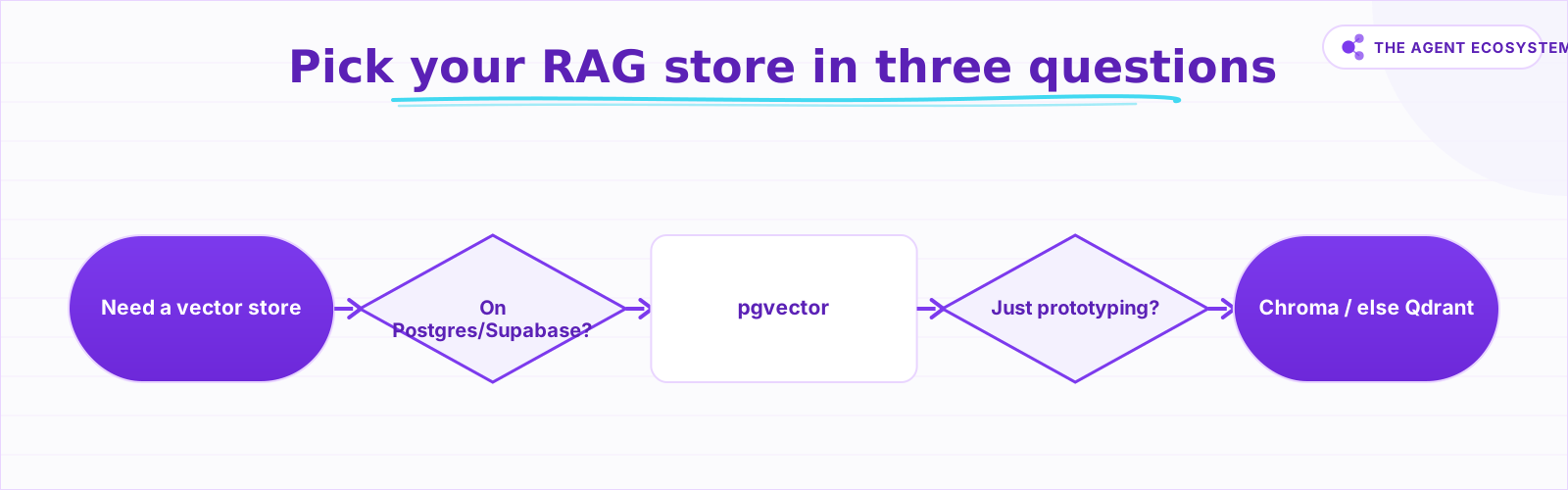 Pick your RAG vector database in three questions.
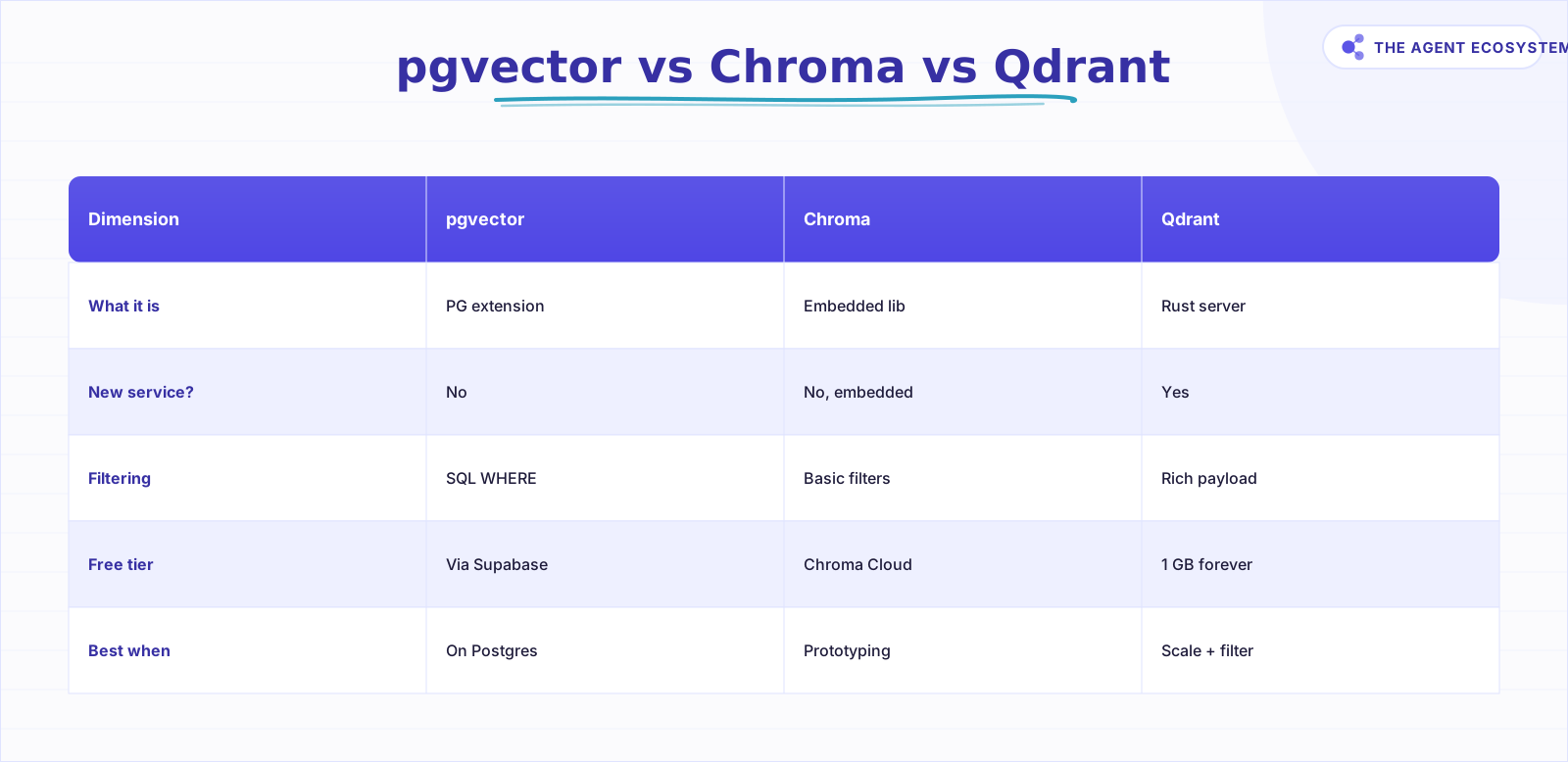 Same retrieval job -- the difference is operational.
pgvector, Chroma, or Qdrant: Which Should You Pick?#
Already on Postgres or Supabase? Use pgvector and skip this debate. Just prototyping? Use Chroma -- it requires zero servers. Genuinely scaling past Postgres or need rich filter logic? Use Qdrant. All three do the same retrieval job at small scale. The difference is entirely operational.
| Dimension | pgvector | Chroma | Qdrant |
|---|---|---|---|
| What it is | Postgres extension | Embedded library | Rust server |
| How it runs | Inside your Postgres | In-process or local server | Docker container or cloud |
| New service to run? | No | No, embedded | Yes |
| Metadata filtering | SQL WHERE | Basic filters | Rich payload filters |
| Free managed tier | Via Supabase Postgres | Chroma Cloud | 1 GB forever-free cluster |
| Best when | Already on Postgres | Prototyping locally | Scale + heavy filtering |
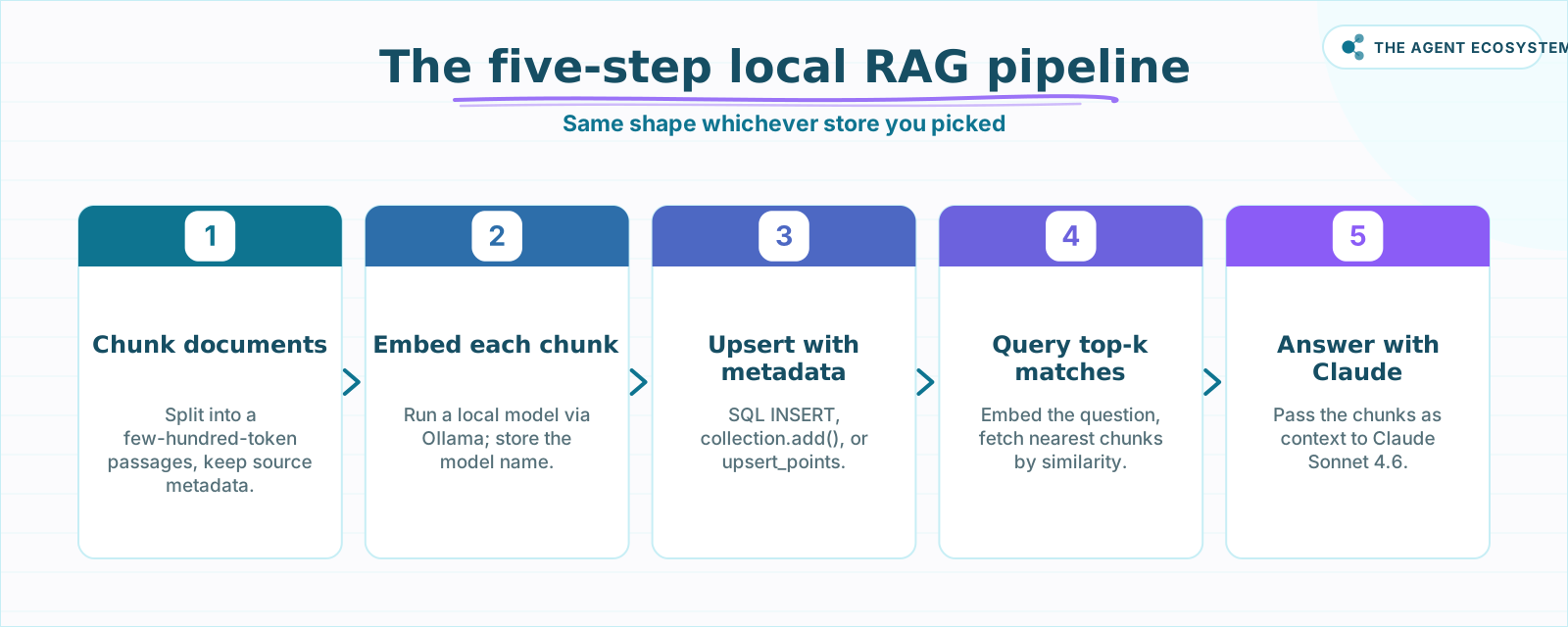 Same five steps regardless of which store you chose.
When Is pgvector the Right Choice?#
pgvector is the right choice when you already run Postgres or Supabase and want zero new infrastructure. It adds a vector type plus HNSW and IVFFlat similarity indexes to a database you already back up, monitor, and pay for. Metadata filtering is a plain SQL WHERE clause, with no new filter language to learn.
The pgvector GitHub repository documents support for L2, inner product, cosine, L1, Hamming, and Jaccard distance functions. One honest caveat: single-precision indexes top out at 2,000 dimensions. Common embedding models at 384, 768, or 1,536 dimensions sit well under that ceiling. A model outputting 3,072 dimensions exceeds it -- use the halfvec type or reduce dimensions first. For headroom beyond a single Postgres instance, the pgvectorscale extension extends that ceiling further.
I was about to docker run a fresh vector server for the production version of my RAG, then caught myself: the Supabase instance already running my app's auth and storage could store vectors too. I deleted the pending container, ran one SQL command, and the index lived in a database that was already backed up and monitored. The new service would have been a second thing to secure and pay for, with no retrieval benefit at that scale. The lesson stuck.
When Is Chroma the Right Choice?#
Chroma is the right choice when you want the lightest possible path to a working RAG prototype, with no server to start or configure. It runs embedded in-process, in-memory by default, with optional disk persistence. It also supports a client-server mode if you outgrow the in-process model.
The Chroma GitHub repository shows it is licensed Apache 2.0, with Python (pip install chromadb) and JavaScript (npm install chromadb) clients. A managed Chroma Cloud tier exists for teams that want a hosted option. For a solopreneur getting a local RAG working today, embedded Chroma is the fastest start: no Docker, no port configuration, no second terminal window.
My first pass at the local RAG build described here used Chroma for exactly this reason. Pip install, import, done. When the prototype graduated to something I wanted running alongside the rest of my stack, I moved to pgvector. But Chroma got me to a working retrieval loop in under an hour.
When Is Qdrant the Right Choice?#
Qdrant is the right choice when your corpus is large, your metadata filtering is complex, or you want a dedicated vector search engine with a managed free tier. It runs as a standalone Rust server, simplest via Docker: docker run -p 6333:6333 qdrant/qdrant, per the Qdrant GitHub repository.
Its standout feature is payload filtering: keyword matching, full-text search, numeric ranges, geo filtering, and more, all applied before the similarity ranking step, not after. That matters when your corpus spans thousands of documents across multiple users or projects and you need to restrict retrieval to a subset before ranking.
Qdrant Cloud's pricing page documents a forever-free tier with 1 GB RAM and 4 GB disk, no credit card required. Qdrant estimates that fits roughly 1 million vectors at 768 dimensions, a generous trial for a solo builder before committing to any paid tier. Use Qdrant when Postgres is genuinely the bottleneck, not as a default starting point.
How Do You Wire Your Chosen Database Into a RAG Pipeline?#
The wiring follows the same shape regardless of which store you picked. Chunk your documents, embed each chunk with a local model, upsert the vectors with their metadata, then query by similarity at inference time. The database sits in the middle and does one job: return the top-k nearest chunks to a query vector fast.
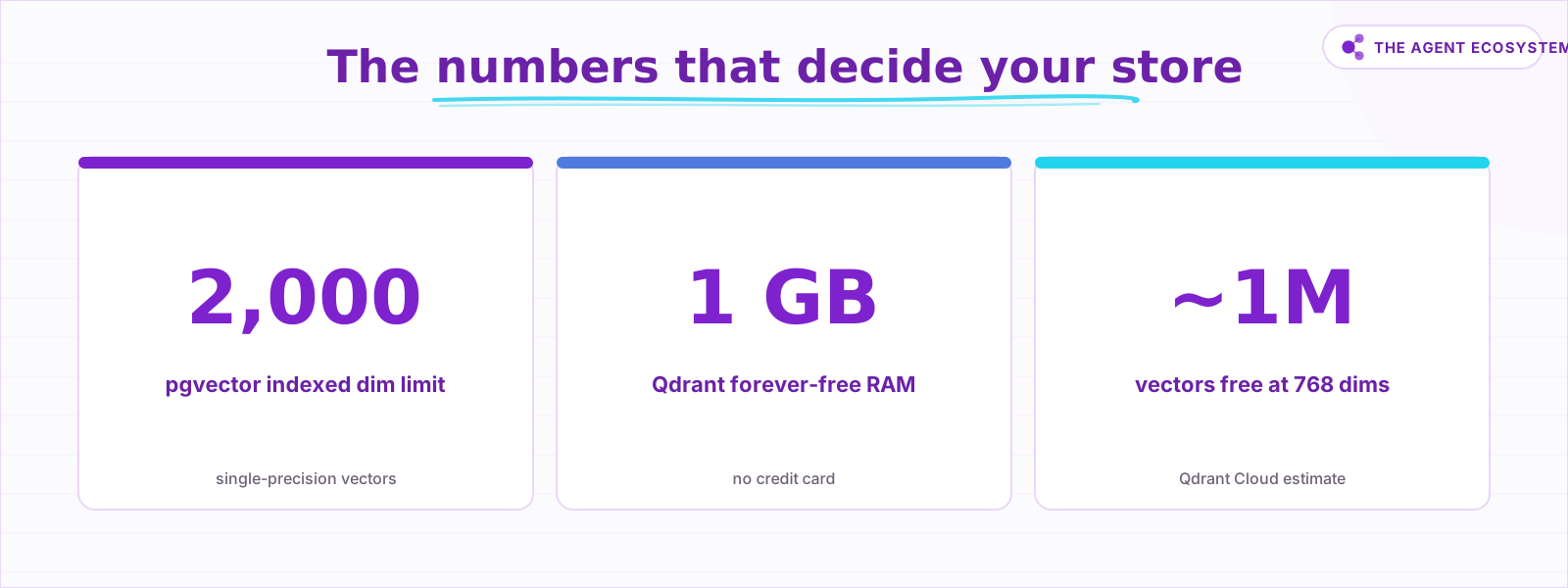 Free-tier ceilings and the one dimension limit to know.
Here is a minimal pgvector upsert to make it concrete:
-- Create the table once
CREATE TABLE chunks (
  id SERIAL PRIMARY KEY,
  content TEXT,
  source TEXT,
  embedding vector(768)
);

-- Insert a chunk
INSERT INTO chunks (content, source, embedding)
VALUES ('Your chunk text here', 'doc-2026-01.pdf', '[0.12, 0.04...]');

-- Query the top 5 nearest chunks
SELECT content, source,
       1 - (embedding <=> '[0.08, 0.11...]') AS similarity
FROM chunks
ORDER BY embedding <=> '[0.08, 0.11...]'
LIMIT 5;
For Chroma, the equivalent is collection.add(documents=[...], embeddings=[...], ids=[...]) and collection.query(query_embeddings=[...], n_results=5). For Qdrant, client.upsert(collection_name="chunks", points=[...]) and client.search(...). Same concept, different syntax. If you want to plug any of these into a fully automated workflow, connecting Ollama to n8n shows how to wrap the whole pipeline in a triggered automation.
What Happens When You Outgrow Your First Pick?#
Migrating between vector databases is real work but not scary work. Export your chunks and metadata, recreate the collection or table in the new store, and re-point your retriever. The actual migration is a few hundred lines of code at most.
The expensive part is a simultaneous embedding model change. If you swap both the database and the embedding model at the same time, every chunk needs re-embedding. That can mean hours of compute for a large corpus. Keep the two decisions separate: migrate the store first, then evaluate whether you need a new embedding model.
At the scale most solo operators work at, pgvector can carry you further than you expect. The AI automation stack and real costs breakdown puts this in context: adding a second managed database service has a real monthly cost and a real maintenance burden. Run that number before you move off Postgres.
How Solopreneurs Get This Wrong#
The most common mistake is reaching for Qdrant or a hosted vector database before writing a single retrieval query. Every tutorial that starts with docker run qdrant/qdrant trains you to think a dedicated server is the baseline. It is not.
The second mistake is treating the database choice as the hard decision and ignoring the embedding model. The database is the easy, swappable part. The embedding model is the sticky part. Changing models later means re-embedding everything. Changing databases means copying some rows.
A third trap: not storing metadata alongside embeddings from the start. Every chunk should be upserted with its source file, page or section number, and creation date. Retrofitting metadata into an existing collection after the fact is painful. Design the schema before you start ingesting.
Where to Go From Here#
Start with the store that fits your current infrastructure and get retrieval working. If you are on Postgres or Supabase, run CREATE EXTENSION vector; today. If you are starting fresh on a laptop, pip install chromadb and prototype. Only move to Qdrant when you have a concrete reason: scale, filter complexity, or a corpus that has genuinely outgrown Postgres.
The local RAG build with Ollama is the natural next read if you want the full pipeline from document loading through to a working chat interface over your own files.
Frequently asked questions
Do I need a vector database for RAG?
Is pgvector good enough for production RAG?
pgvector vs Chroma: which is better for local RAG?
Is Qdrant free?
Can I switch vector databases later?
How many dimensions can pgvector index?
Sources
Primary references and vendor documentation used while drafting and reviewing this article.
Written by

Muhammad Qasim Hammad is an AI agent and automation expert and the founder of Cart Gaze LLC (cartgaze.com). He builds product for the love of it: when an idea lands, a working prototype is usually running within hours, built with the same AI agents and automations he sells. He puts his own output at roughly 20× what it was before agents, and the Agentic OS behind this site is the working proof, documented in public with the tools he actually ran and what they really cost.
AI & Automation Services
Want a pipeline like this running in your business?
I'm Qasim — I design and ship AI agents and n8n automations for solo operators and small teams. Tell me what's eating your team's week, and I'll scope a fix.
Related reading
Fully Local RAG in n8n: Private Embeddings, No Cloud APIs (2026)
Most "local RAG" setups still send your documents to a cloud embeddings API. This guide closes every leak: local embeddings via Ollama, a self-hosted Qdrant or PGVector store, and a local answering model, all in n8n.

Self-Hosted n8n RAG Pipeline: The Private Stack
A fully self-hosted RAG pipeline keeps your documents and compute in-house: n8n orchestrates, Ollama serves a local model, and pgvector stores embeddings in Postgres. Here is the end-to-end node graph, the modeled cost, and when self-hosting beats a managed stack.
Build a Vector Store in n8n (Embeddings for RAG)
Build an n8n vector store that retrieves your own documents by meaning, not keywords. Embedding 1,000 docs costs ~1.3 cents; Supabase free-tier storage costs $0. Full node wiring and step-by-step setup inside.
Local RAG With Ollama: Chat With Your Business Docs Privately
Local RAG with Ollama lets you ask questions across hundreds of private documents without uploading a single file to the cloud. This guide covers three paths from 20-minute desktop setup to n8n pipelines, all at $0 running cost.
Best Embedding Model for n8n RAG: OpenAI vs Gemini vs Local (2026)
Choosing between n8n RAG embeddings comes down to four verifiable axes: dimensions, price per 1M tokens, max input context, and cloud vs local. This guide compares OpenAI, Gemini, and Ollama options so you pick the one you can live with.
n8n Pinecone vs Supabase Vector Store: Which to Pick
The n8n Pinecone Vector Store and Supabase Vector Store nodes wire into an agent the same way, but one is a managed service and one is Postgres you run. Here is how their free tiers, cost at scale, latency, and node wiring compare, and when to pick each for RAG.