Local RAG With Ollama: Chat With Your Business Docs Privately
Keep every byte on your own machine. Pay $0. Answer questions across hundreds of documents in minutes.
AI-drafted, reviewed by Muhammad Qasim Hammad on June 10, 2026. See our AI disclosure.
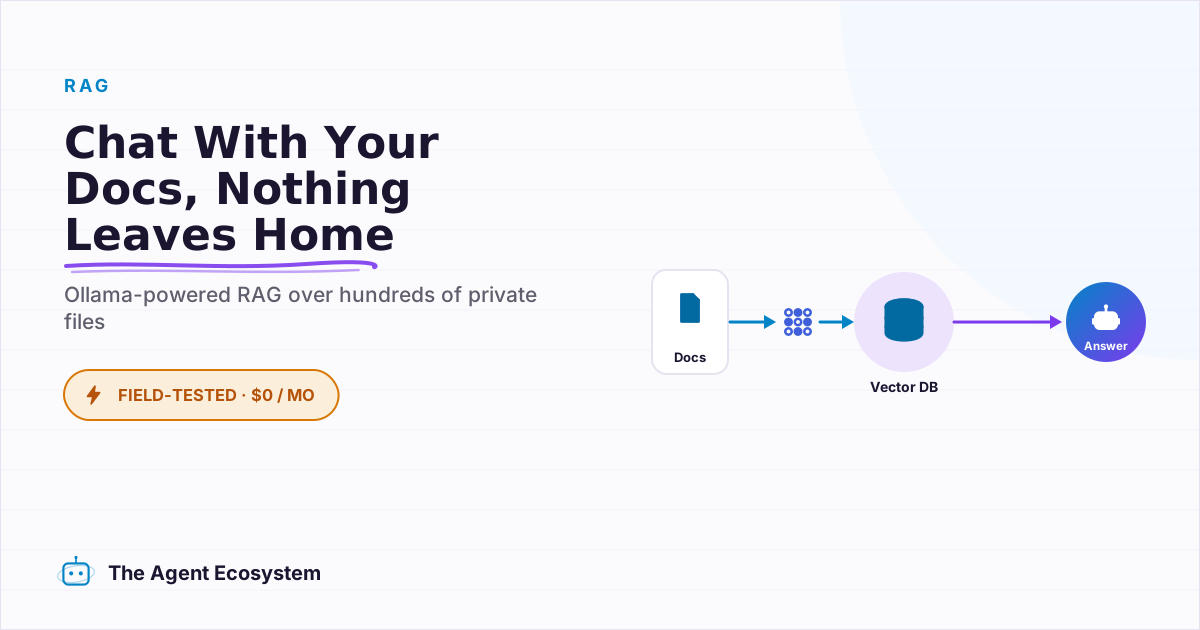
Table of contents
- What is local RAG, and why run it instead of a cloud chatbot?
- What do you need before you start?
- What is the fastest way to chat with your documents?
- AnythingLLM walkthrough
- Open WebUI as the alternative
- How do you build the same thing in n8n?
- Workflow 1: Ingestion (run once per document batch)
- Workflow 2: Query (runs on every question)
- Where does local RAG fall short?
- How do you keep the setup private and healthy over time?
- What should you set up this weekend?
You have 200 PDFs on your hard drive: client contracts, SOPs, meeting notes, invoices. You need an answer that lives in one of them, and every "chat with PDF" SaaS you find wants both the upload and $20 a month. Building local RAG with Ollama keeps every document on your own machine and costs nothing to run.
The practical symptom is a 20-minute search through folders before every client call. You open five PDFs, use Ctrl+F on each, and still miss the clause you need. The real problem is that the tools built to solve this want your files in their cloud, which is exactly where a client contract cannot go.
 Every document stays on your machine. No cloud upload required.
What is local RAG, and why run it instead of a cloud chatbot?#
Local RAG with Ollama keeps both the embedding step and the answering step on hardware you own. Your documents never reach an external server, the running cost is $0 because the machine is already on your desk, and every answer comes with the exact source snippet so you can verify it.
The privacy argument is the whole point. A client contract carries NDA clauses, pricing terms, and personal data. Uploading it to a generic cloud chatbot to ask one question is a real risk, not a hypothetical one. Local RAG removes that risk entirely.
The two-phase structure is worth knowing before you touch any tool:
- Phase 1 (Index): Split each document into chunks, run each chunk through an embedding model to get a vector, and store those vectors in a vector database. Do this once.
- Phase 2 (Query): Embed your question using the exact same model, find the chunks with the most similar vectors (cosine similarity), and send those chunks as context to the local chat model, which writes the answer.
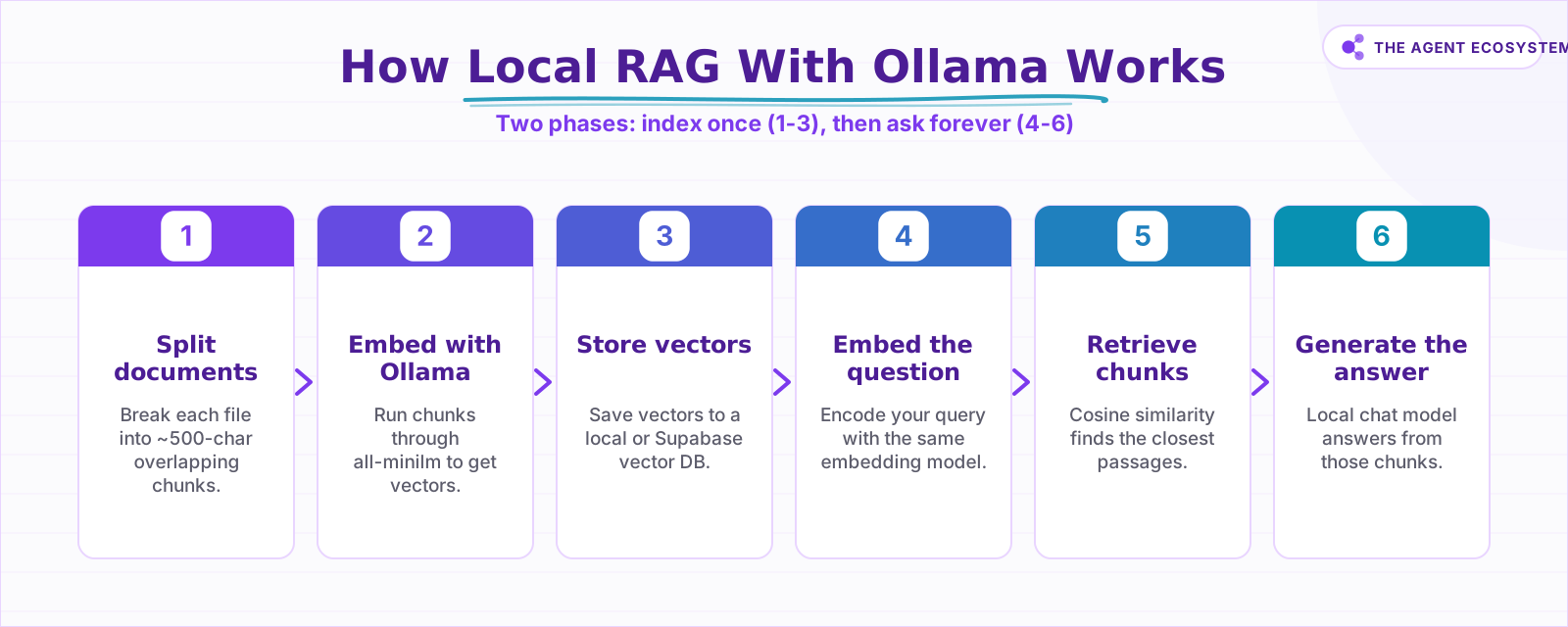 Phase 1 (steps 1-3) runs once. Phase 2 (steps 4-6) runs per question.
Every tool in this post is an interface around those two phases. Once you see them clearly, every setting makes sense.
What do you need before you start?#
The hardware floor is 8GB RAM to run a small 3-4B chat model alongside an embedding model. 16GB is comfortable and opens up 7-8B models. A $5 VPS is enough to run n8n, but the models need a real machine: the Hetzner VPS in my self-hosted n8n setup hosts the automation layer; the 16GB Mac handles all model inference.
First, install Ollama from ollama.com and confirm it runs on port 11434. Then pull two models:
# Embedding model (pick one)
ollama pull all-minilm        # 23M params, fastest, least RAM
ollama pull embeddinggemma    # better quality, needs more RAM

# Chat model (pick one that fits your RAM)
ollama pull llama3.2          # solid 3B option
ollama pull gemma3            # good at instruction-following
ollama pull qwen3             # strong multilingual reasoning
As of mid-2026, Ollama's embeddings documentation lists embeddinggemma, qwen3-embedding, and all-minilm (23M params) as the recommended options for semantic search and RAG. Older standbys mxbai-embed-large (334M) and nomic-embed-text (137M) still work too.
For a full comparison of Ollama against other local runtimes, see the Ollama vs LM Studio vs Jan breakdown. This post assumes Ollama because it exposes a clean HTTP API that every tool here can talk to.
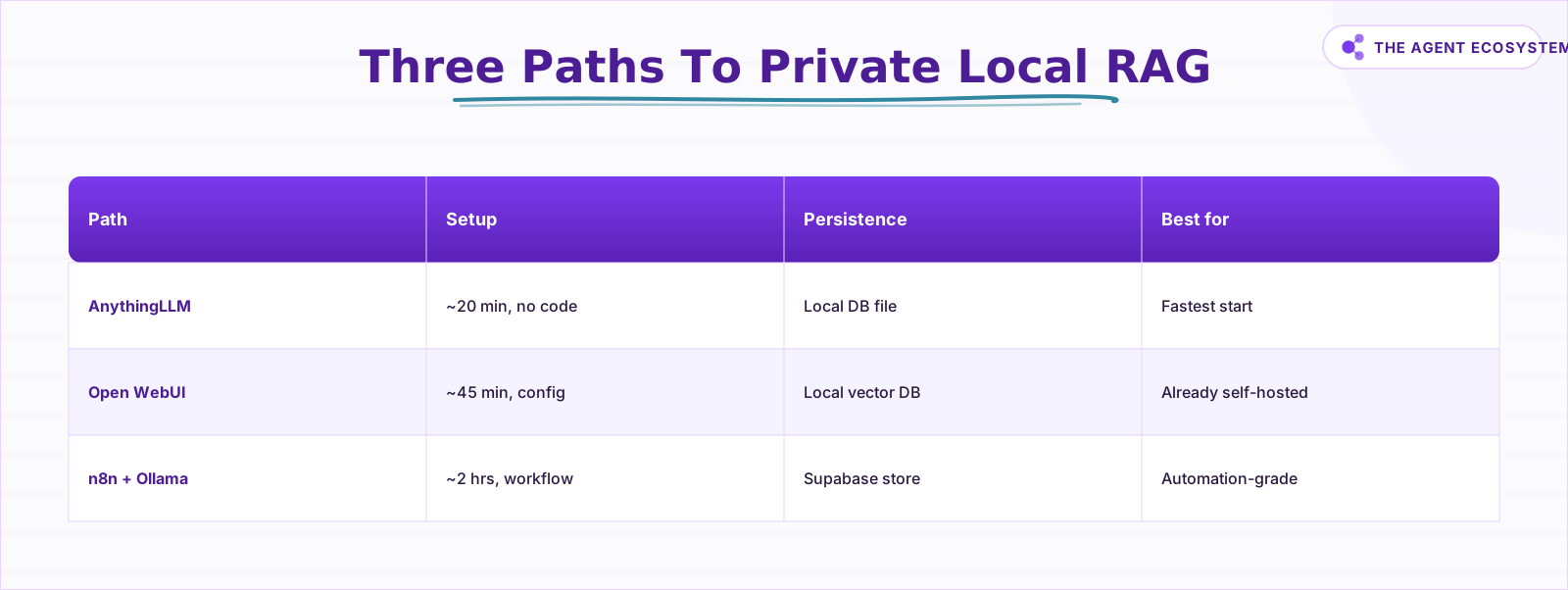 From a 20-minute desktop chat to a reusable n8n pipeline, all at $0.
What is the fastest way to chat with your documents?#
AnythingLLM is the fastest path: a free, MIT-licensed desktop app that connects to your local Ollama instance and stores all vectors on your machine. Setup takes about 20 minutes. Open WebUI's Knowledge feature is a solid alternative if you already self-host it. GPT4All's LocalDocs exists but has recurring breakage reports and weak maintenance signals as of mid-2026, so skip it.
| Path | Setup effort | Needs | Persistence | Best for |
|---|---|---|---|---|
| AnythingLLM desktop | ~20 min, no code | Ollama running locally | Local DB file (stays on disk) | Fastest start; any solopreneur |
| Open WebUI Knowledge | ~45 min, some config | Ollama + Open WebUI self-hosted | Local vector DB | People already running Open WebUI |
| n8n + Ollama pipeline | ~2 hrs, workflow building | n8n + Ollama on same machine | Simple (dev only) or Supabase | Automation-grade; reusable in other flows |
AnythingLLM walkthrough#
- Download the desktop app from anythingllm.com.
- Open Settings > LLM Provider, choose Ollama, and set the base URL to
http://localhost:11434. Select your chat model. - Go to Settings > Embedding Model, choose Ollama, and select
all-minilmorembeddinggemma. - Click New Workspace and give it a name like "Client Contracts."
- Open the Documents panel, drag in your PDFs, and click Move to Workspace. AnythingLLM splits and embeds them locally.
- Ask:
What notice period did we agree with [client name]?The answer appears with the source snippet below it.
That test question is the one I use to verify a fresh setup. If the source snippet shows the actual contract clause, the pipeline is working end to end.
Open WebUI as the alternative#
Open WebUI includes a Knowledge tab with vector DB support and hybrid search. It works with Ollama and OpenAI-compatible backends. The setup is heavier than AnythingLLM. You run it as a Docker container alongside Ollama, configure collections, and upload documents there. Worth it if you already have it running; overkill if you are starting from scratch just for document chat.
 Local processing means your files never leave hardware you control.
How do you build the same thing in n8n?#
The n8n path turns document chat into a reusable workflow block that other automations can call. A client onboarding flow can automatically look up the relevant SOP, or a weekly review workflow can surface action items from last week's meeting notes. n8n ships first-class nodes for both sides: Embeddings Ollama and Ollama Chat Model.
For full details on connecting the two tools, see connecting Ollama to n8n for a local AI agent.
Workflow 1: Ingestion (run once per document batch)#
Manual Trigger
  → Default Data Loader (point at your file or folder)
  → Recursive Character Text Splitter (chunk size 500 characters, overlap 50)
  → Embeddings Ollama (model: all-minilm, base URL: http://localhost:11434)
  → Supabase Vector Store (mode: Insert, table: documents)
Workflow 2: Query (runs on every question)#
Chat Trigger
  → Supabase Vector Store (mode: Retrieve, same embedding model)
  → Ollama Chat Model (model: llama3.2, base URL: http://localhost:11434)
  → Respond to Webhook
Wire the retrieved chunks from the vector store into the chat model's context window. The model answers from those chunks, not from its training data.
One practical note on cost: because every question is one workflow execution, this maps directly to the execution-count billing differences between n8n, Make, and Zapier. That comparison lives in the n8n vs Make vs Zapier cost breakdown.
Where does local RAG fall short?#
Local RAG is reliable for retrieval but has four real limits: chunk boundaries can split a clause, a small model reasons worse than a frontier API, scanned PDFs need OCR before anything works, and some questions genuinely need deeper cross-document reasoning than a 4B model delivers. Know them before depending on it for anything critical.
Chunking misses. When a contract clause splits across two chunks, neither chunk contains the full context. The model answers from an incomplete passage. Tuning chunk size and overlap (try 500 characters with 50 overlap as a starting point) reduces but does not eliminate this. Overlapping chunks help bridge clause boundaries.
Small-model reasoning gap. A 4B or 7B local model summarizes and quotes from retrieved passages well. It handles multi-step legal or financial reasoning worse than current frontier API models. For "what does this clause mean in practice?" style questions, the answer may be technically correct but miss nuance. The retrieval is accurate; the reasoning is the variable.
Scanned PDFs need OCR first. Ollama embeds text. A scanned PDF is an image. You need OCR (Tesseract, Apple's built-in, or a preprocessing step in n8n) to extract text before any of this works. This trips people up constantly.
When a frontier API is the honest call. If you need deep cross-document reasoning, not just retrieval, a capped cloud API is sometimes the right tool. The Claude API cost-control guide covers how to set hard spend limits so a frontier model stays affordable for occasional complex queries while the local stack handles the volume.
How do you keep the setup private and healthy over time?#
The data lives exactly where you put it. AnythingLLM stores its vector database in a local file inside the app's data directory. The Supabase Vector Store in n8n stores vectors in your own Supabase project, either cloud or self-hosted. Nothing goes anywhere you did not configure.
The one rule that breaks setups silently: the embedding model you used to index must be the same model you use to query. If you switch from all-minilm to embeddinggemma after indexing 200 documents, every stored vector is incompatible with the new model. Re-index everything before using the new model in production.
Before re-indexing after a model change:
- Confirm the new embedding model is pulled:
ollama list - Export or back up your existing vector store before clearing it.
- Update the embedding model setting in AnythingLLM (Settings > Embedding Model) or in your n8n Embeddings Ollama node.
- Re-run the ingestion workflow on all documents.
- Test with a known question whose answer you can verify in the source file.
Back up the folder that contains AnythingLLM's data directory, or keep a copy of your ingestion workflow and source documents so you can re-index from scratch if anything corrupts. The source documents are always the source of truth.
For the full picture of where Ollama fits in a $0 local AI stack alongside n8n, Supabase, and other tools, the solopreneur AI automation stack for 2026 post maps everything out with real costs.
What should you set up this weekend?#
Start with AnythingLLM. Install Ollama, pull all-minilm and llama3.2, download the desktop app, create one workspace, drop in five to ten of your most-referenced documents, and ask the contract question. The whole thing takes under 20 minutes, and the first successful answer on a real document is genuinely useful.
If you already have n8n running, add the Supabase Vector Store path next. Build the two-workflow pattern (ingestion and query), connect it to the same Ollama instance on your local machine, and you have a document-answering endpoint other automations can call. That is where this stops being a chat toy and starts being infrastructure.
The gap between "I have documents" and "I can query documents programmatically" is one weekend and $0 in new software costs.
Frequently asked questions
Can I chat with my documents without uploading them to the cloud?
Which Ollama embedding model should I use for RAG?
How much RAM do I need for local RAG with Ollama?
Is AnythingLLM really free?
Can n8n do RAG with a local Ollama model?
Is local RAG as accurate as ChatGPT?
Sources
Primary references and vendor documentation used while drafting and reviewing this article.
- Ollama Embeddings Documentation
- Ollama Embedding Models Blog Post
- Ollama Model Library
- AnythingLLM Official Site
- AnythingLLM GitHub (MIT License)
- Open WebUI Features Documentation
- GPT4All LocalDocs Documentation
- n8n Embeddings Ollama Node
- n8n Ollama Chat Model Node
- n8n Simple Vector Store Node
- n8n Supabase Vector Store Node
Written by

Muhammad Qasim Hammad is an AI agent and automation expert and the founder of Cart Gaze LLC (cartgaze.com). He builds product for the love of it: when an idea lands, a working prototype is usually running within hours, built with the same AI agents and automations he sells. He puts his own output at roughly 20× what it was before agents, and the Agentic OS behind this site is the working proof, documented in public with the tools he actually ran and what they really cost.
AI & Automation Services
Want a pipeline like this running in your business?
I'm Qasim — I design and ship AI agents and n8n automations for solo operators and small teams. Tell me what's eating your team's week, and I'll scope a fix.
Related reading
Fully Local RAG in n8n: Private Embeddings, No Cloud APIs (2026)
Most "local RAG" setups still send your documents to a cloud embeddings API. This guide closes every leak: local embeddings via Ollama, a self-hosted Qdrant or PGVector store, and a local answering model, all in n8n.

Self-Hosted n8n RAG Pipeline: The Private Stack
A fully self-hosted RAG pipeline keeps your documents and compute in-house: n8n orchestrates, Ollama serves a local model, and pgvector stores embeddings in Postgres. Here is the end-to-end node graph, the modeled cost, and when self-hosting beats a managed stack.
Build a Question and Answer Chain in n8n (Answer From Your Docs)
The n8n Question and Answer Chain retrieves passages from your own vector store and answers from them, not from the model's memory. Index once for about $0.01, then answer 1,000 questions for about $2.50 on Claude Haiku 4.5.
Best Embedding Model for n8n RAG: OpenAI vs Gemini vs Local (2026)
Choosing between n8n RAG embeddings comes down to four verifiable axes: dimensions, price per 1M tokens, max input context, and cloud vs local. This guide compares OpenAI, Gemini, and Ollama options so you pick the one you can live with.
Build an AI Customer-Support Bot in n8n (RAG, With Real Monthly Cost)
Build an n8n AI customer support bot that answers repeat questions from your own docs using RAG. Two workflows, about $4.50 per 1,000 answers on Claude Haiku 4.5, and $0 platform cost if you self-host.
Build a Vector Store in n8n (Embeddings for RAG)
Build an n8n vector store that retrieves your own documents by meaning, not keywords. Embedding 1,000 docs costs ~1.3 cents; Supabase free-tier storage costs $0. Full node wiring and step-by-step setup inside.