Turn an n8n Workflow Into an AI API: Webhook to Claude to JSON
Three nodes. One canvas. No backend required.
AI-drafted, reviewed by Muhammad Qasim Hammad on June 22, 2026. See our AI disclosure.
Table of contents
- What does it mean to turn an n8n workflow into an AI API?
- Which three nodes do you need?
- How much does each AI API request cost?
- How do you secure a public AI endpoint?
- How do you guarantee the response is valid JSON?
- How do you build it in n8n, step by step?
- Step 1: Add a Webhook node
- Step 2: Set Respond to "Using Respond to Webhook Node"
- Step 3: Add the AI node and attach Claude
- Step 4: Add a Structured Output Parser (optional but recommended)
- Step 5: Add the Respond to Webhook node
- Step 6: Set Header Auth and activate
- Where can this go wrong?
- Where to go from here
You have a prompt that works in the editor. Now another app, a frontend, or a teammate's script needs to call it programmatically, and you do not want to stand up an Express server, write auth middleware, and run a deploy pipeline just to expose one prompt. An n8n AI API is just three nodes: a Webhook node that receives the HTTP request, an AI node that runs Claude, and a Respond to Webhook node that returns JSON, all on the same canvas.
No Docker. No Lambda. No framework.
If you have ever lost an afternoon reading Express boilerplate just to wrap a single prompt, this is the shortcut. I expose AI workflows this way instead of writing a backend, and the endpoint lives on the same canvas where I tested the prompt, not in a separate code repo.
What does it mean to turn an n8n workflow into an AI API?#
Turning an n8n workflow into an AI API means three nodes do the whole job of an endpoint: receive a request, do work, return a response. The Webhook node receives, the AI node works, and the Respond to Webhook node returns. No separate server exists, since the endpoint lives on the same canvas where you tested your prompt.
The n8n Webhook node creates a real HTTP endpoint that triggers the workflow on each inbound request. It exposes two URLs at the top of the node panel: a Test URL (active only while you click "Listen for test event") and a Production URL (live whenever the workflow is Active). The HTTP Method field supports POST, GET, PUT, PATCH, DELETE, and HEAD. For an AI endpoint that receives a payload, use POST.
One Webhook node setting makes this behave like a real API instead of a fire-and-forget trigger. Set the Respond field to Using 'Respond to Webhook' Node, and you control the response body, status code, and headers completely.
Which three nodes do you need?#
The three required nodes are Webhook (receives the HTTP request), an AI node such as Basic LLM Chain or AI Agent with a Claude Chat Model sub-node (processes the prompt), and Respond to Webhook (sends the JSON answer back to the caller). Wire them left to right, and the workflow becomes a callable endpoint.
The Webhook node's Path field sets the route. Something like /ai-query works. The AI node reads the caller's payload using an expression: {{ $json.body.input }} pulls the input field from a POST body. The Respond to Webhook node's Respond With field offers several options: JSON (you define the body), First Incoming Item (passes the AI node's output straight through), Text, Binary File, and others. For a clean API, choose JSON and reference the AI node's output in the body.
The Respond to Webhook node also exposes Response Code (200, 400, 500, etc.) and Response Headers under Node options. Add a Content-Type: application/json header there so every client knows what it is receiving.
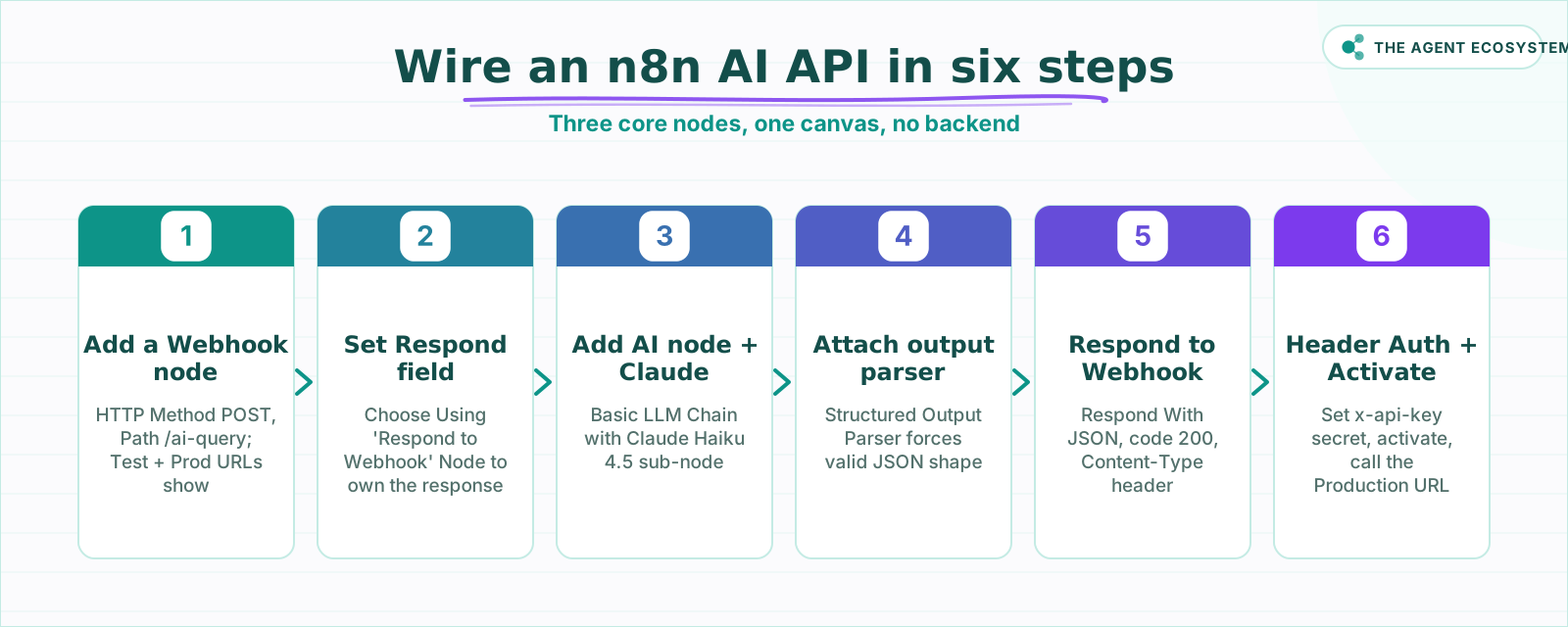 Each step touches one specific field, nothing left to guesswork.
How much does each AI API request cost?#
Serving 1,000 AI API requests costs about $2.00 in Claude tokens on Haiku 4.5 (as of mid-2026), assuming 500 input tokens and 300 output tokens per request. Self-hosted n8n adds $0 in platform fees. Output tokens drive the bill because they cost 5x more than input tokens on every Claude tier, so keeping your JSON response tight directly cuts costs.
The arithmetic: 1,000 requests at 500 input tokens each = 0.5M input tokens; 1,000 requests at 300 output tokens each = 0.3M output tokens. Multiply by the per-million price for each model.
| Model | Input $/1M | Output $/1M | Cost per 1,000 requests | Best for |
|---|---|---|---|---|
| Claude Haiku 4.5 | $1.00 | $5.00 | $2.00 | Extraction, routing, short answers |
| Claude Sonnet 4.6 | $3.00 | $15.00 | $6.00 | Moderate reasoning, summaries |
| Claude Opus 4.8 | $5.00 | $25.00 | $10.00 | Complex analysis, long context |
Prices are from Anthropic's official pricing page as of mid-2026 (June 2026). They change, so check before you budget. n8n self-hosted runs under the fair-code license, meaning the platform itself costs $0. n8n Cloud Starter is €20/month if you prefer managed hosting.
Start on Haiku. Reach for Sonnet only when the endpoint genuinely needs multi-step reasoning or longer context.
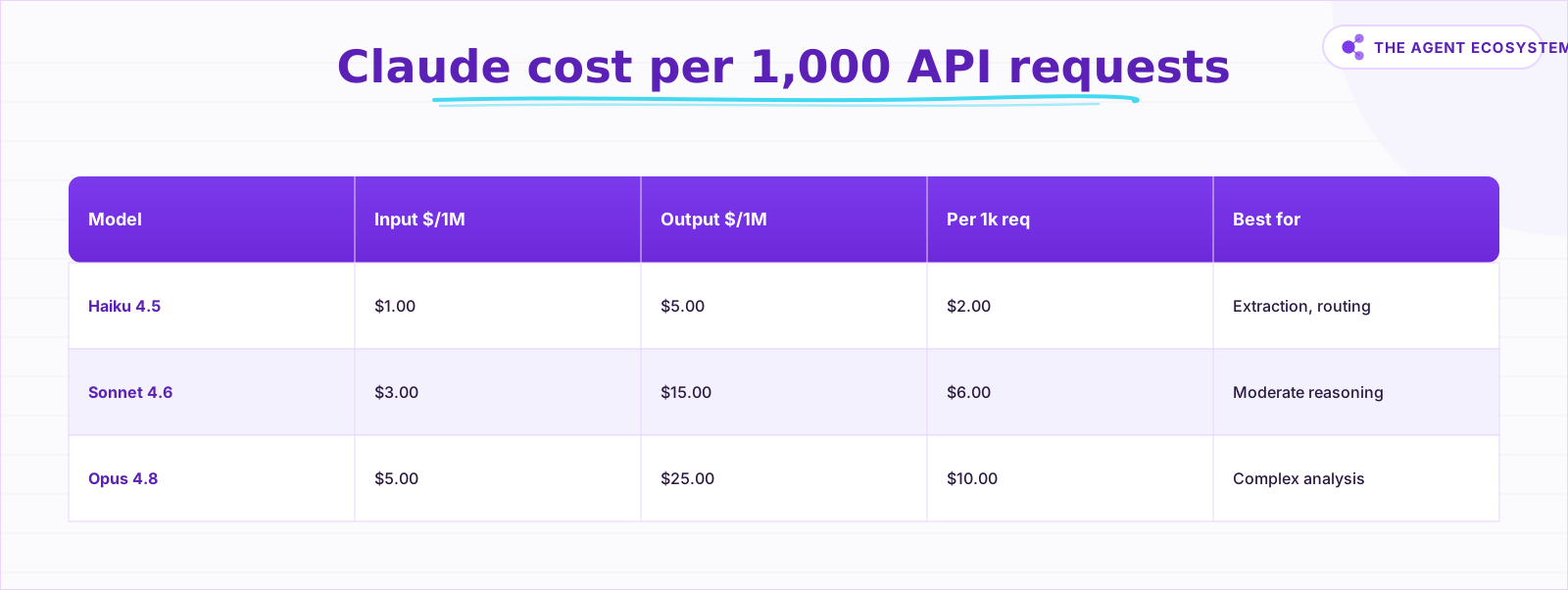 Assumes 500 input, 300 output tokens per request; self-hosted n8n is $0.
How do you secure a public AI endpoint?#
Set the Webhook node's Authentication to Header Auth and create a Header Auth credential with a header Name (for example x-api-key) and a secret header Value. Every caller must include that header on each request, or n8n rejects it before the workflow starts. This is built into the Webhook node; you write zero middleware.
The Header Auth credential lives in n8n's credential store and holds two fields: the header name and the expected value. Treat the value like a password: generate something random, store it in your calling app's environment variables, and rotate it if it leaks.
Beyond auth, add an input validation guard. A missing or malformed field should return a 400 before it reaches the AI node, not a confused model answer. Drop an IF node or a short Code node between the Webhook and the AI node. When validation fails, connect that branch to a second Respond to Webhook node that returns {"error": "bad_request"} with a 400 status code.
How do you guarantee the response is valid JSON?#
You guarantee valid JSON by setting the Respond to Webhook node's Respond With to JSON and attaching a Structured Output Parser sub-node to the AI node. The parser accepts a JSON Schema or a pasted example and forces the model to match that shape. Without it, Claude may wrap its answer in prose or markdown fences that break parsing.
The Structured Output Parser node (n8n-nodes-langchain.outputParserStructured) attaches as a sub-node directly to the Basic LLM Chain or AI Agent. Click "Generate from JSON Example," paste the exact structure you want back, and the parser builds the schema. From that point on, every response from the AI node is validated JSON. For a deeper dive into forcing structured output, see the n8n structured output guide.
Also add Content-Type: application/json in the Respond to Webhook node's Response Headers under Node options. It costs nothing and saves callers from having to guess the content type.
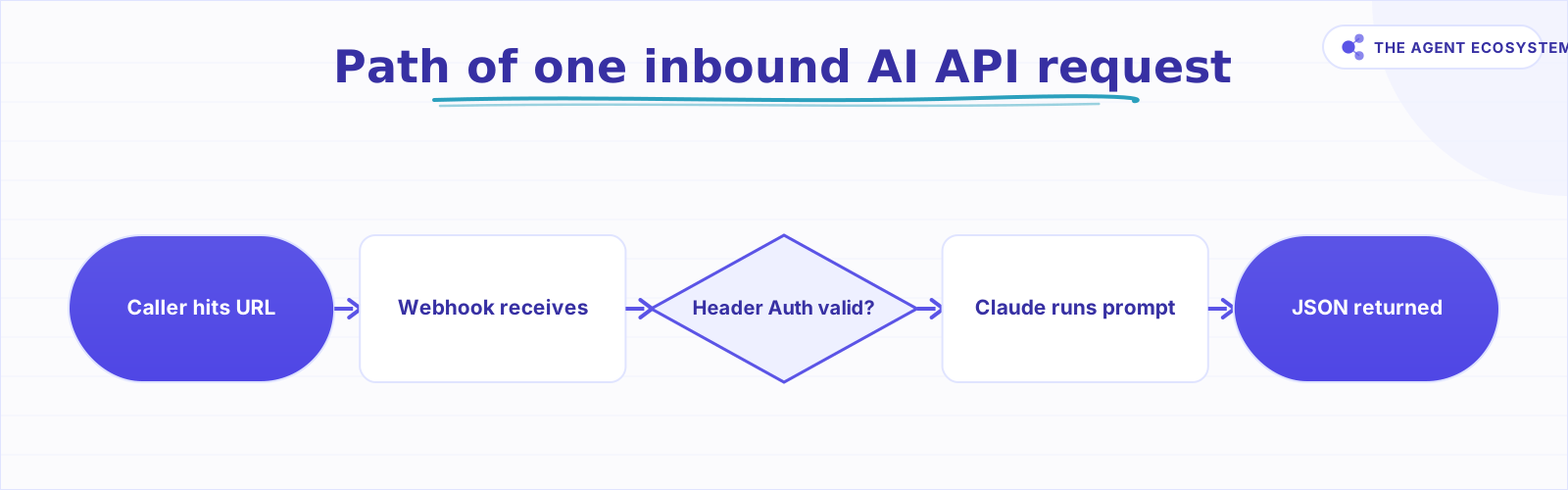 Every inbound request follows this path through the workflow.
How do you build it in n8n, step by step?#
The full build is six steps: add the Webhook node, configure the Respond setting, add the AI node and Claude model, optionally add the Structured Output Parser, add the Respond to Webhook node, then lock it with Header Auth and activate. Each step touches a specific field, so nothing is left to guesswork.
Step 1: Add a Webhook node#
Drag a Webhook node onto the canvas. Set HTTP Method to POST. Set Path to something descriptive like /ai-query. The node shows both URLs at the top of the panel.
Step 2: Set Respond to "Using Respond to Webhook Node"#
In the Webhook node, find the Respond field and choose Using 'Respond to Webhook' Node. Save. This single setting is what separates a real API from a trigger.
Step 3: Add the AI node and attach Claude#
Add a Basic LLM Chain node and connect it after the Webhook node. Inside it, add a Claude Chat Model sub-node. Select Claude Haiku 4.5 as the model. Write your system prompt in the prompt field. Map the caller's payload with an expression:
{{ $json.body.input }}This pulls the input field from the POST body. Adjust the field name to match what your callers send.
Step 4: Add a Structured Output Parser (optional but recommended)#
Add a Structured Output Parser sub-node to the Basic LLM Chain. Click Generate from JSON Example and paste the JSON shape you want. The parser enforces it on every response.
Step 5: Add the Respond to Webhook node#
Add a Respond to Webhook node at the end of the chain. Set Respond With to JSON. Reference the AI node's output in the body. Under Node options, set Response Code to 200 and add a Response Headers entry:
Content-Type: application/jsonStep 6: Set Header Auth and activate#
Back in the Webhook node, set Authentication to Header Auth. Create a new Header Auth credential. Set the Name to x-api-key and the Value to a secret string. Click Activate on the workflow. Call the Production URL:
curl -X POST https://your-n8n-instance/webhook/ai-query \
  -H "Content-Type: application/json" \
  -H "x-api-key: YOUR_SECRET" \
  -d '{"input": "Summarize this for me: n8n is great."}'
The response comes back as JSON. Done.
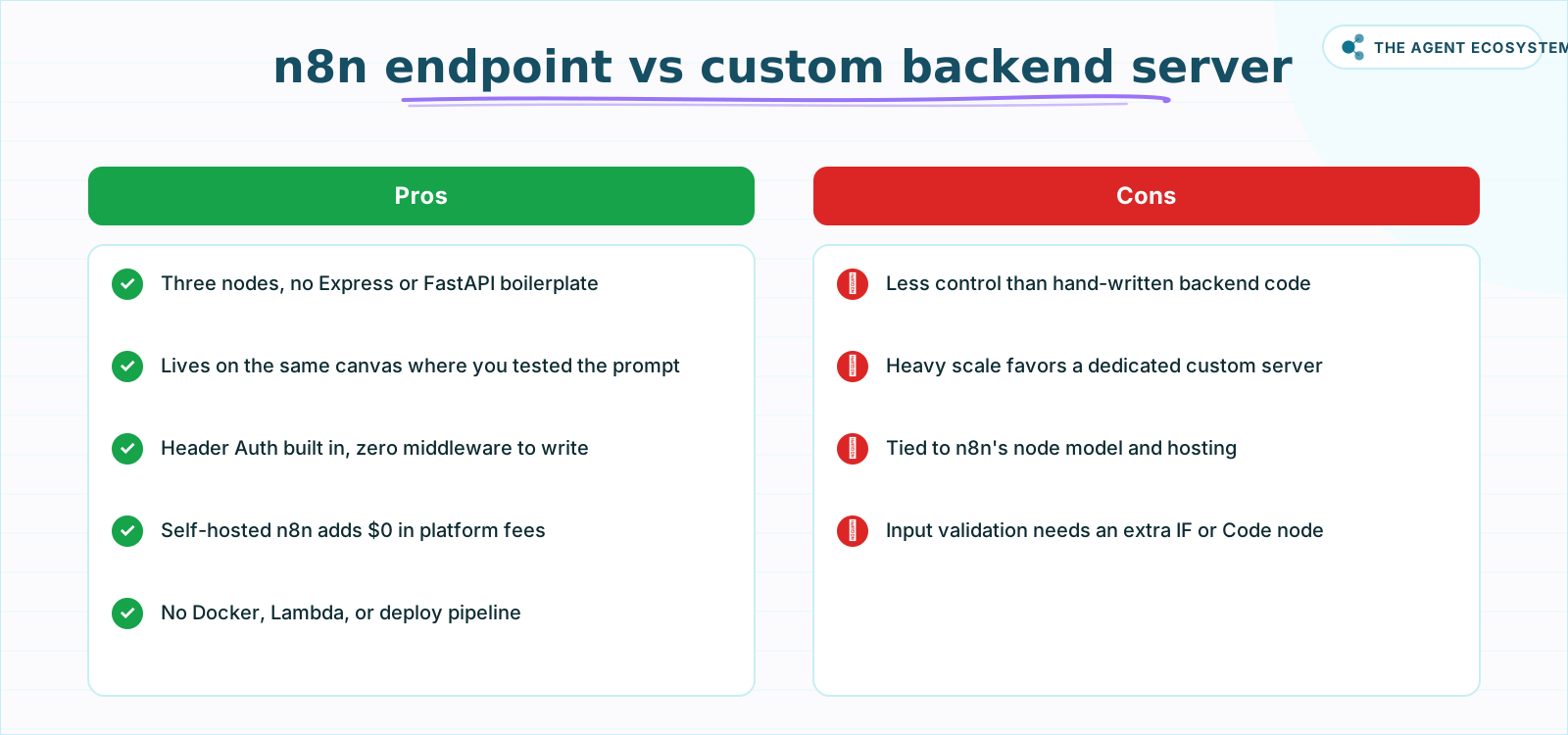 Pick n8n for speed; pick custom code for maximum control at scale.
Where can this go wrong?#
The four most common failure points are: leaving Authentication as None (open relay), shipping the Test URL instead of the Production URL, skipping input validation so bad payloads reach the model, and relying on raw LLM output without a Structured Output Parser.
Open relay. Flip the workflow Active and share the URL without Header Auth, and any party with the URL sends requests at your expense. Webhook URLs do get crawled. Set Header Auth first.
Test URL vs. Production URL. The Test URL only listens while you are in the editor with "Listen for test event" active. The moment you close the editor or stop listening, it goes silent. The Production URL stays live as long as the workflow is Active. Shipping the Test URL means callers get no response after you close the tab.
Unvalidated input. A missing field does not cause a graceful 400; it causes a malformed expression error inside the AI node or a confused model answer. Add an IF node that checks for required fields and routes the bad path to a Respond to Webhook node returning a 400 before the AI node ever runs.
Non-JSON output. Without a Structured Output Parser, Claude may return Here is your answer: {...} or a markdown code fence. That string is not parseable JSON. The parser removes this problem entirely. See the n8n AI agent tools guide if your endpoint also needs to call live tools. For cost controls on per-request token spend, the Claude cost control agent workflow is worth reading. When the endpoint grows into a multi-tool agent, the n8n MCP AI agent guide covers that path.
Where to go from here#
Go from here by hosting the whole thing on a self-hosted n8n VPS for $0 in infrastructure, then adding the Structured Output Parser and Header Auth. The result is a private AI API that costs roughly $2.00 per 1,000 requests in tokens alone, a real backend alternative for solo operators. Start with one endpoint, prove the pattern, then replicate it.
Frequently asked questions
Can n8n expose a workflow as an API endpoint?
Which n8n nodes turn a workflow into an AI API?
How do I secure an n8n webhook endpoint?
How much does an AI API request cost on Claude?
How do I make the response always valid JSON?
What is the difference between the Test URL and the Production URL?
Which Claude model should I use for an API endpoint?
Sources
Primary references and vendor documentation used while drafting and reviewing this article.
Written by

Muhammad Qasim Hammad is an AI agent and automation expert and the founder of Cart Gaze LLC (cartgaze.com). He builds product for the love of it: when an idea lands, a working prototype is usually running within hours, built with the same AI agents and automations he sells. He puts his own output at roughly 20× what it was before agents, and the Agentic OS behind this site is the working proof, documented in public with the tools he actually ran and what they really cost.
AI & Automation Services
Want a pipeline like this running in your business?
I'm Qasim — I design and ship AI agents and n8n automations for solo operators and small teams. Tell me what's eating your team's week, and I'll scope a fix.
Related reading
Force Structured JSON Output from AI in n8n
Your n8n AI step returns a paragraph when the next node needs clean fields. The Structured Output Parser sub-node fixes this by constraining the model to a JSON schema you define, for roughly 30 cents per 1,000 calls on Claude Haiku 4.5.

How to Use the Basic LLM Chain in n8n (Your First AI Step)
The n8n Basic LLM Chain is the simplest AI building block: one prompt in, one model response out, no tools, no memory, no loops. Wire it up in minutes and keep your token bill predictable at about $1.40 per 1,000 calls on Claude Haiku 4.5.
Add an AI Chatbot to Your Website With n8n (Chat Trigger)
Add a working AI chat widget to any website using n8n's Chat Trigger node and the @n8n/chat embed snippet. No React, no SaaS widget, about $7.25 per 1,000 conversations on Claude Haiku 4.5.
Build an AI Lead-Generation Agent in n8n (With Real Monthly Cost)
An n8n AI lead generation agent triages every inbound lead the moment it lands: scoring intent, drafting a personalized reply, and pinging you on the hot ones. Real cost: about $5/month for 100 leads on Claude Sonnet 4.6.
Turn n8n Into an MCP Server: Expose Your Workflows to Claude and Cursor (2026)
Stop leaving Claude Desktop to run n8n workflows by hand. The MCP Server Trigger node turns your existing workflows into callable tools so Claude and Cursor can invoke them directly.
n8n Webhook Security: Locking Down Your Endpoints
An open n8n Webhook node answers anyone who finds the URL. This hardening guide covers the node's authentication options, HMAC signature checks on the payload, IP and origin allow-listing, rate limiting at a reverse proxy, and why the test URL never belongs in production.