n8n Webhook Security: Locking Down Your Endpoints
Harden the Webhook node with auth, HMAC checks, allow-lists, and rate limits.
AI-drafted, reviewed by Muhammad Qasim Hammad on July 30, 2026. See our AI disclosure.
Table of contents
You added a Webhook node in n8n, copied the URL it handed you, and pasted it into a provider dashboard or a form tool. It answered on the first request, so you moved on. That first success hides the problem. By default the endpoint replies to anyone who sends it a request, and the URL you just pasted is not a secret. It travels through browser history, proxy logs, and the settings screen of whatever service calls it.
This is a hardening guide, not a walkthrough of how the node works. It covers the specific ways an exposed n8n webhook gets abused, and the concrete controls that close each hole: authentication on the node, HMAC signature checks on the payload, IP and origin allow-listing, rate limiting at a proxy, and keeping the short-lived test URL off the public internet.
Is your n8n webhook secure by default?#
No. A fresh Webhook node ships with Authentication set to None, so the endpoint accepts any request that reaches the URL. The address is the only barrier, and addresses leak through logs and browser history. Anyone who finds it can trigger your workflow and send whatever payload they like.
An open endpoint is more than an information leak. Whoever holds the URL can trigger your workflow on demand, feed it a crafted body to reach whatever the flow does next, and run up your bill if it calls a paid API or an LLM on every hit. If the workflow writes to a database or posts to Slack, an open webhook hands that action to a stranger with no login and no trace.
The second trap is the test URL. n8n gives each Webhook node two addresses. The test URL only answers while the editor is open and you have clicked Listen for test event, and it lapses after about 120 seconds. The production URL answers continuously once the workflow is active, until you unpublish it. People wire a provider to the test URL during a demo, then wonder why the integration dies the moment they close the tab. If you are still learning the node itself, the webhook to AI API walkthrough covers the wiring; here we assume it works and focus on locking it down.
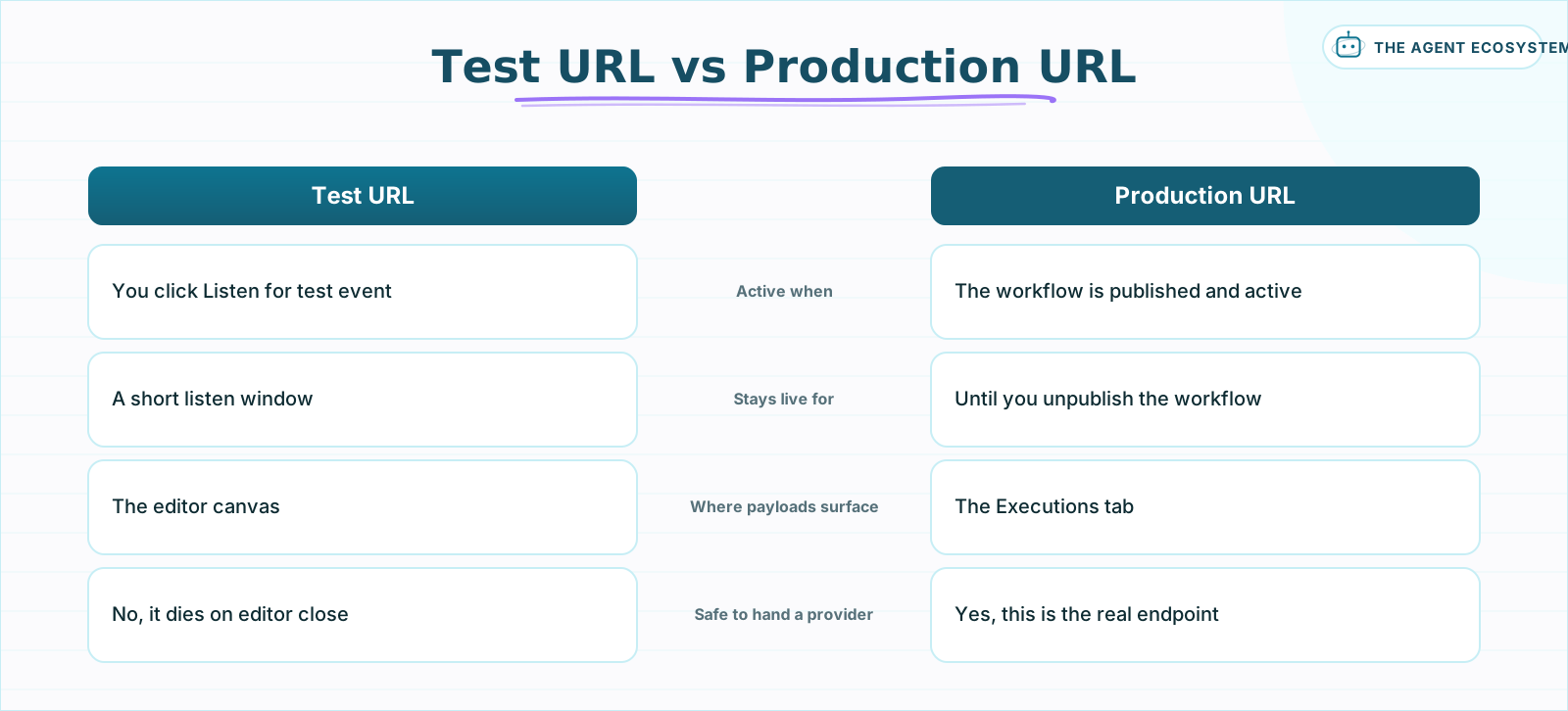 The test URL is a debugging tool with a short lifespan. Only the production URL belongs in a provider's configuration.
What authentication does the Webhook node support?#
The Webhook node offers 4 built-in options in the Authentication field: None, Basic auth, Header auth, and JWT auth. Basic auth checks a username and password, Header auth checks a secret header name and value, and JWT auth validates a signed token using a shared passphrase or a PEM key. Anything but None puts a real gate in front.
For a public endpoint you control on both ends, Header auth is usually the right call. You set a header name and a long random value on the node, store it as a credential, and configure the caller to send the same header. n8n compares it and rejects any request that is missing or wrong before your workflow runs, so a scanner that stumbles onto the URL never reaches your logic.
| Method | What it checks | Setup effort | Best for |
|---|---|---|---|
| None | Nothing, the URL is the only barrier | Zero | Local tests only |
| Basic auth | A username and password on every call | Low | Simple scripts you own |
| Header auth | A secret header name and value | Low | API-key style callers |
| JWT auth | A signed token via passphrase or PEM key | Medium | Callers that already issue JWTs |
Pick the method that matches the caller. Whatever you choose, treat the secret like any other credential: make it long and random, store it in n8n credentials instead of pasting it into the node body, and rotate it if it ever shows up in a log or a screenshot. A weak or reused secret is the same as no auth at all.
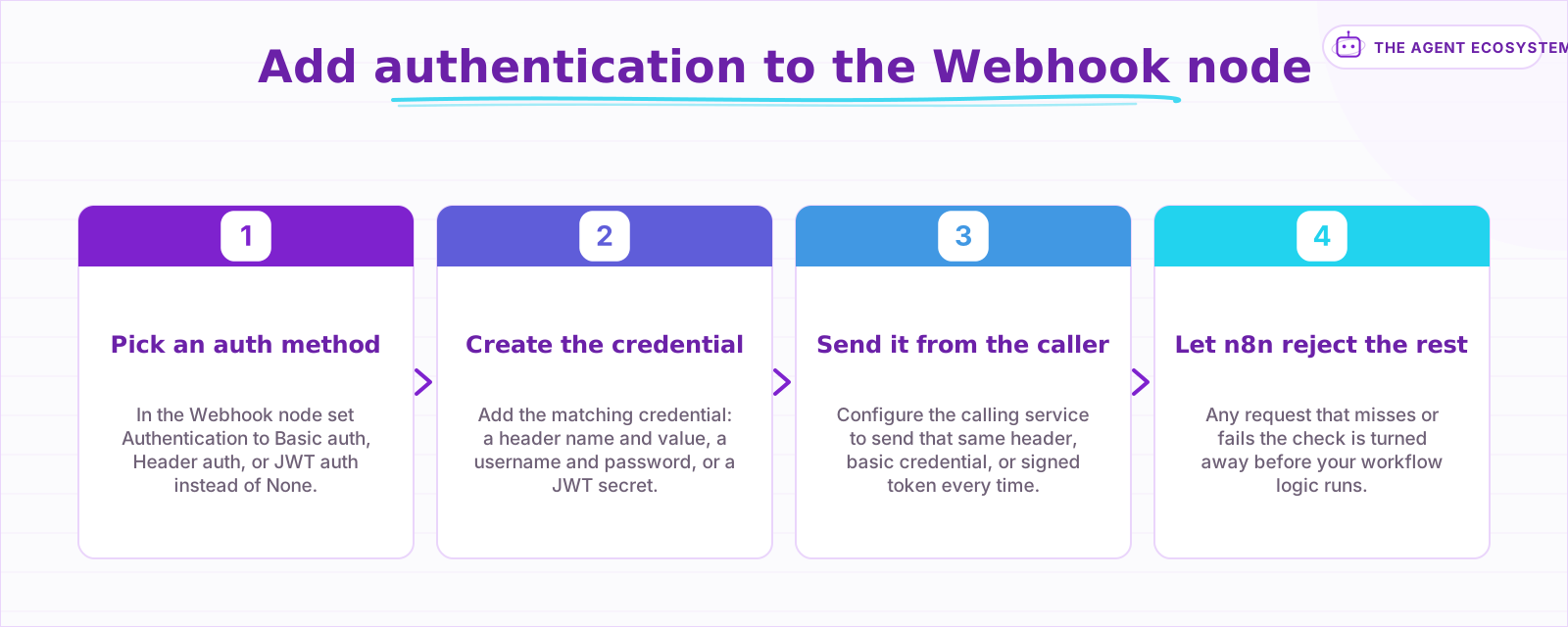 Set the Authentication field, create the matching credential, send it from the caller, and let n8n reject the rest.
How do you verify a signed payload (HMAC)?#
Node authentication proves the caller knew a secret, but it does not prove the body was not tampered with in transit. HMAC signature verification closes that gap. The provider hashes the raw request body with a shared secret and sends the result in a header, and you recompute the same hash to confirm a match.
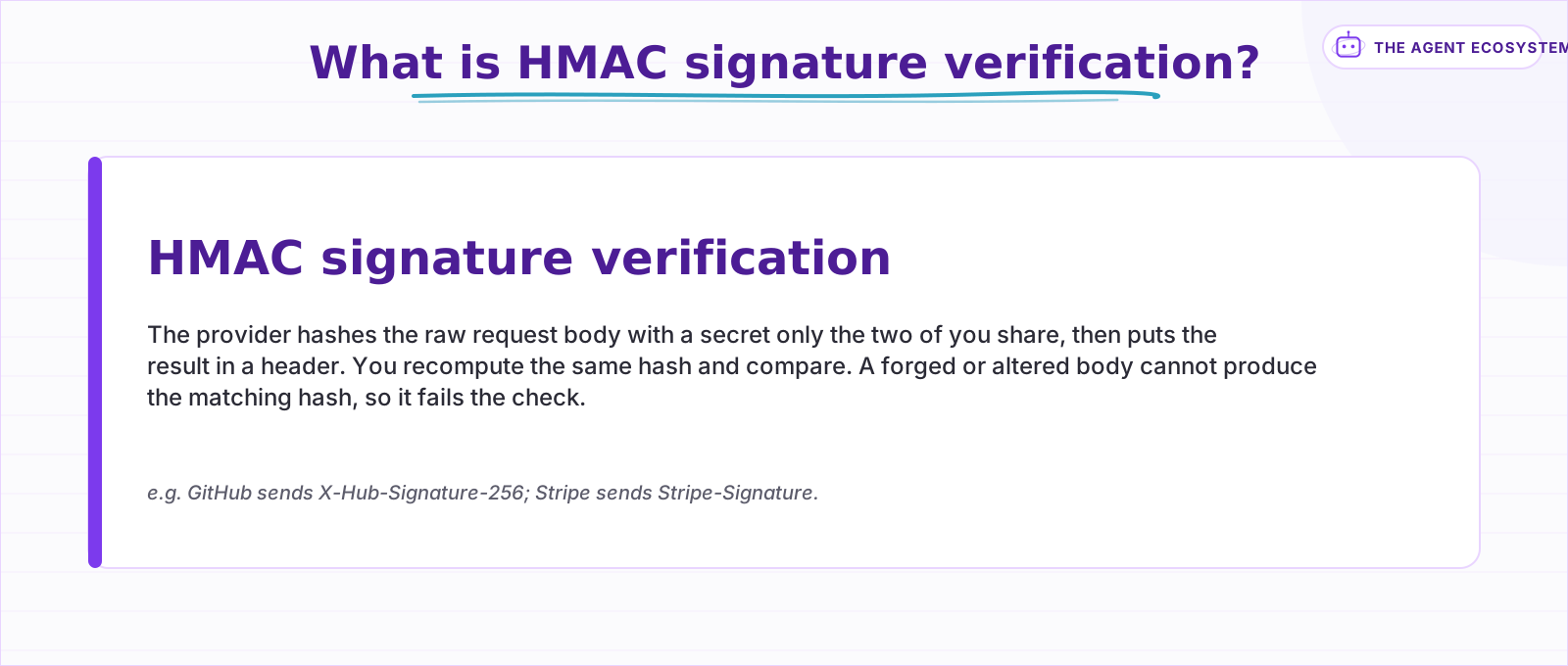 Node auth checks who is calling; a signature check confirms the body itself was not altered in transit.
Public providers like GitHub or Stripe will not send your custom header. Instead they sign each payload: they hash the raw body with a secret you both hold and put the digest in a header such as X-Hub-Signature-256 or Stripe-Signature. Your job is to recompute that digest and check it matches.
In n8n, open the Webhook node Options and enable Raw Body so you hash the exact bytes the provider signed, not a re-serialized copy. The raw payload then lands in {{ $json.rawBody }}. From there, the built-in Crypto node computes an HMAC-SHA256 over that body with your secret, or a Code node does the same with crypto.createHmac and adds a constant-time compare through crypto.timingSafeEqual. Use the constant-time compare: a plain string equality check can leak the secret one character at a time through response timing.
A signature proves the body is authentic, not that it is fresh. To blunt replay, sign a timestamp too and reject anything older than 5 minutes. And keep in mind that an authentic payload can still be hostile: if the body feeds a model, pair signature checks with prompt-injection defenses.
How do you stop abuse and floods?#
Authentication stops unknown callers, but a leaked credential or a valid client gone rogue can still flood the endpoint. The Webhook node adds three native filters: an IP Whitelist to allow only known addresses, Allowed Origins for CORS, and Ignore Bots. For rate limiting, put a reverse proxy in front of n8n.
Start with the node's own filters. The IP Whitelist field accepts only requests from addresses you list, which fits a provider that publishes a fixed set of egress IPs. Allowed Origins locks down CORS so a browser on another domain cannot call the endpoint from a user's session. Ignore Bots quietly drops requests that look like crawlers. None of these replace authentication, but each shrinks the surface an attacker can even knock on.
n8n itself ships no rate limiter, so flood control lives in the layer in front of it. A reverse proxy such as Nginx or Caddy can cap a single IP at, say, 60 requests per minute and drop the rest before they touch your workflow, which also shields you from a client stuck in a retry loop. The node enforces a 16 MB payload ceiling on top of that, so one giant body cannot exhaust memory.
Running behind a proxy changes the URLs n8n prints. Set WEBHOOK_URL to your public HTTPS address so the editor and any provider registration use the reachable endpoint instead of the internal port 5678, and set N8N_PROXY_HOPS to 1 so n8n trusts forwarded headers from exactly one proxy. Get this wrong and your production URL quietly points somewhere no external service can reach. These are perimeter controls; for limits on what the workflow may do once a request is inside, see agent guardrails in n8n.
What is the n8n webhook security checklist?#
Work through five layers in order: turn on node authentication, verify provider signatures with HMAC, restrict callers by IP and origin, rate-limit at the proxy, and expose only the production URL. Each layer is cheap on its own, and together they turn an open endpoint into one that rejects almost every hostile request.
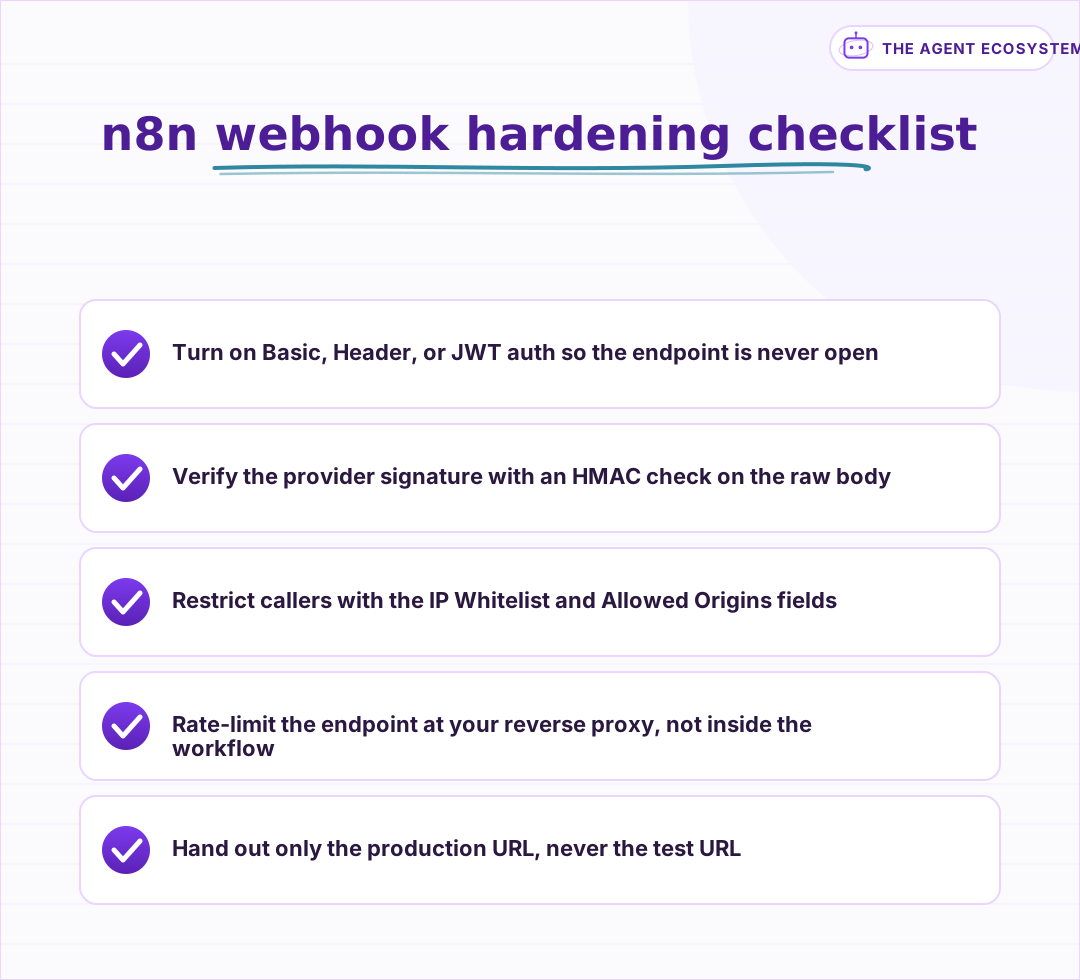 Each control is a separate layer. Together they turn an open endpoint into one that rejects almost every hostile request.
The order matters because each layer assumes the one before it. A signature check is pointless if anyone can reach the node, and rate limiting is no substitute for authentication. Start at the top, send a deliberately bad request at each step and confirm it is turned away, then move down. Most internal workflows are safe after the first two layers; public, provider-fed endpoints want all five.
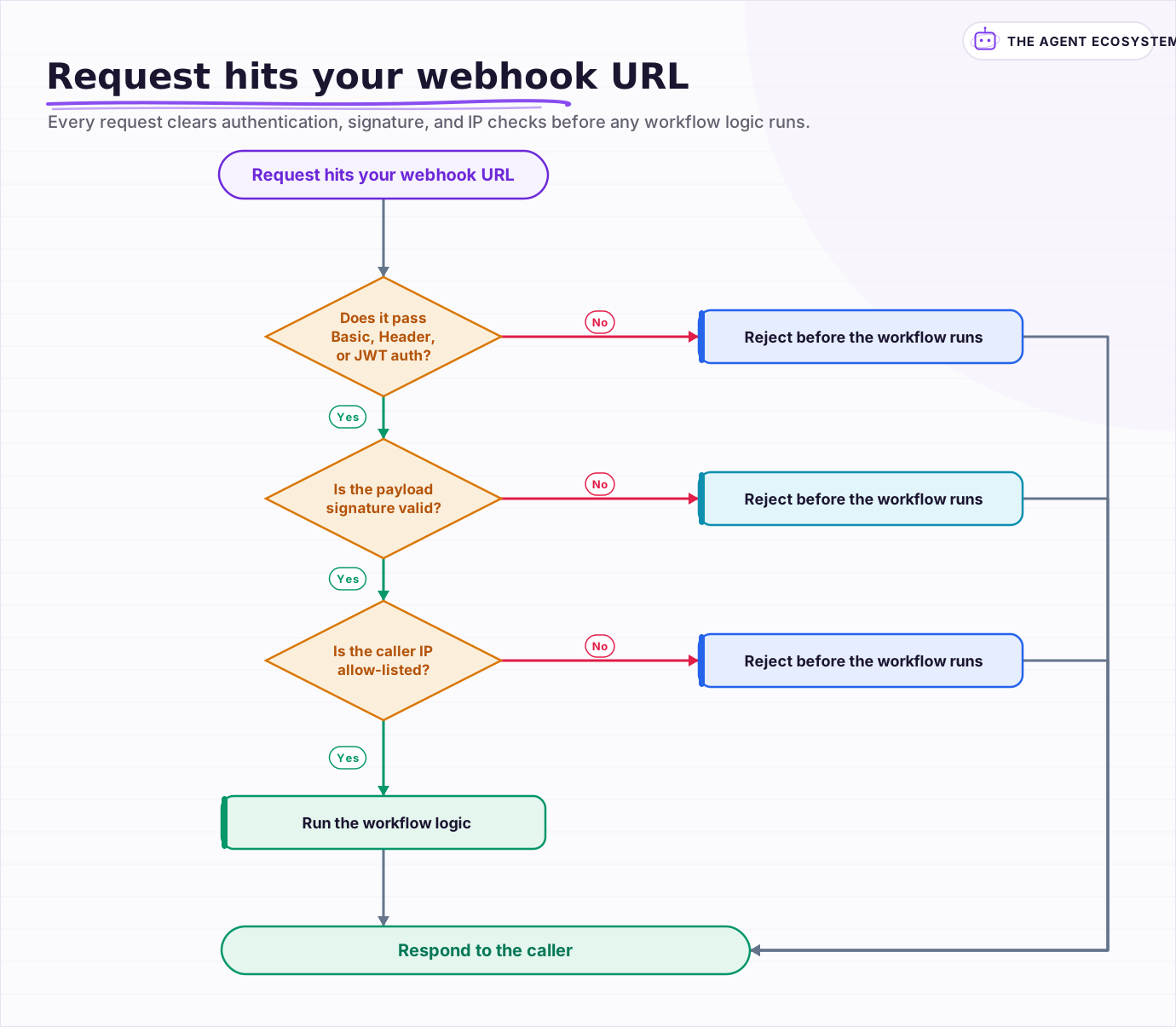 Every request clears authentication, signature, and IP checks before any workflow logic runs; whatever fails is rejected up front.
Frequently asked questions
Is an n8n webhook secure by default?
What authentication does the n8n Webhook node support?
How do you verify an HMAC signature in n8n?
How do you rate-limit an n8n webhook?
Why is my n8n production webhook URL wrong behind a reverse proxy?
Sources
Primary references and vendor documentation used while drafting and reviewing this article.
- n8n Webhook node docs (authentication options, IP whitelist, allowed origins, payload limit)
- n8n Webhook credential docs (Basic, Header, and JWT auth fields)
- n8n Webhook node common issues (test URL vs production URL behavior)
- n8n configure webhook URLs with a reverse proxy (WEBHOOK_URL, N8N_PROXY_HOPS)
Written by

Muhammad Qasim Hammad is an AI agent and automation expert and the founder of Cart Gaze LLC (cartgaze.com). He builds product for the love of it: when an idea lands, a working prototype is usually running within hours, built with the same AI agents and automations he sells. He puts his own output at roughly 20× what it was before agents, and the Agentic OS behind this site is the working proof, documented in public with the tools he actually ran and what they really cost.
AI & Automation Services
Want a pipeline like this running in your business?
I'm Qasim — I design and ship AI agents and n8n automations for solo operators and small teams. Tell me what's eating your team's week, and I'll scope a fix.
Related reading
How to Verify Webhook Signatures in n8n (Stripe, Twilio, GitHub)
A webhook URL is just a URL, and n8n has no built-in way to confirm a request actually came from Stripe, Twilio, or GitHub rather than anyone who found it. Here is how to build signature verification with a Code node, the raw-body Base64 decoding gotcha that breaks most first

Turn an n8n Workflow Into an AI API: Webhook to Claude to JSON
Skip the Express server. An n8n AI API endpoint takes three nodes: a Webhook node receives the HTTP request, an AI node runs Claude, and a Respond to Webhook node returns clean JSON to the caller.
AI Agent Guardrails: Stop Your n8n Agent From Going Off the Rails
An AI agent is a language model with hands. Without guardrails it can follow a malicious instruction, leak data, loop until your bill spikes, or return output the next node cannot parse. This guide maps the five ways an n8n agent breaks to the exact control that stops each.
n8n Webhooks vs Polling: Which Trigger to Use, and Why
Should an n8n workflow fire the instant an event happens (a webhook, push) or check on a timer (polling, pull)? The wrong pick means missed events or wasted executions. Here is the decision framework plus how to wire each trigger.
Stop Prompt Injection in n8n AI Agents: Practical Defenses
Your n8n agent reads emails, scraped pages, and RAG chunks nobody on your side wrote, and a planted instruction can hijack it. Here is the layered prompt injection defense, mapped to OWASP LLM01 and to nodes you can actually toggle.
How to Make Your n8n Workflows Reliable: Error Handling, Retries, and Alerts
n8n does zero error handling by default. Learn to add three layers: node retries, inline error outputs, and one Error Workflow that alerts you whenever any workflow fails silently.