n8n Webhooks vs Polling: Which Trigger to Use, and Why
Push or pull? The decision framework for n8n triggers, plus how to wire a webhook and how to poll.
AI-drafted, reviewed by Muhammad Qasim Hammad on July 24, 2026. See our AI disclosure.
Table of contents
Your n8n workflow either fires the instant something happens or it checks on a timer and hopes it did not miss anything. Pick the wrong one and you get late reactions, duplicate rows, or hundreds of empty executions a day. The n8n webhook vs polling choice is the difference between a push trigger that fires on the event and a pull trigger that asks on a schedule, and getting it right saves both latency and wasted runs.
What is the n8n webhook vs polling difference?#
The n8n webhook vs polling difference is push versus pull. A webhook lets the source call n8n when an event fires, so the run happens once, right away, with 0 wasted checks. Polling flips that: n8n asks the source every interval, adding up to 1 interval of latency and running even when nothing changed.
That single axis decides most of the trade-offs. With a webhook, the source owns the timing and you react in near real time, but you need the source to support webhooks and a publicly reachable URL. With polling, you own the timing and it works against any API, but you pay in latency and empty runs.
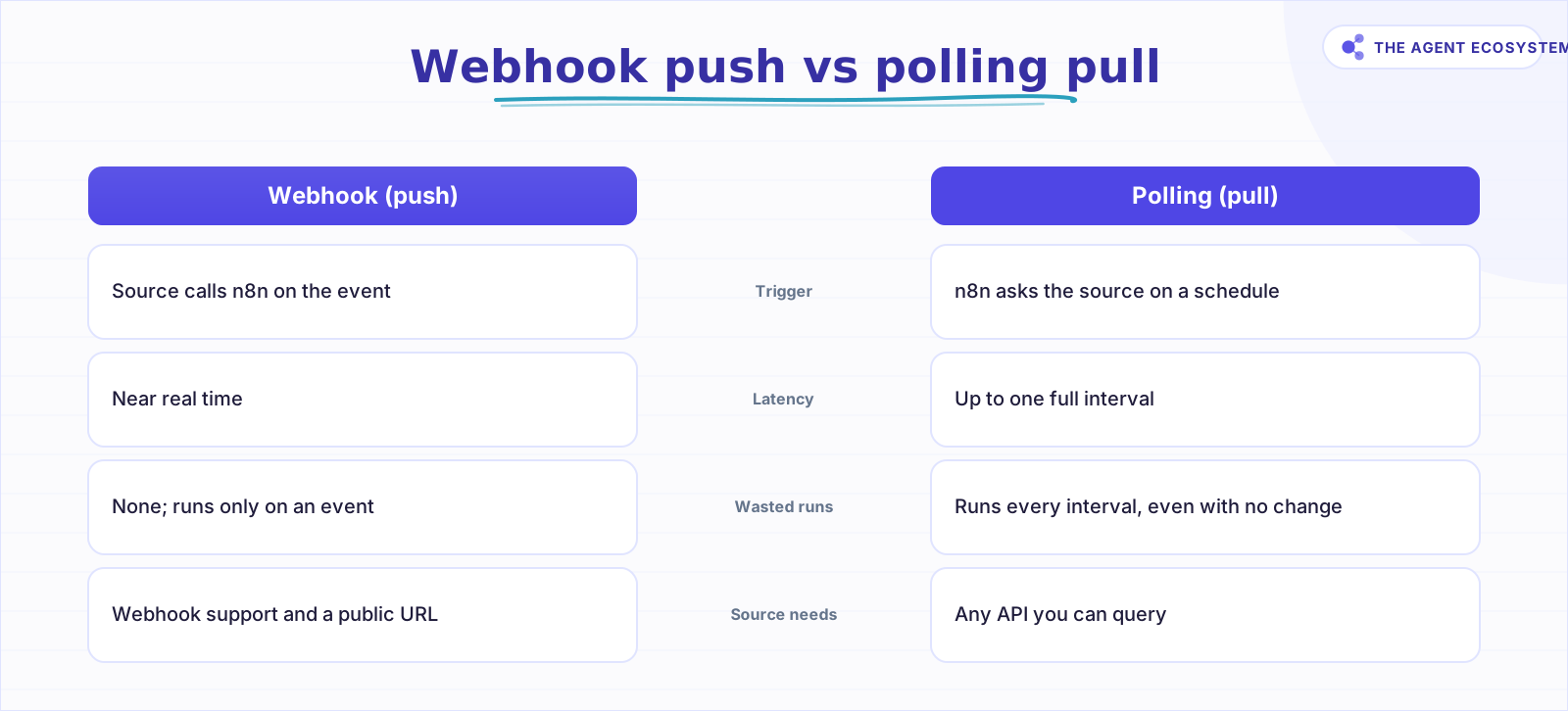 Push fires on the event with no wasted runs; pull asks on a schedule and works with any API.
n8n gives you both shapes. App-specific Trigger nodes register a webhook with the service for you, and the generic Webhook node catches events from anything that can send an HTTP request. For pull, the Schedule Trigger runs your workflow on a fixed interval or a cron expression, per the n8n Schedule Trigger docs.
How do webhooks and polling compare head to head?#
They compare on 4 axes that decide the pick: latency, load, what the source must support, and how you handle duplicates. A webhook wins on latency and load but demands webhook support plus a reachable URL. Polling works with any API on a schedule but adds delay and runs that do nothing when the source is quiet.
| Factor | Webhook (push) | Polling (pull) |
|---|---|---|
| Latency | Near real time on the event | Up to 1 full interval of delay |
| Load | Runs only when an event fires | Runs every interval, even with 0 changes |
| Source requirement | Source must support webhooks; needs a public URL | Any API you can query on a schedule |
| Dedup risk | Retries can deliver the same event twice | A slow interval can re-fetch the same row |
The table hides one honest overlap. Some n8n app Trigger nodes poll under the hood on their own schedule even though they feel event-driven, so "using a Trigger node" does not always mean you got a true push webhook. Check the node's description when latency matters.
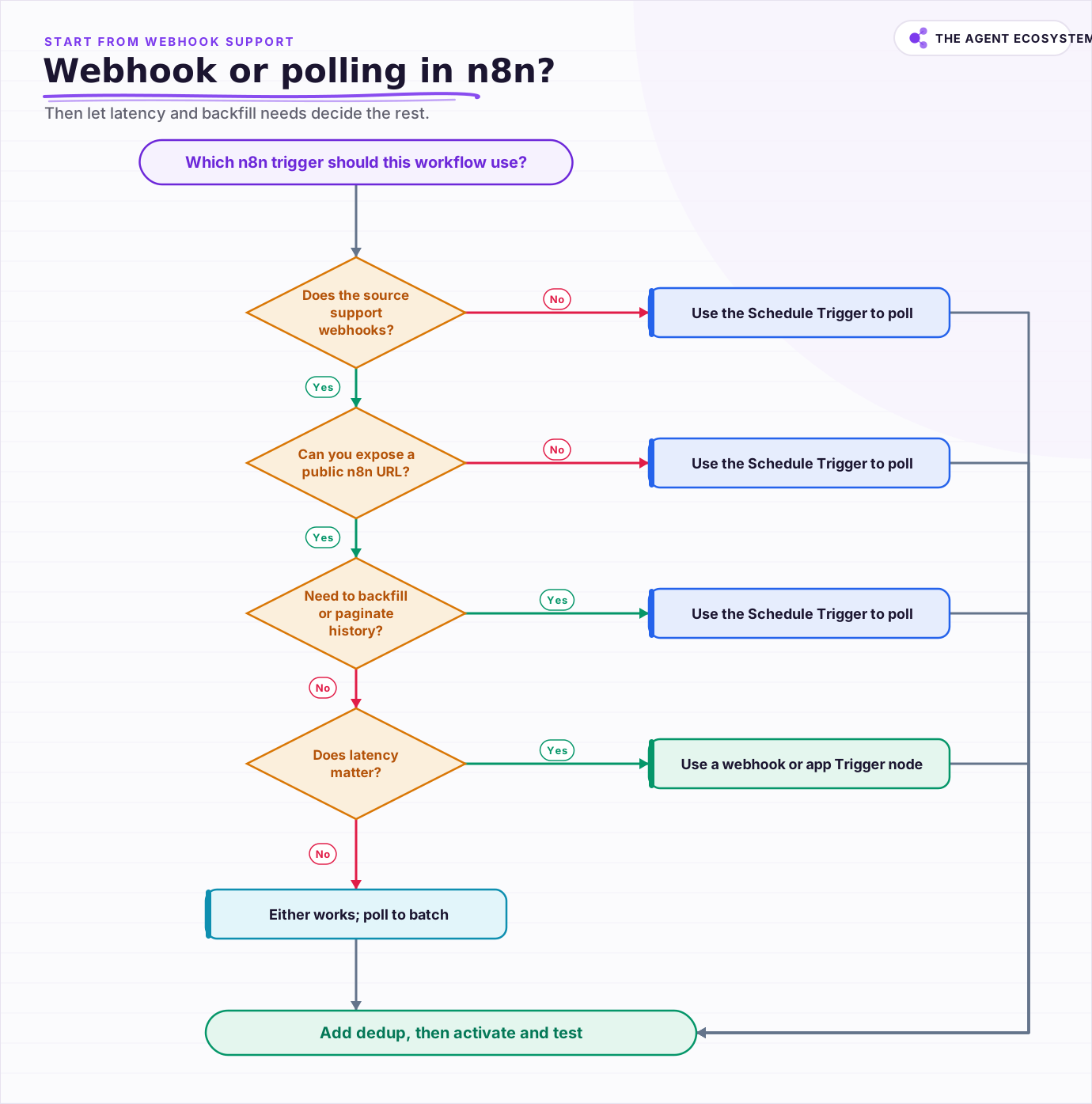 Start from whether the source supports webhooks, then let latency and backfill needs decide the rest.
How do you set up a webhook trigger in n8n?#
You wire a webhook in 5 moves: add the trigger, copy its URL, register that URL in the source, handle duplicates, then activate and test. The generic Webhook node exposes a test URL and a production URL, and the production one only registers once the workflow is active, per the n8n Webhook docs.
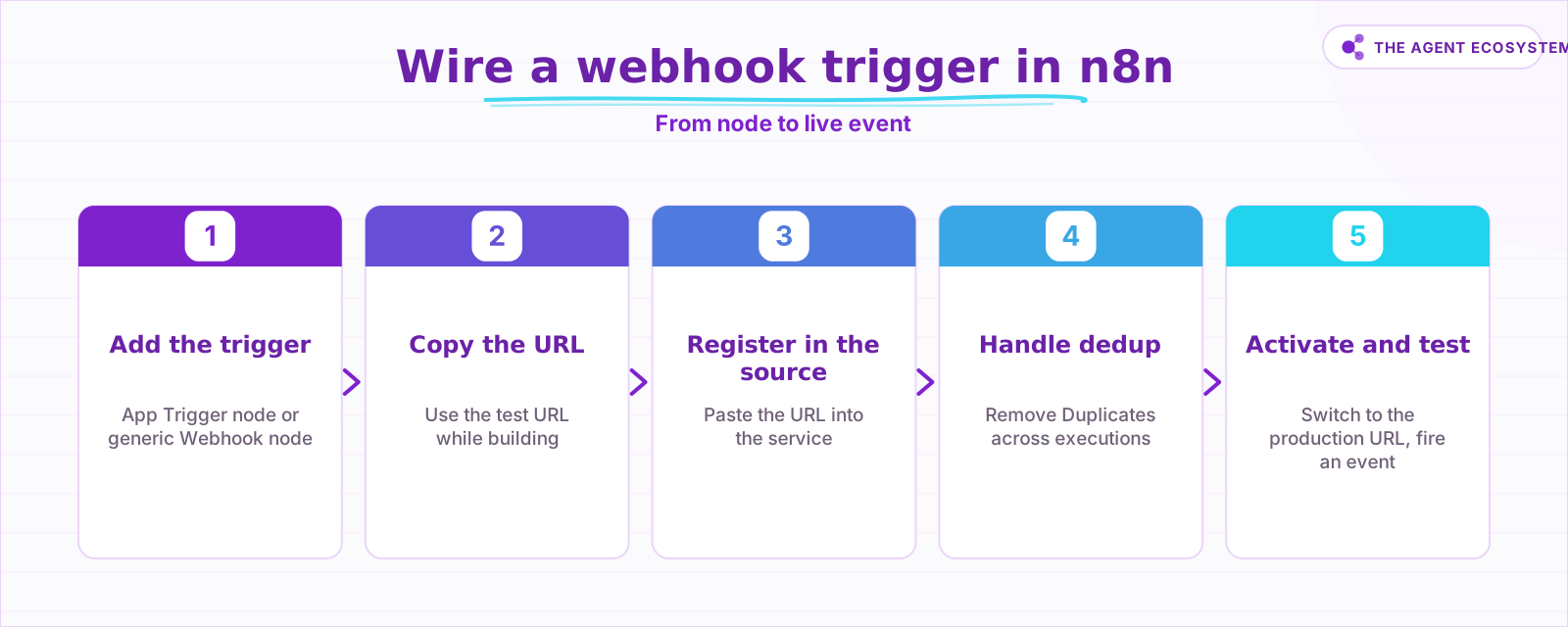 The production URL only registers once the workflow is active, so activate before you test.
The order matters because the production URL is dead until you activate. Use "Listen for Test Event" while you build so you can see the payload in the editor, then switch the source to the production URL and flip the workflow on. If your source has a dedicated app Trigger node, prefer it: it registers the webhook for you and often verifies the signature too.
When should you poll instead of using a webhook?#
Poll when the source has no webhook, when you must backfill or paginate through history, or when you would rather batch changes than react to each one. Polling is also the safer pick when you cannot expose a public URL. You trade up to 1 interval of latency for a trigger that works against literally any queryable API.
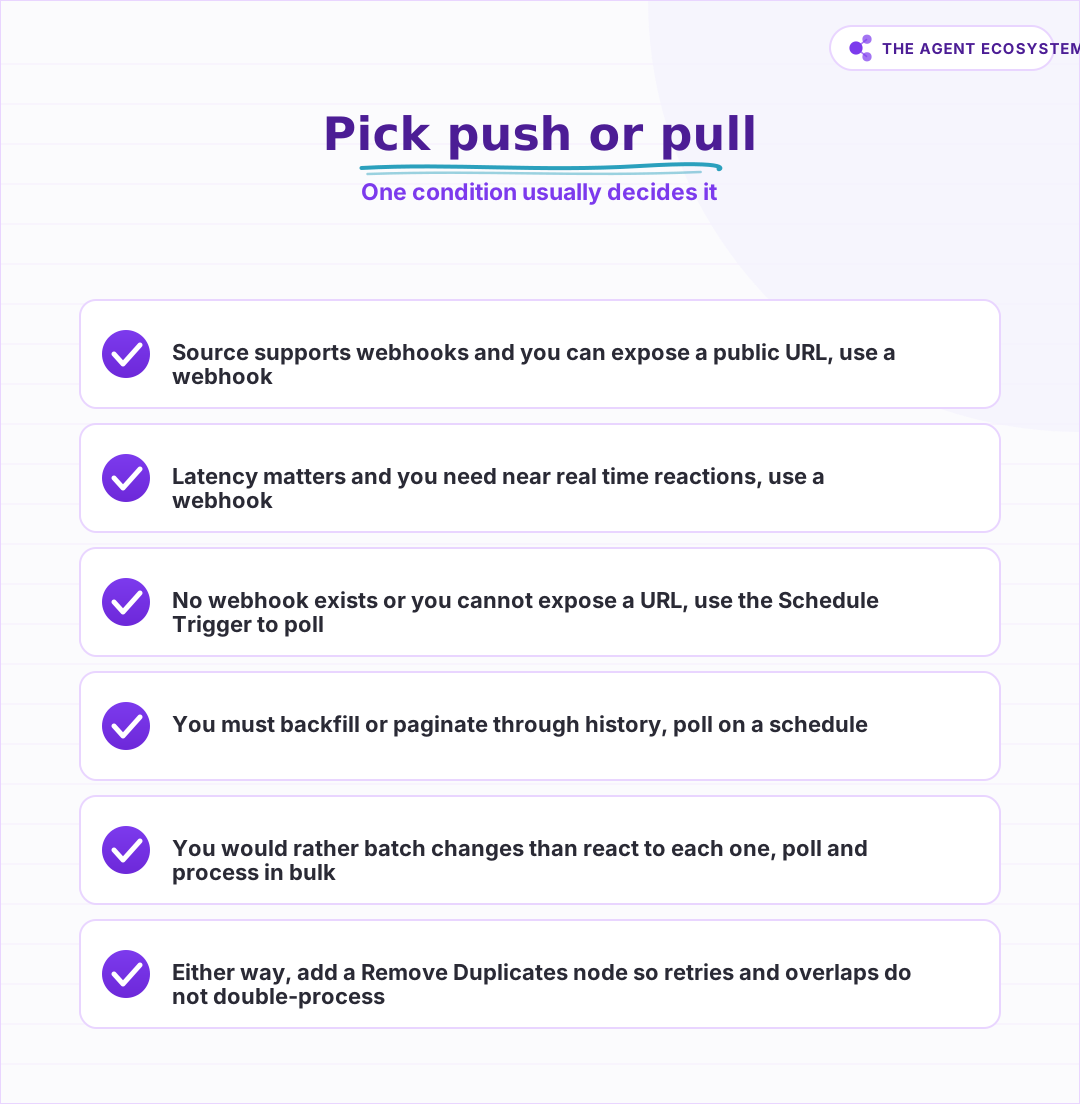 Match the trigger to the source's capability first, then let latency and control break the tie.
Set the interval to match how fresh the data must be, not how fast you can hit the API. A 5 minute interval is fine for a report; a 30 second interval hammers the source for little gain. Whichever side you land on, dedup is not optional. Webhooks retry on failure and can deliver the same event 2 or more times, and a polling loop can re-read the same record before it is marked done.
Which trigger should you choose?#
Choose the webhook when the source supports it and latency matters, and choose polling when there is no webhook, when you must backfill, or when you want to batch. Handle deduplication either way, because both paths can hand you the same event twice. Start from the source's capability, then let latency and control break the tie.
Run the decision once and wire it, do not re-litigate it every build. If you are pushing events into an external system rather than catching them, our guide to calling an AI API from an n8n webhook covers the outbound side. And whichever trigger you pick, pair it with real error handling for reliable n8n workflows so a failed delivery does not vanish silently.
Frequently asked questions
What is the difference between a webhook and polling in n8n?
When should I use polling instead of a webhook in n8n?
Do n8n Trigger nodes use webhooks or polling?
How do I stop duplicate events in n8n?
Does an n8n webhook need a public URL?
Sources
Primary references and vendor documentation used while drafting and reviewing this article.
- n8n Webhook node docs (receives events via a URL; test vs production URL; fallback for services without an app trigger)
- n8n Schedule Trigger node docs (run workflows at fixed intervals or via cron; runs on schedule regardless of change)
- n8n Remove Duplicates node docs (remove items processed in previous executions; Value Is New; history size)
- n8n Trigger nodes overview (app trigger nodes; some poll on a schedule under the hood)
Written by

Muhammad Qasim Hammad is an AI agent and automation expert and the founder of Cart Gaze LLC (cartgaze.com). He builds product for the love of it: when an idea lands, a working prototype is usually running within hours, built with the same AI agents and automations he sells. He puts his own output at roughly 20× what it was before agents, and the Agentic OS behind this site is the working proof, documented in public with the tools he actually ran and what they really cost.
AI & Automation Services
Want a pipeline like this running in your business?
I'm Qasim — I design and ship AI agents and n8n automations for solo operators and small teams. Tell me what's eating your team's week, and I'll scope a fix.
Related reading
n8n Schedule Trigger: Cron, Intervals, and Overlaps
Your scheduled n8n workflow ran an hour off, stacked runs on top of each other, or silently never fired. All three are fixable once you know where n8n looks for cron, timezone, and concurrency. Here is the honest, docs-verified recipe.

How to Make Your n8n Workflows Reliable: Error Handling, Retries, and Alerts
n8n does zero error handling by default. Learn to add three layers: node retries, inline error outputs, and one Error Workflow that alerts you whenever any workflow fails silently.
n8n Error Workflow Template: A Copy-Paste Error Handler
An n8n error workflow template is one reusable flow, built on the Error Trigger node, that you set as your Error workflow so every failure is captured, formatted, and alerted from one place. Here is how to build it, wire it, and set it as your handler.
n8n Webhook Security: Locking Down Your Endpoints
An open n8n Webhook node answers anyone who finds the URL. This hardening guide covers the node's authentication options, HMAC signature checks on the payload, IP and origin allow-listing, rate limiting at a reverse proxy, and why the test URL never belongs in production.
n8n Sub-Workflows: Build Modular, Reusable Automations
Your n8n canvas hit 40 nodes and you keep copy-pasting the same blocks. A sub-workflow is the fix: a workflow that starts with the When Executed by Another Workflow trigger, so others call it like a function. Here is how data crosses the boundary and when to extract.
How to Verify Webhook Signatures in n8n (Stripe, Twilio, GitHub)
A webhook URL is just a URL, and n8n has no built-in way to confirm a request actually came from Stripe, Twilio, or GitHub rather than anyone who found it. Here is how to build signature verification with a Code node, the raw-body Base64 decoding gotcha that breaks most first