How to Verify Webhook Signatures in n8n (Stripe, Twilio, GitHub)
n8n has no built-in signature verification. Here is how to check a webhook actually came from Stripe, Twilio, or GitHub with a Code node, and the raw-body gotcha that breaks most first attempts.
AI-drafted, reviewed by Muhammad Qasim Hammad on August 21, 2026. See our AI disclosure.
Table of contents
A webhook URL is just a URL, and anyone who finds or guesses it can POST whatever they want to it. If that webhook triggers a Stripe billing agent, a voice agent answering Twilio calls, or a GitHub PR-triage agent, a workflow with no signature check will act on a forged request exactly the same way it acts on a real one from the actual service.
Why does a webhook URL need signature verification at all?#
Anything reachable on the internet gets scanned and probed constantly, and a webhook URL is no exception. A signature check is how the workflow confirms a request actually came from the service it claims to, Stripe, Twilio, GitHub, rather than from anyone who found the URL and crafted a payload that looks plausible.
The services that matter most here already sign their payloads specifically so you can verify this: Stripe, GitHub, and Shopify sign with HMAC-SHA256 and send the signature in a header, Stripe-Signature, X-Hub-Signature-256, X-Shopify-Hmac-Sha256. Verification means recomputing that signature yourself from the raw payload and a shared secret, then confirming it matches what the header claims.
This matters even behind a webhook URL that looks unguessable. A long random path is obscurity, not authentication; it can leak through a browser history, a log line, a screen share, or simple brute-force scanning over time, and none of those failure modes are things you control the way you control a signature check.
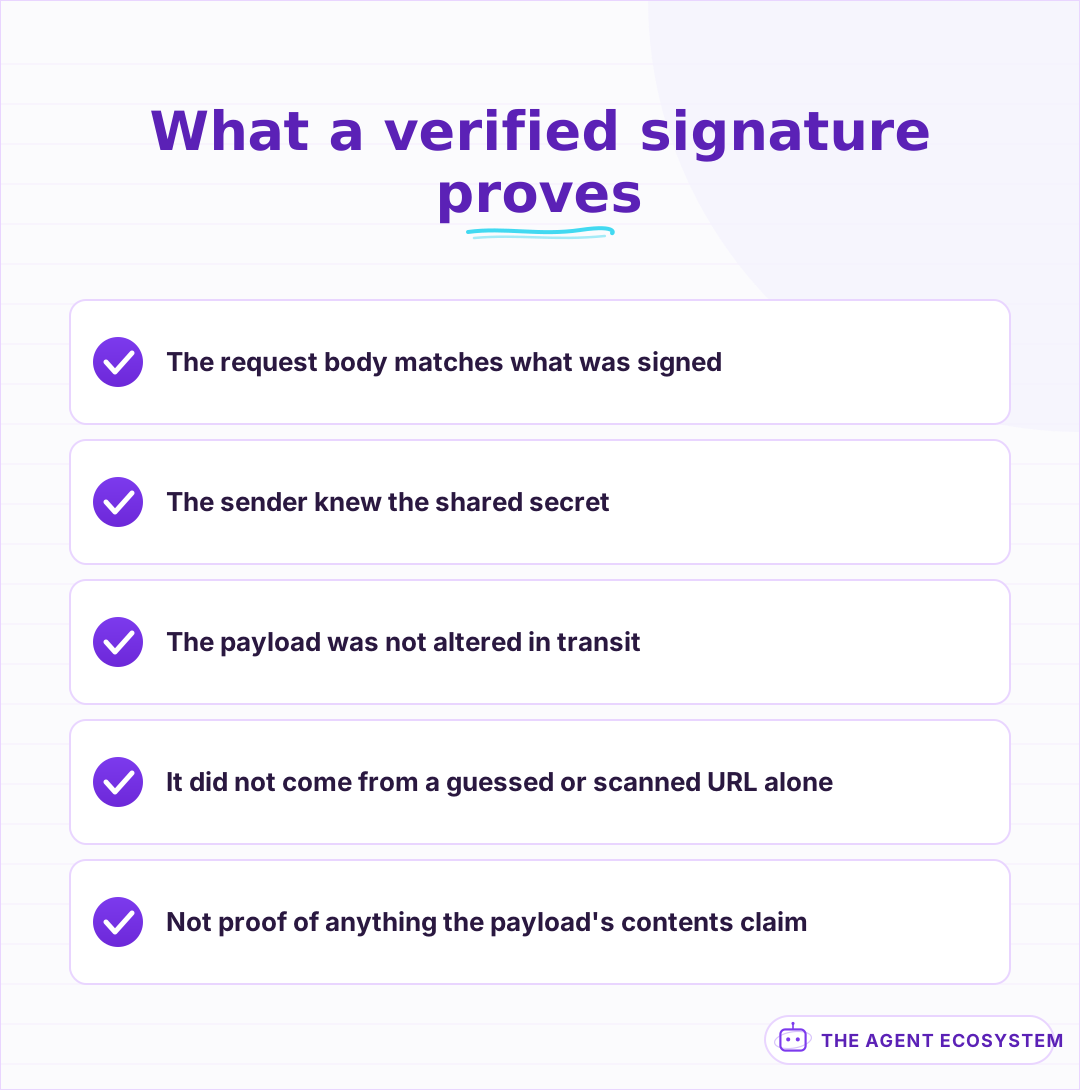 Origin, not just shape; a forged payload can look identical otherwise.
How does n8n actually receive the raw body it needs to verify?#
Signature verification has to run on the exact raw bytes of the request body, not n8n's parsed JSON version of it, since a signature computed over the raw string will not match one computed over a re-serialized object even if the values look identical. Enable raw body mode on the Webhook node so the untouched payload is available.
Here is the gotcha that trips up most first attempts: with raw body enabled, n8n stores it Base64-encoded in $binary.data.data, not as a plain string. Decode it from Base64 to a UTF-8 string in your Code node before hashing anything, or the signature you compute will never match, no matter how correct the rest of the logic is.
This is worth testing in isolation before wiring it into a real workflow. Send 2 or 3 known payloads with a known secret through the decode-and-hash step alone, confirm the output matches a signature you computed independently each time, and only then connect it to the actual verification comparison and the rest of the workflow.
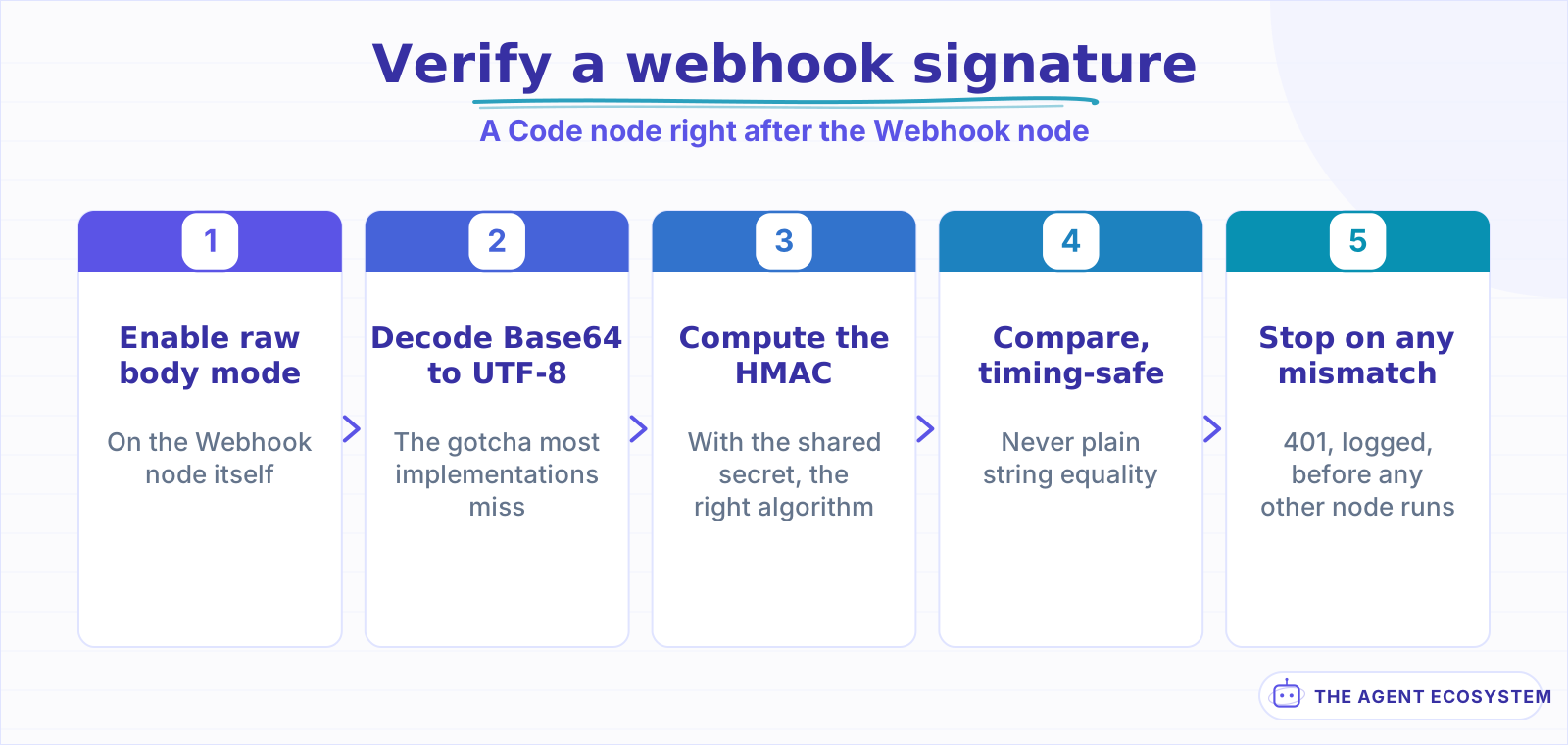 The Base64 decode step is the one most first attempts miss.
How do you compute and compare the signature?#
Add a Code node immediately after the Webhook node: read the raw body, compute an HMAC-SHA256 of it using your endpoint's shared secret, and compare that against the signature the header sent. If they do not match, stop the workflow there and return an error response, before any node downstream touches the payload as if it were trustworthy.
| Step | What it does |
|---|---|
| Enable raw body on the Webhook node | Preserves the exact bytes to hash |
| Decode from Base64 to UTF-8 | The gotcha most implementations miss |
| Compute HMAC-SHA256 with your secret | Recreates what the sender should have sent |
| Compare with a timing-safe function | Avoids leaking the correct signature by timing |
Use a timing-safe comparison function, not a plain string equality check, since a naive comparison can leak information about how much of the signature matched through response-time differences, a genuine, if narrow, side channel.
Store the shared secret as an n8n credential or environment variable, never typed directly into the Code node's script. A secret pasted into node code sits in plain text in the workflow JSON, which means it travels with every export, every backup, and every version-controlled copy of that workflow unless you specifically remember to strip it each time.
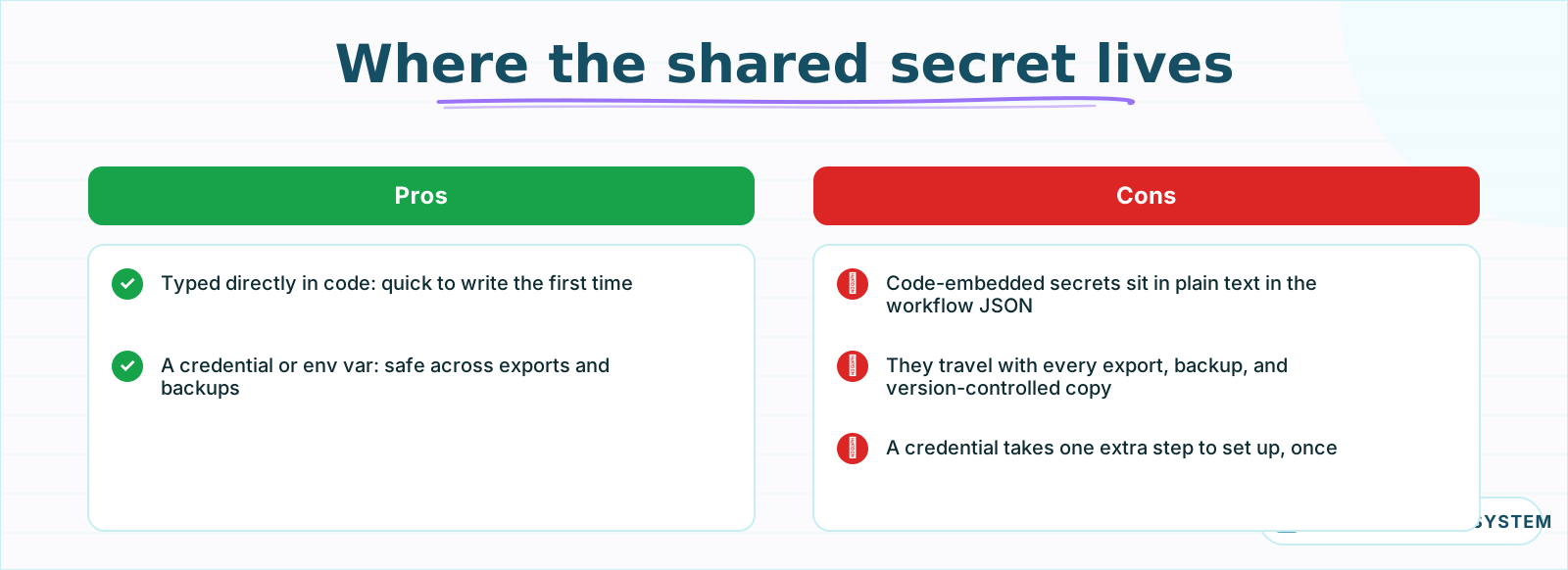 A secret in code travels with every export and backup of the workflow.
Does every provider verify the same way?#
Stripe, GitHub, and Shopify follow close variations of the same pattern: HMAC-SHA256 over the raw body with a header carrying the signature. Twilio's scheme is meaningfully different, it signs the full request URL combined with the sorted POST parameters rather than the raw body alone, so a Stripe-style verification function will not work unchanged against a Twilio webhook.
Check each provider's own current documentation for its exact signing scheme before writing the verification code, rather than assuming every provider works like the first one you implemented; the Shopify order-support agent and the Stripe agent linked above both rely on this same webhook trigger pattern, and each needs its own verification function written against its own provider's docs. The shared secret, the header name, and the exact bytes being signed all vary enough between services that copying a working Stripe verification function onto a Twilio webhook will silently fail.
Write one verification function per provider rather than trying to force a single generic one to handle all of them. The small amount of duplicated code is worth it against the alternative: a clever abstraction that quietly breaks the moment you add a second provider whose scheme does not fit the assumptions the first one baked in.
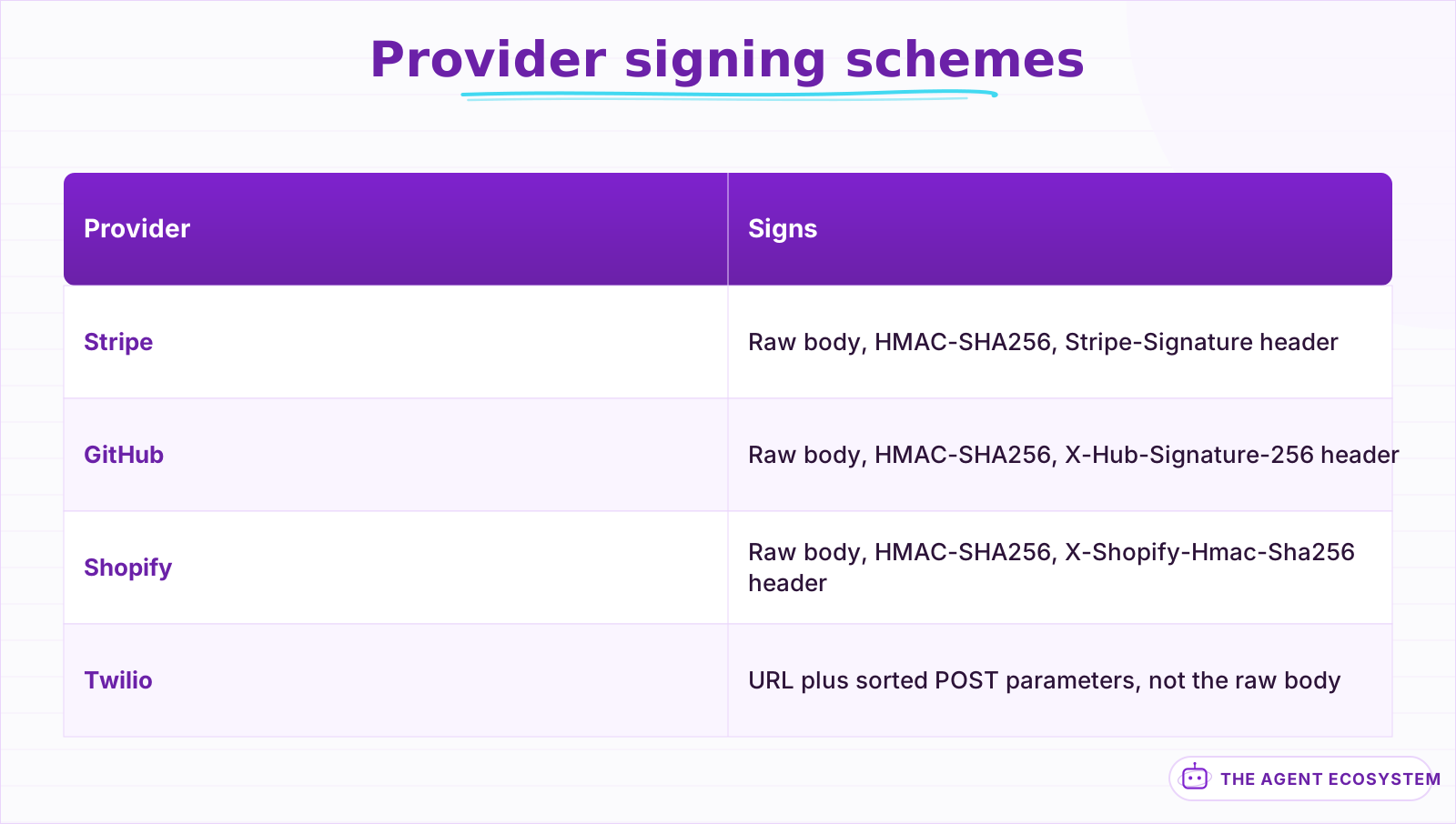 Close variations, except Twilio, which signs something different entirely.
What should happen when verification fails?#
Return a 401 and stop the workflow immediately, before any node that reads the payload's contents runs. A failed verification is not a case for a fallback or a best-effort continuation; it means the request cannot be trusted at all, and processing it partially is not meaningfully safer than processing it fully.
Log failed verifications somewhere you actually check, not silently. A pattern of repeated failures from the same source is worth knowing about even if each individual attempt is harmless, since it can be a sign the endpoint has been discovered and is being probed rather than a one-off misconfiguration on your end.
Rotate the shared secret if you ever suspect it leaked, the same as any other credential, and update it in both the provider's dashboard and your n8n credential or environment variable together, since a mismatch between the two breaks every legitimate request until they agree again.
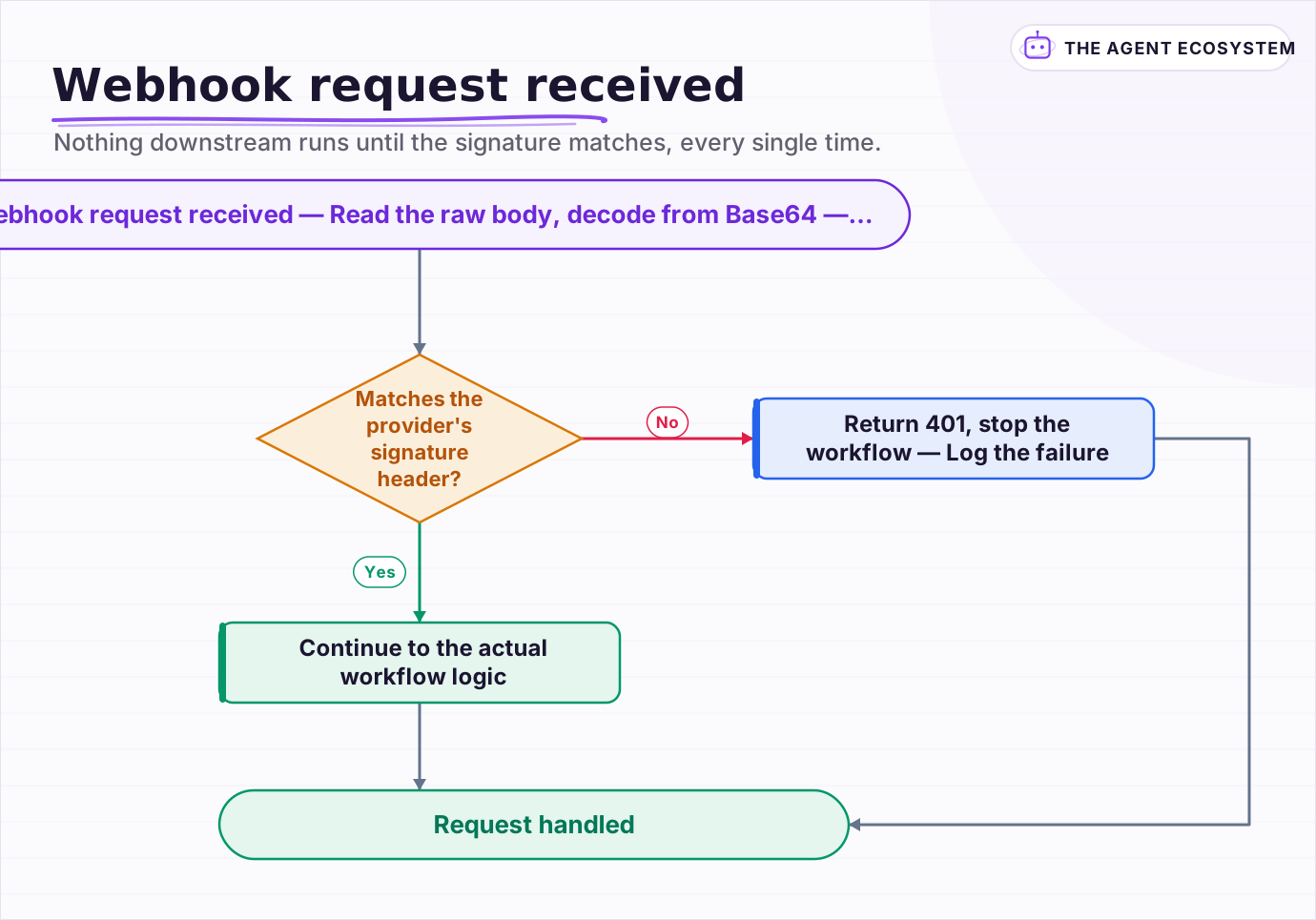 Nothing downstream runs until the signature matches, every single time.
Is this worth the extra setup for every webhook?#
Build it for anything that triggers a real action: a payment record, a call handled, code merged, a customer notified. A purely informational webhook feeding a personal dashboard with no downstream action carries lower stakes, though the setup, usually under 30 minutes the first time, is small enough that skipping it rarely saves meaningful time.
The honest case is simple: an unverified webhook trusts every request that reaches the URL, and a URL is not a secret in any real sense once it exists. The Code node and a shared secret are a small, one-time cost against a category of forged-request risk that costs nothing to avoid and something real to ignore.
Frequently asked questions
Does n8n verify webhook signatures automatically?
Why doesn't my n8n webhook signature verification match?
Do Stripe, GitHub, Twilio, and Shopify all verify webhooks the same way?
What should an n8n workflow do if a webhook signature fails to verify?
Where should the webhook shared secret be stored in n8n?
Sources
Primary references and vendor documentation used while drafting and reviewing this article.
Written by

Muhammad Qasim Hammad is an AI agent and automation expert and the founder of Cart Gaze LLC (cartgaze.com). He builds product for the love of it: when an idea lands, a working prototype is usually running within hours, built with the same AI agents and automations he sells. He puts his own output at roughly 20× what it was before agents, and the Agentic OS behind this site is the working proof, documented in public with the tools he actually ran and what they really cost.
AI & Automation Services
Want a pipeline like this running in your business?
I'm Qasim — I design and ship AI agents and n8n automations for solo operators and small teams. Tell me what's eating your team's week, and I'll scope a fix.
Related reading
n8n Webhook Security: Locking Down Your Endpoints
An open n8n Webhook node answers anyone who finds the URL. This hardening guide covers the node's authentication options, HMAC signature checks on the payload, IP and origin allow-listing, rate limiting at a reverse proxy, and why the test URL never belongs in production.

n8n Webhooks vs Polling: Which Trigger to Use, and Why
Should an n8n workflow fire the instant an event happens (a webhook, push) or check on a timer (polling, pull)? The wrong pick means missed events or wasted executions. Here is the decision framework plus how to wire each trigger.
How to Build an n8n AI Agent for Stripe Billing Support
An n8n AI Agent can look up a customer's charges, invoices, and subscription status and draft a grounded answer to a billing question in seconds. Here is how to wire Stripe in as a read-heavy tool and why refunds and subscription changes should stay gated behind a human
How to Build an n8n AI Agent That Triages GitHub Pull Requests
An n8n AI Agent can read a pull request the moment it opens, label it by size and risk, request the right reviewer, and draft a starting comment, all before a human opens the diff. Here is how to wire GitHub in as a tool and why this is triage, not a replacement for a real
How to Make Your n8n Workflows Reliable: Error Handling, Retries, and Alerts
n8n does zero error handling by default. Learn to add three layers: node retries, inline error outputs, and one Error Workflow that alerts you whenever any workflow fails silently.
How to Build an n8n AI Agent for Shopify Order Support
An n8n AI Agent can look up a Shopify order's real fulfillment status and draft a grounded reply to a "where is my order" question in seconds. Here is how to wire Shopify in as a read-heavy tool, what changed in how Shopify issues API credentials in 2026, and why refunds should