How to Build an n8n AI Agent for Stripe Billing Support
Give an n8n AI Agent read access to Stripe so it can answer billing questions from real data, while every refund and cancellation stays behind a human.
AI-drafted, reviewed by Muhammad Qasim Hammad on August 9, 2026. See our AI disclosure.
Table of contents
A customer emails asking why they were charged twice, and someone on your team has to open Stripe, find the customer, read through charges and invoices, and piece together an answer. Wire n8n's Stripe node into an AI Agent as a tool, and the agent can do that lookup itself: read the question, pull the relevant charges and subscription status, and draft an answer grounded in what Stripe actually shows.
Money is not the place to move fast and loosen guardrails early. Everything in this guide treats reads (looking up a customer, a charge, a subscription) as safe to automate, and treats every write (a refund, a subscription cancellation, a plan change) as something that stays behind a human for as long as you run this, not just the first few weeks.
What can an n8n AI agent actually do with Stripe?#
n8n's Stripe node covers Customers, Charges, Subscriptions, Invoices, Refunds, and Sources as separate resources, each with its own create, get, and list actions, roughly 20 actions across the full node. For a support agent, the ones that matter most are read-only: get a customer by email, list their charges, and get their subscription status.
The Stripe Trigger is genuinely real-time, unlike a polling-based trigger on an app with no webhook: it fires the instant a selected event happens, such as a failed charge or a subscription cancellation, because Stripe pushes the event to n8n directly. That makes Stripe a good fit for time-sensitive workflows like flagging a failed payment the moment it happens, not just answering questions after the fact.
A failed-payment trigger pairs especially well with an agent because the follow-up is usually a judgment call, not a fixed message. A card that failed on a first attempt might just need a friendly retry reminder; a card that has failed 3 times in a row on a long-standing customer is a different, more urgent conversation. Give the agent the customer's payment history alongside the failure event so it can tell those two cases apart before drafting anything.
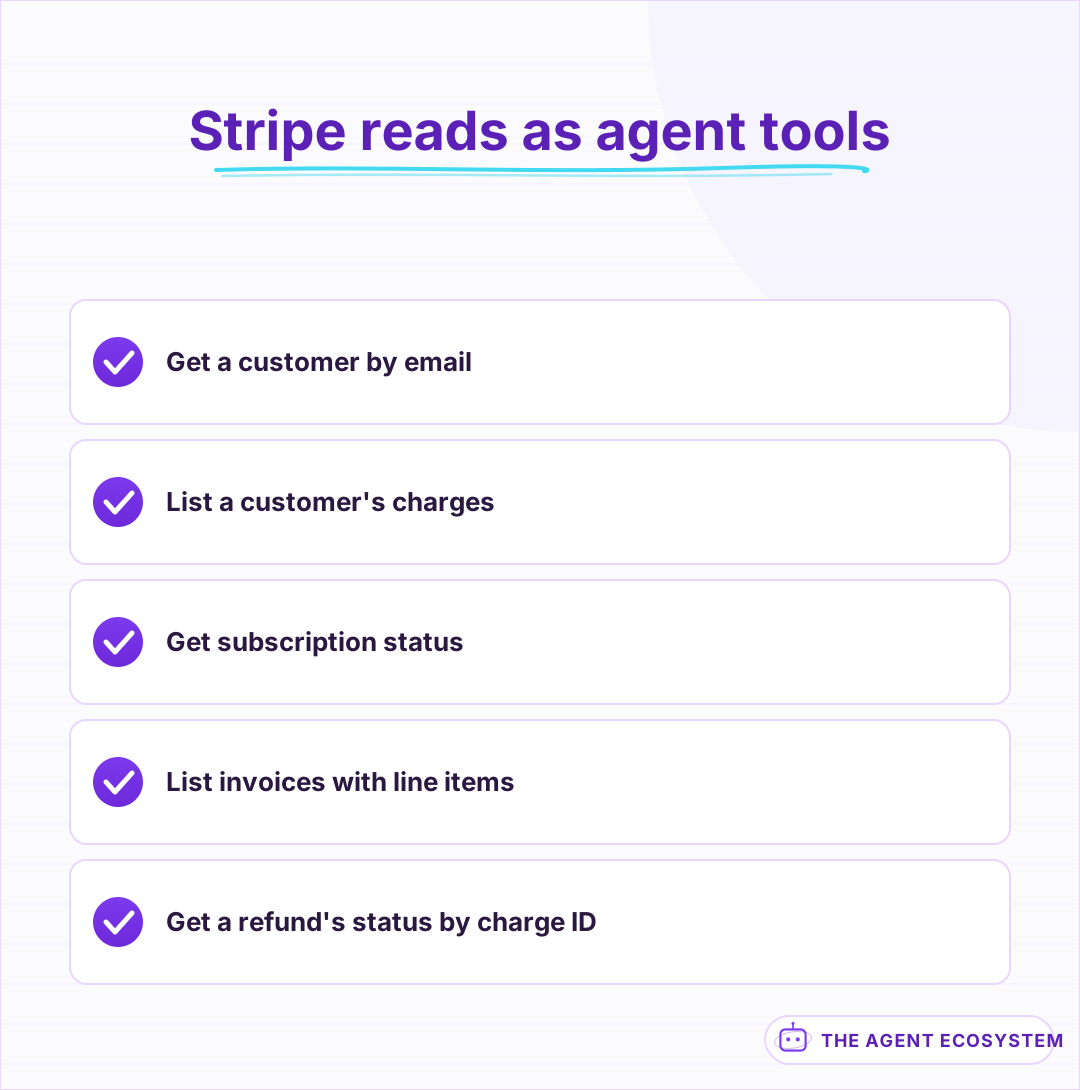 Read-only actions are the safe, useful core of a billing-support agent.
How do you give an n8n AI Agent the Stripe tool?#
Add a Stripe node to the canvas, switch it to Use as Tool, and connect it to your AI Agent node's tool input. Split read tools from write tools explicitly: a get-customer or list-charges tool is safe to let the agent call freely, while a create-refund tool is a different category the agent should only ever propose, never execute directly.
Tool descriptions the model can actually use should say exactly that: tell the model in plain language that refund and cancellation tools require a human to confirm before anything runs, and lean on n8n's human-in-the-loop pattern to enforce it structurally, not just as a suggestion in the prompt. The core mechanics of giving an n8n agent tools still apply; Stripe just has a lower tolerance for a wrong guess than most connected apps.
Use restricted API keys rather than your account's full secret key. Stripe lets you create a key scoped to exactly the resources this workflow needs, read-only on Charges and Subscriptions with no write access at all, so that even a bug in the workflow or a leaked credential cannot execute a refund it was never supposed to be able to make.
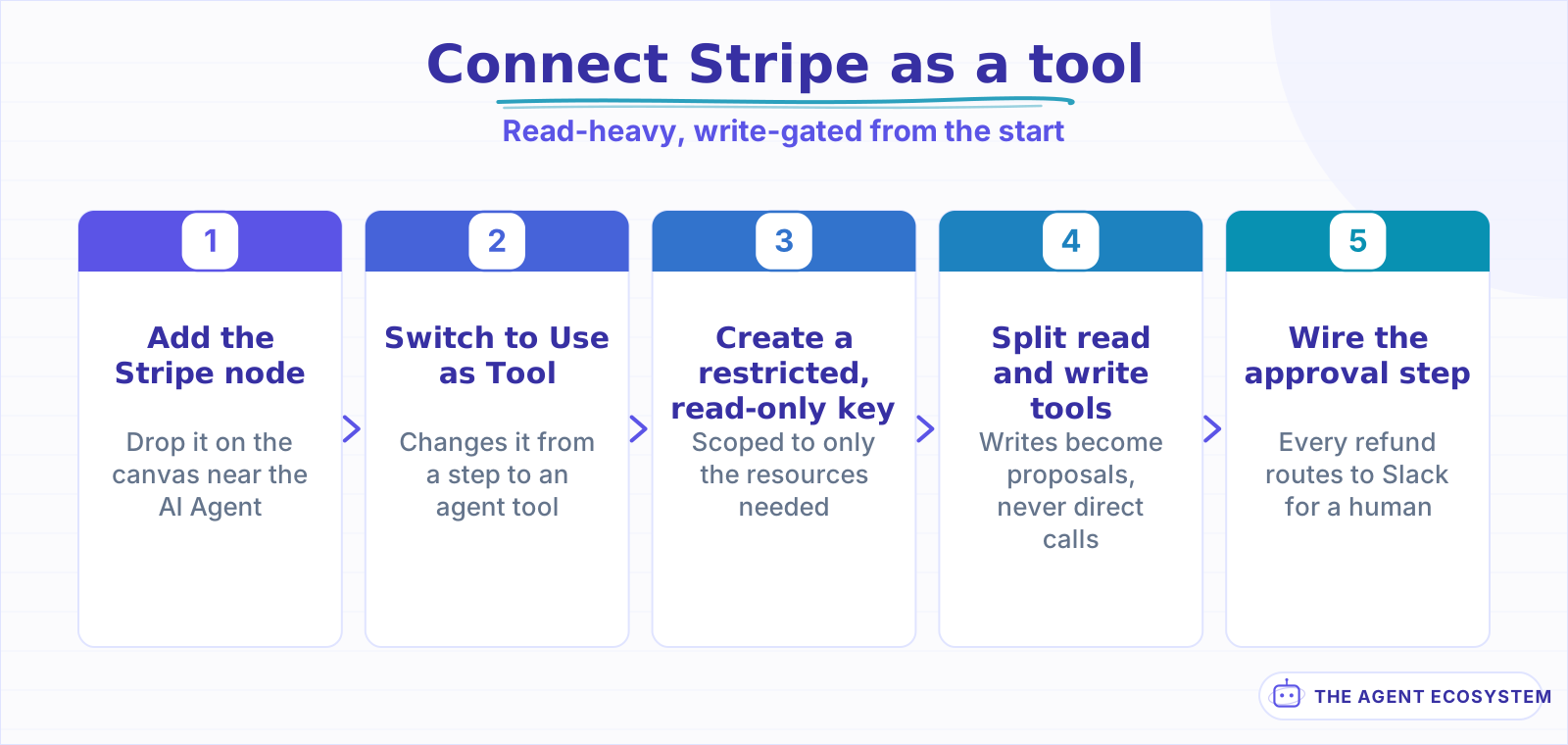 The restricted-key step is the one that limits the damage if anything goes wrong later.
What does a billing-support agent actually answer?#
Picture a support inbox message: "why was I charged twice this month?" The agent looks up the customer by email, lists their charges for the current billing period, and can usually see the real answer in the data itself, such as a plan upgrade that prorated a second charge instead of an error.
Keep the agent's job to reporting what Stripe shows, not deciding what should happen next. "You were charged $29 on the 3rd for your regular renewal and $14 on the 12th as a prorated charge for upgrading to the Pro plan" is a grounded, checkable answer built from real data. "That looks like a mistake, you should get a refund" is a judgment call that belongs to a human, even when the agent is right.
Give the agent access to Invoices alongside Charges, not just one or the other. A charge shows what was taken; the matching invoice shows why, with line items that explain a proration or a one-time add-on a customer forgot about. An agent that only sees the charge amount and not the invoice behind it ends up describing the number without explaining it, which reads as evasive even when nothing is wrong.
| Customer question | What the agent reads | What it should not decide |
|---|---|---|
| Why was I charged twice? | Charges list for the period | Whether it was a mistake |
| Is my subscription still active? | Subscription status | Whether to cancel it |
| Did my refund go through? | Refund status by charge ID | Whether to issue a new one |
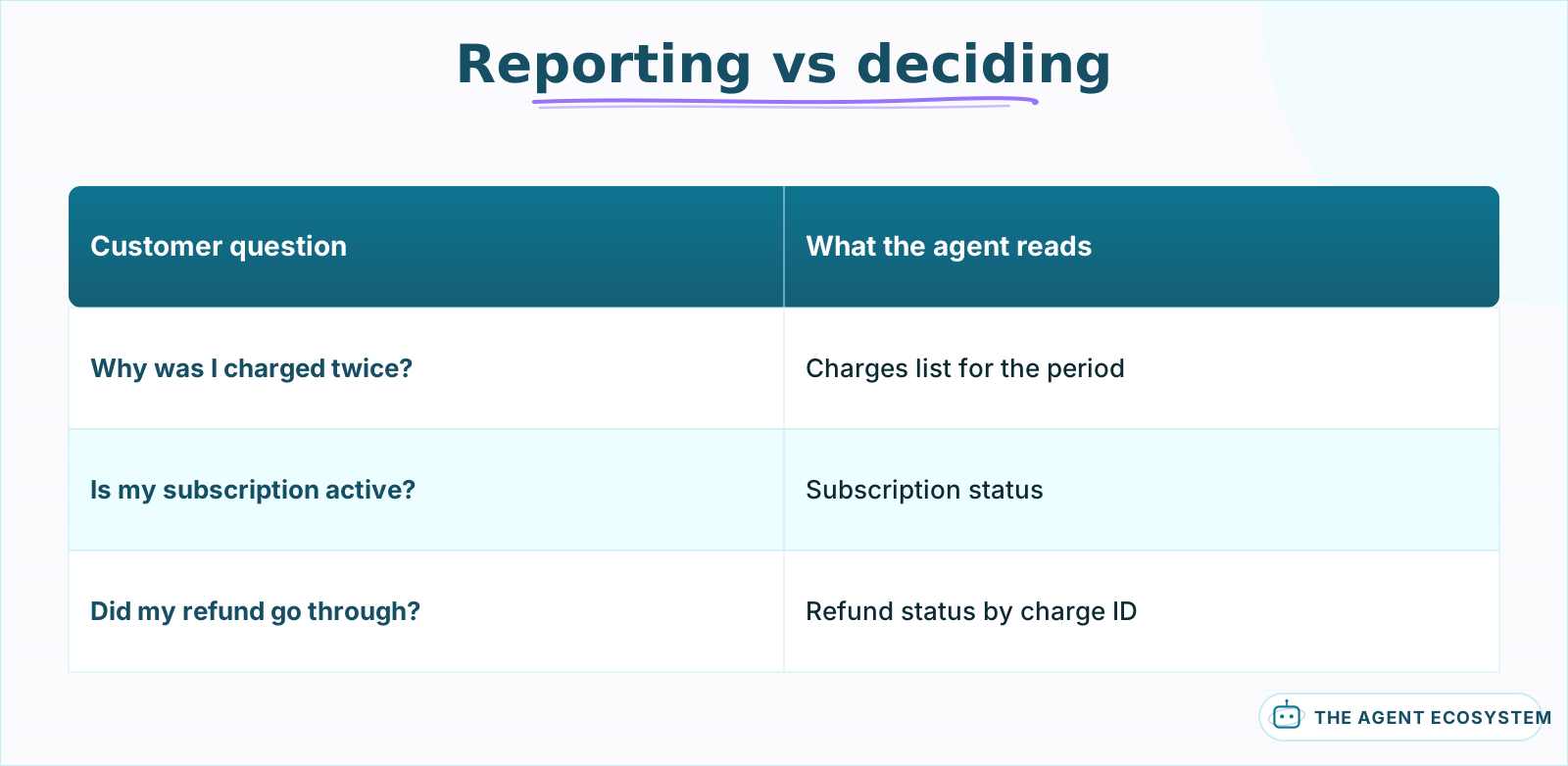 The agent reports what Stripe shows; a human still makes the judgment call.
How do you handle refunds and subscription changes safely?#
A refund or a cancellation should never be a direct tool call the agent executes on its own. Structure it as a two-step flow: the agent reads the situation and drafts a specific, concrete proposal, and a human approves or edits that exact proposal before a separate, human-triggered action executes it in Stripe.
For example, the agent might propose "refund the $14 proration charge from the 12th" rather than a vague "issue a refund," so the reviewer is confirming an exact amount and charge ID, not filling in the specifics themselves.
This is stricter than the approval pattern on a CRM or a workspace tool, where a lower-risk write can eventually run automatically once the agent has earned trust. Money does not get that same loosening; keep every refund and every subscription change gated indefinitely, no matter how long the agent has been running cleanly, because the cost of one wrong automated refund is not proportional to how many correct ones came before it.
Mechanically, the proposal step is a small addition to the workflow. The agent's drafted proposal, customer, charge ID, amount, and reason, goes to a Slack message with Approve and Reject buttons; n8n pauses at that node until a person responds, and only an approved proposal reaches a separate action that a human explicitly confirmed, never one the agent triggers on its own path. A rejected proposal can carry a note back to the agent, so the next draft reflects the correction instead of repeating the same mistake.
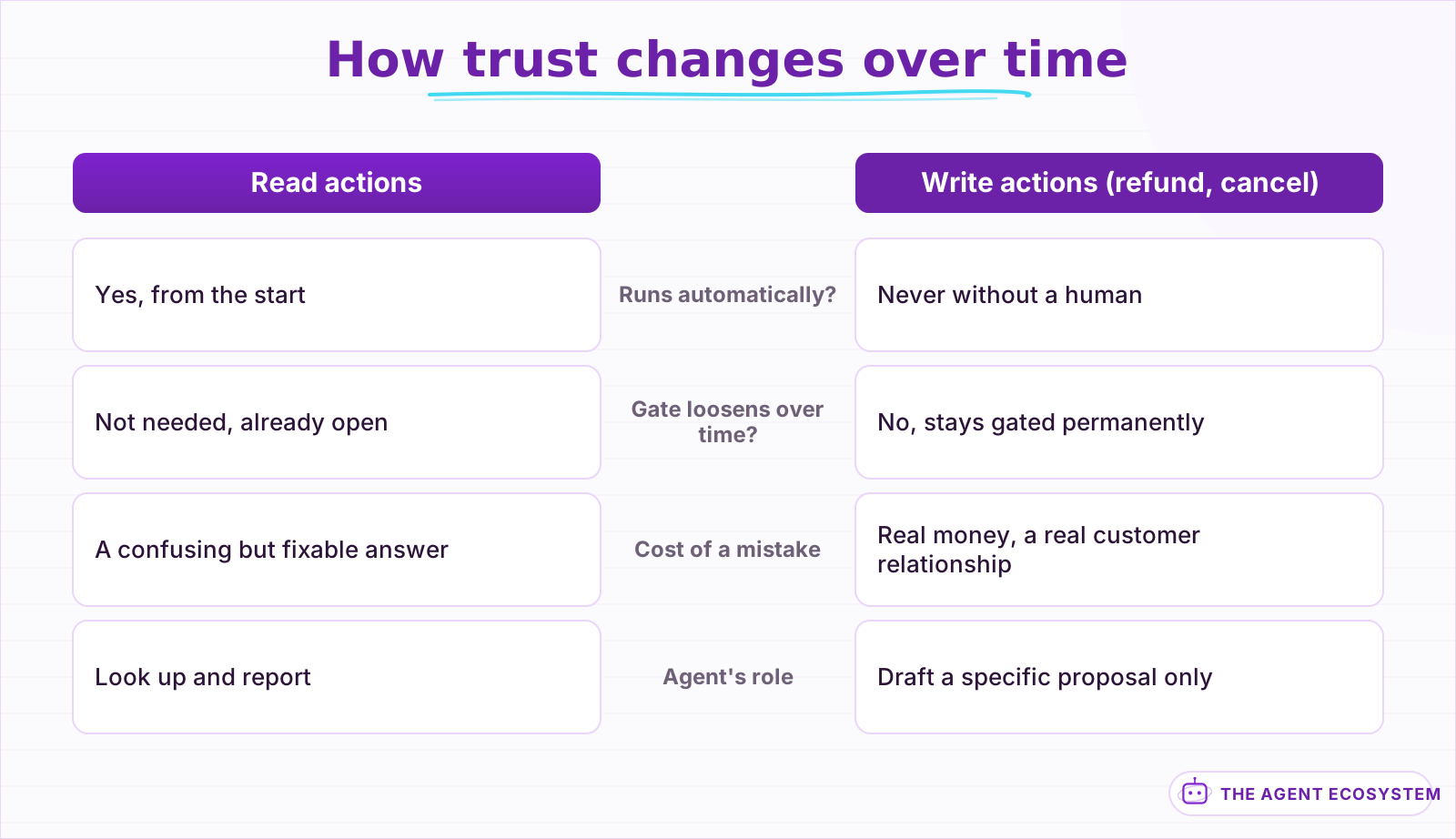 Reads loosen no differently than any other agent. Writes never do.
What breaks, and how do you debug it?#
Most errors are Stripe rejecting an amount or an ID that does not match what actually exists: a refund request for more than the original charge, a customer ID from test mode used against a live-mode key, or a currency mismatch on a multi-currency account.
Turn on Return Intermediate Steps on the AI Agent node and read the exact charge ID and amount the agent pulled before it reaches the proposal stage. Confirm your Stripe API key's mode, test or live, matches the data you expect to see; a test-mode key returns test customers and charges that look real but do not exist in your live account, which is a common source of a lookup that finds nothing. The general agent-not-working checklist covers the credential and permission failures that show up the same way across every connected app.
Currency and amount formatting cause a second class of near-misses. Stripe stores amounts in the smallest currency unit, cents for US dollars, so a tool that reads 2900 and a description that says "$29.00" both need to agree on that conversion; an agent working from the raw integer without knowing the convention can misstate a charge by a factor of 100 in either direction. State the unit explicitly in the tool description rather than assuming the model infers it correctly every time.
Is this worth building versus Stripe's own tools?#
Stripe's own dashboard already has a solid search and a support-focused customer view, and for a small volume of billing questions, a human using that dashboard directly is often faster than building an agent. Build this when the volume is high enough that the lookup itself, not the judgment call, is the bottleneck.
The honest case for this pattern is speed on the reporting step, not a smarter decision than a human would make. An agent that pulls the right charges and drafts a clear, checkable summary in seconds saves real time on every ticket; it should never be the thing that decides whether a customer gets their money back. Keep that call, and the click that executes it, with a person every time.
Where this earns its cost is consistency across a support team, not just speed for one person. Every agent-drafted answer reads the same live data through the same tools, so 2 different support reps handling similar tickets get answers grounded in the same source instead of one checking Stripe carefully and another going from memory of how proration usually works.
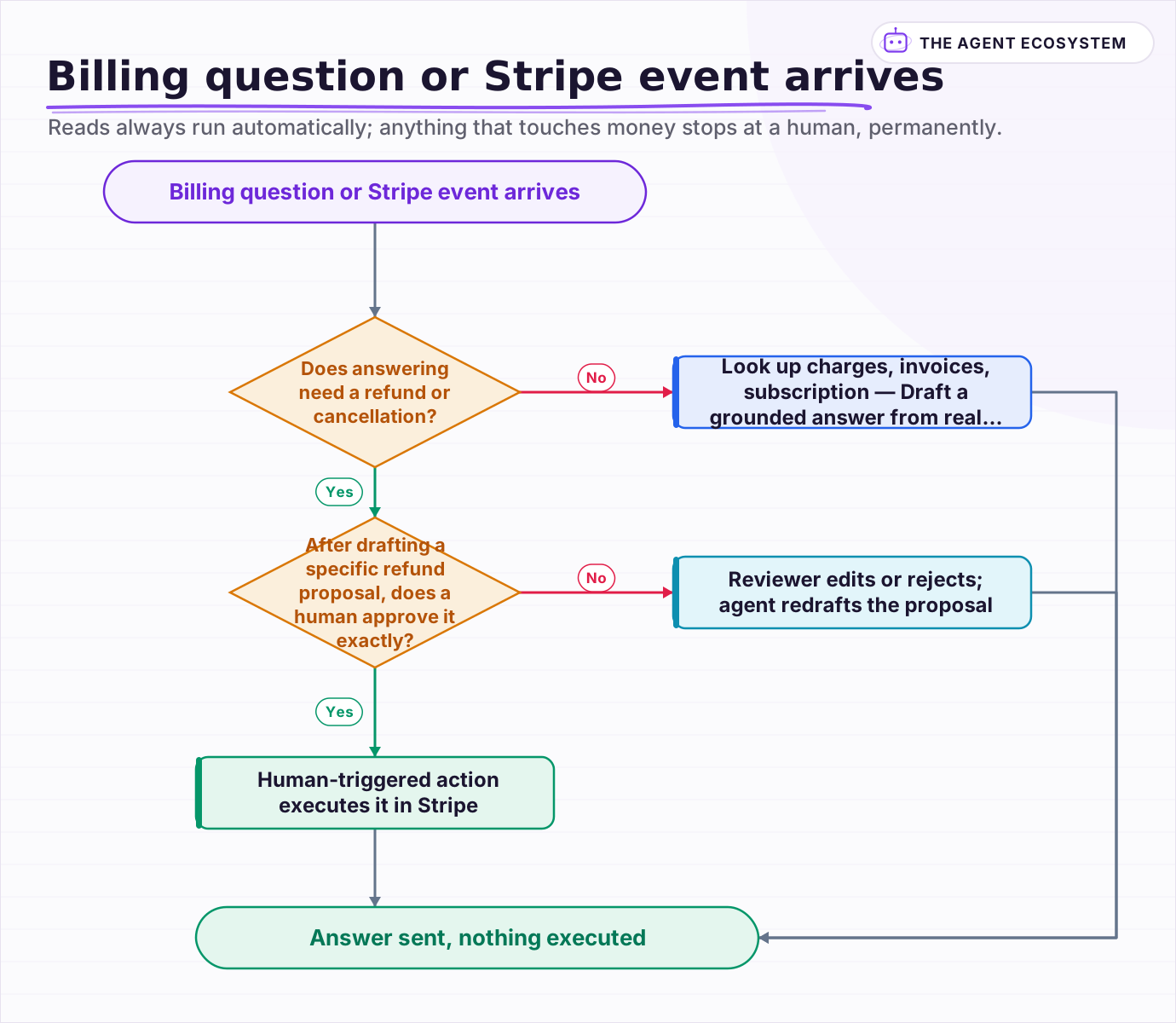 Reads always run automatically; anything that touches money stops at a human, permanently.
Frequently asked questions
Can an n8n AI Agent answer billing questions using real Stripe data?
Should an AI agent be allowed to issue Stripe refunds automatically?
Is the n8n Stripe Trigger real-time?
Why did my n8n Stripe agent misstate a charge amount?
What Stripe API key should I use for a billing-support agent?
Sources
Primary references and vendor documentation used while drafting and reviewing this article.
Written by

Muhammad Qasim Hammad is an AI agent and automation expert and the founder of Cart Gaze LLC (cartgaze.com). He builds product for the love of it: when an idea lands, a working prototype is usually running within hours, built with the same AI agents and automations he sells. He puts his own output at roughly 20× what it was before agents, and the Agentic OS behind this site is the working proof, documented in public with the tools he actually ran and what they really cost.
AI & Automation Services
Want a pipeline like this running in your business?
I'm Qasim — I design and ship AI agents and n8n automations for solo operators and small teams. Tell me what's eating your team's week, and I'll scope a fix.
Related reading
How to Build an n8n AI Agent for Shopify Order Support
An n8n AI Agent can look up a Shopify order's real fulfillment status and draft a grounded reply to a "where is my order" question in seconds. Here is how to wire Shopify in as a read-heavy tool, what changed in how Shopify issues API credentials in 2026, and why refunds should

How to Build an n8n AI Agent That Triages Zendesk Tickets
An n8n AI Agent can read a new Zendesk ticket, tag and prioritize it against rules you define, and route it to the right group, all before a human opens it. Here is how to wire Zendesk in as a tool, avoid the tag-replacement trap that silently deletes existing tags, and keep
How to Build an n8n AI Agent That Manages Your Notion Workspace
An n8n AI Agent can create Notion pages, update database properties, and search your workspace from a single chat message. Here is how to wire the Notion node in as a tool, design a schema the agent can map to reliably, and gate every write behind a human check.
Give Your n8n AI Agent Tools (Calculator, HTTP, Workflows)
Your n8n AI Agent answers from stale training data until you attach real tools. This guide shows you exactly how to wire HTTP Request, Calculator, and Workflow tools so your agent acts on live data.
How to Automate Customer Support with AI Without Losing People
The fastest way to damage a small business with AI is to put a bot in front of customers before it knows when to stop. Twelve lessons on triage before answers, grounding in your own documentation, escalation that carries context, and why deflection rate flatters you.
Add Human Approval to an n8n AI Agent (Send and Wait)
Your n8n AI agent can send emails, issue refunds, and delete records. Gate the irreversible ones with Send and Wait for Response. Here is the exact build, the decision table, and what can go wrong.