Why Your n8n AI Agent Isn't Working: 6 Failure Modes and Fixes
The 6 ways the AI Agent node fails in production, and the node setting that fixes each one.
AI-drafted, reviewed by Muhammad Qasim Hammad on July 30, 2026. See our AI disclosure.
Table of contents
- Where do n8n AI Agents actually break?
- Why won't my n8n AI Agent call its tools?
- What does "agent stopped due to max iterations" mean?
- Why does my n8n agent forget the conversation?
- Why is my agent's output not valid JSON?
- How do you see what the agent is actually doing?
- How do you work through a stuck agent, step by step?
Your n8n AI Agent runs without a red error, but the result is wrong. It ignores the tools you connected, loops until it quits, forgets the last message, or hands back plain text where you expected clean JSON. Most n8n AI Agent failures are configuration problems, not model problems, and they fall into 6 patterns that each have a specific setting behind them.
This guide walks through those 6 failure modes in the order you are most likely to meet them, with the exact node option to check for each one. If the Agent node itself is still new to you, read what an AI agent actually is and how the Agent node differs from a plain LLM chain first, then come back here when something breaks.
Where do n8n AI Agents actually break?#
Agent failures cluster into 6 areas: the model, the tools, the iteration limit, the memory, the output parser, and the prompt. The node rarely throws a red error for any of them. Instead it finishes green and returns a result that is empty, wrong, or shaped differently than you expected, which is exactly why they are hard to spot.
Here is the fast lookup. Match the symptom to the likely cause, then jump to the section that explains the fix.
| Symptom | Likely cause | Where to look |
|---|---|---|
| Agent ignores every tool | Model cannot call tools, or descriptions are vague | Model sub-node and each tool's Description |
| "Agent stopped due to max iterations" | Loop limit hit, often a tool that keeps failing | Max Iterations option |
| Replies forget the last message | Session Key is static, or memory is not attached | Memory sub-node Session Key |
| Output is text, not JSON | A parser wired straight onto the agent | Output parser wiring |
| Same wrong answer every run | System message is steering it the wrong way | System Message option |
| Runs are slow and cost too much | Too many loops or a bloated context window | Intermediate steps and memory window |
Why won't my n8n AI Agent call its tools?#
The most common cause is the model. An AI Agent needs a chat model that supports function or tool calling, and a few model nodes do not, so the agent quietly skips every tool you attached. The second cause is weak wording, because the agent chooses tools by reading their Name and Description, so vague labels get passed over.
Start by confirming the model. If you wired a model that cannot call tools, such as a plain completion model, the agent has no way to invoke anything and will answer from memory alone. Swap in a tool-capable chat model and the tool calls appear.
If the model is fine, the problem is usually the tool metadata. The agent never sees your node names on the canvas; it sees the Name and Description fields you filled in. A tool called tool1 with a blank description is invisible to the model's reasoning. Give each tool a plain-language name and a one-line description of when to use it. This is worth its own read: see why tool descriptions decide everything and the walkthrough on giving an agent tools in n8n.
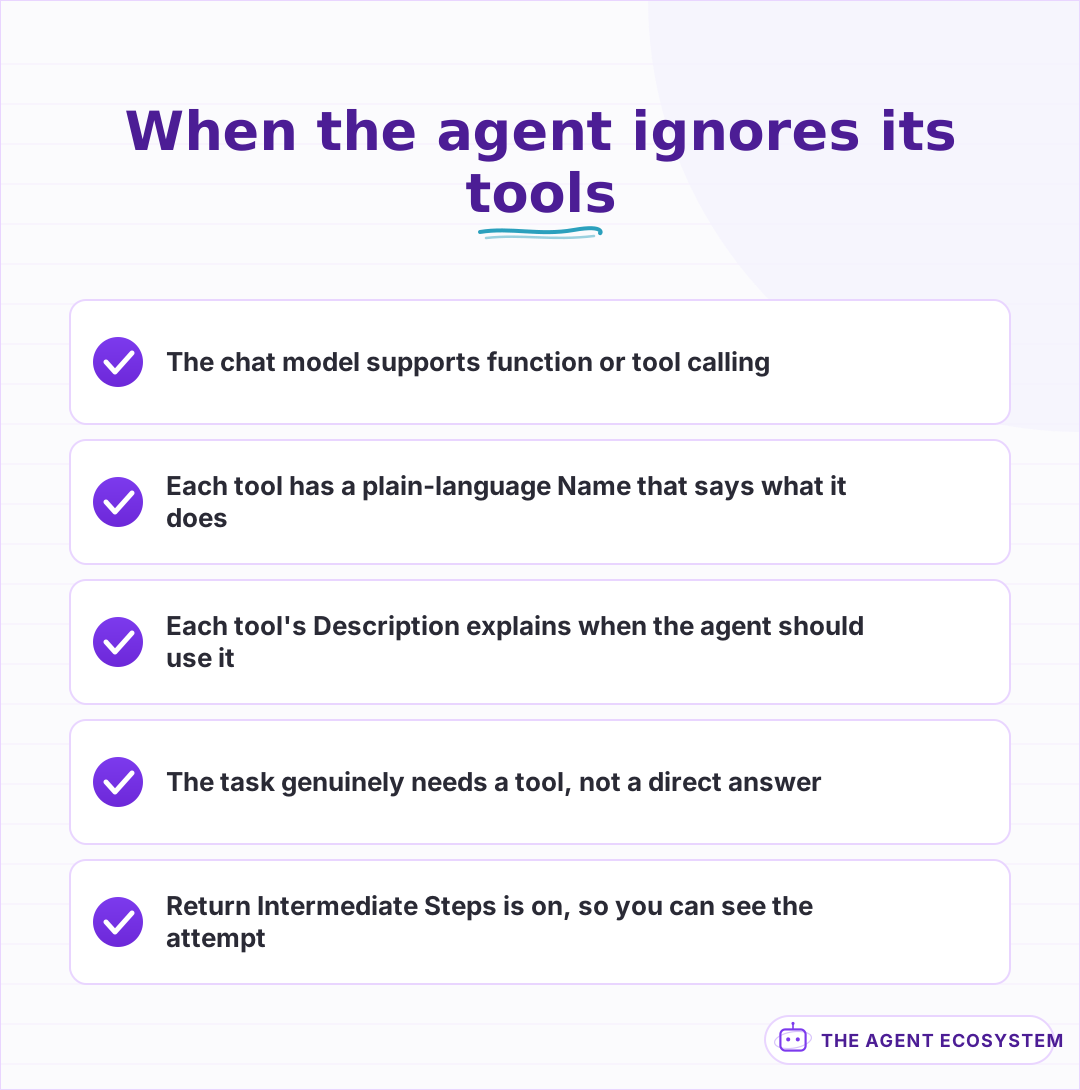 The agent reads names and descriptions, not your canvas layout. Confirm the model can call tools and that each tool tells the agent when to use it.
What does "agent stopped due to max iterations" mean?#
Every AI Agent has a Max Iterations option that caps how many tool loops it runs before giving up. When the field is unset, n8n defaults to 10. Hitting that ceiling usually means a tool keeps failing or returning nothing, so the agent retries the same step until it runs out of loops.
The tempting fix is to raise the number. Sometimes that is correct, because a genuine multi-tool task can need more than 10 steps. More often, a higher limit just delays the same failure and burns more tokens on the way. The real move is to open the run and find the step that keeps failing, then repair that tool or its input. A tool that throws on every call, or an API that returns an empty body, is the usual culprit, and proper error handling around it stops the loop at the source.
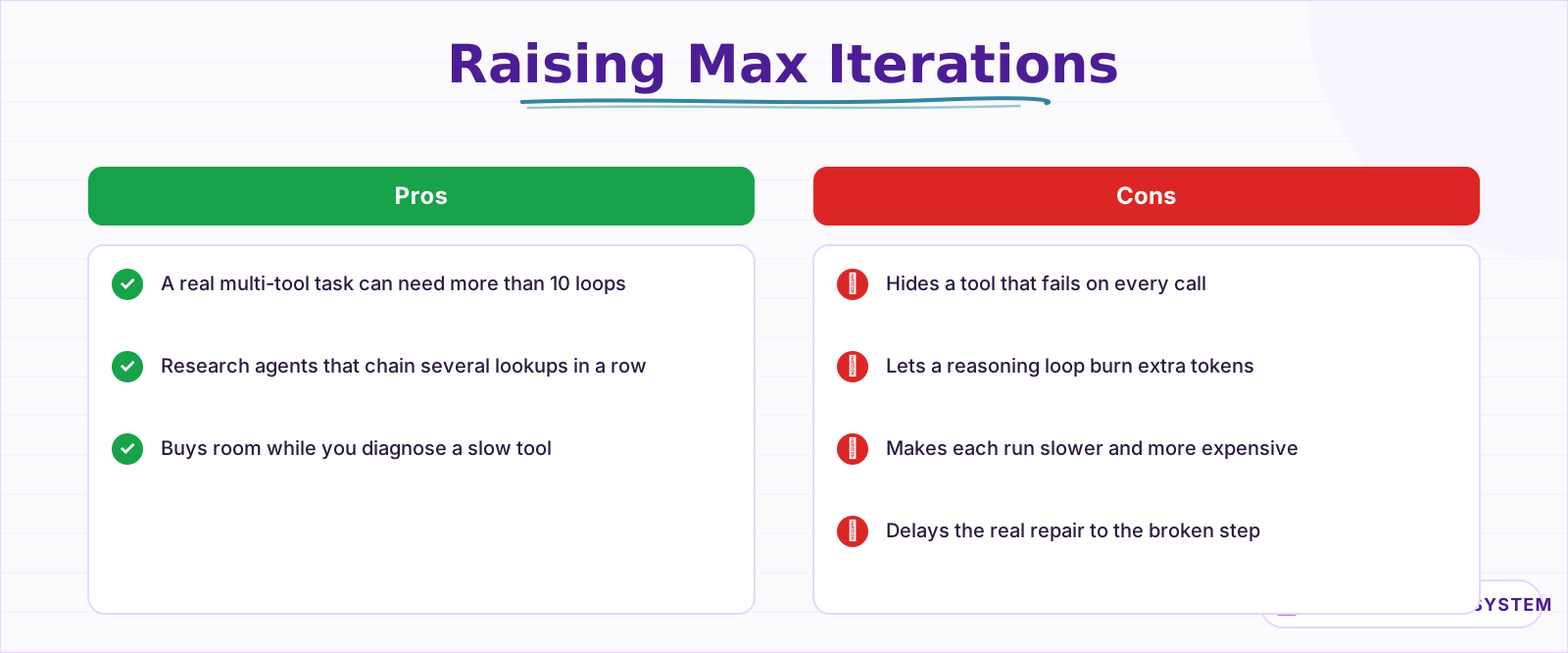 A higher limit helps a genuine multi-tool task, but often it just hides a tool that fails every loop. Read the steps before you raise the number.
Why does my n8n agent forget the conversation?#
Memory is a separate sub-node, and 2 settings decide whether it works. The Session Key tells the agent which conversation to load, so a static key merges every user into one shared thread and a missing memory node makes each message start from a blank slate. The Context Window Length then controls how many past turns the agent actually sees.
The Session Key is where most memory bugs live. If you hard-code it to a constant, one careless value can pool 100 different people into a single history, and the agent answers user B with user A's context. Bind the key to something unique per conversation, such as the chat or user id from the trigger. For the Context Window Length, too small a number loses the thread mid-chat, while too large a number pushes old turns into every prompt and drives up cost. If you are unsure which memory type fits, the breakdown of n8n agent memory types covers the trade-offs.
Why is my agent's output not valid JSON?#
When you need structured output, wiring a Structured Output Parser straight onto the agent is unreliable, because the tool-calling loop and the parser fight over the same response. n8n's own guidance is to parse in a separate step: use the Auto-fixing Output Parser, or hand the raw answer to a dedicated LLM chain.
There is a second subtlety. The Structured Output Parser is meant for the agent's final answer, not for shaping the intermediate steps it takes along the way. If you want a specific format inside the reasoning, describe that format in the System Message instead of leaning on the parser. And when a model still wraps its JSON in markdown fences, a small Code node that extracts and validates the block is the reliable last line of defense. The structured output guide has the full wiring.
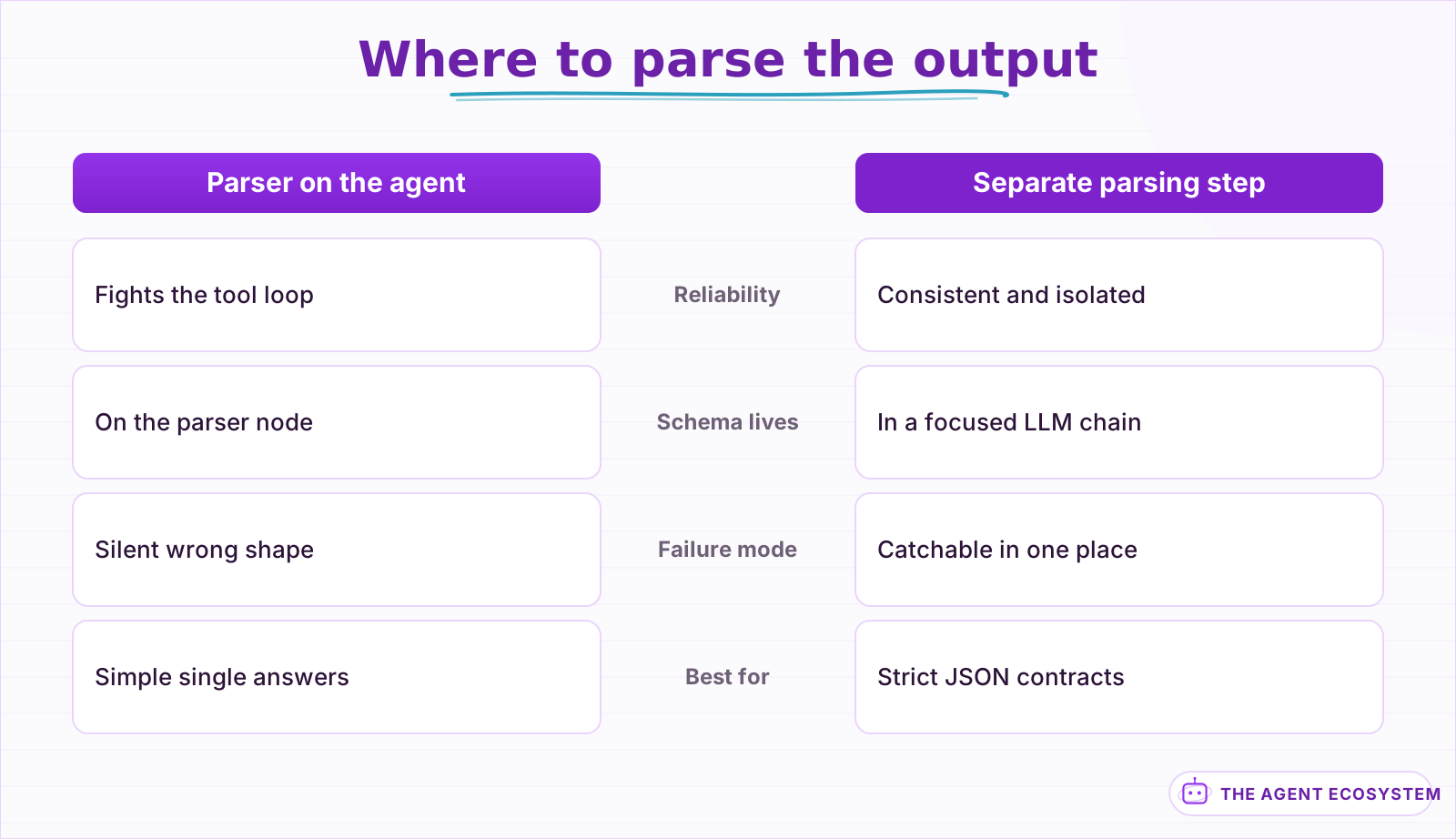 Parsing directly on the agent fights the tool loop. A separate parsing step is more consistent and keeps the schema in one predictable place.
How do you see what the agent is actually doing?#
You cannot debug what you cannot see, and by default the Agent node hides its reasoning. Turn on the Return Intermediate Steps option and the node adds an intermediateSteps field to its output, listing every tool it called, the input it sent, and what came back. That single field turns guessing into reading.
With intermediate steps visible, debugging becomes mechanical. Reproduce the bad run, open the output, and look at the sequence of tool calls. You will usually see the problem straight away: no tool call at all, the wrong tool, a tool called with garbled input, or a tool that returned an error the agent then ignored. Pair this with the n8n execution log, which shows each sub-node's input and output, and the same discipline you would use to test and evaluate agents applies to a one-off bug hunt.
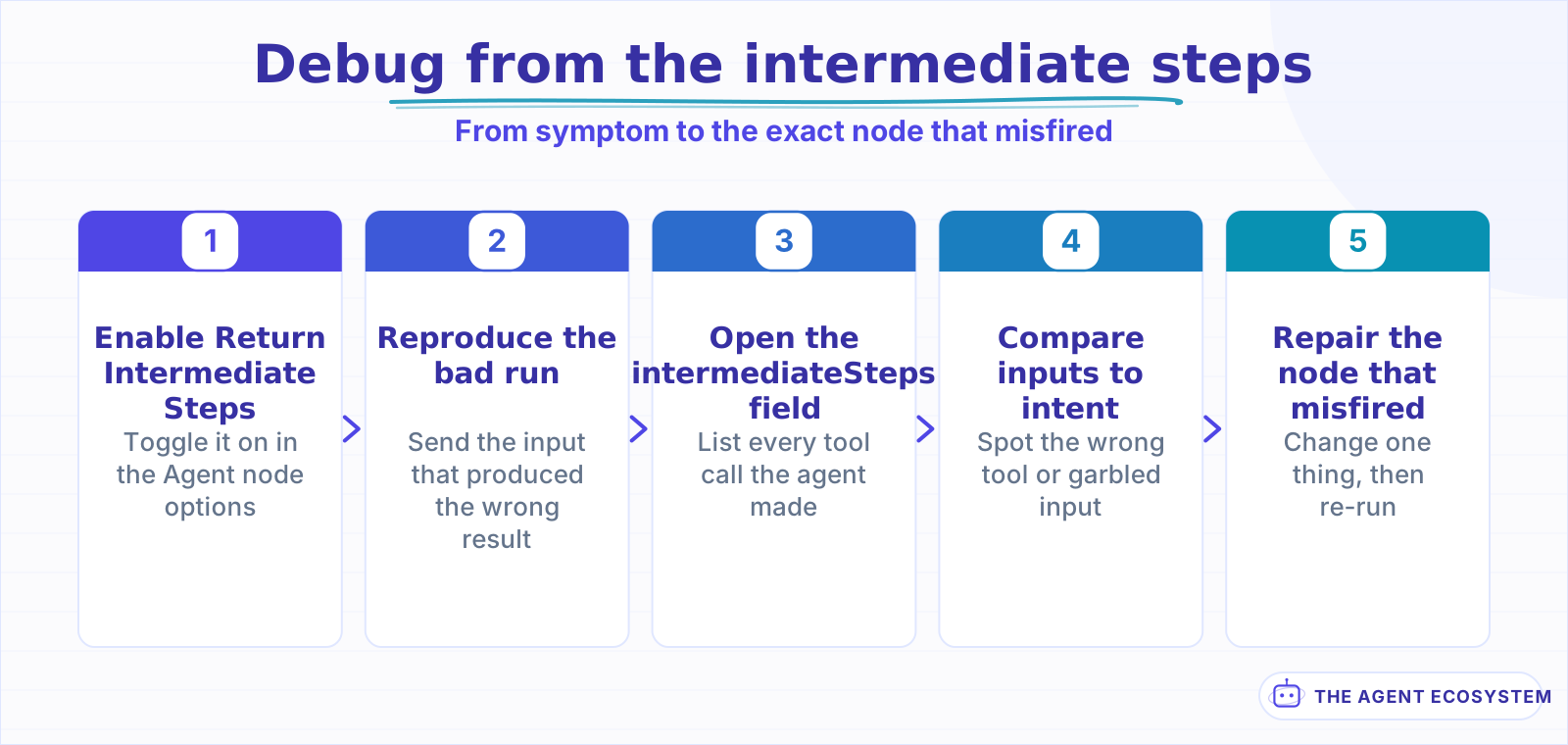 Intermediate steps turn a guessing game into reading. Reproduce the run, list the tool calls, and compare them to what you intended.
How do you work through a stuck agent, step by step?#
Work from the outside in: confirm the model can call tools, then the tools, the loop limit, memory, and the parser. The decision path below runs those 5 checks in order, so you stop at the first one that explains the behavior instead of changing several settings at once and hoping one of them helped.
The point of a fixed order is that the early checks are also the most common causes, so you rarely reach the end. A tool-blind model and vague descriptions account for most "it ignores my tools" reports, and a failing tool accounts for most iteration-limit stops. Change one thing, re-run with intermediate steps on, and read the result before you touch the next setting.
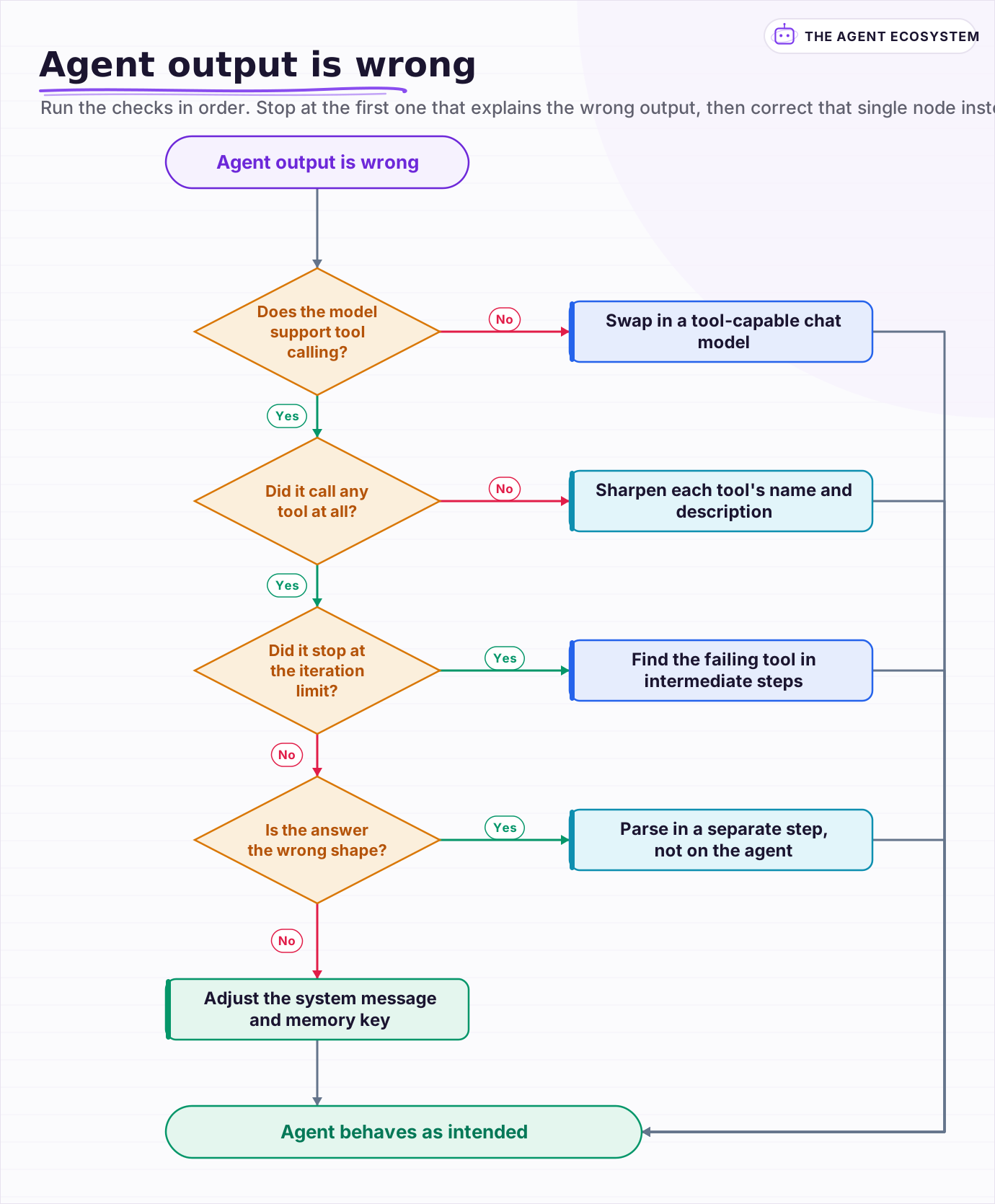 Run the checks in order. Stop at the first one that explains the wrong output, then correct that single node instead of changing everything at once.
Frequently asked questions
Why is my n8n AI Agent not calling its tools?
What does 'Agent stopped due to max iterations' mean in n8n?
Why does my n8n AI Agent keep forgetting the conversation?
How do I get valid JSON out of an n8n AI Agent?
How do I debug an n8n AI Agent that returns the wrong answer?
Sources
Primary references and vendor documentation used while drafting and reviewing this article.
Written by

Muhammad Qasim Hammad is an AI agent and automation expert and the founder of Cart Gaze LLC (cartgaze.com). He builds product for the love of it: when an idea lands, a working prototype is usually running within hours, built with the same AI agents and automations he sells. He puts his own output at roughly 20× what it was before agents, and the Agentic OS behind this site is the working proof, documented in public with the tools he actually ran and what they really cost.
AI & Automation Services
Want a pipeline like this running in your business?
I'm Qasim — I design and ship AI agents and n8n automations for solo operators and small teams. Tell me what's eating your team's week, and I'll scope a fix.
Related reading
AI Agent Guardrails: Stop Your n8n Agent From Going Off the Rails
An AI agent is a language model with hands. Without guardrails it can follow a malicious instruction, leak data, loop until your bill spikes, or return output the next node cannot parse. This guide maps the five ways an n8n agent breaks to the exact control that stops each.

How to Build an AI Agent: The 80% That Survives Week Two
Most tutorials get you a working agent in ten minutes and skip what breaks it in week two. Sixteen lessons covering the loop, tool descriptions, memory, fallbacks, guardrails, evaluation, and the cost levers that decide your bill.
Give Your n8n AI Agent Tools (Calculator, HTTP, Workflows)
Your n8n AI Agent answers from stale training data until you attach real tools. This guide shows you exactly how to wire HTTP Request, Calculator, and Workflow tools so your agent acts on live data.
n8n AI Agent Too Slow? Latency and Cost Fixes
A slow n8n AI Agent is usually doing more work than the task needs: too many tool loops, too big a context, or too heavy a model. Latency and cost come from the same place, the model calls, so here is how to measure them and the levers that cut both at once.
n8n AI Agent vs Chain: Which Should You Use? (2026)
Every n8n builder reaches for the AI Agent by reflex, but a Basic LLM Chain costs roughly 5x less per 1,000 runs on Haiku 4.5. Learn the one mechanical rule that decides which node to use.
AI Agent Observability: Tracing, Metrics, and Cost in Production
Your agent gave a wrong answer and you have no idea where it broke. Observability captures the run (every LLM call, tool call, prompt, and cost) so you can replay it and point at the exact failing step. Here are the three pillars, what to log per step, and when a dedicated tool