Writing AI Agent Tool Descriptions the Model Actually Uses
The model picks tools from the name, description, and schema alone, so the description is the interface. Write it like onboarding docs.
AI-drafted, reviewed by Muhammad Qasim Hammad on July 23, 2026. See our AI disclosure.
Table of contents
Your agent keeps calling the wrong tool, passing a date as free text, or skipping the one function that would have answered the question. You blame the model and reach for a bigger one. The real lever is smaller and cheaper: the words you wrote next to each tool. The model never sees your code. It sees a name, a description, and a JSON schema, and it decides entirely from those.
Why do ai agent tool descriptions decide tool-use reliability?#
Because the model picks and fills every tool from three inputs only: the name, the description, and the parameter schema. It never reads your implementation, so ai agent tool descriptions are the entire interface. A vague description leaves the model guessing at intent, arguments, and units, and guessing is where reliability quietly breaks.
Anthropic's tool use documentation is blunt about this: the single most important factor in tool-use accuracy is a detailed, unambiguous description, and giving the model more description text generally helps more than adding more examples. Think of it as the interface spec a caller reads before wiring anything up. If a new engineer could not use your tool correctly from the description alone, neither can the model, which has strictly less context than that engineer.
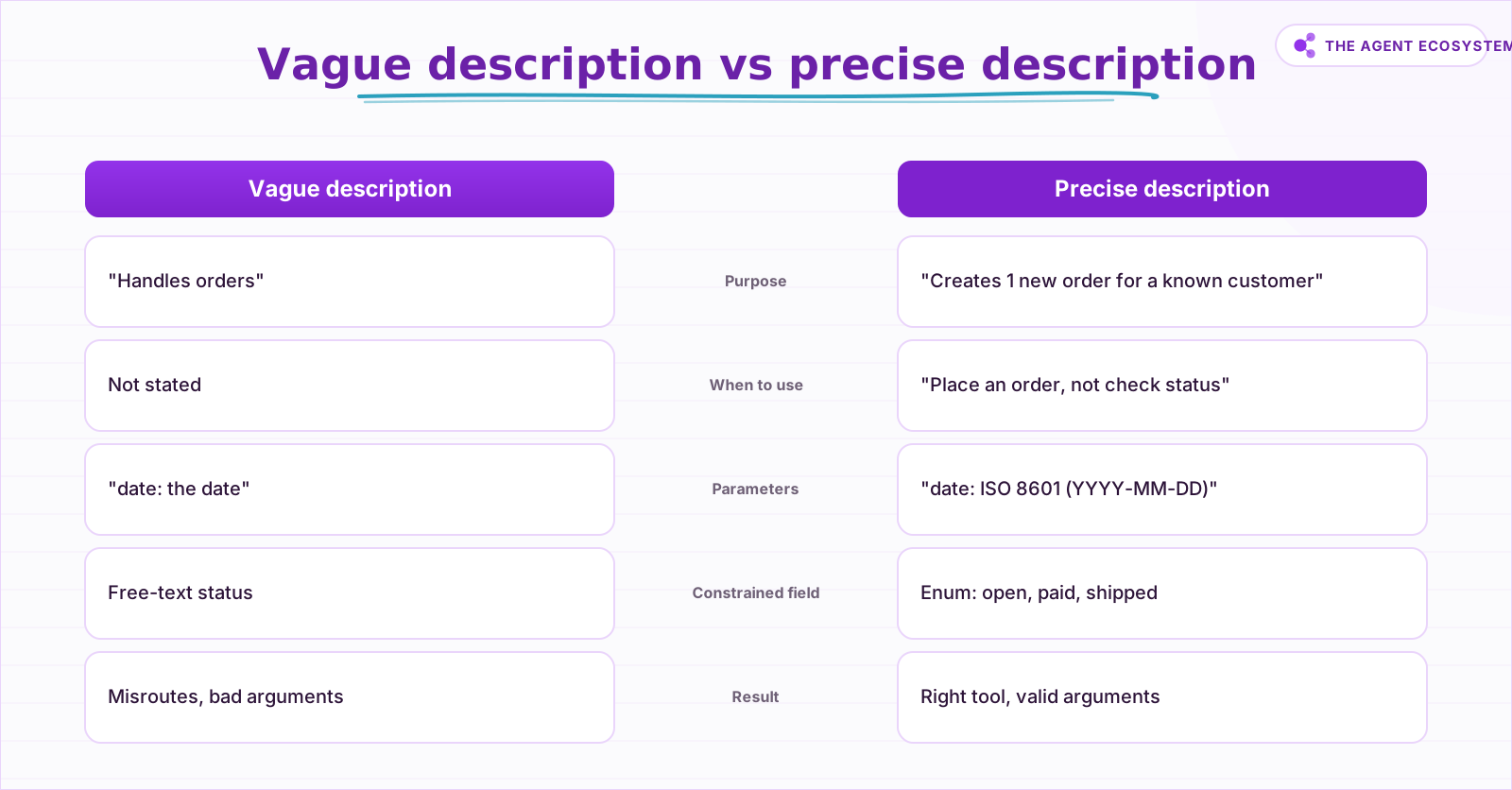 The same tool, two descriptions. The vague one leaves the model guessing at intent, arguments, and units; the precise one removes the guess.
The failure modes are predictable once you see the description as the contract. Two tools with overlapping descriptions get confused, so the model routes to the wrong one on ambiguous prompts. A required argument with no hint gets left blank or hallucinated. A constrained field with no enum gets a plausible-but-invalid value. An ambiguous unit turns 5 into 5 seconds, 5 minutes, or 5 dollars depending on the model's mood.
What does a good tool description actually contain?#
A good description states what the tool does and when to use it, and just as importantly when not to. It describes every parameter with type, format, allowed values, and units, gives at least 1 concrete example, and flags side effects: does this call write, charge, send, or delete? Write it like onboarding docs for a careful new hire.
The what-and-when line is the routing signal. "Get the current weather" is weak; "Get the current weather for a city; use only for present conditions, not forecasts" tells the model both the job and the boundary. Every parameter needs its own sentence, because the schema type alone does not carry format or units. A field typed as string could want an ISO 8601 date, a 2-letter country code, or a raw phone number, and only your description disambiguates. Constrained fields get an enum so the model cannot invent values. And side effects belong in the description because a model that knows a tool sends an email will hesitate before firing it twice.
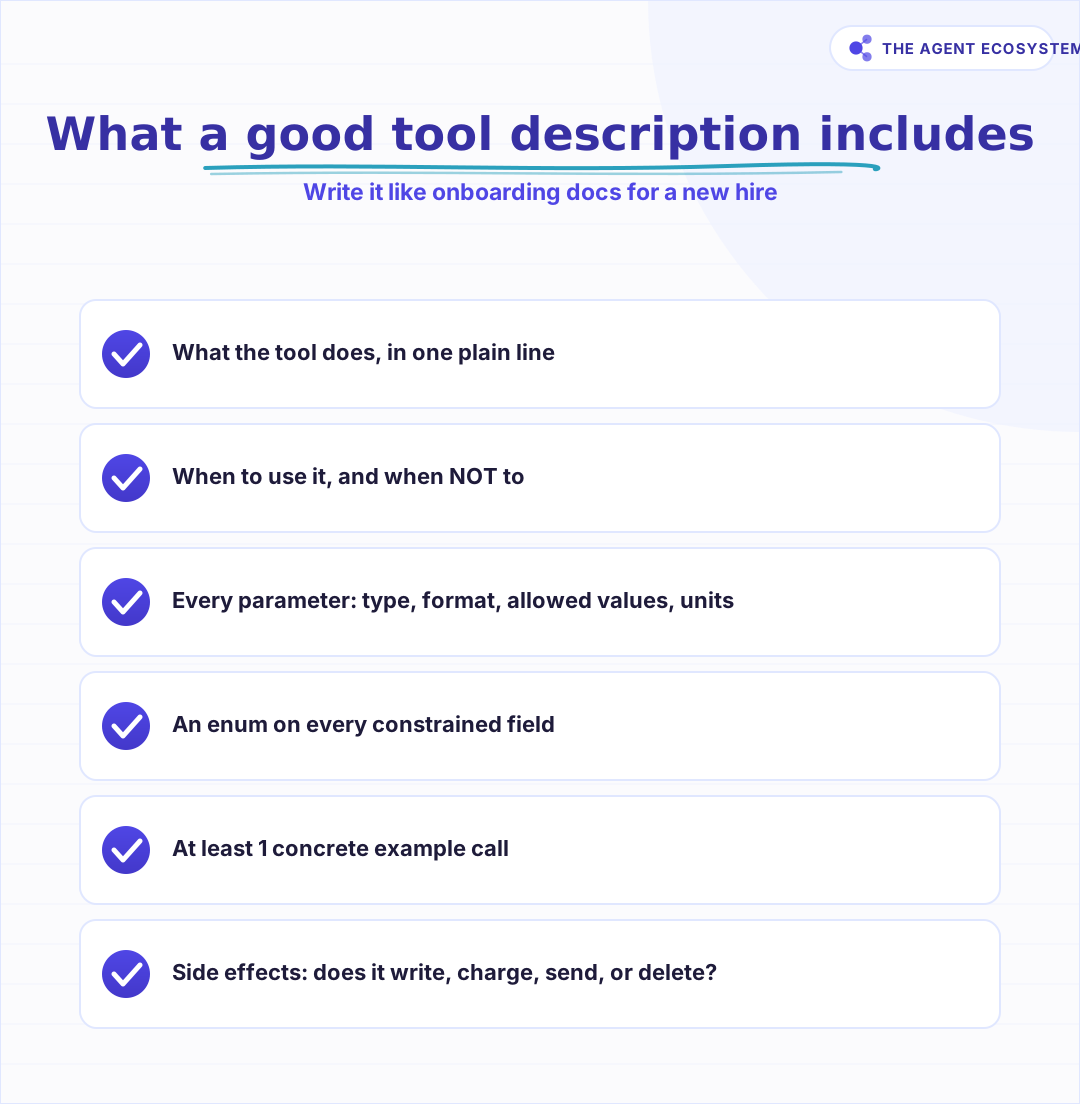 Score any description against these before you ship it. Missing elements are exactly where the model starts guessing.
Here is a compact rubric you can score any description against before you ship it.
| Element | Weak description | Strong description |
|---|---|---|
| Purpose | "Handles orders" | "Creates 1 new order for a known customer" |
| When to use | (omitted) | "Use to place an order, not to check status" |
| Parameter format | "date: the date" | "date: order date, ISO 8601 (YYYY-MM-DD)" |
| Constrained field | "status: the status" | "status: enum of open, paid, shipped, cancelled" |
| Units | "amount: the amount" | "amount: total in USD cents, integer, no symbol" |
| Side effects | (omitted) | "Writes to the DB and charges the card on file" |
How do you write and tighten a tool description?#
Write it in 5 passes, each fixing one class of ambiguity. Name the tool for its job, state what and when in the first line, then document every parameter with type, format, enum, and units. Add 1 example call, note any side effects, and test it against adversarial inputs.
The order matters because early passes remove the ambiguity that later passes depend on. If the name and purpose are unclear, no amount of parameter detail rescues routing. Once the purpose is sharp, parameter documentation stops the argument errors, and the example gives the model a template to copy under pressure. Treat the last pass, adversarial testing, as non-optional: feed it partial inputs, wrong units, and prompts that sit between two tools, and watch where it slips.
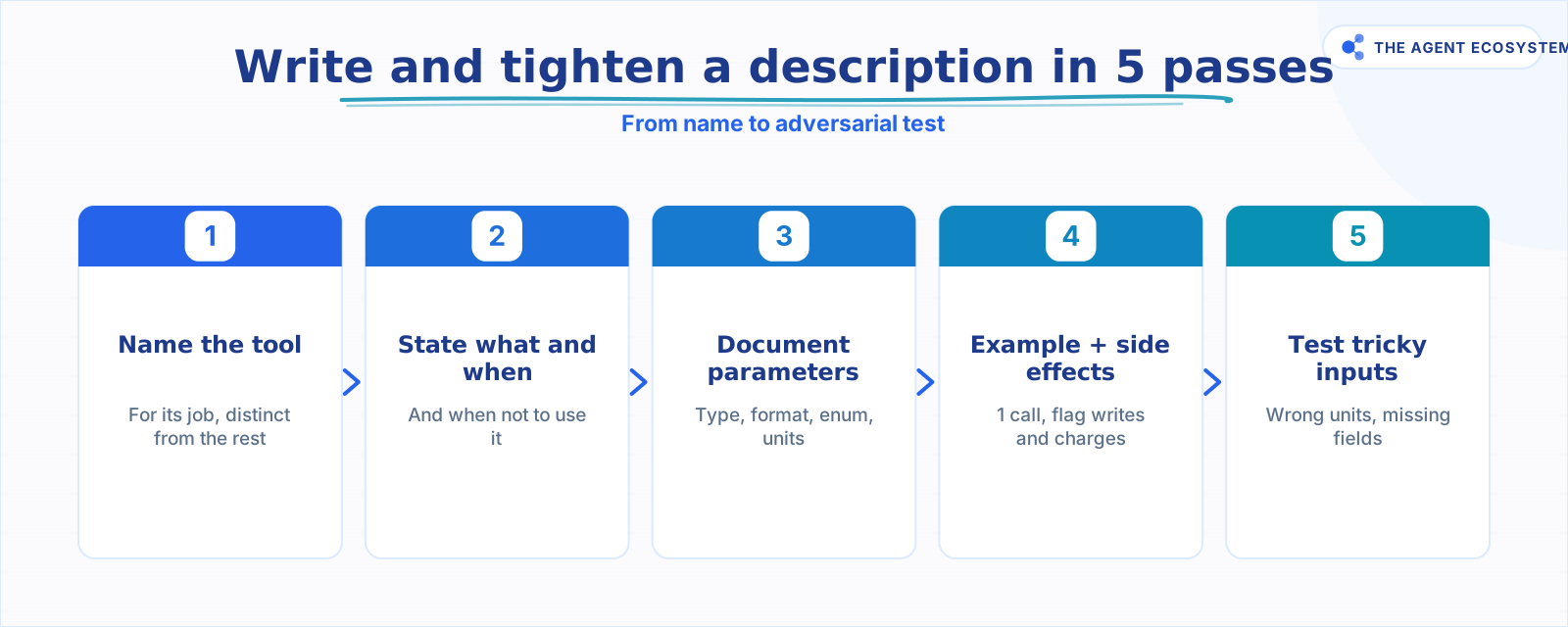 Each pass closes one class of ambiguity. Do them in order, because parameter detail cannot rescue an unclear purpose.
This is exactly the discipline behind n8n's $fromAI pattern, where each tool sub-node on the AI Agent exposes a description and the model fills the parameters at run time. The fill accuracy is a direct function of how well you described each field. The same holds whether you wire tools by hand in the Anthropic or OpenAI SDKs or through a builder. If you are assembling these in n8n, the mechanics of attaching and describing tools are covered in our guide to n8n AI agent tools.
Why did the agent pick the wrong tool, and how do you fix it?#
Start from the description, not the model. When an agent misroutes, the cause is almost always one of 4 things: two descriptions overlap, a purpose is too vague to match intent, a required argument has no hint, or a constrained field has no enum. Each one maps to a cheap edit, not a model upgrade.
Overlap is the most common and the most fixable. If search_orders and get_order both say "retrieve order information," the model has no basis to choose, so make each purpose disjoint and say when not to use the other. A blank required argument usually means the description never told the model the field was mandatory or what it looks like, so add the format and an example. Invalid enum values mean you left a constrained field open, so close it. Walk the decision tree below the next time a wrong call shows up in your logs.
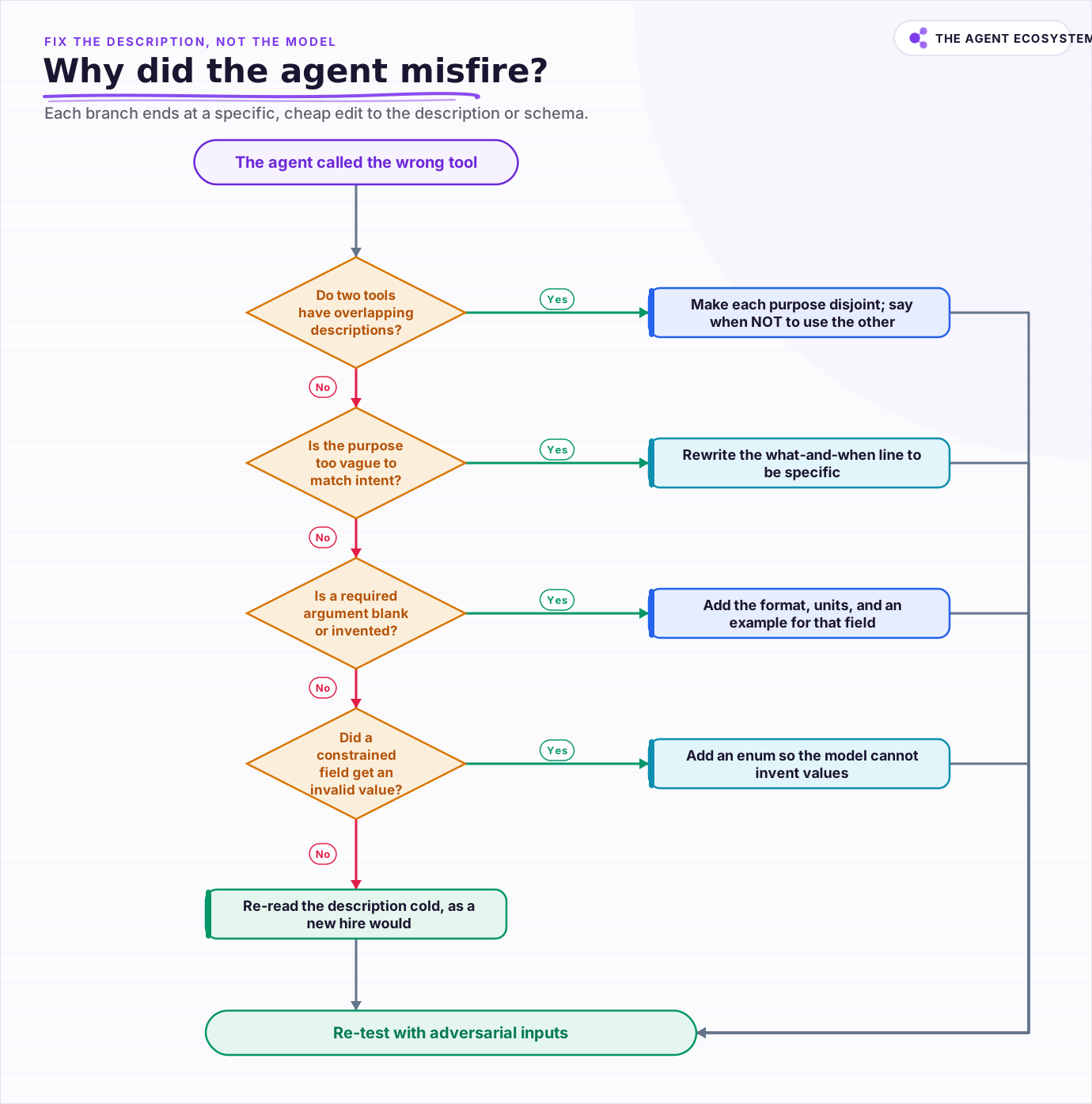 Start from the description, not the model. Each branch ends at a specific, cheap edit to the description or schema.
Where do you go from here?#
Rewrite your 3 most-called tools as if onboarding a new hire, then let your logs tell you the rest. The pattern is durable: the model reads only name, description, and schema, so that surface is where reliability is won or lost. Precise descriptions beat a bigger model on tool-use accuracy at a fraction of the cost.
Ship the rewrite, then watch for the tells: blank required args, invalid enums, and misroutes between similar tools. Each one points at a specific line to tighten. If your tools are Model Context Protocol servers, the same description discipline carries over, and our walkthrough of n8n with MCP shows where those descriptions live. When a tool returns data the agent must parse, pair this with clean structured output so the whole loop stays legible.
Frequently asked questions
Does the model read my tool's code to decide how to call it?
What should a good tool description include?
Why does my agent keep calling the wrong tool?
Are more examples or a longer description better for accuracy?
How do tool descriptions work in n8n's AI Agent?
Sources
Primary references and vendor documentation used while drafting and reviewing this article.
Written by

Muhammad Qasim Hammad is an AI agent and automation expert and the founder of Cart Gaze LLC (cartgaze.com). He builds product for the love of it: when an idea lands, a working prototype is usually running within hours, built with the same AI agents and automations he sells. He puts his own output at roughly 20× what it was before agents, and the Agentic OS behind this site is the working proof, documented in public with the tools he actually ran and what they really cost.
AI & Automation Services
Want a pipeline like this running in your business?
I'm Qasim — I design and ship AI agents and n8n automations for solo operators and small teams. Tell me what's eating your team's week, and I'll scope a fix.
Related reading
Give Your n8n AI Agent Tools (Calculator, HTTP, Workflows)
Your n8n AI Agent answers from stale training data until you attach real tools. This guide shows you exactly how to wire HTTP Request, Calculator, and Workflow tools so your agent acts on live data.

Constrained Decoding Sounds Bulletproof. It Only Fixes the Shape.
Constrained decoding is the mechanism behind OpenAI's Structured Outputs and Anthropic's strict tool use: it compiles your JSON Schema into a grammar and masks invalid tokens before they can ever be sampled, so shape failures stop happening. What it cannot do is check that the
What Is an AI Agent? A Plain-English Guide for Builders
An AI agent is a language model running in a loop that decides its own next action, not a chatbot and not a chain. Here is how the perceive-decide-act-observe loop works, how an agent differs from a chatbot, chain, and workflow, and a checklist for when you actually need one.
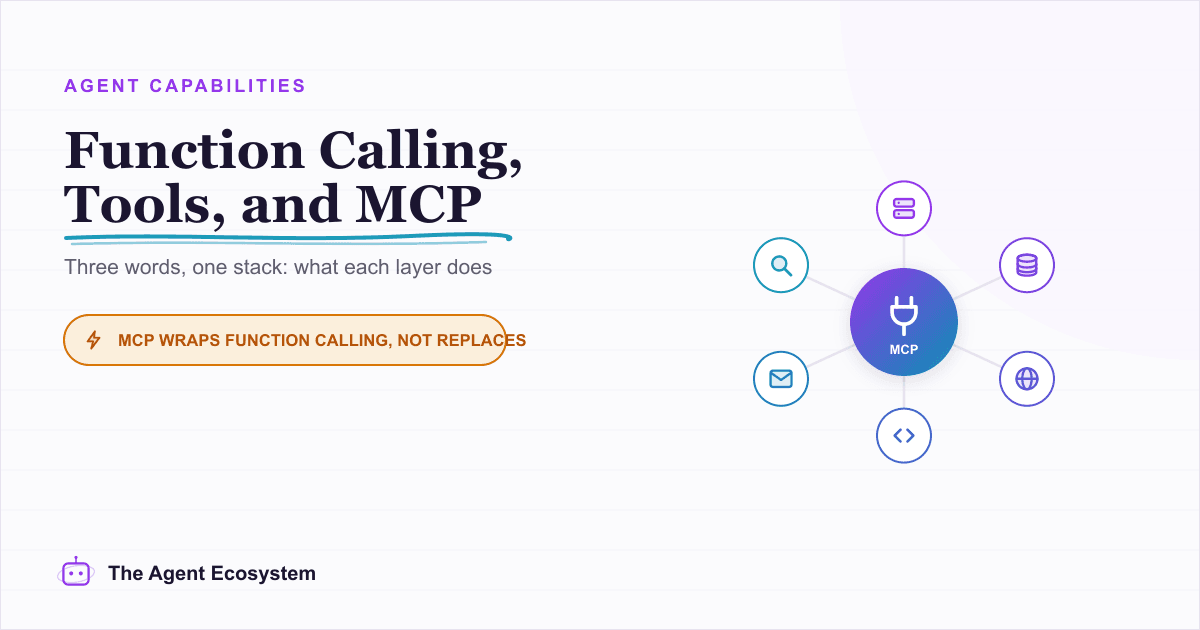
Function Calling vs MCP vs Tools: Give an Agent Capabilities
You keep seeing function calling, tool use, and MCP used as if they compete. They do not. Tools are the functions, function calling is the model mechanism that calls them, and MCP is the standard that shares them across clients. Here is how the three layers stack and which to
How to Build an AI Agent: The 80% That Survives Week Two
Most tutorials get you a working agent in ten minutes and skip what breaks it in week two. Sixteen lessons covering the loop, tool descriptions, memory, fallbacks, guardrails, evaluation, and the cost levers that decide your bill.
Why Your n8n AI Agent Isn't Working: 6 Failure Modes and Fixes
An n8n AI Agent that finishes without an error but ignores its tools, loops until it quits, or returns the wrong shape is almost always a configuration problem. Here are the 6 failure modes that cover most of them, and the specific node setting behind each fix.