Function Calling vs MCP vs Tools: Give an Agent Capabilities
Three words, one stack: what each layer does and when to reach for it.
AI-drafted, reviewed by Muhammad Qasim Hammad on July 10, 2026. See our AI disclosure.
Table of contents
You keep seeing "function calling," "tool use," and "MCP" thrown around as if you have to pick one, and every explainer seems to crown a different winner. The frustration is real, but the premise is wrong: these three words do not sit in competition. They stack. Once you see the layers, the choice gets simple and stops feeling like a religious war.
Are function calling, tools, and MCP three choices or three layers?#
The mcp vs function calling framing is a category error. They are not rivals; they are three layers of one job. A tool is a function the agent may call. Function calling is the model mechanism that emits a structured request to call one. MCP is a standard that exposes tools over a network for any client.
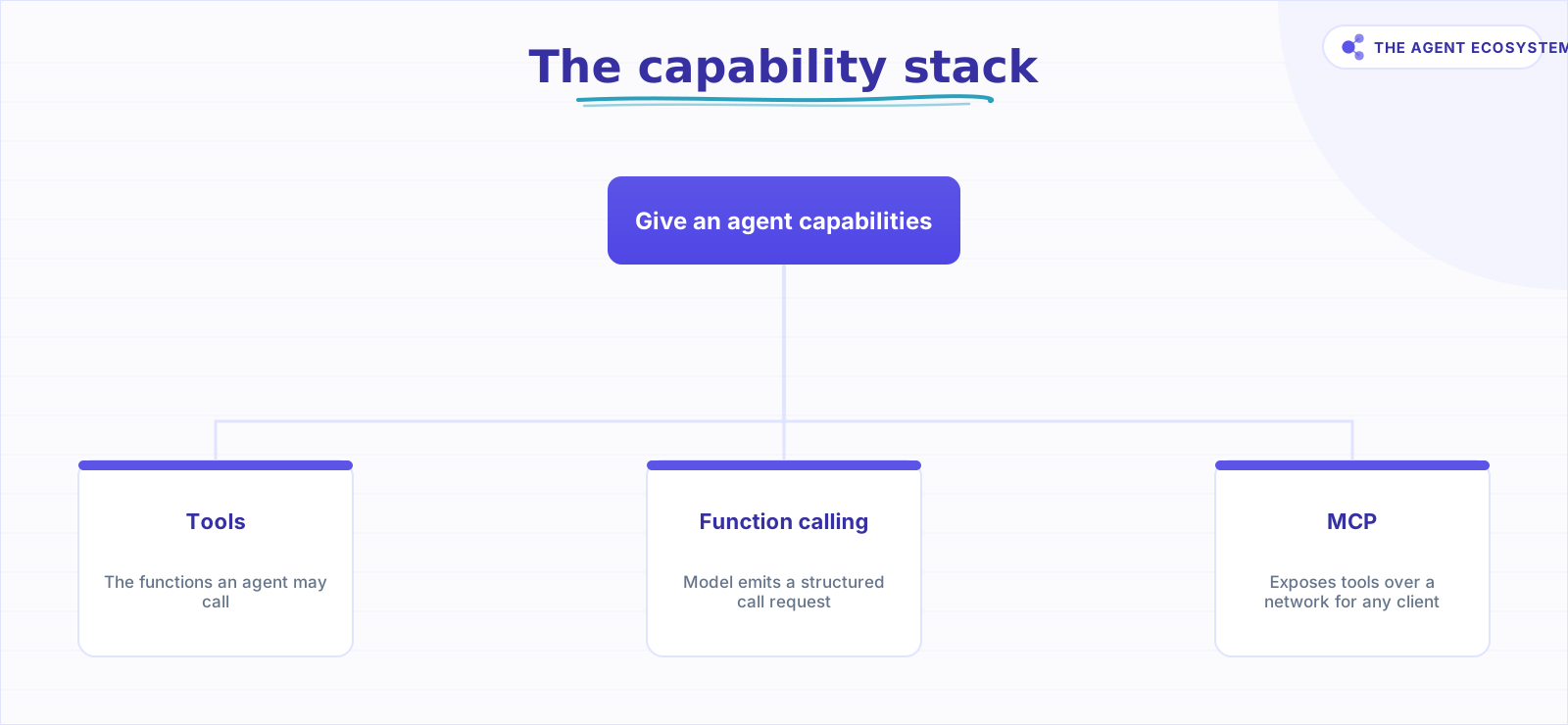 Not three choices on one axis. Tools are the what, function calling is the how, MCP is the how-to-share.
The structural insight worth repeating: MCP does not replace function calling. An MCP client still hands the server's tools to the model, and the model still decides to call one through function calling. MCP standardizes where tools live and how they are discovered, not how the model chooses to invoke them. So you almost never choose "function calling or MCP." You choose "wire this tool inline, or expose it over MCP so other agents can reuse it." That reframing is the whole point of this post.
What is function calling, exactly?#
Function calling is the model-native mechanism for tool use. You describe your tools as JSON schemas and send them alongside the prompt. The model decides whether to call one and returns structured arguments. Your code runs the actual function and feeds the result back. The model never executes anything itself.
That loop is the same decide, call, read, repeat cycle our n8n AI agent tools guide walks through. It is provider-native: OpenAI, Anthropic, and Google's Gemini all implement function calling, with differences in schema shape and field names, per each vendor's own docs. The model only ever requests a call; running the code and handling the result stays on your side of the line.
Concretely, one round looks like this. You declare a get_weather tool with a JSON schema naming a city string parameter. The model reads the user's question, decides the tool applies, and returns {"name": "get_weather", "arguments": {"city": "Lahore"}}. Your code runs the real API call, drops the result back into the conversation, and the model writes the final answer. Four steps, one process, no network standard involved.
The strengths are speed and simplicity. Minimal setup, everything in one codebase, and it is fast to prototype with a handful of tools. The weakness is reuse: the schemas live inside one application, so using the same tool somewhere else means copying them across. Change the tool once and you have to change every copy, which is the same drift problem that pushes people toward shared code in the first place. This inline style is exactly what n8n's native tool sub-nodes compile down to. When an AI Agent node calls the HTTP Request Tool, the Calculator, or the Call n8n Workflow Tool, it reaches them through the model's function-calling ability.
What is MCP, and what does it add?#
MCP is an open client-server standard. A server exposes tools (plus resources and prompts) over a transport. Any MCP-compatible client connects, calls tools/list to discover what is available at runtime, and invokes them, without the schemas being hard-coded into the client. Anthropic introduced it and now maintains it as an open spec, per the Model Context Protocol specification.
The three primitives matter for framing. Tools are actions the model can trigger. Resources are read-only data the server can hand over, like a file or a database row. Prompts are reusable templates the server offers. This post is about the tools primitive, since that is where the function-calling overlap sits, but the same server can carry all three over one connection, which is part of why a single MCP endpoint can replace several bespoke integrations.
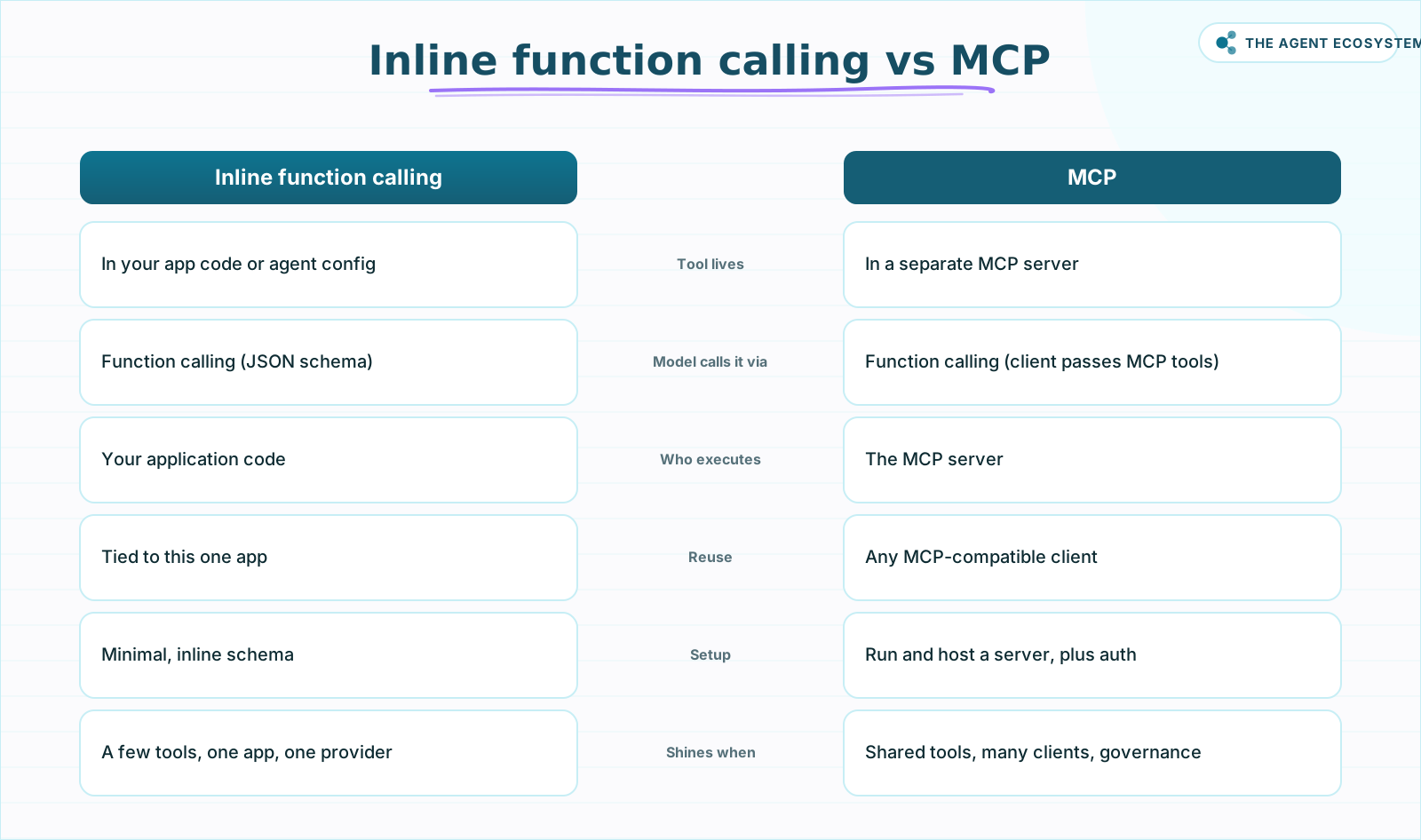 Function calling is in-process and per-app; MCP puts the same tools behind a server many clients share. Underneath, MCP still uses function calling.
What MCP adds over inline function calling is four things: build once and connect many clients, provider independence (the server works regardless of which LLM the client runs), runtime discovery (a server can announce that tools were added or removed via notifications/tools/list_changed), and a natural home for central auth, audit, and rate limiting.
The status is worth stating precisely because it is perishable. As of June 2026, the stable MCP spec is the version dated 2025-11-25, the one-year-anniversary release that added asynchronous Tasks and tighter OAuth. A release candidate dated 2026-07-28 is in flight that makes the protocol core stateless (sessions removed under SEP-2567) and adds an Extensions framework covering Tasks and MCP Apps, per the MCP blog. That final spec was not yet published at the time of writing, so re-check it before you build against it.
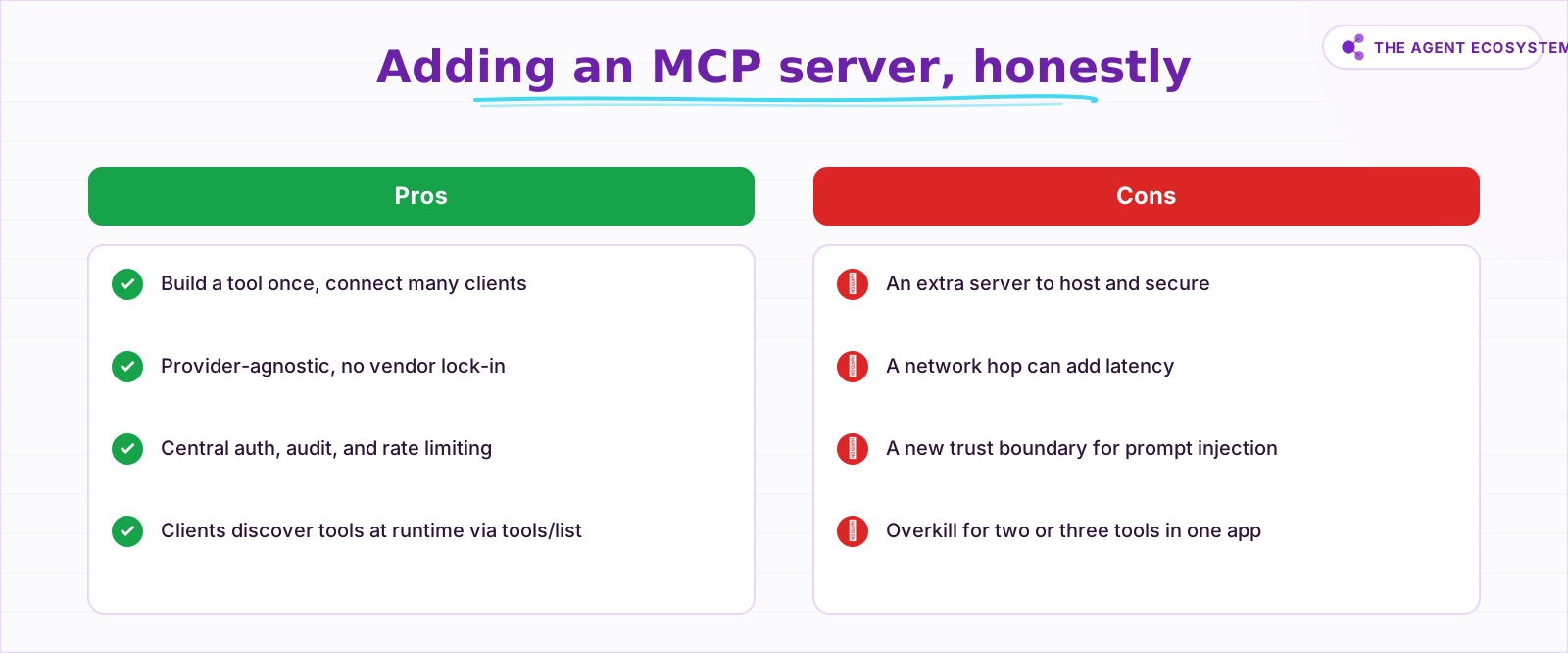 MCP trades immediate simplicity for reuse and governance. For a single small agent, inline tools win.
The cost is honest and specific. An MCP server is another process to run and secure. It adds a network hop, so latency goes up. And it introduces a new trust boundary: a malicious or compromised server, or even a poisoned tool description, is a prompt-injection vector. Governance is a genuine feature here, but the widened attack surface is the tax you pay for it. Treat every external server as untrusted until you have vetted it.
How does this look in n8n, and which do you reach for?#
n8n gives you all three layers in one canvas. Native tool sub-nodes are inline function calling. The MCP Client Tool node connects your agent to an external MCP server. The MCP Server Trigger node turns your own n8n tools into an MCP server that outside clients can call. Both MCP nodes have been native since n8n v1.88, per n8n's docs.
| Layer in n8n | What it is | You reach for it when |
|---|---|---|
| Native tool sub-nodes | Inline function calling on the AI Agent | The tool is an API call, a calculation, or your own workflow |
| MCP Client Tool | Connects the agent to an external MCP server | A tool or server you want already exists as MCP |
| MCP Server Trigger | Exposes your n8n tools to outside AI clients | Other agents should reuse the tools you built |
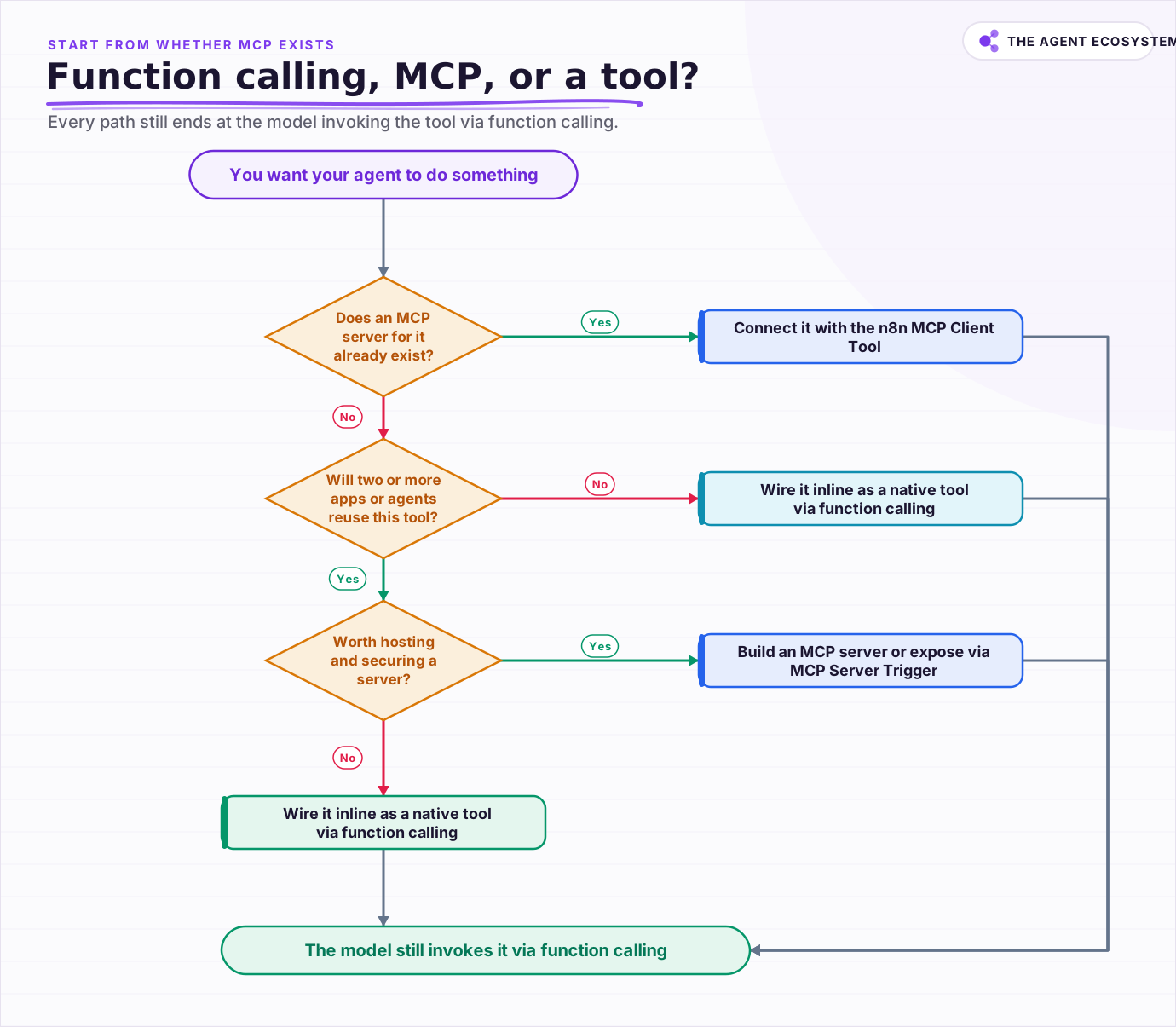 Start from whether an MCP server already exists; every path still ends at the model invoking the tool via function calling.
The MCP Client Tool connects over an SSE or HTTP endpoint with auth (none, bearer, header, or OAuth2) and lets you expose All, Selected, or All-Except tools from the server, per n8n's docs. The MCP Server Trigger only connects to tool nodes and publishes them to clients like Claude Desktop or Cursor. Note that the transport wording is one of the perishable bits: the MCP spec is moving toward streamable HTTP, so confirm the current endpoint type in n8n before you wire auth. If you want a step-by-step on wiring both nodes, my n8n MCP setup guide walks through the client and server paths end to end.
A concrete reuse case makes the split obvious. Say you build a "look up a customer by email" tool inside one support agent as a native n8n node. A month later a second agent, maybe a billing bot, needs the exact same lookup. With inline function calling you copy the node and its config into the second workflow, and now two copies drift apart. Expose that lookup once behind an MCP Server Trigger and both agents call the same server, so a fix lands in one place. That is the moment MCP starts paying rent.
The decision in practice is short. If a tool or server already exists as MCP, plug it in with the MCP Client Tool, since that is the least work. If the capability is bespoke and only this one agent needs it, wire it inline as a native tool through function calling, with no server to run. If two or more agents or apps will reuse it, or you need central governance, stand up an MCP server or expose your tools via the MCP Server Trigger. Our MCP servers solopreneur guide walks the small-team version of that call.
Carry the honesty all the way through: MCP is not automatically better. For a single small agent with three tools, inline function calling ships faster and keeps a smaller attack surface. MCP earns its keep at reuse, multi-provider, and governance scale, not before. And whichever path you take, the tool description is effectively part of the prompt, so keep the tool set tight and gate any send, pay, or delete action behind human approval.
Which one should you reach for?#
Reach for inline function calling by default and add MCP only when reuse or governance forces it. For one small agent, native n8n tools ship fastest with the smallest attack surface. Connect an existing MCP server when one is available, and stand up your own only when several clients will share the same tools.
The mental model that keeps you honest: tools are the capabilities, function calling is how the model requests them, and MCP is how you share them across clients. You are choosing inline versus exposed, never function calling versus MCP. When you do adopt MCP, price the running server, the extra latency, and the new trust boundary against the reuse you actually gain, and re-verify the spec status the week you build.
Frequently asked questions
Does MCP replace function calling?
What is the difference between tools, function calling, and MCP?
When should I use MCP instead of inline function calling?
How does n8n handle function calling and MCP?
What is the current status of the MCP spec?
Sources
Primary references and vendor documentation used while drafting and reviewing this article.
- Model Context Protocol specification (2025-11-25 stable spec, tools/list discovery)
- MCP blog: 2026-07-28 release candidate (stateless core, SEP-2567, Extensions)
- Descope: MCP vs function calling (MCP wraps, does not replace, function calling)
- n8n MCP Client Tool node (SSE/HTTP endpoint, auth, expose All/Selected/All-Except)
- n8n MCP Server Trigger (exposes n8n tools to external MCP clients)
Written by

Muhammad Qasim Hammad is an AI agent and automation expert and the founder of Cart Gaze LLC (cartgaze.com). He builds product for the love of it: when an idea lands, a working prototype is usually running within hours, built with the same AI agents and automations he sells. He puts his own output at roughly 20× what it was before agents, and the Agentic OS behind this site is the working proof, documented in public with the tools he actually ran and what they really cost.
AI & Automation Services
Want a pipeline like this running in your business?
I'm Qasim — I design and ship AI agents and n8n automations for solo operators and small teams. Tell me what's eating your team's week, and I'll scope a fix.
Related reading
How to Use n8n with MCP: Client, Server, and AI Agent Setup
Your n8n AI agent can chat, but it cannot act beyond the nodes you hard-wired. The MCP Client Tool and MCP Server Trigger change that: one gives your agent a server's worth of tools, the other turns your workflows into tools Claude can call.

Turn n8n Into an MCP Server: Expose Your Workflows to Claude and Cursor (2026)
Stop leaving Claude Desktop to run n8n workflows by hand. The MCP Server Trigger node turns your existing workflows into callable tools so Claude and Cursor can invoke them directly.
MCP and A2A: Do These Agent Protocols Matter If You Use n8n?
MCP and A2A are the two agent protocols everyone names, but they solve different problems. MCP connects one agent to tools and data and already ships as an n8n node; A2A coordinates agents across vendors and is aimed at the enterprise. Here is what each means for a solopreneur
MCP Servers for Solopreneurs: Wire Your AI Into Everything
MCP servers give your AI assistant working hands: connect it to GitHub, Supabase, Zapier, and n8n with one standard protocol. First server live in about 20 minutes, free to start.
Give Your n8n AI Agent Tools (Calculator, HTTP, Workflows)
Your n8n AI Agent answers from stale training data until you attach real tools. This guide shows you exactly how to wire HTTP Request, Calculator, and Workflow tools so your agent acts on live data.
MCP's Biggest Update Ships July 28: Stateless, OAuth, Simpler Scaling
The Model Context Protocol's 2026-07-28 revision is at release candidate now. It makes the core stateless, aligns authorization with OAuth 2.1 and OpenID Connect, and reports about six breaking changes production servers must handle first. Here is what it means if you ship