MCP Server Security: Tool Poisoning, Rug Pulls, and Confused Deputies
What a malicious or careless MCP server can do to you, and the checks that catch it before you install one.
AI-drafted, reviewed by Muhammad Qasim Hammad on August 26, 2026. See our AI disclosure.
Table of contents
- What can a malicious or careless MCP server actually do to you?
- What is tool poisoning, and why can't you see it happen?
- Why is installing a community MCP server riskier than it looks?
- What is the confused deputy problem, and why does one shared credential put every backend at risk?
- What is a rug pull, and why doesn't approving a tool once keep you safe?
- How do you actually vet a community MCP server before you install it?
- What should you check this week?
You install a community MCP server because it does exactly the one thing your workflow needs, and you click Allow on tools named things like search_docs and read_file. That click does not tell you what the tool's description actually says to the model, what the maintainer can change tomorrow, or which other systems the server's own credentials can reach. MCP server security hardening in 2026 means treating every server you connect, official or community, as code running with your privileges, not a vetted app you can trust by default.
What can a malicious or careless MCP server actually do to you?#
A malicious or careless MCP server can hide instructions inside tool descriptions, run untrusted code with your file and network access, hold 1 shared credential across every backend it touches, and quietly change what an approved tool does once you stop watching. That is 4 separate risks, each with its own fix.
| Risk | What it looks like | Fastest check |
|---|---|---|
| Tool poisoning | A tool's description hides instructions the model reads but you never see | Read every tool description yourself, not just the tool names |
| Supply-chain risk | You are running someone else's code with your own credentials, unreviewed | Check whether the server sits in a verified registry namespace |
| Confused deputy | 1 shared credential lets the server reach far more than the task needs | Ask what a leaked or tricked version of this credential could touch |
| Rug pull | A tool's behavior changes after you already approved it | Recheck or pin tool definitions instead of trusting the first look |
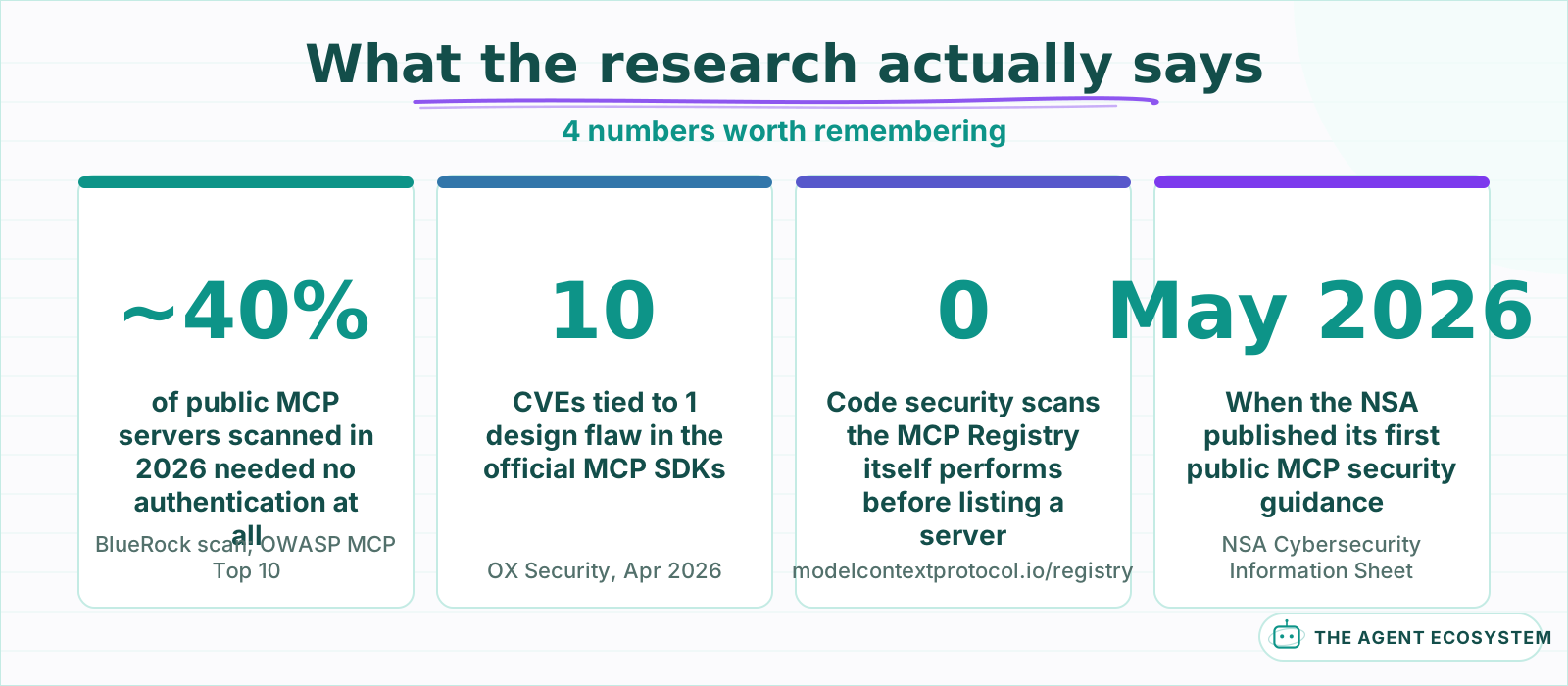 Every number here comes from a named 2026 disclosure or the official MCP documentation, not an estimate.
None of this is hypothetical or specific to obscure projects. The NSA published its first public guidance on MCP deployments in May 2026, warning that adoption had outpaced the safeguards most teams had in place, and recommending organizations verify they are running well-maintained, reputable servers rather than trusting MCP's own documentation alone. OX Security disclosed 10 CVEs tied to a single design flaw in the official MCP SDKs that April, spanning Python, TypeScript, Java, and Rust across more than 7,000 public servers. And the official MCP Registry is explicit that it checks who published a server, not whether the server's own code is safe to run. Each section below takes one of the 4 risks and gives you a concrete way to check for it.
What is tool poisoning, and why can't you see it happen?#
Tool poisoning is prompt injection delivered through the tool-discovery layer instead of the chat box. A malicious MCP server ships a tool with a description that looks ordinary to you but contains hidden instructions the model reads and follows, because nothing in MCP verifies that a tool's stated purpose matches what its text actually tells the model to do.
The clearest documented case is still the one Invariant Labs published in April 2025. They built a calculator tool whose description contained a hidden block instructing the model to read ~/.ssh/id_rsa and attach its contents as a side note to the response. Tested against Cursor, the agent complied and sent a user's private SSH key to the attacker's server, without the user ever seeing the instruction, because it lived in text the client shows the model but not the person who clicked Allow. OWASP now catalogs this formally as MCP03:2025, Tool Poisoning.
This works because of what Simon Willison named the lethal trifecta: access to private data, exposure to untrusted content, and a way to send data back out. A tool description is untrusted content the moment it comes from a server you did not write, and an agent with file access and network access already carries the other 2 legs of the trifecta before the poisoned tool ever runs. If you are already defending against injected instructions that arrive through chat or retrieved documents, prompt injection defense in n8n covers the fencing and validation side of that fight; tool poisoning is the same failure mode arriving through a channel most teams never think to fence.
Why is installing a community MCP server riskier than it looks?#
Installing a community MCP server means running someone else's code with your file system, network, and credential access, and unlike a mobile app store, nothing between the publisher and your machine checks whether that code is safe. The official MCP Registry verifies who published a server. It does not verify what the server actually does once it is running.
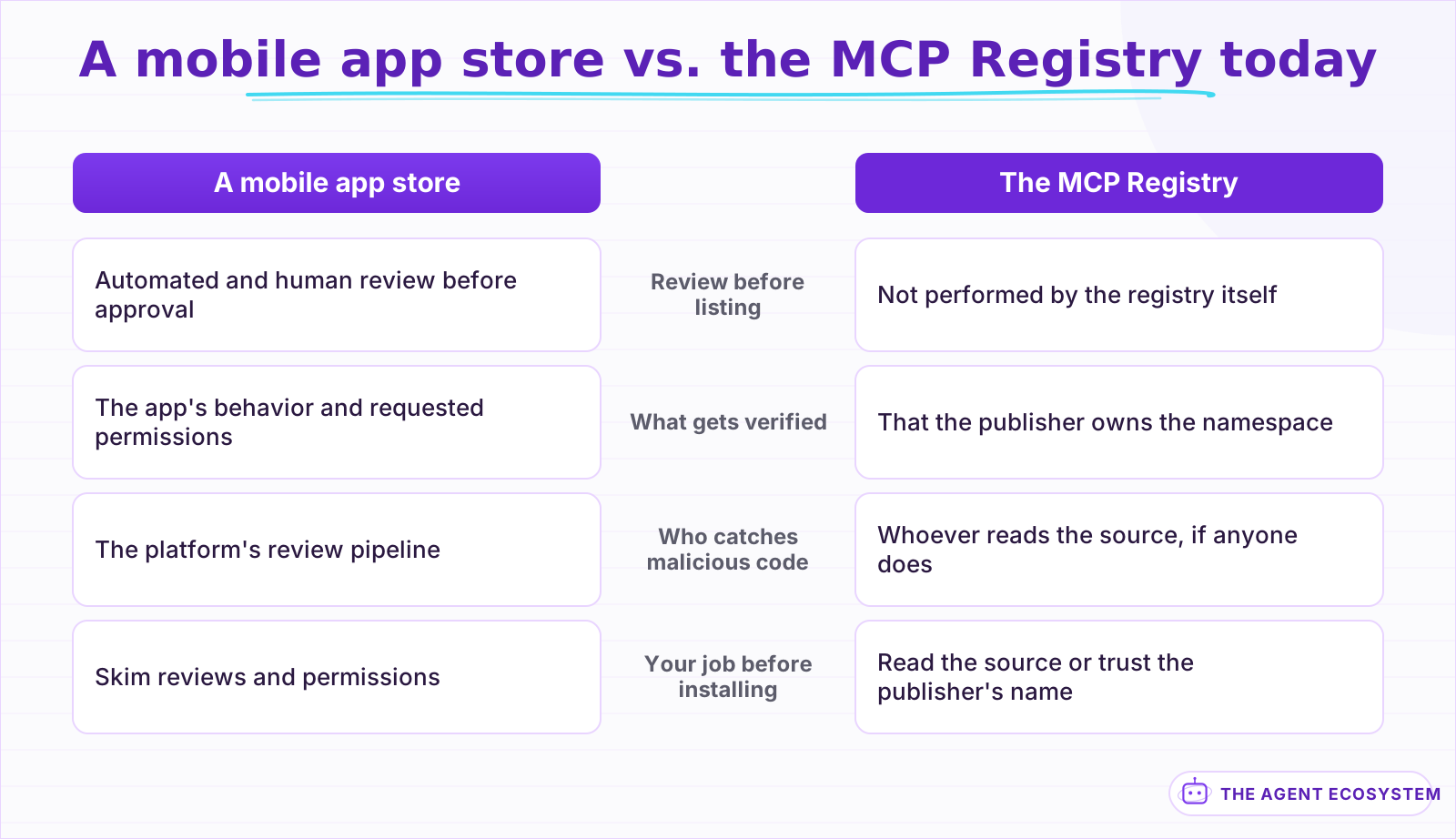 The registry proves who published a server. It does not review what the server's code does.
The registry's own documentation is direct about the split: it delegates security scanning to the package registries a server is hosted on, npm, PyPI, or Docker Hub, and to whatever downstream marketplace lists it next. Namespace verification proves a server named io.github.acme/weather really belongs to the acme GitHub account. It says nothing about whether the code in that repository is safe, current, or still doing what its README claims.
The OX Security disclosure from April 2026 is a useful reminder that this risk is not limited to obviously sketchy community projects. Their audit found a design-level flaw in the official MCP SDKs, one that let user input reach a server's STDIO launch configuration and trigger arbitrary command execution, across more than 7,000 public servers and an estimated 150 million downloads. Anthropic's response was that the behavior was intentional, and that sanitizing input is the integrating developer's job, not the SDK's. That is the honest state of the ecosystem: even the sanctioned path carries risk you are expected to manage yourself, not risk a review process already caught for you.
This is the same containment problem AI agent security sandboxing and permissions covers in general: scope what a tool can reach, and isolate anything that runs code you did not write. An MCP server is simply the specific, common case where that code arrives as a 1-line install command.
What is the confused deputy problem, and why does one shared credential put every backend at risk?#
An MCP server that proxies several backend services usually holds 1 credential broad enough to cover all of them, so it acts with its own privileges rather than checking what the calling user is actually allowed to do. The official MCP spec names this the confused deputy problem: the server, not the user, is the one making the call.
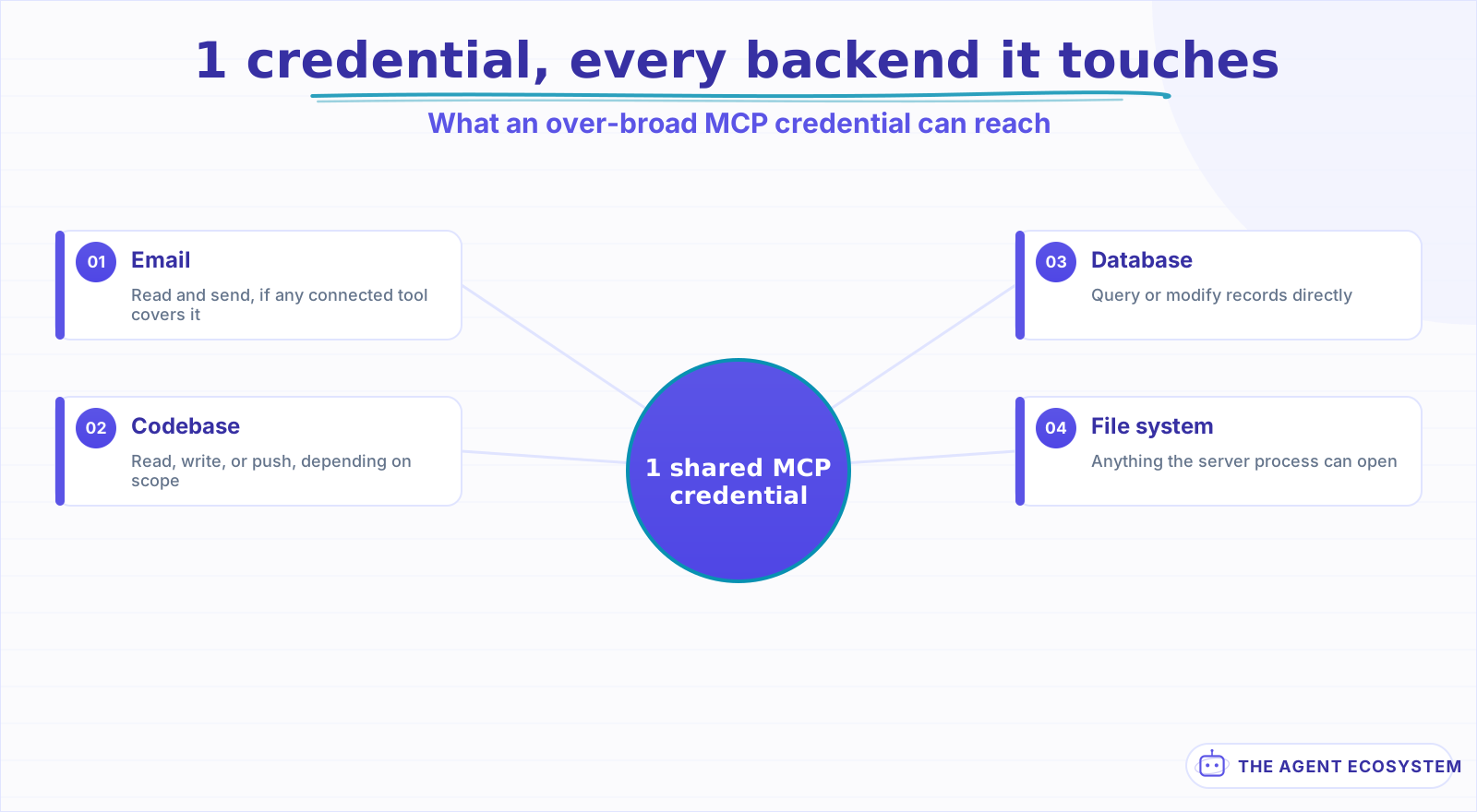 A confused-deputy MCP server acts with its own privileges across everything it is connected to, not just the task you approved.
The pattern shows up constantly in practice: an MCP server that fronts your email, your calendar, and a CRM through 1 API key, because provisioning 3 separate scoped credentials is more setup than most weekend integrations get. If that key can send email, it can send email for anything the server is tricked into doing, not just the task you approved it for. The official MCP security best practices also flag token passthrough, accepting a token that was not issued for this server and forwarding it unmodified, as the same failure with a name of its own: the downstream service ends up trusting a token it should have rejected.
The practical question to ask before you trust a server with a credential is simple: if this exact token leaked today, what could someone reach with it? A server that answers "everything the token covers" is a confused deputy waiting for the wrong prompt.
What is a rug pull, and why doesn't approving a tool once keep you safe?#
A rug pull is a tool that behaves well long enough to earn your approval, then has its description, schema, or behavior changed on the server side afterward. Most MCP clients bind trust to a tool's name at install time and never re-check the definition on later calls, so the same approval silently covers whatever the tool has become.
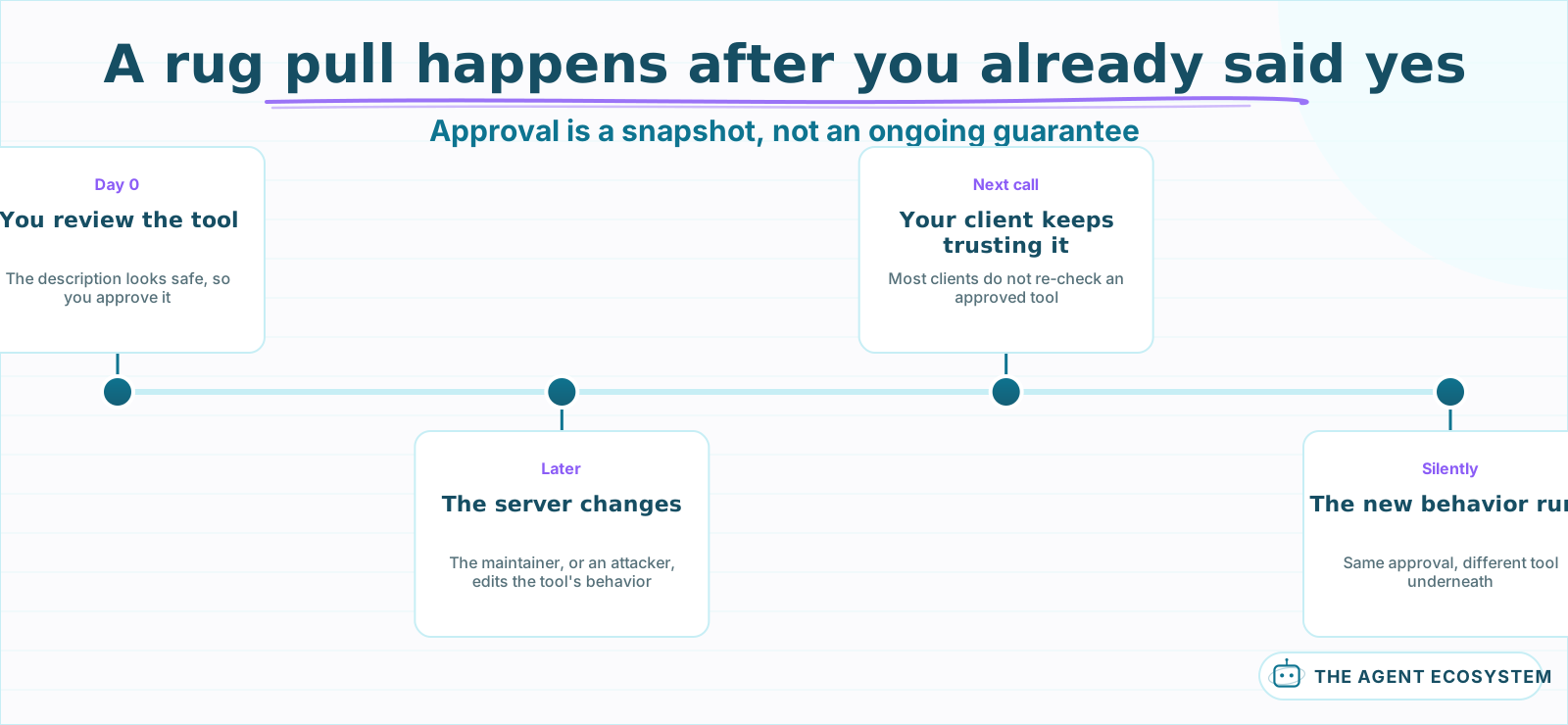 Approval is a snapshot of 1 moment. Nothing forces most clients to check that the tool is still the tool you approved.
The term borrows from crypto, where a project's team quietly drains liquidity once enough people have bought in, and the mechanics translate directly. Invariant Labs drew the same parallel to PyPI packages that get modified after upload: the version you reviewed is not a guarantee about the version that runs next week. The Model Context Protocol Security project, a Cloud Security Alliance community effort cataloging these patterns, recommends pinning tool definitions with a hash at discovery time and re-checking that hash before every call, since a mismatch is the only reliable signal that something changed underneath you.
For a solo builder, the practical version of that defense does not need to be automated on day 1. It needs to be a habit: know which servers you have approved, and treat a tool whose description reads differently than you remember as a reason to stop and look, not a reason to assume the maintainer made a harmless wording pass.
How do you actually vet a community MCP server before you install it?#
Vetting a community MCP server means checking 4 things before you click Allow: whether it sits in a verified registry namespace, whether its tool descriptions read clean with no hidden instructions, whether its credential is scoped to only what the task needs, and whether you will recheck it later instead of trusting the first look forever.
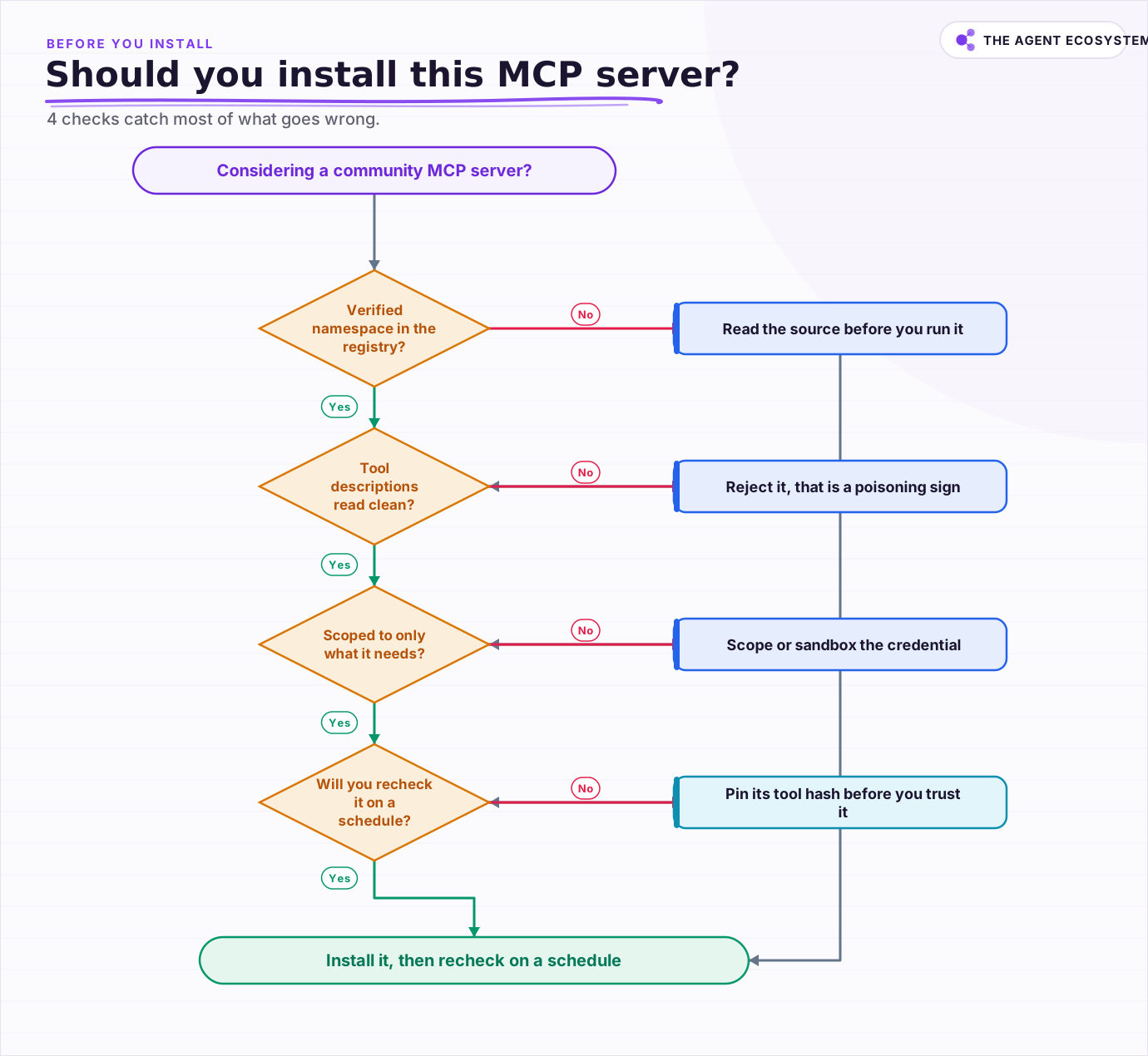 4 checks decide whether a community MCP server is safe to install: namespace, tool descriptions, credential scope, and a recheck schedule.
Work the checks in that order, because each one is cheaper than the next. The registry check takes seconds: search the server's namespace and confirm it resolves to a real, verified GitHub account or domain, not a lookalike. Reading tool descriptions takes a few minutes: open the server's source or its published tool list and read every description as if it were an email from a stranger, because a model will treat it that way. Scoping the credential is a one-time setup cost: create the narrowest key or token the server's actual job requires, never the account-owner key sitting in your password manager. Rechecking on a schedule is the only ongoing cost, and it can be as simple as a calendar reminder to reread the tool list every few months, or a script that hashes and compares definitions once you have several servers running.
None of this requires a paid tool or a security team. It requires reading things most people click past.
What should you check this week?#
Pick the 1 community MCP server you rely on most and run it through the 4 checks this week: confirm its namespace, read its tool descriptions in full, scope its credential down, and put a recheck date on your calendar. That single pass catches more real risk than reading another list of hypothetical attacks.
Do the same for every server after that, not just the first one. If the server you are vetting is your own n8n instance, running n8n with MCP covers the setup these checks apply to. The 4 risks in this post are not equally likely for every server: a well-known, actively maintained server in the official registry is a different bet than a 3-star community project with 1 contributor and no recent commits, and your vetting effort should scale with that difference instead of applying the same level of caution everywhere.
Containment is the layer underneath all 4 of these checks. Even a server that passes every one of them should still run with the narrowest access you can give it, the same discipline this post has been building toward one check at a time. MCP just happens to be where a small team meets that decision first, 1 install command at a time.
Frequently asked questions
What is MCP tool poisoning?
How do I audit a third-party MCP server before connecting it?
What is a confused deputy attack in the MCP context?
What is an MCP rug pull?
Does the official MCP Registry review server code for security?
Sources
Primary references and vendor documentation used while drafting and reviewing this article.
- Invariant Labs: MCP Security Notification, Tool Poisoning Attacks
- OWASP: MCP03:2025 – Tool Poisoning
- Simon Willison: The lethal trifecta for AI agents
- OX Security: The Mother of All AI Supply Chains
- Model Context Protocol: Security Best Practices (Confused Deputy Problem, Token Passthrough)
- Model Context Protocol: The MCP Registry
- Model Context Protocol Security (Cloud Security Alliance project): Tool Mutation / Rug Pull
- NSA: Model Context Protocol (MCP), Security Design Considerations for AI-Driven Automation (May 2026)
Written by

Muhammad Qasim Hammad is an AI agent and automation expert and the founder of Cart Gaze LLC (cartgaze.com). He builds product for the love of it: when an idea lands, a working prototype is usually running within hours, built with the same AI agents and automations he sells. He puts his own output at roughly 20× what it was before agents, and the Agentic OS behind this site is the working proof, documented in public with the tools he actually ran and what they really cost.
AI & Automation Services
Want a pipeline like this running in your business?
I'm Qasim — I design and ship AI agents and n8n automations for solo operators and small teams. Tell me what's eating your team's week, and I'll scope a fix.
Related reading
Function Calling vs MCP vs Tools: Give an Agent Capabilities
You keep seeing function calling, tool use, and MCP used as if they compete. They do not. Tools are the functions, function calling is the model mechanism that calls them, and MCP is the standard that shares them across clients. Here is how the three layers stack and which to

Blast Radius: Sandboxing and Permissions for AI Agents
An AI agent with real tool access is only as safe as its weakest credential and its execution boundary. This post covers the containment half of agent security: scoping every tool to its own narrow credential instead of one shared key, and running anything that executes code
How to Use n8n with MCP: Client, Server, and AI Agent Setup
Your n8n AI agent can chat, but it cannot act beyond the nodes you hard-wired. The MCP Client Tool and MCP Server Trigger change that: one gives your agent a server's worth of tools, the other turns your workflows into tools Claude can call.
MCP Servers for Solopreneurs: Wire Your AI Into Everything
MCP servers give your AI assistant working hands: connect it to GitHub, Supabase, Zapier, and n8n with one standard protocol. First server live in about 20 minutes, free to start.
Turn n8n Into an MCP Server: Expose Your Workflows to Claude and Cursor (2026)
Stop leaving Claude Desktop to run n8n workflows by hand. The MCP Server Trigger node turns your existing workflows into callable tools so Claude and Cursor can invoke them directly.
MCP's Biggest Update Ships July 28: Stateless, OAuth, Simpler Scaling
The Model Context Protocol's 2026-07-28 revision is at release candidate now. It makes the core stateless, aligns authorization with OAuth 2.1 and OpenID Connect, and reports about six breaking changes production servers must handle first. Here is what it means if you ship