Turn n8n Into an MCP Server: Expose Your Workflows to Claude and Cursor (2026)
Use the MCP Server Trigger node to publish your existing workflows as callable tools for Claude Desktop and Cursor
Updated August 6, 2026 — Added a FAQ on securing an n8n MCP server with Bearer auth.
AI-drafted, reviewed by Muhammad Qasim Hammad on June 25, 2026. See our AI disclosure.
Table of contents
- What does it mean to turn n8n into an MCP server?
- MCP Server Trigger vs MCP Client Tool: which direction is which?
- How do you build an n8n MCP server step by step?
- Step 1: Add the MCP Server Trigger node
- Step 2: Attach tools to the AI Tool output
- Step 3: Set Path and Authentication
- Step 4: Activate and copy the production URL
- Step 5: Connect your AI client
- How do you connect Claude Desktop or Cursor to it?
- What is the difference between the test and production MCP URLs?
- When should you expose a workflow as an MCP tool (and when not)?
- Where do builders get the n8n MCP server wrong?
- Where to go from here
You have a working n8n workflow that looks up a customer, runs a weekly report, or posts a record to your CRM, and you keep alt-tabbing out of Claude Desktop or Cursor to trigger it by hand. Build an n8n MCP server with the MCP Server Trigger node and that workflow becomes a callable tool your AI client can invoke directly.
The friction hits every session. You built the logic once. But because it lives inside n8n and not inside your AI client, you are the middleware, copying values back and forth, running the workflow manually, pasting the result back into the chat. That is the problem this post solves.
Before diving in, a quick note on cost. n8n Community Edition is free to self-host, and n8n Cloud Starter is 20 EUR/mo billed annually as of mid-2026, per n8n's pricing page. Exposing your workflows over MCP adds no model cost on the n8n side. The token bill goes to the calling client: Claude's Haiku 4.5 runs at 1 USD input / 5 USD output per million tokens, and Sonnet runs at 3 USD / 15 USD per million, per Anthropic's pricing page. You build the tool once; the client pays to call it.
What does it mean to turn n8n into an MCP server?#
The MCP Server Trigger node lets n8n act as a Model Context Protocol (MCP) server, making your workflows available to MCP clients as callable tools. It exposes a URL clients connect to, then they list and call individual tools. Logic you already built becomes something an external AI client can run on demand.
The key mechanic: unlike a regular trigger node that fires and passes data down a linear sequence, the MCP Server Trigger only connects to and executes tool sub-nodes. You attach tools to its AI Tool output. Those tools are exactly what the MCP client sees when it lists available actions.
Want to expose an entire existing workflow as a single tool? Attach a Call n8n Workflow Tool sub-node to the trigger and point it at that workflow. One sub-node, one existing workflow, one callable tool on the other end.
MCP Server Trigger vs MCP Client Tool: which direction is which?#
The MCP Server Trigger and the MCP Client Tool run the same protocol in opposite directions. With the Server Trigger, n8n is the server: tools flow OUT to whatever client connects. With the Client Tool, an n8n AI Agent is the client, pulling tools IN from an external server. Mixing them up is the most common MCP mistake.
Here is the full contrast:
| Aspect | MCP Server Trigger | MCP Client Tool |
|---|---|---|
| n8n's role | MCP server | MCP client |
| Tools flow | Out to clients | In to your agent |
| Who initiates a call | External client | Your n8n agent |
| Attaches to | Tool sub-nodes | An AI Agent |
| Key field | Path + Authentication | SSE Endpoint + Tools to Include |
| Typical use | Let Claude call your workflow | Let your agent use a remote server |
The MCP Client Tool node is described in the n8n docs as "a Model Context Protocol (MCP) client, allowing you to use the tools exposed by an external MCP server." It takes an SSE Endpoint (the external server's URL), Authentication options (bearer token, header, multiple headers, OAuth2, or None), and a Tools to Include setting (All, Selected, or All Except) so you curate what your agent sees.
That is the reverse of everything the Server Trigger does. If you are building toward an n8n AI agent that consumes external MCP tools, you want the Client Tool. If you are publishing your own tools for a client to call, you want the Server Trigger.
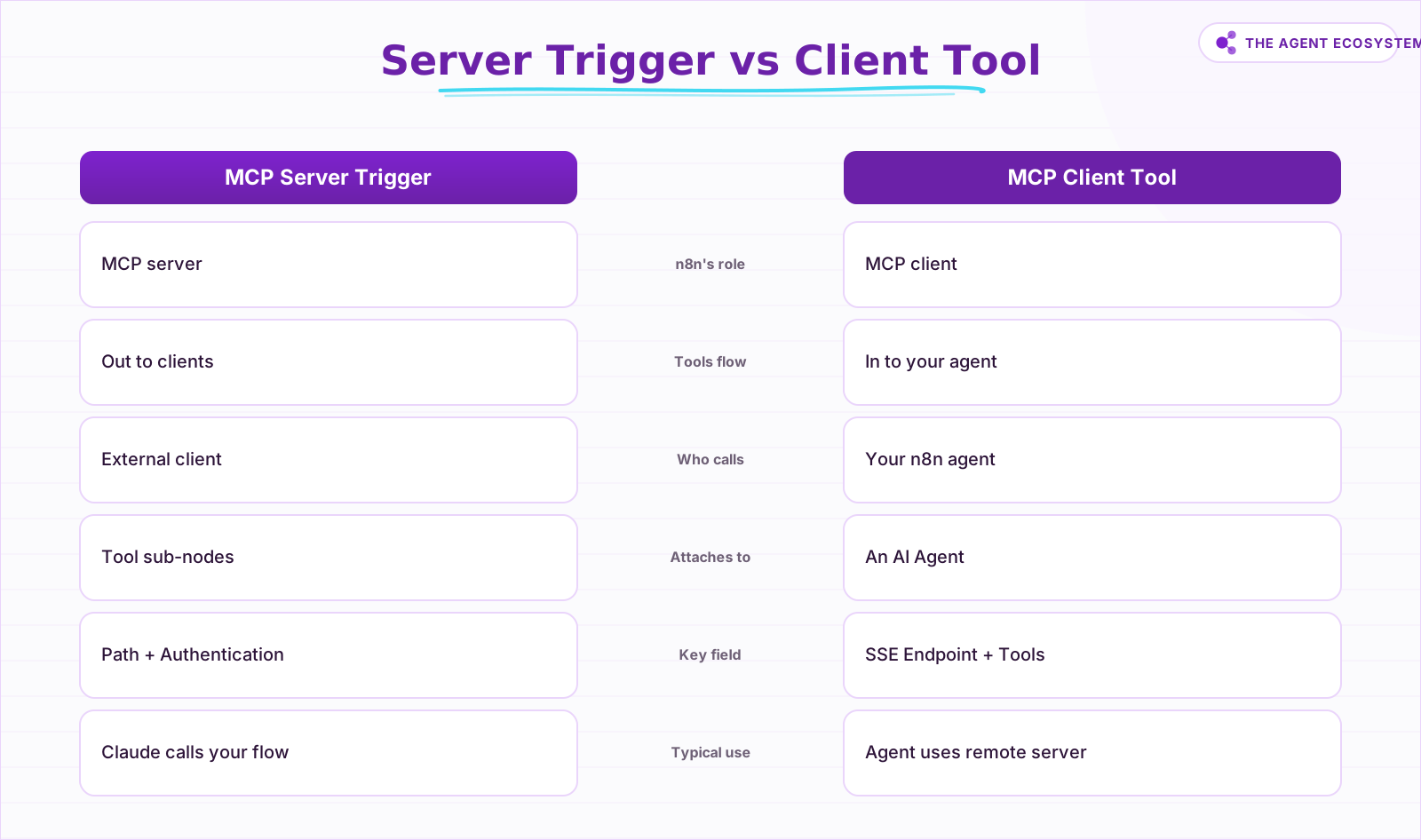 Same protocol, opposite arrows: pick the node for your direction.
How do you build an n8n MCP server step by step?#
Setting up an n8n MCP server takes five actions inside the workflow editor: drop the trigger, attach your tools, configure the path and auth, activate, and hand the production URL to your client. No extra infrastructure is required on the n8n side if you are already self-hosting or on Cloud Starter.
Step 1: Add the MCP Server Trigger node#
Open a new workflow. Add an MCP Server Trigger node as the starting point. Nothing else should come before it in the flow.
Step 2: Attach tools to the AI Tool output#
Connect tool sub-nodes to the trigger's AI Tool output connector. Each sub-node you attach becomes one discoverable tool. To wrap an entire existing workflow as one tool, add a Call n8n Workflow Tool sub-node and point it at that workflow. Your CRM lookup workflow, your report runner, your Slack poster: one sub-node each.
Step 3: Set Path and Authentication#
The Path field defines the URL segment for this MCP server. It defaults to a randomly generated string so it does not collide with other MCP Server Trigger nodes on the same instance. Override it with something readable if you prefer a stable URL. Under Authentication, choose how clients authenticate. Treat this endpoint like any public-facing automation: protect it from the start.
Step 4: Activate and copy the production URL#
Click Activate (labeled Publish in newer n8n) in the top-right of the editor. The node panel surfaces two URLs: a test URL and a production URL. Copy the production URL. The test URL disappears once the workflow goes active; it exists purely for editor-side debugging.
Step 5: Connect your AI client#
Paste the production URL into your MCP client. SSE and Streamable HTTP are the two supported transports; stdio is not supported. Most native MCP clients that speak SSE or Streamable HTTP can use the URL directly. Claude Desktop needs a gateway step, covered in the next section.
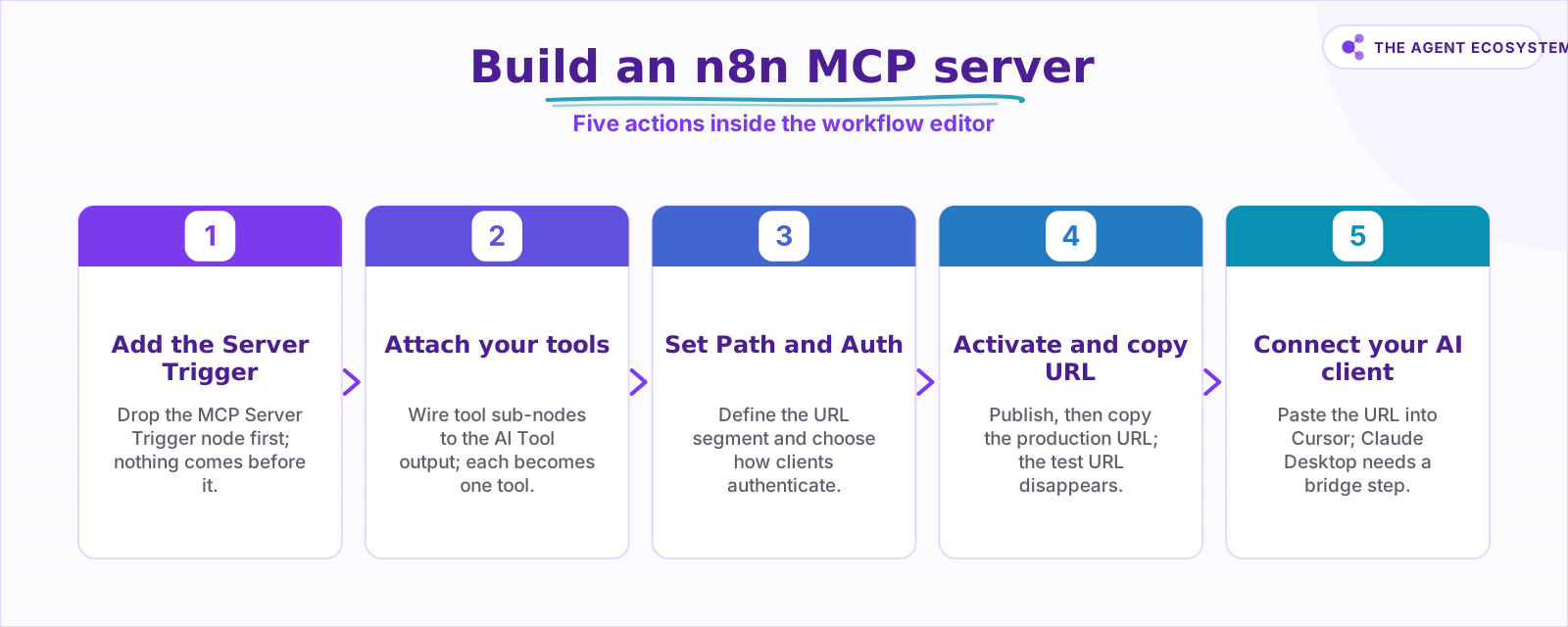 Five steps from blank workflow to a live callable tool.
How do you connect Claude Desktop or Cursor to it?#
Cursor and other MCP clients that speak SSE or Streamable HTTP natively take the production MCP URL directly in their MCP server settings. Claude Desktop expects stdio-style servers and cannot talk directly to the SSE/HTTP endpoint the MCP Server Trigger produces.
For Cursor, the setup is a single URL paste. Open Cursor Settings, go to the MCP tab, and add a new server with the production URL. Cursor will list available tools automatically.
For Claude Desktop, add an mcpServers entry to its config that runs the bridge for you:
npx mcp-remote YOUR_PRODUCTION_MCP_URL --header "Authorization: Bearer YOUR_MCP_TOKEN"Then add the gateway's local stdio address as the MCP server in Claude Desktop's config. The n8n MCP Server Trigger docs include a worked Claude Desktop example with the exact config format. If you are deciding which external MCP servers to pull INTO your agent rather than publish, the solopreneur MCP servers guide covers that catalog separately.
What is the difference between the test and production MCP URLs?#
The test URL is for debugging inside the n8n editor; the production URL is what you give a real client. While the workflow is inactive, clicking "Listen for Test Event" registers the test URL and calls to it show live data on the canvas. Activating the workflow kills the test URL and only the production URL stays valid.
The production URL does not show live data in the canvas. To inspect what ran and what data flowed through, open the Executions tab. Live canvas data is for your debugging session only, not for production traffic.
One practical rule: paste the test URL into a temporary curl call to verify the tool responds before activating. Then activate, switch to the production URL, and never send the test URL to an actual client. A client hitting a dead test URL will silently fail to connect with no useful error on their end.
When should you expose a workflow as an MCP tool (and when not)?#
Expose a workflow when it is read-only, repeatable, and safe to trigger from outside: lookup queries, report generators, data enrichment calls. Keep workflows behind manual control when they write, delete, send messages, or charge money, especially if Authentication is not yet configured.
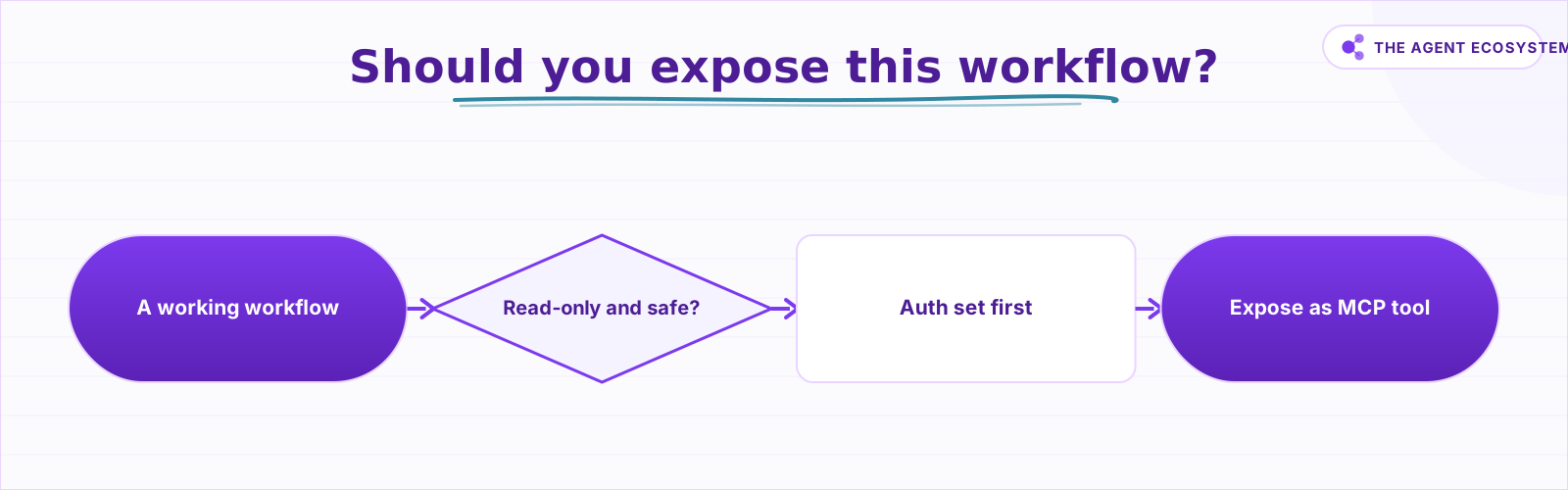 Read-only tools are low-risk; write tools need auth first.
There is also an instance-level option worth knowing. Separately from the per-workflow MCP Server Trigger node, n8n has an instance-level MCP server that creates one connection per instance and lets clients search and trigger any workflow you have explicitly marked available, authenticated by OAuth2 or an access token. Use the per-workflow trigger when you want a curated, scoped tool set for a specific MCP endpoint. Use the instance-level server when you want a broader "all my workflows are discoverable" setup. The two approaches are not mutually exclusive.
I personally expose three read-only lookup workflows to Cursor and keep anything that writes to a CRM or sends a notification behind auth or off the MCP surface entirely. That boundary lets me move fast in Cursor without worrying that a misread prompt will fire a write action. If you want to understand what an n8n "tool" is at a fundamental level before wiring MCP to it, this breakdown of n8n AI agent tools is the right primer.
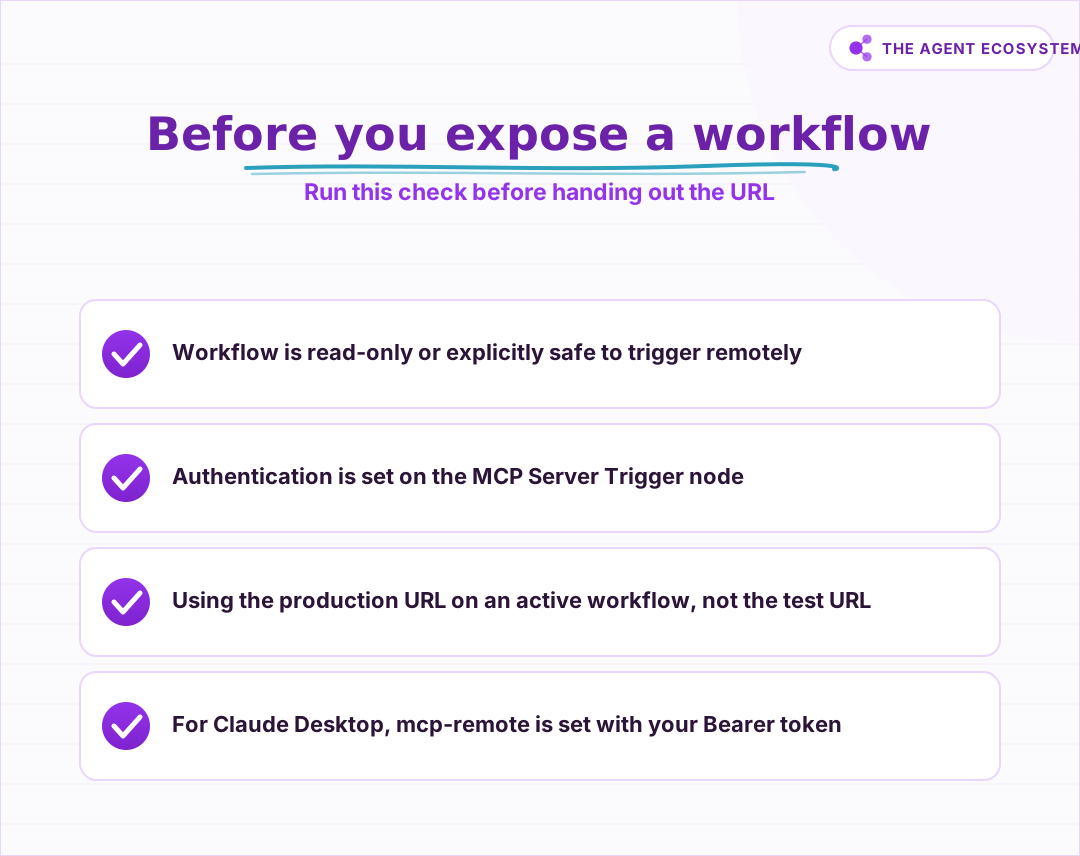 Run this check before handing the MCP URL to any client.
Where do builders get the n8n MCP server wrong?#
The four mistakes I see most often share one pattern: skipping a step that seems optional until something breaks in a way that is hard to trace. Each is easy to avoid once you know the failure mode, and each costs real debugging time when you do not. Here are all four, worst first.
Direction confusion is the most common. Builders open the node search, see "MCP," and grab the first result. If they meant to publish tools but grabbed the MCP Client Tool instead (or vice versa), the workflow will build fine and do nothing useful. Check the node name before wiring anything.
No authentication on a write tool is the costly one. A CRM post or an email sender exposed without auth is callable by anyone who discovers the URL. The random default path offers mild obscurity, not security. Set Authentication from the start.
Shipping the test URL produces mysterious failures. The test URL is tied to an inactive workflow. When you activate the workflow, the test URL stops responding. Clients configured with the test URL will silently fail to connect with no clear error. Always activate first, then copy the production URL.
Forgetting the stdio gateway for Claude Desktop costs an hour if you hit it cold. Claude Desktop cannot talk directly to the SSE/HTTP endpoint the MCP Server Trigger produces. It needs a gateway process running alongside it. This is documented in the n8n MCP Server Trigger docs but easy to miss if you skip the Claude Desktop section. For putting guardrails on the calling side once your tools are live, the Claude API cost control guide covers that separately.
Where to go from here#
Wire up one read-only workflow first. A customer lookup or a report query is the right starting point: low risk, immediate payoff. Confirm it appears in your client tool list and returns correct data before adding anything that writes. Once that pattern is solid, the n8n MCP AI agent guide shows the reverse direction in depth.
Frequently asked questions
Can n8n be used as an MCP server?
What is the difference between the MCP Server Trigger and the MCP Client Tool node?
How do I connect Claude Desktop to my n8n MCP server?
Does exposing n8n as an MCP server cost anything?
What is the difference between the test and production MCP URLs?
Should I use the MCP Server Trigger node or instance-level MCP access?
How do you secure an n8n MCP server?
Sources
Primary references and vendor documentation used while drafting and reviewing this article.
Written by

Muhammad Qasim Hammad is an AI agent and automation expert and the founder of Cart Gaze LLC (cartgaze.com). He builds product for the love of it: when an idea lands, a working prototype is usually running within hours, built with the same AI agents and automations he sells. He puts his own output at roughly 20× what it was before agents, and the Agentic OS behind this site is the working proof, documented in public with the tools he actually ran and what they really cost.
AI & Automation Services
Want a pipeline like this running in your business?
I'm Qasim — I design and ship AI agents and n8n automations for solo operators and small teams. Tell me what's eating your team's week, and I'll scope a fix.
Related reading
How to Use n8n with MCP: Client, Server, and AI Agent Setup
Your n8n AI agent can chat, but it cannot act beyond the nodes you hard-wired. The MCP Client Tool and MCP Server Trigger change that: one gives your agent a server's worth of tools, the other turns your workflows into tools Claude can call.

MCP Servers for Solopreneurs: Wire Your AI Into Everything
MCP servers give your AI assistant working hands: connect it to GitHub, Supabase, Zapier, and n8n with one standard protocol. First server live in about 20 minutes, free to start.
Function Calling vs MCP vs Tools: Give an Agent Capabilities
You keep seeing function calling, tool use, and MCP used as if they compete. They do not. Tools are the functions, function calling is the model mechanism that calls them, and MCP is the standard that shares them across clients. Here is how the three layers stack and which to
Add an AI Chatbot to Your Website With n8n (Chat Trigger)
Add a working AI chat widget to any website using n8n's Chat Trigger node and the @n8n/chat embed snippet. No React, no SaaS widget, about $7.25 per 1,000 conversations on Claude Haiku 4.5.
Turn an n8n Workflow Into an AI API: Webhook to Claude to JSON
Skip the Express server. An n8n AI API endpoint takes three nodes: a Webhook node receives the HTTP request, an AI node runs Claude, and a Respond to Webhook node returns clean JSON to the caller.
Give Your n8n AI Agent Tools (Calculator, HTTP, Workflows)
Your n8n AI Agent answers from stale training data until you attach real tools. This guide shows you exactly how to wire HTTP Request, Calculator, and Workflow tools so your agent acts on live data.