How to Build an n8n AI Agent That Triages Zendesk Tickets
Give an n8n AI Agent the Zendesk tool: tag, prioritize, and route a ticket the moment it arrives, with replies gated behind a human.
AI-drafted, reviewed by Muhammad Qasim Hammad on August 12, 2026. See our AI disclosure.
Table of contents
- What can an n8n AI agent actually do with a Zendesk ticket?
- How do you give an n8n AI Agent the Zendesk tool?
- What does a real ticket-triage workflow look like?
- Should the agent post replies automatically, or wait for you to confirm?
- What breaks, and how do you debug it?
- Is this worth building versus Zendesk's own AI features?
A support inbox fills up with tickets that all need the same first pass: read what the customer actually said, set a priority, tag it by topic, and route it to the right group, before anyone can start actually solving the problem. Wire n8n's Zendesk node into an AI Agent as a tool, and the agent can do that first pass itself, the moment a ticket arrives.
What can an n8n AI agent actually do with a Zendesk ticket?#
n8n's Zendesk node covers Tickets, Users, and Organizations as separate resources, with create, get, update, delete, and search actions across each. For triage, the useful set is narrow: read a new ticket's subject and body, update its priority and tags, add an internal comment, and assign it to a group.
The Zendesk Trigger watches for new and updated tickets and starts the workflow the moment one arrives, which is the natural entry point for triage. Filter it to genuinely new tickets rather than every update, since an agent re-triaging a ticket every time an agent adds a reply will relabel things that do not need relabeling and generate noise your team learns to ignore.
Zendesk's trigger fires on a broad set of update types by default, so filter it down inside the workflow: check that the update is genuinely a new ticket creation, not a status change, a reply, or an internal note being added to a ticket that already went through triage once.
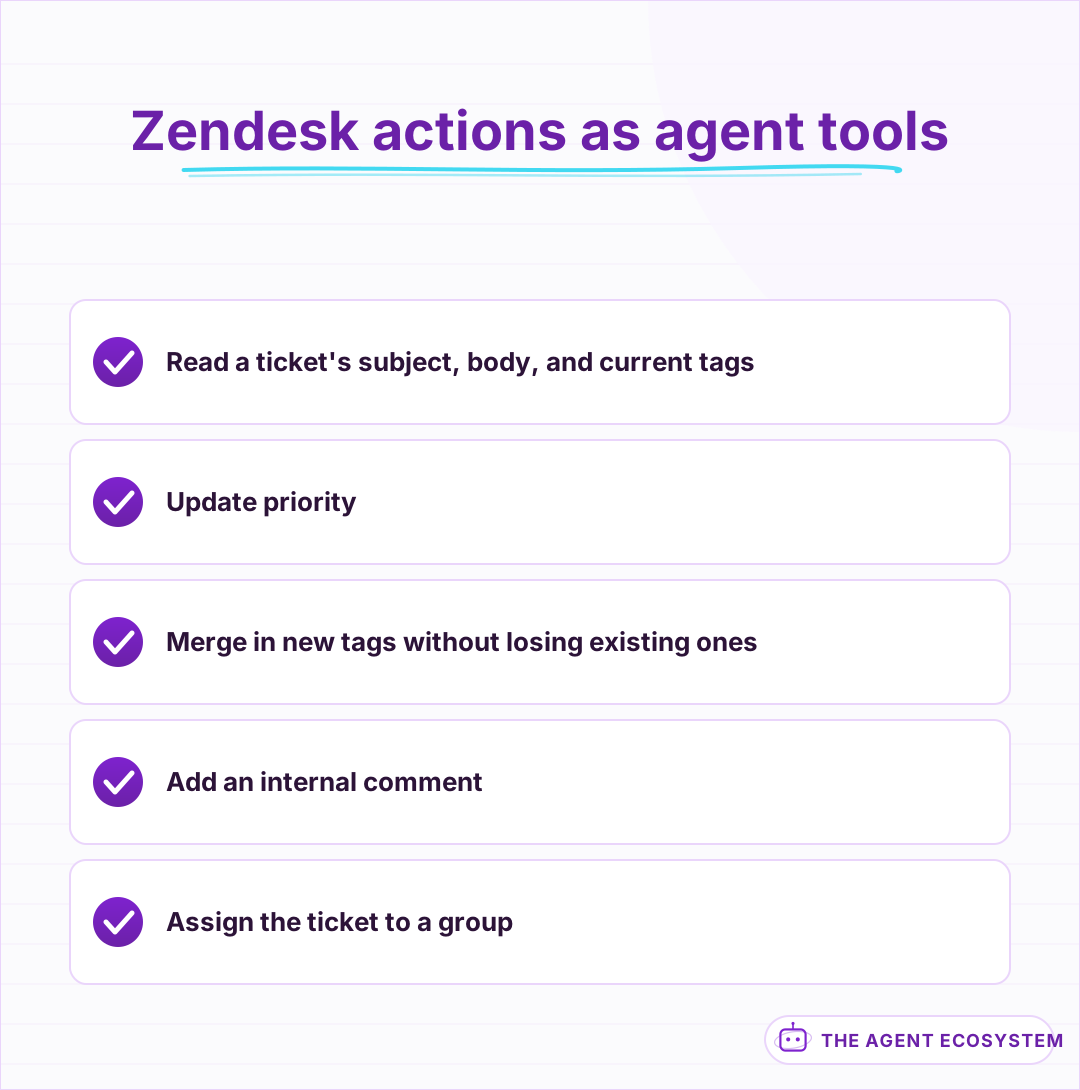 A narrow set of actions covers the whole first-pass triage.
How do you give an n8n AI Agent the Zendesk tool?#
Add a Zendesk node to the canvas, switch it to Use as Tool, and connect it to your AI Agent node's tool input. Give the agent a get-ticket tool to read the current state before any update, since the tag-replacement behavior above means a blind write can quietly delete information a teammate already added.
Tool descriptions the model can actually use should list your account's real tag taxonomy and group names, the same discipline that matters on any support platform: an agent that invents a tag like "billing-issue" when your team's real tag is "billing" just creates ungoverned noise instead of using the taxonomy your reporting already depends on. The core mechanics of giving an n8n agent tools carry over directly.
Scope the API token narrowly, the same discipline that matters on any connected app: a token or an agent-level credential with access limited to tickets and their tags, without the ability to manage users or billing on the Zendesk account itself, limits what a bug in the workflow could ever touch.
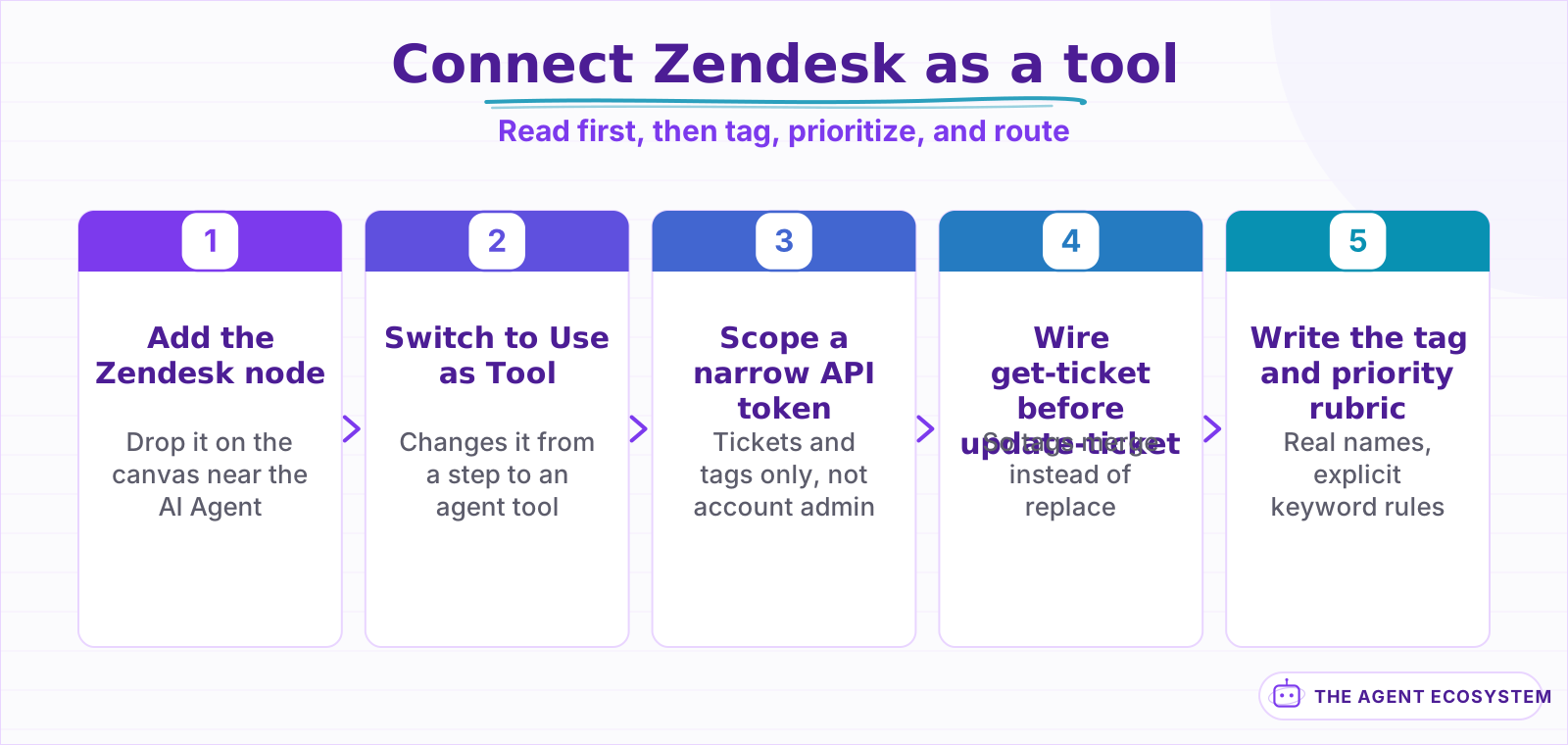 Reading current tags first is the step that prevents the most common mistake.
What does a real ticket-triage workflow look like?#
A ticket comes in: "I was charged for 2 months but only used the product for 1, please help." The agent reads the subject and body, matches it against a fixed set of topic rules, tags it billing, sets priority to Normal, and assigns it to the Billing group, all in a single pass before a human opens it.
| Ticket signal | Tag applied | Priority |
|---|---|---|
| Mentions charge, invoice, refund | billing | Normal |
| Mentions "down", "can't log in", "broken" | technical | High |
| Mentions cancel, downgrade | retention | Normal |
| Angry tone, repeated contact | Existing tags plus escalate | High |
Priority and tags are rule outputs, not a model's mood read on the customer. Give the agent the specific keywords or patterns that map to each priority level rather than asking it to judge urgency from tone alone, since tone is the part large language models read least reliably and get wrong most visibly.
Multi-issue tickets are worth planning for explicitly. A message that mentions both a billing question and a broken feature does not fit one tag cleanly, and forcing the agent to pick just one loses information a rep will need anyway. Let the agent apply more than one topic tag when a ticket genuinely spans more than one issue, rather than forcing a single label onto a message that does not have one.
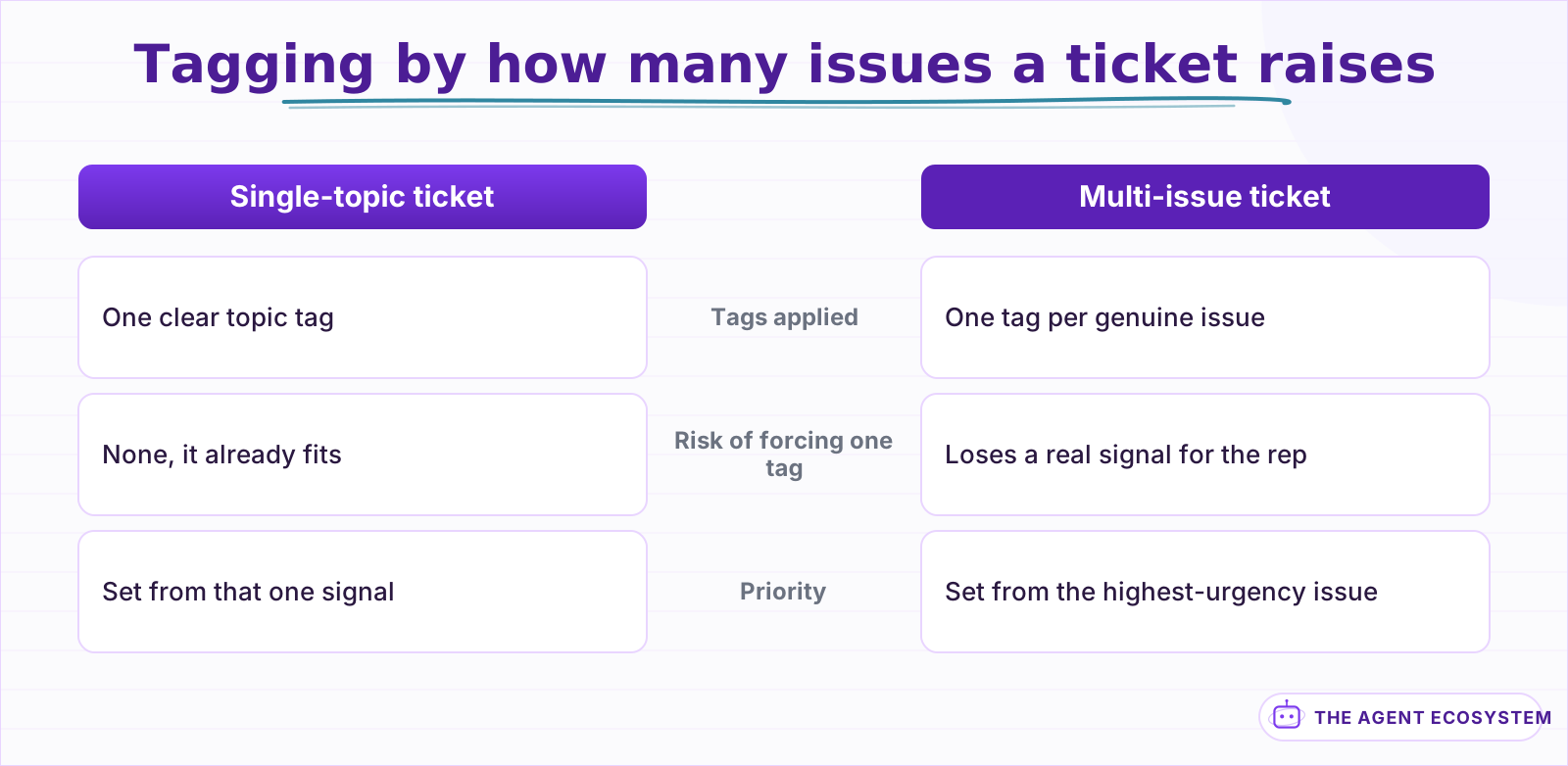 Forcing one label onto a multi-issue ticket loses information a rep will need.
Should the agent post replies automatically, or wait for you to confirm?#
Tagging, prioritizing, and routing are low-risk: a wrong tag costs a few seconds to fix and a customer never sees it. A reply is a different category entirely, since it is customer-facing and often the first impression of how seriously your team is taking the issue.
Let tagging and routing run automatically from the start. Route drafted replies through a human-approval step in Slack for at least the first several weeks, showing the exact reply text before it posts, and loosen that gate only for the most templated, lowest-stakes reply types, such as an order-status lookup, while keeping anything that touches a refund or a complaint under review.
Mechanically, the approval step is a small addition: send the drafted reply, along with the ticket subject and the customer's original message for context, to a Slack message with Approve, Edit, and Reject options, and let n8n pause there until a person responds. An edited reply can post directly once approved, so a reviewer is refining the draft, not writing one from scratch every time.
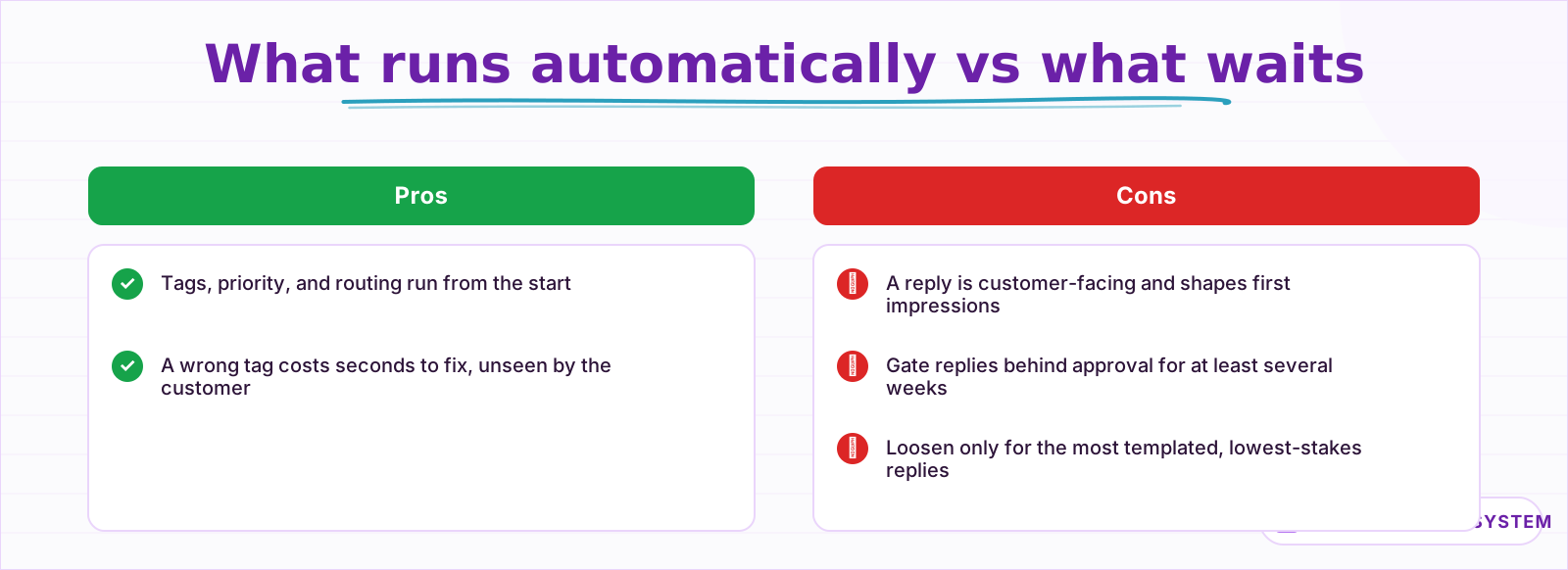 Tagging is cheap to get wrong; a public reply is not.
What breaks, and how do you debug it?#
Beyond the tag-replacement trap, most other failures are permission or custom-field mismatches. The Zendesk API token needs write access to tickets specifically, and a custom field the agent tries to set has to exist in your account's ticket form configuration, or the update is silently ignored for that field rather than erroring loudly.
Turn on Return Intermediate Steps on the AI Agent node and read the exact tags and fields the agent sent before assuming the triage logic itself is wrong. Compare that against the ticket's state right after the write, not just the request, since a silently-dropped tag update is easy to miss if you only check what the agent intended rather than what Zendesk actually saved. The general agent-not-working checklist covers the credential issues that look similar across every connected app.
Rate limits are worth watching on a busy queue, the same way they matter on any API-driven support tool. A read, an update, and a comment on every incoming ticket adds up fast during a spike, such as an incident that generates dozens of tickets in an hour, so keep an eye on Zendesk's API response headers rather than only noticing a problem once requests start failing.
Is this worth building versus Zendesk's own AI features?#
Zendesk ships its own AI-powered triage and suggested replies on higher-tier plans, and if you already pay for that tier, it is genuinely worth trying first, before building a parallel system in n8n that just duplicates work the platform already does natively.
This pattern earns its keep on a plan without that feature, or when you want triage logic that lives in the same automation stack as the rest of your business, not locked inside one vendor's AI add-on.
The honest case for building it yourself is control over the exact rules, not necessarily better judgment than a vendor's model. A fixed tag taxonomy and priority rubric your team wrote and can audit beats a vendor's black-box scoring for a team that wants to know exactly why a ticket got flagged the way it did.
It also composes with the rest of your stack more easily. A triage agent that lives in n8n can pull context from other systems before deciding, checking a customer's subscription status in Stripe or their deal stage in a CRM, in a way a support platform's built-in AI generally cannot reach outside its own data.
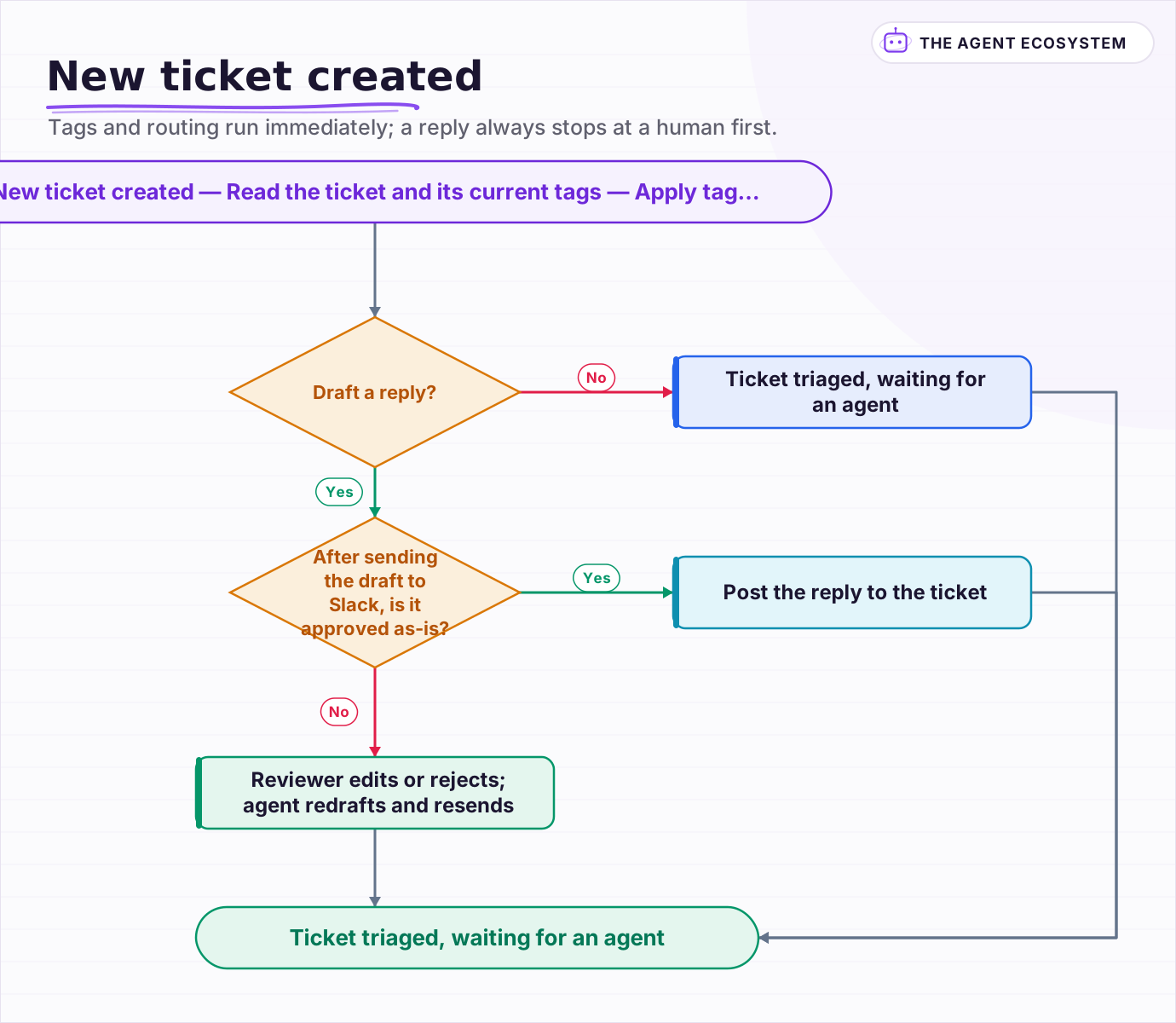 Tags and routing run immediately; a reply always stops at a human first.
Frequently asked questions
Can an n8n AI Agent automatically tag and route Zendesk tickets?
Why did my n8n Zendesk agent delete a ticket's existing tags?
Should an AI agent post replies to Zendesk tickets automatically?
How should an AI agent decide a ticket's priority?
Does this replace Zendesk's own AI ticket triage?
Sources
Primary references and vendor documentation used while drafting and reviewing this article.
Written by

Muhammad Qasim Hammad is an AI agent and automation expert and the founder of Cart Gaze LLC (cartgaze.com). He builds product for the love of it: when an idea lands, a working prototype is usually running within hours, built with the same AI agents and automations he sells. He puts his own output at roughly 20× what it was before agents, and the Agentic OS behind this site is the working proof, documented in public with the tools he actually ran and what they really cost.
AI & Automation Services
Want a pipeline like this running in your business?
I'm Qasim — I design and ship AI agents and n8n automations for solo operators and small teams. Tell me what's eating your team's week, and I'll scope a fix.
Related reading
n8n AI Feedback Analysis: Classify Sentiment and Route Urgent Complaints Automatically
Customer feedback arrives from five places and nobody reads most of it. An n8n workflow with an AI agent classifies every piece by sentiment and theme, routes urgent complaints immediately, and builds a weekly digest your product team can act on.

How to Build an n8n AI Agent for Property Management Maintenance Triage
An n8n AI agent can read a tenant's maintenance request the moment it arrives, sort it by real urgency and category, and route it to the right vendor before a property manager opens it. Here is how to build the triage logic, why certain safety issues must always bypass it
How to Automate Customer Support with AI Without Losing People
The fastest way to damage a small business with AI is to put a bot in front of customers before it knows when to stop. Twelve lessons on triage before answers, grounding in your own documentation, escalation that carries context, and why deflection rate flatters you.
How to Build an n8n AI Agent for Stripe Billing Support
An n8n AI Agent can look up a customer's charges, invoices, and subscription status and draft a grounded answer to a billing question in seconds. Here is how to wire Stripe in as a read-heavy tool and why refunds and subscription changes should stay gated behind a human
How to Build an n8n AI Agent for Salesforce Data Hygiene and Case Routing
An n8n AI Agent can read a new Salesforce Lead or Case, decide what a rule engine cannot, and write the fix back through the Salesforce node. Here is how to wire it as a tool, keep it from guessing at fields it cannot infer, and gate every write behind a human check.
How to Build an n8n AI Agent That Triages GitHub Pull Requests
An n8n AI Agent can read a pull request the moment it opens, label it by size and risk, request the right reviewer, and draft a starting comment, all before a human opens the diff. Here is how to wire GitHub in as a tool and why this is triage, not a replacement for a real