How to Build an n8n AI Agent for Salesforce Data Hygiene and Case Routing
Give an n8n AI Agent Salesforce as a tool: catch duplicate Leads, fill in what the record is missing, and route Cases to the right queue.
AI-drafted, reviewed by Muhammad Qasim Hammad on August 6, 2026. See our AI disclosure.
Table of contents
- What can an n8n AI agent actually do inside Salesforce?
- How do you give an n8n AI Agent Salesforce as a tool?
- What does lead enrichment and dedup look like as an agent task?
- How does the agent route a Case to the right queue?
- Should Salesforce writes run automatically, or wait for approval?
- What breaks, and how do you debug it?
- Is this worth building instead of a native Salesforce Flow?
A rep skips a step in Lead qualification, a Case comes in through the wrong channel, and now someone has to notice, reassign it, and fix the record by hand. Wire n8n's Salesforce node into an AI Agent as a tool, and the agent can catch that class of problem itself: read a new record, decide what is wrong or missing, and write the fix straight into Salesforce.
This is a different job than a simple Salesforce Flow. A Flow can enforce a rule ("if Origin is Email, set Priority to Low"), but it cannot read a free-text Case description and decide the real priority, or notice that two Leads are the same company spelled two different ways. That judgment call is exactly what an LLM adds, with n8n doing the actual read and write against Salesforce's API.
What can an n8n AI agent actually do inside Salesforce?#
n8n's Salesforce node covers the standard objects as separate resources: create, update, get, and delete on Leads, Contacts, Accounts, Opportunities, and Cases, plus a generic search that runs a SOQL-style query and a document-upload action for attachments. Each of those is a clean, narrow tool an agent can call by name.
The Salesforce Trigger node is the entry point for reacting to new or changed records: it polls for records that match a filter, such as newly created Leads or Cases, and starts the workflow from there. Pair that trigger with an AI Agent node and the agent's job becomes deciding what to do with the record it was just handed, not deciding when to run.
Every one of those calls counts against your org's API request limit, which is a real ceiling on a paid Salesforce edition, not a soft warning. An agent that calls search, then get, then update for every single record burns 3 requests where a well-designed tool might need 1. Batch what you can, and check your org's daily limit before you point an agent at a high-volume object like Case.
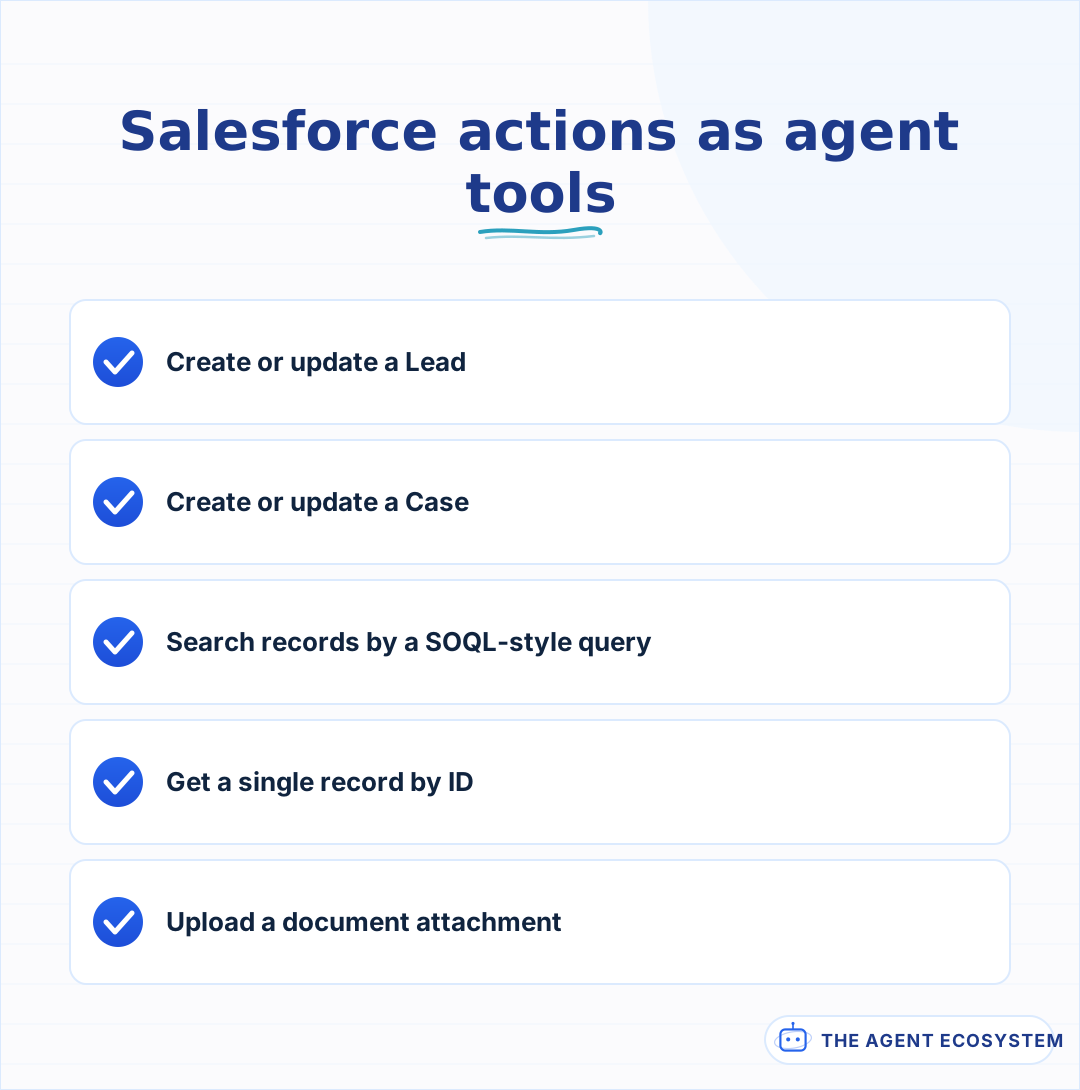 Five narrow actions, each a separate tool the model can call by name.
How do you give an n8n AI Agent Salesforce as a tool?#
Add a Salesforce node to the canvas, switch it to Use as Tool, and connect it to your AI Agent node's tool input. Give the agent one tool per action you actually want it to take instead of one giant "manage Salesforce" tool, so it cannot reach for update-Case when the job is really update-Lead.
Tool descriptions the model can actually use matter even more here than on a simpler app, because Salesforce field names are rarely self-explanatory. Name the exact object, list the fields the agent is allowed to set, and say what a valid value looks like for anything that is a picklist rather than free text. The core mechanics of giving an n8n agent tools still apply; Salesforce just has more fields to be specific about.
Credentials are their own setup step. n8n authenticates against Salesforce through a Connected App with OAuth2, which you create once inside Salesforce Setup and then reuse across every workflow. Scope that Connected App's permitted users and IP ranges deliberately, since the credential it issues can do anything the underlying Salesforce user is allowed to do, not just the specific actions you wired into this one agent.
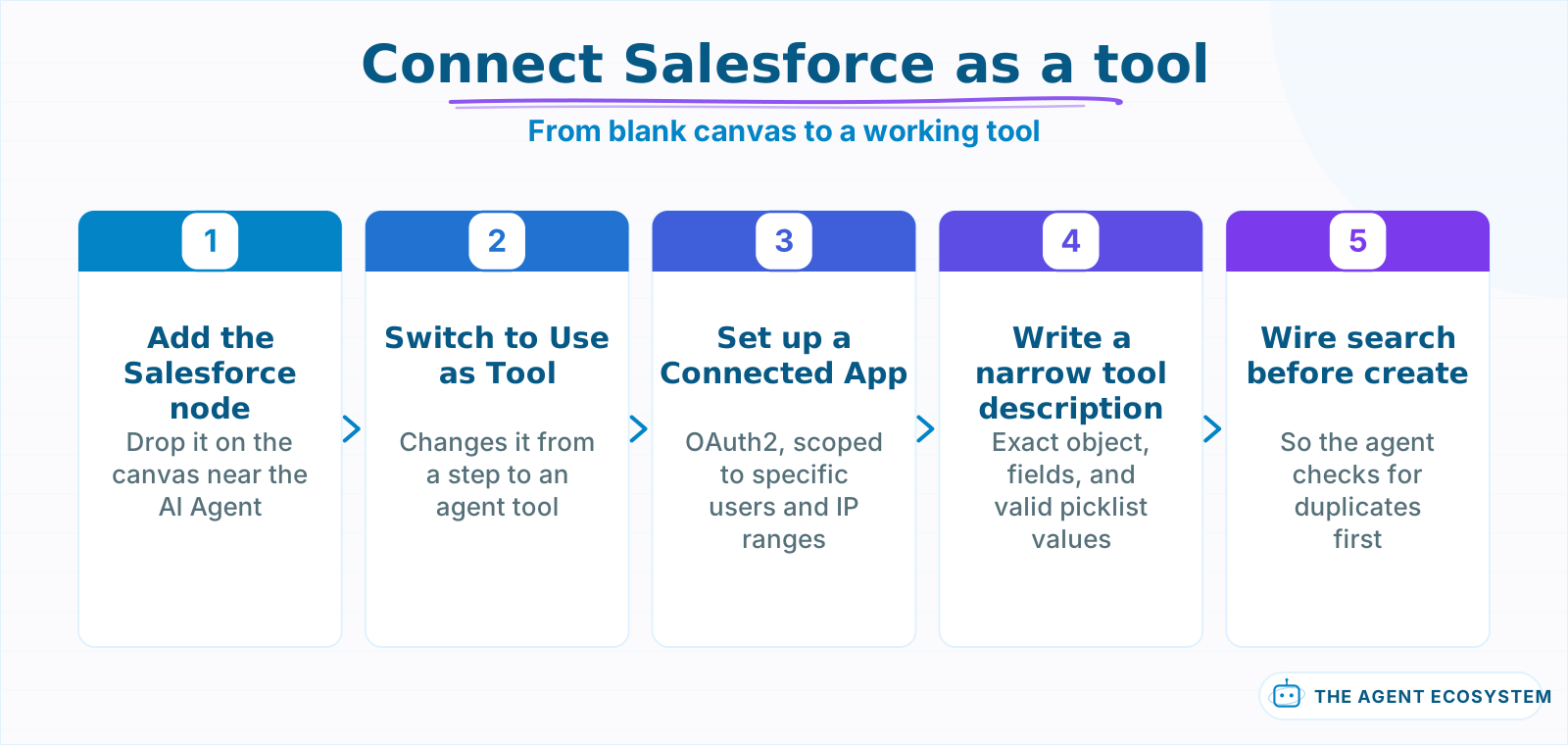 The Connected App step is the one people skip, then get stuck on later.
What does lead enrichment and dedup look like as an agent task?#
A new Lead lands with a company name, an email, and little else. The agent's job is to fill in what it can infer, and to flag, not silently merge, anything that looks like a duplicate of an existing record.
Give the agent a search tool first: query Leads and Contacts by company domain before it ever creates anything. If the domain already exists as a Contact at a won Account, that is a routing signal, not a new Lead, and the agent should say so rather than create a second record. If the domain is genuinely new, the agent can fill in LeadSource from context in the intake message and leave anything it cannot infer blank rather than guess. An agent that invents a plausible-looking value for a field it has no evidence for is worse than one that leaves it empty for a human to fill in.
| Field | What the agent should do |
|---|---|
| Company, Email | Copy directly from the intake source |
| LeadSource | Infer only from clear context (form name, referral note) |
| Industry | Leave blank unless stated explicitly |
| Duplicate check | Search by email domain before creating |
Leaving a field blank is not a failure state; it is the honest output when the source text genuinely does not say. A Lead record with 3 filled fields and 2 openly blank ones is easier for a rep to trust and finish by hand than one where an agent quietly guessed at Industry from a company name that could plausibly belong to several sectors. Treat "I do not know" as a valid tool result, not something to avoid.
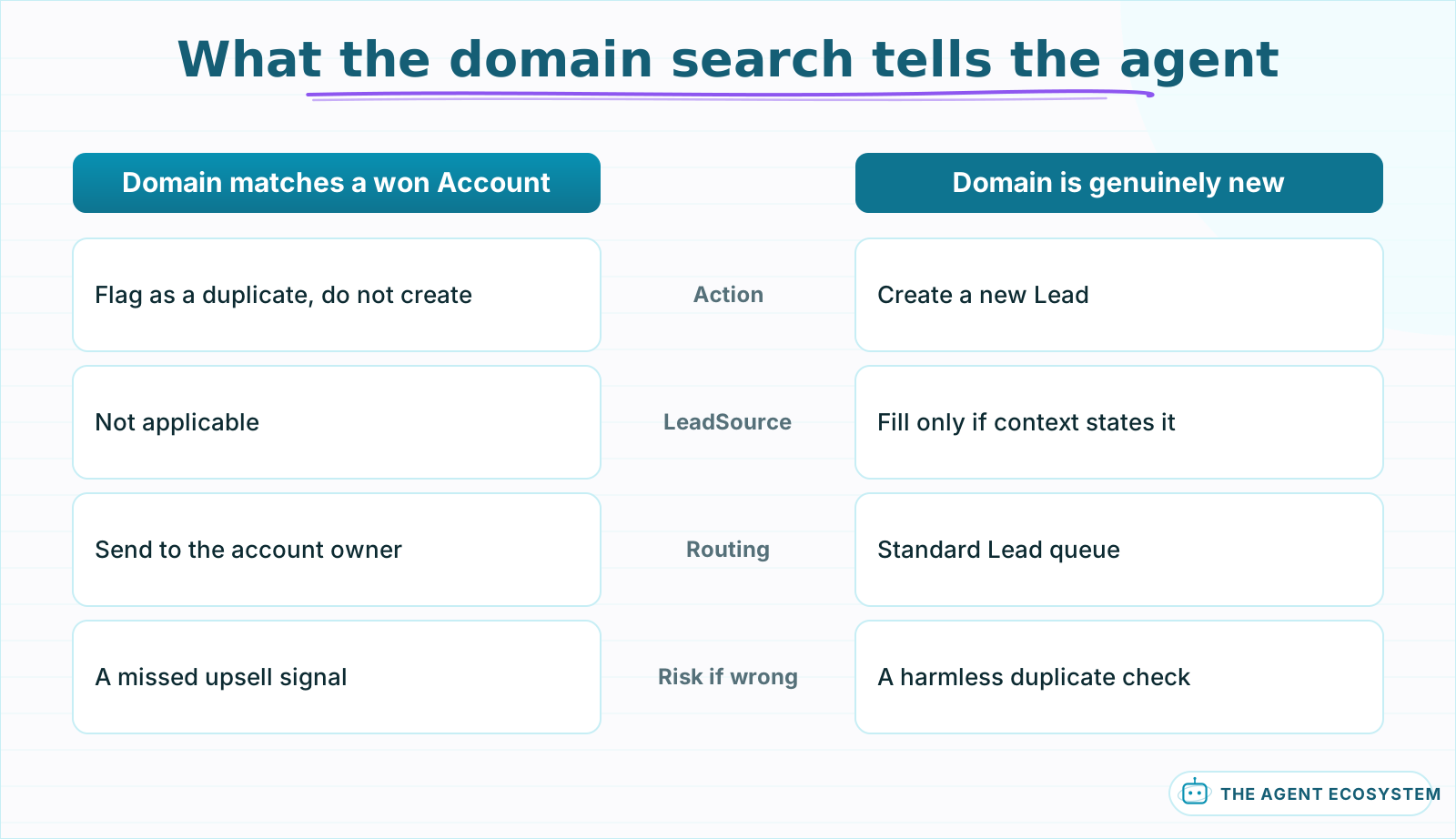 The search result decides the path; the agent should never create past a domain match.
How does the agent route a Case to the right queue?#
A support inbox mixes billing questions, bug reports, and account-access requests in one stream, and someone still has to read each one and pick a queue. An agent with a Case-search and Case-update tool can read the subject and description, classify the topic, and set Priority and the owning queue in a single tool call.
The classification only works if the queues map to something the model can actually tell apart from the text. "Billing," "Technical," and "Account Access" are distinguishable from a support email; "Tier 2" and "Tier 3" usually are not, because that distinction depends on account history the email does not contain. Route on what the words say, and leave severity tiers that depend on account data to a rule the agent cannot see, not a guess it is forced to make.
Give the agent a narrow, named set of queues to choose from rather than free text for the queue field, the same way a Select property works in Notion. A Case-update tool whose description lists the exact 4 or 5 valid queue names by name fails far less often than one that leaves the model to invent a plausible-sounding string that does not match any real queue in the org.
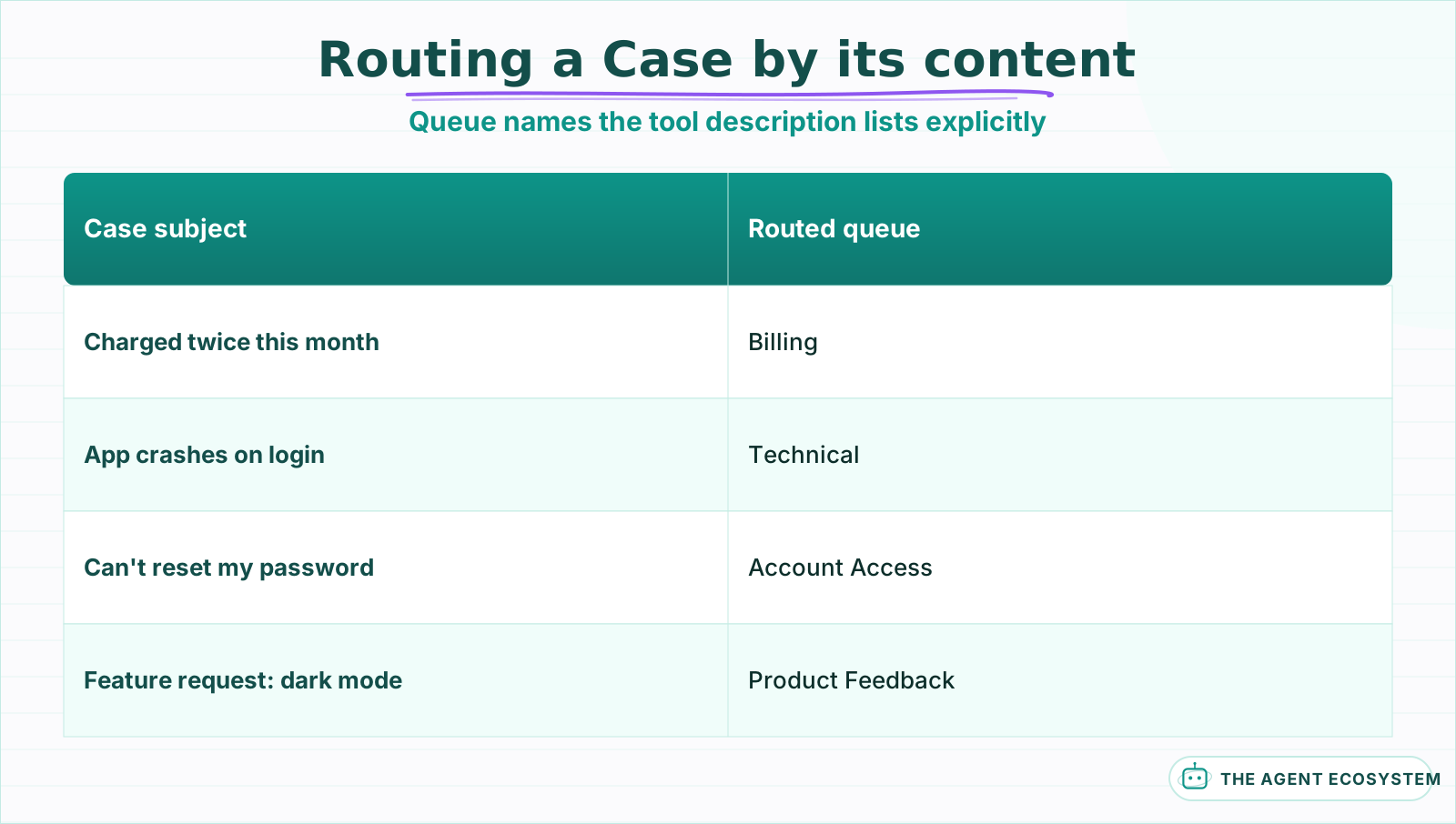 The agent classifies on the words in the subject and description, nothing it cannot see.
Should Salesforce writes run automatically, or wait for approval?#
Reads are cheap to trust early: a search or a get-record call cannot damage a report a sales manager is about to look at. Creates and updates are a different risk, because a wrong field value on a Lead or Case can sit there for months before anyone notices it came from an agent, not a person.
n8n's human-in-the-loop pattern is the right default here: route every Salesforce create or update through a Slack approval step before the node executes, and let searches run straight through. Once a few weeks of approved actions show the agent consistently gets the field mapping right, loosen the gate on the lowest-risk write, such as filling a blank LeadSource, and keep the gate on anything that changes Priority, Owner, or Stage.
Mechanically, this is a small addition to the workflow, not a separate system. After the agent decides on a Salesforce write, send the proposed change (record, field, old value, new value) to a Slack message with Approve and Reject buttons, and let n8n pause at that node until a reviewer responds. A rejection can carry a short correction back to the agent as a new instruction, so a reviewer fixes the one wrong field instead of blocking the whole record.
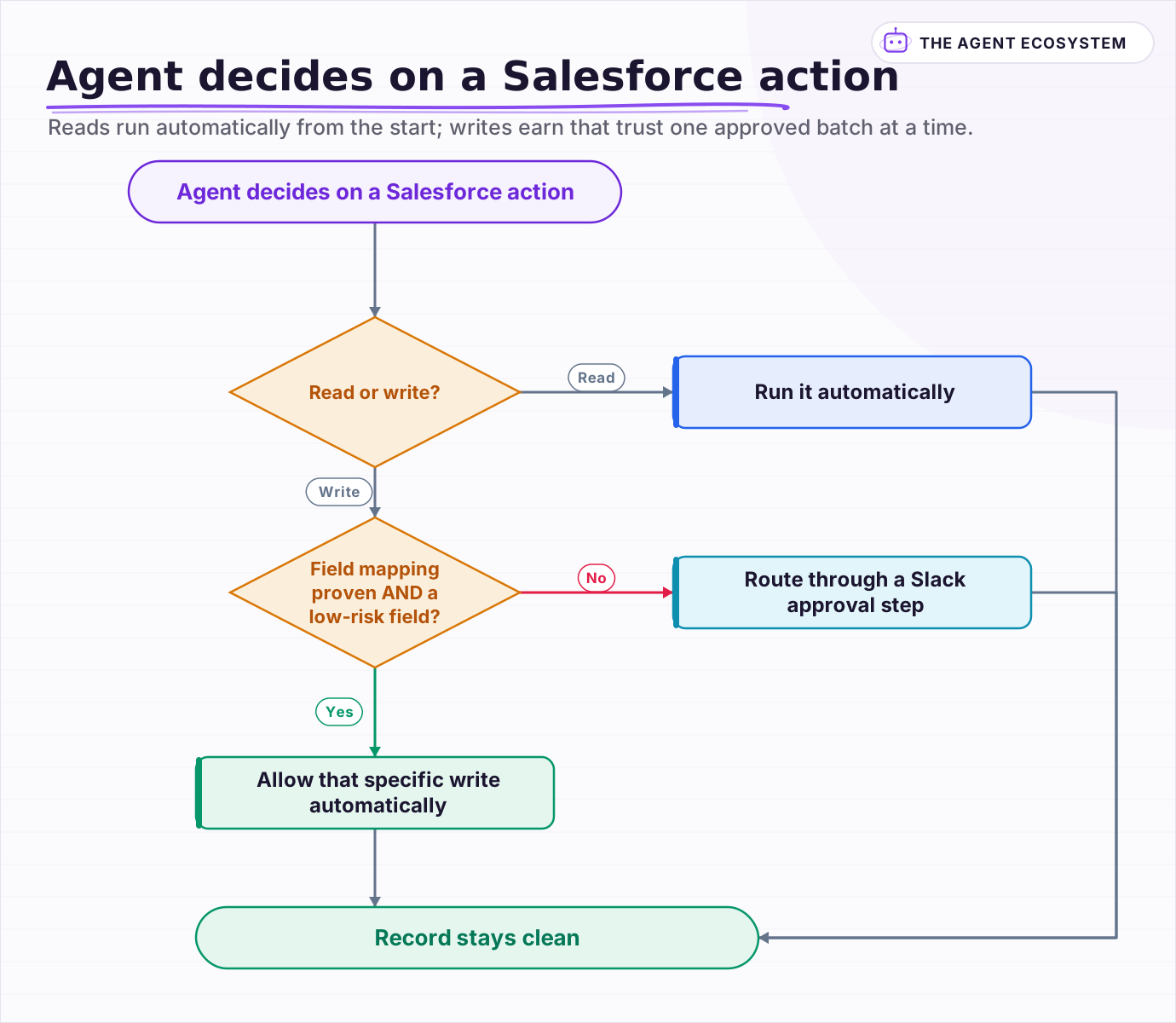 Reads run automatically from the start; writes earn that trust one approved batch at a time.
What breaks, and how do you debug it?#
Most Salesforce tool-call failures are permission errors wearing a confusing message. The integration user needs field-level security and object permissions for every field the agent tries to write, not just the object itself; a locked-down picklist field will reject a value that looks correct in the request.
Turn on Return Intermediate Steps on the AI Agent node and read the exact tool call before Salesforce rejects it. If the request looks right and Salesforce still errors, check field-level security on that specific field before assuming the workflow logic is wrong; a value that violates a picklist's exact allowed list, including capitalization, is the single most common cause once the API connection itself is confirmed working. The general agent-not-working checklist covers the credential and auth failures that look the same across every connected app, Salesforce included.
A second recurring failure is stale metadata: someone renames a picklist value or adds a required field in Salesforce Setup, and the agent's tool description still lists the old options. Because the model trusts the description over the live schema, it keeps offering a value that no longer exists until a human updates the text. Treat the tool description as a piece of config that changes when the org's fields change, not a one-time write.
Is this worth building instead of a native Salesforce Flow?#
Build it when the decision genuinely needs judgment a Flow's rule engine cannot express: reading free text to classify a Case, recognizing a duplicate that is not an exact string match, or inferring a field from context a rule-based system would leave blank every time.
If the rule is a clean if-this-then-that on a structured field, a native Flow is simpler to build, easier for a Salesforce admin to maintain, and does not depend on an LLM call at all.
The two are not competitors so much as a division of labor. Let Salesforce Flow keep handling the deterministic rules it is good at, and add an n8n AI agent only for the specific step that needs to read unstructured text and make a judgment call, gated behind approval until it has proven itself. If your workspace of choice for this kind of agent is Notion rather than Salesforce, the same pattern applies to a Notion AI agent with a much smaller schema to reason about.
Frequently asked questions
Can an n8n AI Agent create and update Salesforce records automatically?
How does an n8n Salesforce agent catch duplicate Leads?
Should an AI agent write to production Salesforce without approval?
Why does my n8n Salesforce node reject a field the agent tried to set?
Should I use an AI agent or a native Salesforce Flow?
Sources
Primary references and vendor documentation used while drafting and reviewing this article.
Written by

Muhammad Qasim Hammad is an AI agent and automation expert and the founder of Cart Gaze LLC (cartgaze.com). He builds product for the love of it: when an idea lands, a working prototype is usually running within hours, built with the same AI agents and automations he sells. He puts his own output at roughly 20× what it was before agents, and the Agentic OS behind this site is the working proof, documented in public with the tools he actually ran and what they really cost.
AI & Automation Services
Want a pipeline like this running in your business?
I'm Qasim — I design and ship AI agents and n8n automations for solo operators and small teams. Tell me what's eating your team's week, and I'll scope a fix.
Related reading
How to Build an n8n AI Agent for HubSpot Lead Scoring
An n8n AI Agent can score a new HubSpot lead the moment it arrives, log which rules fired, and route a task to the right rep, all against a rubric your sales team owns. Here is how to wire HubSpot in as a tool and keep the scoring auditable instead of a black box.

How to Build an n8n AI Agent That Manages Your Notion Workspace
An n8n AI Agent can create Notion pages, update database properties, and search your workspace from a single chat message. Here is how to wire the Notion node in as a tool, design a schema the agent can map to reliably, and gate every write behind a human check.
n8n AI Lead Enrichment: Score and Route Every New Lead Automatically
A new lead arrives with nothing but a name and email. An n8n workflow pulls company data, scores the lead with an AI agent against your ICP, and routes it to the right rep or drip sequence before anyone opens a browser tab.
How to Build an n8n AI Agent That Updates Your Airtable Base
An n8n AI Agent can create and update Airtable records, search a base with Filter By Formula, and keep a deal tracker or content calendar current from a single chat message. Here is how to wire the Airtable node in as a tool and design a schema the agent can map to reliably.
How to Build an n8n AI Agent for Real Estate Lead Qualification
An n8n AI Agent can text a new real estate lead the 1 or 2 questions that actually separate a serious buyer from someone browsing, then route a qualified lead to the right agent within minutes. Here is how to build the qualification logic, why it should ask explicit questions
How to Build an n8n AI Agent That Triages Zendesk Tickets
An n8n AI Agent can read a new Zendesk ticket, tag and prioritize it against rules you define, and route it to the right group, all before a human opens it. Here is how to wire Zendesk in as a tool, avoid the tag-replacement trap that silently deletes existing tags, and keep