How to Build an n8n AI Agent That Updates Your Airtable Base
Give an n8n AI Agent real Airtable tools: create records, update fields, and search a base with Filter By Formula from one chat message.
AI-drafted, reviewed by Muhammad Qasim Hammad on August 8, 2026. See our AI disclosure.
Table of contents
- What can an n8n AI agent actually do inside Airtable?
- How do you give an n8n AI Agent the Airtable tool?
- How should you design the table the agent writes to?
- What does a real example look like, start to finish?
- Should writes run automatically, or wait for you to confirm?
- What breaks, and how do you debug it?
- Is this worth building for your workflow?
A lightweight Airtable base tracking deals, inventory, or content only stays useful if someone keeps updating it, and that someone usually has better things to do. Wire n8n's Airtable node into an AI Agent as a tool, and the agent can do the updating itself: read a plain-English request, decide which record it touches, and write the change straight into the base.
Airtable's own structure makes this easier than it sounds. A base is a set of typed tables with real field types, so an agent mapping free text to fields has clearer guardrails than it would writing to a loose spreadsheet. The trade-off is the same one every agent-plus-database pattern has: reads are safe to automate immediately, writes need a check until the agent has earned trust.
What can an n8n AI agent actually do inside Airtable?#
n8n's Airtable node covers records as its core resource, with actions to create, read, list, update, and delete rows in a specific base and table. List supports Airtable's own Filter By Formula syntax, so an agent can hand the tool a real Airtable formula rather than a vague description of which rows it wants.
The Airtable Trigger polls a table on an interval and fires when a record matching your filter is created or updated, since Airtable's API has no native push webhook for row changes the way n8n itself does. That is fine for an agent reacting to a chat message or a form; do not build a workflow that assumes an Airtable edit reaches n8n within seconds.
Filter By Formula is worth learning on its own, because it is the difference between an agent that can only fetch everything and filter in n8n afterward and one that asks Airtable for exactly the rows it needs. A formula like {Stage} = "Negotiation" does the filtering server-side, which matters once a table grows past a few hundred rows and pulling every record on every read gets slow and wasteful.
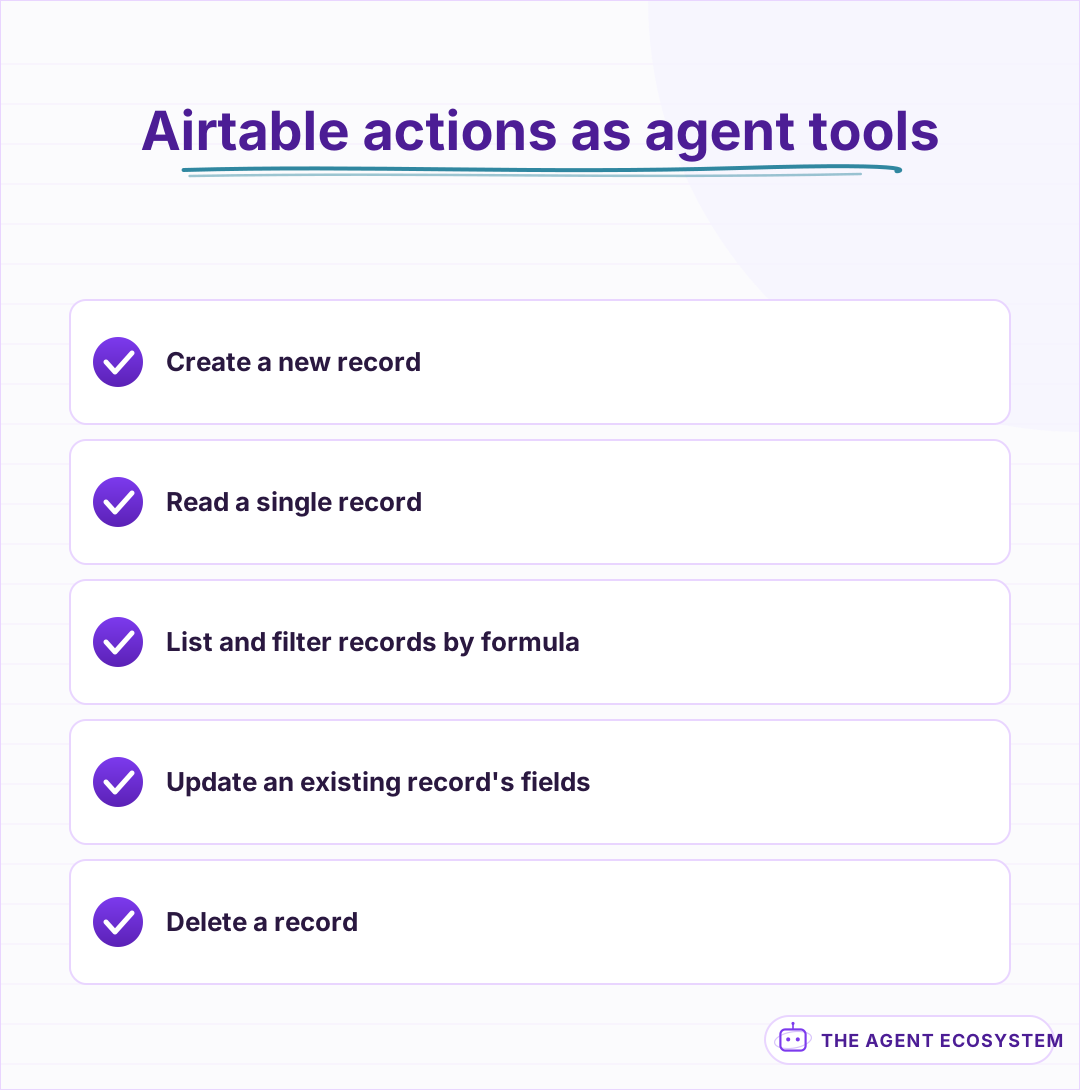 Five record-level actions, each a separate tool the model can call.
How do you give an n8n AI Agent the Airtable tool?#
Add an Airtable node to the canvas, switch it to Use as Tool, and connect it to your AI Agent node's tool input. Point it at one specific base and table per tool rather than a generic tool; an agent guessing at which base you mean gets it wrong far more than one told exactly where to write.
Tool descriptions the model can actually use should name the table's real field names and, for any Single Select or Multiple Select field, the exact allowed options. The core mechanics of giving an n8n agent tools carry over directly; Airtable's typed fields just make a precise description pay off faster than on a freeform table.
Credentials are a personal access token scoped to the specific bases you want reachable, created from your Airtable account settings. Scope it narrowly the same way you would any other integration: a token with access to every base in your workspace can do far more than this one workflow needs, so limit it to the base the agent is actually meant to touch.
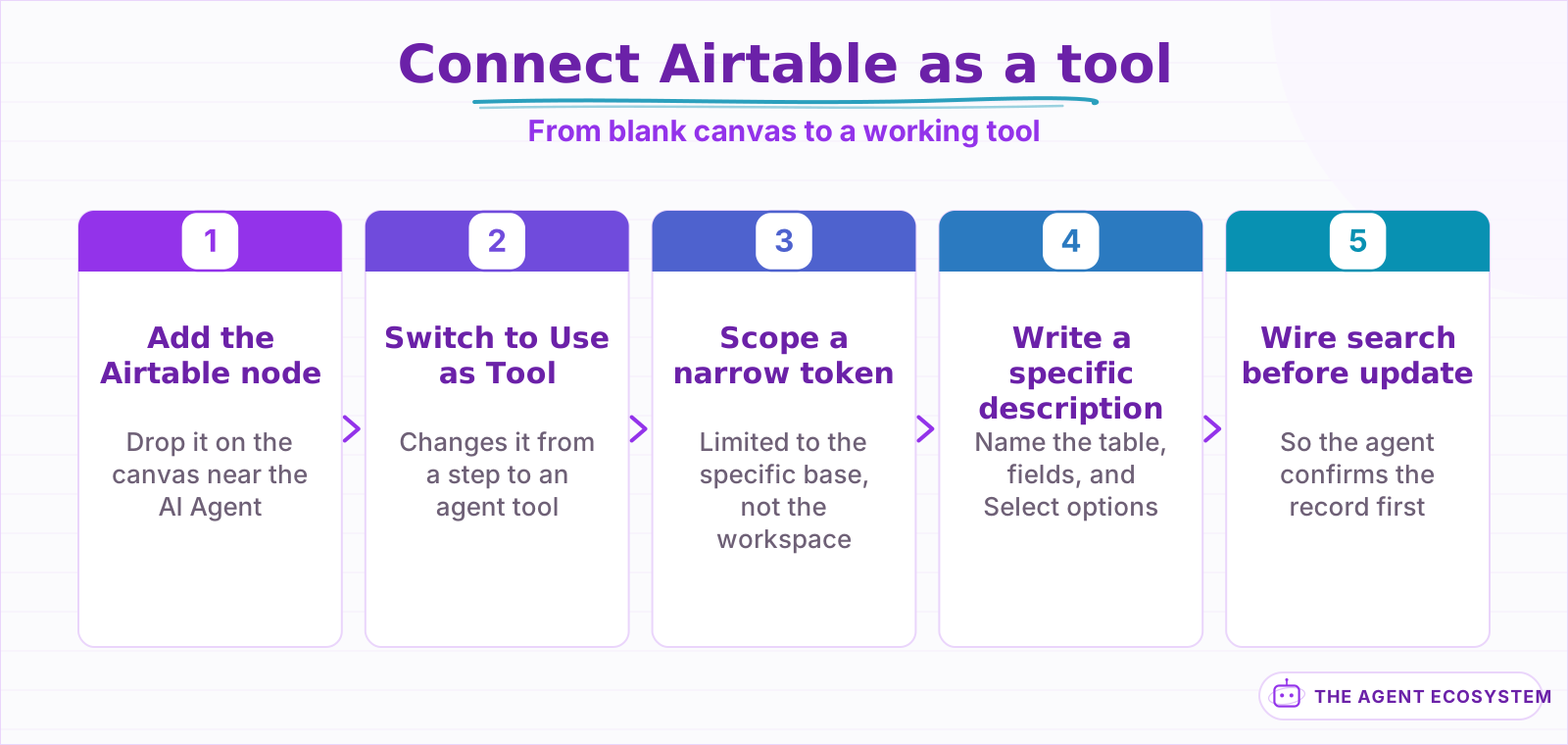 Scoping the token to one base is the step worth the extra few minutes.
How should you design the table the agent writes to?#
Keep it to a handful of well-typed fields, the same discipline that makes any agent-facing schema reliable. A small deal-pipeline table with Deal Name, Stage, Value, and Next Step gives the agent 4 clear targets; a table with 20 optional columns gives it 20 places to leave something wrong.
| Field | Type | Why the agent needs it simple |
|---|---|---|
| Deal Name | Single line text | The one field every record needs |
| Stage | Single select | A fixed list, not a string the agent invents |
| Value | Currency or Number | Structured numbers parse reliably from text |
| Next Step | Single line text | Short and specific, not a paragraph |
Linked Record fields are Airtable's version of a relation, and they carry the same warning a relation does anywhere else: they ask the agent to know another table's exact record ID, which is where a tool call is most likely to fail. Leave linked fields out of a first version and let the agent work within one table until you trust the pattern.
Formula and Rollup fields carry the same restriction they do anywhere else: Airtable computes their value from other fields, so the API rejects a direct write to them even though they display like an ordinary column. If the agent needs to report a rollup, give it a read tool for that field, never a write target.
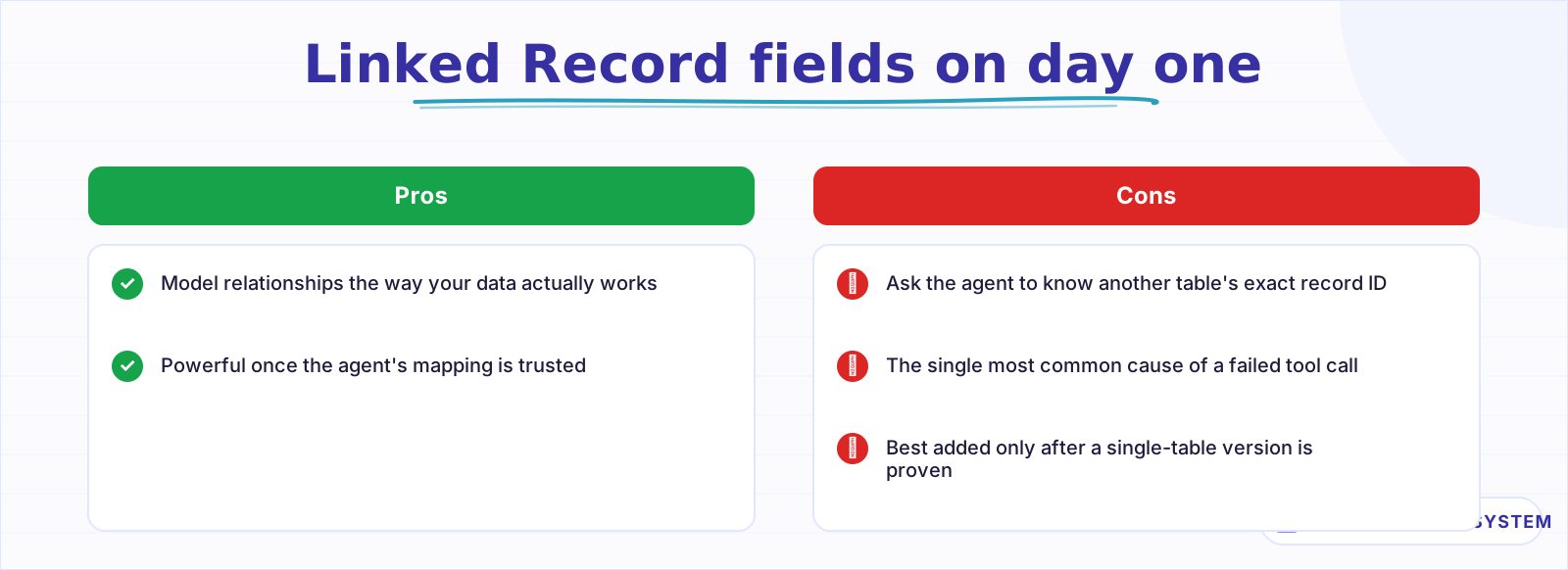 Cross-table relations add real power and the most common way a tool call fails.
What does a real example look like, start to finish?#
Someone drops a note in Slack: "move the Acme deal to Negotiation, value is now $18,000." An n8n workflow with a Slack trigger, an AI Agent node, and the Airtable tool turns that into a single List call to find the Acme record by name, then an Update call that sets Stage and Value, no one opening Airtable.
The List step matters as much as the Update. An agent that updates blind, without first confirming which record it means, risks editing the wrong row when two deals share a similar name. Giving the agent a search-first, then-update pattern, the same read-before-write discipline that works for any connected database, is what keeps a shorthand Slack message from landing on the wrong record.
Ambiguity is the honest failure case worth designing for. If the List call finds 2 records that could both be "the Acme deal," a well-instructed agent reports the ambiguity back to the requester instead of picking one and hoping, and a well-instructed system prompt should say so explicitly: guessing between 2 plausible records is worse than asking which one.
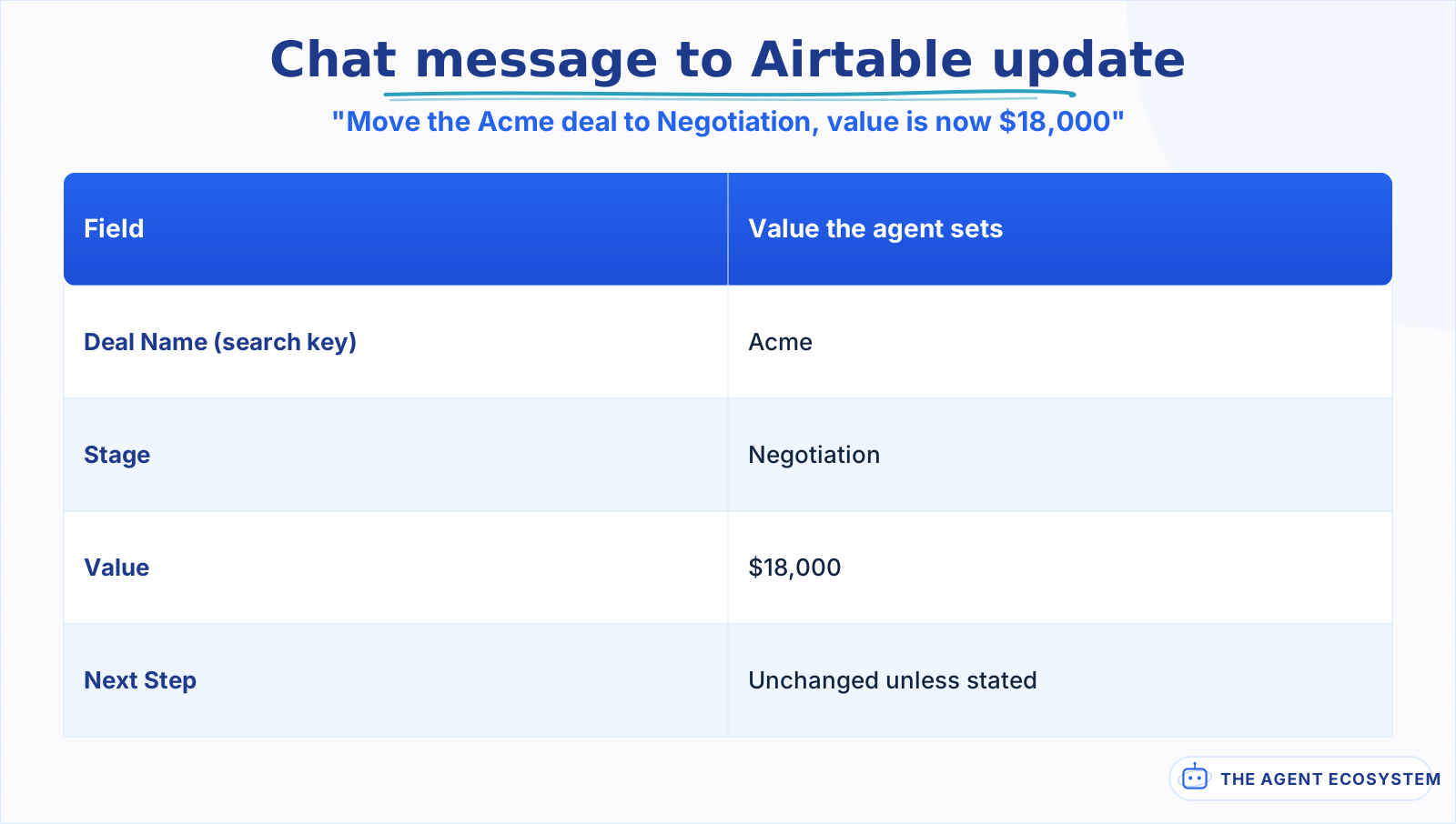 The agent finds the record first, then updates 2 fields in a single tool call.
Should writes run automatically, or wait for you to confirm?#
A List or a Get call is read-only and safe from the start. A Create, Update, or Delete changes a record other people rely on, which earns it a checkpoint for at least the first few weeks you run this, especially on a base more than one person edits.
n8n's human-in-the-loop pattern fits here the same way it does on any other connected app: route writes through a Slack approval step with the proposed change visible before the Airtable node executes, and let reads run straight through. Loosen the gate once the agent's field mapping has held up across real requests, and keep it on Delete permanently, since a mistaken delete has no undo button an agent can reach for.
The approval step is a small addition, not a new system: after the agent decides on a write, send the proposed change to a Slack message with Approve and Reject buttons before the Airtable node runs, and let n8n pause at that node until someone answers. A rejection can carry a short correction back to the agent, so a reviewer fixes one wrong field instead of blocking the whole request.
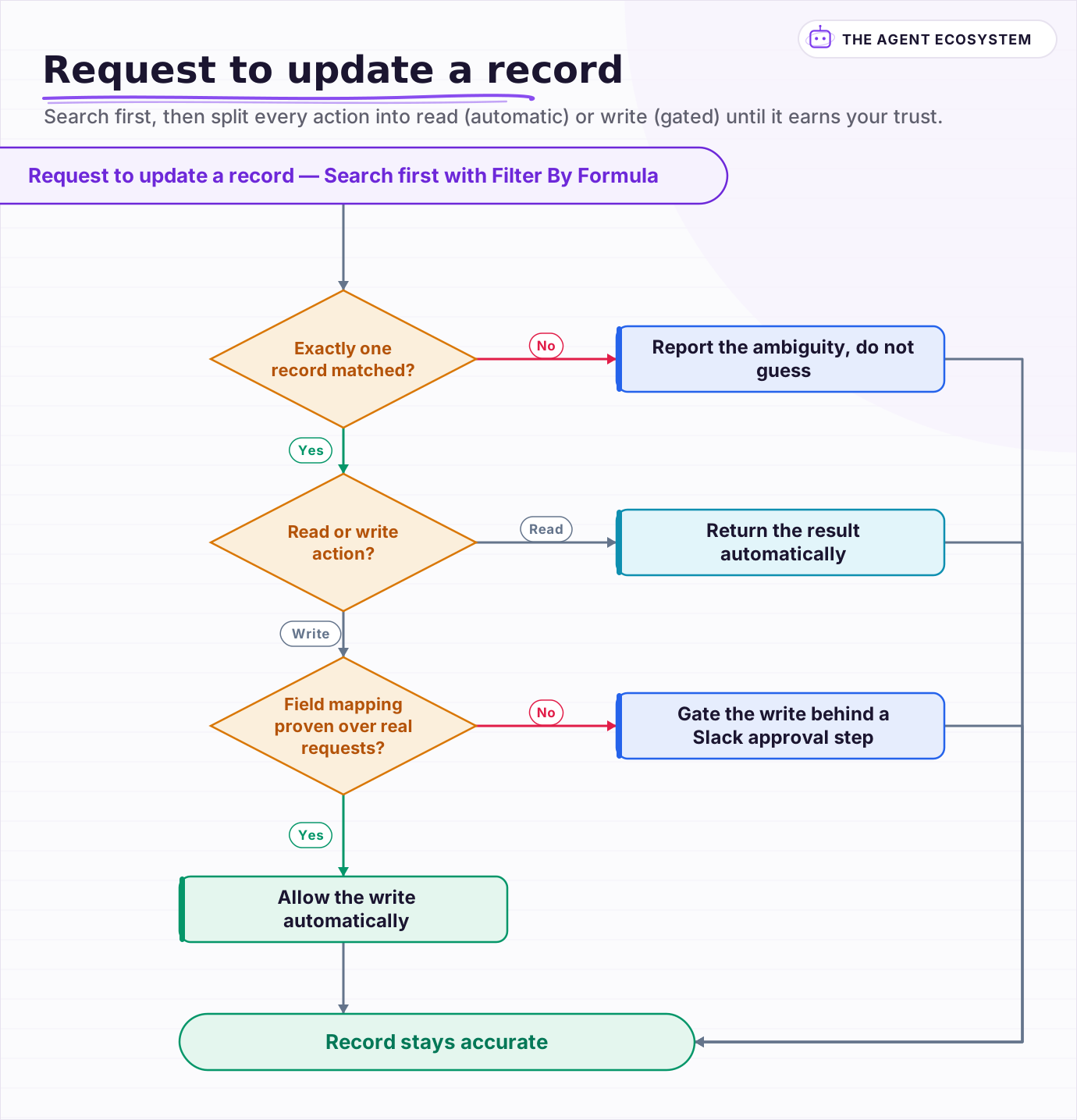 Search first, then split every action into read (automatic) or write (gated) until it earns your trust.
What breaks, and how do you debug it?#
Most failures trace back to a Single Select value that does not exactly match one of the field's defined options, including capitalization, or a base or table ID that changed after someone renamed or duplicated the base. Airtable rejects the write outright rather than silently creating a new option.
Turn on Return Intermediate Steps on the AI Agent node and read the exact Filter By Formula or field values the agent sent before Airtable rejects them. If the request looks right and Airtable still errors, check the base and table IDs are current, since duplicating a base in Airtable creates new IDs even when the name stays the same; the general agent-not-working checklist covers the credential issues that look similar across every connected app.
A malformed Filter By Formula is the third recurring cause, and it fails quietly: instead of an error, a slightly wrong formula often just returns 0 rows, which looks identical to "nothing matched" from inside the workflow. If a search the agent should find something for keeps coming back empty, read the actual formula string it sent before assuming the data itself is missing.
Is this worth building for your workflow?#
Build it when the base already earns its keep but keeping it updated is the part that keeps slipping. A deal tracker, a lightweight content calendar, or a simple inventory count are all good fits, because the schema is small and the update is usually a short, well-defined change.
If your team is already committed to a dedicated tool for the job, like Salesforce for a real CRM pipeline or Notion for a shared knowledge base, match the agent to the tool you actually use rather than migrating to Airtable just to get this pattern. The reusable part is the discipline, not the destination: a small typed schema, one narrow tool per action, and a confirm step on anything destructive.
Frequently asked questions
Can an n8n AI Agent create and update Airtable records automatically?
What is Filter By Formula and why does it matter for an AI agent?
Does the n8n Airtable Trigger fire in real time?
Why does my n8n Airtable search return no results even though the data exists?
Should an AI agent be allowed to delete Airtable records?
Sources
Primary references and vendor documentation used while drafting and reviewing this article.
Written by

Muhammad Qasim Hammad is an AI agent and automation expert and the founder of Cart Gaze LLC (cartgaze.com). He builds product for the love of it: when an idea lands, a working prototype is usually running within hours, built with the same AI agents and automations he sells. He puts his own output at roughly 20× what it was before agents, and the Agentic OS behind this site is the working proof, documented in public with the tools he actually ran and what they really cost.
AI & Automation Services
Want a pipeline like this running in your business?
I'm Qasim — I design and ship AI agents and n8n automations for solo operators and small teams. Tell me what's eating your team's week, and I'll scope a fix.
Related reading
How to Build an n8n AI Agent That Manages Your Notion Workspace
An n8n AI Agent can create Notion pages, update database properties, and search your workspace from a single chat message. Here is how to wire the Notion node in as a tool, design a schema the agent can map to reliably, and gate every write behind a human check.

How to Build an n8n AI Agent for Salesforce Data Hygiene and Case Routing
An n8n AI Agent can read a new Salesforce Lead or Case, decide what a rule engine cannot, and write the fix back through the Salesforce node. Here is how to wire it as a tool, keep it from guessing at fields it cannot infer, and gate every write behind a human check.
How to Build an n8n AI Agent for HubSpot Lead Scoring
An n8n AI Agent can score a new HubSpot lead the moment it arrives, log which rules fired, and route a task to the right rep, all against a rubric your sales team owns. Here is how to wire HubSpot in as a tool and keep the scoring auditable instead of a black box.
n8n AI Agent Hallucinations: How to Ground and Constrain Them
An n8n AI Agent that states a wrong fact or invents a tool result is hallucinating, filling a gap where it has no grounded answer. The fix is not a better model. It is giving the agent real data and constraining what it is allowed to say. Here is how, layered.
n8n Form Trigger + AI Agent: Build a Smart Intake Form
A contact form that sits in an inbox helps nobody. Wire n8n's Form Trigger to an AI agent and every submission gets classified, answered, and routed the moment it arrives.
Text-to-SQL AI Agents: Plain-English Database Queries You Can Trust
A text-to-SQL agent turns 'how many customers churned?' into a real query against a real database. The models are good enough to try this in 2026, but accuracy is mostly a schema problem and safety is entirely a database problem. This is the loop that makes generation reliable,