n8n Form Trigger + AI Agent: Build a Smart Intake Form
Turn a contact form into a live intake system that classifies, replies, and routes every submission.
AI-drafted, reviewed by Muhammad Qasim Hammad on July 24, 2026. See our AI disclosure.
Table of contents
You paste a contact form on your site and every submission lands in an inbox you check twice a day. Half are spam, a third need the same canned answer, and the one urgent lead sits buried under the noise. An n8n form trigger wired to an AI agent classifies, responds to, and routes each submission the moment it arrives, without a middleware layer or a third-party form tool.
n8n's Form Trigger node hosts a web form on your instance's own URL. Submissions hit your workflow directly, and the AI Agent node gets structured fields to work with. Here is how to build that pipeline from an empty canvas.
How does an n8n form trigger feed data to an AI agent?#
The Form Trigger node publishes a web form on your n8n instance and fires the workflow the instant someone submits it. Every field arrives as a named JSON key. Wire that output into an AI Agent node, and the agent reads the structured submission, classifies the intent, and decides the next action without a parsing step in between.
The form lives at a URL on your own n8n domain under the /form/<path> route, and you configure the fields visually in the node editor. Each field gets a type (text, email, textarea, dropdown, number, or date), a label, and optional placeholder text. When someone submits, the workflow receives a clean JSON object where each key matches the field name you defined.
That structure is what makes the AI step simple. The agent sees name, email, category, and message as distinct typed fields, not a blob of free text it has to parse. The system prompt can reference each field by name, and the classification runs on structured data from the first token.
The difference from a standard webhook trigger is worth noting. A webhook receives whatever the caller sends, so you write validation, handle missing fields, and parse the body yourself. The Form Trigger handles all of that: it enforces required fields, validates email format, and constrains dropdowns to the options you defined. The agent gets clean data every time.
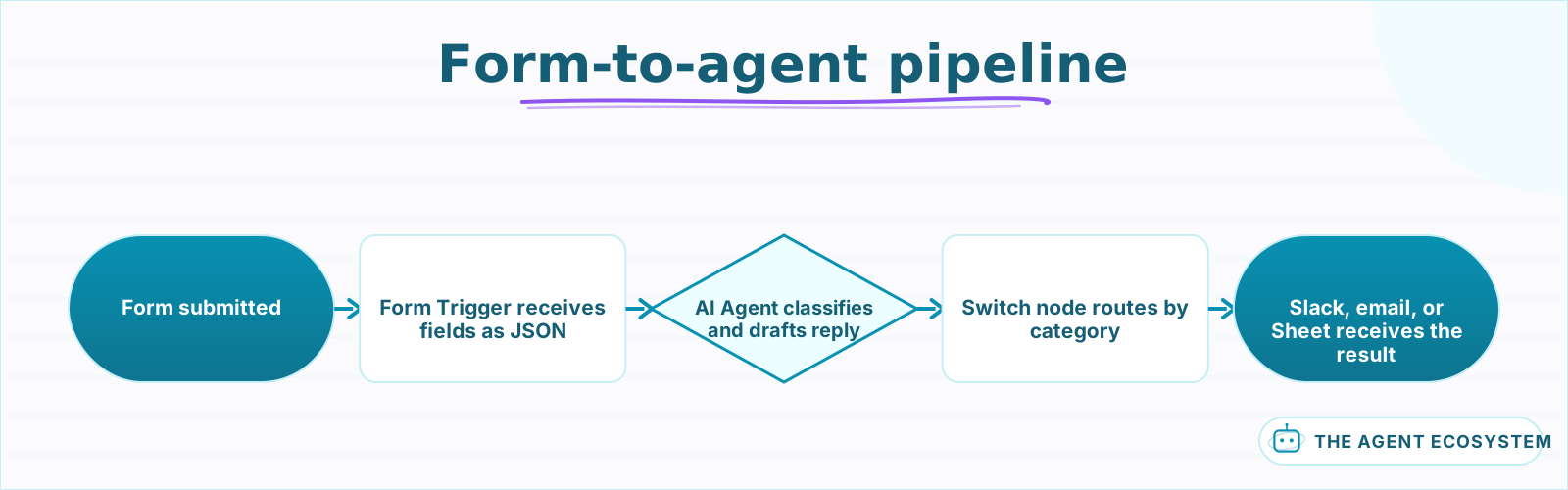 The Form Trigger fires the workflow, the agent classifies and drafts, and a Switch node routes the result to the right channel.
What form fields should you configure for an AI intake workflow?#
Set up 4 to 6 fields that give the agent the context it needs to classify and route each submission on the first pass. Start with name, email, a category dropdown with 3 to 7 options, and a freeform message textarea. Add a priority or urgency dropdown if the use case calls for triage.
The dropdown is the most valuable field for the agent. It pre-classifies the submission before the AI even runs, so the agent starts with a category label instead of guessing from raw text. For a solopreneur's intake form, 3 to 5 options cover most use cases: "New project inquiry," "Support request," "Partnership," and "Other."
| Field | Type | Why the agent needs it |
|---|---|---|
| Name | Text | Personalize the auto-reply |
| Send the agent's response back | ||
| Category | Dropdown (3-7 options) | Pre-classify before the agent runs |
| Message | Textarea | The agent's primary input for classification |
| Urgency | Dropdown (Low / Medium / High) | Route high-priority items to a fast channel |
| Budget range | Dropdown (optional) | Score leads without asking the agent to guess |
Keep the form under 7 fields. Formstack's 2024 conversion data shows each additional field drops completion rates by roughly 11%, and the agent can extract what it needs from the freeform message anyway. The dropdown does the heavy categorical lifting; the textarea gives the agent context.
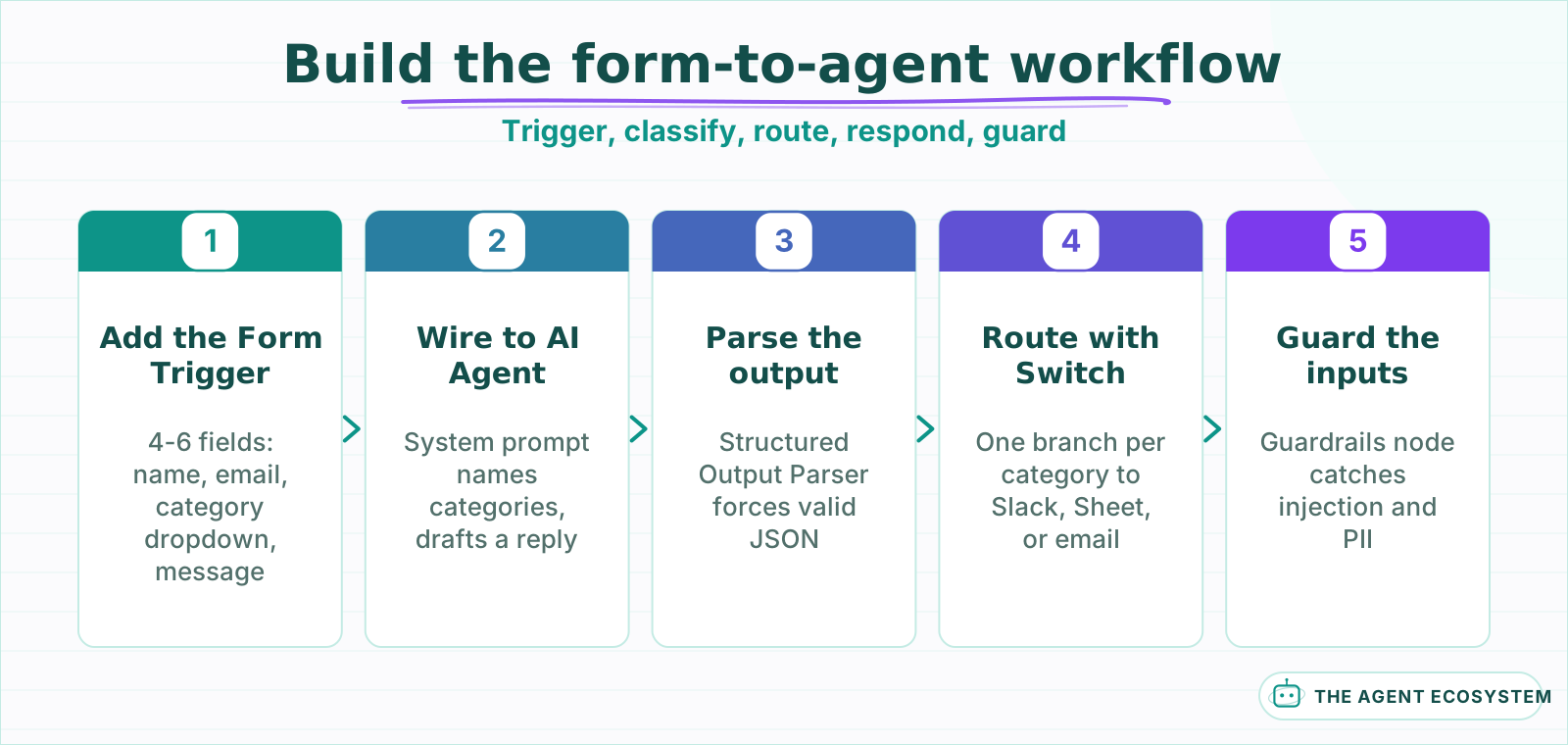 Each step hands structured data to the next: typed fields to the agent, classified JSON to the Switch, and a formatted reply to the submitter.
How do you wire the AI agent to classify and respond to submissions?#
Connect the Form Trigger output directly to an AI Agent node in Tools Agent mode. Write a system prompt that names the categories from your dropdown, tells the agent to classify the freeform message, draft a short reply, and output the result as structured JSON with a Structured Output Parser downstream.
The system prompt is the lever. Here is the shape of a working prompt for a 4-category intake form:
You are an intake assistant. The user submitted a form with the fields: name, email, category, message. Based on the category and message, do two things: (1) confirm or reclassify the category into one of [new-project, support, partnership, other], and (2) draft a 2-3 sentence reply acknowledging the submission and setting an expectation for next steps.
The agent reads the category dropdown first and the message second. If the user picked "Support request" but the message describes a new project, the agent reclassifies it. That reclassification is where the AI adds value over a static webhook-to-Slack pipe: it catches misrouted submissions that would otherwise sit in the wrong queue.
After the agent runs, route the classified output with a Switch node. High-urgency support requests go to Slack. New project inquiries land in a Google Sheet and a follow-up email sequence. Partnerships get a calendar link. The routing logic is deterministic; only the classification and reply drafting are AI.
A Switch node with one branch per category gives you deterministic routing after the AI step. Each branch wires to its own destination, and the agent decides while the Switch node acts. That separation keeps the AI contained to classification and reply drafting while the routing stays under your control. Attach the Structured Output Parser so downstream nodes always receive valid JSON, not free text the Switch node cannot match on.
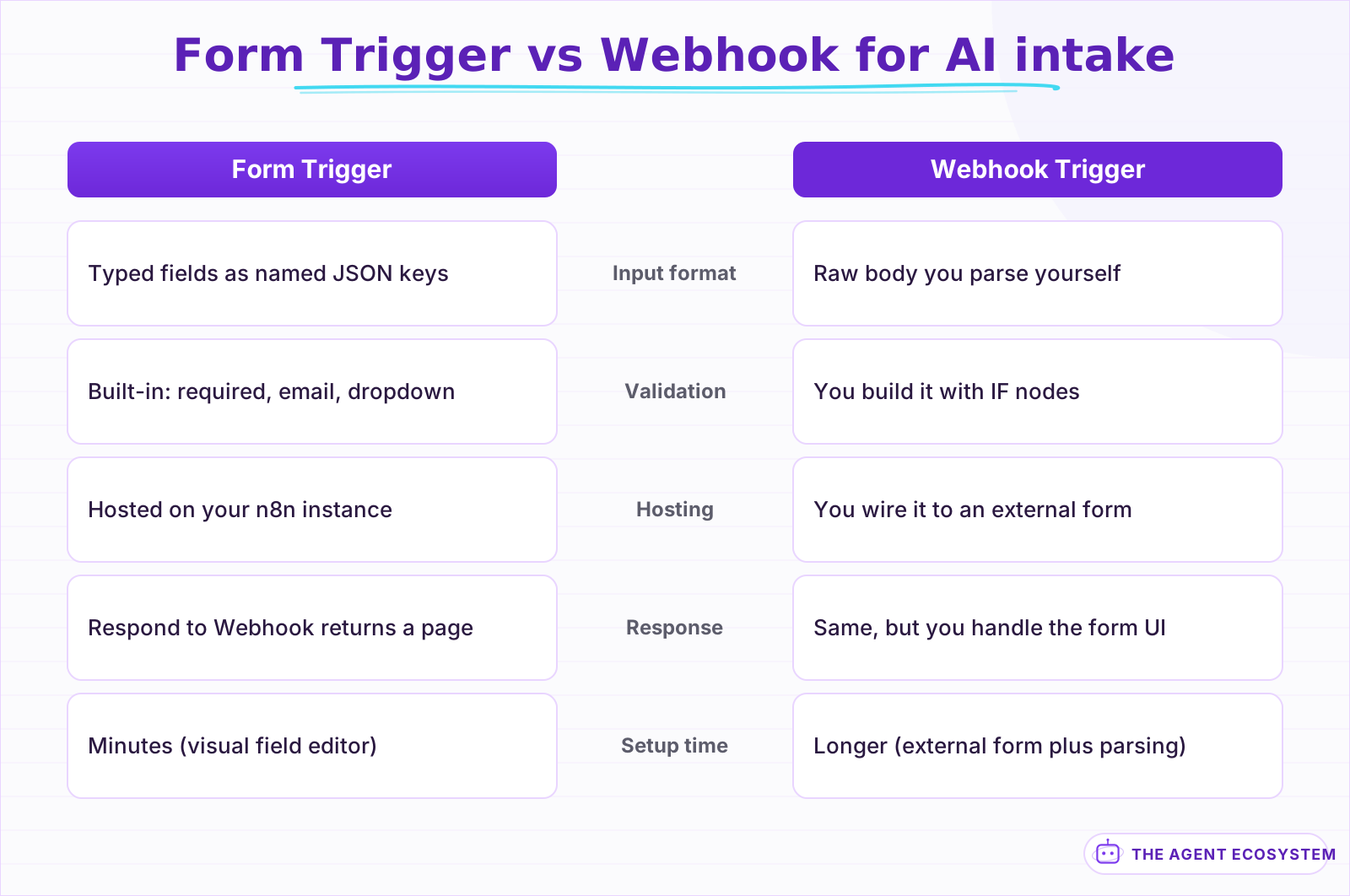 The Form Trigger handles validation, field typing, and hosting so the agent gets clean structured data without extra parsing nodes.
How do you send the agent's response back to the submitter?#
Use n8n's Respond to Webhook node right after the AI Agent to return the drafted reply as the form's confirmation page. The submitter sees a personalized response within seconds instead of a generic "We received your submission." For a parallel notification, add an email node that sends the same reply to the address from the form.
The Respond to Webhook node works because the Form Trigger is, under the hood, a webhook. It holds the HTTP connection open while the workflow runs, then returns whatever you pass to the Respond node as the page the submitter sees. Set the response to HTML and include the agent's drafted reply in a simple template. The round trip from submit to personalized response takes under 10 seconds on n8n Cloud with a fast model.
For forms where the response should also arrive by email, wire a Gmail or Send Email node after the agent. Use the email field from the form as the recipient and the agent's drafted reply as the body. This is the same pattern as an email triage agent, but triggered by a form submission instead of an inbox scan.
Add error handling so a failed agent run returns a safe fallback page instead of a raw error. A simple Error Trigger workflow that sends a generic "We received your submission and will follow up shortly" page covers the failure case. The submitter never sees a broken page, and you get an alert to check the execution log.
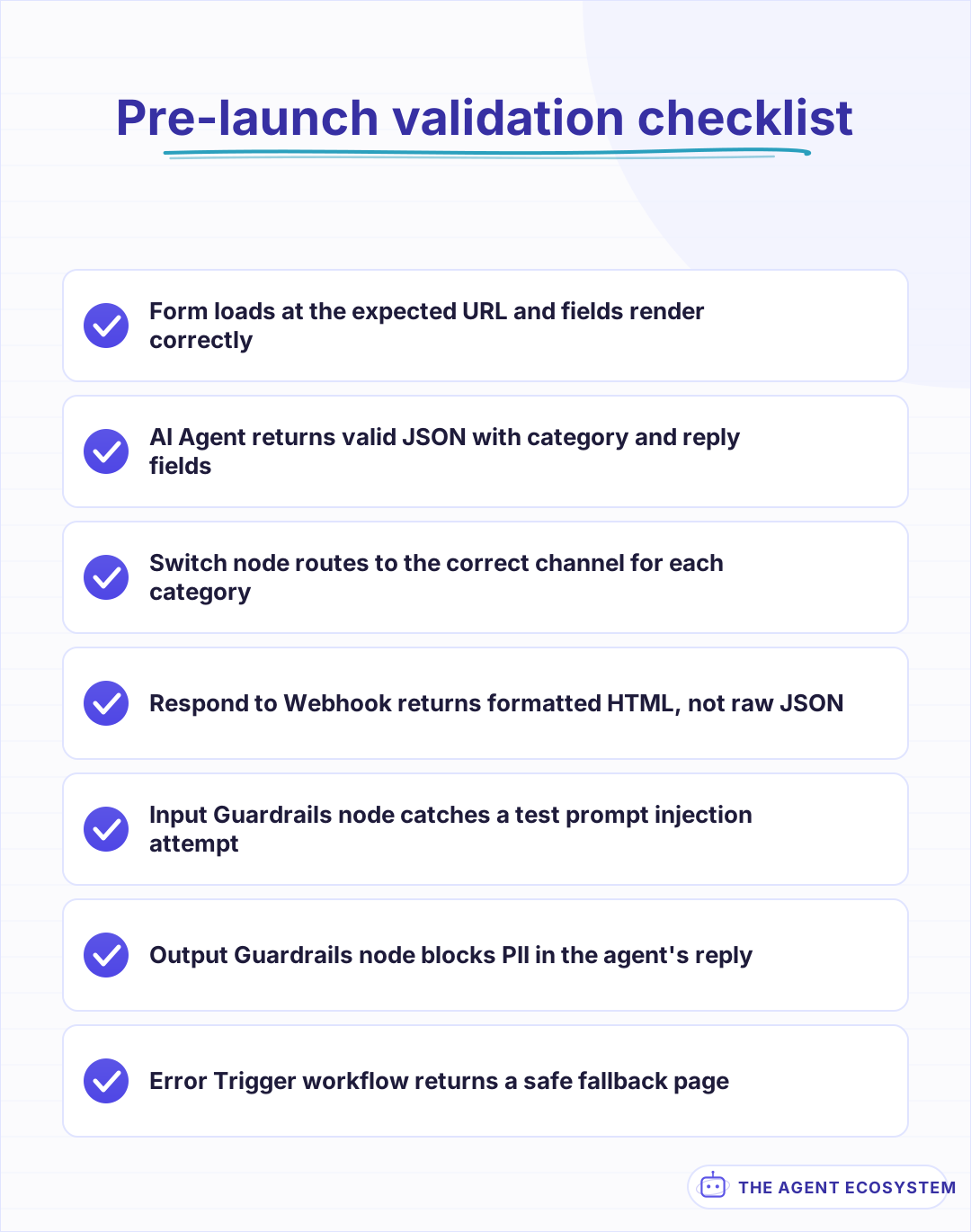 Run through this list before you share the form URL. A broken response or leaked data from the first real submission is hard to walk back.
What should you build this week?#
Start with one intake form that replaces your least useful static contact page. Wire 4 fields to an AI Agent, connect 2 routing channels like Slack and email, and test with 10 real submissions before you send traffic. The entire build fits in under an hour in n8n, and the first correctly reclassified submission pays for the setup.
The pattern scales in one direction: more forms, not more complexity per form. A support form, a partnership form, and a consultation request form can share the same agent with different system prompts, or you can branch them with sub-workflows that each carry their own classification logic and routing rules.
Add guardrails before this goes public. An input Guardrails node catches prompt injection from the freeform field, and an output Guardrails node scans the agent's reply for PII before it reaches the submitter. These are the same controls you would wire around any public-facing AI agent, and they belong here because anyone on the internet can type anything into your form.
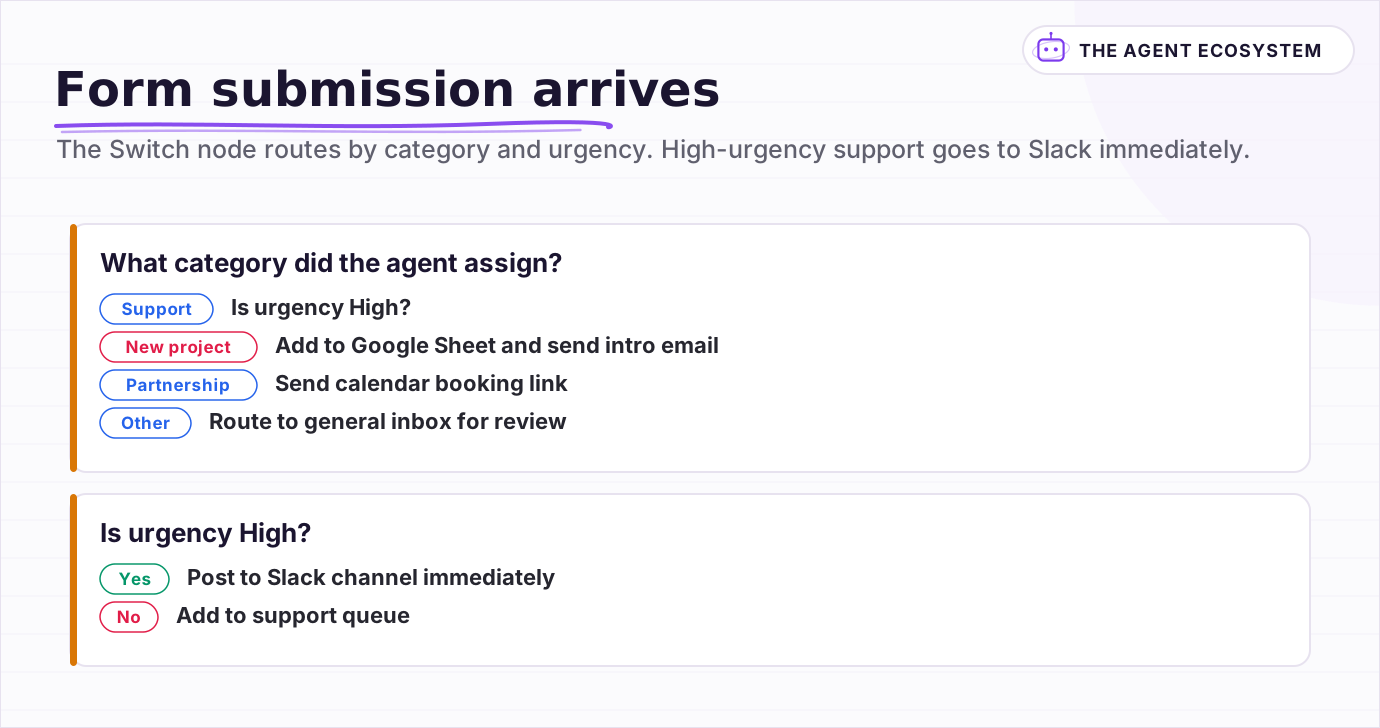 The Switch node routes by category and urgency. High-urgency support goes to Slack immediately; everything else goes to a queue or inbox.
Frequently asked questions
What is an n8n Form Trigger?
Can I use the n8n Form Trigger with an AI Agent node?
How do I send a response back after the form is submitted?
How fast is the response when using an AI agent with a form?
Do I need guardrails on a form-triggered AI agent?
Sources
Primary references and vendor documentation used while drafting and reviewing this article.
Written by

Muhammad Qasim Hammad is an AI agent and automation expert and the founder of Cart Gaze LLC (cartgaze.com). He builds product for the love of it: when an idea lands, a working prototype is usually running within hours, built with the same AI agents and automations he sells. He puts his own output at roughly 20× what it was before agents, and the Agentic OS behind this site is the working proof, documented in public with the tools he actually ran and what they really cost.
AI & Automation Services
Want a pipeline like this running in your business?
I'm Qasim — I design and ship AI agents and n8n automations for solo operators and small teams. Tell me what's eating your team's week, and I'll scope a fix.
Related reading
n8n AI Feedback Analysis: Classify Sentiment and Route Urgent Complaints Automatically
Customer feedback arrives from five places and nobody reads most of it. An n8n workflow with an AI agent classifies every piece by sentiment and theme, routes urgent complaints immediately, and builds a weekly digest your product team can act on.

Build an AI Lead-Generation Agent in n8n (With Real Monthly Cost)
An n8n AI lead generation agent triages every inbound lead the moment it lands: scoring intent, drafting a personalized reply, and pinging you on the hot ones. Real cost: about $5/month for 100 leads on Claude Sonnet 4.6.
n8n AI Automation Ideas: 8 Agent Workflows Worth Building (2026)
Finished the n8n AI tutorial and wondering what to actually build? These 8 n8n AI automation ideas come with the exact nodes, the honest Chain-vs-Agent call, and the right Claude model for each job.
How to Build an n8n AI Agent for Real Estate Lead Qualification
An n8n AI Agent can text a new real estate lead the 1 or 2 questions that actually separate a serious buyer from someone browsing, then route a qualified lead to the right agent within minutes. Here is how to build the qualification logic, why it should ask explicit questions
n8n AI Lead Enrichment: Score and Route Every New Lead Automatically
A new lead arrives with nothing but a name and email. An n8n workflow pulls company data, scores the lead with an AI agent against your ICP, and routes it to the right rep or drip sequence before anyone opens a browser tab.
Auto-Categorize Emails & Tickets in n8n with the AI Text Classifier
The n8n AI Text Classifier node reads each inbound message, picks the right category, and branches your workflow automatically. Costs $0.65 per 1,000 emails on Claude Haiku 4.5. Here is exactly how to build it.