n8n AI Lead Enrichment: Score and Route Every New Lead Automatically
Build a workflow that enriches leads with external data, scores them against your ICP with an AI agent, and routes hot leads to sales in under a minute.
AI-drafted, reviewed by Muhammad Qasim Hammad on July 20, 2026. See our AI disclosure.
Table of contents
A new lead lands in your CRM with a name, an email, and nothing else. Before anyone on your team can decide whether to call or ignore it, somebody has to open LinkedIn, check the company website, guess at the budget, and score the lead by hand. An n8n workflow with an AI agent does that enrichment in under a minute, scores the lead, and routes it to the right rep or drip sequence before the form submission even cools.
This guide walks through building the full pipeline: trigger on new lead, enrich with external data, score with an AI agent, and route based on the score. If you are already using n8n for workflow automation and want to plug AI into your sales funnel, this is the build.
What does an AI lead enrichment workflow look like end to end?#
The workflow has four stages: ingest the lead from your CRM or form, enrich it with external data, score it with an AI agent against your ideal customer profile, and route the scored lead to the right destination. Each stage is a cluster of n8n nodes, and the AI agent sits in the scoring layer where judgment matters most.
The trigger fires when a new contact appears in your CRM (HubSpot, Airtable, Google Sheets, or a webhook from your form). The enrichment layer hits external APIs to pull company size, industry, and social presence. The scoring layer passes the enriched profile to an AI Agent that compares it against your ICP criteria and returns a numeric score with a reasoning summary. The routing layer sends hot leads to Slack, warm leads to an email sequence, and cold leads to a low-priority list.
The entire run takes 15 to 45 seconds depending on how many enrichment calls you make. Compare that to the 10 minutes a human spends doing the same research, and the math works out quickly even on a low-volume funnel.
| Stage | Nodes | Purpose |
|---|---|---|
| Ingest | CRM Trigger or Webhook | Capture new lead data |
| Enrich | HTTP Request (1-3 calls) | Pull company and contact data |
| Score | AI Agent + ICP prompt | Rate fit on a 1-10 scale with reasoning |
| Route | IF + Slack/Email/CRM Update | Send lead to the right destination |
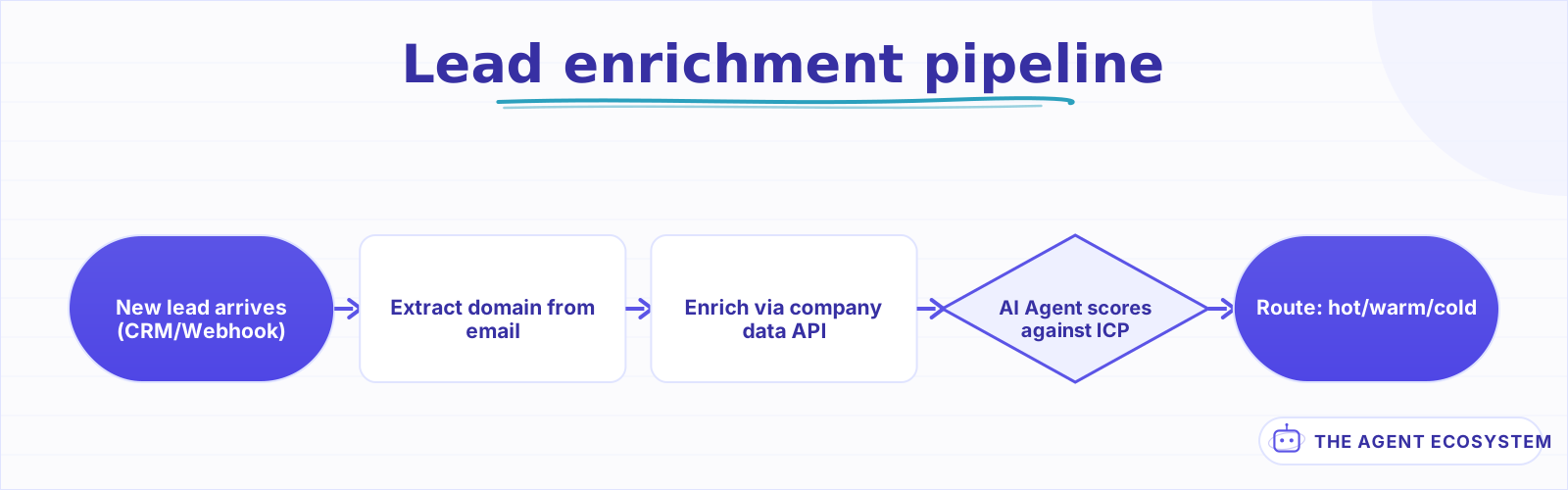 A new lead enters, gets enriched with company data, scored by an AI agent, and routed to sales, nurture, or cold storage.
How do you enrich a lead with external data in n8n?#
Use HTTP Request nodes to pull publicly available data from the lead's email domain. Extract the domain from the email address, call a company data API, and merge the results back into the lead record. Three enrichment calls cover 80% of what a sales rep would research manually.
The first enrichment step is domain extraction. A Code node splits the email at the @ sign and takes the domain half. From there, you hit up to three sources:
- Company data API (Clearbit, Apollo, or a free alternative like PDL) for company size, industry, revenue range, and location
- Website scrape via an HTTP Request to the company homepage for the tagline, product category, and tech stack signals
- Social signals from LinkedIn company pages or Twitter/X follower counts for a rough measure of market presence
Not every lead needs all three. A Code node after the enrichment layer merges whatever came back into a single enriched profile object. If an API returns nothing, the workflow continues with what it has rather than failing. Wrap each HTTP Request in an error handling branch so a 404 from one source does not kill the entire run.
The enriched profile looks something like this by the time it reaches the scoring layer:
{
  "name": "Jane Doe",
  "email": "jane@acmecorp.io",
  "company": "Acme Corp",
  "industry": "SaaS",
  "employeeCount": 85,
  "revenueRange": "$5M-$10M",
  "location": "Austin, TX",
  "techStack": ["React", "Node.js", "AWS"],
  "socialFollowers": 2400
}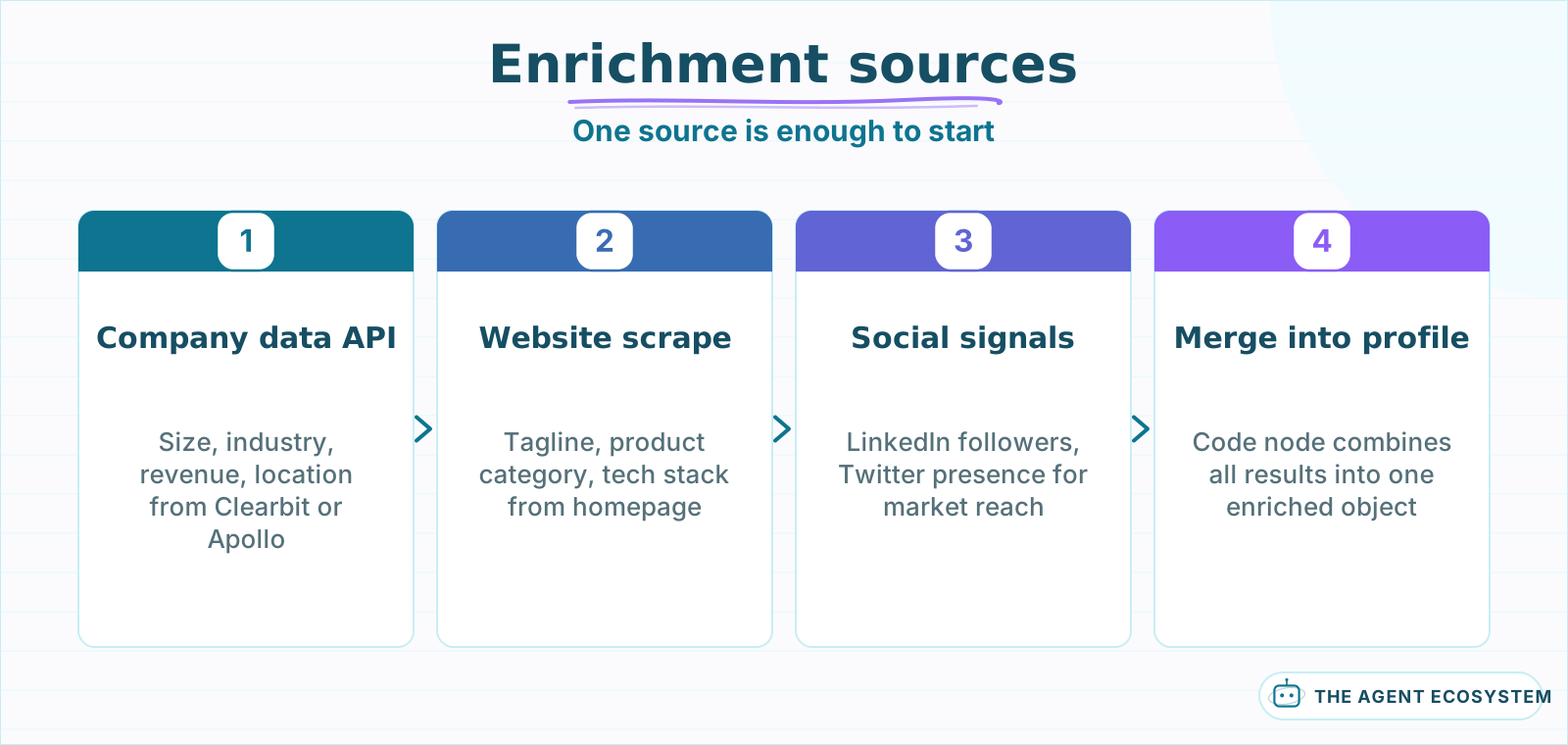 Start with one source and add more only after the scoring layer proves useful. Each call adds latency and failure risk.
How does an AI agent score leads against your ideal customer profile?#
Feed the enriched profile into an AI Agent node with a system prompt that defines your ICP criteria, scoring rubric, and output format. The agent returns a numeric score from 1 to 10 plus a short reasoning paragraph explaining why. This is the step where AI replaces the gut-feel judgment call a rep makes while scanning a LinkedIn profile.
The system prompt is the heart of the scoring layer. A working example:
You are a lead scoring assistant. Score this lead from 1 to 10 based on how well it matches our ideal customer profile. Our ICP: B2B SaaS companies, 20-200 employees, using a modern tech stack, based in North America. Weight company size at 30%, industry fit at 25%, tech stack match at 25%, and location at 20%. Return valid JSON with keys "score" (integer 1-10), "reasoning" (2-3 sentences), and "priority" ("hot", "warm", or "cold" based on the score).
The key design decision is putting the ICP criteria and weights directly in the prompt rather than in code. This means your marketing team can adjust the scoring model by editing a text field in n8n instead of modifying JavaScript. When your ICP shifts from mid-market SaaS to enterprise healthcare, you change the prompt, not the workflow structure.
Parse the agent's output with a Code node or a Structured Output Parser to guarantee you get valid JSON. The downstream routing depends on the priority field, so a malformed response should route to a manual review queue rather than silently dropping the lead.
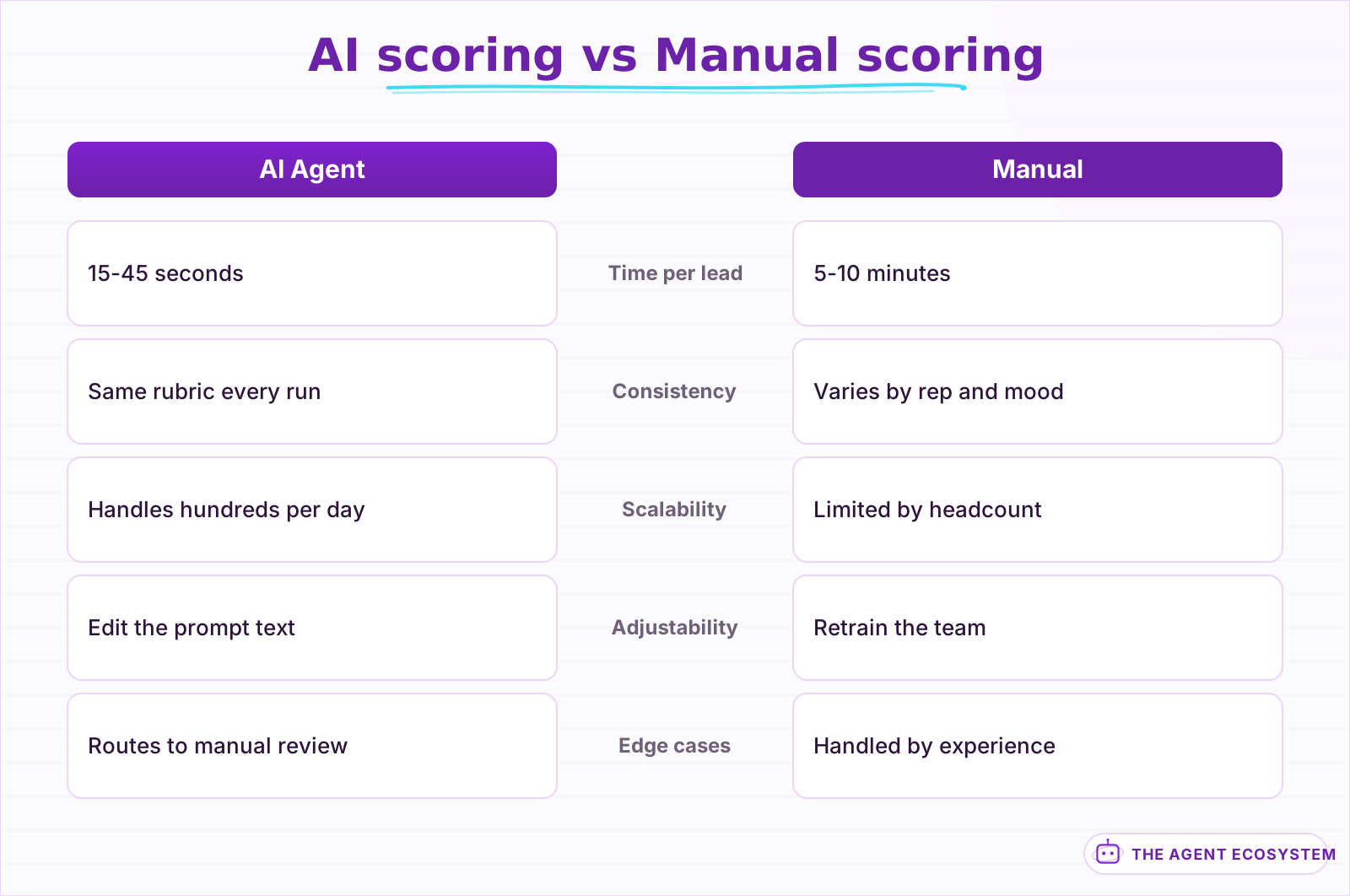 AI scoring applies the same rubric every time and takes seconds instead of minutes. Manual scoring adds judgment but does not scale.
How do you route scored leads to the right destination?#
Add an IF node after the scoring layer that branches on the priority field. Hot leads go to a Slack notification and CRM status update. Warm leads enter an email drip sequence. Cold leads get tagged in the CRM for batch review later. Each branch is a simple node chain that routes the scored lead where your team expects it.
The routing logic is intentionally simple. Three IF conditions, three branches:
- Hot (score 8-10): Slack message to the sales channel with the lead profile, score, and reasoning. Update the CRM record to "Sales Qualified" so the rep sees it at the top of their queue.
- Warm (score 4-7): Add the lead to an email nurture sequence in your email tool (Mailchimp, ConvertKit, or a direct SMTP drip via n8n). Tag the CRM record as "Marketing Qualified."
- Cold (score 1-3): Tag the CRM record as "Low Priority" and log the reasoning. No notification, no sequence. These leads exist for batch review if your pipeline dries up.
The Slack notification for hot leads should include enough context that the rep does not need to open the CRM. Include the company name, size, industry, tech stack highlights, the AI score, and the reasoning summary. A rep who sees "Acme Corp, 85-person SaaS in Austin, score 9/10, strong tech stack match and location fit" can pick up the phone in 30 seconds instead of researching for 10 minutes.
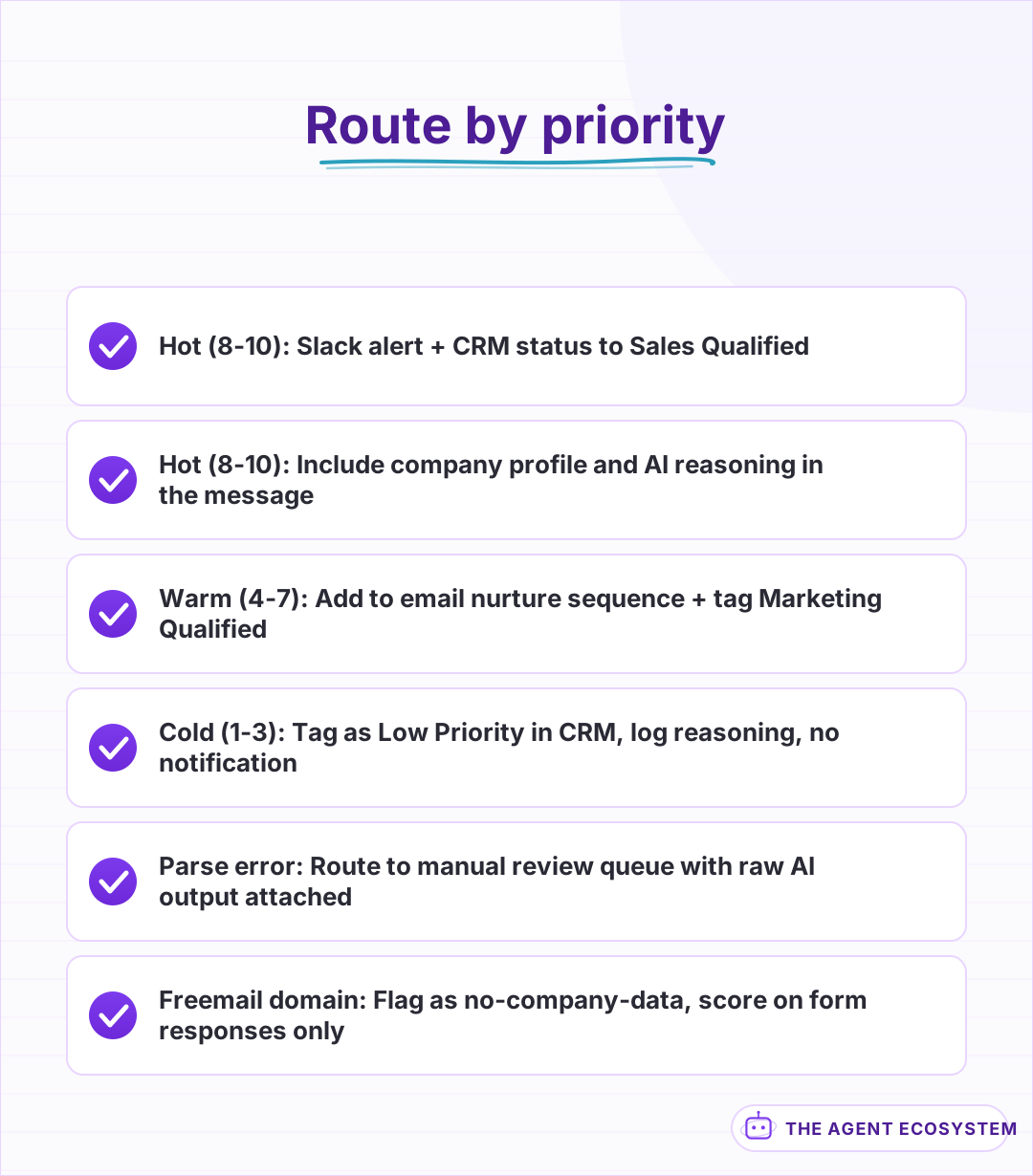 Each priority level gets a different set of actions. Hot leads get immediate attention; cold leads get tagged for batch review.
What are the common failure points and how do you handle them?#
Three things break lead enrichment workflows in production: enrichment APIs return empty data for personal email domains, the AI agent returns inconsistent JSON, and duplicate leads trigger duplicate enrichment runs. Each one has a straightforward fix that keeps the workflow running without manual intervention.
Personal email domains (gmail.com, outlook.com, yahoo.com) return no company data from enrichment APIs. A Code node at the start of the enrichment layer checks whether the domain is a known freemail provider. If it is, skip the company enrichment and send the lead directly to the scoring layer with a flag that says "no company data available." The AI agent's prompt should handle this gracefully: score the lead lower but do not reject it outright, because a gmail.com lead with strong form responses can still convert.
JSON parsing failures from the AI agent happen when the model wraps its response in markdown fences or adds commentary outside the JSON. Use a Code node with a regex extraction pattern and a try-catch wrapper. On parse failure, route the lead to a manual review queue with the raw agent output attached so a human can score it.
Duplicate leads are the quietest failure. A webhook fires twice, a CRM sync runs before dedup, and the workflow enriches and scores the same lead twice. Add a deduplication check early in the workflow: query your CRM or database for the email address and skip the run if the lead was scored within the last 24 hours.
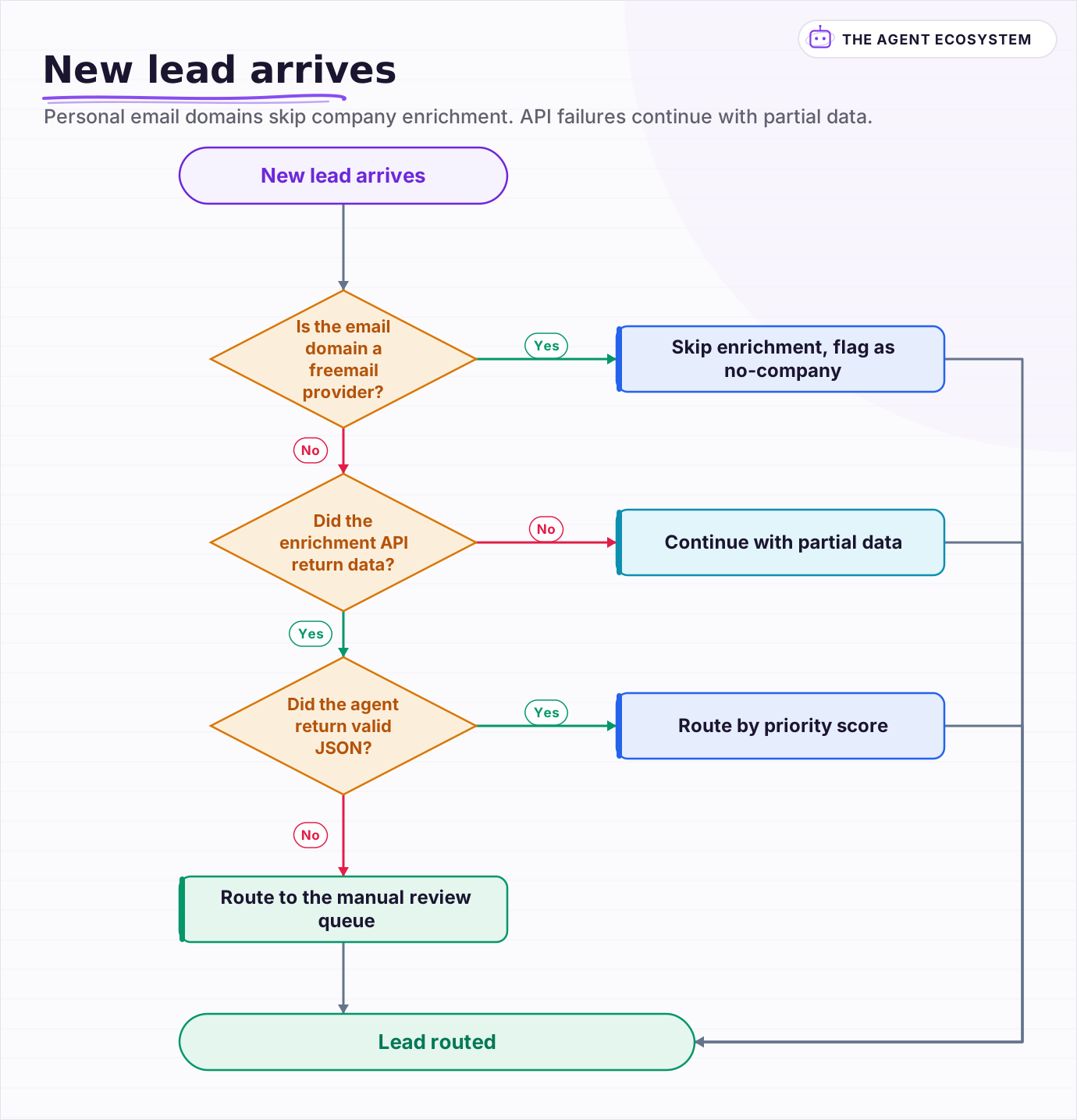 Personal email domains skip company enrichment. API failures continue with partial data. Parse errors go to manual review.
Frequently asked questions
How accurate is AI lead scoring compared to manual scoring?
Which enrichment APIs work best with n8n for lead data?
Can I use this workflow with free CRM tools?
How do I prevent the AI agent from hallucinating lead scores?
What happens when the enrichment API returns no data?
Sources
Primary references and vendor documentation used while drafting and reviewing this article.
Written by

Muhammad Qasim Hammad is an AI agent and automation expert and the founder of Cart Gaze LLC (cartgaze.com). He builds product for the love of it: when an idea lands, a working prototype is usually running within hours, built with the same AI agents and automations he sells. He puts his own output at roughly 20× what it was before agents, and the Agentic OS behind this site is the working proof, documented in public with the tools he actually ran and what they really cost.
AI & Automation Services
Want a pipeline like this running in your business?
I'm Qasim — I design and ship AI agents and n8n automations for solo operators and small teams. Tell me what's eating your team's week, and I'll scope a fix.
Related reading
How to Build an n8n AI Agent for HubSpot Lead Scoring
An n8n AI Agent can score a new HubSpot lead the moment it arrives, log which rules fired, and route a task to the right rep, all against a rubric your sales team owns. Here is how to wire HubSpot in as a tool and keep the scoring auditable instead of a black box.

Build an AI Lead-Generation Agent in n8n (With Real Monthly Cost)
An n8n AI lead generation agent triages every inbound lead the moment it lands: scoring intent, drafting a personalized reply, and pinging you on the hot ones. Real cost: about $5/month for 100 leads on Claude Sonnet 4.6.
How to Build an n8n AI Agent for Salesforce Data Hygiene and Case Routing
An n8n AI Agent can read a new Salesforce Lead or Case, decide what a rule engine cannot, and write the fix back through the Salesforce node. Here is how to wire it as a tool, keep it from guessing at fields it cannot infer, and gate every write behind a human check.
How to Build an n8n AI Agent for Real Estate Lead Qualification
An n8n AI Agent can text a new real estate lead the 1 or 2 questions that actually separate a serious buyer from someone browsing, then route a qualified lead to the right agent within minutes. Here is how to build the qualification logic, why it should ask explicit questions
n8n AI Feedback Analysis: Classify Sentiment and Route Urgent Complaints Automatically
Customer feedback arrives from five places and nobody reads most of it. An n8n workflow with an AI agent classifies every piece by sentiment and theme, routes urgent complaints immediately, and builds a weekly digest your product team can act on.
n8n Form Trigger + AI Agent: Build a Smart Intake Form
A contact form that sits in an inbox helps nobody. Wire n8n's Form Trigger to an AI agent and every submission gets classified, answered, and routed the moment it arrives.