How to Build an n8n AI Agent for HubSpot Lead Scoring
Give an n8n AI Agent HubSpot as a tool: score and enrich a new lead against a rubric you define, then route a task to the right rep.
AI-drafted, reviewed by Muhammad Qasim Hammad on August 10, 2026. See our AI disclosure.
Table of contents
- What can an n8n AI agent actually do inside HubSpot?
- How do you give an n8n AI Agent the HubSpot tool?
- How do you turn a scoring policy into something the agent can apply?
- What does the agent do once a lead is scored?
- Should HubSpot writes run automatically, or wait for you to confirm?
- What breaks, and how do you debug it?
- Is this worth building for your workflow?
A new lead fills out a form, lands in HubSpot with a name and an email, and sits there until someone manually checks the company size, guesses how serious the lead is, and decides whether a rep should follow up today or never. Wire n8n's HubSpot node into an AI Agent as a tool, and the agent can do that first pass itself: read what the lead submitted, score it against rules you define, and update the record before a rep ever opens it.
The agent's job is to apply your scoring rules consistently, not to invent what a good lead looks like. A score that comes from a fixed rubric is something a sales manager can audit and adjust; a score an LLM makes up from vibes is not, and it will drift in ways no one can explain 3 months later.
What can an n8n AI agent actually do inside HubSpot?#
n8n's HubSpot node covers Contacts, Companies, Deals, Tickets, and Engagements as separate resources, with create, update, get, search, and delete actions across each. For a lead-scoring agent, the core set is small: update a Contact's properties, search for an associated Company, and create an Engagement, a task or a note logged on the record.
The HubSpot Trigger fires on CRM events close to real time, such as a new Contact being created, which is the natural entry point for scoring a lead the moment it arrives rather than on a delay. HubSpot also supports scheduled polling as an alternative, filterable by property, pipeline, or owner, for cases where near-real-time is not required.
Search deserves its own mention, because HubSpot's search endpoint filters on real property values the same way a database query does, not a fuzzy text match. Give the agent a search-by-domain tool to check whether a Company record already exists before it creates a duplicate, the same discipline that matters on any CRM: confirm what already exists before adding something new.
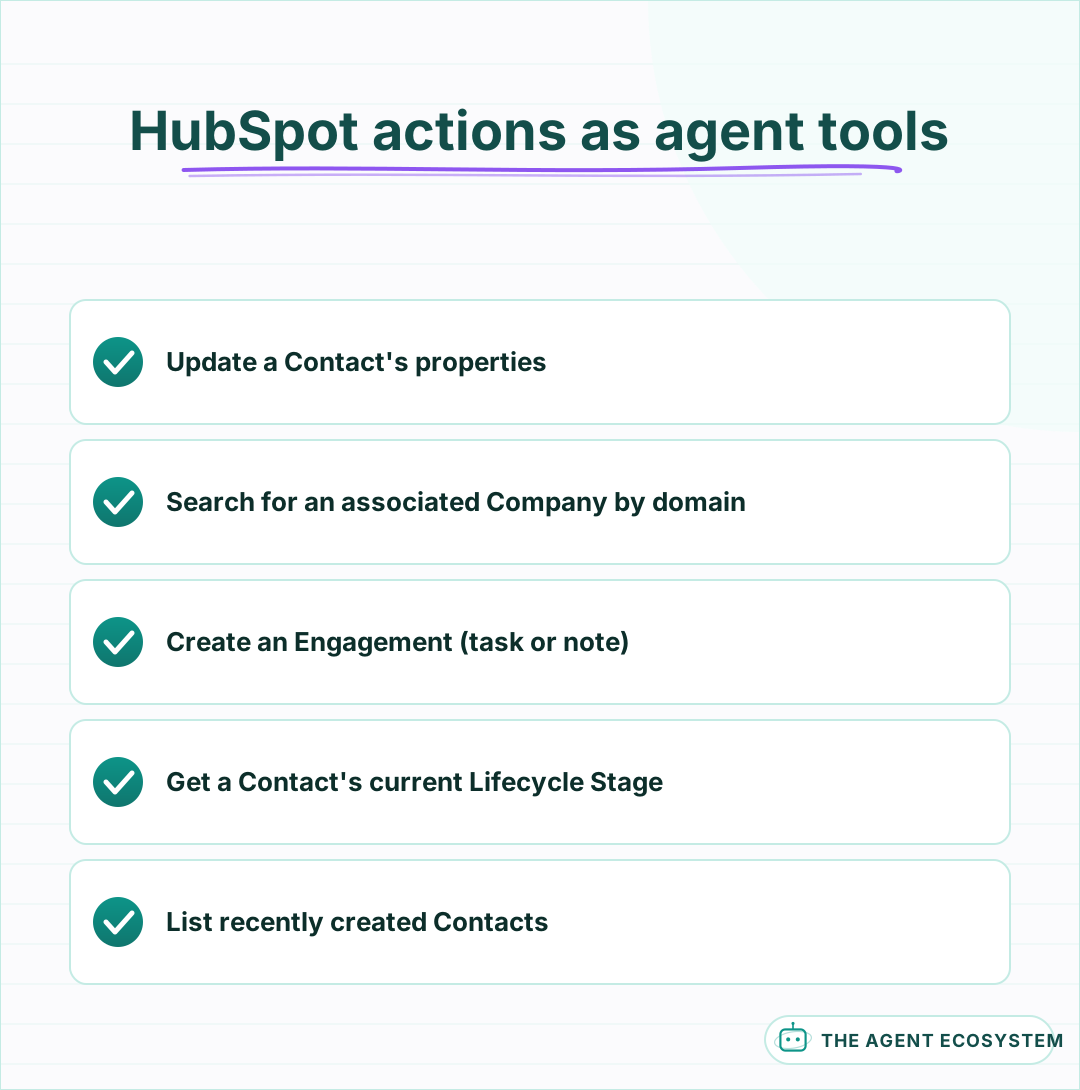 A small set of actions covers scoring, enrichment, and routing.
How do you give an n8n AI Agent the HubSpot tool?#
Add a HubSpot node to the canvas, switch it to Use as Tool, and connect it to your AI Agent node's tool input. Give the agent a search-company tool separate from its update-contact tool, since enrichment (finding out more about the lead) and scoring (writing the result) are different steps that can each fail independently.
Tool descriptions the model can actually use should include the exact property names your portal uses for score and lifecycle stage, plus the fixed rubric itself: list the point values and the properties that earn them directly in the description rather than trusting the model to remember a scoring policy explained once in a system prompt. The core mechanics of giving an n8n agent tools apply the same way to HubSpot as to any other connected app.
Authenticate through a private app token scoped to the specific object permissions this workflow needs, contacts and companies read-write, deals and tickets read-only if the agent never touches them. HubSpot's private apps let you pick permissions per object, so there is no reason to hand the credential broader access than the workflow actually uses.
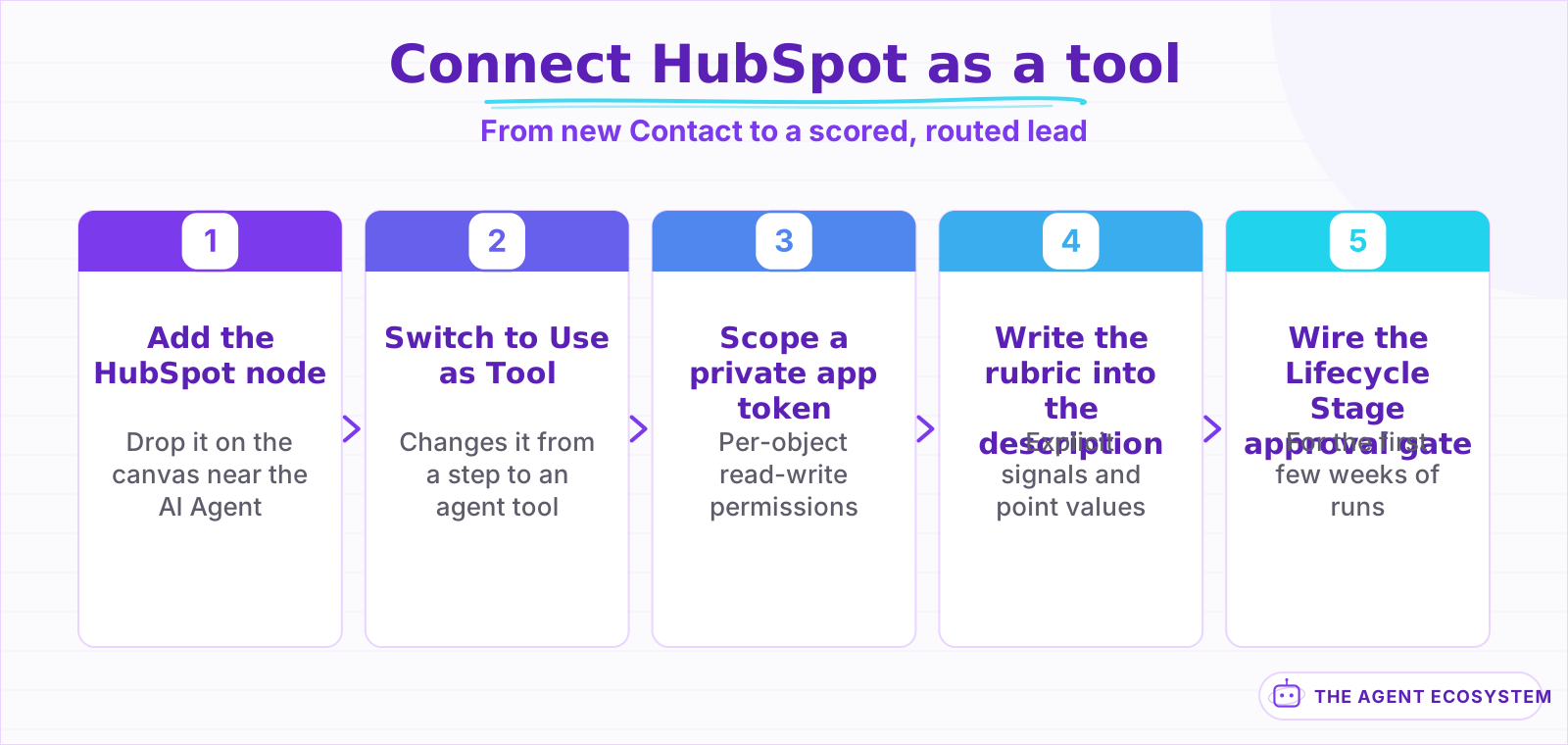 Scoping the private app token by object is the step worth the extra care.
How do you turn a scoring policy into something the agent can apply?#
Write the rubric as an explicit table before you write a single line of the agent's instructions. A policy like "add 20 points for a title containing Director or VP, add 15 points for a company size over 50 employees, add 10 points for requesting a demo" gives the agent a rule to apply, not a judgment to invent.
| Signal | Points | Where the agent reads it |
|---|---|---|
| Title contains Director, VP, Head of | +20 | Contact property: Job Title |
| Company size over 50 employees | +15 | Associated Company property |
| Requested a demo, not just a newsletter | +10 | Form submission context |
| Personal email domain (gmail, yahoo) | -10 | Contact property: Email |
A score built this way is auditable. If a rep questions why a lead scored 45, the answer is a specific rule and a specific field value, not "the model thought it looked promising."
Store the reasoning alongside the score, not just the number. Have the agent write a short note listing which rules fired, "Director title +20, 65 employees +15, personal email -10," into a custom text property or an Engagement note. A bare score of 45 tells a rep nothing about whether it is worth trusting; the same score with its reasoning attached is something they can sanity-check in 5 seconds.
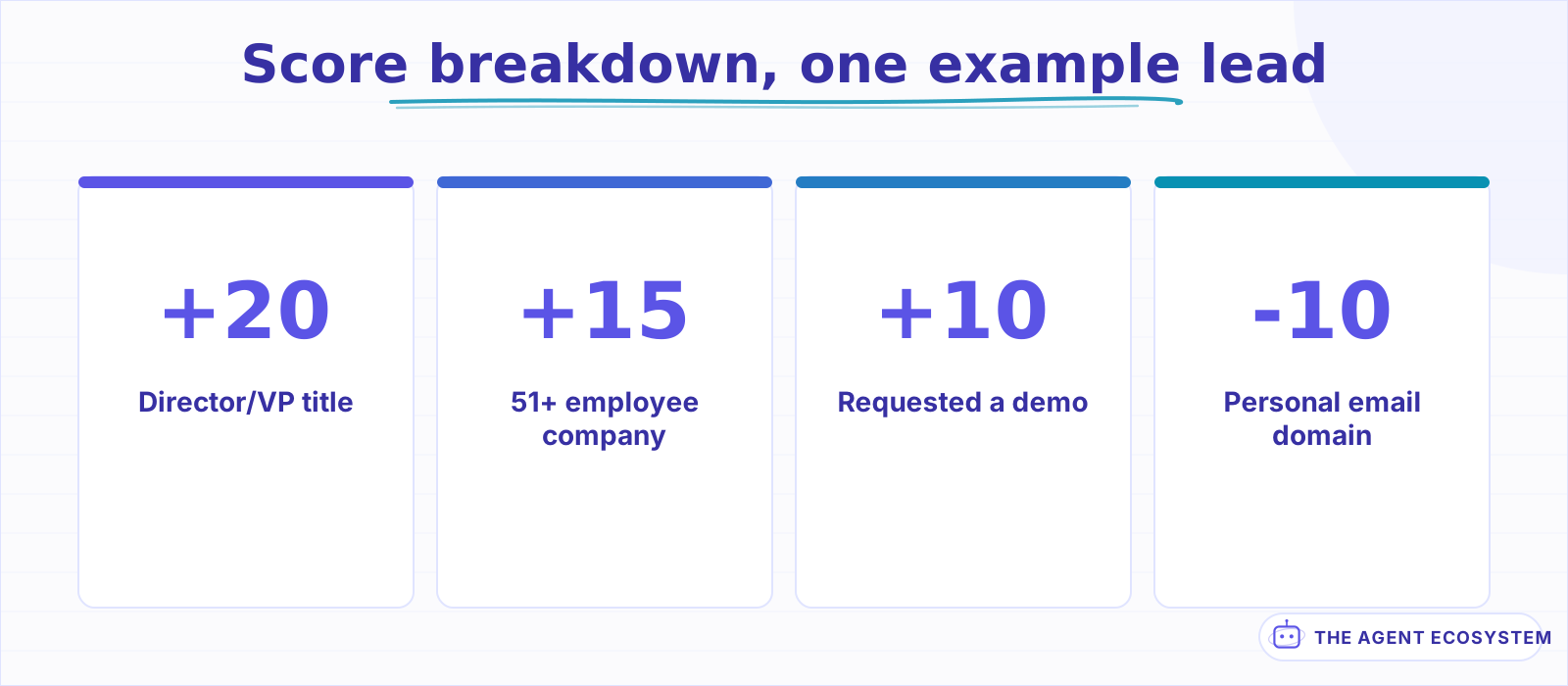 Every point traces back to a specific field value, not a vibe.
What does the agent do once a lead is scored?#
Writing the score is only half the job, and stopping there just leaves a number sitting quietly on the record. The agent should also update Lifecycle Stage when the score crosses a threshold you set, such as moving a Contact from Lead to Marketing Qualified Lead at 40 points.
It should also create an Engagement, a task assigned to the right rep, so the score actually reaches someone instead of waiting to be noticed on the next pipeline review.
Route the task to a rep based on a rule the agent can see, such as territory by state or round-robin by current open-deal count, the same way Case routing works on Salesforce: describe the routing logic explicitly rather than asking the model to decide who seems like the right owner. The same read-then-decide discipline that keeps a Salesforce agent honest applies here without much change.
Set a floor below which the agent does nothing beyond logging the score. A lead that scores 10 points does not need a task interrupting a rep's day; it needs the number recorded so a later signal, a repeat visit or a demo request, can push it over the threshold that actually earns attention. Scoring everything the same way regardless of how low it lands just trains reps to ignore the tasks.
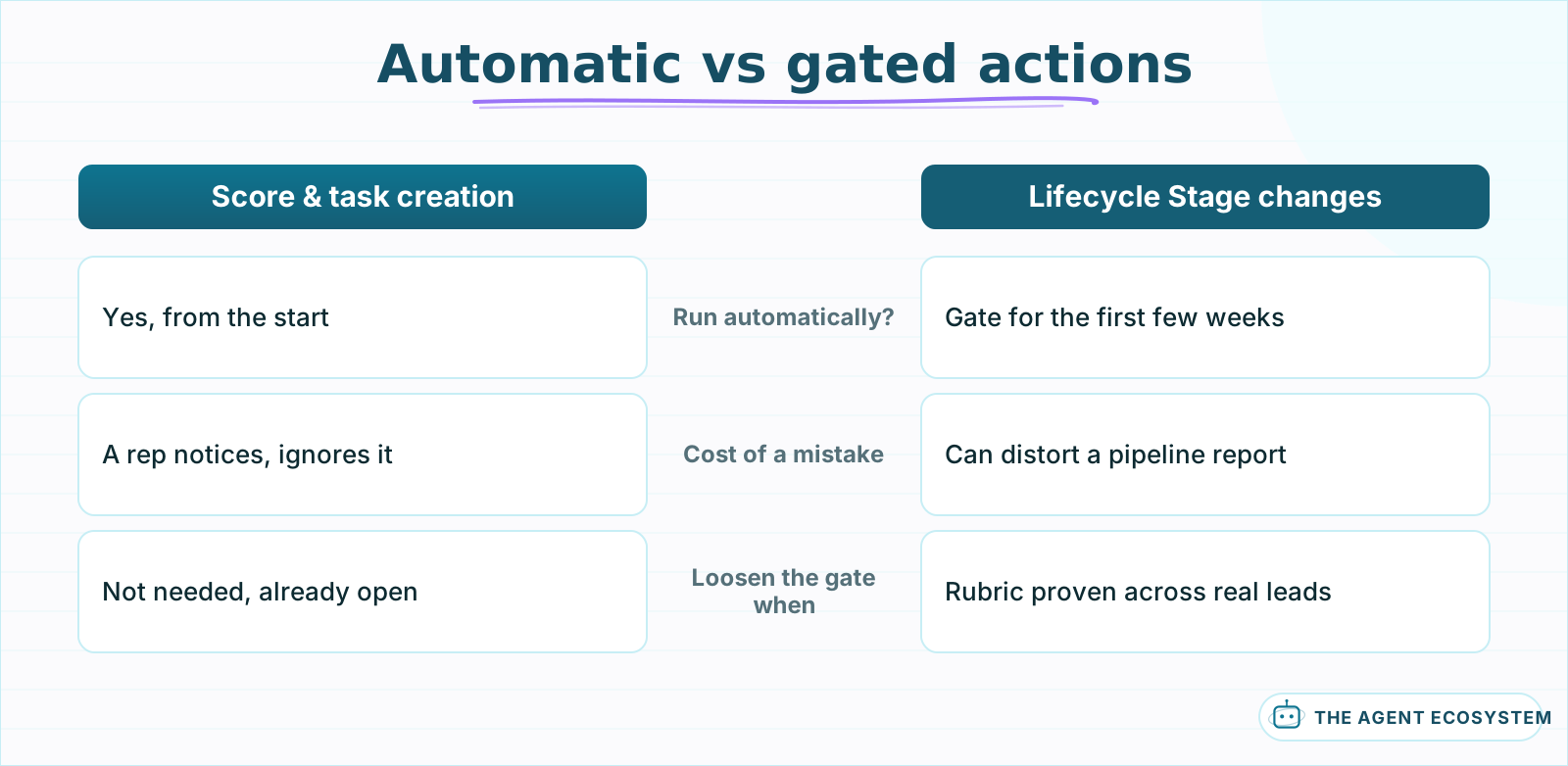 A wrong score is cheap to fix; a wrong stage change can distort a report first.
Should HubSpot writes run automatically, or wait for you to confirm?#
Scoring and enrichment are safe to automate from the start, because a wrong score is cheap to notice and fix; a rep who sees an oddly high or low score for a lead they know will flag it themselves. Creating a task is similarly low-risk, since worst case someone gets a task they can dismiss.
Treat Lifecycle Stage changes with a bit more care if your team runs reporting off that field, since a wrong stage change can distort a pipeline report before anyone catches it. Gate stage changes behind a lightweight approval for the first few weeks if your reporting depends on that field being accurate, then loosen it once the scoring rubric has proven reliable across real leads.
Mechanically this is the same small addition as anywhere else: send the proposed stage change to Slack with Approve and Reject buttons before the HubSpot node runs, and let n8n pause at that node until someone answers. Once you have watched several weeks of approvals go through cleanly, remove the gate on stage changes and keep it only where a mistake would be genuinely costly to unwind.
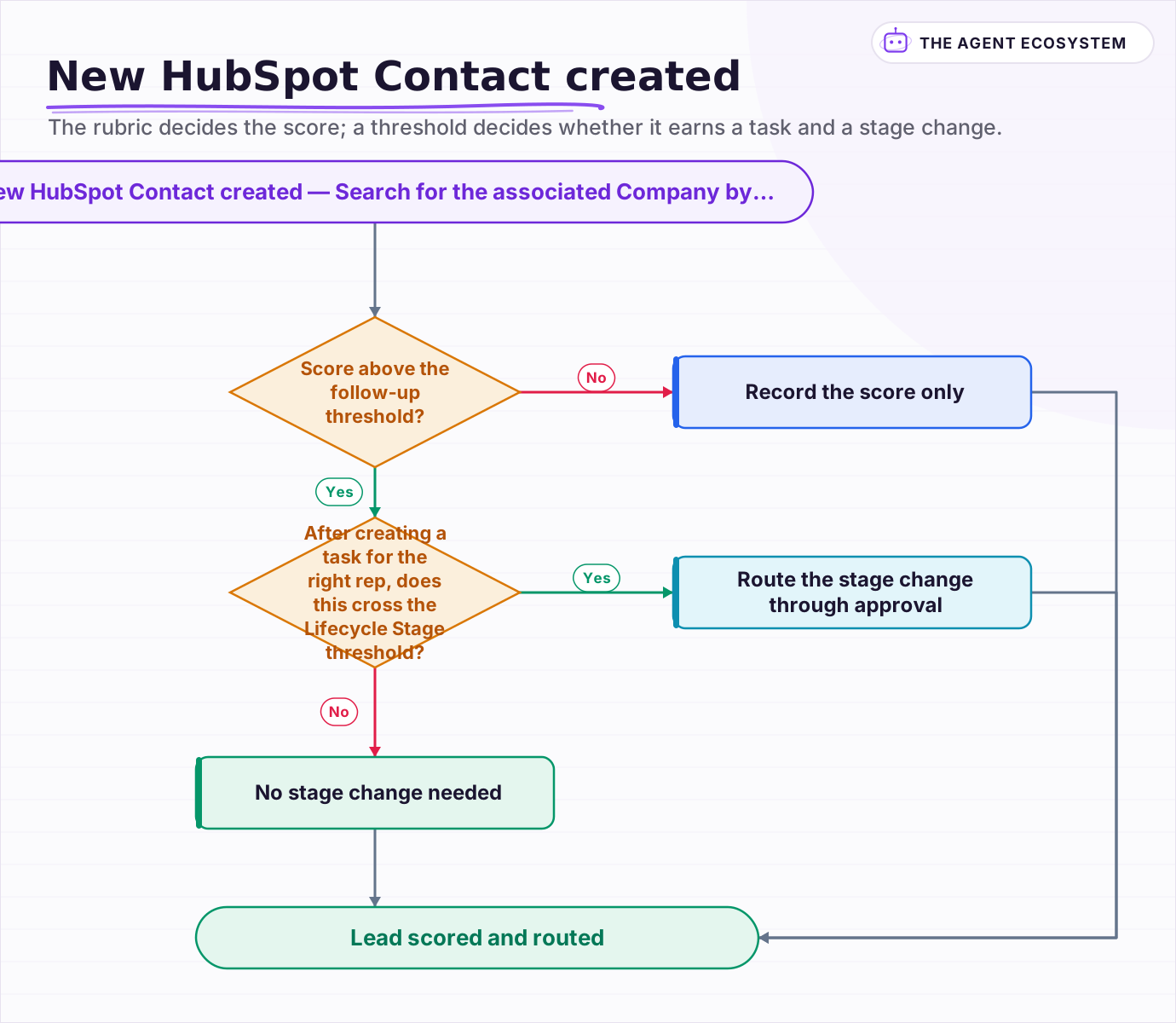 The rubric decides the score; a threshold decides whether it earns a task and a stage change.
What breaks, and how do you debug it?#
Most failures come from a property name or a dropdown value that does not match what the portal actually has configured. HubSpot custom properties are portal-specific, so a tool description copied from a different HubSpot account can reference a property that simply does not exist in yours.
Turn on Return Intermediate Steps on the AI Agent node and check the exact property name and value the agent tried to write before HubSpot rejects it. A Lifecycle Stage or a custom dropdown property that expects one of a fixed set of internal values, not the label shown in the UI, is a common mismatch; the general agent-not-working checklist covers the credential and permission issues that show up the same way across every connected app.
Associations are the second recurring surprise. A Contact and a Company can exist as separate records with no link between them if a form submission never associated the two, so a search for "this contact's company" can come back empty even though a company with a matching domain exists in the portal under a different, unlinked record. Have the agent search Companies by domain directly rather than assuming an association already exists.
Is this worth building for your workflow?#
Build it when new leads genuinely need triage before a rep sees them: enough volume that manual scoring is the bottleneck, and a rubric specific enough that a fixed rule set captures most of what actually matters. A trickle of a few leads a day rarely needs this; a form that brings in dozens usually does.
Keep the rubric itself owned by your sales team, not by whoever builds the workflow. The agent's value is applying the rule consistently and fast, every time, not deciding what the rule should be. Revisit the point values every quarter or so as you learn which signals actually predicted a closed deal, and let the agent's job stay exactly what it started as: apply the current rubric, log the reasoning, and get the score in front of the right rep.
Frequently asked questions
Can an n8n AI Agent score and enrich HubSpot leads automatically?
How do you keep AI-based HubSpot lead scoring auditable?
Should HubSpot Lifecycle Stage changes happen automatically?
Why can't my n8n HubSpot agent find a lead's company?
Does this replace HubSpot's built-in lead scoring?
Sources
Primary references and vendor documentation used while drafting and reviewing this article.
Written by

Muhammad Qasim Hammad is an AI agent and automation expert and the founder of Cart Gaze LLC (cartgaze.com). He builds product for the love of it: when an idea lands, a working prototype is usually running within hours, built with the same AI agents and automations he sells. He puts his own output at roughly 20× what it was before agents, and the Agentic OS behind this site is the working proof, documented in public with the tools he actually ran and what they really cost.
AI & Automation Services
Want a pipeline like this running in your business?
I'm Qasim — I design and ship AI agents and n8n automations for solo operators and small teams. Tell me what's eating your team's week, and I'll scope a fix.
Related reading
n8n AI Lead Enrichment: Score and Route Every New Lead Automatically
A new lead arrives with nothing but a name and email. An n8n workflow pulls company data, scores the lead with an AI agent against your ICP, and routes it to the right rep or drip sequence before anyone opens a browser tab.

Build an AI Lead-Generation Agent in n8n (With Real Monthly Cost)
An n8n AI lead generation agent triages every inbound lead the moment it lands: scoring intent, drafting a personalized reply, and pinging you on the hot ones. Real cost: about $5/month for 100 leads on Claude Sonnet 4.6.
How to Build an n8n AI Agent for Salesforce Data Hygiene and Case Routing
An n8n AI Agent can read a new Salesforce Lead or Case, decide what a rule engine cannot, and write the fix back through the Salesforce node. Here is how to wire it as a tool, keep it from guessing at fields it cannot infer, and gate every write behind a human check.
How to Build an n8n AI Agent for Real Estate Lead Qualification
An n8n AI Agent can text a new real estate lead the 1 or 2 questions that actually separate a serious buyer from someone browsing, then route a qualified lead to the right agent within minutes. Here is how to build the qualification logic, why it should ask explicit questions
How to Build an n8n AI Agent That Manages Your Notion Workspace
An n8n AI Agent can create Notion pages, update database properties, and search your workspace from a single chat message. Here is how to wire the Notion node in as a tool, design a schema the agent can map to reliably, and gate every write behind a human check.
How to Build an n8n AI Agent for Recruiting Resume Screening
An n8n AI Agent can sort a large batch of resumes into a shortlist, a maybe pile, and a clear no against explicit, job-specific criteria, before a recruiter opens a single one. Here is how to build it so it screens for stated qualifications only, ignores protected-class proxies,