How to Build an n8n AI Agent for Shopify Order Support
Give an n8n AI Agent read access to Shopify orders so it can answer "where is my order" from real tracking data, with refunds always human-approved.
AI-drafted, reviewed by Muhammad Qasim Hammad on August 11, 2026. See our AI disclosure.
Table of contents
- What can an n8n AI agent actually do with Shopify orders?
- How do you give an n8n AI Agent the Shopify tool?
- What does a real order-support conversation look like?
- How do you handle refunds and cancellations safely?
- What breaks, and how do you debug it?
- Is this worth building versus Shopify's own inbox tools?
"Where is my order" is the most common message a small store's support inbox gets, and answering it well means opening Shopify, finding the order, and checking the fulfillment status by hand every single time. Wire n8n's Shopify node into an AI Agent as a tool, and the agent can do that lookup itself: read the question, find the order, and answer from the real tracking status instead of a guess.
The repetition is what makes this worth automating. A support rep answering the same question shape 40 times a day is not adding judgment each time, just doing the same lookup and the same kind of reply; that is exactly the pattern an agent handles well, provided it always answers from real order data and never from a plausible-sounding guess about where a package probably is.
What can an n8n AI agent actually do with Shopify orders?#
n8n's Shopify node covers Orders, Products, and Customers as separate resources, with actions to create, update, get, and list each. For order support, the useful set is narrow: get an order by order number or email, list a customer's order history, and read fulfillment and tracking status.
The Shopify Trigger fires on webhook events like order creation or fulfillment updates, which is the natural signal for a proactive workflow, telling a customer their order shipped the moment it does, rather than waiting for them to ask. For a reactive support agent answering inbound questions, the trigger is usually the support message itself, not a Shopify event.
The two patterns work well stacked together. A proactive shipped-notification workflow off the Shopify Trigger cuts down on a real share of "where is my order" messages before they are even sent, since a customer who already got a tracking link has less reason to ask. The reactive support agent then handles what still comes in, whether that is a genuine question or someone who missed the earlier notification.
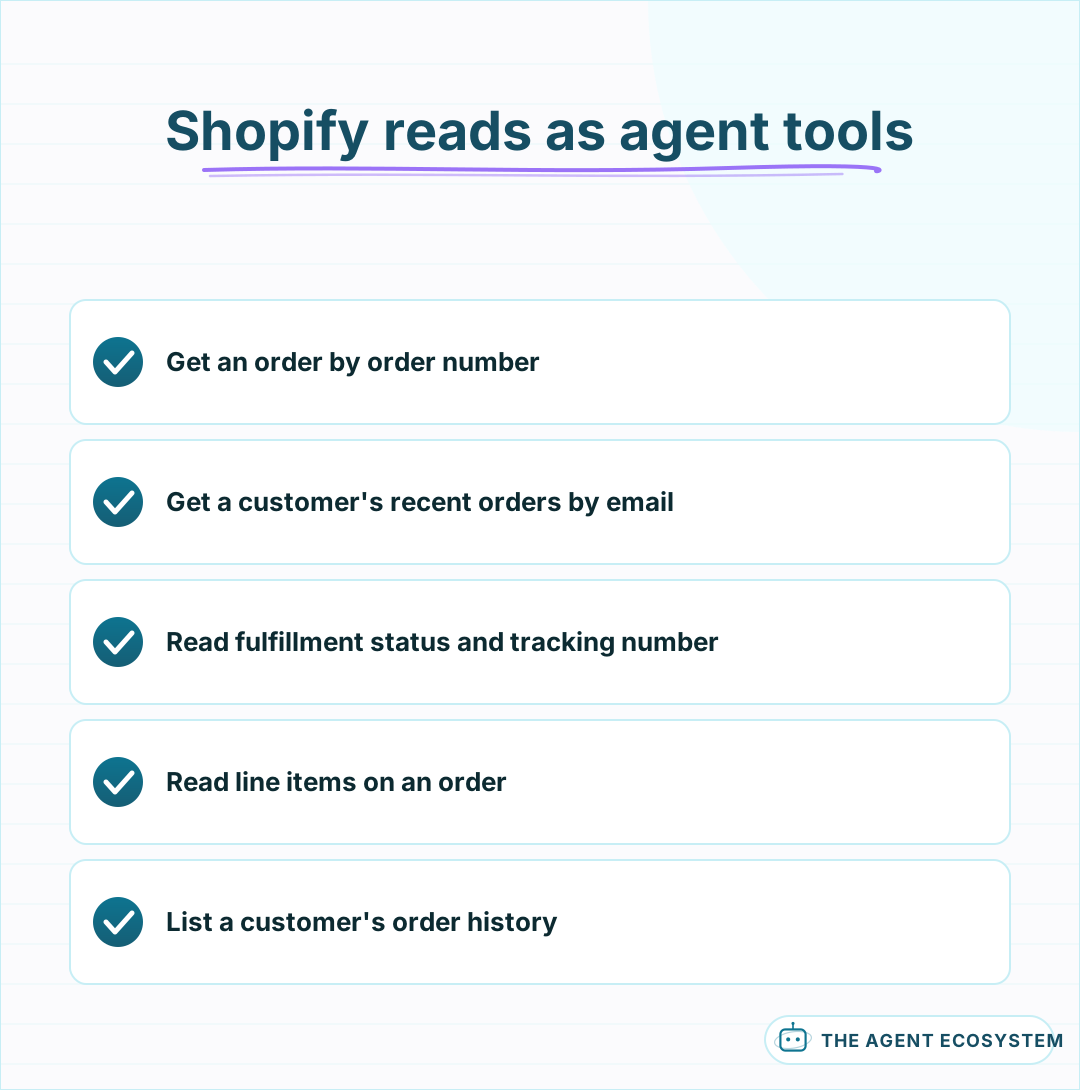 A narrow, read-heavy tool set covers the most repetitive support question.
How do you give an n8n AI Agent the Shopify tool?#
Add a Shopify node to the canvas, switch it to Use as Tool, and connect it to your AI Agent node's tool input. Give the agent a lookup-by-order-number tool and a separate lookup-by-customer-email tool, since a support message might reference either one, and the agent should not have to guess which identifier it was handed.
Tool descriptions the model can actually use matter here the way they do on any connected app: state plainly which fields the order-lookup tool returns, so the agent knows it has fulfillment status and tracking number available and does not need to invent either. The core mechanics of giving an n8n agent tools apply the same way to Shopify once the credential itself is sorted out.
Scope the app to read-only access on Orders and Customers if the agent never needs to write anything back to Shopify itself. A support agent that only looks things up and drafts a reply through your helpdesk or inbox tool has no reason to hold write access to your storefront's order data at all, and a read-only scope limits what a bug or a misused credential could do.
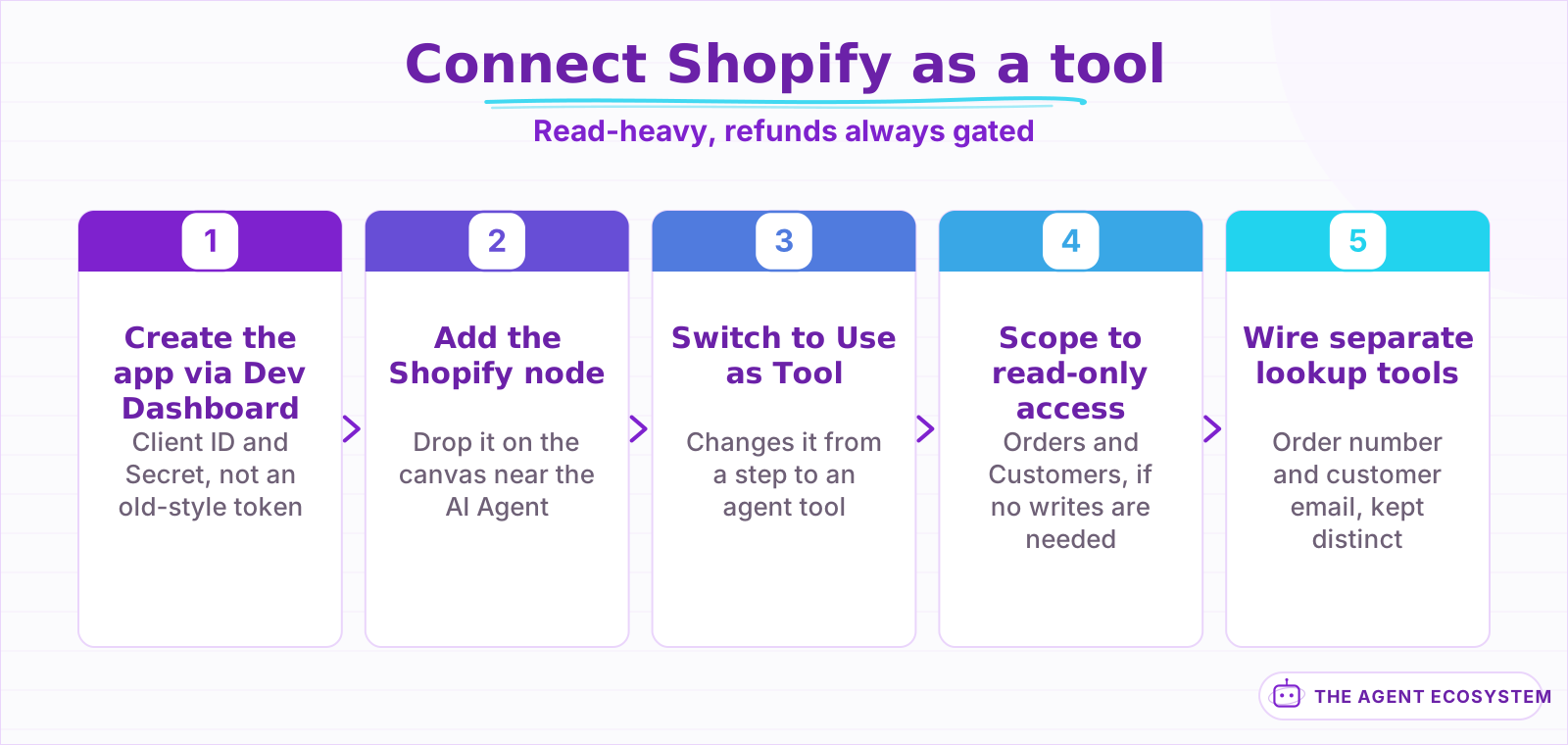 The Dev Dashboard credential step is the one that trips up a 2026 setup.
What does a real order-support conversation look like?#
A customer emails "where is my order, #1042?" The agent calls the order-lookup tool with that number, reads back a fulfillment status of "shipped" with a carrier and tracking number, and drafts a reply with the real tracking link, not a generic "your order is on its way."
| Customer question | What the agent reads | What it should say |
|---|---|---|
| Where is my order? | Fulfillment status, tracking number | The real status and tracking link |
| Did my order ship yet? | Fulfillment status | Shipped, or the current processing stage |
| What did I order? | Line items on the order | The actual items and quantities |
When the order genuinely has not shipped yet, an honest "still processing, expected to ship by [date]" beats a vague reassurance; the agent should say what the data shows, including when that is not the answer the customer was hoping for.
Multiple open orders for the same customer are worth handling explicitly. If a lookup by email returns 3 recent orders and the message did not include a number, have the agent ask which one before answering, rather than guessing the most recent is the one meant; a wrong guess here reads as not having actually checked.
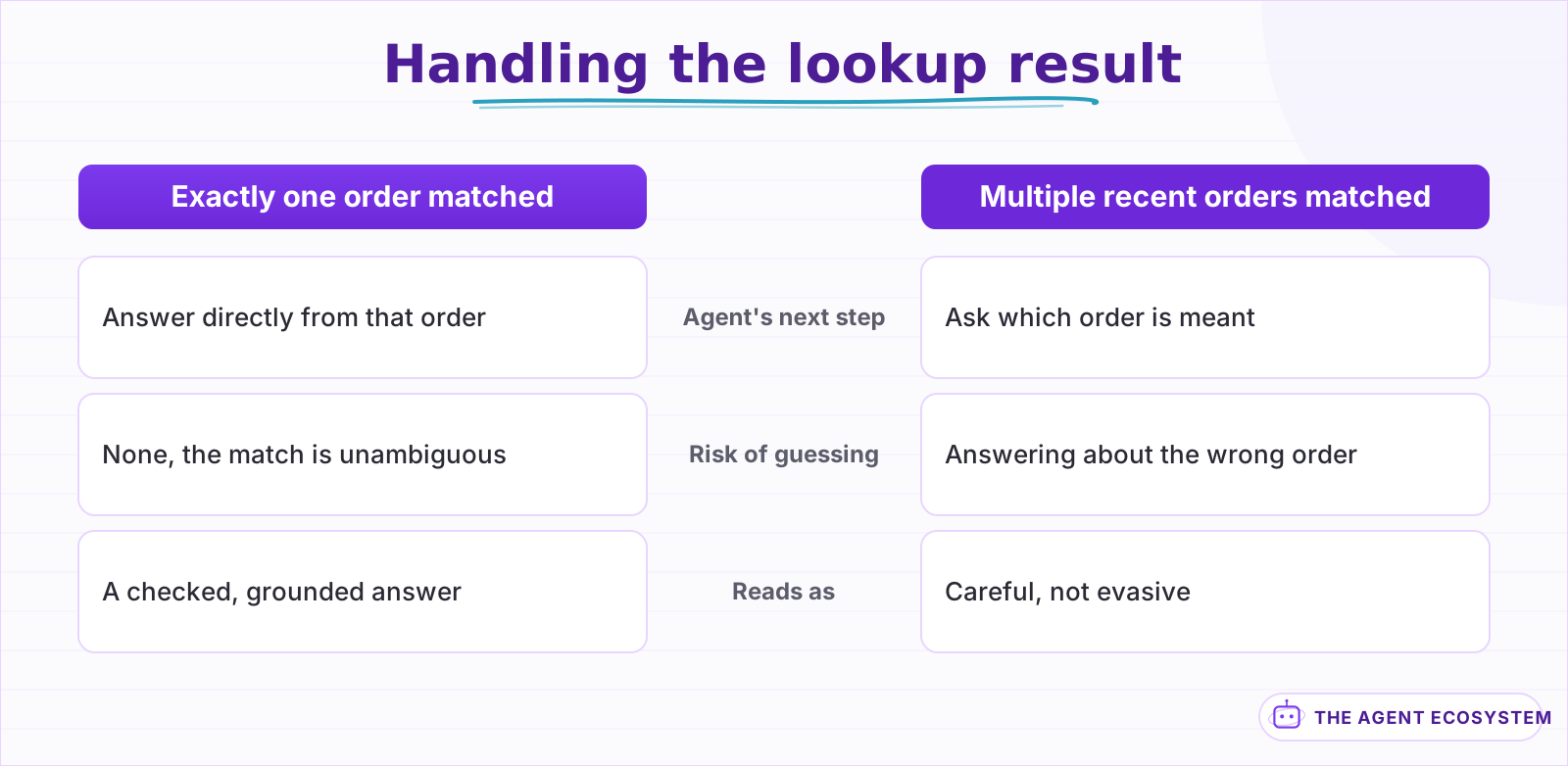 A guess between plausible orders reads as not having actually checked.
How do you handle refunds and cancellations safely?#
Treat a refund or an order cancellation the same way you would treat one on any payment system: never a direct tool call the agent executes on its own. Structure it as a proposal the agent drafts, the specific order, the amount, and the reason, that a human reviews and approves before a separate action executes it.
n8n's human-in-the-loop pattern is the right structure here, and unlike a lower-risk write on a CRM or a workspace tool, this gate should not loosen over time. A refund moves real money and a cancellation can undo a fulfillment already in motion; the agent's job stays preparing the answer, never executing it, the same discipline that applies to a Stripe billing-support agent.
Mechanically, that means the agent's refund proposal, order number, amount, and the customer's stated reason, goes to a Slack message with Approve and Reject buttons, and n8n pauses at that node until someone responds. If your store processes payment through Stripe rather than Shopify Payments, the actual refund may need to happen on the Stripe side; either way, the agent's role stops at drafting a specific, checkable proposal.
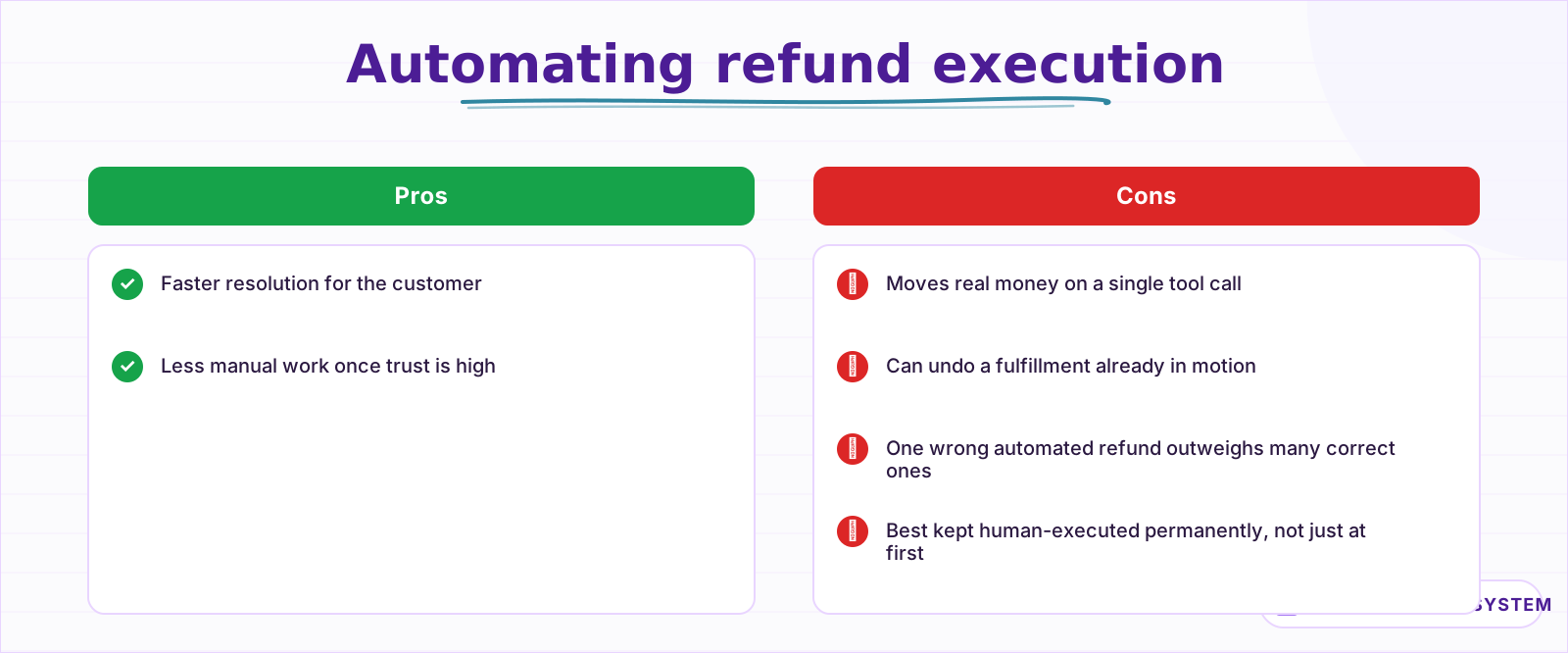 The case against loosening this gate stays the same no matter how long the agent runs cleanly.
What breaks, and how do you debug it?#
Most setup failures now trace back to the credential change: an OAuth-style Client ID and Secret configured where the workflow still expects an old-style access token, or a scope that was never granted to the app in the Dev Dashboard.
Confirm the app has read access to Orders and Customers specifically, since the new flow asks you to grant scopes explicitly rather than assuming broad access.
Turn on Return Intermediate Steps on the AI Agent node and check the exact order number or email the agent searched with before assuming the data itself is wrong. An order number typed with or without its leading # is a common mismatch depending on how the store's number format is configured; the general agent-not-working checklist covers the broader credential and permission issues that show up the same way across every connected app.
A second recurring gap is fulfillment split across multiple shipments. An order with 2 items shipped separately has 2 tracking numbers, and a tool that only reads the order's top-level status can miss that one item shipped days before the other. If your store regularly splits fulfillment, give the agent a tool that reads fulfillment records specifically, not just the order's summary status, so a partial shipment does not get reported as fully shipped or fully pending when it is neither.
Is this worth building versus Shopify's own inbox tools?#
Shopify and most helpdesk apps built for e-commerce already have some form of order lookup built into their support view, and for a small volume of tickets, a human clicking through that view is often just as fast as building an agent.
Build this when ticket volume is high enough that the lookup step, not the judgment, is what is actually slowing your team down.
The honest value here is speed and consistency on the most repetitive question a store gets, not a smarter answer than a person would give looking at the same order. Every reply is grounded in the same real fulfillment data, refunds and cancellations stay a human's call permanently, and the agent's whole job is getting a correct, checkable answer in front of the customer faster than someone opening Shopify by hand.
Start it on the single most repetitive question your inbox gets, almost always order status, before expanding to anything else. A narrow agent that nails "where is my order" every time builds real trust with your support team faster than a broad one that tries to also handle product questions and returns policy from day one and gets some of it wrong.
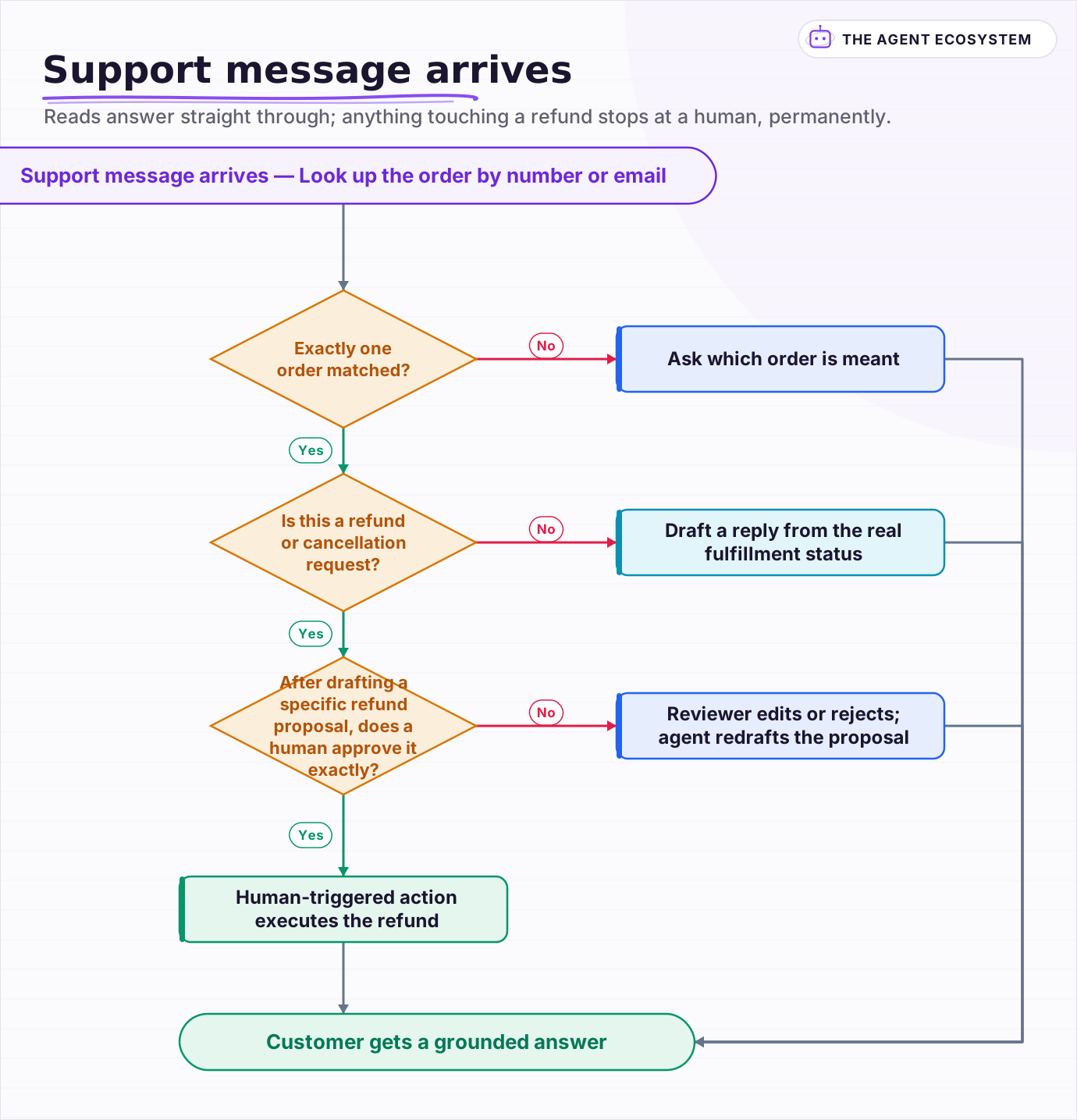 Reads answer straight through; anything touching a refund stops at a human, permanently.
Frequently asked questions
Can an n8n AI Agent answer Shopify order-status questions automatically?
What changed with Shopify API credentials in 2026?
Should an AI agent be allowed to issue Shopify refunds?
How does the agent handle a customer with multiple recent orders?
Why did my n8n Shopify agent report the wrong shipping status?
Sources
Primary references and vendor documentation used while drafting and reviewing this article.
Written by

Muhammad Qasim Hammad is an AI agent and automation expert and the founder of Cart Gaze LLC (cartgaze.com). He builds product for the love of it: when an idea lands, a working prototype is usually running within hours, built with the same AI agents and automations he sells. He puts his own output at roughly 20× what it was before agents, and the Agentic OS behind this site is the working proof, documented in public with the tools he actually ran and what they really cost.
AI & Automation Services
Want a pipeline like this running in your business?
I'm Qasim — I design and ship AI agents and n8n automations for solo operators and small teams. Tell me what's eating your team's week, and I'll scope a fix.
Related reading
How to Build an n8n AI Agent for Stripe Billing Support
An n8n AI Agent can look up a customer's charges, invoices, and subscription status and draft a grounded answer to a billing question in seconds. Here is how to wire Stripe in as a read-heavy tool and why refunds and subscription changes should stay gated behind a human

How to Automate Customer Support with AI Without Losing People
The fastest way to damage a small business with AI is to put a bot in front of customers before it knows when to stop. Twelve lessons on triage before answers, grounding in your own documentation, escalation that carries context, and why deflection rate flatters you.
How to Build an n8n AI Agent for E-Commerce Return Eligibility
Answering "can I return this" correctly means checking the purchase date, the item's category, and its condition against your actual policy, all at once. Here is how to build an n8n AI agent that applies your return policy as explicit rules, quotes the specific line it relied

How to Build an n8n AI Agent for Salesforce Data Hygiene and Case Routing
An n8n AI Agent can read a new Salesforce Lead or Case, decide what a rule engine cannot, and write the fix back through the Salesforce node. Here is how to wire it as a tool, keep it from guessing at fields it cannot infer, and gate every write behind a human check.
n8n AI Feedback Analysis: Classify Sentiment and Route Urgent Complaints Automatically
Customer feedback arrives from five places and nobody reads most of it. An n8n workflow with an AI agent classifies every piece by sentiment and theme, routes urgent complaints immediately, and builds a weekly digest your product team can act on.
Give Your n8n AI Agent Tools (Calculator, HTTP, Workflows)
Your n8n AI Agent answers from stale training data until you attach real tools. This guide shows you exactly how to wire HTTP Request, Calculator, and Workflow tools so your agent acts on live data.