Read Images With AI in n8n: Claude Vision for Receipts and Screenshots
Stop retyping. Feed images to Claude and get clean fields back.
AI-drafted, reviewed by Muhammad Qasim Hammad on June 24, 2026. See our AI disclosure.
Table of contents
- What is n8n AI image analysis, and what can it read?
- How does it work inside n8n?
- How much does AI image analysis cost?
- How do you cut the cost on large images?
- How do you build it in n8n, step by step?
- Step 1: Trigger with binary output
- Step 2: Downscale if needed
- Step 3: Add the Anthropic node
- Step 4: Write the Text Input
- Step 5: Set Input Type and binary field name
- Step 6: Parse and route
- Where can this go wrong?
- What should you set up this weekend?
Receipts pile up in your inbox, screenshots stack in a folder, and scanned forms sit on a desk because someone has to squint at each one and retype the vendor, date, and total by hand. n8n AI image analysis solves this by passing each image to a vision-capable Claude model through the Anthropic node, which reads it and returns the fields you asked for, so the retyping stops.
The symptom is familiar: another stretch of the week lost to keying receipt data into a spreadsheet, or delayed expense reports because the upload pile is too painful to clear manually. The fix is a workflow that does not care how many images arrive.
What is n8n AI image analysis, and what can it read?#
n8n AI image analysis connects an image, passed as binary data, to a vision-capable Claude model through the Anthropic node. The model reads the image and returns whatever you ask for, such as extracted fields, a yes/no answer, a transcription, or a JSON object. It handles receipts, screenshots, product labels, and scanned forms.
Claude is multimodal, meaning it accepts both text and images in the same request. You are not running a separate OCR pipeline and then feeding text to a language model. The image and the question go in together, and the fields come out. Supported formats are JPEG, PNG, GIF, and WebP, passed as base64-encoded binary data, according to Anthropic's vision documentation.
The practical scope is wide. I use it today for restaurant receipts (vendor, date, total, tip), SaaS screenshots (plan name, renewal date, amount), and handwritten delivery notes. It is not a general OCR box; it is a model that understands context, so it can infer a field from a partial label and return null when a field is genuinely absent.
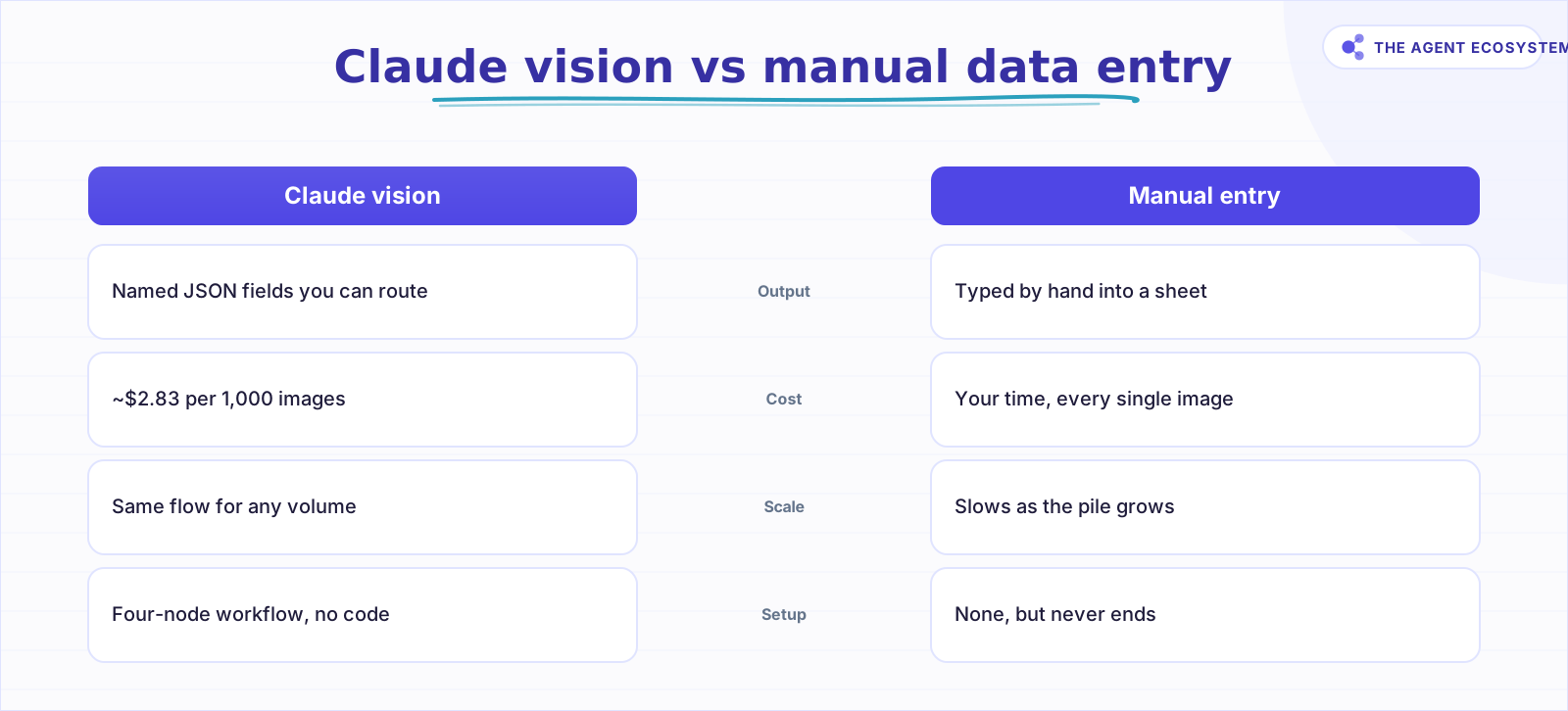 Claude vision returns named fields; manual entry costs your time and does not scale.
How does it work inside n8n?#
The Anthropic node exposes an Image resource with an Analyze Image operation, described in the n8n Anthropic node docs as "Take in images and answer questions about them." Attach your Anthropic credential, pick a vision-capable Claude model, write a question in Text Input, and point the node at the binary image.
The node needs three things: a model, a text prompt, and a binary image. Set Input Type to Binary File(s) and type the binary property name into Input Data Field Name. The OpenAI Image operations docs show the same parameter pattern shared across n8n's LLM nodes.
The binary image must arrive from somewhere upstream. Three clean options:
- Form Trigger with a file upload field (great for manual one-off submissions)
- Google Drive node set to Download File (good for a shared receipts folder)
- HTTP Request node with response format set to File (good for webhook-delivered images)
All three leave the image in a binary property, usually named data. That is the name you put in Input Data Field Name.
How much does AI image analysis cost?#
Analyzing 1,000 standard images costs about $2.83 in Claude tokens on Haiku 4.5, as of mid-2026, plus $0 on self-hosted n8n. The entire bill comes from Anthropic per-token pricing, because the fair-code self-hosted version of n8n is free. Resolution drives the token count, so the image size sets the cost.
The token count per image follows Anthropic's published formula: tokens = (width px x height px) / 750. A standard 1000x1000 image produces 1,000,000 / 750 = 1,334 input tokens. Add roughly 300 output tokens for a handful of extracted fields, and one image costs about 1,634 tokens total.
Here is the full cost table across the three current models, using Anthropic's published pricing as of mid-2026:
Assumption: 1,334 input tokens + 300 output tokens per standard 1000x1000 image.
| Model | Input $/1M | Output $/1M | Cost per image | Per 1,000 images | Best for |
|---|---|---|---|---|---|
| Claude Haiku 4.5 | $1.00 | $5.00 | ~$0.0028 | ~$2.83 | Receipt and screenshot reading |
| Claude Sonnet 4.6 | $3.00 | $15.00 | ~$0.0085 | ~$8.49 | Complex forms, multi-field tables |
| Claude Opus 4.8 | $5.00 | $25.00 | ~$0.0142 | ~$14.15 | High-stakes document review |
The arithmetic for Haiku: (1.334 x $1.00) + (0.3 x $5.00) = $1.33 + $1.50 = $2.83 per 1,000 images. Every number in this table is checkable by hand.
n8n Cloud Starter is €20/month if you prefer a managed host. Self-hosted community edition costs nothing. Either way, the only variable spend is Anthropic tokens.
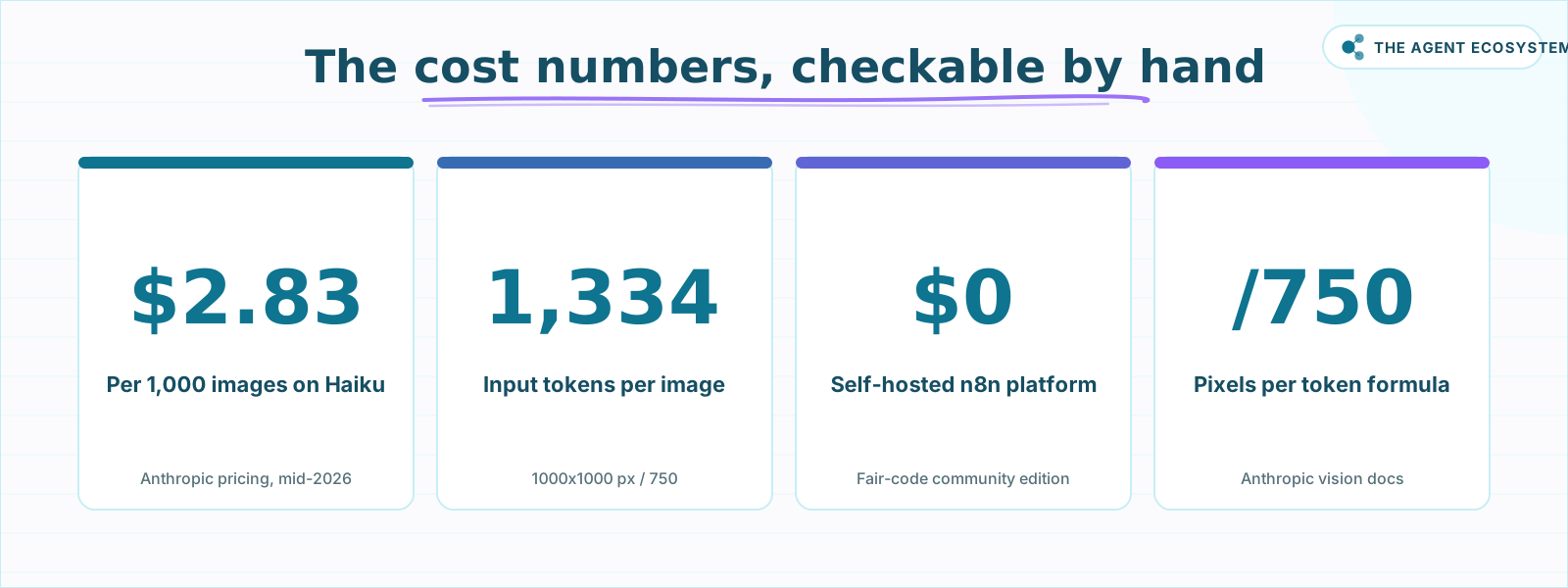 All four numbers are checkable by hand from Anthropic and n8n public pricing.
How do you cut the cost on large images?#
Downscale the image before it reaches the Anthropic node. The token formula is (width x height) / 750, so resolution drives the entire bill. A phone photo at 4032x3024 pixels generates roughly 12,192,768 / 750 = 16,257 tokens before output, about 12x more expensive than a 1000x1000 version of the same receipt.
Anthropic does resize very large images before processing, which caps the extreme cases. But you pay for the pixels you send, not the pixels Anthropic uses after its resize. Shrink the image yourself and pay only for what you actually need.
A 1000x1000 crop covers every receipt, most screenshots, and most product labels with more than enough resolution for Claude to read. Add an Edit Image node before the Anthropic node and set it to resize to 1000px on the longest edge. That one step keeps costs predictable at volume.
For batches, process images sequentially with a Split In Batches node rather than firing them all at once. This keeps your Anthropic rate limits clean and lets you add error handling between images.
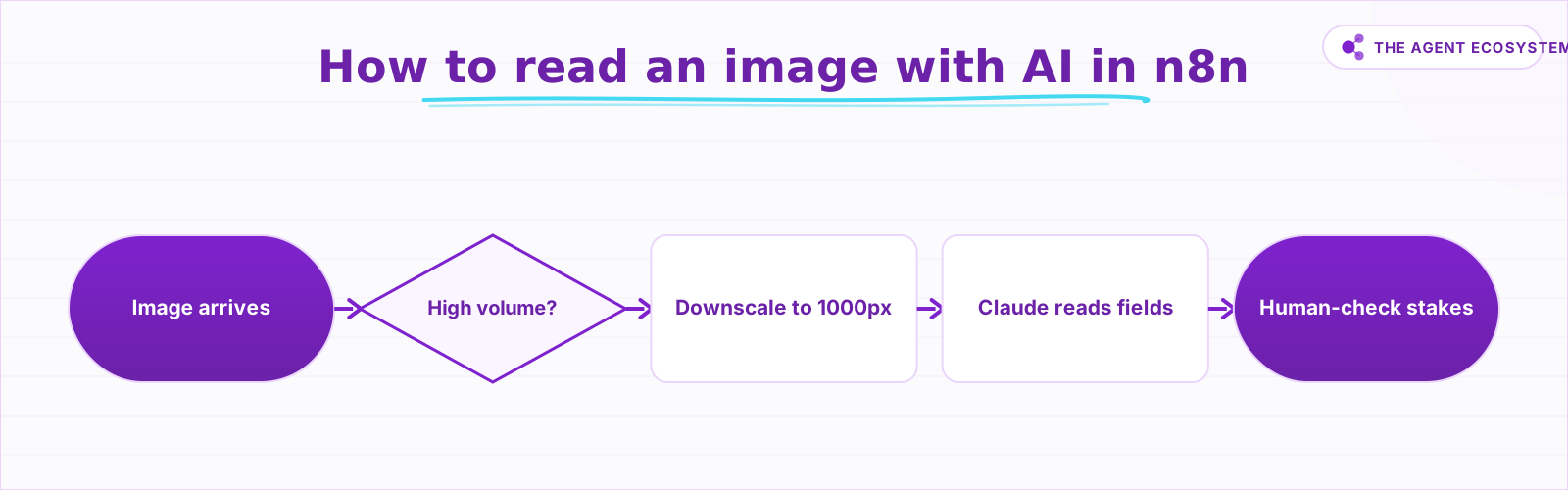 Decide how to read an image with AI in n8n, from extraction to human review.
How do you build it in n8n, step by step?#
Wire a trigger that produces binary data, run it through the Anthropic node with a structured prompt, and parse the output. The whole flow is six short steps, and none of them needs custom code: the trigger, an optional downscale, the Anthropic node, the prompt, the binary field name, then the parse and route.
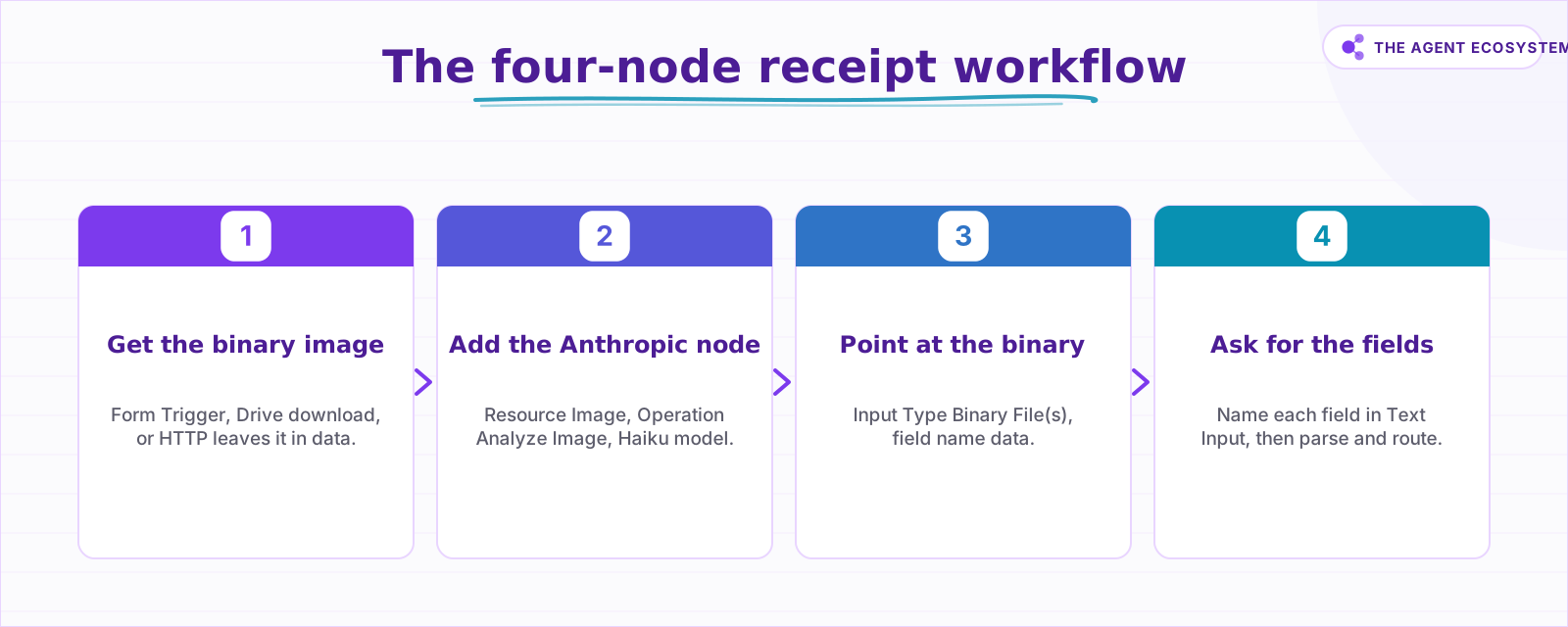 Four nodes cover the full receipt-reading workflow in n8n.
Step 1: Trigger with binary output#
Add a Form Trigger and include a file upload field. Name it something clear like receipt. When a form is submitted, n8n stores the uploaded file as binary data in a property named data by default.
Alternatively, add a Google Drive node, set Operation to Download File, and connect it to a folder ID. The downloaded file lands in binary property data.
Step 2: Downscale if needed#
Add an Edit Image node. Set Operation to Resize, set width to 1000, and enable Maintain Aspect Ratio. Wire it between your trigger and the Anthropic node.
Skip this step if your images are already small (web screenshots, most app exports). Add it for anything shot on a phone or scanner.
Step 3: Add the Anthropic node#
Add the Anthropic node. Connect your Anthropic API credential. Set Resource to Image. Set Operation to Analyze Image. Under Model, select claude-haiku-4-5 (or the current Haiku model name shown in the dropdown).
Step 4: Write the Text Input#
In the Text Input field, ask for the exact fields you need. Copy this prompt as a starting point:
Return JSON with these fields: vendor, date, total, currency.
If a field is not visible in the image, return null for that field.
Do not include any explanation, only the JSON object.
Specific field names produce parseable output. Vague instructions like "describe this image" return a paragraph.
Step 5: Set Input Type and binary field name#
Set Input Type to Binary File(s). In Input Data Field Name, type data (or whatever your trigger named the binary property). This connects the upstream binary to the model call.
Step 6: Parse and route#
The Anthropic node returns the model's answer as a string. Add a Code node or a Set node to JSON.parse() the reply. Then add an If node: if any field is null, route to a Slack message or a Google Sheet row flagged for human review. For anything that moves money, that human-review branch is not optional.
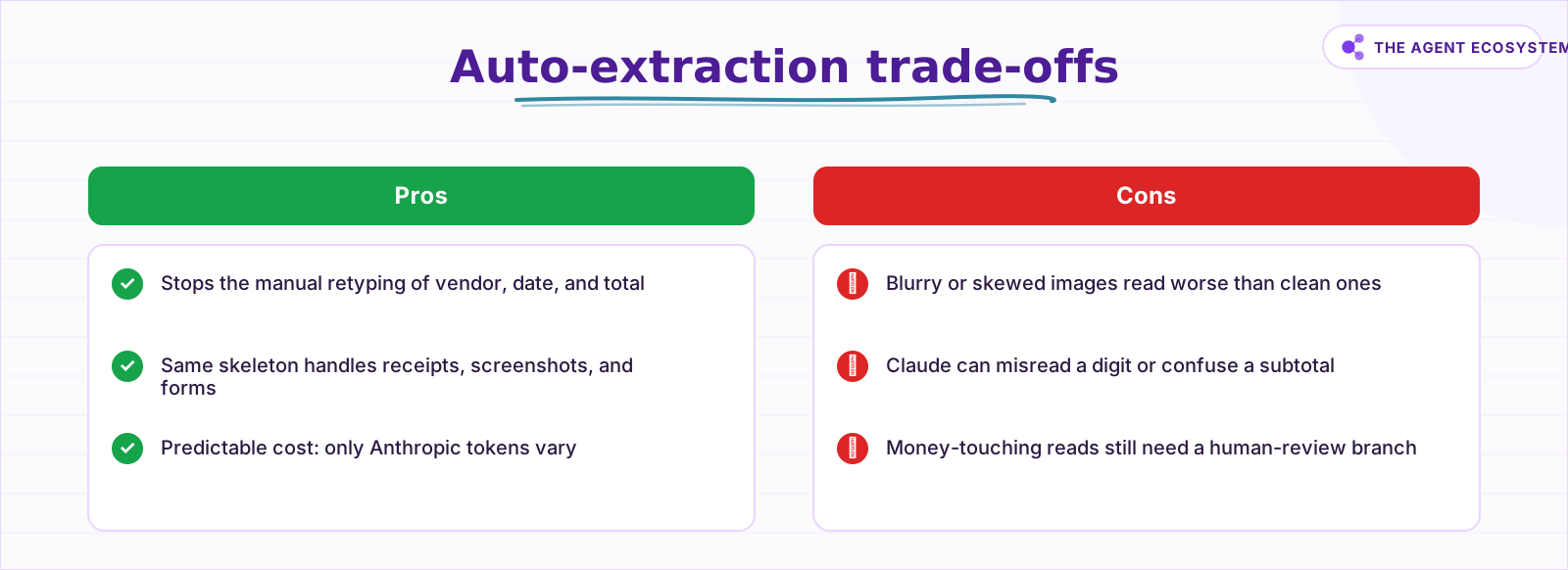 Weigh these trade-offs before removing the human-review branch.
Where can this go wrong?#
Four failure modes account for almost every problem: resolution cost, image quality, vague prompts, and blind trust in the output. Each one is predictable and fixable before it bites. Send oversized images through a resize step, test on your real photos, ask for named fields, and route high-stakes reads to a human first.
Resolution cost is the most common surprise at volume. A batch of 500 phone photos at 12MP each will cost far more than the cost table suggests, because the table assumes a 1000x1000 image. Add the resize step and the cost returns to predictable.
Image quality decides accuracy. A blurry, skewed, or badly lit receipt reads worse than a clean one. Claude is not magic; garbage in produces uncertain output. Test on a sample of your actual images, not ideal stock photos, before committing to a workflow.
Vague prompts return prose. If your Text Input says "what is in this image?", you will get a description paragraph, not fields you can route. The prompt is the schema. Every field you want must be named.
High-stakes reads need a human. Claude can misread a digit, confuse a line item total for a subtotal, or miss a partial field entirely. For invoices, IDs, contracts, or anything that touches your books or your identity, add the human-review branch. The cost of a wrong auto-post is higher than a few seconds of review time.
Compare the two approaches side by side:
What should you set up this weekend?#
Pick one image type you currently handle by hand, with receipts being the fastest win, then build the four-node flow above, the trigger, an optional resize, the Anthropic Analyze Image node, and a parse-and-route step, and run it on ten real images from your own pile. Check every output against the source image.
Check every output against the source image. Adjust the Text Input prompt until the fields come back clean. Then add the human-review branch for nulls before you connect it to any storage or accounting step.
Once receipts work, the same skeleton handles screenshots, product labels, and scanned forms. Swap the prompt, keep the wiring. For deeper control over the model's reply format, see how to enforce structured output in n8n AI workflows. To understand which Claude model fits which task (and why Haiku wins at extraction), the Claude vs GPT vs Gemini cost and speed comparison lays out the numbers. When volume grows and the token bill needs a ceiling, Claude API cost control for agent workflows covers rate limiting and spend guards. If you want image reading as one tool inside a larger agent, n8n AI agent tools shows how to wire it in.
The receipt pile does not have to be a weekly chore. Build the flow once, spot-check a sample each week, and let Claude do the squinting.
Frequently asked questions
Can n8n read text from an image?
How much does AI image analysis cost per image?
Which Claude model should I use to read receipts?
How do I send an image to the Anthropic node?
How do I get clean fields instead of a paragraph?
Does it work on scanned PDFs?
Sources
Primary references and vendor documentation used while drafting and reviewing this article.
- n8n Anthropic node documentation: Image resource and Analyze Image operation
- n8n OpenAI Image operations: Analyze Image parameter pattern
- Anthropic vision documentation: token formula, supported formats, base64 encoding
- Anthropic model pricing: Haiku 4.5, Sonnet 4.6, Opus 4.8
- n8n pricing: Cloud Starter plan
- n8n sustainable use license: free self-hosted community edition
Written by

Muhammad Qasim Hammad is an AI agent and automation expert and the founder of Cart Gaze LLC (cartgaze.com). He builds product for the love of it: when an idea lands, a working prototype is usually running within hours, built with the same AI agents and automations he sells. He puts his own output at roughly 20× what it was before agents, and the Agentic OS behind this site is the working proof, documented in public with the tools he actually ran and what they really cost.
AI & Automation Services
Want a pipeline like this running in your business?
I'm Qasim — I design and ship AI agents and n8n automations for solo operators and small teams. Tell me what's eating your team's week, and I'll scope a fix.
Related reading
Build an AI Document-Extraction Agent in n8n (Invoices, Receipts & Emails)
Build an n8n AI document extraction agent that reads invoices, receipts, and emails, then writes clean structured data to a sheet. Uses Claude and the Information Extractor node. Costs $1.55 per 1,000 documents on Haiku 4.5.

Run AI Sentiment Analysis in n8n (Reviews, Feedback & Support)
Set up n8n sentiment analysis to classify every review, survey reply, or support message automatically. Route negatives to an instant alert and positives to a testimonial ask, for about $0.45 per 1,000 items.
Auto-Categorize Emails & Tickets in n8n with the AI Text Classifier
The n8n AI Text Classifier node reads each inbound message, picks the right category, and branches your workflow automatically. Costs $0.65 per 1,000 emails on Claude Haiku 4.5. Here is exactly how to build it.
Build an AI Customer-Support Bot in n8n (RAG, With Real Monthly Cost)
Build an n8n AI customer support bot that answers repeat questions from your own docs using RAG. Two workflows, about $4.50 per 1,000 answers on Claude Haiku 4.5, and $0 platform cost if you self-host.
Force Structured JSON Output from AI in n8n
Your n8n AI step returns a paragraph when the next node needs clean fields. The Structured Output Parser sub-node fixes this by constraining the model to a JSON schema you define, for roughly 30 cents per 1,000 calls on Claude Haiku 4.5.
Summarize Long Documents in n8n with the AI Summarization Chain
Use the n8n Summarization Chain node to automatically condense transcripts, PDFs, and long articles into one-paragraph summaries. Costs $0.85 per 100 documents on Claude Haiku 4.5, with three method options for any document length.