Summarize Long Documents in n8n with the AI Summarization Chain
Map Reduce, Refine, and Stuff: the three methods, real node wiring, and what it costs per 100 documents
AI-drafted, reviewed by Muhammad Qasim Hammad on June 19, 2026. See our AI disclosure.
Table of contents
- What Is the n8n Summarization Chain, and What Can It Condense?
- Stuff, Map Reduce, or Refine: Which Method Should You Use?
- How Much Does AI Summarization Cost?
- How Do You Set Chunk Size and the Prompts?
- How Do You Build It in n8n, Step by Step?
- Step-by-step node wiring
- Which Summarization Method Fits Your Document?
- Where Can This Go Wrong?
- What Should You Set Up This Weekend?
You have a folder of support transcripts, meeting notes, or competitor articles you will never read in full. The n8n Summarization Chain node handles any document, however long, and returns a short summary automatically using a chunked summarization strategy.
That pile of unread text is not a knowledge problem. It is a workflow gap. Every week you spend 20 or 30 minutes skimming a document just to extract two or three actionable sentences. Multiply that by a dozen documents and you have lost hours to manual reading that a workflow could do in seconds. The Summarization Chain in n8n closes that gap.
What Is the n8n Summarization Chain, and What Can It Condense?#
The Summarization Chain is a root LangChain node in n8n that accepts a body of text and returns a concise summary. It requires a Chat Model sub-node, handles documents of any length by chunking the text, and applies one of three summarization strategies. Support transcripts, meeting notes, PDFs, competitor articles, and long review threads are all valid inputs.
I reach for this whenever a long transcript or report lands that I am never going to read in full. Pointed at a multi-thousand-word call transcript, it returns a tight few-paragraph summary of the headline points, enough to decide whether the full document is worth opening. No manual reading required.
The node outputs a single summary string, which you can pipe to Notion, Slack, Google Sheets, or an email node. It pairs naturally with a text classifier upstream (to route only the documents that need summarizing) and with a RAG pipeline downstream (to pre-condense long documents before they go into a knowledge base). See n8n AI Text Classifier for the routing step and n8n RAG Customer Support Bot for the knowledge base side.
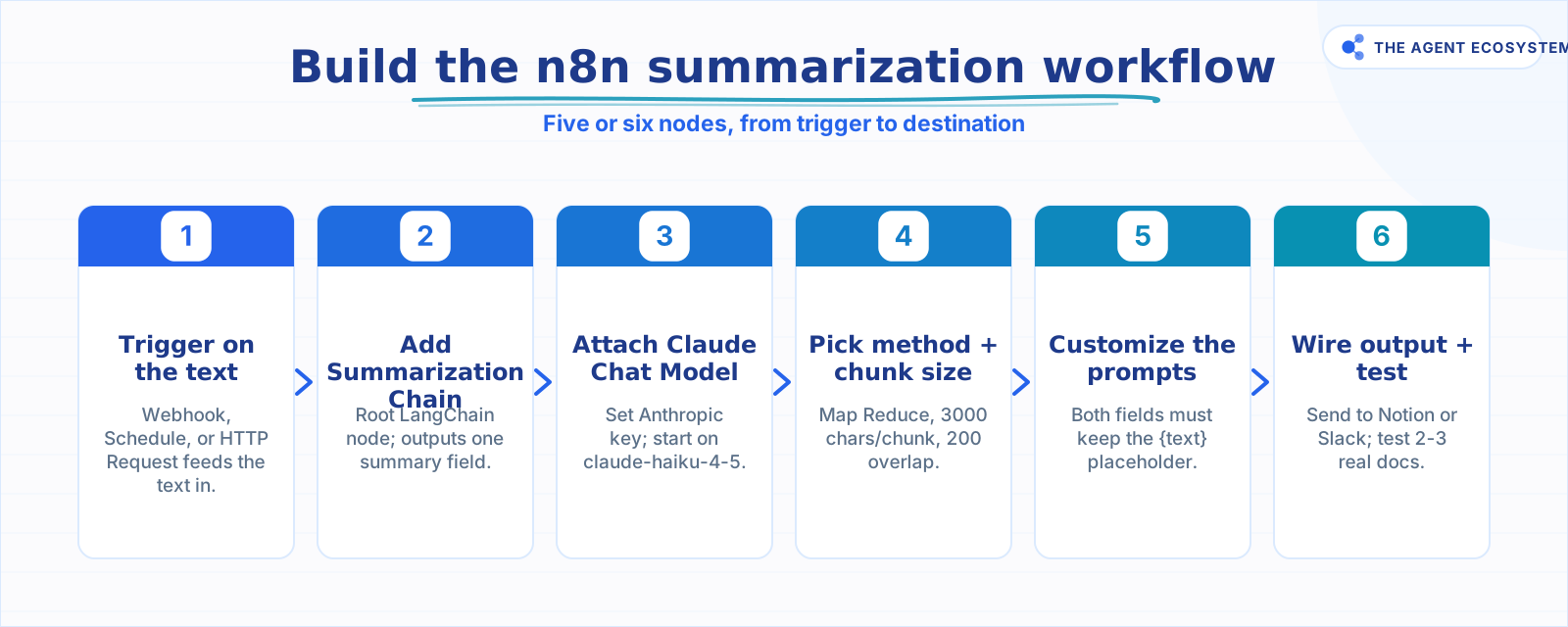 The build, trigger to destination, in six nodes.
Stuff, Map Reduce, or Refine: Which Method Should You Use?#
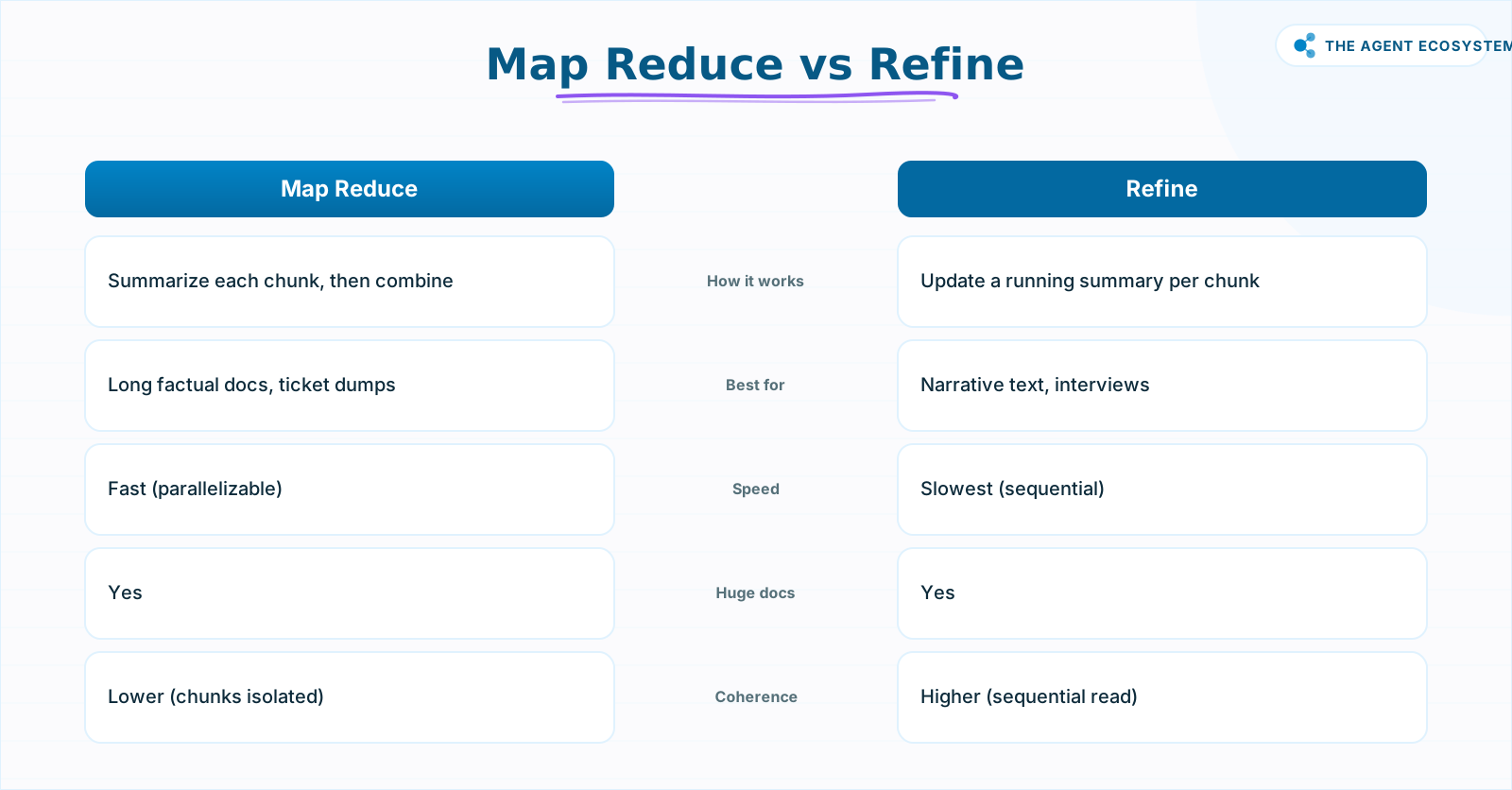
Map Reduce is the right default for most long documents. It splits the text into chunks, summarizes each chunk independently, then summarizes those summaries into a final output. Refine is better for narrative text because it reads sequentially and updates a running summary. Stuff is simplest but only works when the whole document fits in one prompt.
Here is how the three methods compare across the criteria that matter for a solo operator:
| Attribute | Stuff | Map Reduce | Refine |
|---|---|---|---|
| How it works | Sends all text in one prompt | Summarizes each chunk, then combines | Updates a running summary chunk by chunk |
| Best for | Short text (fits one prompt) | Long factual docs, ticket dumps, articles | Long narrative text, transcripts, interviews |
| Speed | Fastest | Fast (parallelizable) | Slowest (sequential) |
| Handles huge docs | No (fails or truncates) | Yes | Yes |
| Cross-chunk coherence | N/A | Lower (chunks isolated) | Higher (sequential read) |
The coherence gap in Map Reduce is real for narrative content. Each chunk is summarized in isolation, so a story that builds across the document can lose its thread. For a support ticket dump or a competitor article, that is not a problem. For a 90-minute interview transcript, Refine earns its extra time.
 Map Reduce for factual speed; Refine for narrative coherence.
How Much Does AI Summarization Cost?#
Summarizing 100 long documents (roughly 4,000 words each) costs about $0.85 on Claude Haiku 4.5 as of mid-2026, on a self-hosted n8n instance that costs $0 in platform fees. That is pricier per item than a classification task because the input is the whole document, not a short sentence, and Map Reduce re-reads every chunk.
The math is straightforward. One long document at roughly 4,000 words generates about 6,000 input tokens (the full text read in chunks, plus prompt overhead) and about 500 output tokens (the intermediate chunk summaries and the final summary). One hundred documents = 0.6 million input tokens + 0.05 million output tokens.
| Model | Input ($/1M tokens) | Output ($/1M tokens) | Cost per 100 docs | Best for |
|---|---|---|---|---|
| Claude Haiku 4.5 | $1.00 | $5.00 | $0.85 | Factual, extractive summaries |
| Claude Sonnet 4.6 | $3.00 | $15.00 | $2.55 | Nuanced summaries that feed decisions |
| Claude Opus 4.8 | $5.00 | $25.00 | $4.25 | Rarely needed for summarization alone |
Prices are from the Anthropic Claude pricing page as of mid-2026 (June 2026). Arithmetic: 0.6 x $1.00 + 0.05 x $5.00 = $0.85. Check the official page before building anything budget-sensitive.
Unlike a routing or classification task (where model quality barely moves the needle), model choice genuinely matters here. Haiku handles factual summaries of support tickets or articles well. Sonnet earns its price when the summary must capture tone, nuance, or a decision-critical detail. Start with Haiku and upgrade only if the output quality falls short.
n8n Cloud Starter is €20/month. Self-hosted n8n under the fair-code license is free. For a workflow that runs 100 summaries a day, the platform cost difference between self-hosted and cloud is the bigger variable. See self-host n8n on a VPS to eliminate that line item, and Claude API cost control to cap the token bill as volume grows.
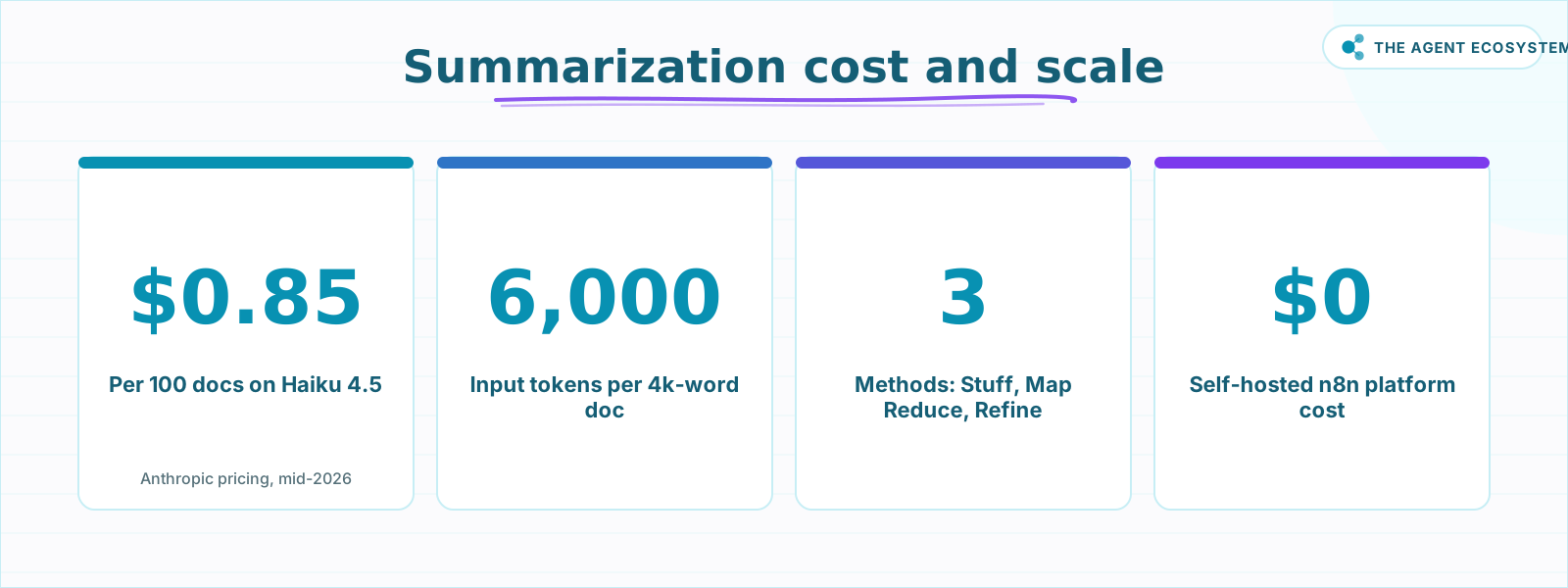 Cost and scale for a standard long-document workflow (mid-2026).
How Do You Set Chunk Size and the Prompts?#
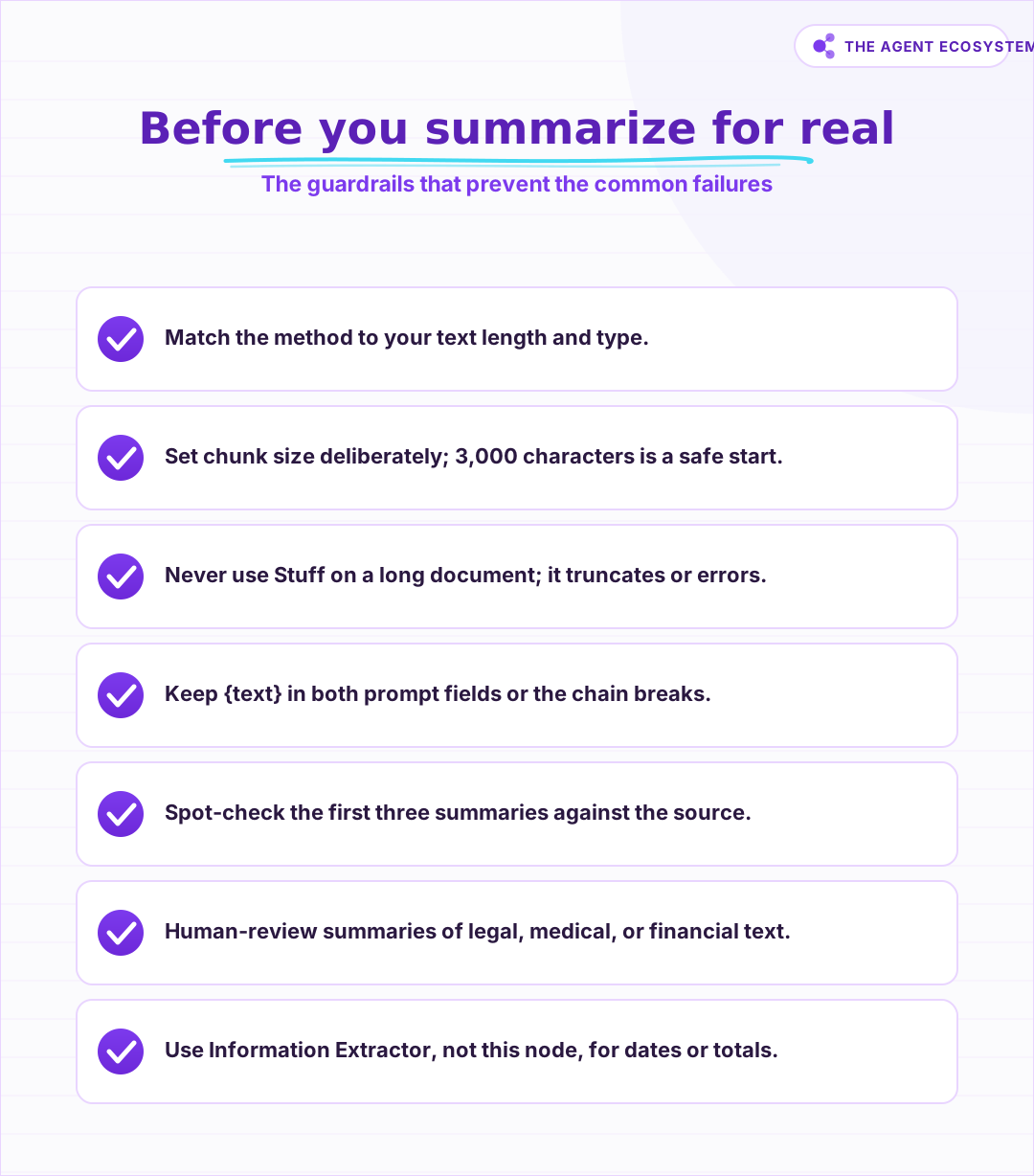
Set Characters Per Chunk to around 3,000 and Chunk Overlap (Characters) to 200 as a starting point, then adjust after your first test run. Both the Individual Summary Prompts field and the Final Prompt to Combine field must include the {text} placeholder or the node will error.
In the node settings, Chunking defaults to Simple (Define Below), which exposes two fields:
- Characters Per Chunk: controls how much text each chunk holds. Too large and a chunk overflows the model's context; too small and you lose the thread across chunk boundaries. 3,000 characters (roughly 500-600 words) is a reasonable starting point for most documents.
- Chunk Overlap (Characters): repeats the last N characters of one chunk at the start of the next. 200 characters of overlap helps the model maintain context at chunk boundaries.
Switch Chunking to Advanced to connect a text-splitter sub-node for more control, such as splitting on paragraph boundaries instead of character count.
For the prompts, the defaults work, but custom prompts produce noticeably better output. Here is a prompt pattern for support transcripts:
Summarize the following customer support transcript in three sentences.
Focus on: the customer's core issue, what the agent did, and the outcome.
{text}
And for the combine step:
You have been given a set of partial summaries from a long document.
Write a single coherent summary that captures all key points.
{text}
Both prompts must include {text} exactly as written. Changing the placeholder to anything else breaks the chain.
How Do You Build It in n8n, Step by Step?#
Add a trigger, connect the Summarization Chain node, attach a Claude Chat Model sub-node, choose Map Reduce as the method, set chunk size, customize the prompts, and wire the output to its destination. The whole workflow is five or six nodes.
 Run this before setting the Summarization Method in the node.
Step-by-step node wiring#
-
Add a trigger. A Webhook node works for incoming documents. A Schedule trigger works for polling a folder or feed. An HTTP Request node works for fetching URLs. Make sure the text content lands in a field you can reference downstream.
-
Add the Summarization Chain node. Search for it in the node panel. Connect it to the trigger. In the Document field, map the text field from your trigger output.
-
Attach a Claude Chat Model sub-node. Click the Chat Model connector below the Summarization Chain node. Add a Claude Chat Model node, enter your Anthropic API credentials, and set the model to
claude-haiku-4-5. -
Set the summarization method. In the node settings, open Summarization Method and choose Map Reduce for most documents. Switch to Refine for narrative transcripts.
-
Set chunk size. Under Chunking, keep it at Simple (Define Below). Set Characters Per Chunk to
3000and Chunk Overlap (Characters) to200. -
Customize the prompts. Edit Individual Summary Prompts and Final Prompt to Combine. Include
{text}in both. Add context about the document type for better results. -
Wire the output. Connect the Summarization Chain output to a Notion, Slack, Google Sheets, or Send Email node. Map the
responsefield (the summary) to the destination. -
Test on real documents. Run the workflow against two or three real documents of different lengths. Check that the summaries are accurate and readable before turning on production volume.
For a full model comparison covering when Haiku is enough and when Sonnet earns its price, see Claude vs GPT vs Gemini in n8n agents: tested for cost and speed.
Which Summarization Method Fits Your Document?#
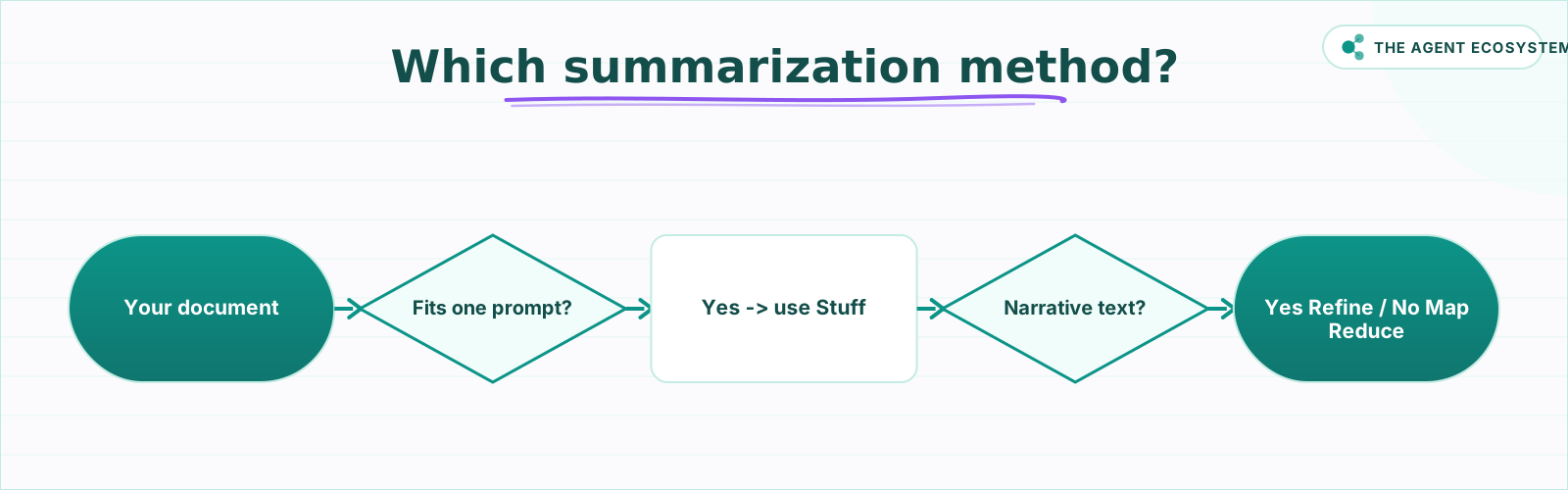
Pick the method by answering two questions about your text. First, does the whole document fit in a single prompt? If yes, Stuff is fine. If not, ask whether the content is narrative or factual: choose Refine for narrative text that needs coherence, and Map Reduce for factual documents where speed matters. The flowchart below maps it out.
 Honest guardrails before you automate every document.
Where Can This Go Wrong?#
The most common failure is using Stuff on a long document. It puts all the text in one prompt, so anything beyond the model's context window either errors out or silently truncates. Switch to Map Reduce or Refine to fix it.
Five failure modes worth knowing before you go live:
- Stuff overflow. Long document plus Stuff method equals a silent truncation or an API error. Always check document length against your model's context window before choosing Stuff.
- Chunk size too large. A chunk that is too large defeats the point of chunking. A chunk that is too small loses context across boundaries. Neither failure is obvious until you read the output. Start at 3,000 characters and adjust.
- Map Reduce coherence loss. Each chunk is summarized in isolation, so a narrative that builds across the document (an interview, a story, a meeting with a backstory) can produce a fragmented summary. Use Refine for those cases.
- Hallucination and dropped facts. A summary is not a faithful copy. The model fills gaps, smooths contradictions, and compresses details. For high-stakes documents (contracts, medical notes, financial reports), a human reads the summary before anyone acts on it.
- Summarization is not extraction. If you need a specific date, a total, or a named entity from the document, the Summarization Chain is the wrong node. Use the Information Extractor node instead. A summary gives you prose; extraction gives you structured fields.
What Should You Set Up This Weekend?#
Pick one document type you are currently skimming by hand: a weekly competitor blog post, a batch of support tickets, or a meeting transcript. Wire a Webhook or Schedule trigger, drop in the Summarization Chain with Map Reduce and a Claude Haiku 4.5 Chat Model, and set the output to post a Slack message or append a Notion row.
Run it for one week. At roughly $0.85 per 100 documents, the cost is negligible. The real payoff is that the pile of unread long text becomes a pile of one-paragraph summaries you can actually act on.
From there, the natural next build is a daily AI digest: a scheduled workflow that summarizes many sources overnight and delivers a single briefing to your inbox each morning.
Frequently asked questions
What is the n8n Summarization Chain node?
What is the difference between Map Reduce, Refine, and Stuff in n8n summarization?
How much does AI summarization cost in n8n?
How long a document can the n8n Summarization Chain handle?
Which Claude model should I use for n8n summarization?
Is summarization the same as extraction in n8n?
Sources
Primary references and vendor documentation used while drafting and reviewing this article.
Written by

Muhammad Qasim Hammad is an AI agent and automation expert and the founder of Cart Gaze LLC (cartgaze.com). He builds product for the love of it: when an idea lands, a working prototype is usually running within hours, built with the same AI agents and automations he sells. He puts his own output at roughly 20× what it was before agents, and the Agentic OS behind this site is the working proof, documented in public with the tools he actually ran and what they really cost.
AI & Automation Services
Want a pipeline like this running in your business?
I'm Qasim — I design and ship AI agents and n8n automations for solo operators and small teams. Tell me what's eating your team's week, and I'll scope a fix.
Related reading
Build a Scheduled Daily AI Digest in n8n (Auto-Summarized)
An n8n daily digest wires a Schedule Trigger, an RSS fetch, a Claude Summarization Chain, and a delivery node into one unattended workflow that drops a short brief in your inbox every morning for about $1/month.

How to Use the Basic LLM Chain in n8n (Your First AI Step)
The n8n Basic LLM Chain is the simplest AI building block: one prompt in, one model response out, no tools, no memory, no loops. Wire it up in minutes and keep your token bill predictable at about $1.40 per 1,000 calls on Claude Haiku 4.5.
Translate Content at Scale in n8n With Claude
Build a repeatable n8n AI translation pipeline using the Basic LLM Chain node and Claude. Translate blog posts, support replies, and product copy in bulk for about $0.83 per 100,000 words.
Build an AI Customer-Support Bot in n8n (RAG, With Real Monthly Cost)
Build an n8n AI customer support bot that answers repeat questions from your own docs using RAG. Two workflows, about $4.50 per 1,000 answers on Claude Haiku 4.5, and $0 platform cost if you self-host.
n8n AI Automation Ideas: 8 Agent Workflows Worth Building (2026)
Finished the n8n AI tutorial and wondering what to actually build? These 8 n8n AI automation ideas come with the exact nodes, the honest Chain-vs-Agent call, and the right Claude model for each job.
Build an AI Document-Extraction Agent in n8n (Invoices, Receipts & Emails)
Build an n8n AI document extraction agent that reads invoices, receipts, and emails, then writes clean structured data to a sheet. Uses Claude and the Information Extractor node. Costs $1.55 per 1,000 documents on Haiku 4.5.